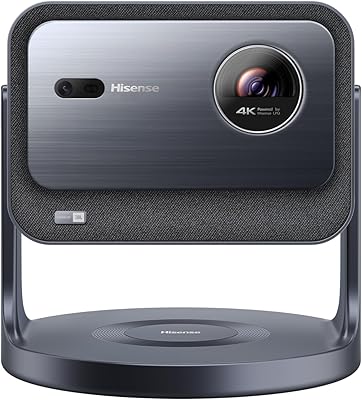
Overview

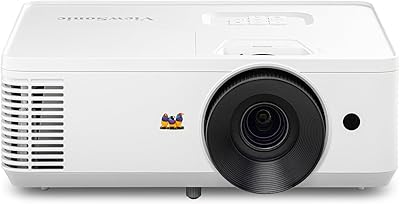
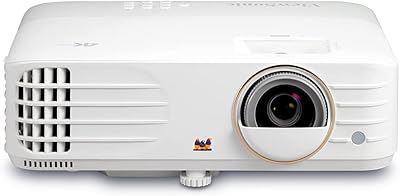
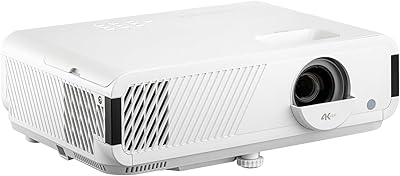
The ViewSonic LS740HD 1080p Laser Projector occupies a practical middle ground in the laser projection market — priced for serious buyers who need reliable performance without stepping into enterprise territory. Unlike older lamp-based units that degrade over time and require costly bulb replacements, this laser projector maintains consistent output across its lifespan. It serves a notably broad audience: IT managers equipping conference rooms, teachers rotating the unit between classrooms, and a surprisingly dedicated community of golf simulator enthusiasts. At under seven pounds, it punches well above its weight in brightness. This is not a boutique home-cinema piece — it is built to work hard in real environments.
Features & Benefits

With 5,000 ANSI lumens on tap, the LS740HD holds its own in rooms where killing the lights simply is not an option — think mid-morning training sessions or permanently lit offices. Full HD resolution keeps charts, text, and video looking sharp at screen sizes stretching well past 100 inches. The 1.3x optical zoom gives installers breathing room when the throw distance is less than ideal. What really stands out for flexible deployments is 360-degree projection support, including portrait mode, letting you mount this unit on ceilings, floors, or tilted walls without fighting the image. The keystone and 4-corner adjustment tools mean setup takes minutes, not hours.

Best For

This ViewSonic unit is a strong fit for small-to-mid-sized conference rooms where ambient light cannot be controlled and reliability matters more than cinematic color depth. Educators and corporate trainers who carry a projector between rooms will appreciate the manageable weight and fast power cycle — no warm-up waiting. The Golf Mode feature is worth highlighting: it is specifically tuned for major golf simulation platforms, making this a legitimate choice for dedicated simulator bays rather than an afterthought. AV integrators and facilities teams will value the low-maintenance laser source. Anyone needing mounting flexibility without custom rigging will find the adjustment range genuinely useful.

User Feedback

Across available reviews, brightness in ambient light draws consistent praise — buyers in education and business confirm the image holds up without blackout curtains. Setup and adjustment also land well, with most users reporting a painless installation experience. On the downside, the built-in audio is widely flagged as inadequate for larger rooms, so factor in external speakers. The lack of onboard smart features means you will always need a source device. Golf simulator users are a vocal and mostly satisfied segment, though a handful note the importance of accurate throw distance planning for smaller simulator bays. Long-term laser durability comments are positive but still limited given the product's relatively recent availability.

Pros

  • Holds a clear, bright image in fully lit conference rooms and classrooms without requiring blackout curtains.
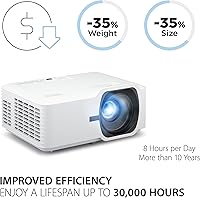
  • Laser light source eliminates the cost and downtime of recurring lamp replacements over the unit's lifespan.
  • Instant power on and off removes warm-up delays — a genuine time-saver during packed meeting or class schedules.
  • The LS740HD includes dedicated Golf Mode support that genuinely addresses simulator rendering requirements, not just as a label.
  • Flexible 360-degree projection and portrait mode enable ceiling, floor, and angled-wall installations without complex rigging.
  • Keystone and 4-corner adjustment make getting a properly aligned image fast, even in imperfect room layouts.
  • Compact enough to carry between rooms regularly without needing a cart or a second person.
  • Full HD output keeps text, charts, and detailed instructional content sharp at large screen sizes.
  • Optical zoom allows image size adjustments without physically repositioning the projector — useful in fixed-mount setups.
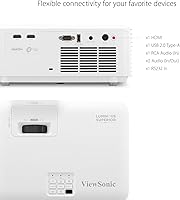
  • Broad connectivity through HDMI and USB handles standard source devices reliably across business and education environments.

Cons

  • Built-in audio is widely reported as too weak for group settings — an external speaker is effectively mandatory.
  • No onboard smart platform or wireless mirroring means a separate source device is always required.
  • Documentation is thin for a projector with this many mounting and adjustment options, leaving non-technical users without adequate guidance.
  • Portrait mode and non-standard orientations require hands-on trial and error that the manual does not adequately support.
  • Buyers in very small or shallow rooms risk finding the minimum throw distance too long for their available space.
  • Color rendering for cinematic content draws criticism from buyers who expected home-theater-grade performance.
  • Auto power control defaults can trigger unexpected shutdowns during static-content presentations if not adjusted after setup.
  • No carry handle or included bag makes single-handed transport over longer distances awkward.
  • Long-term laser reliability data at this price tier is still limited, making extended lifespan projections somewhat speculative.
  • Total setup cost surprises some buyers once external audio and a dedicated source device are factored in alongside the unit price.

Ratings

The ViewSonic LS740HD 1080p Laser Projector earns its scores from AI-driven analysis of verified global buyer reviews, with spam, bot activity, and incentivized submissions actively filtered out before any score is calculated. The ratings below reflect the full picture — where this unit genuinely impresses professional and niche users alike, and where real buyers have run into friction. Strengths and shortcomings are weighted equally so you can make a fully informed decision.

Brightness & Ambient Light Performance
92%
Users in corporate training rooms and school classrooms consistently report that the image stays visible and readable even with overhead lights on — a critical requirement most lamp-based units at this tier fail to meet. Daytime presentations without blackout curtains are routinely described as a non-issue.
A small share of buyers in very large, brightly windowed spaces note that direct sunlight washing across the screen still causes washout. This is a physics limitation rather than a product flaw, but it catches a few buyers off guard.
Image Sharpness & Resolution
84%
Full HD output at large screen sizes holds up well for spreadsheets, slides, and detailed instructional content. Users projecting onto 100-inch-plus screens report that text remains crisp and legible from the back of a mid-sized room, which matters enormously for classroom and boardroom use.
Buyers coming from 4K displays or high-end home-cinema projectors find the resolution adequate but not impressive. At larger throw distances, some report a softness toward screen edges that becomes noticeable during high-detail content.
Setup & Installation Flexibility
89%
The combination of horizontal and vertical keystone controls with 4-corner adjustment makes non-standard installations — angled ceilings, offset mounting positions, temporary floor placement — genuinely manageable without professional calibration. Multiple users highlight getting a properly aligned image in under ten minutes on first setup.
Portrait mode, while functional, requires some trial and error to dial in correctly, and the manual is not particularly helpful for non-standard orientations. Users with no prior AV experience occasionally find the adjustment menu less intuitive than expected.
Throw Distance & Zoom Range
78%
22%
The optical zoom provides genuine flexibility for rooms where the projector cannot be repositioned — useful in fixed-mount conference room setups. Users consistently appreciate being able to fine-tune image size without physically moving the unit across the room.
In smaller rooms under 10 feet deep, some buyers find the minimum throw distance still produces a larger image than their screen or wall can accommodate. Golf simulator users in particular flag this as something to measure carefully before purchasing.
Golf Simulator Compatibility
86%
Among golf simulator buyers, the dedicated Golf Mode is a clear differentiator. Users running popular simulator platforms report smoother color rendering and reduced motion artifacts compared to generic projectors they previously used. This segment is vocal and largely satisfied with the purpose-built support.
A handful of simulator users note that throw distance planning in basement or garage bays with low ceilings requires precise measurement, and mistakes are costly. The Golf Mode itself works well, but the setup margin for error in tight spaces is narrower than casual buyers expect.
Laser Light Source Reliability
81%
19%
Buyers who previously dealt with lamp replacements appreciate the lower long-term maintenance burden. Early adopters report stable brightness levels over extended use periods, and the instant on/off behavior removes the frustrating warm-up and cool-down cycles that lamp units require.
Because this product has only been on the market since mid-2023, long-term durability data is still accumulating. A few users are cautious about extrapolating laser lifespan claims at this price point, and that skepticism is fair given the limited real-world track record so far.
Audio Output
43%
57%
For quick one-person demos or small private setups where audio is secondary, the built-in speaker technically functions and saves the step of connecting an external device. Users doing brief solo run-throughs find it passable as a convenience feature.
In any real meeting room, classroom, or simulator environment, the built-in audio is broadly described as inadequate — thin, low-volume, and easily overwhelmed by ambient noise. This is one of the most repeated criticisms across buyer reviews, and an external speaker or audio system should be treated as a mandatory companion purchase.
Smart Features & Connectivity
51%
49%
HDMI and USB inputs cover the standard source device connections reliably. Users running laptops, media players, or game consoles report stable, consistent signal handling without handshake issues during long sessions.
The LS740HD has no built-in smart platform, streaming app support, or wireless display mirroring — you always need a separate source device. In an era where many competing units offer at least basic app access, this absence is a recurring point of frustration for buyers who expected a more self-contained experience.
Portability & Physical Design
77%
23%
At under seven pounds with a compact chassis, this ViewSonic unit is genuinely movable between rooms without needing a cart or two people. Educators and trainers who carry it regularly describe the form factor as one of its underappreciated strengths.
The unit lacks a carry handle, which makes single-handed transport awkward over longer distances. A few buyers who expected a dedicated carrying case or included bag were surprised to find neither in the box.
Power & Startup Behavior
88%
Instant-on behavior is something users notice immediately after switching from lamp projectors. Meeting facilitators and teachers describe the ability to start presenting within seconds as a practical time-saver during back-to-back sessions.
The auto power control settings, while useful, require some initial configuration to avoid the unit shutting off unexpectedly during low-motion content like static slides or paused simulator screens. A few users flagged unintended shutdowns before adjusting the defaults.
Value for Money
74%
26%
For buyers specifically needing 5,000-lumen laser output with flexible mounting in a professional context, the pricing lands reasonably against comparable alternatives. The avoided lamp replacement costs over time are a genuine long-term financial argument that informed buyers cite.
Casual users or those who only need occasional projection find the investment harder to justify, particularly given the missing smart features and audio limitations. Buyers who did not factor in the cost of external audio and source hardware report some sticker shock at the total setup cost.
360-Degree & Portrait Mode Projection
73%
27%
For AV integrators and creative installations, the ability to project from virtually any angle — including floor-up or ceiling-down — is a genuine capability that expands where and how the unit can be deployed. Users doing unconventional simulator or event setups find this freedom valuable.
Portrait mode in particular is not a plug-and-play experience for non-technical users. Without clear guided setup in the documentation, some buyers have reported spending significant time troubleshooting orientation-related image distortion on their own.
Build Quality & Durability
79%
21%
The chassis feels solid and well-assembled rather than plasticky, which matters for buyers who transport the unit regularly or mount it in permanent installations. Users who have knocked or jostled it during moves report no issues with alignment or component integrity.
The exterior finish attracts dust and fingerprints visibly, which is a minor but consistent cosmetic gripe. Some buyers in dusty environments — workshops, older school buildings — wonder about long-term internal dust management, though no widespread failures have been reported.
Color Accuracy & Consistency
69%
31%
For business and educational content — presentations, charts, instructional video — color rendering is accurate enough that no one in a boardroom or classroom is likely to complain. The image is clean and professional-looking right out of the box.
Users who cross-shop this unit for secondary home-cinema duties find the color profile less nuanced than dedicated home-theater projectors at similar price points. Skin tones and cinematic color grading receive the most criticism from this subset of buyers.
Documentation & Support
58%
42%
ViewSonic's brand support infrastructure is established, and users report that warranty claims and technical support contacts are accessible without major friction compared to lesser-known brands in this category.
The included documentation is widely described as thin for a projector with this many adjustment and mounting options. Users attempting non-standard installations — angled mounts, portrait orientation, golf simulator placement — frequently resort to third-party guides and forums to fill gaps the manual leaves open.

Suitable for:

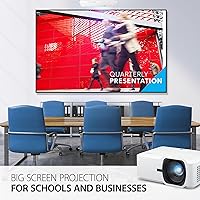
The ViewSonic LS740HD 1080p Laser Projector is built for buyers who need dependable, high-brightness projection in environments where controlling ambient light is not realistic — think corporate meeting rooms, university lecture halls, and K-12 classrooms running back-to-back sessions throughout the day. Educators and trainers who carry a projector between spaces will appreciate the manageable weight and the ability to get a properly aligned image in minutes rather than after a lengthy calibration process. Facilities managers and AV integrators will find the laser light source a compelling alternative to lamp-based units, primarily because it removes the recurring cost and downtime of bulb replacements — though buyers should note this is still a maturing technology at this price point, and long-term field data continues to accumulate. Golf simulator enthusiasts represent a genuinely well-served niche here: the dedicated Golf Mode is not a marketing checkbox but a functional feature with real compatibility support for major simulator platforms, making this a rare projector that directly addresses the specific rendering demands of simulator play. Anyone who needs mounting flexibility — ceiling, floor, portrait, or angled wall — without hiring an AV installer will find the adjustment toolset practical and thorough.
Not suitable for:

The ViewSonic LS740HD 1080p Laser Projector is the wrong choice for buyers primarily motivated by home-cinema quality, as the color depth, contrast, and nuance required for film viewing in a darkened room are not where this unit excels — it is tuned for visibility in lit spaces, not for cinematic immersion. Buyers expecting a self-contained smart device will be frustrated: there is no built-in streaming platform, no wireless screen mirroring, and no app ecosystem, so a separate source device is always required. The built-in audio is genuinely inadequate for group settings, which means budgeting for an external speaker system is not optional but essential for classroom or conference use — a cost that occasionally surprises buyers who did not read the specs carefully. Those working in very compact rooms, particularly golf simulator builders with tight ceiling heights or shallow bay depths, need to measure throw distance rigorously before purchasing, as the minimum projection range can exceed what smaller spaces allow. Finally, buyers looking for a projector that works straight out of the box with no additional hardware investment — no external speakers, no media player, no careful room planning — will likely find the total ownership experience more demanding than they anticipated.
Specifications

  • Light Source: Uses a solid-state laser rather than a traditional lamp, which removes the need for periodic bulb replacements and maintains more consistent brightness over time.
  • Brightness: Rated at 5,000 ANSI lumens, delivering enough output to produce a visible, detailed image in rooms with overhead lighting left on.
  • Resolution: Native Full HD resolution of 1920x1080 pixels, suitable for detailed presentations, instructional video, and simulator content at large screen sizes.
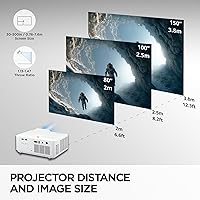
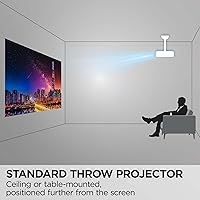
  • Throw Ratio: Operates within a 1.1–1.5 throw ratio, meaning it requires a moderate distance from the screen rather than an ultra-short or long-throw placement.
  • Optical Zoom: Features 1.3x optical zoom, allowing the projected image size to be adjusted without physically moving the projector from its mounted or placed position.
  • Digital Zoom: Supports 0.8x–2.0x digital zoom for additional image-size flexibility, though optical zoom should be prioritized to avoid image quality loss.
  • Screen Size Range: Projects images ranging from 80″ to 150″ diagonally, covering standard presentation screens as well as large simulator and auditorium surfaces.
  • Throw Distance: Requires between 6.6 ft and 12.3 ft of distance from lens to screen, with a 100″ image achievable from approximately 8.2 ft away.
  • Image Adjustment: Includes both horizontal and vertical keystone correction plus 4-corner adjustment, enabling precise image alignment in non-standard mounting positions.
  • Projection Angles: Supports full 360-degree projection and portrait mode orientation, allowing installation on ceilings, floors, and angled or sidewall positions.
  • Connectivity: Equipped with HDMI, USB, and a 3.5mm audio jack for connecting source devices and routing audio output to external speakers.
  • Golf Mode: Includes a dedicated Golf Mode optimized for compatibility with major golf simulation software platforms, addressing specific color and motion rendering requirements.
  • Power Behavior: Laser architecture enables instant power on and off with no warm-up or cool-down period, and an optional auto power control setting is available.
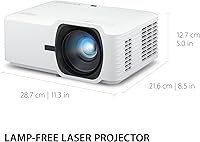
  • Dimensions: The unit measures 11.3 x 8.5 x 5 inches, a compact footprint relative to its brightness output and professional-grade feature set.
  • Weight: Weighs 6.6 pounds, light enough for a single person to carry between rooms or transport to different installations without additional equipment.
  • Aspect Ratio: Native 16:9 widescreen aspect ratio, aligned with standard presentation formats, HD video content, and most simulator display configurations.
  • Audio Output: Built-in speaker is present but intended only as a basic convenience feature; external audio via the 3.5mm jack is strongly recommended for group environments.
  • Manufacturer: Produced by ViewSonic, a brand with an established presence in the commercial display and projector market across business and education segments.
  • Release Date: First made available in August 2023, meaning long-term field durability data is still accumulating as of this writing.
  • Market Rank: Holds a top-100 ranking in the Video Projectors category on Amazon, reflecting consistent buyer demand across professional and niche use cases.

Related Reviews

ViewSonic PA503HD 4000-Lumen Full HD Projector
77%
91%
Brightness Performance
87%
Image Sharpness & Clarity
84%
Color Accuracy & Contrast
88%
Setup & Ease of Installation
86%
Value for Money
More
Optoma GT3500HDR 1080p Full HD Home Laser Projector
88%
91%
Image Quality
87%
Brightness
85%
Ease of Setup
82%
Portability
90%
Design & Build Quality
More
Nebula Capsule 3 Laser Portable Mini Projector
77%
83%
Image Quality
61%
Brightness & Ambient Light Performance
93%
Portability & Form Factor
88%
Smart OS & App Experience
86%
Autofocus & Image Correction
More
GKLPO 1080P Projector
86%
88%
Image Quality
92%
Wi-Fi Connectivity
89%
Bluetooth Connectivity
90%
Portability
85%
Setup & Ease of Use
More
JOWLURK M7 Native 1080p Projector
74%
88%
Ease of Setup
74%
Image Quality
57%
Brightness Accuracy
83%
Wireless Connectivity
79%
Bluetooth Performance
More
NISOO Z1 1080P Projector
87%
93%
Image Quality
81%
Brightness
88%
Color Accuracy
84%
Audio Performance
90%
Connectivity Options
More
ViewSonic PX748-4K UHD Projector
74%
91%
Image Sharpness
93%
Gaming Performance
78%
Brightness & Ambient Light Handling
71%
Color Accuracy
86%
Setup & Installation
More
FUDONI GC666 1080P WiFi Projector
77%
83%
Image Clarity
61%
Brightness Performance
78%
WiFi & Connectivity
89%
Ease of Setup
72%
Build Quality
More
Haqdl HA03 1080P Outdoor Smart Projector
72%
83%
Value for Money
76%
Picture Quality
88%
Ease of Setup
81%
Portability
73%
Smart Features & Apps
More
PANSEBA QK06 Native 1080P Projector
82%
92%
Value for Money
87%
Display Quality
90%
Portability
88%
Ease of Setup
85%
Connectivity Options
More

FAQ

Yes, and this is genuinely one of its strongest practical qualities. At 5,000 ANSI lumens, the LS740HD produces a clear, readable image under standard overhead office or classroom lighting without needing to dim or black out the room. Direct sunlight hitting the screen surface is a different matter and will still cause washout, as it would with any projector.

You do. The ViewSonic LS740HD 1080p Laser Projector has no built-in smart platform, app store, or wireless screen mirroring — it is a display output device, not a self-contained media player. You will need to connect a laptop, media stick, Blu-ray player, or similar source device via HDMI or USB to feed it content.
Golf Mode is a preconfigured picture profile that adjusts color rendering and image processing to better match the visual demands of golf simulation software — things like green fidelity, ball tracking contrast, and motion clarity. ViewSonic has confirmed compatibility with major platforms, though you should check their current compatibility list for the specific software you use, as simulator ecosystems do update.

Honestly, no. The speaker is there as a last-resort convenience for very small or solo-use setups, but most buyers using this in a classroom, conference room, or simulator bay describe it as too quiet and too thin for group listening. Budget for an external speaker connected via the 3.5mm audio jack — treat it as part of the total setup cost rather than an optional accessory.

The unit needs at least about 6.6 feet of clear throw distance to produce a usable image, and the minimum screen size it comfortably projects is around 80 inches diagonal. For very compact rooms or golf simulator bays with shallow depth or low ceilings, measure your available throw distance carefully before purchasing — this is the most common setup miscalculation buyers report.

Laser light sources at this tier are typically rated for 20,000 hours or more under normal operating conditions, which translates to many years of regular use without replacement. That said, this unit has only been on the market since mid-2023, so long-term real-world data is still limited. The theoretical advantage over lamp-based units is significant, but treat extended lifespan projections as informed estimates rather than proven guarantees.

Yes. The 360-degree projection support means this unit can be ceiling-mounted, floor-mounted pointing upward, or installed at angled orientations without damaging the laser mechanism — unlike some older projector designs with lamp placement restrictions. Portrait mode is also supported, though non-standard orientations do require some patient adjustment via the onscreen menus to get a correctly aligned image.

For a standard front-projection setup, most buyers report getting a properly aligned image within ten minutes. The horizontal and vertical keystone controls combined with 4-corner adjustment cover most room imperfections without needing professional calibration. More complex installations — angled mounts, portrait orientation, simulator bays — take longer and the included manual is not especially detailed, so non-technical users may need to rely on online resources or ViewSonic support.

It will display movies in full HD without issue, but it is not optimized for home-cinema viewing. The color profile and contrast characteristics are tuned for bright-room visibility in professional environments, not for the nuanced shadow detail and color accuracy that film enthusiasts look for in a dark home-theater setup. If your primary use case is cinematic viewing rather than business or simulator use, there are purpose-built home-theater projectors worth comparing at similar price points.

An HDMI cable is the most straightforward connection — plug one end into your laptop and the other into the projector, and it should be recognized immediately with no additional configuration needed in most cases. If your laptop only has USB-C or DisplayPort outputs, you will need the appropriate adapter. There is no built-in wireless display support, so a physical cable is always required.

Where to Buy