Dragon Touch 32″ Smart Family Calendar Display


Overview
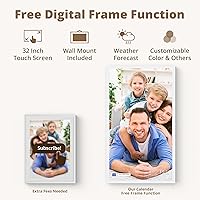
The Dragon Touch 32″ Smart Family Calendar Display is a large-format wall screen built around one straightforward premise: put the entire household schedule somewhere everyone can actually see it. The 32-inch full HD touchscreen is the first thing you notice — it's genuinely large enough to read from across a room, which makes it a fundamentally different proposition from the compact 10-inch calendar tablets that came before it. When nobody's actively using it, the screen shifts into photo frame mode, cycling through family pictures. It mounts flush to a wall or sits on a desk, giving you flexibility. This is a premium investment that makes the most sense for families ready to use every feature it offers.
Features & Benefits
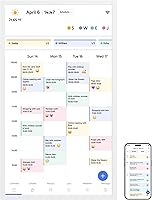
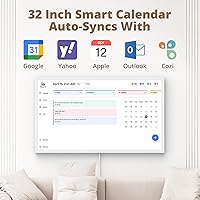
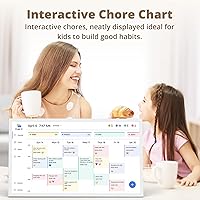
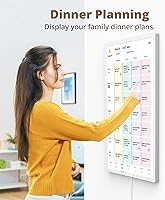
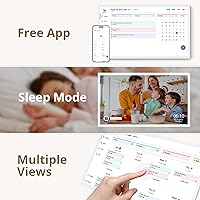
The core scheduling system lets you assign color codes to each family member, so a glance at the screen tells you whose dentist appointment is whose and which kid has soccer practice. It syncs directly with Google Calendar and Apple Calendar — changes made on your phone show up on the wall screen without you having to touch it. The chore chart is a genuine highlight for parents of younger children; kids can check off tasks themselves, which builds accountability in a way a paper list never quite did. There's also a dinner planner built in, and you can push updates remotely through the eCalendar app if plans change while you're out.
Best For
This wall calendar screen is a strong fit for households with school-age kids where the daily shuffle of activities, homework, and chores genuinely needs a central hub. Families already using Google or Apple calendars will find the sync painless — there's no rebuilding your schedule from scratch. It also works well for home office households where one or more adults need a dedicated organizational display that isn't their laptop screen. If aesthetics matter to you, the clean white frame and sharp display hold up as wall decor. Where it's probably not the right fit: small households with simple schedules, or anyone hesitant about depending on a companion app long-term.
User Feedback
Buyers consistently praise the screen quality and how straightforward the initial setup is — most report being up and running within minutes of unboxing. The physical installation draws mixed comments; at just over 23 pounds, wall mounting takes some effort, and a few users note the included hardware is adequate but not impressive. Where feedback gets more divided is the app subscription. Some advanced features sit behind a paid tier, which surprises buyers who expected everything included at this price. There are also scattered reports of Wi-Fi sync hiccups following app updates. The Dragon Touch planner display earns strong loyalty from families who use it daily, but occasional reliability concerns are worth factoring in.
Pros
- The 32-inch full HD screen is large enough to read comfortably from across a room, unlike most competing calendar displays.
- Color-coded per-member scheduling makes it immediately obvious whose commitments belong to whom at a glance.
- Bi-directional sync with Google and Apple Calendar means no manual re-entry of existing schedules.
- The interactive chore chart gives kids a sense of ownership over their tasks in a way paper lists rarely achieve.
- Remote updates via the eCalendar app let parents adjust the family schedule without being home.
- The built-in dinner planner is a small but genuinely practical feature that cuts down on daily decision back-and-forth.
- When idle, this smart family display shifts into a photo frame mode that looks polished and intentional on a wall.
- Wall and desk mounting options give households flexibility in where and how to position the screen.
- Initial setup is consistently reported as quick and straightforward, even for less tech-savvy users.
- The display quality earns strong praise from real buyers, with sharp, clear visuals in typical home lighting.
Cons
- Advanced features like Magic Import require a paid subscription, which is not clearly communicated upfront at this price tier.
- At over 23 pounds, wall installation requires proper anchoring hardware and is not a quick one-person job.
- The entire smart functionality depends on continued app support — there is no meaningful offline fallback if that changes.
- Some users have reported Wi-Fi sync disruptions following app updates, requiring manual reconnection or troubleshooting.
- The included mounting hardware is considered adequate at best, and some buyers opt to source better materials separately.
- Households that only need one or two calendars may find the multi-member feature set more complex than necessary.
- The premium price point is difficult to justify for families who will only use a fraction of the available features.
- App-side interface updates have occasionally introduced bugs that temporarily break calendar sync for existing users.
Ratings
The scores below for the Dragon Touch 32″ Smart Family Calendar Display were generated by AI after analyzing verified buyer reviews from global markets, with spam, bot-submitted, and incentivized feedback actively filtered out. Every category reflects the honest distribution of real household experiences — including the frustrations, not just the highlights. Where users were divided, the scores reflect that tension directly.
Screen Quality
Setup Experience
App Reliability
Value for Money
Build & Hardware Quality
Wall Installation
Chore Chart Usability
Calendar Sync Accuracy
Photo Frame Mode
Remote Management
Subscription Transparency
Multi-Member Scheduling
Dinner Planner Feature
Long-Term Durability
Suitable for:
The Dragon Touch 32″ Smart Family Calendar Display is purpose-built for busy households where keeping multiple people organized is a daily challenge. It's particularly well-suited for parents with school-age children who need a shared, always-visible schedule that everyone in the family can glance at without pulling out a phone. Families already using Google Calendar or Apple Calendar will find the sync genuinely useful, since their existing schedules carry over without rebuilding anything. Households where two parents or caregivers share coordination duties — managing pickups, activities, and chores across different work schedules — get real mileage from the per-member color coding and remote update capability. If you also care about how your home looks, the large display doubles as a photo frame with enough screen quality to make it feel intentional rather than utilitarian.
Not suitable for:
The Dragon Touch 32″ Smart Family Calendar Display is not the right choice for smaller households with straightforward schedules, where a shared phone calendar or a basic wall planner would accomplish the same thing at a fraction of the cost. Anyone uncomfortable with ongoing app dependency should think carefully before committing, since the display relies on Wi-Fi and a companion app for its core functionality — if Dragon Touch ever discontinues app support, the smart features stop working. Buyers expecting an all-inclusive experience should know that some advanced tools sit behind a paid subscription tier, which can feel like an unwelcome surprise at this price point. The unit weighs over 23 pounds, so wall mounting requires real hardware and some patience; renters or anyone in a temporary living situation may find that a complication. And if you only want a digital photo frame, this wall calendar screen is significant overkill.
Specifications
- Screen Size: The display measures 32 inches diagonally, making it large enough to read comfortably from across a typical living room or kitchen.
- Resolution: The screen outputs at 1080p Full HD, delivering sharp text and clear images suitable for calendar entries and photo display alike.
- Touchscreen: The panel is fully interactive with touch input, allowing family members to tap, scroll, and update content directly on the display.
- Dimensions: The unit measures 28.98 x 17 x 0.99 inches, giving it a slim profile that sits close to the wall when mounted.
- Weight: The display weighs 23.1 pounds, which requires secure wall anchoring using appropriate hardware for safe installation.
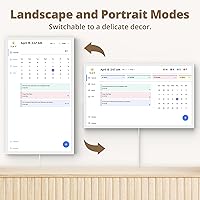
- Mounting Options: The unit supports both wall mounting and desk placement, offering flexibility for different room layouts and household preferences.
- Connectivity: Wi-Fi is required for calendar sync, photo uploads, and remote management; there is no offline smart-feature fallback.
- Calendar Sync: The display integrates with Google Calendar and Apple iOS Calendar, syncing events bi-directionally through the companion app.
- Companion App: The eCalendar app is available for both iOS and Android and serves as the primary control interface for remote schedule management.
- Chore Chart: The built-in chore chart supports per-member task assignment, allowing individual family members to check off completed items interactively.
- Dinner Planner: A dedicated dinner planner feature is included, letting households display meal plans for the week visible to all family members.
- Photo Frame Mode: When the calendar is not in active use, the screen automatically transitions to a digital photo frame displaying uploaded family images.
- Paid Features: Advanced tools including Magic Import are locked behind a subscription tier and are not included in the base purchase price.
- Color: The unit is available in White, with a clean frame finish designed to blend with modern home interiors.
- Model Number: The official model identifier is XKRL0004-WT-EU, which can be used when contacting Dragon Touch support or sourcing accessories.
- Brand: The display is manufactured and sold by Dragon Touch, a consumer electronics brand specializing in digital frames and smart displays.
- Release Date: The product was first made available in December 2024, making it a recent addition to the smart family display category.
- Compatible Devices: The eCalendar app and remote management features are compatible with smartphones running current versions of iOS and Android.
Related Reviews
Dragon Touch 21.5″ Smart Family Calendar Display
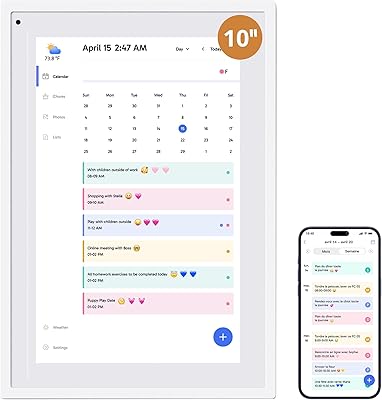
Dragon Touch TM10 10.1-inch Digital Family Calendar
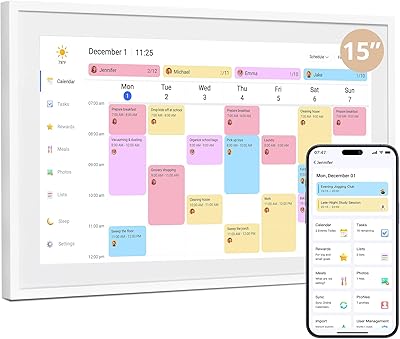
Dragon Touch TM15 15.6″ Smart Family Calendar Display
SYLVOX 32-Inch 12V Smart RV TV

Westinghouse 32-inch Xumo Smart TV
Dragon Touch L012 Mini Projector
Dragon Touch KidzPad Y88X 10 32GB
SYLVOX Limo Series 32-Inch RV Smart TV
EASTSHINE S2 LCD Display Smart Charger