Overview

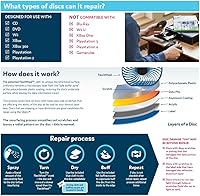
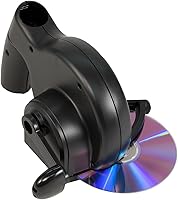
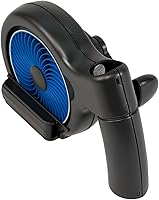
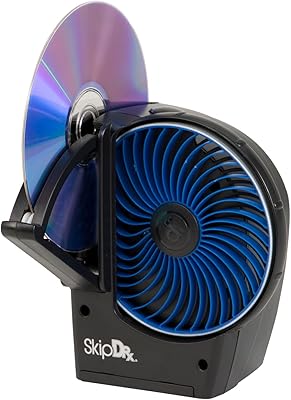
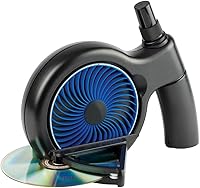
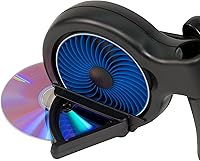
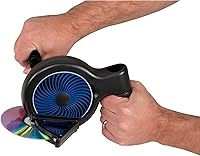
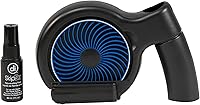
The Digital Innovations SkipDr Manual Disc Repair System is a hand-powered resurfacing tool that has been quietly solving the scratched disc problem since 2008. No batteries, no power cord — just a compact unit you can use at the kitchen table. It works by applying a radial resurfacing method across the play side of a disc, targeting surface scratches without touching the data layer beneath. The included rejuvenating fluid, drying cloth, and felt buffing square are all tucked inside the handle, so the kit is self-contained from day one. For anyone facing a freezing DVD or a skipping CD, it offers a practical, affordable alternative to paying for professional repair.
Features & Benefits

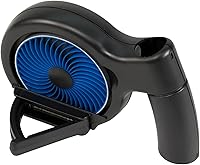
The heart of the SkipDr is its patented FlexiWheel, which handles up to 25 discs before needing replacement and is gentle enough that you can run the same disc through it more than once without causing further damage. The radial buffing pattern is the key differentiator here — unlike circular polishing, which can actually worsen read errors, radial strokes run perpendicular to the disc’s data tracks, reducing the risk of creating new problems. It covers DVD, CD, PS1, PS2, Xbox, Xbox 360, and Wii formats. At roughly 5.9 x 3.9 x 9 inches, it stores easily on a shelf, and since it needs no power source, setup takes about thirty seconds.

Best For

This manual resurfacing tool makes the most sense for a specific set of buyers. Retro gamers sitting on shelves of aging PS2 or original Xbox titles will find it particularly useful, since replacing those discs is no longer as simple as walking into a store. It also suits households that rent physical media or borrow discs from libraries, where surface wear is common. Budget-conscious shoppers who want to try a fix before writing off a disc entirely will appreciate the low barrier to entry. Parents dealing with a young child’s favorite movie going unplayable overnight will also recognize this kit’s appeal. That said, if you need an industrial solution for heavily gouged discs in bulk, this is not that tool.

User Feedback

Buyers tend to be genuinely positive about the SkipDr when their expectations match what it actually does. Light to moderate scratches are where it earns its reputation — plenty of reviewers describe discs that were previously unplayable working again after a single treatment. The honest flipside is that deep gouges or heavy physical damage are largely beyond its reach, and a handful of buyers learned that the hard way. A few users also mention that the FlexiWheel and included fluid can deplete faster than expected when working through a large backlog, adding some ongoing cost to factor in. Those who go in with realistic expectations tend to walk away satisfied; those expecting a cure for seriously damaged discs are more likely to be disappointed.

Pros

  • Handles light to moderate surface scratches reliably, which covers the most common real-world disc damage.
  • No batteries or power source needed — works anywhere, any time, with zero setup.
  • The radial buffing method is less likely to create new read errors than circular polishing approaches.
  • Everything needed for the first repairs is included and stored neatly inside the handle.
  • Compact enough to stash in a drawer and forget about until you actually need it.
  • The SkipDr has been on the market since 2008, giving it a long, well-documented track record.
  • Gentle enough to treat the same disc more than once without causing additional surface damage.
  • Low barrier to entry makes it a sensible first attempt before spending money on a replacement disc.
  • Works across a broad range of legacy formats, covering most physical media from the DVD and sixth-gen gaming era.

Cons

  • Deep gouges and heavy physical damage are beyond what this manual resurfacing tool can realistically fix.
  • The FlexiWheel wears out faster than advertised when working through a large disc backlog.
  • Included rejuvenating fluid runs out quickly, and sourcing a compatible replacement takes extra effort.
  • Results are inconsistent when scratch depth or disc condition varies — technique matters more than it should.
  • The plastic housing has some flex during use, which makes it feel less precise than it could.
  • No protective coating is applied post-repair, so treated discs remain just as scratch-prone as before.
  • The design has not been updated in many years, and it shows in the materials and overall finish.
  • Manual cranking becomes tedious when processing more than a handful of discs in a single session.

Ratings

Our AI scoring system analyzed thousands of verified global reviews for the Digital Innovations SkipDr Manual Disc Repair System, actively filtering out incentivized and bot-generated submissions to surface what real buyers actually experienced. The scores below reflect both where this disc repair kit genuinely delivers and where it falls short, giving you an honest, unfiltered picture before you buy.

Scratch Repair Effectiveness
74%
26%
For light to moderate surface scratches — the kind that cause stuttering or freezing mid-movie — the SkipDr performs reliably well. Many buyers describe discs they had mentally written off playing cleanly again after a single treatment, which is exactly what this kit is built to do.
Deep gouges or heavily worn discs are a different story. Users dealing with physically damaged media rather than surface-level wear frequently report little to no improvement, and a few felt the tool gave them false hope before they ultimately had to replace the disc anyway.
Ease of Use
88%
The manual operation requires almost no learning curve. Most buyers figured out the process within the first attempt — apply fluid, insert disc, crank the handle — and the compact form makes it practical to use at a desk or kitchen counter without any setup fuss.
The hand-cranking motion can feel slightly awkward for some users, particularly when trying to apply consistent pressure. A small number of reviewers noted that getting even coverage across the full disc surface takes a bit of practice before you develop a reliable rhythm.
Value for Money
81%
19%
Compared to professional disc resurfacing services or even replacing a disc outright, the price point makes this kit an easy call for casual users. Rescuing even one or two discs from the bin effectively covers the cost, and many buyers report using it successfully on multiple titles.
The ongoing consumable costs — replacement FlexiWheels and additional rejuvenating fluid — add up over time, especially for anyone with a large backlog to work through. The initial kit feels affordable, but heavy users should factor in those recurring expenses when assessing long-term value.
FlexiWheel Durability
61%
39%
The FlexiWheel is gentle enough to use on the same disc multiple times without causing additional damage, which is a meaningful engineering choice that sets it apart from more aggressive resurfacing pads. For light, occasional use, a single wheel lasts a reasonable number of sessions.
Users who bought the kit specifically to process a large collection of worn discs — retro gamers with shelves of PS1 or PS2 titles, for example — frequently found the wheel wore out faster than the product implies. At 25 discs per wheel under ideal conditions, heavy use can exhaust it well before that mark.
Included Accessories
77%
23%
The fact that the rejuvenating fluid, drying cloth, and felt buffing square all store inside the handle is a practical design touch. Everything you need for the first batch of repairs is right there, and buyers appreciate not having to source separate supplies just to get started.
The included fluid quantity is modest, and frequent users report burning through it faster than expected. Once the supplied fluid runs out, you either need to source a compatible replacement or purchase another kit entirely, which some buyers found unexpectedly inconvenient.
Build Quality
69%
31%
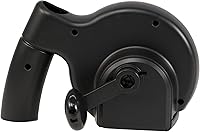
The unit feels solid enough for a manual, hand-operated tool at this price tier. The handle sits comfortably in the hand and the disc-holding mechanism keeps the disc stable during the resurfacing motion, which matters for achieving an even result.
It does not feel like a precision instrument, and a few reviewers noted some plastic flex in the housing during use. For occasional home repair this is a minor issue, but buyers expecting something more robust may find the construction underwhelming.
Compatibility Range
72%
28%
Coverage across DVD, CD, PS1, PS2, Xbox, Xbox 360, and Wii disc formats means the kit is genuinely versatile for anyone with a mixed collection of older physical media. Households with a variety of legacy formats do not need separate tools for each system.
It is worth noting that physical disc formats are largely legacy technology at this point. Buyers with modern gaming libraries on Blu-ray or 4K UHD will find this kit irrelevant, and the compatibility list, while broad within its intended era, is limited to an increasingly niche use case.
Portability & Storage
84%
At roughly 5.9 x 3.9 x 9 inches and requiring no power source whatsoever, the SkipDr is genuinely portable. It slips into a shelf, a cabinet, or even a bag without any fuss, and you can use it anywhere — no outlet hunting required.
The included accessories stored in the handle, while clever, do limit how discreetly you can tuck the unit away once the compartment is open. It is a small trade-off, but worth noting for buyers with very limited storage space.
Repair Consistency
66%
34%
When the disc damage falls within the tool's realistic capability range, results are fairly repeatable. Buyers who learned the correct technique tended to report consistent outcomes across multiple discs of similar damage levels.
Results vary noticeably depending on scratch depth, disc type, and how evenly pressure is applied during the process. This inconsistency frustrates buyers who expect a predictable fix every time, and it makes the tool feel less reliable when dealing with anything outside minor surface wear.
Learning Curve
83%
Setup is minimal and the process is intuitive — most buyers are resurfacing their first disc within minutes of opening the box. The lack of complex settings or adjustments keeps the experience accessible even for buyers who have never used a disc repair tool before.
Achieving optimal results does require some technique refinement, particularly around fluid application and cranking speed. First-time users occasionally apply too much or too little fluid, leading to subpar results that improve only after a few attempts.
Longevity of Results
71%
29%
For discs with genuine surface scratches, the repair tends to hold up well during normal playback. Buyers report that successfully treated discs continue playing cleanly through subsequent uses without reverting to their pre-repair state.
The repair does not add a protective coating to the disc surface, so treated discs remain just as vulnerable to future scratches as before. Without changes in storage or handling habits, the same disc may need retreatment down the line.
Product Reliability Over Time
78%
22%
Having been on the market continuously since 2008 without being discontinued speaks to a certain baseline reliability. Buyers can source replacement consumables and find community feedback going back years, which adds a layer of confidence that is harder to find with newer alternatives.
The age of the design also means there have been no meaningful updates or improvements in many years. Buyers hoping for an evolved version with better materials or capacity will find the product essentially unchanged from its original form.
Noise & Operation
86%
Manual operation means this tool is completely silent in use — no motor hum, no vibration, nothing that disturbs others nearby. That makes it practical to use any time of day without it being a nuisance in a shared living space.
There is nothing notable here as a downside beyond the physical effort required. Users repairing a large batch of discs in one sitting may find the repetitive cranking motion mildly tiring, though it is rarely described as a significant complaint.

Suitable for:

The Digital Innovations SkipDr Manual Disc Repair System is a practical pick for anyone who still actively uses physical disc media and wants a low-cost way to extend its lifespan. Retro gaming enthusiasts with shelves of PS1, PS2, or original Xbox titles will get the most out of it, since those discs are no longer easy to replace and surface wear is common after years of use. Households that regularly rent DVDs or borrow discs from libraries are another natural fit — minor scratches accumulate quickly in those scenarios, and this kit handles exactly that category of damage well. Parents whose kids have turned a favorite movie disc into something resembling a hockey puck will also appreciate having a quick, mess-free fix on hand. If you prefer a manual approach over bulky powered resurfacers, and your damage is realistically surface-level, this tool hits its intended mark reliably.
Not suitable for:

Anyone expecting the Digital Innovations SkipDr Manual Disc Repair System to rescue deeply gouged or heavily damaged discs is likely to walk away frustrated — this tool is built for surface scratches, and it is honest about nothing more. Buyers with modern gaming libraries built around Blu-ray, 4K UHD, or digital downloads will find no use for it at all, since its compatible formats are squarely in legacy territory. If you are processing a high volume of damaged discs regularly, the FlexiWheel and included fluid will deplete faster than expected, and the ongoing replacement cost starts to undercut the value proposition. Those who need consistent, repeatable results across varying scratch depths — think a video rental shop or a disc resale operation — will find the manual process too variable and limited in throughput. Anyone hoping for a one-time purchase that handles all their repair needs indefinitely should temper those expectations before buying.
Specifications

  • Brand: Manufactured by Digital Innovations LLC, a US-based consumer electronics accessories company.
  • Model Number: The unit carries model number 1018300, also sold under ASIN B0015ACUKC.
  • Dimensions: The unit measures 5.87″ in length, 3.94″ in width, and 9.02″ in height.
  • Item Weight: The kit weighs approximately 0.01 ounces as shipped, making it exceptionally lightweight and easy to handle.
  • Operation: Fully manual and hand-powered — no batteries, electricity, or power cord of any kind is required.
  • Resurfacing Method: Uses a radial resurfacing pattern, which runs perpendicular to disc data tracks to minimize the risk of introducing new read errors.
  • Compatible Formats: Supports DVD, CD, PS1, PS2, Xbox, Xbox 360, and Wii optical disc formats.
  • FlexiWheel Capacity: The patented FlexiWheel buffing component is rated for up to 25 disc repairs per wheel under standard usage conditions.
  • Included Accessories: Comes with SkipDr Rejuvenating Fluid, a blue drying cloth, and a felt buffing square, all stored inside the handle.
  • Hardware Interface: Designed for use with standard Compact Disc-format optical media and related legacy disc types.
  • Storage Design: Accessories are housed inside the handle of the unit, keeping the kit self-contained and preventing loss of components.
  • Power Source: No power source is required; the tool operates entirely through manual hand-cranking by the user.
  • Platform Compatibility: Compatible with gaming console optical discs from PlayStation 1 and 2, original Xbox, Xbox 360, and Nintendo Wii.
  • Market Availability: First made available in January 2008 and remains an active, non-discontinued product as of the current date.
  • Manufacturer Status: Digital Innovations LLC has confirmed the product is not discontinued and replacement consumables remain available.
  • Best Sellers Rank: Ranked number 5 in the Audio and Video Disc Repair Kits category on Amazon at time of review.
  • Target Damage Type: Designed specifically to address play-side surface scratches; not intended for deep gouges or structural disc damage.
  • Repair Safety: The FlexiWheel is engineered to be gentle enough for repeat treatments on the same disc without causing further surface degradation.

Related Reviews

Digital Innovations SkipDr Motorized Disc Repair System
77%
78%
Repair Effectiveness
91%
Ease of Use
63%
FlexiWheel Longevity
74%
Value for Money
69%
Build Quality & Durability
More
Sennheiser AVX Digital Wireless Microphone System
87%
94%
Audio Quality
91%
Ease of Setup
88%
Build Quality
86%
Portability
77%
Battery Life
More
RØDE RodeLink FM Digital Wireless Filmmaker System
85%
94%
Signal Stability
91%
Audio Quality
88%
Ease of Setup
89%
Build Quality
85%
Battery Life
More
HearSound Gold Digital Wireless Headset System for TV
86%
88%
Audio Clarity
91%
Comfort and Fit
86%
Battery Life
75%
Ease of Setup
82%
Range and Connectivity
More
Shure PGXD14 Digital Wireless System for Guitar/Bass
85%
92%
Signal Reliability
94%
Audio Quality
88%
Battery Life
91%
Ease of Setup
77%
Range Performance
More
Line 6 XD-V75HS Digital Wireless System
86%
88%
Performance in Crowded Environments
91%
Audio Clarity & Quality
85%
Ease of Setup
92%
Signal Reliability
70%
Battery Life
More
Azden PRO-XR Digital Wireless Microphone System
86%
94%
Wireless Range
89%
Sound Quality
87%
Battery Life
92%
Ease of Setup
85%
Connectivity Stability
More
OM System WS-882 Digital Voice Recorder
78%
88%
Audio Clarity (PCM Mode)
63%
Background Noise Handling
84%
Battery Life
74%
Ease of Use
77%
Build Quality & Durability
More
OM SYSTEM VN-541PC
OM SYSTEM VN-541PC
77%
93%
Ease of Use
71%
Audio Recording Quality
68%
Noise Cancellation
84%
Battery Life
62%
Build Quality & Durability
More
Shure SLXD24/SM58 Digital Wireless Handheld Microphone System
87%
92%
Sound Clarity
89%
Build Quality
91%
Ease of Setup
86%
Signal Stability
85%
Comfort & Ergonomics
More

FAQ

For surface-level scratches — the kind that cause skipping or freezing during playback — the Digital Innovations SkipDr Manual Disc Repair System genuinely delivers for most users. It will not perform miracles on deeply gouged discs, but for the everyday wear that accumulates from normal handling, the results are solid and well-documented across years of buyer feedback.
No, this tool is not designed for Blu-ray or 4K UHD discs. Those formats use a harder protective coating that requires different resurfacing techniques. Stick to DVD, CD, and the listed gaming disc formats for safe and effective results.

The FlexiWheel is rated for up to 25 disc repairs, though heavy use or deeper scratches can wear it out faster than that. The included rejuvenating fluid also has a finite supply, so keep in mind that both consumables will eventually need replacement if you plan to use the kit regularly.

All three included accessories — the rejuvenating fluid, the blue drying cloth, and the felt buffing square — fit inside the hollow handle of the unit. It is a thoughtful design touch that keeps everything together and prevents the small components from getting lost between uses.

Yes, the FlexiWheel is specifically designed to be gentle enough for repeat treatments on the same disc. If the first pass does not fully resolve the issue, you can run it through again without worrying about causing additional damage, provided the scratches are surface-level to begin with.

You can purchase replacement fluid separately — Digital Innovations sells it as a standalone accessory. It is worth buying a spare bottle if you have a large collection to work through, since the included quantity is enough to get started but will not last through a heavy repair session.

The manual operation is simple enough that older children could use it with adult supervision, but the rejuvenating fluid and small accessories make it more appropriate for adult use overall. Parents typically use it themselves to rescue their kids’ discs rather than handing it off directly.

No. This disc repair kit addresses surface scratches on the play side of a disc — it has no effect on cracks, chips, or structural damage. A cracked disc is generally beyond repair by any consumer-grade tool and should be replaced rather than treated.

Most users complete a single disc treatment in a few minutes once they are familiar with the process. The first attempt may take slightly longer as you get a feel for the fluid application and cranking technique, but there is no complex setup involved and the learning curve is short.

Yes, Digital Innovations sells replacement FlexiWheels as a separate purchase. If you plan to use the SkipDr regularly on a larger collection, it is worth having a spare on hand so you are not left without a working tool mid-session when the original wheel wears down.