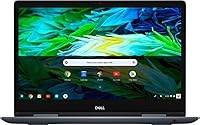
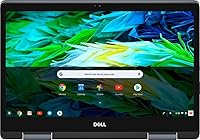
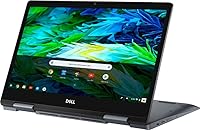
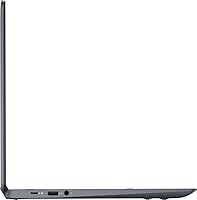
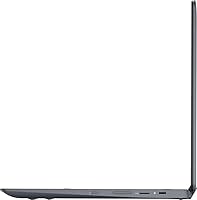
Overview

The Dell Inspiron 14″ 2-in-1 Chromebook occupies an interesting middle ground — it's not a throwaway budget machine, but it doesn't pretend to compete with premium 2-in-1s either. Launched in late 2018, it runs Chrome OS, which means your expectations need to be calibrated from the start: this is a cloud-first device, built around Google's ecosystem rather than traditional desktop software. What actually sets it apart from cheaper rivals is its 14-inch FHD IPS display — a real step up from the HD panels crammed into lower-cost models. For students and light users, that distinction matters more than it might seem.

Features & Benefits

The Intel Core i3-8130U processor makes a tangible difference over Celeron-based Chromebooks — you'll notice it when juggling a Google Doc, a YouTube tab, and a video call at the same time, though 4GB of RAM does set a ceiling on how far you can push multitasking. The 128GB eMMC storage is unusually roomy for Chrome OS, so you're not constantly shuffling files to Google Drive. The 360-degree hinge adds real flexibility: tent mode works well for watching content, and stand mode is handy at a desk. One honest note — EMR pen support is built in, but the stylus is not included and has to be bought separately.

Best For

This Chromebook is a natural fit for students who live inside Google's tools — Docs, Slides, Meet, Classroom — and don't need Windows software or Adobe apps. It's also a smart pick for households wanting a fast, low-maintenance laptop that boots in seconds and mostly takes care of itself. Families, educators, and anyone already embedded in Google's ecosystem will feel right at home. That said, if your workflow depends on legacy desktop applications, this 2-in-1 simply isn't the right tool. The flip modes do add value for PDF annotation or casual sketching, though four pounds is on the heavier side for extended hand-held use.

User Feedback

Owners of the Dell Inspiron Chromebook tend to agree on a few things. The build quality and overall fit-and-finish draw consistent praise — many buyers are pleasantly surprised by how solid it feels at this tier. The backlit keyboard earns equally warm feedback, with most finding it comfortable for extended sessions. On the flip side, 4GB of RAM hits a wall once the tab count climbs, and Chrome OS app limitations — particularly around offline use and legacy software — are a real frustration for users who didn't expect them. Battery life earns good marks for all-day classroom use, but long-term owners have raised concerns about hinge durability over time.

Pros

  • The 14-inch FHD IPS touch display is noticeably sharper and more color-accurate than HD panels found on cheaper rivals.
  • Intel Core i3 performance handles everyday multitasking, streaming, and video calls without the lag Celeron users know too well.
  • 128GB of eMMC storage is unusually generous for a Chromebook, leaving plenty of room without constant file juggling.
  • Chrome OS stays fast, boots in seconds, and requires almost zero maintenance compared to Windows machines.
  • The backlit keyboard is comfortable for extended writing sessions and earns consistent praise from real-world owners.
  • Flip-and-fold design adds practical versatility — tent mode for media, stand mode for desk use, tablet mode for sketching.
  • Built-in EMR pen support opens up annotation and digital note-taking without needing any third-party workaround.
  • Wi-Fi 5 connectivity keeps video calls and cloud syncing reliably fast on modern home and campus networks.
  • HDMI output makes it straightforward to connect to an external monitor or classroom projector when needed.
  • Battery life comfortably covers a full school day of typical use without hunting for an outlet.

Cons

  • 4GB of RAM becomes a real bottleneck once you push past 8 to 10 open browser tabs simultaneously.
  • Chrome OS cannot run Windows applications, Adobe software, or most legacy desktop tools — a hard limit for many users.
  • The stylus pen is not included despite EMR support being advertised, which frequently catches buyers off guard at checkout.
  • Being a 2018 model, buyers must verify Google's automatic update expiration date to confirm how long security patches continue.
  • At four pounds, this Chromebook is noticeably heavy for a device marketed partly as a tablet experience.
  • Offline functionality is genuinely limited — Chrome OS leans heavily on internet connectivity for full day-to-day productivity.
  • Long-term owners have flagged mixed experiences with hinge durability, raising real questions about longevity under daily heavy use.
  • Only one USB 2.0 and one USB 3.0 port leave very little room for peripherals without adding a hub.

Ratings

Our scores for the Dell Inspiron 14″ 2-in-1 Chromebook were generated by AI after analyzing thousands of verified buyer reviews from global markets, with spam, incentivized submissions, and bot activity actively filtered out before any scoring was applied. Each category reflects the full weight of real user experience — strengths and frustrations treated equally — so the numbers tell an honest story rather than a flattering one. Where this 2-in-1 earns strong marks, the data backs it up; where scores dip, real patterns in buyer feedback explain exactly why.

Display Quality
83%
The 14-inch FHD IPS panel draws consistent praise from users who switched from cheaper HD-only Chromebooks and noticed an immediate difference in sharpness and color accuracy. Text stays crisp during long writing sessions, and the wide viewing angles make sharing the screen sideways in a classroom or meeting genuinely comfortable.
The glossy touchscreen surface collects fingerprints quickly, which becomes distracting during extended use without regular wiping. Outdoor visibility in direct sunlight is a recurring complaint, particularly from students who move between indoor and outdoor spaces throughout the school day.
Performance
74%
26%
The Core i3-8130U handles everyday Chrome OS work — Docs drafting, Meet calls, YouTube in the background — noticeably more smoothly than Celeron-based rivals at the same price. Switching between several open apps feels responsive in typical light-to-moderate use sessions.
Once the tab count climbs past 8 or 10, the 4GB RAM ceiling becomes impossible to ignore — pages reload, apps stall, and the experience degrades. Users running a video call alongside open reference tabs and a document report this friction most acutely during busy academic or work days.
Battery Life
77%
23%
Most owners comfortably clear a full school or office day on a single charge during standard use — browsing, Docs, and occasional streaming. Chrome OS's efficiency helps the battery stretch further than a comparable Windows device would under the same workload conditions.
Sustained video playback or back-to-back video calls drain the battery faster than the specs imply, with users frequently reporting the need for a charger by mid-to-late afternoon. Running the display at high brightness consistently shortens real-world battery life beyond what casual benchmarks suggest.
Value for Money
78%
22%
The combination of an FHD IPS touchscreen, i3 processor, 128GB storage, and a flip hinge at this price tier offers more tangible hardware than most direct rivals manage. Buyers frequently describe feeling like they received more than the price suggested when they first unbox and use it.
The value calculation weakens when you factor in the cost of a separately purchased stylus and the looming AUE expiration date on a 2018 device. Buyers spending close to this budget on a new or recent-year model would likely secure better long-term software support for the same investment.
Software & OS Experience
67%
33%
Chrome OS boots fast, stays stable, and requires virtually zero maintenance — no manual updates, no antivirus subscriptions, no unexpected restarts. For users already living in Google's ecosystem, the experience flows naturally and feels genuinely low-friction from the first day of use.
The OS limits are a real dealbreaker for the wrong buyer — no Windows apps, no full Adobe suite, and inconsistent offline functionality in areas with unreliable connectivity. The 2018 release date adds urgency to checking how much of Google's AUE support window remains before committing.
Keyboard & Trackpad
82%
18%
The backlit keyboard draws some of the most enthusiastic recurring praise across the entire review pool, with users noting that key travel feels deliberate rather than shallow. Backlighting proves genuinely useful for evening study sessions and low-light environments like lecture halls with dimmed screens.
The trackpad receives occasional criticism for inconsistent tap-to-click sensitivity during longer sessions, with some users reporting unintended cursor jumps while typing quickly. These complaints are a minority view but appear often enough across reviews to be considered a real — if intermittent — friction point.
Hinge & Versatility
72%
28%
Tent and stand modes earn genuine appreciation from students and educators who use the device for content viewing or screen-sharing in small group settings. The 360-degree hinge adds real utility rather than feeling like a checkbox feature, particularly for anyone regularly presenting or consuming media at a desk.
Hand-held tablet use becomes tiring within minutes due to the 4-pound weight, which sits at the heavy end for a device partly marketed around tablet functionality. Long-term owners also report increased hinge looseness after sustained daily folding, suggesting durability over multi-year use is a legitimate concern.
Storage
84%
128GB eMMC is genuinely uncommon at this Chromebook price tier and gives users room to install Android apps, store offline files, and keep downloaded media without constant storage management. Users upgrading from 32GB or 64GB Chromebooks consistently call this out as one of the most immediately appreciated differences.
The eMMC format is meaningfully slower than the NVMe SSDs found in similarly priced Windows laptops, which shows up during large file transfers or batch app installations. Users saving high-resolution media or managing substantial offline project files locally can still push the storage limits over time.
Port Selection
63%
37%
A full-size HDMI port is a practical inclusion that lets users connect to classroom projectors or home monitors without any adapter — a convenience that comes up repeatedly in positive reviews from students and educators. The combo audio jack handles both headphones and external microphones without issue.
Two USB ports total — one 2.0 and one 3.0 — leave almost no room for peripherals without a hub, which is a recurring frustration for users who need to connect a mouse, USB drive, and charge simultaneously. The port count feels like the sharpest hardware compromise on an otherwise reasonably equipped machine.
Pen Support
57%
43%
When paired with a compatible EMR stylus, the built-in pen input responds accurately and without noticeable lag, making PDF annotation and light digital sketching genuinely functional rather than a gimmick. Students and educators using it for handwritten note-taking report the feel is natural enough for extended annotating sessions.
The stylus is not included in the box — a fact that surprises a notable share of buyers who reasonably assumed pen support meant a pen was packaged with the device. Tracking down a compatible EMR stylus adds both cost and research effort that most buyers did not plan for at checkout.
Wireless Connectivity
81%
19%
Wi-Fi 5 keeps streaming, cloud sync, and video calls reliably smooth on modern home and campus networks, with users rarely reporting dropped connections during sustained online sessions. Bluetooth pairing with headphones and wireless peripherals works consistently and without the reconnection frustrations seen on some entry-level Chromebooks.
Bluetooth 4.0 lacks the energy efficiency and reduced latency of Bluetooth 5.0, which occasionally shows up as slight audio delay with newer wireless headphones. Performance in densely populated shared networks — large university buildings or conference spaces — draws occasional criticism from users who depend on consistently fast connections.
Weight & Portability
68%
32%
The slim 0.66-inch profile fits neatly into a standard backpack alongside textbooks and gear without creating a bulk problem. The compact footprint of 13 × 9.06 inches means it takes up a reasonable amount of desk or lap space without feeling oversized during everyday mobile use.
At 4 pounds, this Chromebook sits on the heavier end of its class, and buyers expecting a tablet-like carry experience will be disappointed quickly. Users who commute daily on foot or carry their bag for extended periods frequently mention the weight as a cumulative fatigue issue by the end of the day.
Long-term Support
53%
47%
Chrome OS's automatic update system delivers security patches consistently and quietly for devices still within their AUE window, with no user effort required. Buyers who verify the AUE date before purchasing can still extract meaningful, secure daily use from this 2-in-1 if usable support time remains.
Launching in December 2018 places this device close to or past Google's AUE cutoff, meaning security and feature updates may be nearing expiration or already gone depending on purchase timing. Owning a Chromebook past its AUE date carries real, ongoing security exposure that is easy to overlook until it becomes a problem.
Webcam Quality
61%
39%
The built-in webcam covers standard video calls on Google Meet and Zoom without requiring any external device, which suits the typical student or remote-work use case this 2-in-1 is designed around. Most users in typical indoor lighting report it performs adequately for its intended purpose.
Image quality in lower light conditions is noticeably soft, and users participating in evening calls or working in dimly lit rooms frequently note that the picture looks grainy or washed out. The webcam is functional rather than good, and anyone prioritizing video quality for content creation will find it limiting.

Suitable for:

The Dell Inspiron 14″ 2-in-1 Chromebook is a strong fit for students from middle school through college who spend most of their time in Google Workspace, browsing, streaming, and video conferencing. If your day revolves around Docs, Slides, Meet, or Classroom, this 2-in-1 handles all of it without complaint, and the i3 processor gives it a real edge over cheaper Celeron models when you are multitasking under deadline pressure. Households looking for a reliable, low-maintenance secondary laptop will also appreciate how little attention Chrome OS demands — it updates itself, stays fast, and boots in seconds. Educators and learners who want to annotate PDFs or do light digital sketching will find the EMR pen support genuinely useful, though they should budget for a compatible stylus separately. Anyone already living inside Google's ecosystem, from Gmail power users to Google Drive-dependent teams, will feel right at home here.

Not suitable for:

If you rely on Windows applications — whether that's Microsoft Office desktop, Adobe Creative Suite, or any specialized professional software — the Dell Inspiron 14″ 2-in-1 Chromebook will leave you frustrated, and no amount of hardware quality changes that fundamental OS limitation. Power users who routinely open 15 or more browser tabs while running Android apps simultaneously will hit the ceiling of 4GB RAM more often than they would like. This 2-in-1 launched in 2018, so buyers should check Google's automatic update expiration date before committing, since AUE limits how long a Chromebook continues to receive security patches. Anyone hoping to use it primarily as a hand-held tablet should know that four pounds is genuinely heavy for extended one-handed use — it works better as a laptop that folds into tent or stand mode than as a true tablet replacement. If offline productivity is critical to your workflow, Chrome OS's dependency on a live connection will become a persistent frustration.

Specifications

  • Display: 14-inch FHD IPS touchscreen with a 1920×1080 resolution and TrueLife LED backlight delivers sharp detail and wide viewing angles.
  • Processor: Intel Core i3-8130U (8th generation) runs at 2.2GHz, offering noticeably faster responsiveness than entry-level Celeron-based Chromebooks.
  • RAM: 4GB DDR memory supports everyday browsing, Google Workspace tasks, and video calls, though heavy multitasking will approach its ceiling.
  • Storage: 128GB eMMC flash storage is unusually generous for a Chrome OS device, reducing the pressure to constantly offload files to the cloud.
  • Graphics: Intel UHD Graphics 620 (integrated) handles everyday video playback and light visual tasks without requiring a dedicated GPU.
  • Operating System: Google Chrome OS comes pre-installed, offering a cloud-first computing experience with support for Chrome extensions and Android apps via Google Play.
  • Hinge Design: 360-degree flip-and-fold hinge allows the device to shift between laptop, tent, stand, and tablet modes for flexible everyday use.
  • Keyboard: Full-size backlit keyboard provides comfortable key travel and visibility in low-light environments, earning consistent praise from real-world users.
  • Wireless: Wi-Fi 5 (802.11ac, 2x2) supports wireless throughput up to 867 Mbps for smooth streaming, video conferencing, and cloud syncing.
  • Bluetooth: Bluetooth 4.0 enables wireless pairing with headphones, mice, external keyboards, and other compatible peripherals.
  • Ports: Connectivity includes one USB 2.0 port, one USB 3.0 port, a full-size HDMI output, and a combo microphone and headphone jack.
  • Pen Support: EMR (Electro-Magnetic Resonance) pen input is built into the display, but a compatible stylus is sold separately and not included in the box.
  • Webcam: A built-in webcam is integrated above the display, suitable for video calls, remote learning sessions, and online meetings.
  • Weight: The device weighs 4 pounds, which is functional as a laptop but noticeably heavy for prolonged hand-held tablet use.
  • Dimensions: Physical dimensions measure 13 × 9.06 × 0.66 inches, compact enough to fit in a standard school bag or backpack without issue.
  • Color: Finished in Urban Gray, a matte neutral tone that resists visible fingerprints better than the glossy surfaces common at this price tier.
  • Release Date: First available in December 2018; buyers should check Google's official AUE (Auto Update Expiration) list to confirm remaining software support life.

Related Reviews

Mom's Tattoo Ink Primary Color Kit #2

81%
93%
Color Vibrancy
89%
Needle Flow & Consistency
91%
Healed Result Quality
88%
Batch-to-Batch Reliability
87%
Pigment Concentration
More
Dell Inspiron 14 5440 Laptop
76%
88%
Display Quality
74%
Performance
61%
RAM & Multitasking
82%
Build Quality
67%
Battery Life
More
Dell 14 Plus Laptop DB14250-14-inch 2.5K, Intel Core Ultra 7, 16GB RAM, 1TB SSD

85%
91%
Performance
94%
Display Quality
85%
Battery Life
88%
Build Quality
86%
Keyboard Usability
More
HP OmniBook X Flip 14″ 2K Touch-Screen 2-in-1 Laptop, AMD Ryzen AI 7 3500U, 24GB RAM, 1.5TB Storage
86%
92%
Performance
90%
Display Quality
88%
Multitasking & RAM
94%
Storage Capacity
84%
Portability & Weight
More
ASUS Chromebook 16 2-in-1 Touchscreen Laptop
74%
88%
Display Quality
81%
Convertible Versatility
83%
Performance & Speed
79%
Battery Life
76%
Build Quality
More
Lenovo Chromebook 300e Yoga 11.6″ 2-in-1
77%
88%
Build Quality & Durability
82%
Battery Life
61%
Display Quality
69%
Performance & Speed
84%
2-in-1 Versatility
More
ASUS Chromebook Flip C434 2-In-1 Laptop

86%
91%
Build Quality
87%
Display Quality
90%
Battery Life
89%
Portability
83%
Performance (General Use)
More
Head & Shoulders Green Apple 2-in-1 Shampoo
81%
91%
Dandruff Control
67%
Conditioning Performance
88%
Scent Experience
86%
Value for Money
89%
Daily Usability
More
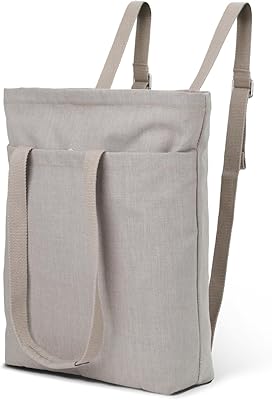
2-in-1 Waterproof Tote Backpack 14″
72%
83%
Convertible Design
76%
Laptop Protection
61%
Water Resistance
79%
Interior Organization
52%
Strap Comfort
More
Jhirmack 10-in-1 Leave-In Conditioner Spray 2-Pack
75%
88%
Detangling Performance
83%
Moisturizing Effect
74%
Heat Protection
86%
Softness & Shine
81%
Value for Money
More

FAQ

No, it does not. The Dell Inspiron 14″ 2-in-1 Chromebook supports EMR pen input natively, but the stylus itself is sold separately. This is one of the most common sources of buyer frustration, so if pen use is part of your plan, budget for a compatible EMR stylus before you check out.

Not in the full desktop sense. Chrome OS cannot run native Windows applications. You can use Microsoft Office through a browser via Microsoft 365, and the mobile Office apps are available through Google Play. However, if your workflow depends on full desktop Windows software, specialized tools, or Adobe Creative Suite, this 2-in-1 is not the right choice.

Google assigns every Chromebook an Auto Update Expiration (AUE) date, which marks when security patches stop. Since this model launched in late 2018, the AUE window may be close or already passed depending on when you read this. Always check Google's official AUE list before purchasing an older or refurbished Chromebook — running one past its expiration date carries real security risks.

For typical light use — a few tabs, Google Docs, video calls — it is fine. Where you start to feel the squeeze is when you push past 8 to 10 active browser tabs while also running Android apps in the background. Chrome OS is leaner than Windows, which helps, but 4GB is still a genuine ceiling if you tend to multitask aggressively.

It is genuinely useful for some scenarios, but expectations matter. Tent and stand modes are great for watching content on a desk or presenting something. Hand-held tablet use, though, is where the 4-pound weight works against it — most people find it awkward to hold for more than a few minutes. Think of it as a laptop with flexible positioning rather than a true tablet replacement.

Some, yes. Google Docs, Sheets, and Slides all have offline modes, and certain Android apps function without connectivity. That said, Chrome OS is fundamentally designed around an internet connection, and a chunk of its core functionality depends on it. If you frequently work in places with spotty or no Wi-Fi, you will need to plan carefully and set up offline access in advance.

Yes, and it is straightforward. There is a full-size HDMI port built in, so connecting to a monitor or projector requires a standard HDMI cable and nothing else. No adapters or dongles needed for typical setups, which is a genuinely useful convenience.

For a Chrome OS device, 128GB is actually quite roomy. Most Chrome OS users rely heavily on Google Drive for file storage, so local storage pressure is rarely a problem. Unless you are downloading a large number of Android apps or saving substantial amounts of media locally, you are unlikely to fill it up in typical daily use.

Yes, the difference is real in everyday use. Celeron-based Chromebooks can slow down noticeably when you open multiple tabs or run a mix of browser and Android apps. The Core i3-8130U handles those situations more comfortably and recovers from multitasking much faster. For straightforward, single-task browsing a Celeron does the job, but the i3 gives you noticeably more practical headroom.

For a typical student day of writing, browsing, and video calls, most owners report getting comfortably through without needing a charge. Battery drain picks up under heavier workloads like sustained video playback or running multiple demanding apps. For longer days, it is worth bringing the charger along as a backup rather than risking running out mid-afternoon.