Overview

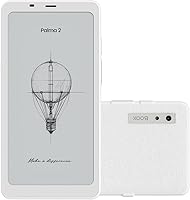
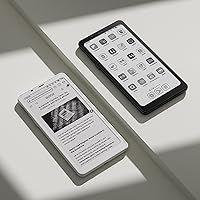
The BOOX Palma 2 Mobile E Ink eReader occupies a genuinely unusual space in the reading device market — it is roughly the size and shape of a smartphone, yet built entirely around the eye-friendly, low-distraction experience of e-ink. Unlike Kindle or Kobo devices, the Palma 2 runs full Android 13, meaning you are not locked into a single storefront or app ecosystem. That openness comes at a cost — literally. This is a premium-tier purchase that makes clear sense for serious, high-volume readers but will feel hard to justify for someone who reads a chapter before bed. Upgraders from the original Palma will find a faster processor, more RAM, and a refined Carta 1200 panel. Just know going in that e-ink refresh rates will never rival a phone screen — and for most buyers here, that is entirely the point.
Features & Benefits

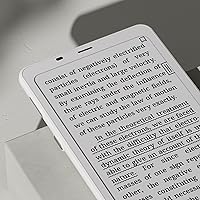
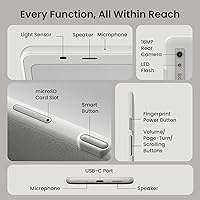
The 6.13-inch screen is where the Palma 2 makes its strongest impression. At 300 ppi on Carta 1200 glass, text is crisp enough that the pixel grid disappears — even at smaller font sizes. The adjustable front light handles everything from bright daylight to a dim bedroom without harsh glare, with warm and cool color temperature control built in. Under the hood, an octa-core processor paired with 6GB of RAM means third-party apps stay responsive in a way older e-ink hardware simply could not manage. The Smart Button is a small but genuinely useful addition, assignable to custom actions like launching an app or toggling refresh mode. One honest caveat: the 16MP rear camera is technically capable, but shooting photos on an e-ink display is a novelty rather than a practical daily tool.

Best For

This e-ink reader is purpose-built for a specific kind of reader. If you rely on multiple library and bookstore apps — Libby, Kindle, Kobo, Moon+ Reader — and resent being forced into one walled garden, this is one of the few e-ink devices that lets you install and run them all without friction. Commuters and frequent travelers tend to love it: the device slides into a jacket pocket where a full-size Kindle simply will not fit, and the 3,950mAh battery easily lasts through multi-day trips. Document-heavy professionals who routinely switch between PDFs and EPUB files will appreciate the unusually broad format support. That said, there is no stylus support at all, so annotation beyond basic highlighting is off the table, and anyone expecting a tablet-grade media experience will find this device frustrating.

User Feedback

Across roughly 160 ratings, the Palma 2 holds a 4.2-star average — genuinely positive, though not without real complaints. Praise clusters around build quality and pocketability, with many buyers noting how natural the one-handed grip feels during long reading sessions. Criticism tends to land in two spots: refresh lag during heavy scrolling in browsers or certain PDF apps catches users off guard if they expected phone-like fluidity, and the price draws regular comparison to far cheaper Kindle alternatives. The off-white colorway also comes up — it attracts smudges visibly and divides opinion on long-term aesthetics. Worth noting: almost no one in the reviews treats this as a phone replacement. The consensus is firmly that it functions best as a focused companion device — something you reach for when you want to read without the pull of notifications.

Pros

  • Runs full Android 13, so you can install any reading app without ecosystem restrictions.
  • The 300 ppi Carta 1200 screen makes text look sharp and print-like even at small font sizes.
  • Pocketable form factor fits where standard eReaders simply do not — a genuine daily carry advantage.
  • Multi-day battery life holds up through long trips with Wi-Fi off and brightness at a moderate level.
  • 6GB of RAM keeps third-party apps responsive in a way older e-ink hardware could not manage.
  • Adjustable warm and cool front light makes reading comfortable from bright sunlight to a dark bedroom.
  • 128GB of internal storage plus a microSD slot means storage will never be a practical concern.
  • Physical page-turn buttons and a customizable Smart Button make one-handed reading genuinely comfortable.
  • Broad document format support covers PDF, EPUB, DOCX, CBR, and many more without conversion.
  • For readers split across multiple libraries and storefronts, the open platform is a real, daily convenience.

Cons

  • No stylus support at any level — handwritten annotation is simply not possible on this device.
  • The off-white finish picks up oils and scuffs visibly during regular pocket carry.
  • E-ink refresh lag in scrolling-heavy apps like browsers remains a persistent frustration for new users.
  • BOOX software menus are functional but inconsistently organized, requiring patience to configure properly.
  • The built-in speaker is thin and tinny — not a realistic option for regular audiobook listening.
  • Routing audio through USB-C requires a dongle, which undercuts the clean pocketable experience.
  • Price is steep relative to Kindle alternatives that handle core reading tasks nearly as well.
  • Very large or graphically complex PDFs can slow the device down noticeably mid-document.
  • App compatibility varies — some Android apps designed for high-refresh screens produce visible ghosting.
  • The 16MP camera sounds impressive on paper but is rarely useful given the e-ink display limitations.

Ratings

The BOOX Palma 2 Mobile E Ink eReader scores below are generated by AI after analyzing verified global user reviews, with spam, bot activity, and incentivized feedback actively filtered out. The result is an honest picture of where this device genuinely impresses and where it falls short — no glossing over the friction points that real buyers run into. Both the strengths that keep enthusiasts loyal and the trade-offs that frustrate newcomers are reflected transparently in every category.
Screen Clarity
93%
The 300 ppi Carta 1200 panel consistently draws praise from readers who spend hours a day on the device. Text at small font sizes stays crisp without aliasing, and the glass cover lens gives the screen a premium, almost printed-page quality that cheaper e-ink panels simply do not match.
A small number of users report minor backlight bleed at the lowest brightness settings in a completely dark room. While this rarely affects daytime reading, it is worth noting for anyone who reads exclusively at night with lights off.
Portability & Form Factor
91%
At 170g and roughly the dimensions of a compact smartphone, the Palma 2 slides into a jeans pocket in a way that a standard Kindle Paperwhite simply cannot. Commuters and travelers consistently flag this as the deciding factor — one device that takes up zero extra bag space during daily travel.
The narrow width that makes it so pocketable also means one-handed reading in landscape orientation feels awkward for users with smaller hands. A few buyers also note that the off-white finish shows scuffs along pocket edges over extended daily carry.
App Ecosystem & Openness
89%
Running full Android 13 means users can install Kindle, Libby, Kobo, Moon+ Reader, and virtually any reading app alongside each other without workarounds. For readers spread across multiple libraries and storefronts, this flexibility alone justifies the price premium over locked-down alternatives.
Android openness cuts both ways — users have to manage app compatibility themselves, and some apps designed for high-refresh screens produce noticeable ghosting on e-ink. There is no curated optimization layer like Kindle provides, so some tinkering is expected.
Performance & Responsiveness
83%
The octa-core processor and 6GB of RAM make a tangible difference compared to previous BOOX models. Apps open quickly, page turns in reading apps feel snappy, and multitasking between a PDF and a note app does not produce the sluggishness that plagued earlier e-ink Android devices.
Performance expectations need to be calibrated carefully. Scrolling-heavy tasks like browsing Reddit or navigating complex web pages reveal the inherent ceiling of e-ink refresh rates, and no amount of processing power fully eliminates that lag. Users expecting phone-like fluidity will be consistently disappointed.
Battery Life
86%
The 3,950mAh battery holds up well across multi-day reading trips without needing a charge. Users who read two to three hours daily commonly report going four to five days between charges when Wi-Fi is disabled and screen brightness stays moderate — a meaningful advantage over any backlit tablet.
Running Wi-Fi constantly for syncing or using heavier Android apps drains the battery noticeably faster than pure reading mode. A handful of reviewers who use the device as a light general-purpose Android machine found battery life closer to a day and a half, which undercuts the low-power appeal.
Front Light Quality
81%
19%
The adjustable warm and cool color temperature gives the Palma 2 genuine versatility across reading environments. Switching to warm amber tones in the evening feels noticeably gentler on tired eyes compared to devices with only a fixed white front light.
The light distribution is not perfectly uniform across the panel — some users spot a slightly brighter zone near the bottom edge at low brightness settings. It is not distracting during normal use, but perfectionists who push the front light to its lower limits may notice it.
Build Quality & Materials
88%
The glass cover lens gives the Palma 2 a genuinely premium feel compared to plastic-screened e-readers in this category. The overall chassis feels solid in hand, with no flex or creaking, and the button placement — particularly the fingerprint power button — feels considered rather than thrown together.
The off-white colorway, while attractive out of the box, is a polarizing long-term choice. It picks up oils and light grime from regular pocket carry and does not clean as easily as a matte dark-colored device. A protective case is practically essential for maintaining appearances.
One-Handed Usability
79%
21%
The combination of physical page-turn buttons, a fingerprint-embedded power key, and a programmable Smart Button makes reading with one hand genuinely comfortable. Commuters who need their other hand free for a coffee or a handrail tend to highlight this as a standout detail.
The Smart Button customization, while useful once configured, requires navigating BOOX software menus that are not particularly intuitive for first-time users. Getting the button mapped exactly how you want takes some trial and error that should not be necessary at this price point.
Document Format Support
87%
Support for PDF, EPUB, MOBI, DOCX, CBR, CBZ, and many more formats means professionals and power users rarely hit a wall when loading files. Academic researchers and lawyers who carry dense PDFs report that the device handles complex layouts and annotations better than most dedicated e-readers.
Very large or graphically complex PDFs — particularly scanned academic journals — can load slowly and occasionally cause the app to stutter mid-document. Reflow rendering on some older MOBI files also produces occasional formatting inconsistencies that require manual adjustments.
Camera Utility
41%
59%
The 16MP sensor is technically capable, and in well-lit conditions the Palma 2 can capture a legible photo of a whiteboard or a document page for quick reference. For that narrow use case — digitizing a physical page on the fly — it does the job adequately.
Composing and reviewing a photo on an e-ink display is a frustrating experience in practice. The refresh rate makes framing a moving subject nearly impossible, and the monochrome preview gives no accurate sense of the final image. Most users quickly stop using the camera altogether after the novelty wears off.
Audio Features
58%
42%
Having a built-in speaker and dual microphones opens the door to audiobooks and voice-memo use cases that a stripped-down e-reader would not support. Using Bluetooth 5.1 with wireless headphones for an Audible session while the screen sits idle works reliably.
The built-in speaker is thin and tinny — passable for podcast listening in a quiet room but not something you would willingly use in public. Routing audio through the USB-C port via OTG also requires carrying a dongle, which undermines the device's clean portability proposition.
Value for Money
67%
33%
For the specific audience this device targets — open-ecosystem power readers who want pocketable form factor and Android flexibility — the Palma 2 is arguably the best single option on the market. There is genuinely no direct competitor that matches this combination of size, specs, and software freedom.
For anyone outside that niche, the price is hard to defend against a Kindle Paperwhite that costs a fraction of the price and does core reading tasks nearly as well. The premium reflects engineering and openness, not necessarily a better reading experience for the average buyer.
Software & BOOX Interface
72%
28%
BOOX has put genuine effort into optimizing Android for e-ink, with per-app refresh mode controls and a reasonably clean launcher. Users who invest time in the settings find they can tune the experience quite precisely to match their reading habits.
The interface still carries the rough edges typical of BOOX software — occasional menu inconsistencies, settings buried under non-obvious paths, and update rollouts that sometimes introduce new bugs while fixing old ones. It is functional, but it does not feel polished enough for the asking price.
Storage & Expandability
92%
128GB of internal storage is genuinely generous for a reading device — enough to hold thousands of books, PDFs, and comic files without ever worrying about space. The microSD slot adds a further safety net for users who archive large document libraries.
There is very little to criticize here in isolation. The only mild frustration reported is that the microSD slot can be slightly stiff to use one-handed, and there is no file manager pre-installed that handles card content as gracefully as internal storage.
Annotation & Note-Taking
48%
52%
Basic touch-based highlighting and text annotation work fine for casual reading notes. Users who rely only on finger-based markup for occasional flagging of passages will find the tools adequate for that limited use case.
The complete absence of stylus support is a notable gap at this price tier. Readers who expected to handwrite margin notes — a reasonable assumption given the device cost and BOOX brand positioning — will be flatly disappointed. This is a hard limitation, not a software fix.

Suitable for:

The BOOX Palma 2 Mobile E Ink eReader is purpose-built for high-volume readers who have outgrown the limitations of closed ecosystems like Kindle and want to run Libby, Kobo, Moon+ Reader, and other apps side by side on a single device. Commuters and frequent travelers are a particularly strong fit — the device tucks into a jacket or jeans pocket where a standard eReader cannot, and the multi-day battery means one less charger to pack. Professionals who move between dense PDFs, Word documents, and EPUB files throughout the day will find the broad format support and 128GB of storage genuinely practical rather than just impressive on paper. Anyone deliberately trying to create a low-distraction reading habit will also appreciate having a device that runs Android without tempting them with social feeds or notification banners — that friction by design is a real feature for this crowd. Original Palma owners who found performance occasionally sluggish will notice a meaningful step up from the faster processor and additional RAM in this generation.

Not suitable for:

The BOOX Palma 2 Mobile E Ink eReader is a hard sell for casual readers who pick up a book a few times a week and already own a Kindle — the price gap is simply too large to justify for someone who does not actively feel the pain of ecosystem lock-in. Anyone hoping to use this device for handwritten annotations should know upfront that there is no stylus support at all; highlighting with a finger is the ceiling here, which is a genuine limitation that BOOX does not always make obvious in its marketing. Buyers expecting tablet-style media consumption — smooth video, fluid web browsing, responsive social apps — will find e-ink refresh rates frustrating within days, regardless of how powerful the hardware is. Parents or non-technical users looking for a simple, managed reading experience will likely find the open Android environment more overwhelming than liberating. And if your entire book library lives in the Kindle ecosystem and you have no plans to diversify, a Paperwhite at a fraction of the cost will serve you just as well for pure reading.
Specifications

  • Screen: 6.13″ Carta 1200 E Ink display with flat glass cover lens for improved contrast and surface durability.
  • Resolution: 824×1648 pixels at 300 ppi, delivering sharp, print-like text clarity across font sizes.
  • Processor: Octa-core CPU paired with a BSR chip optimized for e-ink rendering and Android performance.
  • RAM: 6GB of RAM enables smooth multitasking and keeps third-party reading apps reliably responsive.
  • Storage: 128GB of internal storage plus a microSD card slot for additional library and document expansion.
  • Operating System: Android 13, providing full access to the Google Play ecosystem and third-party app installation.
  • Battery: 3,950mAh Li-ion Polymer battery supports multiple days of reading on a single charge under typical use.
  • Connectivity: Wi-Fi and Bluetooth 5.1 for wireless syncing, audio streaming, and peripheral device pairing.
  • Front Light: Built-in adjustable front light with both warm and cool color temperature modes for comfort in any lighting.
  • Camera: 16MP rear camera with LED flash, primarily suited for document scanning rather than general photography.
  • Audio: Built-in speaker, dual microphones, and USB-C audio output via OTG adapter for wired headphone use.
  • Buttons: Fingerprint-embedded power button, physical volume and page-turn buttons, and one programmable Smart Button.
  • Dimensions: Device measures 159×80×8.0mm, keeping it within standard smartphone footprint for pocket carry.
  • Weight: Approximately 170g, light enough for extended one-handed reading without hand fatigue.
  • USB Port: USB-C port supports charging, OTG connectivity, and audio output via adapter.
  • File Formats: Supports PDF, EPUB, EPUB3, MOBI, AZW3, DOCX, CBR, CBZ, FB2, TXT, HTML, RTF, CHM, and several additional formats.
  • Sensors: Includes a G-sensor for automatic screen rotation and an ambient light sensor for adaptive brightness adjustment.
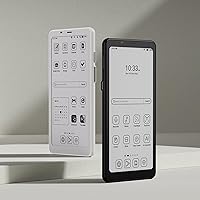
  • Color: Available in Off White; glass cover lens finish may show smudges and minor scuffs with regular pocket carry.
  • Stylus Support: No stylus support is included or compatible; annotation is limited to touch-based highlighting and text notes.
  • In the Box: Package includes the device only; no case, stylus, or wall adapter is included in the standard retail box.

Related Reviews

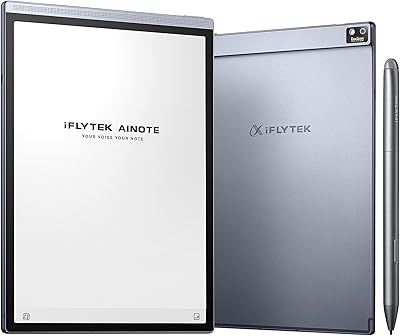
iFLYTEK AINOTE Air 2 E Ink Tablet
76%
88%
Writing Experience
83%
AI Transcription Accuracy
86%
Display Quality
91%
Portability & Design
79%
Multilingual Support
More
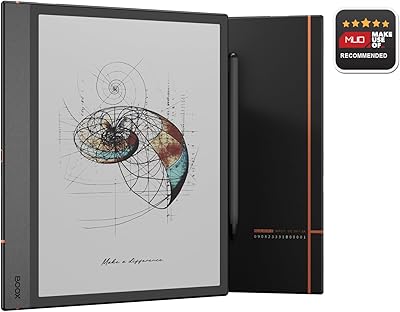
BOOX Note Air 4C 6GB/64GB
81%
93%
Display Quality (B/W)
67%
Color Display Quality
88%
Writing & Stylus Experience
91%
Build Quality & Design
84%
Android Openness & App Ecosystem
More
Nature's Bounty Vitamin E Oil 30,000IU 2.5oz (Pack of 2)
82%
89%
Effectiveness for Skin Hydration
92%
Moisturizing Performance
80%
Scar & Fine Line Reduction
72%
Texture & Feel
68%
Absorption Speed
More
Millennium Mom's Tattoo Ink 14 Bottle Primary Color Kit 2-1/2 oz
88%
94%
Pigment Quality
90%
Ease of Application
88%
Fade Resistance
91%
Flow Consistency
85%
Long-Term Performance
More
Tamron 35mm f/2.8 Di III OSD M1:2 Lens for Sony E-Mount
85%
94%
Image Quality
75%
Autofocus Speed
90%
Macro Performance
88%
Build Quality
91%
Portability
More
Tamron 35-150mm F/2-2.8 Di III VXD Lens
84%
92%
Optical Sharpness
89%
Autofocus Performance
94%
Aperture Versatility
87%
Build Quality
78%
Value for Money
More
Tamron 24mm F/2.8 Di III OSD Lens
79%
91%
Image Sharpness
93%
Value for Money
74%
Build Quality & Durability
71%
Autofocus Performance
88%
Macro Capability
More
GSOW PSTAND-2S 2-Shelf Mobile Projector Stand
86%
88%
Build Quality
93%
Ease of Assembly
82%
Stability at Max Height
86%
Mobility & Casters
89%
Thermal Management
More
RejuveNaturals Vitamin E Oil 2 Fl Oz
88%
88%
Effectiveness for Skin Healing
91%
Hydration and Moisturization
85%
Absorption Speed
89%
Gentleness on Sensitive Skin
87%
Ease of Application
More
MOM'S Tattoo Ink - Black Onyx 2 Oz.
85%
94%
Tattoo Ink Consistency
89%
Longevity of Results
91%
Vegan & Skin Safety
88%
Ease of Application
74%
Flow Control
More
Derma E Skin Brightening Cream 2 oz
84%
88%
Effectiveness in Brightening
90%
Skin Compatibility & Sensitivity
82%
Moisturizing & Hydration
78%
Scent & Fragrance
85%
Texture & Absorption
More

FAQ

Yes, since the Palma 2 runs Android 13, you can install the Kindle app directly from the Google Play Store and access your entire Amazon library. The same goes for Libby, Kobo, Moon+ Reader, and virtually any other reading app you already use. This cross-app flexibility is one of the main reasons people choose this device over a standard Kindle.

Both use E Ink technology, but the BOOX Palma 2 Mobile E Ink eReader uses the newer Carta 1200 panel with a glass cover lens, which gives it slightly better contrast and a more premium surface feel than the Paperwhite. The 300 ppi resolution is comparable, so text sharpness is similar. The bigger practical difference is size — the Palma 2 is notably more compact and pocketable.
Technically you can install them, but the experience is genuinely poor. E-ink displays refresh too slowly for scrolling feeds, video playback, or anything that involves fast-moving visuals. The device can handle those apps, but most users stop trying within a day or two. Think of this as a reading and document device that happens to run Android, not the other way around.

With Wi-Fi off and brightness at a moderate level, most users get four to five days of reading before needing to charge. If you leave Wi-Fi on for constant syncing or run heavier apps regularly, expect that to drop closer to a day and a half. For travel, it is genuinely practical to go a long weekend without hunting for a power outlet.

No, the standard retail box includes only the device itself. Given that the off-white finish shows smudges and scuffs with daily pocket carry, picking up a case separately is worth considering before your first use. BOOX and several third-party manufacturers offer slim cases designed specifically for the Palma 2 form factor.

No — there is no stylus support on this device at all, and none is compatible. Annotation is limited to touch-based text highlighting and typed notes within reading apps. If handwritten annotation is important to your workflow, you would need to look at a different BOOX model designed specifically for that purpose, such as the Note Air series.

It is not designed to be, and most buyers who try quickly find it falls short. There is no cellular radio, no SIM card slot, and the e-ink screen makes fast-paced communication apps genuinely frustrating to use. The device works best as a dedicated companion for reading and documents — a second device you carry alongside your phone, not instead of it.

Straightforward PDFs open and render well, and the broad format support is a genuine strength for document-heavy users. Very large files or scanned PDFs with dense graphics can load slowly and occasionally cause a brief stutter when scrolling. For most professional documents, academic papers, and ebook files, performance is comfortable enough for daily use.

The Smart Button is a physical button you can assign to a custom action — launching a specific app, toggling refresh mode, or triggering a system shortcut. Once configured, it is a genuinely useful shortcut for one-handed reading. The setup process requires navigating BOOX software menus that are not the most intuitive, but it only takes a few minutes once you know where to look.

If you found the original Palma's performance occasionally sluggish — particularly with heavier apps or large files — the Palma 2 is a meaningful step up thanks to the faster processor and 6GB of RAM. The screen panel also benefits from the newer Carta 1200 technology. If your original Palma handles your reading workflow without frustration, the upgrade is less urgent and comes down to how much the hardware improvements matter to you personally.

Where to Buy