Overview

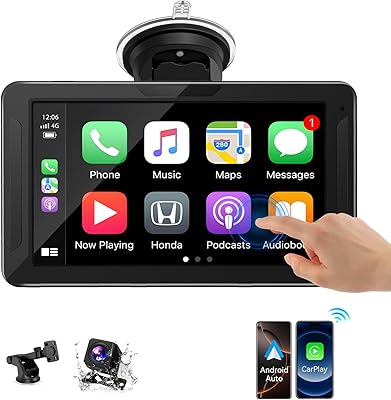
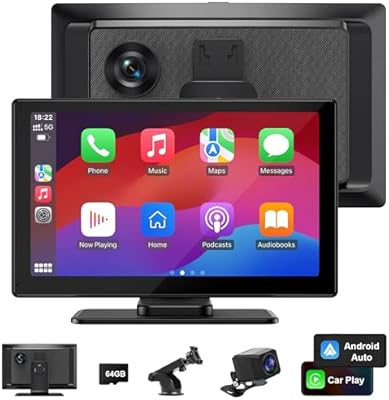
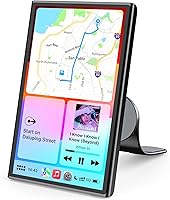
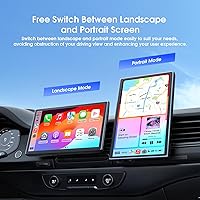
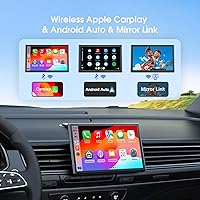
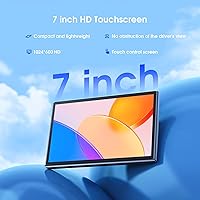
The Avylet RC08HL 7″ Portable CarPlay Screen arrived in early 2025 as a straightforward answer to a common frustration: older vehicles with no factory-fitted smart display. It packs a 7-inch IPS touchscreen at 1024×600 resolution onto a magnetic mount that attaches to your dashboard without any drilling or permanent modification. Both Apple CarPlay and Android Auto connect wirelessly, and after the first pairing the screen auto-reconnects whenever you get in the car. One genuinely useful differentiator is portrait and landscape switching — most fixed-orientation screens in this segment can't do that. For a no-fuss CarPlay upgrade that travels with you, this wireless dash display makes a compelling case.

Features & Benefits

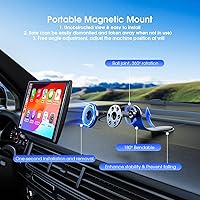
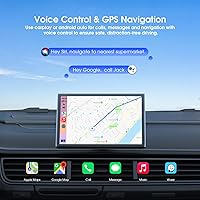
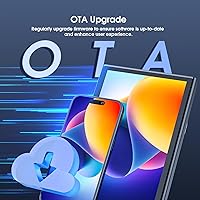
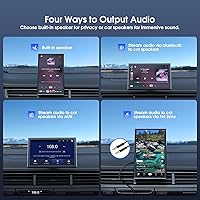
Going wireless is the headline here — no cable dangling from your phone, no fumbling with connectors on a cold morning. The magnetic mount handles positioning with 360° rotation and 180° tilt, so you can dial in the exact angle without blocking your sightlines. Voice control through Siri or Google Assistant keeps hands where they belong, on the wheel. For cars that lack Bluetooth audio output, the built-in FM transmitter and AUX connection are practical workarounds, though neither will satisfy anyone chasing audio fidelity. OTA firmware updates and a customizable boot logo round things out — small touches, but they signal that Avylet intends to support this device past the purchase date.

Best For

This portable CarPlay screen fits a pretty specific driver profile, and knowing that upfront saves disappointment. It's built for people with older vehicles that never came with smart displays — think a 2015 sedan or a work truck still running a basic stereo. Rideshare drivers and anyone who switches between cars frequently will appreciate that it pops off the mount and moves with them. Android users should confirm they're on Android 11 or later before ordering; that requirement catches people off guard. If you primarily live in Waze or Google Maps during your commute and want a larger navigation view without the cost and labor of a full radio swap, this wireless dash display is a sensible pick.

User Feedback

Across 344 ratings, the Avylet screen lands at 3.9 out of 5 — respectable, but not without reservations. Buyers commonly praise fast initial setup, the clean look of the magnetic mount, and a touch display that responds well without lag. Where things get mixed is the mount adhesive holding up over months in a hot car, occasional Wi-Fi drops that require a re-pair, and a microphone that works best when you're sitting close — roughly within arm's reach. A few users were caught off guard by the Huawei incompatibility and the single-device Wi-Fi limitation, meaning you can't run this screen and an Avylet dash cam from the same phone simultaneously. Worth knowing before you buy.

Pros

  • Wireless CarPlay and Android Auto connection means zero cables to manage on your daily commute.
  • Auto-reconnects to your phone when you get in the car — no manual pairing after the first setup.
  • Portrait and landscape mode switching gives you real flexibility that most budget screens skip entirely.
  • The magnetic mount installs without drilling and adjusts to virtually any viewing angle.
  • Voice control via Siri or Google Assistant keeps your hands on the wheel where they belong.
  • OTA firmware updates mean the device can improve over time without any manual intervention.
  • FM transmitter and AUX output cover older cars that lack Bluetooth audio routing.
  • At under 11 ounces, it is light enough to move between vehicles without hassle.
  • The 11.5-foot car charger cable gives you real flexibility in routing power across different car layouts.

Cons

  • Mount adhesive reliability over months of heat and vibration is a recurring concern in user feedback.
  • Wi-Fi drops that require a re-pair have been reported often enough to flag as a real annoyance.
  • The microphone performs best only within roughly arm's reach — less ideal in larger vehicle cabins.
  • Android 11 is a firm minimum requirement that many buyers overlook until after purchase.
  • Huawei devices are entirely incompatible, with no documented fix or workaround available.
  • Cannot run simultaneously with an Avylet dash cam on the same phone due to shared Wi-Fi dependency.
  • No rear camera support is included or possible, limiting utility for parking-heavy driving situations.
  • At 3.9 out of 5 stars across 344 ratings, user satisfaction is middling rather than consistently strong.
  • Avylet is a newer, less-established brand with limited long-term reliability data compared to category veterans.
  • The recommended connection range of under 8 meters may cause issues if your phone is stored far from the dash.

Ratings

Our editorial team trained an AI model on verified global buyer reviews for the Avylet RC08HL 7″ Portable CarPlay Screen, actively filtering out incentivized, duplicate, and bot-generated submissions to surface what real drivers actually experience day to day. The scores below reflect both the genuine strengths that keep buyers satisfied and the friction points that prevent this wireless dash display from earning a cleaner sweep. Nothing has been smoothed over — if a category has problems, the score and commentary say so plainly.

Ease of Setup
83%
Most buyers are up and running with CarPlay or Android Auto within 10 to 15 minutes of unboxing — no tools, no wiring, no visit to a car audio shop. The auto-reconnect feature after first pairing is consistently praised; you simply get in the car and the screen picks up where it left off.
The magnetic mount adhesive requires a 12 to 24 hour curing window before attaching the screen, which catches impatient first-day users off guard. A handful of Android buyers also hit the Android 11 requirement wall only after attempting setup, adding unnecessary frustration to the experience.
Wireless Connectivity
71%
29%
When the wireless connection holds steady, it genuinely eliminates the daily ritual of plugging in a cable — a quality-of-life improvement that commuters consistently highlight. Short-trip drivers in particular report almost no disruptions during typical 20 to 30 minute urban commutes.
Mid-session Wi-Fi drops are a recurring complaint, especially on longer highway drives or in areas with radio-frequency congestion. Reconnecting while in motion is inconvenient and a real distraction, and the 8-meter recommended range can cause issues if the phone is stored in a bag behind the driver's seat.
Display Quality
76%
24%
The 7-inch IPS panel delivers a noticeably larger and more readable navigation view than a phone propped on a dash mount, which is the core job most buyers need it to do well. Colors are accurate enough for map rendering, and touch response is described as snappy rather than laggy.
At 1024×600 resolution, the display looks reasonably sharp at arm's length but does not hold up to close inspection — text at small sizes on map labels can appear slightly soft. Glare management in direct afternoon sunlight is only adequate, which matters for drivers with south- or west-facing dashboards.
Mount Reliability
62%
38%
The magnetic attachment mechanism itself is clever — detaching and reattaching the screen between vehicles takes seconds, and the 360° rotation plus 180° tilt give you genuine flexibility in finding the right viewing angle without blocking air vents or sight lines.
The adhesive steel gasket has generated a disproportionate share of negative feedback, particularly from drivers in hot climates where dashboards reach high temperatures in summer. Several users report the mount losing grip within two to four months, and the replacement process involves removing residue and re-curing — not a quick fix.
Voice Control
68%
32%
Triggering Siri or Google Assistant through the screen works as advertised for common tasks like starting navigation, placing calls, or switching music tracks, which meaningfully reduces the need to touch anything while driving on familiar routes.
The built-in microphone has a practical range of roughly 1.5 meters, which becomes a limitation in SUVs or trucks where the driver sits further from the dash. Road noise at highway speeds further degrades recognition accuracy, and some users with heavy accents report more misfires than they experienced using phone-based voice commands directly.
Android Compatibility
59%
41%
Android Auto functions well once connected for users on Android 11 or above, providing the full Android Auto interface with Google Maps, Waze, Spotify, and messaging apps working as expected on a larger screen.
The Android 11 minimum is a genuine exclusion that affects a meaningful portion of potential buyers, particularly those on budget phones or older mid-range devices still receiving security updates but stuck on Android 10. This requirement is not prominently displayed in the product title, making it a post-purchase discovery for too many buyers.
Audio Output
66%
34%
The FM transmitter and AUX output cover the essential use case of routing phone audio through a car stereo that lacks Bluetooth, which is a necessary practical feature for the older-vehicle audience this screen targets. Having both options included in the box is genuinely useful.
Neither the FM transmitter nor the AUX connection delivers audio quality that would satisfy anyone who pays attention to how music actually sounds — FM in particular introduces background hiss and quality degradation on crowded frequency bands in urban areas. These are utility features, not audio features.
Portrait & Landscape Modes
81%
19%
The ability to switch between portrait and landscape orientations is a tangible differentiator that drivers actually use — portrait mode works well for mounting on narrow center console areas, while landscape suits a wider dashboard placement for navigation-heavy use.
Switching between orientations requires a manual trigger rather than automatic rotation based on physical positioning, which some users find slightly cumbersome when the screen is already mounted. The feature works, but it is not as fluid as toggling orientation on a modern smartphone.
Value for Money
74%
26%
For budget-conscious drivers who want CarPlay functionality without the $200 to $500+ cost of a replacement head unit and professional installation, this wireless dash display represents a pragmatic middle ground that delivers the core CarPlay experience at a fraction of the price.
The connectivity reliability issues and mount durability concerns mean that some buyers end up feeling the savings were partially offset by the frustration of troubleshooting. Buyers who prioritize a set-and-forget experience may find the value proposition weakened by the maintenance the mount occasionally demands.
OTA Update Support
78%
22%
Over-the-air firmware updates via super link mode are a meaningful long-term investment signal for a budget device — buyers appreciate that Avylet is positioned to push improvements without requiring users to download files or connect to a computer.
Avylet is a newer brand with a limited track record, so it remains to be seen whether OTA update support is sustained over a 2 to 3 year ownership window. Early buyers have little historical evidence to lean on when assessing whether bug fixes will actually materialize.
Portability
87%
Weighing under 11 ounces and requiring no permanent installation, this portable CarPlay screen is genuinely easy to move between a personal car, a rental, or a partner's vehicle — a real advantage for rideshare drivers or anyone managing multiple cars.
Each new vehicle requires its own adhesive gasket for the magnetic mount, meaning portability comes with the minor cost and prep time of setting up the mount fresh in every car. Carrying a spare gasket kit is advisable for frequent car-switchers.
Apple CarPlay Performance
79%
21%
iPhone users on iOS 9 or later will find CarPlay performs reliably for core tasks like Apple Maps navigation, calls, and streaming — the wireless connection removes the friction of plugging in, and the larger screen genuinely improves readability versus phone mounting.
The wireless connection adds a small but noticeable latency compared to wired CarPlay, and in back-to-back comparisons with wired setups, the responsiveness gap is detectable during fast map interactions. Not a dealbreaker, but worth knowing if you have used wired CarPlay extensively before.
Device Compatibility
55%
45%
For users within the supported ecosystem — iPhone on iOS 9 or later, or Android devices on Android 11 or later — compatibility is straightforward and generally trouble-free once the initial pairing is completed.
Huawei device incompatibility, the Android 11 floor, and the inability to run simultaneously alongside an Avylet dash cam collectively carve out a meaningful segment of buyers who will hit compatibility walls. These are documented but not prominently communicated exclusions that generate avoidable post-purchase dissatisfaction.
Box Contents
82%
18%
The included accessories are well-considered for a budget product — an 11.5-foot power cable provides real flexibility in routing around a car interior cleanly, and the AUX cable, wire clips, and magnetic mount hardware mean most buyers can achieve a tidy install without any additional purchases.
No rear camera is included or supported, which feels like a notable omission for drivers who hoped to get parking assistance functionality alongside CarPlay. A spare adhesive gasket in the box would also have been a practical addition given the mount durability concerns some buyers experience.

Suitable for:

The Avylet RC08HL 7″ Portable CarPlay Screen is a strong fit for anyone driving an older vehicle that never came with a modern infotainment system and who isn't ready to commit to the cost and complexity of replacing the factory head unit. Rideshare drivers and people who regularly switch between multiple cars will find real value in how easily this wireless dash display detaches and re-mounts — it genuinely travels with you. Commuters who spend long stretches relying on Waze, Google Maps, or Apple Maps will appreciate having a dedicated 7-inch screen for navigation rather than propping up a phone. iPhone users on iOS 9 or later and Android users running Android 11 or above will both get wireless connectivity without needing to dig out a cable every morning. If your priority is getting CarPlay functionality into an older car quickly and affordably, this portable CarPlay screen delivers on that core promise.

Not suitable for:

The Avylet RC08HL 7″ Portable CarPlay Screen is not the right choice for Huawei device owners — incompatibility is confirmed and documented, so there is no workaround. Android users below version 11 will also hit a hard wall; the assumption that any modern Android phone qualifies is a mistake that has caught buyers off guard. If you're planning to pair this screen with an Avylet dash cam, be aware that both devices rely on your phone's Wi-Fi hotspot, and a single phone cannot feed both at once. Buyers expecting premium audio output should temper expectations — the FM transmitter and AUX connection are functional fallbacks, not quality audio solutions. Anyone who needs rear camera support is out of luck as well, since this wireless dash display neither includes nor supports that feature. Finally, if long-term mount durability in extreme heat is a concern, the adhesive-based magnetic mount has drawn skepticism from users in warmer climates.

Specifications

  • Screen Size: The display measures 7 inches diagonally using an IPS panel for consistent color and viewing angles.
  • Resolution: Native resolution is 1024×600 pixels, delivering a clear and sharp image for navigation and media use.
  • Orientation: Both landscape and portrait display modes are supported, switchable during use without restarting the device.
  • Dimensions: The unit measures 6.69 × 0.79 × 4.33 inches, keeping the footprint compact enough to avoid obstructing the driver's view.
  • Weight: The screen weighs 0.67 lb (10.8 oz), light enough to be held securely by the magnetic mount without sagging.
  • CarPlay Support: Apple CarPlay connects wirelessly and requires the paired iPhone to run iOS 9 or later.
  • Android Auto: Android Auto connects wirelessly but requires the paired Android device to run Android 11.0 or later.
  • Mount Type: A magnetic mount with a steel gasket adheres to the dashboard and offers 360° rotation and 180° tilt adjustment.
  • Connectivity: Supported connections include Bluetooth, Wi-Fi, AUX output (3.5mm), and FM transmitter for audio routing.
  • Voice Control: Hands-free voice commands are handled through Siri on Apple devices and Google Assistant on Android devices.
  • Microphone Range: The built-in microphone performs optimally when the speaker is within 1.5 meters of the screen.
  • Wireless Range: CarPlay and Android Auto wireless connections are recommended within 8 meters of the paired device.
  • OTA Updates: Firmware updates are delivered over the air via super link mode, requiring no manual file transfers or PC connections.
  • Rear Camera: No rear camera is included in the box, and the device does not support an external rear camera input.
  • Huawei Support: Huawei devices are explicitly incompatible with this unit and cannot be used with CarPlay or Android Auto on this screen.
  • Power Cable: An 11.5-foot car charger cable is included, providing ample length for clean routing through most vehicle interiors.
  • Audio Cable: A 5-foot AUX audio cable is included for connecting the screen's audio output to a car stereo AUX input.
  • In the Box: Package includes the screen unit, car charger, AUX cable, four wire clips, magnetic mount, steel gasket, and user manual.
  • Boot Logo: The startup boot logo can be customized through a service offered by Avylet, allowing for minor personalization.
  • Screensaver: The screensaver can be set to activate after 10 seconds, 30 seconds, or 1 minute of inactivity, or disabled entirely.

Related Reviews
Krunia T95 7″ Portable CarPlay Screen
75%
88%
Wireless Connectivity
84%
Screen Brightness & Visibility
82%
Touch Response & 60FPS Performance
79%
Portrait & Landscape Mode Flexibility
61%
Mount Stability
More
LANGDA LD-01 7″ Portable CarPlay Screen
74%
88%
Ease of Setup
67%
Wireless Connectivity
74%
Screen Quality
86%
Value for Money
57%
Build Quality
More
Leadtree 7-inch HD Portable Wireless CarPlay Screen
86%
88%
Wireless Connectivity
92%
Ease of Installation
85%
Display Quality
87%
GPS Navigation Accuracy
90%
Reversing Camera Quality
More
VUDDIG 3SPRO Portable Carplay Screen
85%
88%
Wireless Functionality
94%
Ease of Installation
90%
Video Quality (Cameras)
70%
Display Brightness
65%
Sound Quality
More
Aonerex Wireless CarPlay Screen 7″
85%
91%
Setup & Installation
93%
Connectivity
88%
Display Quality
87%
Navigation Performance
84%
Audio Quality
More
HUTNVEA 7″ Apple CarPlay Screen
85%
91%
Setup & Installation
89%
Display Quality
84%
Connectivity & Integration
87%
Usability & Interface
83%
Performance & Speed
More
IIWEY iK7 10″ Portable CarPlay Screen
75%
88%
Wireless Connectivity
67%
Display Quality
71%
Dash Cam Performance
82%
Backup Camera
61%
Mount Stability
More
Imagebon 7″ Wireless CarPlay Android Auto Screen
72%
81%
Wireless Connectivity
83%
Value for Money
86%
Ease of Installation
74%
Display Quality
61%
Performance & Speed
More
NAVRUF 7″ Portable CarPlay Android Auto Screen
75%
91%
Ease of Installation
78%
Wireless Connectivity
74%
Display Quality
61%
Mount Stability
63%
Audio Integration
More
Avylet RC06HL 9.26″ Portable CarPlay Screen
76%
91%
Ease of Installation
78%
Wireless CarPlay & Android Auto
83%
Display Quality
63%
Mount & Dashboard Stability
74%
Backup Camera Quality
More

FAQ

Both CarPlay and Android Auto connect wirelessly over Wi-Fi — your phone stays in your pocket or bag. You will need to plug the screen itself into your car's power outlet using the included charger cable, but your phone does not need to be physically connected to the screen at any point.

Yes, that is exactly the scenario this wireless dash display is designed for. It mounts on your dashboard via a magnetic adhesive mount and does not require any modification to your existing radio or wiring. For audio, you route sound either through the FM transmitter to your car's radio frequency or via the AUX cable into your stereo's AUX input.

It depends on your Android version. Android Auto requires Android 11.0 or later, which is a harder requirement than many buyers expect. If your phone is running Android 10 or earlier, Android Auto will not function on this screen. Check your phone's software version in settings before purchasing.

The steel gasket adheres to your dashboard with a pressure-sensitive adhesive, and Avylet recommends pressing it firmly and letting it cure for 12 to 24 hours before attaching the screen. Skipping that curing window is a common reason the mount feels loose early on. Once properly set, most users find it holds well in normal conditions, though some in consistently hot climates have reported gradual weakening of the adhesive over several months.

No — Huawei devices are explicitly listed as incompatible, and there is no workaround documented by the manufacturer. If your primary phone is a Huawei model, this is not the right product for you.

Unfortunately, no. Both the Avylet RC08HL 7″ Portable CarPlay Screen and the Avylet dash cam rely on your phone's Wi-Fi connection, and a single phone cannot simultaneously feed both devices. You would need two separate phones to run both at the same time, which is not practical for most people.

Voice control works through Siri or Google Assistant natively, so you can place calls, send messages, get directions, and control media entirely hands-free. The built-in microphone works well when you are sitting close to the screen — within about arm's reach. In larger vehicles or when there is significant road noise, pickup can be inconsistent.

Yes, any app that runs through Apple CarPlay or Android Auto will display on this wireless dash display. That includes Waze, Google Maps, Apple Maps, Spotify, and most other CarPlay or Android Auto compatible apps. The apps themselves still run on your phone; the screen just mirrors and controls them.

A Wi-Fi drop will interrupt the CarPlay or Android Auto session, and you will need to re-initiate the connection. After the first pairing, the screen is designed to auto-reconnect when you get back in the car, but mid-session drops have been flagged by some users as an occasional annoyance. Staying within the recommended 8-meter range of your phone helps reduce this.

No, this portable CarPlay screen does not include a rear camera and does not support connecting an external one. If reverse camera functionality is important to you, you will need to look at a different product category, such as a full replacement head unit that includes camera input support.