Overview

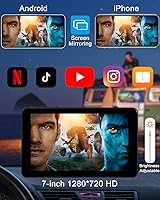
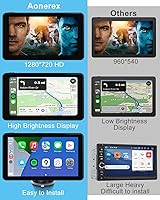
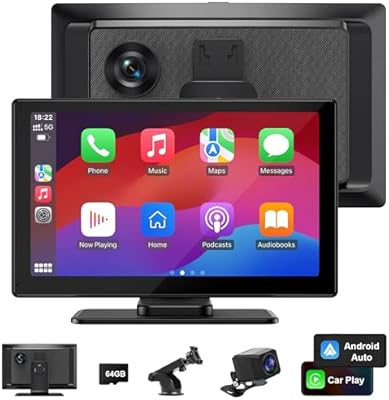
The Aonerex G736 7″ Portable CarPlay Screen is a straightforward answer to a very common frustration: your car is fine, but the infotainment system is a decade behind. Rather than ripping out the factory stereo, this portable CarPlay screen clips onto your dash via an external bracket — no wiring required, no trim panels removed, no shop appointment needed. The 7-inch display runs at 1280×720 with 2.5D tempered glass and adjustable brightness, which holds up reasonably well in direct sunlight. Power comes from the included 12-24V car charger; Aonerex is explicit that third-party chargers can cause voltage instability. As a Chinese OEM brand, the hardware may look familiar if you have shopped this category before.
Features & Benefits

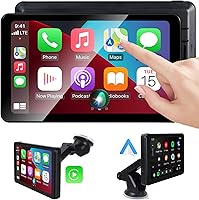
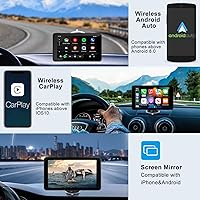
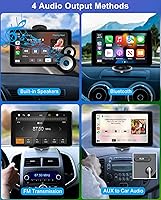
What actually makes this wireless dash display useful day-to-day is how it handles the connection. It pairs over Bluetooth for audio and control, then uses Wi-Fi to carry the actual CarPlay or Android Auto data stream — so there is no cable looping across your center console. Beyond navigation apps, Mirror Link and AirPlay let you cast other content to the screen, which is a nice option for passengers on longer drives. For audio, you have got three output paths: AUX cable, FM transmitter, or Bluetooth to your factory speakers. The built-in speakers work, but treat them as a backup rather than a primary listening experience. Siri and Google Assistant respond through the unit's onboard microphone, keeping hands-free use practical on the road.

Best For

This portable CarPlay screen lands in a pretty specific sweet spot, and knowing who it is actually built for helps set expectations. It is a strong fit for anyone driving an older vehicle where a full stereo replacement is not worth the cost or hassle — think a 2010s-era truck or a second car that rarely gets upgraded. Rideshare and delivery drivers will appreciate that the bracket setup is genuinely portable: pull it off one dashboard and mount it in another in minutes. Commuters using navigation apps daily will find the 7-inch display far more readable than a phone mount. It is less suited to audiophiles or anyone expecting OEM-grade build quality; this is a practical tool, not a luxury upgrade.

User Feedback

Across roughly 678 ratings, the Aonerex unit sits at 4.1 stars — which feels about right given what it is. Buyers consistently praise how quickly the wireless connection establishes on first use and how stable the bracket holds even on rougher roads. The display sharpness draws genuine compliments; most people are not expecting much from a budget-priced screen and are pleasantly surprised. Where things get messy: voltage-related reboots appear frequently among users who swapped in a different car charger — stick with the included one. FM audio quality also takes hits in urban areas with congested radio bands. CarPlay stability tends to get slightly better reviews than Android Auto, which occasionally drops and needs a reconnect. Long-term durability data is still sparse given the product's relatively recent launch.

Pros

  • Wireless CarPlay and Android Auto connect without a single cable running across your dashboard.
  • The 7-inch 1280×720 display is noticeably sharper than most buyers expect at this price point.
  • Setup takes minutes: attach the bracket, plug in the included charger, pair your phone, and you are ready to go.
  • Works across 12V to 24V systems, making it compatible with cars, SUVs, pickups, and light commercial trucks.
  • Mirror Link and AirPlay expand this portable CarPlay screen's usefulness well beyond basic navigation.
  • Siri and Google Assistant respond hands-free through the built-in microphone, cutting down on phone handling while driving.
  • The bracket is genuinely tool-free to mount and remove, making it easy to transfer between vehicles.
  • Multiple audio paths — AUX cable, FM transmitter, and Bluetooth — mean it adapts to most factory stereo setups.
  • Delivers CarPlay functionality at a fraction of the cost of a professional head-unit installation.

Cons

  • Using any charger other than the one included risks voltage instability and unpredictable mid-drive reboots.
  • FM audio quality drops noticeably in urban areas where the radio spectrum is congested.
  • Android Auto stability trails CarPlay, with some users reporting connection drops that require a manual reconnect.
  • The external bracket and visible power cable give the dash a clip-on appearance rather than a built-in one.
  • Built-in speakers are thin and low-volume — serviceable in an emergency but not for daily listening.
  • As an OEM-origin product, long-term warranty support and after-sales reliability are harder to predict than established brands.
  • The unit launched in mid-2024, so there is very little long-term durability data available from real-world users.
  • The screen and bracket add noticeable physical bulk to the windshield or dash area, which some drivers find obstructive.

Ratings

The Aonerex G736 7″ Portable CarPlay Screen has been evaluated across 14 performance categories by our AI-powered rating system, which processed hundreds of verified buyer experiences globally while actively filtering out bot-generated, incentivized, and spam reviews. Scores are calibrated to reflect both what this wireless dash display does well and where real users have consistently encountered friction. No category has been softened or inflated — if a pain point surfaces repeatedly in verified feedback, it is reflected directly in the score.
Wireless Connectivity
78%
22%
Most CarPlay users report a quick, reliable wireless connection that holds steady throughout a typical commute. The Bluetooth-plus-Wi-Fi bridge approach keeps the phone untethered, which genuinely changes how convenient the whole setup feels for daily drivers who previously relied on cable-dependent solutions.
Android Auto users have a noticeably different experience: mid-route connection drops are a recurring complaint that often require a manual reconnect — distracting and frustrating during active navigation. CarPlay holds a clear reliability edge, and Android users should factor that gap into their decision.
Display Quality
83%
The 1280×720 panel looks noticeably crisp for a unit in this price range, and the 2.5D tempered glass gives it a more refined feel than the cost implies. Commuters using navigation apps daily consistently note how much more readable maps are on this screen compared to a phone wedged into a vent mount.
In direct afternoon sunlight, the display can wash out at certain angles, and while the brightness adjustment helps, it does not fully compensate for high-glare conditions. Mounting lower on the dash rather than against the windshield significantly reduces this issue, but it requires deliberate positioning.
Ease of Setup
87%
Fast, painless first-time setup is one of the most consistently praised aspects of this wireless dash display. The no-tools bracket, the automatic Wi-Fi handshake that follows Bluetooth pairing, and the clear included manual have most buyers up and running in under ten minutes — an outcome that genuinely surprises people expecting a more technical process.
Android Auto users occasionally hit a snag during initial pairing, particularly if battery optimization settings on their phone interfere with background Wi-Fi or Bluetooth activity. A smaller number of users also needed to fully restart the unit before it recognized their device on the very first connection attempt.
Value for Money
84%
For buyers who want wireless CarPlay in an older vehicle without paying for professional head-unit installation, this portable CarPlay screen lands in a genuinely compelling spot. The feature set — wireless connectivity, a sharp display, multiple audio outputs, and voice assistant support — would have required a substantially higher budget just a few years ago.
The long-term durability picture remains incomplete given the product's recent launch date, creating real uncertainty around whether the value holds after 18 months or more of daily use. Buyers who prioritize confirmed build longevity may find that the OEM-origin hardware leaves that question uncomfortably open.
Audio Performance
58%
42%
Having three audio routing options — AUX, FM transmitter, and Bluetooth — gives users real flexibility depending on what their factory stereo supports. For drivers who primarily need clear navigation voice prompts rather than high-fidelity music playback, the available outputs cover the practical basics without requiring any stereo modifications.
The built-in stereo speakers are noticeably thin and underpowered, making them a last resort rather than a genuine feature for music. FM transmitter quality drops sharply in dense urban areas where frequency congestion is highest — which is precisely where most commuters are actually using the device every day.
Build Quality
67%
33%
The tempered glass front panel feels more solid than the price suggests, and the chassis does not flex noticeably under normal handling or daily dashboard vibration. For routine commuter use, the construction holds up adequately within the limited track record available so far.
This is OEM-origin hardware, and buyers familiar with this product category will recognize the fit-and-finish as functional rather than polished. Seam alignment and button feel reflect a budget tier, and the absence of long-term owner data makes it difficult to assess how the housing weathers extended daily use.
Mounting Stability
76%
24%
The bracket earns consistent praise for keeping the screen securely positioned during everyday driving, including on rougher urban streets and sustained highway speeds. Rideshare and delivery drivers who transfer the unit between multiple vehicles particularly appreciate how confidently and quickly it re-mounts each time.
A subset of users report adhesion softening during peak summer heat in parked cars, causing the bracket to lose grip on windshield or dash surfaces. Textured or curved dash panels reduce holding reliability more than the included instructions acknowledge, which can surprise buyers with less conventional vehicle interiors.
CarPlay Stability
82%
18%
iPhone users consistently report a low-interruption CarPlay experience once the initial pairing is complete. Daily commuters running Apple Maps, Spotify, and phone integration across multi-hour drives generally note that the connection holds without needing any manual intervention after the first setup.
A portion of CarPlay users does encounter occasional interface lag or brief freezes, most often when switching between apps mid-drive or launching a navigation session after the phone has been idle. These incidents appear more likely when the connected phone is running low on available memory or processing headroom.
Android Auto Stability
63%
37%
When Android Auto maintains a connection, the interface is functional and navigation app integration works as expected for city routing and highway commutes. Initial pairing typically completes without major issues, and the on-screen setup process is clear enough for most Android users to follow without outside help.
Mid-drive disconnections are a well-documented and recurring complaint from Android users, and the required fix — manually re-initiating the connection from the settings menu — is disruptive enough to be a genuine frustration. This pattern appears across multiple Android device manufacturers, pointing to a firmware-level limitation rather than a phone-specific incompatibility.
Voice Assistant Response
74%
26%
Siri performs reliably for iPhone users under typical driving conditions, handling navigation requests, call initiation, and music controls without requiring any screen interaction. Google Assistant also responds well when road noise is moderate, covering the majority of standard daily commuting and errand-running scenarios adequately.
The built-in microphone picks up road noise and wind at highway speeds, leading to voice recognition errors during faster, longer drives. Users in louder cabin environments — older trucks or vehicles with minimal sound insulation — report a noticeably higher rate of missed or misinterpreted commands.
Touch Responsiveness
71%
29%
The 7-inch touch panel handles standard navigation inputs — tapping app icons, swiping between screens, entering a destination address — without meaningful lag under normal operating temperatures. For a budget-tier portable display, responsiveness during everyday CarPlay use is generally rated as acceptable by the majority of verified reviewers.
Some users report a subtle input delay after the unit has been running in a warm cabin for extended periods, particularly near the screen edges where touch sensitivity is less precise. Tapping smaller UI elements in those edge zones can require a second attempt, which becomes noticeable on interfaces with dense controls.
Vehicle Compatibility
88%
The 12V to 24V input range is genuinely broad, and buyers have confirmed smooth operation across passenger cars, SUVs, full-size pickups, vans, and light commercial vehicles without any electrical modification. That wide coverage removes a significant buying concern for drivers of larger or less conventional vehicle types.
Electrical compatibility does not guarantee a clean installation in every cabin: curved or deeply recessed dash surfaces can limit useful bracket placement and reduce mounting angle options. A small number of owners in vehicles with unusual interior layouts have needed to experiment with positioning to achieve a comfortable viewing angle.
Power Management
61%
39%
When used with the included charger as specified, the unit powers up cleanly and draws a stable current across both 12V and 24V systems without thermal issues under normal use. Buyers who follow the charger requirement consistently report uninterrupted operation with no spontaneous restarts during daily use.
Voltage sensitivity is a genuine and well-documented weakness: substituting the included adapter with a personal or higher-output charger has triggered random mid-drive reboots for a significant number of buyers. The unit carries no onboard battery, so any power interruption — from a charger swap or a loose connection — results in an immediate full restart with no graceful recovery.
Portability
91%
The no-tools bracket design is practically useful for anyone moving between vehicles regularly — rideshare drivers, families sharing multiple cars, or fleet users can detach and remount the unit in under a minute without any equipment. At 1.61 pounds, it is light enough to slip into a bag or glovebox without adding meaningful bulk.
Portability brings a visible trade-off: the external bracket and power cable are always apparent inside the cabin, giving a clip-on aesthetic rather than an integrated look. Drivers who care about interior appearance will notice the setup, and routing the power cable discreetly requires additional cable management accessories not included in the box.

Suitable for:

The Aonerex G736 7″ Portable CarPlay Screen is built for a very specific type of driver: someone whose car works perfectly fine but whose factory infotainment is years behind modern smartphone integration. It is ideal for owners of older vehicles — think anything pre-2015 — where replacing the head unit would cost more than the car realistically deserves. Rideshare and delivery drivers get particular value here, since the bracket-mounted screen moves between vehicles without any tools or technical fuss. Commuters who rely on navigation apps like Waze or Google Maps will find the 7-inch touch display a meaningful upgrade over a phone wedged into an air-vent mount. Budget-conscious buyers who want wireless CarPlay without committing to a professional stereo installation will find this wireless dash display hits a genuinely practical middle ground.

Not suitable for:

The Aonerex G736 7″ Portable CarPlay Screen is not the right fit for drivers who care about audio quality or expect a clean, factory-integrated look inside their cabin. The FM transmitter and AUX output are functional workarounds at best — anyone serious about sound fidelity will find them limiting, especially in dense urban areas where FM frequencies are badly congested. Drivers who rely primarily on Android Auto and need consistent, uninterrupted connectivity may find the occasional dropout frustrating enough to reconsider. Anyone who assumes they can substitute a higher-output personal charger should know upfront that voltage irregularities from third-party adapters have triggered random reboots for a notable share of buyers — the included charger is not optional. Drivers wanting a permanent, polished in-dash solution should invest in a proper head-unit replacement instead.
Specifications

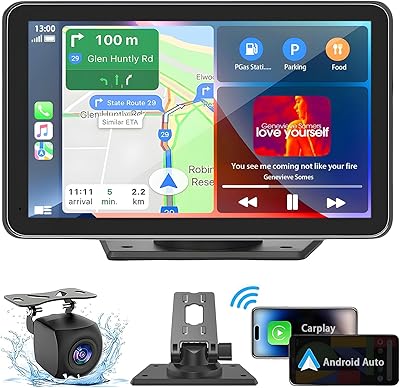
  • Screen Size: The touch display measures 7 inches diagonally with a 1280×720 HD resolution panel.
  • Display Glass: A 2.5D curved tempered glass panel covers the touch surface, with manually adjustable screen brightness.
  • Wireless: Uses a Bluetooth plus Wi-Fi dual-connection bridge to establish wireless CarPlay and Android Auto without any phone cable.
  • Compatibility: Supports Apple CarPlay for iPhone users and Android Auto for Android smartphone users, both via wireless connection.
  • Power Input: Operates on 12V to 24V DC vehicle power, supplied exclusively through the included car charger to maintain voltage stability.
  • Connector: The unit receives power through a USB Type-C port connected to the provided vehicle charger.
  • Audio Outputs: Audio can be routed through built-in stereo speakers, a 3.5mm AUX cable output, an FM transmitter, or Bluetooth to a factory stereo.
  • Audio Channels: The onboard audio system is configured for 4.0 surround channel output.
  • Video Codecs: Supports H.264 and H.265/HEVC video encoding for screen mirroring and media playback compatibility.
  • Voice Control: Both Siri and Google Assistant are accessible hands-free through the unit's integrated microphone input.
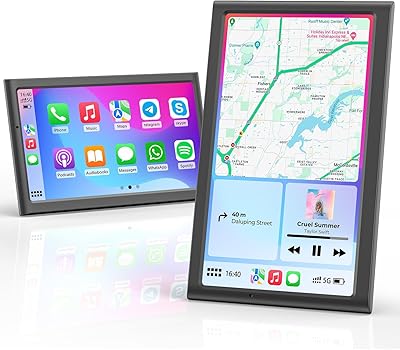
  • Extra Features: Includes Mirror Link, AirPlay, and general screen mirroring for sharing content beyond the standard CarPlay and Android Auto interfaces.
  • Mounting: Attaches to the dashboard or windshield via an external bracket that requires no tools for either installation or removal.
  • Vehicle Range: The 12V to 24V power input range makes the unit compatible with passenger cars, SUVs, pickup trucks, and light commercial vehicles.
  • Dimensions: The full unit including bracket measures 8.98 × 5.55 × 3.98 inches.
  • Weight: The complete unit with stand weighs 1.61 pounds, keeping the load on the dashboard mount minimal.
  • In the Box: Package includes the 7-inch screen, mounting stand, AUX cable, car charger, and a printed user manual.

Related Reviews
LANGDA LD-01 7″ Portable CarPlay Screen
74%
88%
Ease of Setup
67%
Wireless Connectivity
74%
Screen Quality
86%
Value for Money
57%
Build Quality
More
Krunia T95 7″ Portable CarPlay Screen
75%
88%
Wireless Connectivity
84%
Screen Brightness & Visibility
82%
Touch Response & 60FPS Performance
79%
Portrait & Landscape Mode Flexibility
61%
Mount Stability
More
Leadtree 7-inch HD Portable Wireless CarPlay Screen
86%
88%
Wireless Connectivity
92%
Ease of Installation
85%
Display Quality
87%
GPS Navigation Accuracy
90%
Reversing Camera Quality
More
VUDDIG 3SPRO Portable Carplay Screen
85%
88%
Wireless Functionality
94%
Ease of Installation
90%
Video Quality (Cameras)
70%
Display Brightness
65%
Sound Quality
More
HUTNVEA 7″ Apple CarPlay Screen
85%
91%
Setup & Installation
89%
Display Quality
84%
Connectivity & Integration
87%
Usability & Interface
83%
Performance & Speed
More
Avylet RC08HL 7″ Portable CarPlay Screen
73%
83%
Ease of Setup
71%
Wireless Connectivity
76%
Display Quality
62%
Mount Reliability
68%
Voice Control
More
IIWEY iK7 10″ Portable CarPlay Screen
75%
88%
Wireless Connectivity
67%
Display Quality
71%
Dash Cam Performance
82%
Backup Camera
61%
Mount Stability
More
Imagebon 7″ Wireless CarPlay Android Auto Screen
72%
81%
Wireless Connectivity
83%
Value for Money
86%
Ease of Installation
74%
Display Quality
61%
Performance & Speed
More
NAVRUF 7″ Portable CarPlay Android Auto Screen
75%
91%
Ease of Installation
78%
Wireless Connectivity
74%
Display Quality
61%
Mount Stability
63%
Audio Integration
More
YOTON YD075 7.5-inch Portable DVD Player
70%
74%
Value for Money
61%
Battery Life
52%
Screen Quality
57%
Build Quality
88%
Ease of Use
More

FAQ

Both CarPlay and Android Auto operate fully wirelessly on the Aonerex G736 7″ Portable CarPlay Screen. It uses Bluetooth for the initial pairing and control handshake, then switches to Wi-Fi for the actual data stream — so your phone can stay in your pocket or on a separate mount without any cable tethering it to the screen. Most users report that the wireless pairing is fast to establish, particularly on the CarPlay side.

It is strongly recommended that you use only the included charger. The unit is calibrated for a specific voltage delivery range, and third-party chargers — even well-known brands — have triggered random reboots for a meaningful number of buyers. The included charger is not a throwaway accessory; it is a functional part of keeping the unit running stably. Treat it as a required component, not an optional one.

That is exactly the use case this wireless dash display was built for. As long as your vehicle has a working 12V power outlet — which virtually every car made in the last 30 years does — the unit will power up and run. You pair your phone once, and from that point CarPlay or Android Auto takes over the screen while your factory stereo and dashboard remain completely untouched. The bracket mounts without drilling, cutting, or modifying anything.

You have three practical options for routing audio to your factory speakers: a 3.5mm AUX cable if your stereo has that input, an FM transmitter tuned to an open local frequency, or Bluetooth pairing directly to your car's audio system if it supports that. The unit also has built-in speakers as a fallback, but they are small and not particularly loud — adequate for navigation voice prompts but not enjoyable for music. Most users get the best everyday results pairing audio through AUX or Bluetooth.

Buyers generally report the bracket holds well, including on rougher roads and during sharp turns. It uses a clamping or suction-based mechanism that is more substantial than a typical phone vent mount. That said, like any dash-mounted accessory, extreme heat inside a parked car can temporarily soften adhesion on suction-type mounts, so placement and surface type matter. The stand is included in the box, so no additional hardware or purchases are needed.

Most people are up and running within five to ten minutes on the first go. You mount the bracket, power the unit using the included car charger, and follow the on-screen pairing steps to connect your phone via Bluetooth. Once that handshake is complete, the Wi-Fi bridge for CarPlay or Android Auto sets up automatically. The included manual covers each step, and there is no app download required.

Yes, this portable CarPlay screen supports both platforms. iPhone users connect via Apple CarPlay and Android users via Android Auto — both wirelessly. You cannot run both simultaneously on the same screen, but switching between a paired iPhone and an Android phone is done through the on-screen settings without a full reset. Both Siri and Google Assistant work through the built-in microphone depending on which phone is connected.

Android Auto connection reliability is a recurring topic in user reviews for this unit, and it does trail CarPlay in consistency. The most common fixes are ensuring both Bluetooth and Wi-Fi are active on your phone simultaneously, keeping the Android Auto app fully updated, and making sure the screen does not lock during use. If dropouts continue, fully unpairing and re-pairing from scratch often resolves the issue. Some Android users have also found that disabling battery optimization for the Android Auto app helps maintain a stable connection.

The 2.5D tempered glass and adjustable brightness setting help considerably, and most buyers report the display is legible under normal daytime driving conditions. Direct, unfiltered sunlight at certain angles can still cause washout — this is a known limitation of portable screens in this price and size category, not a defect unique to this unit. Mounting position makes a real difference: positioning the screen lower on the dash rather than flush against the windshield tends to reduce glare significantly.

Yes, the unit is specifically rated for 12V to 24V electrical systems, which covers the vast majority of full-size pickups, SUVs, vans, and light commercial vehicles — including trucks that run on 24V systems. The bracket is designed to fit a variety of dash configurations and does not require any vehicle-specific modifications. Several buyers have confirmed using it successfully in full-size trucks and work vans without any compatibility issues.