Overview

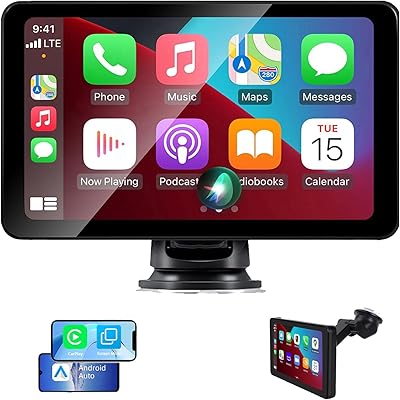
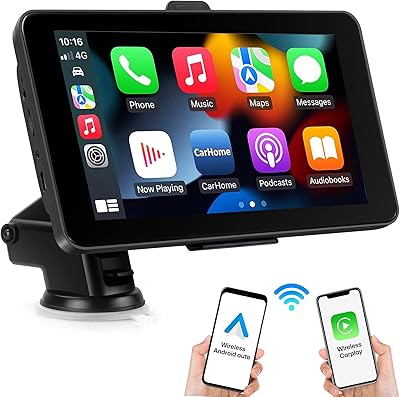
The Krunia T95 7″ Portable CarPlay Screen is a no-install solution for drivers who want wireless CarPlay or Android Auto without touching their factory head unit. Launched in early 2025 by Krunia — a small but growing name in aftermarket car tech — this portable CarPlay screen targets a practical sweet spot: real functionality at a budget-friendly price. You stick it to the dash via suction cup or adhesive pad, plug in the included car charger, and you're done. No cutting wires, no voiding warranties, no appointment at an installer. If your car shipped without a smart infotainment screen, or you simply want a second display for navigation, this wireless dash screen makes a compelling case.
Features & Benefits

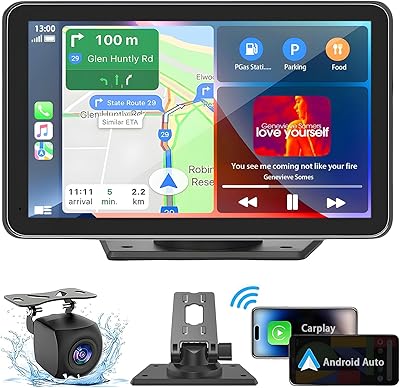
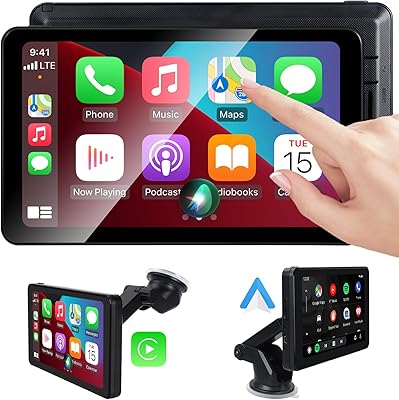
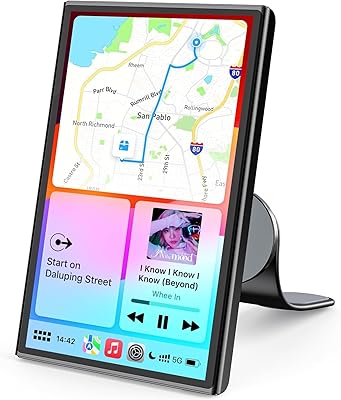
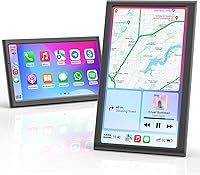
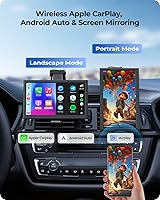
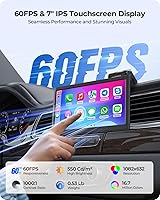
The 7-inch IPS panel runs at 60 frames per second, and that actually matters when you're tapping through a map mid-route — the response feels crisp rather than laggy, a clear step above the stuttery displays common at this price point. Both Apple CarPlay and Android Auto connect wirelessly, cutting out the USB cable dangling from your phone. The dual-orientation support is genuinely useful: portrait mode gives you a taller map column, while landscape suits music and podcast controls better. At 550 cd/m² brightness, the screen holds up well on sunny days. The Krunia T95 also handles its own Bluetooth and Wi-Fi independently, so it won't interfere with your car's existing audio setup.

Best For

This portable CarPlay screen is an easy recommendation for anyone driving a car from the pre-CarPlay era who has no interest in a full head unit swap. It's equally well-suited for rideshare drivers or people who regularly switch between vehicles — the suction mount comes off in seconds, making it genuinely portable. Budget-conscious buyers get the wireless CarPlay experience at a fraction of what a new head unit costs. The orientation-switching feature is a bonus for anyone who uses both turn-by-turn navigation and longer audio sessions regularly. And if you want a basic backup camera without running full AV cables, the Krunia T95 supports an optional external camera — you'll need to request it from the seller separately.

User Feedback

With roughly 490 ratings averaging 4.3 stars, buyers are broadly satisfied, and wireless pairing reliability along with bright screen performance draw the most consistent praise. Several reviewers note that coming from a slower, cheaper display, the 60FPS difference felt tangible in daily use. Setup time is another positive — most users report getting connected within a few minutes out of the box. On the downside, a handful of buyers flag that the suction cup can lose grip on certain dash textures, particularly in high heat. The rearview camera, while compatible, is not included by default — something a few buyers were caught off-guard by. Krunia's customer service and warranty process receive mixed but mostly favorable mentions.

Pros

  • Wireless CarPlay and Android Auto work reliably after setup — no cable dangling from your phone every morning.
  • The 60FPS IPS display feels noticeably smoother than most competing screens in this price range.
  • Bright enough to stay readable on sunny days, which is where many cheaper rivals fall flat.
  • Portrait and landscape switching is a genuinely useful feature, not just a spec bullet.
  • Zero installation required — no wiring, no tools, no voiding factory warranties.
  • Portable enough to move between vehicles or store in a bag when not needed.
  • Independent Bluetooth and Wi-Fi avoid conflicts with the existing car audio system.
  • The included accessory kit — long charging cable, AUX cable, and two mount options — covers most setups without extra purchases.
  • A two-year extended warranty is available on request, which is a reassuring commitment from a smaller brand.

Cons

  • The suction cup mount loses grip on textured or curved dashboards, especially in summer heat.
  • Initial pairing on some Android devices requires a specific sequence that the manual does not explain clearly.
  • The backup camera is not included in the box — you have to contact Krunia separately to request it.
  • Plastic build shows fingerprints easily and shows wear after months of daily attachment and removal.
  • Bluetooth audio has noticeable latency during video playback via mirror link, causing lip-sync issues.
  • Voice control performance drops significantly in noisy cabin conditions like open windows or loud music.
  • The warranty claim process is not documented in the package, leaving buyers to figure it out on their own.
  • Customer support response times are inconsistent — some buyers wait several days for a reply.
  • Screen rotation between portrait and landscape is manual, which is disruptive to change while driving.

Ratings

The Krunia T95 7″ Portable CarPlay Screen has been evaluated using AI-driven analysis of verified global buyer reviews, with spam, bot-generated, and incentivized feedback actively filtered out to ensure the scores reflect genuine ownership experiences. Across hundreds of real-world ratings, both the standout strengths and the honest frustrations have been weighted equally — so what you see below is an unvarnished picture of how this wireless dash screen performs for everyday drivers.
Wireless Connectivity
88%
Most buyers report that wireless pairing with both Apple CarPlay and Android Auto works reliably after the initial setup, with phones reconnecting automatically on subsequent drives. For commuters who previously fumbled with USB cables every morning, the cord-free experience is a meaningful daily upgrade.
A subset of users notes that the initial Bluetooth handshake can take longer than expected on some Android devices, occasionally requiring a manual reconnect. In rare cases, the connection drops briefly when the phone screen locks, which is more annoying than critical but worth knowing.
Screen Brightness & Visibility
84%
At 550 cd/m², the display holds up well in direct afternoon sunlight — a genuine differentiator at this price point where many rivals wash out on bright days. Drivers using it for navigation on summer road trips consistently highlight how readable the map remains even through a windshield.
While daytime visibility is solid, a few reviewers note that maximum brightness can make the screen feel slightly harsh during night driving if auto-dimming does not engage quickly enough. The brightness adjustment interface is functional but not the most intuitive to find mid-drive.
Touch Response & 60FPS Performance
82%
18%
Buyers who upgraded from slower, budget CarPlay screens consistently call out the 60FPS panel as noticeably more responsive — tapping through a navigation menu or swiping between apps feels fluid rather than sticky. For a screen in this price range, that smoothness is a genuine differentiator.
Under very heavy app load or when switching between CarPlay and mirror-link mode, a handful of users report brief stutters that break the otherwise smooth experience. It is not a persistent issue, but it does remind you this is not flagship-tier hardware.
Portrait & Landscape Mode Flexibility
79%
21%
The dual-orientation feature turns out to be more useful than buyers initially expect — portrait mode in particular gives a taller map view that makes turn-by-turn navigation significantly easier to follow at a glance. Rideshare drivers managing navigation and a music app simultaneously find the ability to switch orientations genuinely practical.
The screen rotation is not automatic and requires a manual input, which a few users find disruptive when switching mid-drive. Additionally, some third-party apps within CarPlay do not fully optimize their layouts for portrait mode, leaving awkward blank margins.
Mount Stability
61%
39%
On smooth, flat dashboards the suction cup mount holds firmly under normal driving conditions, and the included adhesive gasket offers a more permanent alternative for drivers who do not need to move the screen between vehicles. Setup takes only a few minutes regardless of which mounting method you choose.
This is the most frequently cited pain point in user reviews. On textured, curved, or leather-wrapped dashboards — common in many European and Japanese vehicles — the suction cup loses grip, especially in high ambient heat. Several buyers report the screen dropping onto the dash on hot summer days, which is a real safety concern.
Setup & Ease of Use
83%
The out-of-box setup experience is consistently praised — most first-time users report being fully connected and navigating within five to ten minutes of unboxing. The included quick-start guide is clear enough that buyers with minimal tech comfort level get through the pairing process without frustration.
A small number of Android Auto users find the initial Wi-Fi Direct pairing slightly more complex than the iPhone equivalent, requiring a specific sequence of steps that is not immediately obvious from the manual. Once set up, it works reliably, but the first-time experience on Android is rougher than on iOS.
Build Quality & Materials
63%
37%
For a screen at this price tier, the Krunia T95 feels adequately solid — the chassis does not creak or flex noticeably in hand, and the IPS glass panel has a decent scratch-resistant feel. Buyers with realistic expectations for budget car tech are generally not disappointed.
The plastic housing shows fingerprints easily and lacks the premium matte finish found on pricier competitors. A handful of long-term owners mention that the bezel edges show minor wear after several months of daily removal and reattachment, suggesting the build is designed more for occasional portability than daily rigorous handling.
Screen Resolution & Color Accuracy
74%
26%
The IPS panel produces vibrant, warm colors that make navigation maps and album artwork look noticeably better than the washed-out displays on competing budget screens. Text in navigation apps is crisp and easy to read at arm's length from the driver's seat.
At 1082x632, the resolution is not especially high for a 7-inch display — fine details in satellite map views can look slightly soft, and video content via mirror link reveals the pixel density limits more clearly. For navigation and CarPlay app use it is perfectly adequate, but video enthusiasts will notice.
Rearview Camera Compatibility
58%
42%
Buyers who request and add the optional 4-LED external camera report that the backup view activates reliably when reverse gear is engaged, adding a genuinely useful safety feature for parking in tight urban spots without a full AV system install.
The camera is not included in the box — it requires contacting Krunia directly to request it, which a notable number of buyers discover only after purchase. The process adds friction, and a few users mention inconsistent response times from customer support when requesting the accessory.
Value for Money
86%
Measured against the cost of even a basic aftermarket head unit installation, this portable CarPlay screen delivers wireless CarPlay functionality at a fraction of the investment and zero installation labor. For buyers in older cars who want a practical, removable upgrade, the value equation is hard to argue with.
Buyers expecting the fit, finish, and rock-solid mount of a premium brand will feel the gap at this price. The trade-off is real: you get the core CarPlay experience in exchange for accepting a product that is functional rather than refined.
Audio Output & Bluetooth Quality
71%
29%
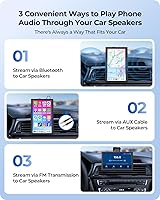
Audio routing through the car's existing speakers via Bluetooth or the included AUX cable works cleanly, and most users report that call quality through CarPlay voice control is clear enough for hands-free use on highways. The independent Bluetooth radio avoids conflicts with the car stereo.
Bluetooth audio latency is noticeable when watching video through mirror link, creating a lip-sync issue that makes it unsuitable as a video player in that mode. A few users also report minor audio dropouts on longer drives, though this appears to be unit-specific rather than universal.
Portability & Size
81%
19%
At just over half a pound and with a compact footprint, this wireless dash screen slips easily into a laptop bag or glovebox when not in use — a real benefit for rideshare drivers or people sharing vehicles. The 7-inch size is large enough to be useful without dominating the dashboard.
The 7-inch form factor, while portable, does occupy meaningful windshield or dash real estate, and some drivers find it partially obscures certain dashboard indicators depending on mounting position. Taller drivers or those in smaller cars may need to experiment with placement to avoid sightline conflicts.
Voice Control Functionality
69%
31%
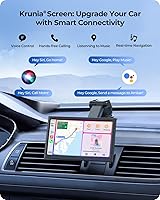
Siri and Google Assistant work through the screen as expected within CarPlay and Android Auto, and buyers appreciate being able to send messages or reroute navigation without lifting a finger during highway driving. The hands-free experience functions correctly in standard driving conditions.
Voice recognition performance is tied entirely to the phone's own assistant rather than any onboard processing, so in loud cabin environments — windows down, loud music — command accuracy drops noticeably. The screen itself adds no enhancement to voice control beyond what the phone already offers.
Warranty & Customer Support
66%
34%
Krunia promotes a two-year extended warranty beyond the standard coverage, which is a reassuring commitment for a smaller brand entering a crowded market. Buyers who have engaged the support team for legitimate issues report that replacement units were eventually dispatched.
Response times from Krunia's support channel are inconsistent — some users receive quick replies while others wait several days for acknowledgment. The warranty claim process is not clearly documented in the box, requiring buyers to independently contact the brand, which adds unnecessary friction after a purchase issue.

Suitable for:

The Krunia T95 7″ Portable CarPlay Screen is purpose-built for drivers who want a practical, non-destructive upgrade to an older vehicle that shipped without any smart infotainment system. If you own a car from the pre-CarPlay era and have no interest in paying an installer to tear apart your dashboard, this wireless dash screen is exactly the kind of plug-and-go solution you are looking for. Rideshare drivers and people who frequently move between multiple vehicles will especially appreciate how easily it detaches — the whole unit comes off in seconds and travels in a bag. Budget-conscious commuters who rely heavily on navigation apps will find the bright IPS display and fluid 60FPS touch response a tangible daily improvement over cheaper alternatives. The dual-orientation mode is also a quiet standout for anyone who switches regularly between long navigation sessions and music or podcast controls, since portrait mode gives a noticeably taller map view that is easier to read at a glance.
Not suitable for:

Buyers expecting a premium, permanently installed feel should look elsewhere — the Krunia T95 7″ Portable CarPlay Screen is a budget product and carries the trade-offs that come with that positioning. If your dashboard is curved, heavily textured, or wrapped in leather, the suction cup mount is likely to become a recurring frustration, particularly in warm climates where heat weakens suction over time. Drivers who want a factory-grade backup camera experience out of the box will also be disappointed — the compatible rearview camera is not included and requires a separate request to the seller. Anyone who expects a crystal-clear video playback experience or pixel-dense display for anything beyond navigation and app use will notice the resolution limits fairly quickly on a 7-inch panel. Finally, buyers who want a fully hands-off, zero-effort wireless experience may encounter a steeper-than-expected initial setup on Android devices, and those who value fast, responsive after-sales support may find the customer service experience inconsistent.
Specifications

  • Brand & Model: Manufactured by Krunia under the model designation T95, first made available in January 2025.
  • Screen Size: 7-inch IPS display panel with a 1082x632 pixel resolution and support for 16.7 million colors.
  • Refresh Rate: Runs at 60 frames per second for smoother touch response and reduced input delay compared to standard 30FPS portable screens.
  • Brightness: Peak brightness of 550 cd/m² with a 1000:1 contrast ratio, designed for legibility in direct sunlight and varying lighting conditions.
  • Compatibility: Supports wireless Apple CarPlay and wireless Android Auto, as well as wired mirror link for compatible smartphones.
  • Connectivity: Built-in Bluetooth and Wi-Fi radios operate independently, without requiring integration with the vehicle's existing audio or infotainment system.
  • Orientation Modes: Screen can be manually switched between portrait and landscape orientations to suit navigation, media, or app use preferences.
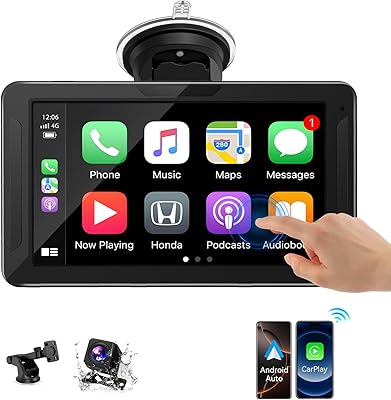
  • Mounting Options: Attaches via an included suction cup bracket for windshield or smooth dashboard surfaces, or via an adhesive gasket for a more fixed dashboard position.
  • Dimensions: Unit measures 6.97 x 1.26 x 4.21 inches (L x D x H) in its standard orientation.
  • Weight: Weighs 8.5 ounces, making it light enough to carry between vehicles or store in a bag when not in use.
  • Rearview Camera: Compatible with an optional external 4-LED rearview camera that must be requested separately from Krunia; not included in the standard box.
  • Audio Output: Outputs audio through the vehicle's speakers via Bluetooth connection or the included 5ft AUX cable.
  • Power Source: Powered via the included 11.5ft car charger, which connects to the vehicle's 12V cigarette lighter or USB power outlet.
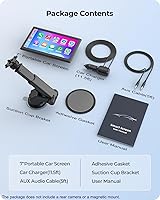
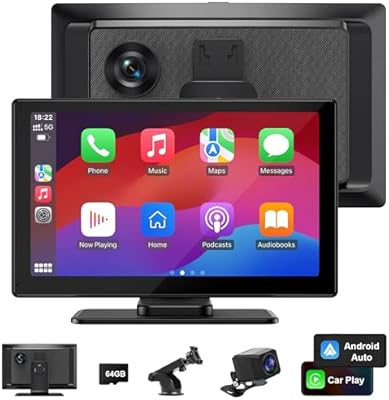
  • In the Box: Package includes the 7″ screen unit, 11.5ft car charger, 5ft AUX audio cable, adhesive gasket, suction cup bracket, and a printed user manual.
  • Warranty: Standard warranty applies at purchase; a 2-year extended warranty is available by contacting Krunia directly through their official support email.
  • Voice Control: Hands-free voice commands are supported through the native voice assistant of the connected phone (Siri or Google Assistant) via the CarPlay or Android Auto interface.
  • Map Support: Navigation maps are worldwide in coverage, delivered through whichever mapping app the driver uses within CarPlay or Android Auto (such as Google Maps or Apple Maps).
  • Traffic Updates: Real-time traffic alerts and route updates are available through the connected navigation app on the paired smartphone.

Related Reviews

LANGDA 7-inch Portable Carplay Screen for Car
85%
91%
Value for Money
88%
Ease of Installation
85%
Wireless Connectivity (Carplay & Android Auto)
92%
Screen Display Quality
80%
GPS Navigation Accuracy
More
Leadtree 7-inch HD Portable Wireless CarPlay Screen
86%
88%
Wireless Connectivity
92%
Ease of Installation
85%
Display Quality
87%
GPS Navigation Accuracy
90%
Reversing Camera Quality
More
HUTNVEA 7″ Apple CarPlay Screen
85%
91%
Setup & Installation
89%
Display Quality
84%
Connectivity & Integration
87%
Usability & Interface
83%
Performance & Speed
More
Aonerex Wireless CarPlay Screen 7″
85%
91%
Setup & Installation
93%
Connectivity
88%
Display Quality
87%
Navigation Performance
84%
Audio Quality
More
VUDDIG 3SPRO Portable Carplay Screen
85%
88%
Wireless Functionality
94%
Ease of Installation
90%
Video Quality (Cameras)
70%
Display Brightness
65%
Sound Quality
More
Avylet 7″ Wireless Apple CarPlay Screen
84%
89%
Wireless Connectivity
92%
Ease of Installation
85%
Display Quality
81%
Voice Control Performance
88%
GPS Navigation
More
IIWEY Ik7 Portable Carplay Screen 10-inch
86%
92%
Wireless Connectivity
87%
Display Quality
89%
Dash Cam Performance
85%
GPS Navigation
90%
User-Friendliness
More
NAVRUF 7″ HD Apple CarPlay & Android Auto Screen
86%
94%
Ease of Installation
87%
Display Quality
90%
Bluetooth Connectivity
91%
Voice Assistant Functionality
89%
Portability and Mounting
More
Imagebon 7-inch Android Carplay Screen (2GB+32GB)
86%
89%
Ease of Wireless Connectivity
91%
Screen Performance
85%
Setup and Installation
88%
Audio Output Flexibility
83%
GPS Navigation Performance
More
Krunia RC06 9.26″ Wireless Portable Car Play Screen
82%
92%
Display Quality
89%
Ease of Installation
87%
Wireless Connectivity
94%
Compatibility with CarPlay/Android Auto
91%
Value for Money
More

FAQ

The wireless connection handles both Apple CarPlay and Android Auto without a cable between your phone and the screen. You do still need to plug the screen itself into your car's power outlet using the included charger, but your phone stays in your pocket or on a mount — no USB tethering needed.

Yes, that is exactly the scenario this type of screen is built for. The Krunia T95 7″ Portable CarPlay Screen operates entirely independently of your factory head unit — it has its own Bluetooth, Wi-Fi, and power supply. As long as your car has a working 12V outlet or USB port, you can run it without touching the existing stereo.
Most iPhone users report being fully paired and navigating within five to ten minutes the first time. Android users may need a few extra minutes to complete the Wi-Fi Direct pairing step, which involves a specific sequence the manual covers. After the first setup, subsequent connections are automatic and much faster.

On flat, smooth surfaces it holds well under normal driving conditions. The issue is that textured dashboards, curved surfaces, and leather wrapping significantly reduce suction reliability — and in high heat, even a solid initial grip can weaken over the course of a day. If your dash is anything other than flat and smooth, the adhesive gasket option is the more dependable choice.

No, it does not. The screen is compatible with an optional external 4-LED rearview camera, but that camera is a separate item you need to request directly from Krunia after purchase. Check their listed support email to arrange it — some buyers have reported receiving one at no charge, though response times can vary.

The screen supports both orientations, but the switch is manual rather than automatic, meaning you need to tap through a setting to rotate the display. It is not something most people would do at speed — but if you know you prefer portrait for navigation and landscape for music, you can set it before you pull out and leave it.

It supports Android Auto, which requires Android 6.0 or higher and a compatible Android phone with the Android Auto app installed. Wireless Android Auto also has its own compatibility requirements — not every Android phone supports it wirelessly, so it is worth checking your specific model against Google's official Android Auto compatibility list before buying.

Yes, this is one of the more consistent positives buyers mention. The brightness level is high enough that the display stays legible in afternoon sun, which is a real differentiator compared to dimmer screens in the same price range that become nearly unreadable during summer drives. Some glare from certain windshield angles can still occur, but overall daytime visibility is solid.

It routes audio through your car speakers, not through any onboard speaker of its own. You can connect via Bluetooth to your existing car stereo, or use the included AUX cable if your stereo has an AUX input. Either way, CarPlay music, navigation prompts, and call audio all come through the car's sound system as expected.

The standard warranty covers the unit from purchase, and Krunia offers a 2-year extended warranty if you reach out to them directly — the contact details are on their product listing. The warranty process is not documented inside the box, so you need to initiate contact yourself. Experiences with response time vary, but buyers who have gone through the process generally report that replacements were issued for legitimate hardware faults.