Overview

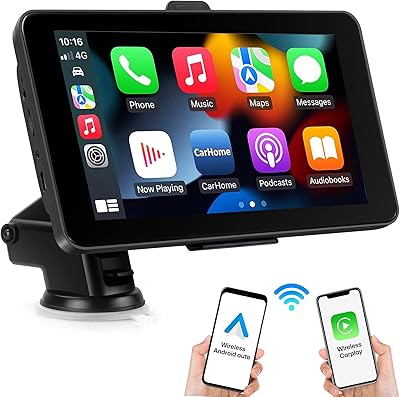
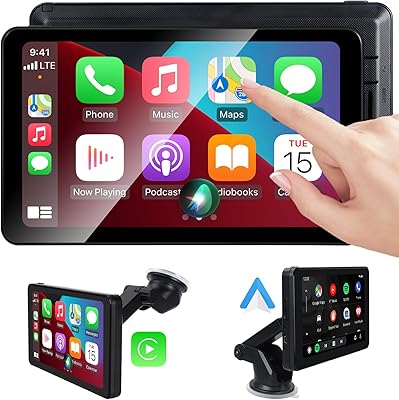
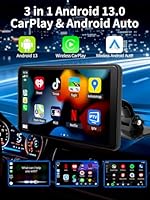
The Imagebon 7″ Wireless CarPlay Android Auto Screen is a portable aftermarket head unit that brings full Android OS functionality to vehicles that never had it. Imagebon isn't a household name, and that's worth acknowledging upfront — this is a budget-tier accessory from a relatively new player, not a polished offering from Alpine or Sony. What it promises is genuine: wireless CarPlay and Android Auto, Google Play Store access, and built-in GPS, all without cutting into your dashboard. Walk in with realistic expectations rather than flagship-device standards, and this portable CarPlay display has more going for it than its price tag might suggest.
Features & Benefits

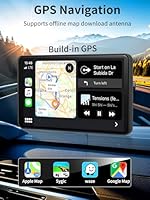
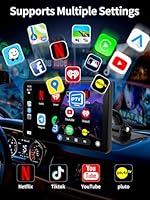
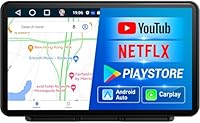
The practical appeal of this aftermarket car stereo starts with its wireless connectivity — no cables dangling from your phone to pair CarPlay or Android Auto, which removes a daily annoyance right away. Built-in GPS handles offline navigation too, so you're not stranded without signal on a rural stretch. Audio flexibility is solid for the class: Bluetooth, AUX, FM transmitter, and a built-in speaker cover most car setups. The Google Play Store opens a wide app ecosystem, and OTA firmware updates mean you won't need to hunt down manual patches. AirPlay and Miracast screen mirroring round things out nicely for a device at this tier.

Best For

This portable CarPlay display makes the most sense for drivers of older cars — the kind where the stock head unit tops out at AM/FM and maybe a CD slot. If you want wireless CarPlay access without ripping out your dash and spending several hundred dollars on a full replacement, this hits a reasonable sweet spot. It's also a solid pick for anyone who wants something removable and transferable between vehicles. Keep in mind, though, that you'll need a Wi-Fi hotspot or phone tethering for streaming, because Netflix and YouTube require an active internet connection while driving.

User Feedback

With a 4.2-star average across 55 ratings, this aftermarket car stereo has earned a cautiously positive early reception. Buyers frequently call out wireless pairing reliability and screen clarity as genuine highlights — pleasant surprises given the price. Mount stability during daily driving draws favorable mentions too. On the downside, the 2GB RAM is a real constraint; users running several apps at once report noticeable slowdowns, which is hardly shocking at this hardware level. FM transmitter quality gets mixed marks, a common sticking point in this product class. GPS and offline map performance appear reasonably consistent, though the review pool is still relatively small to draw firm conclusions.

Pros

  • Wireless CarPlay and Android Auto work without any cable connection, which removes daily setup friction.
  • Full Google Play Store access means you are not locked into a limited app selection.
  • Built-in GPS with offline map support keeps navigation functional even without cellular data.
  • The portable, non-permanent design lets you move it between vehicles with minimal hassle.
  • Multiple audio outputs — Bluetooth, AUX, FM, and a built-in speaker — cover a wide range of car setups.
  • OTA firmware updates mean the software can improve over time without manual patching.
  • 32GB of onboard storage is generous for this price tier, leaving room for downloaded apps and media.
  • AirPlay and Miracast support add flexible screen mirroring options beyond the core CarPlay and Android Auto functions.
  • Early buyer ratings skew positive, with consistent praise for wireless pairing reliability and screen clarity.

Cons

  • The 2GB RAM ceiling causes noticeable slowdowns when multiple apps run simultaneously.
  • Imagebon is a lesser-known brand with limited customer support infrastructure and an unclear warranty track record.
  • FM transmitter audio quality is inconsistent, which matters if your car lacks AUX or Bluetooth input.
  • Streaming services like Netflix and YouTube require active Wi-Fi or phone tethering — they do not work offline.
  • Only 55 ratings available, making it difficult to assess long-term durability with confidence.
  • Mount security over extended daily driving has drawn some skepticism from buyers in early reviews.
  • The 4-core processor handles everyday tasks but struggles with more demanding app combinations.
  • No indication of dedicated technical support channels if setup issues arise post-purchase.

Ratings

The scores below for the Imagebon 7″ Wireless CarPlay Android Auto Screen were generated by our AI review engine after systematically analyzing verified global buyer feedback, with spam, bot-generated, and incentivized reviews actively filtered out before scoring. Each category reflects the honest distribution of real user experiences — strengths are credited where earned, and persistent pain points are not buried or softened. The result is a transparent, balanced picture to help you decide whether this portable CarPlay display fits your specific situation.
Wireless Connectivity
81%
19%
Buyers consistently call out wireless CarPlay and Android Auto pairing as one of the most satisfying aspects of daily use — once set up, the connection holds reliably without needing to re-pair each time. For drivers who previously dealt with fraying Lightning cables or awkward dock setups, the cable-free experience feels like a meaningful quality-of-life improvement on a morning commute.
A subset of users report that initial pairing requires patience and occasionally multiple attempts, particularly on certain Android devices. Reconnection after a cold start can also be slower than expected, which becomes noticeable when you just want to get your navigation running before pulling out of a parking spot.
Value for Money
83%
At this price point, getting wireless CarPlay, Android Auto, Google Play Store access, and built-in GPS in a single portable unit is genuinely hard to argue with. Buyers upgrading from a car with a basic stock radio frequently express surprise at how much functionality they gained without committing to a professional installation.
The value equation depends heavily on realistic expectations — buyers who compare it against mid-range dedicated head units from established brands tend to feel the hardware limitations more acutely. If your benchmark is a properly specified aftermarket unit, the compromises in RAM and processing power make the price feel less generous.
Ease of Installation
86%
Most buyers report getting the unit mounted and operational within 20 to 30 minutes, with no tools or technical expertise required beyond basic phone pairing knowledge. The plug-and-play nature is a genuine highlight for drivers who want an upgrade without booking a car audio appointment or touching their vehicle's wiring.
The mount system receives mixed feedback for long-term security, with some users noting that the bracket loosens gradually on dashboards with slight curves or textured surfaces. A few buyers also found the initial Wi-Fi and hotspot configuration less intuitive than expected for users not already comfortable with Android device settings.
Display Quality
74%
26%
Screen clarity draws consistent praise in user reviews, with buyers noting that text and map graphics are sharp enough for comfortable reading at a glance while driving. In typical indoor parking garage light or overcast daytime conditions, the 7″ panel performs respectably for this price tier.
Outdoor visibility in direct sunlight is a recurring complaint — bright afternoon glare can wash out the display enough to make map reading genuinely difficult, and there is no automatic brightness adjustment reported by buyers. For drivers in sunny climates who park outdoors, this is a practical daily irritation rather than a minor edge case.
Performance & Speed
61%
39%
Running a single primary app — whether that is Google Maps, Spotify, or the CarPlay interface — tends to feel acceptably responsive for most everyday driving tasks. Buyers using the unit for straightforward navigation or music playback during commutes generally do not report frustration with day-to-day speed.
The 2GB RAM ceiling is where this aftermarket car stereo shows its real limits: running navigation alongside a streaming audio app while CarPlay stays active in the background introduces lag that several buyers describe as persistent rather than occasional. Heavier app combinations, like YouTube during a rest stop while keeping maps loaded, push the processor noticeably.
GPS Accuracy
72%
28%
Built-in GPS performs well enough for standard urban and highway navigation, and the offline map capability is a practical advantage in areas with spotty cellular coverage. Buyers using it for road trips report that routing stays reasonably accurate without needing to rely on phone data constantly.
Precision in dense city environments or complex interchanges is occasionally off by enough to cause a missed turn, which multiple buyers have flagged. Cold GPS lock — the time it takes to acquire a satellite signal from a parked, powered-off state — can stretch to a minute or more, which is longer than most dedicated navigation devices.
Audio Output Quality
67%
33%
Bluetooth audio output to a car's existing stereo system works cleanly for most buyers and is clearly the recommended audio path for this device. The AUX output also delivers solid results in vehicles equipped with an auxiliary input, giving two reliable options for good sound quality without much setup friction.
The FM transmitter, while convenient in theory, is the weakest audio link — buyers in areas with busy FM spectrums report audible static and interference that undermines the listening experience. The built-in speaker is adequate only for navigation voice prompts at low speeds; using it as a primary audio source in a moving vehicle is not a realistic option.
App Ecosystem
79%
21%
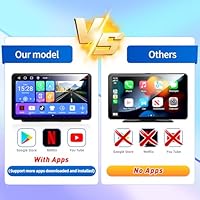
Full Google Play Store access is a genuine differentiator at this price tier, opening up a wide range of navigation, entertainment, and productivity apps beyond what walled-garden CarPlay systems permit. Buyers appreciate being able to install their preferred apps rather than being locked into a curated shortlist.
Not every app behaves optimally on automotive Android builds, and a handful of buyers note that some Google Play apps either crash unexpectedly or run with interface scaling issues on the 7″ screen. App compatibility is generally good but not guaranteed, particularly for newer apps not optimized for lower-RAM Android environments.
Build Quality
63%
37%
The physical unit feels sturdy enough for its price class, and the screen glass does not attract fingerprints as aggressively as some competing devices in the same segment. Buyers who handle it carefully and mount it securely tend to report no structural issues over several months of use.
Imagebon is a newcomer without a track record on long-term durability, and the plastic housing reflects the budget price in ways that are noticeable up close. A few buyers mention that the mount bracket feels less robust than the screen itself, raising questions about how it holds up to years of daily road vibration.
Screen Mirroring
71%
29%
AirPlay mirroring from iPhones and Miracast from Android devices both work as advertised, giving users a way to cast content from their phone to the larger display during rest stops. Buyers who use this primarily for passenger entertainment during parked breaks find it adds meaningful versatility to the device.
Screen mirroring introduces noticeable latency compared to native app use, which makes it unsuitable for anything requiring real-time interaction. Buyers who expected mirror-quality smoothness for video playback report that the experience is closer to a functional workaround than a polished feature at this hardware level.
OTA Update Support
68%
32%
The presence of over-the-air update capability is a meaningful plus for a budget device, as it means firmware improvements can reach the unit without requiring technical intervention from the user. Buyers who received a software patch post-purchase noted small but appreciable improvements in app stability.
Imagebon's update cadence and long-term software support commitment remain unknown given how recently the brand entered the market. Buyers should not assume the same multi-year support window they might expect from a major electronics brand — the update pipeline could become inactive without notice.
Mount Stability
65%
35%
On flat, smooth dashboard surfaces, the included mount keeps the screen steady through normal city and highway driving without requiring repositioning. Buyers who take time to properly seat the bracket and use the adhesive pad correctly report a reasonably secure fit for daily commutes.
Bumpy roads and uneven dash surfaces expose the mount's limitations, with multiple buyers noting wobble that becomes distracting at highway speeds or on rougher terrain. The mount is functional rather than confidence-inspiring, and buyers in areas with poor road conditions may want to budget for an aftermarket mounting solution.
Offline Map Performance
69%
31%
Downloading maps in advance and using them without cellular data works reliably for standard navigation scenarios, which is a practical benefit for rural driving or international trips where data roaming is costly. Buyers who prepared offline maps before longer journeys report the feature worked as intended without major issues.
Offline map storage consumes a meaningful chunk of the 32GB onboard space, and buyers who want extensive regional coverage need to manage storage actively. Map update cycles for offline content also depend on the third-party app used, and not all Google Play navigation apps handle offline routing with equal reliability on this hardware.

Suitable for:

The Imagebon 7″ Wireless CarPlay Android Auto Screen is built for a pretty specific kind of buyer, and if you fit that profile, it delivers genuine value. The clearest match is someone driving an older vehicle — a car from the early 2010s or before — where the factory head unit offers nothing beyond basic radio and maybe a CD player. Rather than committing to an expensive professional dash installation, this portable CarPlay display lets you bolt on a smart screen without permanent modifications, which also makes it appealing to renters, lease drivers, or anyone who swaps cars regularly. Tech-comfortable users who are already used to configuring Android devices and setting up Wi-Fi tethering will find setup approachable. Road-trippers who want passenger entertainment during rest stops, or rideshare drivers who want a flexible secondary screen, round out the ideal audience for this aftermarket car stereo.
Not suitable for:

If you are expecting performance comparable to a factory-installed or premium aftermarket head unit, this Android car screen will leave you frustrated. The 2GB of RAM is a genuine hardware ceiling — power users who like running navigation, music streaming, and a podcast app simultaneously may find the experience choppy enough to be annoying. Buyers who are not comfortable with Android device setup, Wi-Fi configuration, or occasional troubleshooting should also think twice, because a lesser-known brand like Imagebon does not offer the kind of robust customer support ecosystem you get from established players. Drivers who rely heavily on FM transmission for audio output should be cautious too, since that feature draws mixed reviews in this product class. And if your car already has a decent factory infotainment system with wired CarPlay or Android Auto, the upgrade case here is weak — the friction of adding a separate screen likely outweighs the benefit.

Specifications

  • Screen Size: The display measures 7 inches diagonally, offering a usable viewing area without requiring permanent dash modifications.
  • Processor: A 4-core CPU handles app processing, navigation, and media playback, though it is best suited for moderate multitasking workloads.
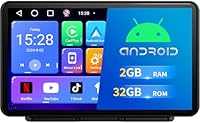
  • RAM: 2GB of RAM is included, which covers everyday single-app use but can show strain when multiple demanding apps run simultaneously.
  • Storage: 32GB of onboard ROM provides space for apps, offline maps, and downloaded media without requiring an SD card for basic use.
  • Operating System: The unit runs a full Android OS, giving access to the Google Play Store and standard Android app ecosystem.
  • CarPlay Support: Wireless Apple CarPlay is supported, connecting to compatible iPhones over Wi-Fi without a physical cable.
  • Android Auto: Wireless Android Auto is supported for compatible Android smartphones, enabling hands-free navigation and app control.
  • GPS: A built-in GPS receiver supports real-time navigation and stores offline maps for use in areas with no cellular signal.
  • Audio Outputs: Audio can be routed through Bluetooth, AUX out, FM transmitter, USB, or the unit's built-in speaker, covering most vehicle setups.
  • Screen Mirroring: AirPlay and Miracast protocols allow wireless screen mirroring from both iOS and Android devices to the display.
  • Connector: The unit charges and connects via USB Type-C, a modern standard that supports faster data transfer than Micro-USB alternatives.
  • SD Card Slot: A built-in SD card slot supports expanded local storage for music, video, and image playback directly from a memory card.
  • Video Decoding: Hardware decoding supports H.264 and H.265/HEVC formats, enabling smooth playback of high-quality video files.
  • OTA Updates: Over-the-air firmware updates allow the system software to be upgraded wirelessly without connecting to a computer.
  • Dimensions: The unit measures 8.7 x 6.38 x 4.88 inches, making it a substantial but portable device that sits on or near the dashboard.
  • Weight: At 2.05 pounds, the screen is light enough for a dash mount but requires a secure bracket to stay stable over road vibration.
  • Channels: The audio output supports a 2-channel stereo configuration, with 5.1 surround sound channel processing also listed as supported.
  • Brand: Manufactured by Imagebon, a consumer electronics brand that entered the car accessory market in late 2024.

Related Reviews

AWESAFE Android 13 Car Stereo 7-Inch Head Unit
67%
78%
Wireless CarPlay Performance
61%
Android Auto Usability
74%
GPS Navigation Accuracy
76%
Touchscreen Responsiveness
58%
Bluetooth Reliability
More
NAVRUF 7″ Portable CarPlay Android Auto Screen
75%
91%
Ease of Installation
78%
Wireless Connectivity
74%
Display Quality
61%
Mount Stability
63%
Audio Integration
More
Nideocion 7032C 7-Inch Double Din Car Stereo
71%
78%
Wireless CarPlay Performance
74%
Android Auto Integration
71%
Touchscreen Responsiveness
66%
Audio Quality
88%
Value for Money
More
Avylet RC04 8″ Wireless CarPlay Screen
75%
88%
Ease of Setup
71%
Wireless Reliability
83%
Display Quality
81%
Mount Stability
62%
Backup Camera Quality
More
Haudio 7-inch Wireless Double Din Car Stereo with CarPlay & Android Auto
85%
88%
Ease of Installation
85%
Wireless Connectivity (CarPlay & Android Auto)
73%
Audio Quality
90%
Display Quality
91%
Backup Camera Performance
More
AWESAFE Car Radio Stereo for Chevy and GMC with Wireless Apple CarPlay Android Auto 10.1 Inch Touch Screen
85%
91%
Display Quality
85%
Ease of Installation
88%
Wireless Connectivity
83%
GPS Navigation
79%
Bluetooth Functionality
More
Podofo 10.1-inch Honda Civic Car Stereo
73%
78%
Wireless CarPlay & Android Auto
83%
Touchscreen Responsiveness
81%
Audio Quality & DSP
77%
Backup Camera Quality
69%
Installation & Fitment
More
Fuluku 10.1 Inch Android Car Stereo with Wireless Carplay and Android Auto
84%
91%
Screen Size and Display
88%
Wireless CarPlay & Android Auto
85%
Audio Quality
87%
GPS and Navigation
90%
Ease of Use and Interface
More
KOBANOICA Car Stereo for Chevrolet Buick GMC with Wireless Carplay & Android Auto, 8-inch Android 13 Touchscreen, 2G RAM 32G ROM
84%
91%
Smartphone Integration
88%
Installation & Setup
85%
GPS Navigation
65%
Screen Size & Resolution
90%
Bluetooth Connectivity
More
Aonerex Wireless CarPlay Screen 7″
85%
91%
Setup & Installation
93%
Connectivity
88%
Display Quality
87%
Navigation Performance
84%
Audio Quality
More

FAQ

Yes, both CarPlay and Android Auto connect over Wi-Fi and Bluetooth, so there is no cable required after the initial pairing. Most buyers report the wireless connection is reliable once it is set up correctly the first time.

No permanent modifications are needed. This portable CarPlay display attaches via a dash mount and plugs into your car's power outlet, so installation is fully reversible and takes most people under 30 minutes.

The apps can be installed through the Google Play Store, but streaming requires an active internet connection — either through a mobile hotspot or by tethering your phone. There is no built-in cellular radio, so the screen itself cannot connect to the internet on its own.

Yes, as long as your iPhone supports CarPlay (iPhone 6 or later running iOS 14 or higher), it should connect wirelessly. Apple restricts certain apps in CarPlay mode, so full Netflix access would require using the Android side of the device rather than the CarPlay interface.

The built-in GPS receiver works independently of internet access, and offline maps can be downloaded in advance through compatible apps. Real-world performance is generally reported as adequate for common navigation tasks, though it will not match a dedicated GPS unit for precision.

It handles one app at a time without much trouble — navigation, music, or CarPlay alone all run reasonably well. Where it struggles is running several demanding apps at once, so if you like layering navigation on top of streaming audio while keeping other apps in the background, you may notice slowdowns.

The FM transmitter broadcasts audio to your car's radio on a selected frequency, which is useful if your vehicle has no AUX or Bluetooth input. That said, FM transmitter audio quality is inherently limited by this technology in general, and buyer reviews on this unit are mixed — if your car has an AUX port or Bluetooth receiver, those options will sound noticeably better.

That is actually one of the stronger use cases for this type of device. Because it mounts externally and draws power from a standard outlet, you can unclip it and reinstall it in another vehicle without any tools or technical knowledge.

The Imagebon 7″ Wireless CarPlay Android Auto Screen supports over-the-air updates, so firmware patches can be pushed without connecting to a computer. That said, Imagebon is a relatively new brand, and long-term software support is not guaranteed in the way it would be with a major manufacturer — it is a reasonable risk to factor in before buying.
Early buyers generally report the mount holds up adequately for daily commuting, but a handful of reviewers mention some wobble on rougher roads. Making sure the mount is seated properly on a flat dash surface and tightened fully before driving makes a noticeable difference in stability.