
Overview

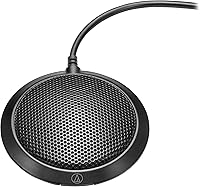
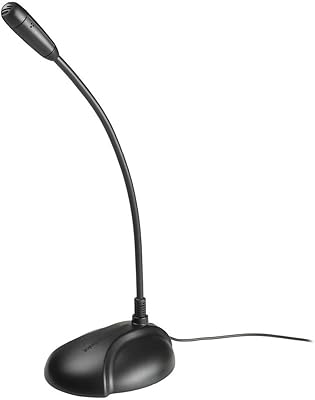
The Audio-Technica ATR4697-USB is a boundary microphone built to lie flat on a table and capture voices from every direction without any fuss. It connects via USB-C and works straight out of the box with computers, tablets, and smartphones. The omnidirectional pickup covers a full 360-degree radius, making it practical for shared desk setups or small meeting rooms where people sit around a single surface. It sits at an accessible price point that positions it as a genuine entry into professional-grade boundary mic territory without demanding a significant investment.

Features & Benefits

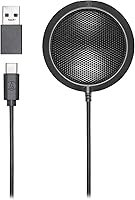
At the core of this boundary mic is an omnidirectional condenser capsule that handles consistent voice pickup across the entire table zone without requiring anyone to lean toward it. The cable terminates in USB-C, and a USB-C to USB-A adapter is included — a practical touch if your machine only has the older port. Bus-powered over USB, it needs no external power supply or driver installation. The polycarbonate and alloy steel housing feels solid enough for daily office use. With a 200-ohm impedance and mono output, the signal chain stays clean and uncomplicated, which is exactly what a conference call setup calls for.

Best For

This conference microphone makes the most sense for small group settings — think three or four people gathered around a laptop for a Zoom or Teams call. Remote workers who want a reliable, hands-free mic without fiddling with placement will find it suits that role well. It also works for educators recording lectures or trainers running voice sessions where holding a microphone would be awkward. If you regularly switch between USB-C and USB-A devices, the included adapter removes that headache entirely. It shines brightest as a step up from a built-in laptop mic, rather than a replacement for a dedicated recording setup.

User Feedback

With a 3.8-star average across nearly 90 reviews, this boundary mic sits in solidly mixed-positive territory. Buyers consistently praise how easy it is to get running — plug it in and it works, no configuration required. Voice clarity at a reasonable table distance also draws favorable comments. The recurring criticism is that the omnidirectional pattern picks up ambient room noise — air conditioning hum, keyboard clicks, nearby conversations. In a quiet room it holds up well; in a noisier environment, it can struggle noticeably. A handful of users feel the build is lighter than expected at this price tier. Buyers who match their room conditions to what this mic can realistically handle tend to walk away satisfied.

Pros

  • Plug-and-play USB setup works instantly on Windows, macOS, and most mobile devices without any driver installation.
  • The flat boundary design stays completely out of sightlines during video calls, unlike boom arms or desktop stands.
  • Includes both a USB-C cable and a USB-A adapter, so switching between devices requires no extra accessories.
  • Voice clarity is a clear step above what any built-in laptop microphone can deliver at comparable distances.
  • Bus-powered over USB means no wall outlet, no power brick, and no cable clutter beyond the single USB connection.
  • Works reliably across major conferencing platforms including Zoom, Teams, and Google Meet without configuration.
  • Compact footprint takes up minimal desk space and can be slipped into a bag without a dedicated case.
  • The polycarbonate and alloy steel build handles daily use and occasional travel without showing obvious wear.
  • At its price point, it brings a recognized professional audio brand into reach for budget-conscious buyers.

Cons

  • The omnidirectional pickup pattern captures ambient room noise, HVAC hum, and nearby keyboard sounds without discrimination.
  • The cable is fixed and non-detachable, so any cable damage renders the entire unit unusable.
  • At 1.5 meters, the cable length can feel restrictive on larger tables or in rooms where the host device is not nearby.
  • Sensitivity drops off noticeably beyond roughly one meter, making it less effective in spacious or high-ceilinged rooms.
  • No onboard gain control or mute button means all audio adjustments must be handled in software.
  • Build feels lighter and less substantial in person than product photos tend to suggest.
  • Long-term durability data is limited, and the cable stress point near the mic body raises concerns over extended daily use.
  • Solo users needing directional focus will find this boundary mic is a poor substitute for a purpose-built cardioid design.

Ratings

The Audio-Technica ATR4697-USB earns a measured but honest assessment here — our AI has processed verified buyer reviews from global markets, actively filtering out incentivized and bot-generated feedback to surface what real users consistently experience. Scores reflect both where this boundary mic genuinely delivers and where it falls short, so you can make a confident, eyes-open purchasing decision.

Ease of Setup
93%
Buyers repeatedly highlight that this boundary mic is genuinely plug-and-play — connect it and it is recognized immediately by Windows, macOS, and most mobile devices without any driver hunting. For non-technical users joining a conference call in a hurry, that instant readiness is a real practical advantage.
A small number of users on older USB-A-only systems noted occasional recognition delays when using the included adapter, requiring an unplug-and-replug cycle. It is not a widespread issue, but worth knowing if your hardware is aging.
Voice Clarity
76%
24%
At close-to-mid table distances, voices come through with reasonable intelligibility on Zoom, Teams, and Google Meet. Reviewers upgrading from built-in laptop microphones almost universally notice a meaningful improvement in how their voice sounds to remote participants.
The clarity advantage shrinks noticeably in rooms with hard surfaces or background noise. Speech can sound slightly thin compared to cardioid alternatives at similar prices, and at distances beyond roughly 1.5 meters the signal starts to feel less defined.
Noise Rejection
44%
56%
In a genuinely quiet room — a home office with soft furnishings, for instance — the condenser capsule captures speech without obvious coloration or distortion. Users in controlled environments report clean enough audio for casual conferencing and voice recording.
This is the most common complaint in the review pool. The omnidirectional pattern does not discriminate between the speaker and the room, so HVAC noise, keyboard clicks, street traffic, and nearby conversations all get captured with equal enthusiasm. It is a fundamental trade-off of the design, not a defect.
Build Quality
61%
39%
The polycarbonate and alloy steel combination gives the housing a credible feel for a budget-tier device. It sits flat and stable on a desk without sliding, and the cable connection point feels adequately reinforced for daily use.
Several reviewers describe the overall construction as lighter than expected once they hold it in person. The base does not feel particularly weighted, and there is a perception among some buyers that the materials reflect the accessible price point more than photos suggest.
Value for Money
78%
22%
As a no-frills upgrade path from an integrated laptop microphone, this conference microphone lands at a price that is hard to argue with. You get a recognizable audio brand, a proper boundary mic form factor, and USB-C connectivity bundled together for less than most wired desk mics.
When buyers compare it against similarly priced cardioid USB microphones, the value calculation becomes less clear. Those alternatives often offer better noise rejection, which makes the ATR4697-USB feel like a narrower-use purchase than it might initially appear.
USB-C Compatibility
88%
The USB-C cable length of 1.5 meters works well for most desk and table setups, and the included USB-A adapter is a thoughtful addition rather than an afterthought. Users who move between a USB-C laptop and a USB-A desktop praised not needing to source a separate cable.
The cable is not detachable, so if it is damaged the entire unit is effectively unusable. A handful of users also wished the cable were slightly longer for larger conference table setups where the host device sits at one end.
Platform Compatibility
84%
Confirmed to work without configuration on Zoom, Microsoft Teams, Google Meet, and standard OS audio settings across Windows and macOS. Educators using it with recording software like Audacity or OBS also report clean device recognition.
A few Android tablet users noted inconsistent recognition, and there are isolated reports of the mic not appearing reliably in certain Chromebook audio settings. These appear to be edge cases rather than systemic issues.
Omnidirectional Coverage
71%
29%
For its core intended use — a small group of three or four people seated around a shared table — the 360-degree pickup pattern genuinely captures all voices without requiring participants to reposition or speak up. It removes the awkward mic-passing dynamic from informal meetings.
The same coverage that makes it useful in a group setting becomes a liability in solo use or open-plan environments. There is no way to narrow the pickup field, so buyers expecting directional control will need to look elsewhere.
Low-Profile Design
86%
The flat boundary form factor blends unobtrusively into desk and table setups. It does not block sightlines during video calls, and its compact footprint means it does not compete for desk real estate the way an arm-mounted mic would.
The low profile also means it can be accidentally knocked or have items placed on top of it. A few users mentioned the mic being bumped mid-call precisely because it sits so flush with the surface and is easy to overlook.
Cable Length & Routing
67%
33%
The 1.5-meter cable is adequate for typical single-desk use and keeps things tidy without excessive slack. It routes cleanly along a desk edge when cable management clips are used.
For larger boardroom-style tables or setups where the connected device is not immediately adjacent, 1.5 meters can feel restrictive. Extension cables introduce additional variables, and with no detachable cable option, users are locked into the included length.
Sensitivity & Pickup Distance
63%
37%
The -46 dB sensitivity is calibrated for speech at close range, which suits its conference and dictation use cases reasonably well. Voices within roughly one meter register with sufficient level in most default OS audio settings.
Push beyond that distance or lower your voice and the sensitivity starts to feel insufficient. Users in larger rooms or those who tend to lean back during calls reported needing to boost gain significantly, which compounds the ambient noise issue.
Driver-Free Operation
91%
The USB audio class compliance means no software installation is required on any supported platform. IT-managed devices in corporate environments particularly benefit from this since no admin permissions are needed to get the mic running.
Because there is no companion software, there are also no onboard controls for gain, EQ, or noise filtering. What you hear is what you get — for users who want to fine-tune their audio, that requires third-party software at the OS level.
Durability Over Time
58%
42%
Short-term durability appears solid based on reviewer accounts. The mic handles being moved between rooms and packed into a bag without obvious issues for most buyers within the first several months of use.
Longer-term feedback is thinner given the product age, but some buyers flagged concerns about the cable stress point near the mic body after extended daily use. The non-replaceable cable means any degradation there ends the product's useful life.

Suitable for:

The Audio-Technica ATR4697-USB is a strong fit for anyone who needs a shared, hands-free microphone for small group conversations — think a team of two to four people gathered around a laptop for a recurring Zoom or Teams call. Remote workers who want to stop hunching toward a headset or dealing with a boom arm will appreciate how this boundary mic just sits on the desk and does its job quietly. Educators and corporate trainers who record voice content or conduct live sessions benefit from the always-on, no-management nature of the flat form factor. It also makes sense for small businesses or home offices that need a step up from the embarrassingly poor audio of a built-in laptop microphone without committing to a complex audio interface setup. If your recording or calling environment is reasonably quiet and controlled, this conference microphone delivers a reliable, hassle-free experience at a price that does not require much deliberation.

Not suitable for:

The Audio-Technica ATR4697-USB is genuinely not the right tool for anyone working in a noisy or acoustically live environment — open-plan offices, rooms with hard floors and bare walls, or spaces near busy streets will expose the omnidirectional pattern's biggest weakness, which is that it captures everything around it without filtering. Solo podcasters, streamers, or content creators who need tight, focused vocal pickup should look at a cardioid USB microphone instead, where the directional element keeps background noise largely out of the signal. Anyone expecting studio-adjacent audio quality at this price tier will likely walk away underwhelmed; this boundary mic is calibrated for intelligible speech in conferencing, not for nuanced recording work. Users who need a longer cable run for a large conference table, or who want onboard controls for gain and muting, will find this unit too bare-bones for their needs. Finally, buyers who have already tried a decent headset microphone and are happy with it probably will not gain enough from switching to a shared table mic to justify the change.

Specifications

  • Polar Pattern: Omnidirectional condenser capsule captures sound equally from all directions across a full 360-degree radius.
  • Connectivity: Terminates in a USB-C connector and includes a USB-C to USB-A adapter for compatibility with a wider range of devices.
  • Cable Length: The attached cable measures 1.5 m (4.9 ft), suitable for standard desk and small table conferencing setups.
  • Sensitivity: Audio sensitivity is rated at -46 dB, calibrated for close-to-mid range speech capture in conferencing applications.
  • Impedance: Output impedance is 200 ohm, consistent with standard USB condenser microphone designs for speech and voice use.
  • Form Factor: Boundary (flat, table-mount) design allows the microphone to sit flush on a horizontal surface without a stand or arm.
  • Power Source: Bus-powered via USB connection, requiring no external power supply, batteries, or phantom power source.
  • Channels: Mono single-channel audio output simplifies integration with conferencing software and OS audio settings.
  • Housing Material: Outer enclosure is constructed from polycarbonate and alloy steel for everyday durability in office environments.
  • Compatible Devices: Works with personal computers, smartphones, and tablets across PC, Mac, Android, and iOS platforms.
  • Driver Requirement: No driver installation is required; the microphone operates as a standard USB audio class device on all supported platforms.
  • Recommended Use: Designed specifically for speech capture, video conferencing, and teleconferencing rather than music recording or broadcast.
  • Color: Available in black with a low-profile housing finish that blends into typical desk and conference room environments.
  • Weight: The microphone unit weighs approximately 0.017 oz, making it lightweight enough for portable daily use.
  • Product Dimensions: Footprint measures 14 x 14 x 7 inches, providing a stable flat base on any smooth horizontal surface.
  • Included Accessories: Package includes the microphone unit, the attached USB-C cable, and one USB-C to USB-A adapter.
  • Model Number: Official model designation is ATR4697-USB, as identified by Audio-Technica and registered under ASIN B082BC34TS.
  • First Available: The product was first listed for sale in December 2019, giving it several years of real-world user feedback.

Related Reviews
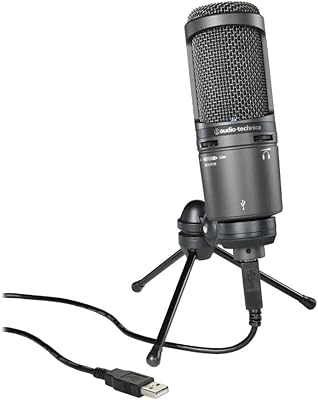
Audio-Technica AT2020USB+ Cardioid Condenser USB Microphone
87%
92%
Audio Quality
88%
Ease of Use
85%
Noise Isolation
87%
Build Quality
90%
Value for Money
More
Audio-Technica ATR2100x-USB Cardioid Dynamic Microphone
86%
89%
Sound Quality
91%
Ease of Use
92%
Value for Money
88%
Build Quality
85%
Connectivity Options
More
Audio-Technica ATR4750-USB Omni Condenser Microphone
85%
88%
Sound Quality
92%
Ease of Setup
85%
Build Quality
75%
Background Noise Sensitivity
90%
Compatibility with Devices
More
Audio-Technica ATH-S120C-BK USB-C Headphones
82%
84%
Sound Quality
78%
Comfort for Long Use
91%
USB-C Connectivity
88%
Portability and Design
85%
Ease of Use (Controls)
More
Audio-Technica AT2005USB
88%
93%
Build Durability
88%
Vocal Clarity
91%
Ambient Noise Rejection
96%
Plug-and-Play Simplicity
87%
Zero-Latency Monitoring
More
Black Lion Audio Revolution 2x2 USB Audio Interface
84%
89%
Sound Quality
76%
Ease of Setup
92%
Build Quality
87%
Latency Performance
80%
Compatibility with DAWs
More
M-Audio M-Track 2X2 USB Audio Interface

85%
91%
Sound Quality
88%
Ease of Use
85%
Build Quality
92%
Latency and Monitoring
87%
Connectivity Options
More
M-Audio M-Track Duo
M-Audio M-Track Duo
83%
88%
Preamp Clarity
93%
Value for Money
62%
Build Quality
91%
Ease of Installation
87%
Portability
More
Antelope Audio Zen Go Synergy Core USB Audio Interface
86%
92%
Audio Quality
90%
Portability
88%
Setup & Installation
85%
Onboard Effects
91%
Latency
More
Audio-Technica AT-LP3XBT
82%
88%
Sound Quality (Wired)
74%
Bluetooth Audio Quality
93%
Ease of Setup
91%
Fully Automatic Operation
67%
Build Quality
More

FAQ

Yes, it does. The boundary mic is recognized automatically as a standard USB audio device, so Zoom, Teams, and Google Meet will detect it in their audio input settings without any driver installation or manual configuration. You may need to select it as your default microphone in your OS audio settings the first time you plug it in.

It performs best when participants are within roughly one meter of the mic. For a small group of two to four people seated around a typical office or home desk, coverage is generally solid. Beyond that distance, voices can start to sound thinner and require a gain boost, which also pulls in more background noise.

For most users, yes. The USB-C to USB-A adapter included in the box handles the connection without issues on standard USB-A 2.0 and 3.0 ports. A small number of users on older hardware reported needing to unplug and reconnect once before the device was recognized, but it is not a widespread problem.

This is the most honest concern to address about this conference microphone. Because the pickup pattern is omnidirectional, it cannot distinguish between your voice and ambient noise like air conditioning, keyboard clicks, or street sounds. In a moderately quiet room it is manageable, but in a noisier space you will likely need to apply noise suppression software like Krisp or NVIDIA RTX Voice on top of it.

It can work with smartphones and tablets that support USB audio class devices, but compatibility depends on your specific device and its USB port type. With an appropriate adapter for your device, it tends to work on Android. iPhone compatibility via Lightning or USB-C varies by iOS version and adapter quality, so it is worth testing before relying on it for critical calls.

No, there are no onboard controls of any kind. There is no mute button, no gain dial, and no indicator light. Any muting or volume adjustments need to be handled through your conferencing app or OS audio settings, which can feel inconvenient during live calls if you need to mute quickly.

It is adequate for the price, but some buyers feel the physical weight and material texture are lighter than expected once they have it in hand. The polycarbonate and alloy steel construction holds up fine under normal daily use, but it does not feel premium. Think of it as a well-made budget peripheral rather than a piece of professional broadcast equipment.

Technically it will record audio, but it is not a good fit for podcasting or vocal recording. The omnidirectional pattern will capture the full room acoustic including echoes and background noise, and the sensitivity is tuned for speech clarity at a distance rather than close-mic vocal warmth. A cardioid USB microphone would serve those use cases far better.

At 1.5 meters the cable works fine for most standard desk setups where your computer is within arm's reach. If your machine is further away — on a different surface or at the far end of a larger table — you may find it tight. The cable is not detachable, so a USB extension cable is the only workaround, and that introduces an additional potential point of failure.

Most users notice a clear improvement, particularly in how their voice sounds to people on the other end of a call. Built-in laptop microphones tend to pick up fan noise and keyboard sound from the machine itself, and the audio often sounds distant and hollow. This boundary mic places the capsule on the desk surface, which helps capture voices more directly and consistently — it is a genuine upgrade, just not a dramatic one.