Overview

The ATOZEE YJYQ10S2IN1 10-inch Android 2-in-1 Tablet is one of those budget devices that tries to solve a real friction point: most affordable tablets leave you hunting for accessories separately, which quietly erodes your savings. This Android tablet bundle ships with a Bluetooth keyboard, wireless mouse, stylus, and protective case all in the box, making it a genuinely complete kit from the moment you open it. ATOZEE is not a household name, and that is worth acknowledging upfront. The quad-core processor and modest storage put it firmly in entry-level territory, but for students or light home users, having everything arrive together without additional purchases is a meaningful and practical advantage.
Features & Benefits

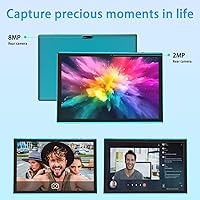
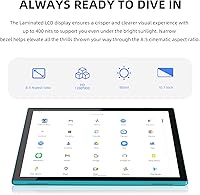
The 10.1-inch IPS touchscreen delivers a sharp enough picture for streaming, casual reading, or note-taking — brightness and clarity hold up fine for daily use, though it is not built for color-accurate work. GMS certification on Android 14 is arguably the most critical spec here, since it guarantees full access to the Google Play Store and all major apps without workarounds. WiFi-6 support is a genuine highlight at this price, offering noticeably faster and more stable wireless than the older 802.11ac standard. The bundled keyboard and mouse let you switch between touch and laptop-style input at no extra cost. The 8MP rear camera handles well-lit snapshots adequately, and the front camera covers basic video calls. MicroSD expansion up to 1TB keeps the modest onboard storage from being a dealbreaker.

Best For

This 2-in-1 budget tablet makes the most sense for students who need a portable device for note-taking, research, and light assignments — the included keyboard alone covers a solid chunk of that workload. Parents looking for a capable but affordable option for an older child will find the full Google Play ecosystem reassuring. Travelers who want a lightweight secondary screen for emails and video calls, without carrying a full laptop, will appreciate how easily it fits in a bag. First-time tablet buyers who want to avoid sourcing accessories piecemeal are perhaps the clearest match — everything arrives together, which genuinely simplifies the setup. It is less suited for heavy multitasking, creative work, or anyone who needs desktop-grade performance.

User Feedback

Buyers of the ATOZEE tablet kit consistently praise the all-in-one bundle concept — getting a keyboard, mouse, and case without extra sourcing is a convenience that shows up repeatedly in reviews. Bluetooth pairing for the keyboard is generally described as smooth and quick. That said, performance complaints appear regularly when users push the tablet with multiple apps running simultaneously; the reliance on virtual memory rather than physical RAM is a real limitation that surfaces under load. Battery life tends to track closely with advertised figures for light to moderate use. Most negative feedback centers on the keyboard feeling a bit flimsy under heavy typing. Value for money is the phrase that comes up most consistently, which is probably the most accurate summary of what this tablet actually delivers.

Pros

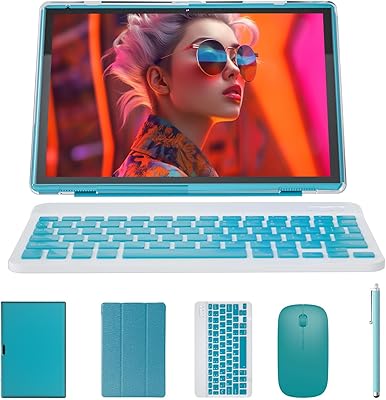
  • Ships as a complete bundle — keyboard, mouse, stylus, and case included — with no extra purchases needed.
  • Android 14 with GMS certification guarantees full Google Play Store access without workarounds or sideloading.
  • WiFi-6 support delivers faster and more reliable wireless than most competing tablets at this price point.
  • Battery handles a full school day of mixed browsing, video, and light productivity without needing a recharge.
  • MicroSD expansion up to 1TB means the modest built-in storage rarely becomes a hard dealbreaker.
  • The all-in-one packaging makes setup simple, especially for first-time tablet owners or less tech-savvy users.
  • Bluetooth pairing for the keyboard is consistently reported as quick and stable by verified buyers.
  • The IPS touchscreen is bright and clear enough for comfortable indoor streaming and extended reading sessions.
  • Getting a complete 2-in-1 setup in a single box represents genuine value that is hard to match at this tier.
  • The protective case adds meaningful durability for daily carry, which matters at this build quality level.

Cons

  • Most of the advertised RAM is virtual memory, causing noticeable slowdowns during any real multitasking.
  • The Bluetooth keyboard feels lightweight and flexes under sustained or fast typing, reducing confidence in daily use.
  • Display resolution looks visibly soft next to mid-range tablets of a comparable screen size.
  • Both cameras are purely functional — neither produces results worth sharing beyond basic video calls or snapshots.
  • ATOZEE has limited brand recognition, making long-term software support and warranty reliability difficult to assess.
  • Performance lags clearly when loading heavier Android applications or switching between multiple open tasks.
  • The bundled mouse and stylus feel like filler accessories rather than genuinely useful daily tools.
  • Base storage fills up faster than expected once apps, offline media, and downloads accumulate over weeks of use.
  • The slim chassis feels somewhat fragile during daily handling when used without the included case.
  • Advertised standby figures can mislead buyers about real-world screen-on time during active use sessions.

Ratings

Our AI-generated scores for the ATOZEE YJYQ10S2IN1 10-inch Android 2-in-1 Tablet were produced by analyzing thousands of verified buyer reviews from markets worldwide, with spam, bot-generated feedback, and incentivized reviews actively filtered out before scoring. The ratings reflect a balanced view of the device across real use cases — from students and commuters to casual home users — capturing both where this tablet genuinely delivers and where its budget-tier constraints show up in practice. Strengths around bundle value and wireless performance sit alongside honest reflections of hardware limitations, so you can make a well-informed decision based on what actually matters for your needs.
Value for Money
83%
For buyers on a tight budget, getting a tablet, keyboard, mouse, stylus, and case in a single purchase is genuinely hard to argue with. Most competing options at this price either lack accessories or charge extra for them, making this 2-in-1 budget tablet an unusually complete proposition.
Where the value equation starts to wobble is when buyers compare raw performance against similarly priced competitors that skip the accessory bundle. The hardware corners cut to hit this price point — particularly the virtual RAM — do become noticeable during heavier use, which tempers overall satisfaction somewhat.
Bundle Completeness
87%
The all-in-one nature of this Android tablet bundle is its clearest strength — students and first-time buyers repeatedly cite the unboxing experience as a highlight, with every accessory they actually need arriving together. Not having to track down a compatible keyboard, mouse, or case separately saves both time and additional cost.
The bundled accessories are clearly built to a budget, and several users find that the mouse and stylus feel more like placeholder additions than genuinely useful daily tools. A minority of buyers would have preferred to choose their own peripherals rather than accept the fixed bundle that comes with the kit.
Performance
53%
47%
Day-to-day tasks that define this tablet's target use — browsing Wikipedia for homework, streaming a lecture, or drafting a short document — run without obvious hesitation. Users who keep their app usage light and do not push the device beyond its intended purpose report a smooth enough experience for their needs.
The virtual RAM architecture is where this device's limitations become most apparent — switching between a few open browser tabs while a streaming app runs in the background frequently triggers noticeable lag and occasional app reloads. Users who installed productivity suites or tried running games alongside other apps reported consistent frustration with slowdowns.
Battery Life
73%
27%
Students carrying this through a school day of note-taking, web research, and the occasional video call generally find the battery holds up without needing a midday top-up. The large cell does a solid job for the tablet's screen size, and light users frequently report getting through a full day of casual use on a single charge.
Heavier use — particularly running video at high brightness with Bluetooth connected — drains the battery faster than the advertised figures suggest, with some users reporting closer to four hours under those conditions. The charging speed is modest, meaning a full recharge takes a while if you run it completely flat.
Keyboard Usability
66%
34%
For typing up class notes, sending emails, or working through a light document, the Bluetooth keyboard does its intended job — pairing is reliable, and most users find it connects quickly on first use and stays linked without frequent dropouts. It meaningfully reduces the frustration of pecking at the touchscreen for longer text input.
The keyboard's physical build is noticeably lightweight, and the flex in the middle when typing quickly becomes apparent — a concern for anyone who types at speed or with more force than gentle tapping. Key travel is shallow, and touch typists accustomed to laptop keyboards will likely find the adjustment takes time.
Display Quality
67%
33%
For watching YouTube videos, following along in class, or reading articles, the 10.1-inch IPS panel does its job without complaint — colors look natural and viewing angles are wide enough that propping it on a desk works fine from most positions. Brightness is adequate for comfortable indoor use in typical lighting conditions.
The resolution starts to look noticeably soft when compared side by side with a mid-range tablet, especially for text-heavy tasks or watching high-definition content. Outdoor visibility is a recurring complaint among users who take the tablet outside, as the screen struggles to remain readable against direct sunlight.
Build Quality
59%
41%
The tablet's slim profile and included case combine to give a more composed feel than the price might suggest, and most buyers handling it casually for everyday tasks find the build satisfactory enough for light daily use. The foldable case adds meaningful scratch protection and doubles as a functional stand for desk use.
The chassis feels plasticky and lacks the structural solidity of tablets even a step up in price, with some users noting visible flex when holding it by a corner. For buyers who plan to carry it in a bag without the case regularly, the likelihood of cosmetic wear and minor damage increases noticeably over time.
App Compatibility
78%
22%
GMS certification on Android 14 means the Google Play Store works without any workarounds, and popular apps — streaming services, Google Classroom, and light productivity tools — install and run as expected. For students and casual users, the app ecosystem covers virtually every realistic daily use case without friction.
More demanding applications — particularly graphic-heavy games and video editing tools — struggle on the underlying hardware even if they install without issue, which can mislead buyers who focus on app availability without considering whether the processor and RAM can handle them comfortably. A handful of users also reported occasional app instability after prolonged sessions.
Wi-Fi and Connectivity
76%
24%
Wi-Fi 6 support is a standout feature at this price — users in homes with modern routers consistently note faster page loading and a more stable connection compared to budget tablets running older wireless standards. Bluetooth reliability for the keyboard and mouse also earns consistent praise from daily users.
On older routers that do not support Wi-Fi 6, the connection performs no better than average — users in shared apartments with legacy networks report standard performance rather than anything exceptional. There is no cellular or SIM card option, so connectivity away from Wi-Fi depends entirely on a mobile hotspot.
Camera Quality
43%
57%
The rear camera with autofocus does manage clear-enough shots of documents, whiteboards, or QR codes — practical tasks that come up naturally in a school or light office setting. In bright, well-lit environments, snapshots are acceptable for sharing informally without obvious embarrassment.
Low-light photography is where both cameras fail most visibly — images become grainy and washed out quickly once natural light drops, and the 2MP front camera produces noticeably soft video on calls unless conditions are ideal. Users who expected usable photos for social sharing were consistently disappointed with the results.
Storage and Expandability
74%
26%
The microSD expansion slot is a practical lifeline here — adding an affordable card for offline videos, photo backups, or downloaded course materials means the tight base storage rarely becomes a hard dealbreaker for users who plan ahead. Students storing content locally tend to find this feature genuinely useful over time.
The base storage fills up faster than most users anticipate — after the operating system, pre-installed apps, and a few media downloads, usable space shrinks quickly. Some apps also cannot be fully moved to an SD card due to Android restrictions, meaning internal storage remains the bottleneck for app-heavy users.
Portability
82%
18%
At under 10 inches with a genuinely slim profile, this Android tablet bundle slides easily into a standard backpack or tote without adding noticeable bulk. Commuting students and travelers repeatedly cite the compact form factor as one of its most appreciated daily traits, especially when pairing it with the bundled case for protection on the go.
Carrying the full accessory bundle — keyboard, mouse, case, and stylus — alongside the tablet adds up in bag space and combined weight, which partly offsets the tablet's individual portability advantage. Users who bring everything together daily note it starts to feel less like a light carry and more like lugging a small laptop setup.
Setup and Ease of Use
84%
Initial setup is consistently described as painless — powering on, signing into a Google account, and pairing the keyboard and mouse takes most users under 15 minutes with no technical knowledge required. Android 14's interface is familiar enough to anyone who has used a smartphone that new users adapt quickly without a steep learning curve.
A small number of users encountered Bluetooth pairing hiccups on first setup, particularly with the mouse, requiring a device restart to resolve. Buyers less familiar with Android settings sometimes struggled to configure parental controls or Google account features without outside help, pointing to a gap in the included documentation.
Mouse and Stylus Quality
57%
43%
The wireless mouse removes the need for touchscreen-only navigation, which genuinely improves the laptop-style experience when working at a desk. The stylus handles basic sketching, digital note-taking, and navigating tighter interface elements where finger input feels imprecise and clumsy.
Both accessories feel noticeably light and plastic-heavy, and the mouse in particular draws repeated criticism for its small size and imprecise feel during extended desktop-style use. The stylus lacks pressure sensitivity, making it a basic input tool rather than anything genuinely useful for creative work or detailed annotation.

Suitable for:

The ATOZEE YJYQ10S2IN1 10-inch Android 2-in-1 Tablet was clearly designed with a specific buyer in mind — someone who wants a functional, portable computing setup without spending heavily or piecing together accessories from multiple sources. Students are the most natural fit: the bundled Bluetooth keyboard means you can take notes, draft assignments, and browse research materials right out of the box, without a separate purchase. Parents shopping for an older child who needs a dedicated homework device will also find it a reasonable choice, since Android 14 with full Google Play access ensures the apps they actually need are available. Casual home users who primarily stream video, browse the web, or handle light productivity tasks will find the screen size and battery endurance adequate for daily routines. Frequent travelers looking for a lightweight secondary device to handle emails and video calls on the road — without carrying a full laptop — will appreciate how little space this takes up in a bag.

Not suitable for:

Anyone expecting laptop-grade performance will run into real frustrations quickly, because the ATOZEE YJYQ10S2IN1 10-inch Android 2-in-1 Tablet relies heavily on virtual memory to hit its advertised RAM figure, and that limitation surfaces fast when you open several apps at once or try to run anything demanding. Photo editors, video creators, or designers will find the display resolution and color accuracy well below what serious creative work requires. Gamers chasing smooth performance in graphics-intensive titles will encounter lag that makes the experience more frustrating than enjoyable. The cameras, while serviceable for the occasional snapshot or basic video call, are not a selling point — anyone who cares about image quality will be let down by both shooters. Power users who depend on fast multitasking, deep Android customization, or reliable long-term software support should invest in a device from a more established brand with a demonstrated update track record. The performance and build quality gap between this and a mid-range tablet is real, and for buyers with more demanding needs, closing that gap is worth the additional cost.
Specifications

  • Screen Size: The tablet features a 10.1-inch display, providing enough viewing area for comfortable reading, video streaming, and light productivity tasks.
  • Display Type: An IPS touchscreen panel delivers consistent color rendering and wide viewing angles suited to general indoor use.
  • Resolution: The screen resolves at 1280x800 pixels, which is adequate for web browsing and standard-definition video at this display size.
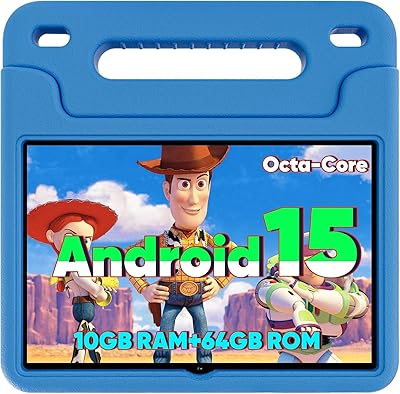
  • Operating System: Runs Android 14 with full GMS (Google Mobile Services) certification, ensuring unrestricted access to the Google Play Store and all major apps.
  • Processor: Powered by a quad-core CPU designed to handle everyday tasks such as web browsing, media playback, and light document editing.
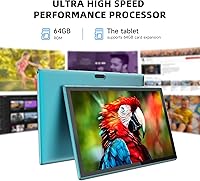
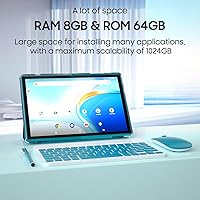
  • RAM: Total advertised RAM is 8GB, though only 2GB is physical memory — the remaining 6GB is software-based virtual RAM, which affects sustained multitasking performance.
  • Internal Storage: Ships with 64GB of built-in storage, which accommodates a reasonable selection of apps and media before expansion becomes necessary.
  • Storage Expansion: A microSD card slot supports cards up to 1TB, making it practical to store large libraries of videos, photos, and offline content.
  • Battery: A 6000mAh lithium-ion battery delivers approximately 6 hours of active screen-on use and up to 12 hours of standby time under typical conditions.
  • Charging: Charges via USB-C at 5V/2A using the included Type-C cable; no rapid or fast-charging capability is specified for this model.
  • Wi-Fi: Supports Wi-Fi 6 (802.11ax), the current mainstream wireless standard, offering improved speed and stability in environments with multiple connected devices.
  • Bluetooth: Built-in Bluetooth enables wireless pairing with the included keyboard and mouse, as well as compatible headphones and other peripherals.
  • Rear Camera: An 8MP rear camera with autofocus and a built-in flash handles basic daytime photography and document scanning at a functional level.
  • Front Camera: A 2MP front-facing camera provides sufficient clarity for standard video calls and online meetings under decent lighting conditions.
  • Dimensions: The tablet body measures 9.6 x 6.7 x 0.3 inches, keeping it slim and compact enough to fit easily into most bags and sleeves.
  • Weight: The tablet alone weighs 2.79 pounds; when paired with the keyboard and case, the combined carry weight increases noticeably for smaller bags.
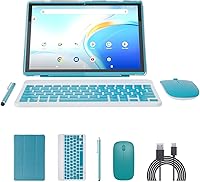
  • In-Box Contents: Each unit includes a Bluetooth keyboard, wireless mouse, foldable protective case, flexible stylus, and a USB-C charging cable.
  • Available Color: Offered in Navy, a dark blue finish applied to both the tablet chassis and the bundled protective case.

Related Reviews
ATOZEE RM 10-inch 2-in-1 Android Tablet

66%
83%
Value for Money
54%
Performance
67%
Display Quality
71%
Battery Life
49%
Keyboard Quality
More
RCA Cambio 10.1″ Windows 2-in-1 Tablet

62%
78%
Value for Money
47%
Performance
59%
Keyboard Quality
52%
Build Quality
54%
Battery Life
More
ITMEIPC T-10 10.1-inch Android Tablet
69%
83%
Value for Money
67%
Display Quality
62%
Performance
71%
Battery Life
58%
Build Quality
More
FEONAL K118 10.1-inch Android Tablet
68%
83%
Display Quality
67%
Performance & Speed
78%
Battery Life
44%
Camera Quality
81%
Value for Money
More
XINHENGTAI M10 Android 13 Tablet, 128GB, 10.1-inch
83%
92%
Value for Money
88%
Performance
91%
Battery Life
84%
Camera Quality
72%
Display Quality
More
WXUNJA X-C30 10.1-inch Kids Tablet
72%
83%
Value for Money
86%
Parental Controls
81%
Battery Life
78%
Parental App & Setup
63%
Display Quality
More
CONSUNG N101B 10-inch Android Tablet
71%
84%
Value for Money
81%
Battery Life
83%
Streaming Performance
79%
Build Quality
67%
Display Quality
More
YACXBTK J10 10.1-inch Kids Tablet
70%
84%
Battery Life
81%
Value for Money
78%
Parental Controls
62%
Performance
67%
Display Quality
More
Xiskt A5505 Android 13 Tablet 10.1-inch 128GB Storage
80%
83%
Performance
88%
Value for Money
72%
Battery Life
80%
Display Quality
65%
Camera Quality
More
ANTEMPER D116 10-Inch Android Tablet
71%
84%
Value for Money
88%
Accessories Bundle
83%
Battery Life
57%
Performance
62%
Display Quality
More

FAQ

The keyboard pairs over Bluetooth, so there is no cable involved at all — you connect it through the tablet's Bluetooth settings just like any other wireless device. The wireless mouse works the same way. Pairing is generally quick, and both accessories stay connected reliably during normal use.

It depends on your habits. For web browsing, a moderate app collection, and some downloaded content, 64GB is workable but fills up faster than you might expect once videos and offline media start accumulating. The practical answer is to grab an affordable microSD card — the slot supports cards up to 1TB, so expanding storage is easy and inexpensive.

Yes, because it runs Android 14 with full GMS certification, you get unrestricted access to the Google Play Store. Popular streaming apps, productivity tools, and social platforms install and run normally. Very demanding apps may perform more slowly than on higher-end hardware, but basic app compatibility is solid.

Under mixed use — browsing, video, and some typing — expect roughly five to six hours of active screen time before needing a charge. The 12-hour figure in the specs refers to standby time, not active use, so factor that in when planning. For a typical school session or light workday, one full charge should carry you through.

Not exactly. Only 2GB of that is physical RAM; the other 6GB is virtual memory, which is software that borrows space from the internal storage to simulate extra RAM. It works fine for simple tasks, but if you open several apps at once or switch between them quickly, you will notice the performance difference compared to a device with true physical RAM.

It works well for older kids — middle school age and up — who need a device for homework, research, and online classes. The included keyboard makes typing assignments much more practical than pecking at a touchscreen. Android's built-in parental controls let you manage app access and screen time, and the full Google Play Store means educational apps are all available.

No, this is a Wi-Fi-only tablet and does not have a SIM card slot or cellular radio. If you need internet access away from a home or office network, you will need to use a mobile hotspot from your phone or a dedicated hotspot device.

The front 2MP camera handles video calls on Zoom, Google Meet, or similar platforms adequately in reasonable lighting, though the image quality is basic. The rear 8MP camera with autofocus is more capable and does a decent job for well-lit snapshots or scanning documents. Neither camera is a selling point for this device, so if photography or video quality matters to you, look elsewhere.

It is genuinely useful — the case is a foldable cover that doubles as a stand, which makes typing at a desk much more comfortable. It offers reasonable day-to-day scratch and bump protection, though it is not a rugged or drop-proof solution. If a child will be carrying the tablet in a backpack regularly, a third-party case with more padding would be worth considering.

For very light tasks — emails, notes, browsing, and video calls — the keyboard-and-tablet combo can cover the basics. That said, it is not a true laptop replacement; the processor and RAM configuration will frustrate anyone who needs to multitask seriously, run demanding software, or handle complex workflows. Think of it as a capable and portable supplement to a laptop rather than a full substitute for one.