Overview

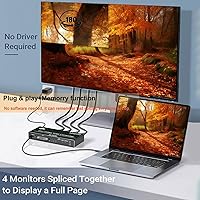
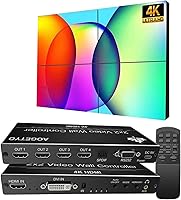
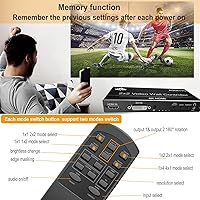
The AOGETYO 2x2 4K Video Wall Controller is a compact, no-fuss box that takes a single HDMI or DVI source and distributes it across four screens as one unified image. It sits discreetly behind a display rack or on a shelf — no rack mounting required. Beyond the classic 2x2 grid, it supports seven layout configurations, so you are not locked into one arrangement. Plug-and-play setup means no driver installation headaches, and a built-in memory chip recalls your last configuration every time you power it on — a small but genuinely practical detail for anyone running a recurring installation.
Features & Benefits

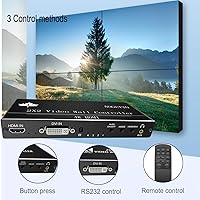
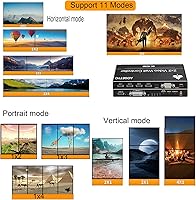
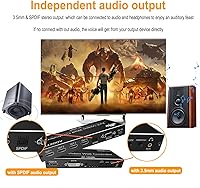
What separates this multi-screen splitter from a basic HDMI splitter is its range of layout modes — eight total, from a single-row 1x4 strip to a balanced 2x2 grid — each switchable with a dedicated hotkey on the remote. You can also rotate any individual output 180 degrees, which helps when mounting screens in portrait orientation. Three control methods cover most scenarios: IR remote, front-panel buttons, and RS232 for integrators. Audio gets dedicated 3.5mm and S/PDIF ports, independent of HDMI. One honest caveat worth knowing: while the input handles 4K, each output tops out at 1080p, so adjust expectations accordingly before buying.

Best For

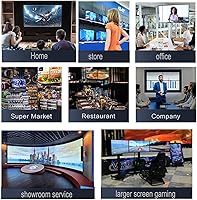
This video wall controller hits a practical sweet spot for anyone needing a functioning multi-screen display without spending heavily on a professional processor. A small boutique, café, or trade show exhibitor could run a looping promo video across four TVs from a single laptop or media player with minimal effort. Home theater builders on a budget will appreciate the layout flexibility, and gamers occasionally use it for multi-panel ambient setups. If you are exploring video wall concepts for the first time, this is a low-risk, hands-on way to get real experience without committing to an expensive commercial-grade solution.

User Feedback

Buyers consistently highlight quick, hassle-free setup as the standout experience — many report getting all four screens running within minutes, even without consulting the manual. The remote draws praise for responsiveness, though a handful of users note it needs a fairly direct line of sight. The most common frustration involves resolution expectations: buyers who assume each output will carry 4K are caught off guard by the 1080p ceiling. Occasional HDMI handshake issues with specific TV brands come up, but these seem to be edge cases rather than a pattern. Value for money is, by far, the dominant sentiment across reviews.

Pros

  • Unboxing to four working screens in under fifteen minutes is a realistic outcome for most buyers.
  • Eight layout modes give real flexibility without requiring any software configuration.
  • Built-in memory means your layout survives every power cycle without manual reconfiguration.
  • Dedicated audio outputs let you route sound to a speaker system independently of your HDMI chain.
  • Compatible with nearly every common HDMI source — laptops, streaming boxes, game consoles, and more.
  • The included remote has dedicated hotkeys for each mode, making live switching fast and reliable.
  • DVI input support adds useful flexibility for users with older workstations or legacy graphics hardware.
  • At its price tier, this multi-screen splitter offers a feature set that would cost significantly more from established AV brands.
  • Compact and light enough to mount discreetly behind a screen or inside a small AV cabinet.

Cons

  • Each output is capped at 1080p — buyers expecting 4K per screen will be let down regardless of source quality.
  • IR remote requires clear line of sight, which is impractical when the unit is tucked behind displays.
  • Build quality feels budget-grade; port connections may loosen after frequent cable swaps.
  • No 90-degree rotation support means portrait-mode installs depend entirely on the display's own capabilities.
  • HDMI handshake failures have been reported with specific older TV models, occasionally requiring cable cycling to resolve.
  • Always-on commercial use raises durability concerns, with some buyers reporting issues after six to twelve months.
  • Remote batteries are not included, which is a minor but unnecessary friction point right out of the box.
  • RS232 documentation is too sparse to be useful without significant independent research by the installer.

Ratings

The AOGETYO 2x2 4K Video Wall Controller has been evaluated by our AI system after analyzing verified buyer reviews from global markets, with spam, bot-generated, and incentivized feedback actively filtered out. Scores reflect the honest distribution of real user sentiment — the strengths that kept buyers satisfied and the friction points that led to complaints. Both sides are represented transparently so you can make a genuinely informed decision.
Ease of Setup
88%
A recurring theme across reviews is how quickly non-technical buyers got all four screens displaying correctly. Many users — including those with no AV background — reported being fully operational within ten minutes of unboxing, relying solely on intuition and the remote.
A small number of buyers encountered initial HDMI handshake issues, particularly with older TV models, that required input source cycling or cable swaps to resolve. The included instructions are minimal, which occasionally caused confusion during first-time configuration.
Value for Money
91%
At its price tier, this multi-screen splitter delivers a feature set that would have cost several times more just a few years ago. Buyers running digital signage for small shops or building home theater setups consistently describe it as punching well above its weight class.
The trade-off for the low price is visible in component longevity concerns raised by a portion of long-term users. A few buyers reported unit failures after six to twelve months of continuous operation, which tempers the otherwise strong value perception.
Display Layout Flexibility
84%
Eight selectable layout modes — including horizontal strips, vertical columns, and the standard 2x2 grid — give this wall unit genuine versatility for different installation scenarios. Switching between modes via dedicated remote hotkeys is fast and does not require a reboot.
Some buyers expected fully custom bezels or per-screen zoom adjustments, which this controller does not support. The layout options are fixed presets rather than freely configurable, which may disappoint users with non-standard screen size combinations.
Output Resolution Quality
67%
33%
For 1080p content displayed across four screens, the image distribution is clean and consistent with no noticeable degradation between outputs. Buyers running standard HD media players, TV boxes, or gaming consoles report sharp, stable images across all four panels simultaneously.
This is the most misunderstood aspect of the product. While the input accepts 4K signals, each HDMI output is capped at 1080p — a distinction many buyers miss before purchasing. Those expecting 4K per screen are consistently disappointed, and this single issue accounts for a disproportionate share of negative reviews.
Remote Control Performance
79%
21%
The included IR remote handles mode switching reliably under normal conditions, and having dedicated hotkeys for each layout mode means you are rarely pressing more than one button to change the wall configuration. Most buyers found it responsive and intuitive within a few uses.
IR line-of-sight dependency is a real limitation in installations where the unit is tucked behind screens or inside an enclosure. Several users noted the effective range is shorter than expected, and there is no RF or Bluetooth alternative if IR becomes impractical.
Build Quality & Form Factor
72%
28%
The compact enclosure fits discreetly in most AV setups without demanding dedicated space. At just under a pound, it is light enough to mount behind a display using adhesive strips, which several buyers in retail signage applications found practical.
The plastic casing feels utilitarian rather than durable, and a few users described the port connections as slightly loose after repeated cable swaps. For permanent installations this is unlikely to matter, but the build does not inspire confidence for high-traffic or mobile use cases.
Audio Output Functionality
63%
37%
Having a dedicated 3.5mm stereo jack and S/PDIF output is a genuine bonus at this price point, allowing audio to be routed to a soundbar or amplifier without depending on the HDMI chain. Buyers using this for retail signage with background music appreciated the independent audio path.
The audio output functionality received relatively little attention in reviews, suggesting most buyers either did not use it or considered it secondary. A handful of users reported inconsistent audio sync on the 3.5mm output, though this appeared tied to specific source devices rather than a universal flaw.
Input Source Compatibility
81%
19%
Compatibility with a broad range of HDMI sources — including laptops, streaming boxes, game consoles, and DVD players — was confirmed by buyers across many different use cases. The DVI input adds flexibility for users with older workstations or graphics cards lacking HDMI.
DVI users should note it does not carry 4K signals, limiting that input path to lower resolutions. A small number of buyers using 4K@60Hz sources also encountered recognition problems, which aligns with the stated 4K@30Hz ceiling and is worth factoring in before purchase.
Configuration Memory & Reliability
77%
23%
The onboard memory that recalls the last active layout and settings on power-up is a quietly useful feature for anyone running a fixed installation. Retail operators who leave the unit running on a timer particularly appreciated not having to reconfigure each morning.
While the memory function works reliably for most users, a minority reported occasional resets to default settings after power interruptions. This is a low-frequency issue but worth noting for mission-critical signage environments where unexpected layout changes would be disruptive.
RS232 & Advanced Control
58%
42%
For AV integrators building automated control systems, the RS232 port provides a legitimate path to incorporate this wall unit into a broader automation setup. It is a feature rarely found at this price point, and its presence is a genuine differentiator for technically inclined buyers.
RS232 documentation is sparse, and casual users will find no practical reason to use it. The lack of detailed protocol documentation means integrators need to experiment or research independently, which limits how useful this feature is in practice for anyone outside a professional AV context.
Multi-Mode Switching Speed
74%
26%
Switching between layout modes is near-instant for most configurations, which matters in live event or presentation contexts where you need to toggle between a full-screen single source and a tiled view on the fly. Buyers using this for live events noted the transitions were clean enough for public-facing displays.
A few users observed a brief black screen during mode transitions, which is typical for this class of device but can be jarring in retail or event environments. It is not a defect so much as an inherent characteristic of how the signal is rerouted internally.
Rotation Feature Usefulness
69%
31%
The 180-degree per-output rotation is a practical inclusion for portrait-mode installations — think vertical digital signage panels in retail corridors or menu boards. Buyers who needed this feature found it worked reliably and saved them from sourcing a separate rotation device.
The rotation is limited to 180 degrees, meaning 90-degree portrait flips are not supported. This is a meaningful gap for users building vertical video walls, as true portrait orientation requires the display itself to handle the rotation, which not all TVs support natively.
Package Contents & Out-of-Box Experience
83%
Everything needed for a basic four-screen setup arrives in the box — remote, USB power adapter, and cable included. Buyers appreciated not facing a hidden accessory list on day one, and the unit powers on immediately without any driver installation or software configuration.
Battery for the remote is not included, which is a minor but recurring annoyance mentioned across multiple reviews. The power cable is USB-based, which some buyers found unexpectedly casual for a video processing device, though it functioned without reported issues.
Long-Term Durability
61%
39%
For buyers using the unit in low-duty-cycle environments — powering on for a few hours daily in a home theater or small shop — the device appears to hold up adequately over the medium term. Units used for occasional event setups seem to experience fewer reliability concerns than always-on deployments.
Buyers running the unit continuously in commercial signage environments raised more concerns about longevity. Several reported performance degradation or outright failure after extended always-on use, suggesting thermal management may be a limiting factor for high-duty installations.

Suitable for:

The AOGETYO 2x2 4K Video Wall Controller is a practical fit for anyone who needs a functioning multi-screen display without the budget or technical complexity of professional AV equipment. Small business owners — think a café looping a promo reel, a boutique running brand content, or a gym displaying class schedules — will find it delivers exactly what they need with minimal fuss. Home theater enthusiasts who want the visual impact of a tiled display wall but are not ready to invest in a commercial-grade processor will appreciate how accessible the setup process is. Trade show exhibitors and event coordinators who need a portable, reliable unit that can be configured on-site in minutes are also well-served here. IT hobbyists and AV learners who want hands-on experience with video wall concepts — understanding signal splitting, layout logic, and display synchronization — will find this multi-screen splitter to be a low-risk, high-insight starting point.
Not suitable for:

The AOGETYO 2x2 4K Video Wall Controller is not the right tool if your application demands 4K resolution on each individual output screen — the device caps every output at 1080p regardless of what your source is sending, and no firmware update changes that. Broadcasting studios, high-end retail flagships, or control rooms where image sharpness across large panels is non-negotiable should look at purpose-built professional video wall processors, which handle per-output 4K and precise bezel correction. Buyers planning always-on commercial deployments running 16 or more hours a day should factor in durability concerns raised by long-term users before committing. If you need true 90-degree portrait rotation handled by the controller itself, you will be disappointed — this wall unit only supports 180-degree flips, meaning portrait orientation still depends on the display's own settings. Anyone needing RS232 automation with detailed protocol documentation should also be cautious, as the support materials for advanced control are sparse.
Specifications

  • Brand: Manufactured and sold under the AOGETYO brand.
  • Dimensions: The unit measures 8.62 x 5.31 x 1.69 inches, making it compact enough to mount behind a display or sit flat in an AV rack.
  • Weight: The device weighs 13.4 ounces, light enough to be secured behind a screen with adhesive mounting solutions.
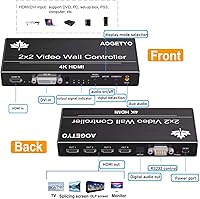
  • Input Ports: Accepts one HDMI 1.4 input or one DVI input from a single source device at a time.
  • Output Ports: Provides four HDMI outputs, each carrying an independent signal to a separate display.
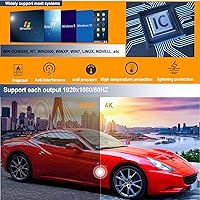
  • Input Resolution: Supports source input resolutions up to 4K at 30Hz (3840x2160), as well as 1920x1080p at up to 60Hz.
  • Output Resolution: Each of the four HDMI outputs supports a maximum resolution of 1920x1080p; per-output 4K is not available.
  • Display Modes: Offers eight selectable layout configurations: 2x2, 1x2, 1x3, 1x4, 2x1, 3x1, 4x1, and a 1x1 passthrough splitter mode.
  • Rotation: Each individual output channel can be rotated 180 degrees independently to accommodate inverted display mounting.
  • Control Methods: The unit can be operated via the included IR remote, front-panel buttons, or RS232 serial control for integration with automation systems.
  • Audio Output: Includes a 3.5mm stereo audio jack and an S/PDIF optical output for routing sound to external speakers or amplifiers independently of HDMI.
  • HDCP Compliance: Input is compliant with HDCP 1.4, ensuring compatibility with standard protected content sources.
  • Memory Function: An onboard smart chip retains the last active layout and settings, restoring them automatically each time the unit is powered on.
  • Power Supply: Powered via USB using the included USB cable and USB power adapter; no proprietary power brick is required.
  • Compatible Sources: Works with a wide range of HDMI and DVI input devices including laptops, desktop PCs, TV boxes, DVD players, Xbox, and PS4.
  • Compatible Displays: Output is compatible with HDTVs, monitors, projectors, DLP screens, and splicing screens that accept HDMI input.
  • Package Contents: Box includes the video wall controller, one IR remote control, one USB power cable, and one USB power adapter; AAA batteries for the remote are not included.
  • DVI Limitation: The DVI input does not support 4K resolution; DVI use is limited to standard and HD resolutions only.

Related Reviews

CAMWORLD AC13C 4K Video Camera
85%
92%
Video Quality
88%
Zoom Performance
85%
Low Light Performance
90%
Ease of Use
75%
Portability
More
Hojocojo CDR10B 4K Camcorder
68%
83%
Value for Money
62%
Video Quality
71%
Audio Quality
79%
Ease of Use
68%
Night Vision
More
ORDRO AX65 4K Video Camera
83%
92%
Value for Money
88%
Ease of Use
85%
Image Stabilization
90%
Video Quality
80%
Zoom Performance
More
Suttie 4K Video Camera DV112
82%
86%
Video Quality
91%
Ease of Use
82%
Zoom Performance
78%
Night Vision
85%
Battery Life
More
Yealink A10 4K Video Conference Camera
86%
91%
Video Quality
88%
Audio Clarity
85%
Ease of Setup
92%
AI Features (Auto-framing & Speaker Tracking)
78%
Software Usability
More
Zoom Q2n-4K Handy Video Recorder
73%
93%
Audio Quality
78%
Video Quality (Well-Lit)
44%
Low-Light Performance
92%
Portability
67%
Audio-Video Sync
More
HeavenBird 4K HDMI Video Capture Card
75%
91%
Ease of Setup
78%
Video Output Quality
74%
4K Passthrough Performance
69%
Audio Functionality
82%
Build Quality
More
Peryoua V108 4K Camcorder
69%
83%
Value for Money
61%
Video Quality
88%
Ease of Use
91%
Bundle Completeness
67%
Battery Performance
More
ClonerAlliance UHD Pro (CA-989UP)
83%
94%
Ease of Setup
89%
Recording Quality
96%
PC-Free Functionality
58%
HDMI Compatibility
62%
Audio Support
More
OIEXI UHD 4K Video Camera Camcorder
83%
88%
Video Quality
84%
Ease of Use
87%
Portability
91%
Battery Life
62%
Audio Quality
More

FAQ

No, and this is the most important thing to understand before buying. While the device accepts a 4K source signal, each of the four HDMI outputs is capped at 1080p. Your screens will display a sharp 1080p image, but not 4K per panel.

None at all. The AOGETYO 2x2 4K Video Wall Controller is fully plug-and-play. You connect your source, connect your screens, power it on, and select your layout with the remote or front-panel buttons. No computer configuration is required.
Yes, but with one important caveat — the DVI input does not support 4K. If your source is a DVI-equipped PC, you will be limited to HD resolutions on that input path. For 4K source compatibility, use the HDMI input.

No. The unit has a built-in memory chip that saves your last active layout and configuration. When power is restored, it picks up exactly where it left off without needing any manual reconfiguration.

Yes. The 4x1 vertical layout is one of the eight available modes and is selectable directly from the remote. Keep in mind that portrait-mode 90-degree rotation within that layout would need to be handled by your individual displays, as the controller only supports 180-degree flips.

Under normal conditions it works reliably at typical room distances, but it does require a reasonably clear line of sight to the unit. If the controller is mounted behind a TV or inside a cabinet, the IR signal may not reach it consistently. In those cases, the front-panel buttons or RS232 control are the practical alternatives.

Yes. The unit has both a 3.5mm stereo audio output and an S/PDIF optical port, so you can run audio to a soundbar, amplifier, or speaker system independently of the HDMI outputs. This is handy for retail or event setups where you want centralized audio control.

Yes, both consoles are explicitly compatible as input sources. Just connect the console to the HDMI input on the controller and your screens to the four HDMI outputs. Set all screens to 1080p output in the console settings for the most reliable results.

It works fine for moderate-duty use, but long-term always-on operation is where some users have reported reliability concerns. If you are planning 16-plus hours of daily use in a commercial setting, it is worth factoring in the possibility of a shorter-than-expected lifespan compared to professional-grade signage hardware.

RS232 is a serial communication protocol used by AV integrators to control devices programmatically from a control system, such as a Crestron or AMX setup. If you are a home user or a small business owner, you will almost certainly never need it. It is there for integrators building more complex automated AV environments.