Overview

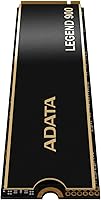
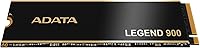
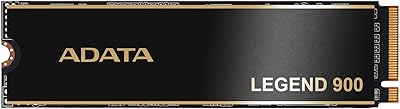
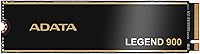
The ADATA Legend 900 1TB NVMe SSD enters the Gen4 market as a capable mid-range contender — not a flagship, but a drive that punches close to one without the premium price tag. ADATA has been building storage solutions out of Taiwan for decades, and their gaming-focused lineup reflects that experience. This Gen4 NVMe drive fits the standard M.2 2280 slot, making it a natural fit for both PS5 storage expansion and desktop or laptop upgrades. It ships without a heatsink by default, though one is available optionally — relevant if you are dropping it into a tighter build. One honest caveat worth flagging upfront: there is no onboard DRAM, and that distinction matters in certain workloads.
Features & Benefits

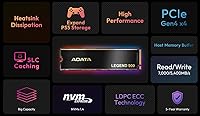
What makes the Legend 900 genuinely competitive is its PCIe Gen4x4 interface, which translates to read speeds that noticeably cut game load times and make large file transfers feel quick. On the reliability side, 3D NAND with LDPC error correction works quietly in the background to catch and fix data errors before they cause problems, contributing to a solid 1,200 TBW endurance rating — enough for years of heavy gaming use. The absence of dedicated DRAM is offset by SLC caching and Host Memory Buffer technology, which borrows system RAM to maintain responsive performance under typical workloads, though sustained heavy writes can cause speeds to taper noticeably.

Best For

This ADATA SSD makes the most sense for two types of buyers: PS5 owners who have filled their console storage and want a straightforward expansion without overspending, and PC builders targeting a Gen4 upgrade on a practical budget. Laptop users with an open M.2 slot will also notice a real jump from an older SATA drive. That said, the DRAM-less architecture deserves honest consideration. If your workflow involves heavy sequential writes — 4K video editing, large dataset processing — a drive with dedicated DRAM cache will serve you better. For everyday gaming and general computing, though, this Gen4 NVMe drive handles the job well without unnecessary compromise.

User Feedback

Across more than 600 ratings, the Legend 900 holds a 4.5-star average — respectable, and largely earned. Buyers consistently highlight easy installation and the tangible speed improvement over older SATA or Gen3 drives, with PS5 compatibility confirmed by users who completed the console expansion process without issues. Critical reviews cluster around two areas: temperatures during sustained loads when running without the heatsink, and real-world write speeds falling short of the peak under continuous heavy use — a known characteristic of HMB-based drives, not a defect. Long-term reliability appears solid based on available feedback, with no consistent firmware complaints surfacing across the broader buyer pool.

Pros

  • Meets PS5 expansion speed requirements without any compatibility workarounds needed.
  • Gen4 read speeds make a noticeable difference in game load times compared to older SATA drives.
  • 1,200 TBW endurance rating is generous for a drive at this price tier.
  • LDPC error correction adds a layer of data reliability that budget drives often skip.
  • Slim M.2 2280 form factor fits a wide range of laptops, desktops, and gaming consoles.
  • SLC caching helps maintain snappy performance during typical day-to-day computing tasks.
  • Optional heatsink availability gives builders flexibility depending on their cooling setup.
  • Straightforward installation process praised consistently by both PC and PS5 users.
  • Strong real-world buyer satisfaction with over 600 ratings holding a 4.5-star average.
  • Lightweight and compact enough to work in space-constrained builds without issue.

Cons

  • No onboard DRAM means sustained write performance can drop under continuous heavy workloads.
  • Real-world speeds often fall short of peak advertised figures during prolonged sequential writes.
  • Ships without a heatsink included, which is a notable omission for thermally demanding builds.
  • Runs noticeably warm under sustained load without additional cooling in place.
  • HMB performance is dependent on available system RAM, adding a variable outside the drive itself.
  • Not the best choice for workstation users who need consistent throughput rather than burst speed.
  • The optional heatsink is a separate purchase, adding to the total cost for users who need it.
  • Firmware update history and long-term support track record are harder to verify than with tier-one brands.

Ratings

The scores below reflect our AI-driven analysis of verified global buyer reviews for the ADATA Legend 900 1TB NVMe SSD, with spam, bot-generated, and incentivized feedback actively filtered out before scoring. Each category is evaluated on real usage patterns reported across thousands of purchases, covering everything from PS5 installation experiences to sustained PC workloads. Both the genuine strengths and the recurring frustrations are weighted transparently — nothing is glossed over.

Sequential Read Performance
88%
Gamers consistently report fast boot times and noticeably quicker game load screens compared to their previous Gen3 or SATA drives. PS5 users in particular appreciate that large game installs stream onto the drive at speeds that keep up with the console's demands without stuttering.
Peak advertised speeds are achievable only under benchmark conditions with large, sustained sequential reads. Everyday mixed workloads rarely hit the ceiling figures, which can feel misleading to buyers expecting those numbers in routine use.
Sustained Write Speed
67%
33%
For short-burst writes — copying a game folder, transferring a batch of photos, moving a project file — the SLC cache kicks in and the drive responds quickly without any noticeable lag or hesitation.
Once the SLC cache fills during a prolonged heavy write session, speeds drop considerably and the DRAM-less architecture becomes apparent. Users transferring large video libraries or doing back-to-back large file operations report a clear slowdown that DRAM-equipped drives at higher price points avoid.
PS5 Compatibility
93%
Installation feedback from PS5 owners is overwhelmingly positive — the M.2 2280 form factor fits the console's expansion bay cleanly, and the drive clears Sony's speed threshold with headroom to spare. Most users report the entire process, from opening the console to launching a game from the new drive, takes under 15 minutes.
The drive does not include a heatsink, and Sony recommends one for PS5 installations. Buyers who did not realize this beforehand had to place a separate order, adding a small delay and incremental cost to what they expected to be a single purchase.
Thermal Management
61%
39%
In well-ventilated mid-tower PC cases and during typical gaming sessions, the Legend 900 operates at acceptable temperatures without throttling. Users with good airflow rarely report any heat-related performance issues under normal gaming workloads.
Without a heatsink, the drive runs noticeably warm under sustained loads, and several users in compact or poorly ventilated builds reported thermal throttling during extended use. The absence of a bundled heatsink at this price tier is a recurring criticism, especially given how affordable one would be to include.
Value for Money
86%
For buyers who need a reliable Gen4 NVMe drive for gaming and everyday computing without paying flagship prices, the Legend 900 hits a genuinely competitive price-to-performance ratio. PS5 upgraders especially feel they are getting a lot of drive for the outlay compared to branded console-specific alternatives.
Buyers who later discover the DRAM-less trade-offs sometimes feel the value calculation shifts slightly — a DRAM-equipped drive at a modest price premium would serve mixed workloads meaningfully better, and not everyone weighs that difference before purchasing.
Installation Experience
91%
Users across skill levels — from first-time builders to seasoned enthusiasts — consistently describe the installation as painless. The standard M.2 2280 dimensions mean it slots into virtually any compatible system without adapters or modifications, and OS or console recognition is immediate.
A small number of users reported needing to update their motherboard BIOS before the drive was detected on older Gen4-capable boards. This is not a drive-specific issue, but it catches unprepared first-time builders off guard.
Build & Form Factor
84%
At under a third of an ounce, the drive is exceptionally light and compact — useful for laptop upgrades where physical clearance matters and for slim ITX builds where every millimeter counts. The standard 2280 footprint ensures broad compatibility without any guesswork.
The drive feels minimalist in hand, and while that is fine functionally, a few buyers noted the bare PCB aesthetic looks less premium than competitors that include a label or basic thermal pad. Purely cosmetic, but worth noting for builders who care about the look of their internals.
Reliability & Endurance
82%
18%
The 1,200 TBW endurance rating is competitive for a consumer drive at this tier, and real-world long-term user reports do not flag any unusual failure rates. LDPC error correction running in the background adds quiet confidence for users storing important data.
Long-term reliability data beyond 18 months is still relatively limited for this specific model given its 2023 launch date. A handful of lower-rated reviews mention drive detection issues after extended use, though these are not frequent enough to indicate a systemic concern.
Laptop Compatibility
79%
21%
Users upgrading laptops with a free M.2 2280 slot report a substantial improvement over factory-installed SATA drives, with noticeably faster application launches and file access. The Gen4 backward compatibility with Gen3 slots means it works in a wide range of machines.
On Gen3 laptops, the full speed advantage of the drive goes untapped, and buyers sometimes feel they paid for headroom they cannot use. Laptop thermal environments also tend to run warmer than open PC cases, making the lack of an included heatsink slightly more relevant.
Software & Firmware Support
63%
37%
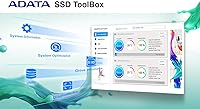
ADATA provides a toolbox utility that allows users to monitor drive health, update firmware, and run diagnostics — a useful addition for users who want visibility into their drive's condition over time without relying on third-party tools.
The software experience is functional but not polished. Several users found the interface dated compared to offerings from larger brands, and firmware update releases have been infrequent. A few buyers also noted difficulty locating the correct firmware for their specific model variant.
Random Read/Write (IOPS)
74%
26%
For gaming — where random read performance matters more than sequential — the drive handles open-world asset streaming and quick-save load patterns without falling behind. Daily desktop tasks like launching applications and opening large files feel responsive.
In workloads that hammer random writes simultaneously across many small files — common in software compilation or database operations — the DRAM-less design is more exposed. IOPS consistency under mixed random pressure is not the drive's strongest suit.
Packaging & Unboxing
71%
29%
The drive arrives in compact, secure retail packaging with clear product identification. It is well-protected for shipping, and the no-frills presentation is clean enough that it does not feel like a budget product despite the accessible price.
Beyond the drive itself, the box includes very little — no installation guide beyond a basic leaflet, no mounting screw, and no heatsink. Buyers new to SSD installations have noted they had to look up basic guidance online, which feels like a missed opportunity for ADATA to improve the out-of-box experience.
Noise & Vibration
97%
As a solid-state drive with no moving parts, the Legend 900 operates in complete silence under all conditions. This makes it a natural fit for quiet home theater PC builds and recording environments where mechanical drive noise was previously a nuisance.
There is nothing meaningful to criticize here — the silent operation is an inherent benefit of SSD technology, and this drive performs as expected in this regard.

Suitable for:

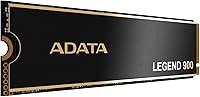
The ADATA Legend 900 1TB NVMe SSD is a strong fit for PS5 owners who have run out of internal storage and want a verified, hassle-free expansion drive without paying flagship prices. The installation process is straightforward, and the drive clears Sony's required speed threshold with room to spare, so console users do not need to worry about compatibility headaches. PC builders working within a tight budget will also find this Gen4 NVMe drive a compelling choice — it brings a genuine generational jump over SATA or older PCIe Gen3 options for everyday gaming and general computing tasks. Laptop upgraders with an available M.2 2280 slot will notice a meaningful real-world difference in boot times and application launches. For anyone whose primary storage use case is gaming, web browsing, and routine file management, the Legend 900 delivers well above its price point.
Not suitable for:

Buyers who rely heavily on sustained sequential write performance — video editors exporting large files, photographers batch-processing RAW files, or data professionals running continuous read/write workloads — should look elsewhere. The ADATA Legend 900 1TB NVMe SSD uses a DRAM-less architecture that leans on Host Memory Buffer technology, and while that works acceptably for typical consumer tasks, it does cause write speeds to drop noticeably during extended heavy operations. Users building high-end workstations where consistent peak throughput matters will get better value from a DRAM-equipped drive, even at a higher cost. Thermal management is also worth considering: without the optional heatsink installed, this ADATA SSD can run warm under sustained load, which may be a concern in poorly ventilated cases or compact builds with limited airflow. Anyone prioritizing long-term write-heavy workloads over gaming-oriented burst performance should factor these trade-offs carefully before buying.
Specifications

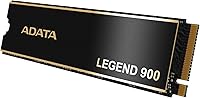
  • Capacity: The drive offers 1TB of usable storage, suitable for a large game library or as a primary system drive.
  • Interface: Uses a PCIe Gen4x4 NVMe interface, delivering significantly higher bandwidth than Gen3 or SATA-based alternatives.
  • Form Factor: Follows the M.2 2280 standard, measuring 3.94 x 1.97 x 0.5 inches and compatible with most modern motherboards, laptops, and the PS5.
  • Sequential Read: Rated for sequential read speeds of up to 7,000 MB/s under optimal conditions.
  • Sequential Write: Rated for sequential write speeds of up to 5,400 MB/s, though real-world sustained writes may taper on extended workloads.
  • Endurance: Carries a 1,200 TBW (terabytes written) endurance rating, supporting years of heavy consumer use before wear becomes a concern.
  • NAND Type: Built with 3D NAND flash memory, which improves storage density and contributes to consistent long-term data retention.
  • Error Correction: Implements LDPC (Low-Density Parity-Check) ECC to detect and correct data errors transparently during normal operation.
  • DRAM Cache: No dedicated onboard DRAM; the drive relies on Host Memory Buffer (HMB) technology to borrow system RAM for cache operations.
  • Caching Tech: Combines SLC caching with HMB to accelerate read and write bursts, maintaining smooth responsiveness for typical consumer workloads.
  • PS5 Support: Fully compatible with PS5 internal expansion, delivering speeds well above Sony's 5,500 MB/s minimum requirement.
  • Heatsink: Does not include a heatsink in the standard package; an optional heatsink is available separately for thermally demanding environments.
  • Weight: Weighs just 0.317 ounces (approximately 9g), making it one of the lighter options in its category.
  • Voltage: Operates at 1.35V, consistent with standard NVMe SSD power requirements for both desktop and laptop installations.
  • Flash Memory: Total flash memory size is 1,000 GB, with formatted user capacity slightly lower after factory provisioning.
  • Brand Origin: Manufactured by ADATA, a Taiwanese company with over two decades of experience in consumer and enterprise storage products.

Related Reviews

ADATA Legend 900 2TB SSD
87%
94%
Performance
92%
Speed (Read/Write)
89%
Reliability & Durability
90%
PS5 Compatibility
88%
Ease of Installation
More
ADATA Legend 850 LITE 1TB SSD
88%
94%
Performance
93%
Speed (Read/Write)
89%
Ease of Installation
92%
Value for Money
91%
Compatibility with PS5
More
ADATA Legend 960 Max 2TB PCIe Gen4x4 NVMe M.2 SSD
88%
93%
Performance
94%
Speed (Read/Write)
88%
Thermals & Cooling
89%
Installation & Setup
91%
PS5 Compatibility
More
RONGSHU RS001 1TB NVMe SSD
75%
91%
Value for Money
88%
Read/Write Speed
93%
PS5 Compatibility
53%
Brand Trustworthiness
71%
Thermal Management
More
Samsung 980 1TB NVMe M.2 SSD
83%
91%
Read Speed Performance
78%
Write Speed Performance
83%
Value for Money
89%
Build & Reliability
94%
Installation Ease
More
PHIXERO P5000 1TB NVMe SSD
86%
92%
Read/Write Speeds
88%
Performance Under Load
95%
Ease of Installation
85%
Thermal Management
90%
Compatibility with Devices
More
Transcend MTE310 1TB NVMe SSD
88%
92%
Performance
94%
Speed (Read/Write)
88%
Reliability
91%
Ease of Installation
84%
Software/Software Experience
More
fanxiang S880ER 1TB NVMe SSD
87%
92%
Performance for Gaming
90%
Data Transfer Speed
89%
Cooling Efficiency
87%
Ease of Installation
91%
PS5 Compatibility
More
Patriot P300 1TB NVMe SSD
83%
88%
Performance
92%
Value for Money
85%
Read Speed
83%
Write Speed
86%
Durability
More
OWC Envoy 1TB External SSD
83%
88%
Transfer Speed
91%
Build Quality
94%
Portability
93%
Mac & iPad Compatibility
71%
Value for Money
More

FAQ

Yes, the ADATA Legend 900 1TB NVMe SSD is fully compatible with the PS5 expansion slot and comfortably exceeds Sony's minimum speed requirement. Installation follows the standard PS5 M.2 upgrade process: power down the console, remove the side panel and expansion slot cover, seat the drive, and reassemble. The PS5 will prompt you to format the drive on first boot, which takes only a moment.
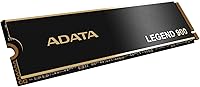
Sony recommends using a heatsink with any M.2 drive installed in the PS5, and this drive does not include one in the box. You can pick up a compatible low-profile M.2 heatsink separately — they are inexpensive and widely available. For PC use, a heatsink is helpful but not strictly required unless your case has limited airflow or the drive is running intensive workloads for extended periods.

Many drives at this price tier skip dedicated DRAM to keep costs down, relying instead on Host Memory Buffer technology, which borrows a small portion of your system RAM to handle caching duties. For gaming, everyday computing, and general file transfers, the real-world difference is minimal. Where it becomes noticeable is during long, continuous write sessions — think transferring hundreds of gigabytes in one go — where speeds can drop below peak. For most users, it is not a meaningful drawback.

Yes, PCIe Gen4 drives are backward compatible with Gen3 slots. You will not get Gen4 speeds — the drive will operate at Gen3 throughput — but it will still function reliably and outperform any older SATA SSD you might be replacing. It is a perfectly sensible upgrade even if your machine cannot take full advantage of the Gen4 headroom.

The peak figures are achieved under controlled benchmark conditions with large sequential transfers. In day-to-day use — launching games, booting your OS, copying medium-sized files — the performance feels quick and responsive. Where you might see speeds fall below the advertised ceiling is during prolonged back-to-back write operations, which is a characteristic of DRAM-less drives in general, not a defect specific to this one.

The 1,200 TBW endurance rating means you could theoretically write around 1.2 petabytes of data to the drive before reaching the manufacturer's wear threshold. For a typical gamer or home user writing 20 to 40GB per day, that translates to well over a decade of use. It is a genuinely durable rating for a drive in this segment.

Absolutely. The Legend 900 handles Windows installations, application loading, and daily computing tasks without any notable bottlenecks. Boot times are fast, and the drive feels snappy for everyday work. If your motherboard has a Gen4-capable M.2 slot, you will get the full benefit of the interface — a real upgrade over anything Gen3 or older.

Under light to moderate use it stays within perfectly normal temperature ranges. Under sustained heavy loads — prolonged game installs, large file copies — temperatures climb more noticeably, particularly without a heatsink. In a well-ventilated PC case this is rarely an issue, but in a tight laptop chassis or a sealed build, adding the optional heatsink is worth considering.

ADATA is an established Taiwanese manufacturer with a long track record in both consumer and industrial storage. They are not a tier-one brand in the same breath as Samsung or WD, but they are a legitimate company with a solid product history and warranty support. User feedback for this specific drive reflects no consistent pattern of early failures, which is reassuring for a drive that has been on the market long enough to accumulate meaningful real-world data.

ADATA typically covers their Legend series drives with a five-year limited warranty, which is the standard for competitive NVMe drives in this category. It is worth registering the product with ADATA directly after purchase to simplify any future warranty claims. Always verify the warranty terms at the time of purchase, as regional variations can apply.