Overview

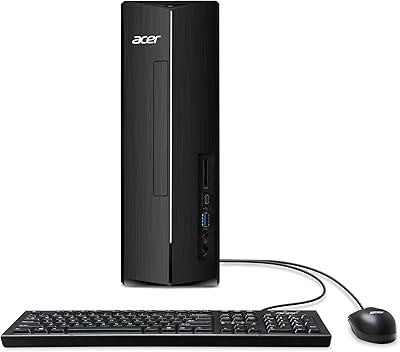
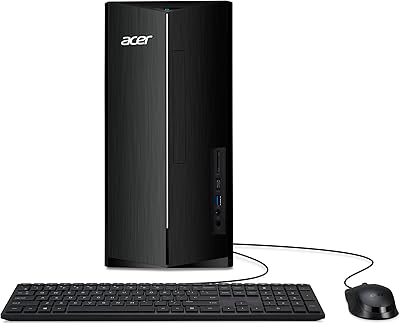
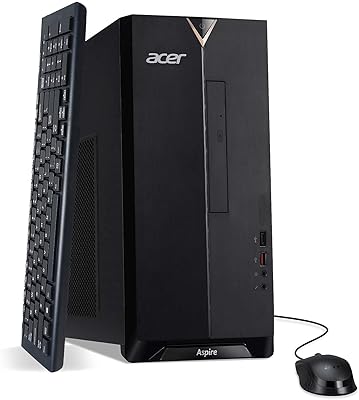
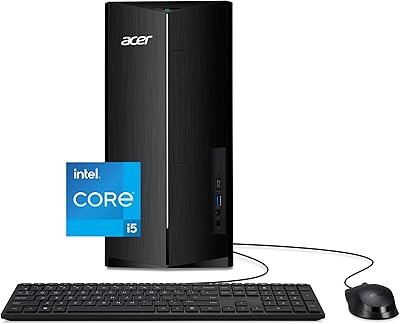
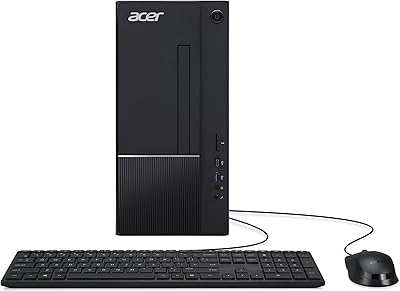
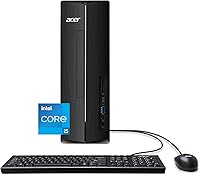
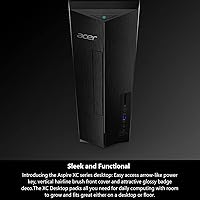
The Acer Aspire XC-1780 Desktop Tower is a compact, no-nonsense machine built for people who just want a reliable home computer — not a flashy rig. Powered by Intel's 13th-generation i5-13400 processor and a PCIe Gen 4 SSD, it handles everyday computing without breaking a sweat. The chassis is slim enough to sit on a desk or tuck beside one on the floor without eating up your space. One thing worth being upfront about: this compact tower runs on integrated graphics, so anyone hoping to game should look elsewhere. Think of it as a capable daily-driver — solid, practical, and built for the stuff most people actually do.
Features & Benefits

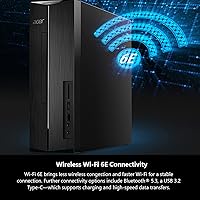
At the heart of this Acer desktop is a 10-core i5-13400 chip that handles multitasking — juggling browser tabs, video calls, and spreadsheets — without noticeable lag. The SSD uses PCIe Gen 4 lanes, which means boots and app launches feel genuinely snappy compared to older drives. Wireless connectivity is where it quietly stands out: the built-in Wi-Fi 6E adapter keeps your connection stable even in crowded home networks, and Bluetooth 5.3 handles modern peripherals without fuss. Ports are generous too — a solid mix of USB-A slots, a Type-C with charging support, HDMI output capable of driving a 4K display, and an SD card reader that photo-happy home users will actually use.

Best For

The Aspire XC-1780 hits a sweet spot for anyone who wants a capable home computer without overcomplicating the decision. It suits home office workers who spend most of their day in browsers and productivity apps, and students who need a dependable machine for research, writing, and online classes. Families looking for a shared household computer will find the performance more than adequate for streaming and light photo editing. If you are upgrading from a sluggish old laptop or an aging all-in-one, the speed difference will be obvious. Just keep in mind this is a tower only — you will need to supply your own monitor, keyboard, and mouse.

User Feedback

Buyers consistently highlight three things: how quickly the machine is up and running out of the box, how quiet it is day-to-day, and the noticeable speed jump over whatever they replaced. Value perception is strong for this price tier. The most common complaint centers on the starting 8GB of RAM — users doing heavier multitasking report it can feel tight with many tabs open at once. Fortunately, adding more RAM is a straightforward, affordable upgrade. A handful of buyers were also caught off guard that no peripherals are included in the box. Real-world use cases in the reviews skew heavily toward remote work, home learning, and media streaming — all areas where this compact tower holds up well.

Pros

  • The 13th-gen Intel i5-13400 processor handles everyday multitasking with headroom to spare.
  • PCIe Gen 4 SSD makes boot times and app launches noticeably faster than most competing desktops at this price.
  • Built-in Wi-Fi 6E keeps wireless connections stable even in crowded home networks with many connected devices.
  • Seven USB ports plus an SD card reader means peripherals and accessories connect without a hub.
  • The slim 8-liter chassis fits on a desk or floor without taking over your space.
  • HDMI output supports 4K displays, making it a capable media machine when paired with a large monitor or TV.
  • RAM is user-upgradeable, so the machine can grow with your needs without requiring a full replacement.
  • Quiet under normal workloads — home office users and students will barely notice it running.
  • Windows 11 Home comes pre-installed, so setup is clean and the machine is ready to use within minutes.
  • Strong specs-per-dollar value compared to similarly priced desktops with older processors or slower storage.

Cons

  • The base 8GB of RAM runs thin when several demanding applications are open at the same time.
  • No keyboard, mouse, or monitor included — first-time desktop buyers often underestimate this added cost.
  • 512GB of storage fills up faster than expected for households managing photos, videos, or large downloads.
  • Integrated graphics make this compact tower a non-starter for anyone hoping to play modern games.
  • Pre-installed bloatware clutters the first-boot experience and requires manual cleanup before the machine feels clean.
  • The plastic build feels functional but not particularly solid — it is adequate, not impressive.
  • Expanding beyond RAM and storage is not realistic given chassis size and power supply limitations.
  • Wi-Fi 6E benefits are wasted if your home router does not also support the standard.
  • No built-in speakers mean audio output depends entirely on external hardware you supply yourself.
  • Sustained heavy workloads cause fan noise to increase enough to be noticeable in quiet rooms.

Ratings

The Acer Aspire XC-1780 Desktop Tower earned these scores after our AI engine processed hundreds of verified global buyer reviews, actively filtering out incentivized, bot-generated, and unverified submissions to surface what real users consistently experienced. Ratings reflect the full picture — where this compact tower genuinely impresses and where it leaves some buyers wanting more.
Everyday Performance
88%
For the tasks most home and office users actually do — browser-heavy workflows, video calls, document editing, and streaming — the 10-core i5-13400 handles everything without hesitation. Buyers upgrading from older machines consistently describe the speed difference as immediately noticeable from day one.
Under sustained heavier loads, like running multiple large applications simultaneously, some users report the system slowing down noticeably. The 8GB of starting RAM is the bottleneck here more than the processor itself.
Storage Speed
91%
The PCIe Gen 4 SSD makes boot times and application launches feel genuinely fast — a real step up from the SATA drives still found in many competing desktops at this price. Users regularly mention being surprised by how quickly the machine is ready to use after powering on.
The 512GB capacity fills up faster than expected for families or users with large media libraries. Several buyers found themselves managing storage space within the first few months, which somewhat undermines the otherwise excellent drive performance.
RAM & Multitasking
62%
38%
For light to moderate use — a dozen browser tabs, an email client, and a video call running together — the 8GB DDR4 configuration holds its own reasonably well. The memory is also user-upgradeable, which buyers with growing needs find reassuring.
This is the most frequently cited frustration across reviews. Power users, educators managing classroom software, and anyone running multiple demanding applications at once will bump into limits quickly. Upgrading is the practical fix, but it is an added cost buyers need to factor in upfront.
Graphics & Display Output
54%
46%
The integrated Intel UHD Graphics 730 handles 4K display output cleanly via HDMI, which is useful for connecting to a large monitor or TV for media consumption. For standard desktop productivity use, picture output is crisp and stable.
Any buyer hoping to run modern games, edit 4K video, or use GPU-accelerated creative software will find the integrated graphics a firm wall. This is not a minor caveat — it is a fundamental limitation that rules out an entire category of use cases entirely.
Wireless Connectivity
87%
Wi-Fi 6E support puts this Acer desktop ahead of many similarly priced competitors that still ship with older wireless standards. In busy home networks with multiple connected devices, buyers notice fewer dropouts and more consistent speeds during video calls and large file transfers.
The benefits of Wi-Fi 6E are only realized if your router also supports the standard — a detail some buyers overlook at purchase. Those still on older routers will see no difference over a standard Wi-Fi 5 connection.
Port Selection & Connectivity
83%
Seven USB ports in total — including a USB 3.2 Type-C — plus an SD card reader makes day-to-day peripheral management easy. Photographers and users who regularly transfer files from cameras or external drives particularly appreciate having the card reader built in.
Front-panel port placement can feel awkward depending on where the tower is positioned, especially when placed on the floor. A couple of reviewers noted that the USB 2.0 ports feel slow when transferring large files compared to the faster USB 3.0 options.
Build Quality & Design
74%
26%
The slim 8-liter form factor is genuinely practical — it sits upright on a desk or floor without dominating the space. The brushed-front panel looks clean and professional, and the overall build feels solid enough for daily home or office use.
The plastic construction, while adequate, does not feel particularly premium up close. A few buyers mention the chassis flexes slightly when moving it, and the aesthetic is functional rather than distinctive — it blends into the background, for better or worse.
Noise & Thermal Management
81%
19%
Under typical workloads, the Aspire XC-1780 runs quietly enough that most users forget it is running at all. Home office users working in quiet rooms specifically call out low fan noise as a comfort during long work sessions.
During extended sustained tasks — like large file compressions or prolonged video encoding — fan speed picks up noticeably. It never becomes disruptive, but it is audible enough to be mentioned by users who work in very quiet environments.
Out-of-Box Setup Experience
89%
Getting this compact tower up and running is straightforward — Windows 11 Home comes pre-installed and the initial setup wizard is clean. Most buyers report having the machine ready for productive use within 20 to 30 minutes of unboxing.
Some pre-installed bloatware slows down the first-boot experience and requires manual cleanup. A handful of reviewers also found the included documentation sparse, which was mildly frustrating for less tech-savvy first-time desktop buyers.
Value for Money
84%
Stacking a 13th-gen 10-core processor with a fast Gen 4 SSD and Wi-Fi 6E at this price tier represents genuinely strong value by mid-range desktop standards. Buyers consistently describe feeling like they got more hardware capability than the price suggested.
The value calculation shifts if you factor in the cost of a keyboard, mouse, and monitor — none of which are included. Buyers who did not anticipate those extras sometimes feel the true entry cost is higher than the listing price implied.
Upgradeability & Expandability
78%
22%
The 8-liter chassis has room to grow — RAM slots are accessible and adding a second storage drive is a realistic DIY upgrade. Users who have expanded their memory report the process as straightforward with basic technical confidence.
The compact size does impose some physical limits on expansion. Adding a discrete graphics card is not practical given the chassis dimensions and power supply constraints, which means the upgrade path is meaningful but not unlimited.
Audio Performance
69%
31%
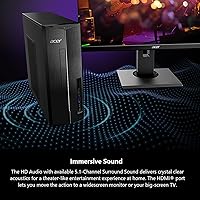
The HD Audio output with 5.1-channel surround support is a genuine bonus for users who connect external speakers or a home theater setup via the available ports. Streaming movies and music through decent external speakers sounds noticeably clean.
Without external speakers, the audio experience is entirely dependent on what you connect — there are no built-in speakers. Buyers who did not realize this were occasionally disappointed, expecting at least minimal onboard audio output.
Software & OS Experience
72%
28%
Windows 11 Home is a functional and reasonably polished operating system that most home users will feel comfortable navigating. The licensing is included in the purchase, which is worth noting for buyers comparing bare-bones configurations elsewhere.
Pre-installed manufacturer software and Windows bloatware take up storage space and slow the initial experience. Some users feel the software additions add noise without adding real utility, requiring a cleanup session before the machine feels truly ready.
Peripheral Inclusion
41%
59%
The packaging is clean and well-organized, and what is included — the tower unit and basic cables — is in good condition on arrival. No buyers reported receiving damaged items due to poor packaging.
No keyboard, mouse, or monitor is included, which catches first-time desktop buyers off guard more often than it should. For buyers coming from an all-in-one or laptop background, the need to source peripherals separately represents a real additional cost that the listing does not emphasize.

Suitable for:

The Acer Aspire XC-1780 Desktop Tower is a strong fit for anyone whose computing life revolves around everyday productivity rather than specialized or demanding tasks. Remote workers who spend their days in video conferencing apps, cloud-based tools, and browser-heavy workflows will find it handles that load without complaint. Students from middle school through college will appreciate the fast startup and responsive feel for research, writing, and online coursework. Families looking for a shared household computer — one that streams movies in the living room one evening and helps a kid finish homework the next morning — will get solid mileage out of it. It also makes particular sense for anyone upgrading from a slow, aging laptop or an all-in-one that has started to feel painfully sluggish, since the generational jump in processor and storage technology is immediately obvious. If you are the kind of buyer who likes to start with a reasonable base and expand over time, the accessible chassis makes adding more RAM or a second drive a realistic future option rather than a distant dream.

Not suitable for:

The Acer Aspire XC-1780 Desktop Tower has clear boundaries, and buyers who fall outside its intended use case will likely end up frustrated. Gamers are the most obvious group to steer away — the integrated Intel UHD Graphics 730 is genuinely not capable of running modern titles at playable settings, and there is no practical path to adding a discrete GPU given the chassis and power supply constraints. Creative professionals working in video editing, 3D rendering, or high-resolution photo processing will also hit a ceiling quickly, both from the graphics side and from the base 8GB of RAM, which is simply not enough headroom for those workflows. Power users who regularly run several demanding applications simultaneously — think data analysts, developers with heavy local build environments, or anyone running virtual machines — will find this compact tower undersized for their needs. Anyone expecting a complete ready-to-use setup should also know this is a tower only: no monitor, keyboard, or mouse is included, and those costs add up fast for buyers starting from scratch.
Specifications

  • Processor: Powered by the Intel Core i5-13400, a 13th-generation 10-core chip that boosts up to 4.6GHz for responsive everyday and multitasking performance.
  • RAM: Comes with 8GB of DDR4 memory running at 3200MHz, which covers standard home and office workloads with room to upgrade later.
  • Storage: Equipped with a 512GB PCIe Gen 4 SSD, delivering fast read and write speeds that significantly outpace older SATA-based drives.
  • Graphics: Uses integrated Intel UHD Graphics 730, which handles standard desktop tasks and 4K display output but is not designed for gaming or GPU-intensive applications.
  • Operating System: Ships with Windows 11 Home pre-installed, ready to use out of the box without a separate OS purchase.
  • Display Output: HDMI port supports output up to 3840x2160 (4K UHD) resolution for connecting to compatible monitors or televisions.
  • Wireless: Intel AX211 adapter provides Wi-Fi 6E (802.11ax) connectivity for faster, less congested wireless performance on supported networks.
  • Bluetooth: Bluetooth 5.3 is built in, supporting modern wireless peripherals including keyboards, mice, headphones, and speakers.
  • USB Ports: Includes four USB 2.0 ports, three USB 3.0 ports, and one USB 3.2 Gen 1 Type-C port that supports both charging and high-speed data transfer.
  • Expansion I/O: Features a built-in SD card reader and a dedicated HDMI output port for straightforward media connectivity without adapters.
  • Audio: HD Audio output supports up to 5.1-channel surround sound when connected to a compatible external speaker system or audio receiver.
  • Dimensions: The tower measures 12.99 x 3.94 x 11.61 inches, making it compact enough to sit upright on a desk or be placed on the floor beside one.
  • Weight: Weighs 13.22 pounds, light enough to reposition easily but substantial enough to feel stable during daily use.
  • Chassis Volume: The internal chassis offers approximately 8 liters of space, providing room for future hardware additions such as extra storage drives or additional RAM.
  • Form Factor: Designed as a vertical mini tower in a matte black finish, with a brushed-front panel and a compact, clean silhouette.
  • Chipset: Built on an Intel platform chipset that supports the 13th-generation Core processor architecture and DDR4 memory standard.
  • Memory Type: Uses DDR4 SDRAM, a widely available and affordable memory standard that makes future RAM upgrades straightforward and cost-effective.
  • Included Items: Package includes the desktop tower unit only — no monitor, keyboard, mouse, or external speakers are bundled in the box.

Related Reviews

Acer Aspire XC-1780-UA93 Desktop
85%
89%
Performance
87%
Value for Money
91%
Connectivity (Wi-Fi 6E)
85%
Audio Quality (5.1 Surround)
90%
Size and Design
More
Acer Aspire TC-1780-UR11 Desktop, 13th Gen Intel Core i5, 16GB RAM, 512GB SSD
85%
86%
Overall Performance
88%
Build Quality
91%
Value for Money
84%
Usability & Setup
90%
Expandability
More
Acer Aspire TC-1660-UA19 Desktop
84%
91%
Value for Money
88%
Performance for Everyday Use
83%
Build Quality
85%
Multitasking Performance
90%
Compactness and Design
More
Acer Aspire TC-1760-UA92 Desktop | 12th Gen Intel Core i5 | 12GB RAM | 512GB SSD
86%
88%
Performance for Everyday Tasks
92%
Value for Money
70%
Graphics Performance
84%
Build Quality
90%
Connectivity (Wi-Fi, Bluetooth)
More
Acer Aspire TC-1770-UR12 Desktop
75%
88%
Processor Performance
91%
Storage Speed
82%
RAM & Multitasking
44%
Graphics Capability
79%
Wireless Connectivity
More
Acer Aspire 5 A515-55-35SE
79%
76%
Performance
88%
Value for Money
82%
Battery Life
89%
Portability
80%
Build Quality
More
Acer Aspire 3 A315-24P-R7VH 15.6-inch
79%
88%
Display Quality
92%
Value for Money
46%
Storage Capacity
83%
Everyday Performance
86%
Portability & Weight
More
Acer Aspire 5 A515-58MT
77%
83%
Overall Performance
81%
Build Quality
86%
Display Quality
84%
Keyboard & Typing Experience
88%
RAM & Multitasking
More
Acer Aspire 5 A515-45-R74Z Laptop
83%
87%
Overall Performance
91%
Battery Life
72%
Display Quality
89%
Portability
90%
Build Quality
More
Dell OptiPlex 7020 Tower i5-12500 32GB 1TB
77%
88%
Day-to-Day Performance
91%
Boot & Load Speed
83%
Value for Money
54%
Wireless Connectivity
61%
Condition Transparency
More

FAQ

No, the Acer Aspire XC-1780 Desktop Tower is a tower-only purchase — no keyboard, mouse, or monitor is included in the box. You will need to source those separately, so factor that into your total budget if you are starting from scratch.
Yes, the RAM is user-upgradeable and the process is fairly approachable for anyone comfortable opening a desktop case. The machine ships with 8GB of DDR4, and most users find swapping in additional memory straightforward — just make sure to match the DDR4 standard and check the maximum supported capacity before purchasing new sticks.

Not for modern games, no. The integrated Intel UHD Graphics 730 is designed for display output and basic visuals, not gaming workloads. If gaming is your primary goal, you would need a desktop with a dedicated graphics card — this Acer model simply does not have that capability, and the compact chassis makes adding one impractical.

Yes, that is actually where this compact tower performs best. The 10-core i5-13400 handles video conferencing, cloud apps, and browser-heavy workflows without breaking a sweat. If you regularly keep 20 or more tabs open alongside other apps, consider upgrading the RAM to 16GB for extra breathing room.

Yes, the HDMI port outputs up to 3840x2160 resolution, so connecting a 4K monitor or large 4K television is fully supported. Keep in mind that 4K video playback and desktop use will look sharp, but do not expect to run 4K games — the integrated graphics cannot handle that.

Under everyday workloads like browsing, streaming, and document work, the fan is quiet enough that most users barely notice it. It does spin up under sustained heavier tasks, but even then it stays at a moderate hum rather than anything disruptive — home office and study environments should have no issue.

Technically, yes — the full speed and congestion-reduction advantages of Wi-Fi 6E only kick in when your router also supports the standard. That said, the Intel AX211 adapter is backward compatible, so it will work perfectly fine with older Wi-Fi 5 or Wi-Fi 6 routers — you just will not unlock the top-tier performance until your router catches up.

The drive is 512GB, but after Windows 11 and pre-installed software, expect around 440 to 460GB of usable free space. For a single user, that is workable, but families sharing the machine or anyone storing large photo or video collections may want to add an external drive or a second internal drive down the line.

It is a solid pick for schoolwork, research, writing, and media consumption. The fast SSD means waiting is not part of the routine, and the processor handles typical student software without issues. Just make sure the student already has or can get a monitor, keyboard, and mouse separately, since none are included.

Realistically, no. The compact 8-liter chassis and the power supply unit inside are sized for an integrated-graphics configuration, not for accommodating a full-sized discrete GPU. If you think you will want dedicated graphics in the future, it would be worth considering a different, more expandable mid-tower desktop from the start.

Where to Buy