Overview

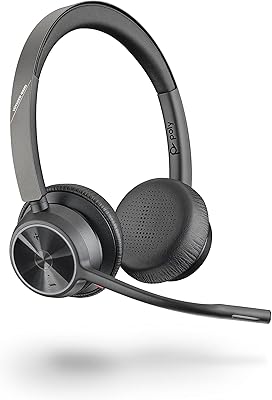
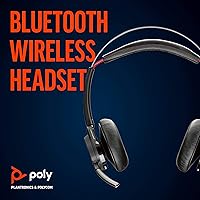
The Plantronics Voyager Focus UC Bluetooth Stereo Headset was built with one clear audience in mind: professionals who live on calls. While most business headsets default to a single-ear mono design, this Voyager Focus UC headset goes stereo — a meaningful difference when you are on back-to-back video meetings and want audio that does not feel like a phone from 2005. Plantronics, now operating under the Poly brand, has decades of credibility in professional audio, and this headset sits at the upper end of the workday-use category. It carries Microsoft Teams certification and works across Zoom and other UC platforms, making setup largely plug-and-play for most office environments.
Features & Benefits

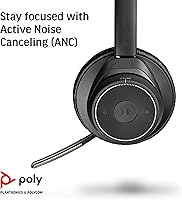
The three-mic boom array is arguably the standout feature here — not just for what you hear, but for what callers on the other end do not. Background noise gets filtered aggressively at the source, so a barking dog or a noisy air conditioner rarely makes it through to your meeting. ANC on the listening side is solid for a business headset — effective enough to take the edge off open-office noise, though it will not rival dedicated consumer noise-canceling headphones. Battery life runs a genuine full workday with ANC on, and the USB-A dongle means reliable PC pairing even on machines without built-in Bluetooth. The roughly 98-foot wireless range gives real freedom to move.

Best For

The Poly Voyager Focus UC is built for a specific kind of professional: someone who spends a significant chunk of their day talking, not just listening. If you are on Teams or Zoom calls for four or more hours daily, the stereo audio and ANC combination makes a real difference in focus and fatigue reduction compared to a basic mono headset. Open-plan office workers will appreciate the noise blocking during calls, and the wireless range is wide enough to step into a kitchen or adjoining room without dropping the connection. That said, if your workday involves light phone use or you primarily want music listening, you might not need everything this wireless UC headset brings.

User Feedback

With a 4.0-star average across several hundred ratings, the pattern in user responses is fairly telling. Most of the praise centers on microphone call quality — people report that colleagues and clients consistently notice a cleaner, clearer audio experience compared to built-in laptop mics or cheaper headsets. Where opinions diverge is on comfort. The on-ear design puts pressure on the outer ear rather than surrounding it, and buyers who wear it beyond three or four hours often note fatigue. A handful of users also mention occasional pairing hiccups with the USB dongle on certain laptop models. This Voyager Focus UC headset earns its rating — it just is not the right fit for everyone.

Pros

  • Microphone clarity is consistently praised — callers report noticeably cleaner audio versus laptop mics or budget headsets.
  • Microsoft Teams certification means setup is plug-and-play with no driver headaches on most systems.
  • The stereo dual-ear design reduces listening fatigue during long meeting-heavy workdays.
  • Battery life comfortably covers a full eight-hour workday even with ANC running.
  • Simultaneous pairing to both a PC and a mobile phone keeps you connected without switching manually.
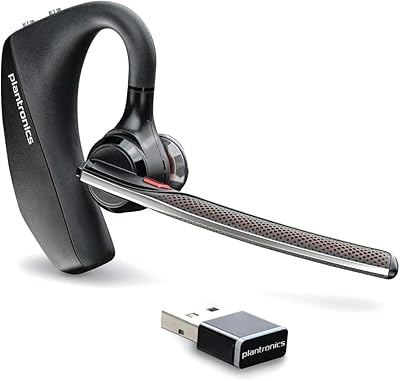
  • The USB-A dongle provides a reliable, stable connection on machines without built-in Bluetooth.
  • Wireless range of roughly 98 feet gives genuine desk-to-kitchen freedom during calls.
  • ANC is effective at softening open-office chatter and background hum without needing to isolate yourself.
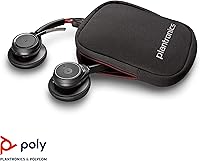
  • The included hard carrying case makes it practical to transport between a home office and a shared workspace.
  • The Poly Voyager Focus UC works across Zoom, standard UC platforms, PC, Mac, and mobile — no ecosystem lock-in.

Cons

  • On-ear cushions create noticeable pressure fatigue during sessions longer than three to four hours.
  • Bluetooth 4.2 is dated by current standards and lacks the efficiency improvements found in newer chipsets.
  • The USB-A dongle is a dealbreaker for users on modern USB-C-only laptops without an adapter.
  • ANC performance lags behind over-ear consumer headphones at the same price, which some buyers find disappointing.
  • Touch controls have a learning curve and can trigger accidental commands during active calls.
  • Some users report intermittent pairing instability with the dongle on certain laptop models or operating system updates.
  • The product design dates back to 2015, meaning buyers should verify whether a newer Poly model better suits current needs.
  • At this price tier, the lack of an over-ear option in the same line is a meaningful comfort trade-off.
  • Call-focused feature set means the audio tuning is optimized for voice clarity, not rich music reproduction.

Ratings

The scores below for the Plantronics Voyager Focus UC Bluetooth Stereo Headset were generated by our AI engine after analyzing verified global user reviews, actively filtering out incentivized, duplicate, and bot-submitted feedback to surface what real buyers actually experienced. Every category reflects both the consistent praise and the recurring frustrations found across hundreds of honest assessments, so you get a transparent picture rather than a polished sales narrative.

Microphone Clarity
91%
This is where the Poly Voyager Focus UC genuinely earns its price. The three-mic boom array isolates the speaker's voice with real precision, and people on the receiving end of calls — whether on Teams, Zoom, or a regular phone call — consistently notice the difference compared to laptop mics or cheaper headsets.
In very loud environments, such as a busy co-working space with multiple conversations nearby, occasional audio artifacts do slip through on the microphone side. A small number of users also noted that the boom arm needs to be positioned carefully for optimal pickup — leaving it raised degrades quality noticeably.
Active Noise Canceling
74%
26%
For a business headset, the ANC performs well enough to meaningfully reduce consistent background noise like HVAC systems, office hum, and keyboard sounds. Remote workers in moderately noisy home environments found it effective at maintaining focus during long call sessions without needing to find a quiet room.
Buyers expecting consumer-grade ANC performance comparable to dedicated noise-canceling headphones will find it underwhelming. Louder or more dynamic noise sources — a busy street, a loud open-plan office with lots of voices — push its limits quickly, and a few users felt the ANC reduction was modest given the price tier.
Call Audio Quality
88%
Voice reproduction on calls is clear and well-defined, striking the right balance between warmth and intelligibility that matters during long professional meetings. Users switching from mono single-ear headsets consistently reported that the stereo dual-ear experience made hours of back-to-back calls significantly less mentally draining.
Audio quality is tuned specifically for voice, which means it lacks the low-end depth or soundstage that makes music or multimedia content enjoyable. If you occasionally use your headset for watching videos or listening to music between meetings, the experience is functional but noticeably flat.
Battery Life
83%
A genuine full workday of call use with ANC enabled is realistic for most users, which is the bar that matters for this product type. Professionals who start their day at 8am and wrap up by 6pm reported being able to get through without needing to charge mid-session, even on heavier call days.
Battery life is rated conservatively at 10 hours of talk time with ANC on, and heavy users pushing continuous usage close to that ceiling occasionally reported needing to top up before the end of their day. The headset also takes a few hours to fully recharge, which can be inconvenient if you forget to plug it in overnight.
Comfort & Fit
61%
39%
For sessions up to two or three hours, the leather cushions and relatively light 5.5-ounce weight make this wireless UC headset reasonably comfortable. Users with shorter meeting blocks or those who take regular breaks reported no significant issues, and the adjustable headband accommodates a range of head sizes well.
Extended wear beyond three to four hours is where the on-ear design becomes a genuine problem. The cushions press against the outer ear rather than surrounding it, and buyers who wear the headset for six or more hours straight frequently report soreness and pressure fatigue that over-ear alternatives at a similar price avoid entirely.
Wireless Connectivity
79%
21%
The USB-A dongle provides a noticeably more stable and reliable wireless connection than relying on a laptop's built-in Bluetooth, particularly in environments with a lot of competing wireless signals. The 98-foot range is generous enough to cover most realistic desk-to-kitchen or desk-to-printer scenarios without signal drops.
The USB-A dongle is a liability for users on newer laptops with only USB-C ports, requiring an adapter that adds friction to an otherwise straightforward setup. A minority of users also reported intermittent pairing instability after certain operating system updates, requiring a dongle re-pair to resolve.
Platform Compatibility
86%
Microsoft Teams certification means the headset integrates tightly with the platform — call controls respond correctly, mute status syncs with the app, and setup is genuinely plug-and-play for most IT environments. Zoom and other major UC platforms also work without configuration issues in the vast majority of reported setups.
The native integration depth outside of Teams varies by platform, and some call control functions — like Teams-specific status indicators — do not carry over to Zoom or Meet. Users in mixed-platform environments occasionally found the experience slightly less polished on non-Teams calls.
Build Quality
77%
23%
The headset feels solidly constructed for a professional device, with a headband and hinges that hold up well to the regular folding and unfolding that comes with daily commuter use. The hard carrying case ships in the box, which adds meaningful protection and signals that Poly designed this with portability in mind.
Some long-term users noted that the leather ear cushion material begins to show wear — cracking or peeling — after one to two years of daily use. The overall design has not been refreshed since the product launched in 2015, and the slightly dated aesthetic shows against newer competitors at a comparable price.
Touch Controls
63%
37%
Once learned, the touch controls let you answer calls, adjust volume, and manage media without reaching for your keyboard or phone, which is genuinely convenient during a busy call day. The earcup placement of the controls is logical and accessible without needing to remove the headset.
The learning curve is steeper than it should be at this price point — accidental taps triggering unintended actions during active calls were a recurring complaint, particularly for new users. Tactile feedback is absent, which makes confident control use harder in situations where you cannot look at the headset.
Multipoint Pairing
81%
19%
Simultaneous pairing to a PC via dongle and a mobile phone via Bluetooth works reliably for most users and removes a genuine pain point for professionals who field calls across two devices throughout the day. Switching between a computer meeting and a mobile call is handled smoothly without manual re-pairing.
Audio handoff between devices occasionally lags a second or two, which can cause the first words of a mobile call to be missed while the headset switches source. A small number of users reported that the multipoint connection occasionally dropped one device after a firmware update.
Setup & Ease of Use
84%
For Teams-certified use, initial setup is as close to instant as a business headset gets — plug in the dongle, Teams recognizes it, and you are on a call within minutes. Non-technical users and IT administrators both praised the lack of driver installation requirements in standard deployments.
Users who wanted to explore advanced settings, customize controls, or update firmware needed to download and navigate the Poly Lens desktop application, which some found unintuitive. The touch control learning curve also adds a subtle onboarding friction that simpler button-based headsets avoid.
Value for Money
69%
31%
For professionals who genuinely rely on calls for several hours a day, the microphone quality and Teams integration justify the mid-to-premium price in a way that budget headsets simply cannot match. IT buyers and businesses deploying headsets across a team often cited lower support overhead and consistent performance as a cost justification.
Given the 2015 product launch, buyers paying a current mid-to-premium price are investing in aging hardware — Bluetooth 4.2, an on-ear design with known comfort limitations, and no significant hardware refresh since release. Competing headsets launched more recently offer Bluetooth 5.x, improved ANC, and over-ear comfort at similar or lower price points.
Portability
78%
22%
At 5.5 ounces and with a foldable design, this Voyager Focus UC headset packs into a bag without taking up significant space. The included hard case keeps it protected during commutes and makes it practical for professionals who split their week between home and an office.
The dongle is an additional small item to track and transport, and losing it effectively eliminates the most reliable connection method. The headset does not fold as compactly as some travel-focused competitors, so it occupies more bag space than a purely portable-first design would.

Suitable for:

The Plantronics Voyager Focus UC Bluetooth Stereo Headset is a strong match for remote and hybrid professionals whose workdays revolve around voice and video calls on platforms like Microsoft Teams or Zoom. If you spend four or more hours daily in meetings, the stereo dual-ear design reduces listening fatigue in a way a single-ear mono headset simply cannot replicate. The three-mic boom array means your audio comes through cleanly on the other end — a real professional advantage when you are presenting, interviewing, or on client calls where sound quality reflects on you. Open-plan office workers dealing with ambient chatter or background noise will also find genuine value in the ANC, which keeps distractions at bay without requiring you to retreat to a quiet room. The wireless range is wide enough to give you the freedom to grab a coffee or pace during a long call, and the included USB-A dongle makes it compatible even with older work laptops that lack native Bluetooth.
Not suitable for:

The Plantronics Voyager Focus UC Bluetooth Stereo Headset is not the right call for anyone prioritizing all-day physical comfort above everything else. The on-ear form factor places consistent pressure on the outer ear, and buyers who wear headsets for six or more uninterrupted hours frequently report discomfort that over-ear alternatives at a comparable price point avoid entirely. This wireless UC headset is also a poor fit for anyone expecting consumer-grade ANC performance — it handles office noise well, but it will not block out a loud cafe or a noisy commute the way dedicated noise-canceling headphones are designed to. Buyers running the latest USB-C-only laptops should also take note: the dongle is USB-A, which means an adapter is needed and adds a small but real point of friction. Finally, if your use case is primarily music listening or casual personal audio rather than professional calling, the pricing and feature set here are likely more than you need.

Specifications

  • Form Factor: Dual-ear (stereo) on-ear headset with a foldable boom microphone arm.
  • Connectivity: Bluetooth 4.2 wireless connection supplemented by an included USB-A dongle for PC pairing.
  • Wireless Range: Operates at distances of up to 98 feet (30 meters) from the paired source device.
  • Talk Time: Delivers up to 12 hours of talk time, or approximately 10 hours with Active Noise Canceling enabled.
  • Listening Time: Supports up to 15 hours of audio playback, reduced to roughly 12 hours when ANC is active.
  • Microphone: Three-microphone noise-canceling boom array designed to isolate the speaker's voice and suppress background noise.
  • Noise Canceling: Active Noise Canceling (ANC) functions on both the listening side and the microphone transmission side.
  • Ear Cushions: Leather-covered on-ear cushion pads are used on both earcups.
  • Weight: The headset weighs 5.5 ounces, making it relatively lightweight for an on-ear stereo business headset.
  • Audio Driver: Each earcup uses a dynamic audio driver with an impedance of 32 Ohm.
  • Controls: Call management and media playback are handled via touch-sensitive controls on the earcup.
  • Multipoint: Supports simultaneous Bluetooth pairing to two devices, such as a PC and a mobile phone, at the same time.
  • Certification: Officially certified for Microsoft Teams and broadly compatible with Zoom and other major UC platforms.
  • Compatible Devices: Works with PCs and Macs via the USB-A dongle, and connects to mobile phones via Bluetooth directly.
  • Bluetooth Version: Uses Bluetooth 4.2, which provides stable connectivity but predates the efficiency improvements of newer Bluetooth 5.x standards.
  • Carrying Case: Ships with a hard-shell carrying case for protected storage and transport between work locations.
  • Water Resistance: This headset carries no official water or sweat resistance rating and should be kept away from moisture.
  • Battery Type: Internal rechargeable battery; the included base or cable is used for charging between sessions.

Related Reviews

Poly Voyager 5200 UC
80%
94%
Voice Isolation & DSP
88%
Microphone Clarity
82%
Wireless Range & Stability
77%
All-Day Comfort
79%
Value for Money
More
Plantronics Voyager 6200 UC B6200 Bluetooth Headset
88%
91%
Audio Quality
89%
Comfort for Extended Use
87%
Noise Cancellation Performance
88%
Bluetooth Connectivity
84%
Battery Life
More
Plantronics Voyager 4310 USB-C Bluetooth Mono Headset
86%
88%
Call Clarity & Noise Cancellation
91%
Battery Life
85%
Comfort for Long Use
90%
Bluetooth Connectivity
80%
Sound Quality
More
Jabra Stealth UC Bluetooth Headset
84%
89%
Sound Quality
90%
Comfort & Fit
76%
Battery Life
85%
Noise Cancellation
80%
Voice Control Functionality
More
Jabra Evolve 20 UC Stereo
81%
91%
Microphone Clarity
86%
All-Day Comfort
88%
Call Control Usability
93%
UC Platform Compatibility
74%
Build Quality & Durability
More
Poly Voyager 4310 UC Wireless Headset
82%
88%
Microphone Quality
91%
Battery Life
72%
Comfort & Fit
86%
Wireless Connectivity
84%
Call Audio Clarity
More
RIG 400HX Xbox Gaming Headset
72%
84%
Value for Money
81%
Comfort & Fit
71%
Audio Quality
68%
Microphone Clarity
57%
Build Quality
More
Poly Voyager 4320 UC Wireless Headset
78%
84%
Microphone Clarity
91%
Battery Life
82%
Wearing Comfort
76%
Connectivity Reliability
63%
Noise Isolation (Listening)
More
Jensen CD-560 Portable Stereo CD Player with AM/FM Stereo Radio and Bluetooth
79%
75%
Sound Quality
85%
Bluetooth Connectivity
90%
Portability
68%
Build Quality
92%
Ease of Use
More
Plantronics Voyager Legend Bluetooth Headset
73%
83%
Call Clarity
71%
Voice Command Accuracy
81%
Battery Life
63%
Comfort & Fit
67%
Bluetooth Connectivity
More

FAQ

The Plantronics Voyager Focus UC Bluetooth Stereo Headset is officially certified for Microsoft Teams, which means call controls like answer, end, and mute are recognized natively by the Teams app. In most cases you plug in the USB-A dongle, Teams detects the headset, and you are ready to go without installing extra drivers. Some users install the Poly Lens desktop app to unlock firmware updates and customize settings, but it is not required for basic operation.
Yes, the Poly Voyager Focus UC supports multipoint Bluetooth, so you can stay paired to your computer via the dongle and to your mobile phone via Bluetooth simultaneously. If a call comes in on your phone while you are on a PC meeting, you can switch between them without re-pairing. It is one of the more practical features for people who field calls on multiple devices throughout the day.

The included dongle is USB-A, so you will need a USB-A to USB-C adapter to use it on a modern laptop that has only USB-C ports. The adapter itself is inexpensive and widely available, but it is an extra step that some buyers find annoying. Alternatively, you can pair the headset directly via Bluetooth if your laptop has it built in, though the dongle generally provides a more stable connection.

For a business headset, the ANC is genuinely solid — it takes the edge off consistent background noise like HVAC hum, keyboard clatter, and general office chatter. That said, it is not in the same league as dedicated consumer noise-canceling headphones designed specifically for that purpose. If your office is exceptionally loud or you need near-total isolation, you may want to compare it against over-ear alternatives before committing.

This is the most honest caveat to flag: the on-ear design places the earcups against your outer ear rather than surrounding it, and that creates pressure over time. Most users find it comfortable for sessions of two to three hours without issue, but feedback from people who wear it all day frequently mentions ear fatigue or soreness. If extended continuous wear is critical for you, an over-ear headset would be a more comfortable long-term fit.

Consistently, yes — this is one of the most praised aspects in real user feedback. The three-mic boom array does a noticeably better job of delivering clear voice audio than a laptop's built-in microphone, and colleagues on calls tend to comment on the difference. The mic also filters background noise from your environment, so your voice comes through cleanly even if there is activity happening around you.

Teams certification is the official badge it carries, but the Poly Voyager Focus UC works perfectly well with Zoom, Google Meet, Cisco Webex, and most other major calling platforms. The call controls may not be as deeply integrated outside of Teams, but audio quality and core functionality hold up across all of them.

The rated 12-hour talk time with ANC on holds up reasonably well in practice for most users. A typical eight-hour workday with mixed calls and listening time should not drain the battery completely. If you are in back-to-back calls all day with ANC running continuously, you may want to charge it overnight rather than relying on a midday top-up.

It is a fair question. The core design and feature set still hold up for professional call use, and the Teams certification has kept it relevant. Where it shows its age is mainly in Bluetooth 4.2, which is older than what newer headsets use. If you want the latest Bluetooth efficiency or more advanced ANC, Poly has released newer models worth considering. But if you find this wireless UC headset at a reduced price, the fundamentals of call quality and connectivity remain competitive.

In the box you get the headset itself, the USB-A Bluetooth dongle for PC pairing, a charging cable, and a hard-shell carrying case for storage and transport. The carrying case is a practical touch that makes it easier to move the headset between a home office and a shared workspace without it getting knocked around in a bag.