Overview

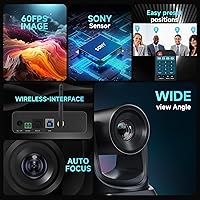
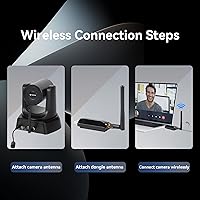
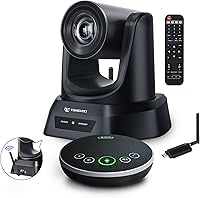
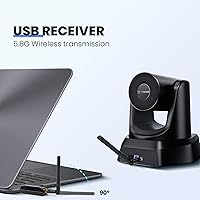
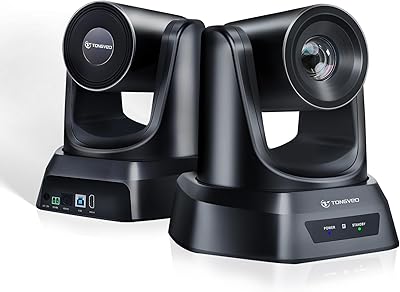
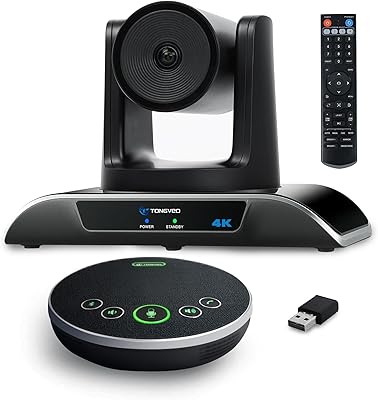
The TONGVEO PTZ 3X Wireless Conference Camera System enters the market as a complete bundle aimed at small-to-medium meeting rooms and church streaming setups that need real placement flexibility without running cables across the room. The 5.8GHz wireless link genuinely sets it apart from most competitors at this price point — tethered USB conference cameras simply can't offer the same freedom. You get the camera, a Bluetooth speakerphone, receiver dongle, IR remote, and all mounting hardware in one box. Shooting at 1080p and 60 frames per second puts it a step above the basic 30fps webcams that still dominate this space, delivering noticeably smoother motion during active presentations. Setup is plug-and-play with no drivers required on Windows or Mac.
Features & Benefits

The pan, tilt, and zoom controls are straightforward — the IR remote handles most everyday use, while RS485 or RS232 joystick support gives AV-equipped rooms a more professional option. The 114-degree field of view is wide enough to cover a full conference table without distortion, which honestly matters more than the 3X zoom in most real setups; that zoom is useful but modest, best suited for pulling in a speaker rather than capturing fine detail. Operating on the 5.8GHz band keeps the connection clean in offices where 2.4GHz Wi-Fi is congested. UVC 1.1 compliance means Zoom, OBS, WebEx, and similar platforms recognize the camera instantly. The anti-shake system reduces noticeable jitter when the camera sweeps between preset positions.

Best For

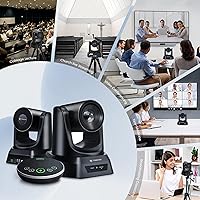
This wireless PTZ system makes the most sense for people who need camera flexibility without hiring someone to manage it. Small conference rooms that currently rely on a fixed webcam will notice a real improvement in how remote participants feel included — you can actually frame the active speaker instead of showing an empty whiteboard. Churches and community organizations that stream services are a natural fit, since repositioning between segments is quick and cable-free. Remote educators, trainers, and interviewers running one-person productions will appreciate having full PTZ control from a single remote. Anyone building a hybrid meeting room from scratch will find this camera bundle covers both audio and video in one purchase.

User Feedback

Owners of the TONGVEO conference camera generally praise how quickly it gets up and running, and most appreciate having a speakerphone included rather than sourcing one separately — audio quality draws positive comments, though some note it falls short of a dedicated conference mic in larger rooms. The 50-foot wireless range holds up well in open spaces, but a few buyers report signal inconsistency through thick walls, so room layout matters. Worth knowing upfront: the product documentation acknowledges the wireless dongle can get warm during long sessions, which is common for RF hardware but worth monitoring. The antenna pairing is factory-set — disassembling the receiver reportedly breaks that connection permanently, so handle it with care.

Pros

  • Complete bundle includes camera, speakerphone, receiver, remote, and all mounting hardware in one box.
  • Plug-and-play setup gets you into a Zoom or Teams call within minutes — no drivers, no configuration headaches.
  • Operating on the 5.8GHz band keeps the wireless link stable in offices packed with competing 2.4GHz Wi-Fi signals.
  • Smooth 60fps capture makes panning and active presentations look noticeably cleaner than standard 30fps webcams.
  • The bundled speakerphone handles small room audio well, eliminating the need for a separate microphone purchase.
  • Multiple mounting options — desk, wall, tripod, ceiling — give installers real flexibility without extra accessories.
  • UVC 1.1 compliance means every major conferencing platform recognizes the camera immediately without custom software.
  • The wide field of view covers a full conference table without distortion, which matters more day-to-day than the zoom range.
  • Anti-shake helps smooth out the image during fast pan and tilt movements between preset camera positions.

Cons

  • Wireless PTZ command latency of one to two seconds feels disruptive during fast-moving live calls or services.
  • Real-world wireless range drops significantly when walls or furniture sit between the camera and the USB dongle.
  • The wireless dongle heats up noticeably during extended sessions, introducing reliability uncertainty for long events.
  • Disassembling the receiver destroys its factory-paired wireless connection — a costly mistake with no easy fix.
  • Speakerphone audio thins out in rooms larger than a standard small conference space, leaving remote participants straining to hear.
  • Low-light video performance is average and requires supplemental lighting to maintain acceptable image quality.
  • The IR remote requires direct line-of-sight, which becomes awkward with side-wall or angled ceiling mounting positions.
  • No companion smartphone app feels like a missed opportunity for a system marketed on its wireless convenience.
  • Advanced configuration documentation for RS485 joystick control is sparse, frustrating more experienced AV installers.

Ratings

The TONGVEO PTZ 3X Wireless Conference Camera System has been evaluated by our AI rating engine after parsing verified global buyer reviews, actively filtering out incentivized, bot-generated, and low-quality feedback to surface what real users actually experience. The scores below reflect a balanced picture — where this camera bundle genuinely impresses and where it falls short in day-to-day use. Both strengths and frustrations are weighted transparently so buyers can make an informed call.
Wireless Connection Reliability
74%
26%
Most users in open-plan offices and single-room church setups report a stable, drop-free connection throughout long sessions. The 5.8GHz band clearly helps in buildings crowded with 2.4GHz Wi-Fi traffic, and many buyers specifically mention fewer freezes compared to their previous USB-tethered setups.
Reliability drops noticeably when walls or structural obstacles sit between the camera and the dongle. Several buyers in larger spaces report intermittent signal loss beyond 30 feet in real-world conditions, suggesting the advertised 50-foot range is best achieved in line-of-sight scenarios.
Video Quality
83%
The 60fps capture rate makes a visible difference during active presentations and when panning across a room — motion stays smooth rather than stuttering the way 30fps webcams do. For a conference camera in this price range, the image holds up well under typical office and church lighting conditions.
Low-light performance is average at best; images soften noticeably in dimly lit meeting rooms or evening services without supplemental lighting. A handful of users also note slight color washing in high-contrast environments, though this is fairly common at this sensor tier.
PTZ Control Responsiveness
71%
29%
Preset-to-preset movement is smooth enough for live streaming use cases where abrupt jumps would be distracting. The IR remote works reliably within a reasonable distance, and users running RS485 joystick setups in AV-equipped rooms report precise control with minimal calibration needed.
Wireless latency between a remote command and actual camera movement is the most consistent complaint in user reviews — typically a one-to-two second delay that feels awkward during live calls. For fast-paced Q&A sessions or dynamic church services, this lag can disrupt the flow of switching between speakers.
Speakerphone Audio Quality
78%
22%
The bundled speakerphone earns genuinely positive remarks for a camera-system accessory, with users in small conference rooms noting that remote participants hear voices clearly without echo. The noise suppression handles keyboard clicks and HVAC hum reasonably well in typical office environments.
In rooms larger than roughly 20 by 20 feet, voice pickup starts to thin out and remote participants report having to ask people to speak up. Buyers comparing it directly to a dedicated conference microphone at a similar standalone price consistently rate the audio as a step behind.
Ease of Setup
89%
Plug-and-play truly delivers here — multiple buyers mention being up and running on a Zoom or WebEx call within minutes of opening the box, with no driver hunting or software configuration required on either Windows or Mac. The included hardware kit covers most mounting scenarios without needing extra parts.
The antenna pairing process trips up a small but vocal group of buyers who assumed the dongle was modular. The product documentation warns that disassembling the receiver breaks the factory pairing permanently, and a few users learned this the hard way, requiring a full replacement.
Build Quality
69%
31%
The camera unit itself feels solid and holds its position well after mounting, and the pan/tilt mechanism operates without obvious mechanical slop. Most buyers handling the product daily in a professional environment report no structural issues over several months of use.
The speakerphone housing and the wireless dongle feel noticeably cheaper than the camera body — plasticky in a way that stands out given the overall system price. The dongle warming up during extended sessions is acknowledged even in the product description, which does little to reassure buyers paying for a professional-grade setup.
Zoom & Framing Flexibility
67%
33%
The wide 114-degree field of view handles small and medium rooms without fisheye distortion, which is the more practically useful feature for most meeting setups. Pulling in a speaker at the far end of a conference table with the optical zoom works cleanly without pixelation artifacts.
Three times optical zoom is modest by PTZ camera standards, and buyers expecting to isolate fine detail or cover a large auditorium will hit its limits quickly. It works fine for pulling in faces at a standard conference table but should not be the primary reason anyone chooses this system.
Software Compatibility
86%
UVC 1.1 compliance means the camera shows up immediately in Zoom, Teams, WebEx, OBS, and GoToMeeting without any manual configuration — something many buyers specifically call out as a relief after past experiences with finicky drivers. Mac compatibility is equally solid across recent OS versions.
A small number of users on older Windows 7 and Vista systems report occasional recognition glitches, though these edge cases are rare. OBS users note that advanced PTZ software control through conferencing apps requires some manual setup that is not clearly documented in the included materials.
Mounting Versatility
82%
18%
The range of mounting options — desk stand, monitor clip, wall bracket, tripod thread, and ceiling-inverted mode — gives installers real flexibility without buying extra accessories. Church AV volunteers and small office managers both highlight this as a practical advantage over single-mount competitors.
The monitor clip can feel insecure on thicker displays, and ceiling mounting requires confident DIY skills since the bracket hardware is minimal. A tripod is the most stable option for temporary setups, but that adds desk footprint in rooms where space is already limited.
Value for Money
72%
28%
Getting a PTZ camera, a functional speakerphone, a wireless receiver, remote control, and all mounting hardware in a single purchase at this price point represents genuine savings over assembling equivalent components separately. For buyers equipping a church hall or small office on a tight budget, the bundle logic is hard to argue with.
Buyers comparing this system against entry-level wired PTZ cameras from more established brands note that the wireless convenience comes at a quality trade-off in both audio and video performance. If cable management is not a constraint, spending similarly on a wired PTZ with a separate dedicated microphone likely yields better results.
Range Performance
63%
37%
In straightforward open-room deployments — a single-level sanctuary, a boardroom with no partition walls — users regularly confirm the wireless link holds strong across a sizable space. For these use cases the freedom from running long USB extension cables is a real practical benefit.
Real-world range in environments with drywall, brick, or furniture obstacles falls well short of the spec sheet figure for a meaningful portion of buyers. This is not unusual for consumer 5.8GHz hardware, but it is worth being clear-eyed about if the installation site has any structural complexity.
Remote Control Usability
77%
23%
The IR remote is responsive and covers the core PTZ functions without requiring a learning curve — even non-technical staff at houses of worship manage it confidently after a brief walkthrough. Preset position recall is fast enough for most live use cases.
The remote requires direct line-of-sight to the camera's IR receiver, which becomes awkward when the camera is mounted on a side wall or angled away from the operator. There is no companion smartphone app, which feels like a gap for a wireless system sold in part on its modern flexibility.
Long-Session Stability
66%
34%
For meetings and streams under two hours, the system generally performs without issue and buyers running weekly services or recurring team calls report consistent behavior session to session. Rebooting between sessions appears to reset any accumulated heat-related sluggishness effectively.
The wireless dongle heating issue surfaces in longer continuous use — think all-day conference events or extended streaming productions. While the heat does not typically cause permanent damage if the device is allowed to cool, it introduces an unpredictability that makes this system less suitable for mission-critical long-duration broadcasts.
Documentation & Support
58%
42%
The quick-start guide is clear enough for basic deployment and most buyers get the camera running without ever needing customer support. The inclusion of both a printed manual and labeled hardware kit reduces setup friction for first-time PTZ camera users significantly.
Technical documentation for advanced configurations — particularly RS485 joystick wiring and UVC software control — is thin and leaves more experienced AV integrators searching for answers online. Customer support response times draw criticism in several reviews, with buyers reporting multi-day delays when troubleshooting the antenna pairing issue.

Suitable for:

The TONGVEO PTZ 3X Wireless Conference Camera System is a strong fit for small-to-medium organizations that need camera placement flexibility without the headache of cable management. Churches and community centers that stream weekly services will find the wireless freedom particularly useful — being able to reposition the camera between setups without rerouting cables is a genuine time saver for volunteer AV teams. Small business conference rooms that currently rely on a fixed laptop webcam or basic USB camera will notice a real step up in how professional their meetings look and sound, especially with the bundled speakerphone handling room audio. Remote educators, corporate trainers, and interviewers running solo productions will appreciate having PTZ control at their fingertips without needing a dedicated operator. Buyers who want a single purchase to cover camera, audio, mounting, and control — rather than assembling components from multiple vendors — will find the all-in-one bundle logic genuinely compelling for getting a hybrid meeting room functional quickly.
Not suitable for:

Buyers with demanding or mission-critical production requirements should think carefully before committing to this camera bundle. The TONGVEO PTZ 3X Wireless Conference Camera System carries real limitations around PTZ response latency and wireless range in obstacle-heavy environments — issues that would be disruptive in fast-paced live broadcasts or large auditorium deployments where the camera sits far from the receiver through multiple walls. Organizations that already own a quality dedicated conference microphone will likely find the bundled speakerphone redundant rather than additive, and may prefer a wired PTZ option at a comparable price that prioritizes video performance. Professional AV integrators building complex multi-camera setups will find the documentation for RS485 control and advanced configurations too thin to rely on. Anyone expecting broadcast-grade audio or the kind of zoom reach needed to cover a large venue will hit the system's ceiling quickly and come away disappointed.
Specifications

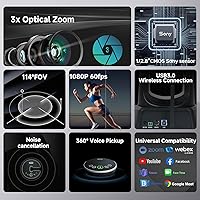
  • Resolution: The camera captures video at 1080p full HD resolution running at 60 frames per second for smooth motion during active presentations and panning movements.
  • Wireless Frequency: Transmission operates on the 5.8GHz band, which reduces interference in environments where 2.4GHz Wi-Fi networks are heavily congested.
  • Wireless Range: The system supports a wireless transmission range of up to 50 feet between the camera and the USB receiver dongle under line-of-sight conditions.
  • Optical Zoom: The PTZ camera provides 3X optical zoom, allowing modest subject magnification without introducing digital pixelation artifacts.
  • Field of View: A 114-degree wide-angle lens covers the full width of small to medium conference tables without visible barrel distortion.
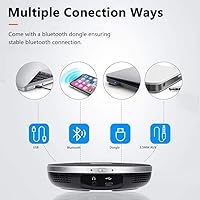
  • Connectivity: The receiver connects to a host computer via USB 3.0 and is recognized automatically as a UVC 1.1 device without requiring driver installation.
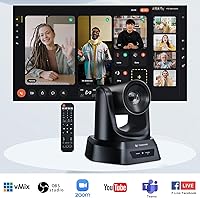
  • Control Options: The camera can be operated via the included IR remote control, an RS485 or RS232 joystick controller, or directly through UVC-compatible conferencing software.
  • Speakerphone: The bundled speakerphone provides 360-degree omnidirectional voice pickup with active background noise suppression for cleaner audio in meeting environments.
  • OS Compatibility: The system is compatible with Windows XP through Windows 11 and macOS 10.4 or higher, covering the vast majority of current business computers.
  • Mounting Options: The camera supports installation on a desk stand, monitor clip, wall bracket, standard tripod thread, or ceiling-inverted mount using the included hardware.
  • Power Supply: The camera unit is powered by an included DC 12V external power adapter rather than drawing power through the USB connection.
  • Image Sensor: The camera uses a CMOS image sensor, which is the standard sensor type found in this class of conference and streaming cameras.
  • Anti-Shake: An integrated anti-shake feature is active during pan and tilt movements to reduce visible jitter when the camera sweeps between preset positions.
  • Video Format: Recorded video is stored in MP4 format, and the system supports PCM and AAC audio formats for capture and playback.
  • Storage: The camera includes a Micro SD card slot for local video recording independent of the connected computer.
  • Package Weight: The complete package including all accessories weighs 7.11 pounds, which is typical for a bundled PTZ system with speakerphone and mounting hardware.
  • Package Dimensions: The retail box measures 11.85 by 10.35 by 8.19 inches, accommodating the camera body, speakerphone, receiver, remote, and all installation accessories.
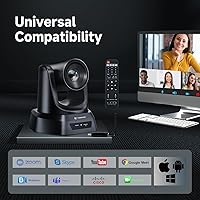
  • Software Compatibility: The system works out of the box with Zoom, WebEx, GoToMeeting, BlueJeans, Microsoft Teams, OBS, and any other platform that accepts a standard UVC camera input.

Related Reviews
TONGVEO 20X PTZ Conference Camera
78%
88%
Zoom Clarity & Optical Performance
93%
Setup & Ease of Use
79%
PTZ Movement & Preset Recall
86%
Video Quality at 1080p 60fps
71%
Remote Control Reliability
More
TONGVEO 4K Conference Room Camera System
78%
83%
AI Auto-Tracking Performance
78%
Video Quality
58%
Digital Zoom Quality
74%
Speakerphone Audio Clarity
91%
Ease of Setup
More
CKK Wireless Security Camera System 4pcs 3MP PTZ
80%
88%
Video Quality
85%
Motion Detection Accuracy
82%
Ease of Installation
80%
Night Vision Performance
78%
App Performance
More
OHWOAI Solar Powered 4MP Wireless PTZ Camera System
85%
92%
Solar Power Efficiency
89%
360° Rotation Coverage
85%
Night Vision Performance
90%
Setup & Installation
80%
Two-Way Audio Quality
More
ZEROXCLUB Wireless Backup Camera System with 7-Inch Monitor and 3 Cameras
86%
93%
Wireless Signal Clarity
88%
Ease of Installation
91%
Night Vision Performance
89%
Video Quality (HD 1080P)
85%
Camera Coverage (Rear & Side Views)
More
Hiseeu 3MP Wireless Security Camera System with 12 Cameras and 3TB HDD
85%
92%
Value for Money
95%
Setup and Installation
89%
Night Vision Quality
72%
Motion Detection
78%
Mobile App Experience
More
Hiseeu Wireless Pro 4K NVR Security Camera System, 8 Cameras, 3TB Storage
85%
94%
Setup and Installation
88%
Image Quality
92%
Storage Capacity
85%
Motion Detection Accuracy
87%
Night Vision Performance
More
SMONET 8-Channel Wireless Security Camera System with 4pcs 1080P Cameras and 3TB HDD
85%
91%
Value for Money
96%
Ease of Setup
87%
Video Quality
90%
Night Vision Performance
85%
App Usability
More
SmartSF Wireless Security Camera System 10CH 5MP NVR with 4 3MP Cameras, 1TB HDD
86%
88%
Setup and Installation
91%
Value for Money
89%
Video Quality
90%
Night Vision Performance
85%
Remote Monitoring (App)
More
SmartSF Wireless Security Camera System 10CH 5MP NVR with 8 3MP Cameras 3TB HDD
84%
88%
Setup & Installation
91%
Video Quality
89%
Night Vision Performance
83%
Motion Detection
82%
App Experience
More

FAQ

Yes, the camera itself transmits wirelessly to a small USB dongle you plug into your computer — so the only cable near your computer is that short USB connection. The camera still needs its own DC power adapter plugged in at its mounting location, so you will have one power cable at the camera end, but nothing running across the floor to your laptop or PC.

The listed range is 50 feet, but that figure assumes a clear line of sight with no obstructions. In a typical office or church setting with drywall partitions, furniture, or other wireless devices nearby, buyers commonly report reliable performance up to around 25 to 35 feet. If the camera and receiver are in the same open room with no major obstacles between them, you should be fine.

It works with Teams just as well as Zoom or WebEx — any platform that accepts a standard webcam input will recognize this camera automatically. Because it uses UVC 1.1 compliance, the operating system treats it like any other webcam, so software compatibility is rarely an issue.

This is one of the more honest trade-offs to flag: yes, there is a lag of roughly one to two seconds between pressing a button on the IR remote and the camera actually moving. For leisurely repositioning between speakers in a meeting it is manageable, but if you need fast, snappy PTZ response during a live event, this delay will feel noticeable.

It performs well in rooms with four to eight people seated around a standard conference table. Beyond that size — think a larger boardroom or an open fellowship hall — voices at the far end of the room start to drop off and remote participants may struggle to hear clearly. For genuinely large rooms, a dedicated conference microphone array will serve you better.

Unfortunately, the antenna pairing between the camera and its specific dongle is set at the factory and cannot be restored once the receiver is disassembled. A few buyers have learned this the hard way. Keep the dongle intact and treat it as a sealed unit — if it stops working, you would need a replacement from the manufacturer rather than being able to repair it yourself.

Yes, it does warm up with extended use, and the product documentation actually acknowledges this directly. It is not unusual behavior for RF wireless hardware, but it is worth knowing upfront. If you notice it getting very warm, unplugging it and letting it cool for a few minutes before reconnecting typically resolves any performance issues.

It works on both platforms. Mac compatibility starts at macOS 10.4 and covers current versions, and Windows support runs from XP all the way through Windows 11. No drivers need to be installed on either OS — just plug in the dongle and the computer recognizes the camera automatically.

You can control basic PTZ functions through conferencing software that supports UVC PTZ commands, but the experience varies by platform and not all software exposes those controls clearly. For reliable day-to-day use, most people find the IR remote the most practical option. If you have an RS485-capable joystick controller, that is the most precise method available.

It is genuinely a solid fit for church streaming, which is actually one of the use cases it was designed around. The wireless freedom means volunteers can reposition the camera between a worship set and a sermon without running new cables, and the wide field of view handles typical sanctuary or fellowship hall widths well. Just set realistic expectations on the zoom reach — it is fine for pulling in a speaker on a small stage, but not powerful enough for a large auditorium where the camera needs to be far from the subject.