
Overview
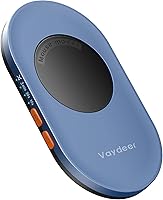
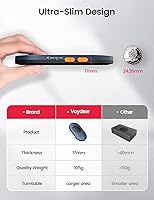
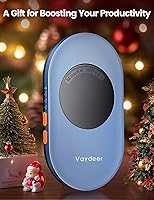
The Vaydeer Air 3 Mouse Jiggler is a compact hardware device that physically moves your mouse cursor at set intervals, keeping your computer active without installing any software. At just 0.69 inches thin and 3.7 ounces, the first thing you notice is how little desk space it demands — plug it in, set your interval, and forget it. Unlike software-based solutions that can leave traces in system logs or trip corporate IT policies, this desk gadget operates entirely at the hardware level. Remote workers, IT professionals, and anyone subject to activity-monitoring tools will find it a practical, low-friction option.
Features & Benefits
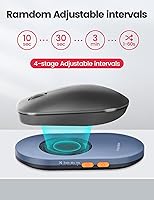
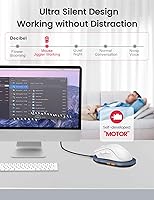
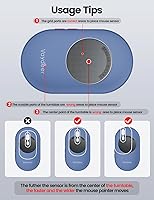
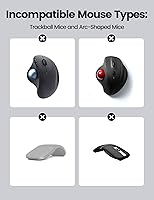
Four interval settings give you real control: 10 seconds, 30 seconds, 3 minutes, or a randomized 1–60 second mode that mimics unpredictable human behavior convincingly. The quiet micro-motor is a genuine improvement over older mechanical designs — no clicking, no whirring, nothing to pull your attention away from your work. Because the Vaydeer Air 3 connects via USB Type-C and requires no drivers, it works across both Windows and Mac without touching your system configuration. The cursor follows a random path each cycle, which adds to the natural feel. One honest caveat: this mouse jiggler relies on your mouse's optical sensor, so a standard-sized optical mouse must be placed on top — laser mice and trackpads won't cooperate.
Best For
This desk gadget makes the most sense for remote employees whose workplaces use idle-detection or time-tracking software — it keeps a session active during breaks, lunch, or while you step away to handle something. Anyone running long background processes, automated scripts, or large file transfers will also appreciate not having to babysit the screen to prevent lockouts. Because it leaves zero software footprint, it's a viable option for corporate environments where installing third-party programs on a work machine isn't allowed. It's also genuinely portable — small enough to tuck into a laptop bag without a second thought. If you travel between offices or hot-desk regularly, this mouse jiggler is easy to carry and just as easy to set up.
User Feedback
With over 6,000 ratings and a 4.5-star average, the Vaydeer Air 3 has a strong track record among buyers. The most consistent praise centers on how quiet it actually is in practice — people who have owned noisier mechanical versions report this one genuinely runs without any audible presence. Reliable cursor activation is another common theme. On the critical side, a subset of users with mice that have smaller or off-center optical sensors report inconsistent movement detection. A handful also note that the indicator LED can be distracting in darker rooms. Sentiment around pricing skews positive — most buyers feel the build quality and feature set justify the cost, calling it solid value for what it does.
Pros
- Operates with zero software installation, making it safe to use on locked-down corporate machines.
- Near-silent micro-motor is a genuine upgrade over older mechanical designs that click and whir.
- Four interval settings, including a randomized mode, add flexibility for different workflows.
- Randomized cursor movement pattern looks natural rather than robotic or repetitive.
- Ultra-slim build at 0.69 inches thick means it barely takes up space on a crowded desk.
- USB Type-C connection works across both Windows and Mac without any configuration.
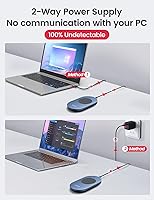
- Hardware-level operation leaves no detectable software trace on the host system.
- Lightweight at 3.7 oz, easy to carry between workspaces or pack for travel.
- Strong track record with thousands of verified buyers and a consistently high satisfaction rating.
- Straightforward to use — plug in, press the button, select your interval, done.
Cons
- Requires a normal-sized optical mouse placed directly on top; laser mice and trackpads will not work.
- No timer shutdown feature, so the device runs continuously until you manually switch it off.
- The indicator LED can be a noticeable distraction when working in a dark or dim room.
- Mice with smaller or off-center optical sensors may detect movement inconsistently.
- No app or remote control support, so adjusting settings requires physically reaching the device.
- Turntable spin duration is fixed at 15 seconds and cannot be customized by the user.
- Only one USB Type-C cable is included, which may not reach in all desk configurations.
- Not compatible with trackpad-only setups, limiting its use with certain ultrabooks or tablets.
Ratings
The scores below for the Vaydeer Air 3 Mouse Jiggler were generated by our AI engine after analyzing thousands of verified purchase reviews from global buyers, with spam, bot-submitted, and incentivized feedback actively filtered out. Each category reflects the honest consensus across that user base — strengths and frustrations weighted equally — so you get a clear, unvarnished picture of what this desk gadget actually delivers before you decide.
Noise Level
Ease of Setup
Undetectability
Mouse Compatibility
Build Quality
Portability
Interval Flexibility
Indicator Light
Value for Money
Cursor Movement Quality
Compatibility Across OS
Discreetness
Durability
Suitable for:
The Vaydeer Air 3 Mouse Jiggler is a practical fit for remote workers who need their computer to stay active during breaks, particularly those whose employers use idle-detection or time-tracking software to monitor productivity. It also works well for anyone running long background tasks — large file transfers, automated scripts, overnight renders — where a screen lock or sleep event would interrupt the process. Because it operates entirely at the hardware level with no driver installation and no software footprint, it suits professionals working on managed corporate devices where installing third-party applications is restricted or prohibited by IT policy. Frequent travelers and hot-deskers will appreciate how light and slim it is; it fits into a laptop bag without any real inconvenience. If you regularly use a standard optical mouse and want a genuinely silent, set-it-and-forget-it solution, this desk gadget covers that need reliably.
Not suitable for:
The Vaydeer Air 3 Mouse Jiggler is not the right tool if your primary mouse is a laser mouse, a trackpad, or a compact travel mouse with an off-center or undersized optical sensor — the device physically relies on that sensor to register movement, and incompatible setups will see inconsistent or no response at all. Users who work in very dark environments may find the indicator LED distracting or harder to ignore than expected, which is a minor but real annoyance if your workspace is dim. This desk gadget also does not include app-based remote control or a timer shutdown feature, so if you need to schedule automatic shutoffs or manage it from your phone, you will need to look at more feature-rich alternatives. It is worth being clear-eyed about the intended use: this is a hardware tool with a specific function, not a productivity platform, so buyers expecting advanced configuration options will likely find it limited. Anyone whose computer uses a non-optical pointing device as their primary input should consider a software-based solution instead.
Specifications
- Dimensions: The device measures 5.39 x 3.13 x 0.69 inches, keeping its footprint compact enough to sit unobtrusively on most desks.
- Thickness: At 17.3mm (0.69 inch) thin, it is one of the slimmer hardware mouse movers available in its category.
- Weight: The unit weighs 3.7 oz (105g), light enough to carry in a laptop bag without adding noticeable bulk.
- Connection: It connects via a USB Type-C cable, which is included in the package.
- OS Compatibility: Fully compatible with both Windows and Mac operating systems without any configuration changes required.
- Driver Requirement: No drivers or software installation of any kind is needed; the device is recognized as a standard HID input device.
- Motor Type: An internal quiet micro-motor drives the turntable mechanism, designed to operate without audible clicking or mechanical noise.
- Interval Settings: Four interval modes are available: 10 seconds, 30 seconds, 3 minutes, and a randomized mode that selects a pause between 1 and 60 seconds automatically.
- Spin Duration: The turntable rotation cycle is fixed at 15 seconds per activation and is not user-adjustable.
- Cursor Track: Mouse pointer movement follows a randomized path each cycle rather than a fixed repetitive loop.
- Mouse Compatibility: Designed for use with normal-sized optical mice; laser mice, trackpads, and compact travel mice with off-center sensors may not register movement reliably.
- Detection Technology: Uses optical movement detection, requiring the underside sensor of a compatible mouse to be positioned over the turntable surface.
- Detectability: The device operates at the hardware level and leaves no software trace, registry entry, or process visible to the host operating system.
- Indicator Light: An LED indicator on the left side of the unit reflects the current operating status and selected interval mode.
- Color: Available in dark blue.
- App Control: No companion app or remote control functionality is included; all settings are adjusted via the physical button on the device.
- Timer Shutdown: The device does not feature an automatic timer shutdown; it continues operating until manually switched off.
- Model Number: The official model number is FM2031, also referenced by Vaydeer as the ultra-slim variant.
- Customer Rating: Holds a 4.5 out of 5 star average based on over 6,000 verified ratings on Amazon.
- Category Rank: Ranked #59 in the Computer Mice category on Amazon at the time of this review.
Related Reviews
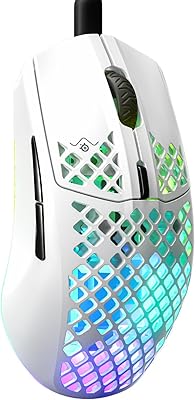
SteelSeries Aerox 3 Gaming Mouse
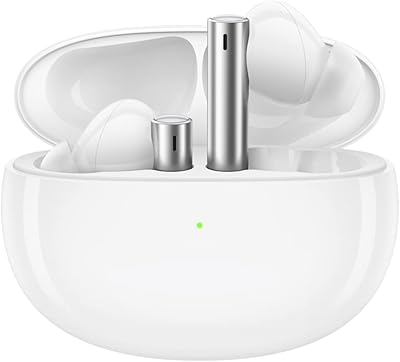
realme Buds Air 3 Wireless Earbuds
Nebula Mars 3 Air Portable Projector
Jicawz 8000mAh Rechargeable Electric Air Duster
EarFun Air Pro 3

KCEVE KC-303X Triple Monitor KVM Switch
seenda SKM64-3 Wireless Keyboard and Mouse Combo
IT Dusters AirTec Type 3 Electric Duster
be quiet! Pure Rock 3 CPU Cooler