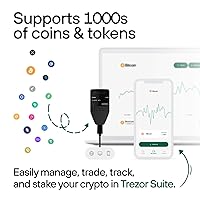
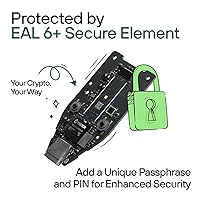
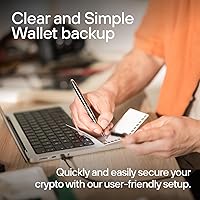

Overview

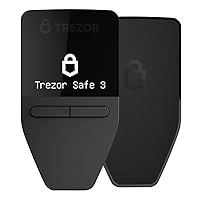
The Trezor Safe 3 Crypto Hardware Wallet is SatoshiLabs' answer to a straightforward question: what does serious cold storage look like at a mid-range price? Keeping crypto on an exchange means trusting someone else's server and security team with your assets — this hardware wallet eliminates that dependency by keeping private keys entirely offline. The headline upgrade over earlier models is the EAL6+ Secure Element, a chip-level certification that adds meaningful tamper resistance. Trezor also publishes its firmware as open source, so anyone can audit the code — a transparency standard not every competitor meets. That said, set expectations accordingly: this is a compact, USB-C-only device with a small mono screen. Functional, not flashy.

Features & Benefits

The EAL6+ Secure Element goes beyond marketing: the certification means the chip has passed third-party testing for resistance to physical attacks like fault injection and side-channel analysis — threats a determined attacker might realistically attempt. The Trezor Safe 3 also supports a passphrase protection layer, essentially a 25th seed word only you know, adding a hidden line of defense even if your backup cards are compromised. For recovery, Shamir Backup lets you split the seed into multiple shares, so a single lost card won't cost you everything. The Trezor Suite app manages portfolio tracking and transaction signing on both desktop and mobile. Coin coverage is broad, though some tokens require third-party integrations like MetaMask rather than native support.

Best For

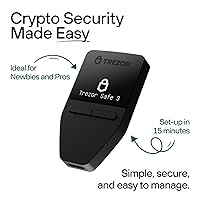
This cold storage device suits crypto holders who want credible, well-documented security without paying for a premium touchscreen model. If open-source firmware matters to you — and for a security device it genuinely should — Trezor's transparency record is hard to match in this category. It's also practical for anyone managing Bitcoin, Ethereum, and a range of altcoins without juggling multiple wallets. Setup reportedly takes around 15 minutes, and buyer feedback largely backs that claim. Where it falls short: there's no Bluetooth, no wireless option, and the display is about as basic as they come. For long-term hodl storage backed by an established support community and solid documentation, it's a dependable pick.

User Feedback

With a 4.6-star average across over a thousand ratings, the Trezor Safe 3 sits in rare territory for a security product, where even small friction points tend to surface in reviews. The Trezor Suite app earns consistent praise for being more approachable than competing interfaces — a meaningful advantage for buyers who aren't deeply technical. The most common complaint is the lack of Bluetooth; anyone switching from Ledger's lineup notices the gap immediately. The mono OLED screen also draws periodic criticism for feeling dated against newer color-display rivals. On the positive side, buyers frequently mention regular firmware updates and accessible documentation as signs that SatoshiLabs stays engaged with the product long after purchase — something worth weighing seriously.

Pros

  • EAL6+ Secure Element delivers chip-level tamper resistance verified by independent third-party testing, not just manufacturer claims.
  • Open-source firmware lets anyone audit the code, offering a level of verifiable transparency most rivals cannot match.
  • Shamir Backup splits the recovery seed across multiple shares, so a single lost card does not put funds at risk.
  • Passphrase support adds a hidden extra layer of protection that remains effective even if your physical backup is found.
  • Trezor Suite is consistently praised by buyers as more approachable than competing wallet management software.
  • Broad coin and token support covers the vast majority of mainstream portfolios in one compact device.
  • Weighing just half an ounce, the hardware wallet is genuinely easy to store discreetly or carry securely.
  • Real buyer feedback consistently confirms the 15-minute setup estimate, making the initial experience low-stress.
  • Frequent firmware updates and well-maintained documentation suggest SatoshiLabs actively supports the product over time.
  • FIDO2 two-factor authentication extends the device's utility well beyond straightforward crypto storage.

Cons

  • No Bluetooth or wireless option makes mobile use noticeably less convenient compared to several competing wallets.
  • The mono OLED screen looks and feels dated next to newer color-display rivals in the same price range.
  • Some tokens require third-party integrations like MetaMask rather than working natively through Trezor Suite.
  • No water resistance whatsoever means storage environment needs careful thought, especially for travel scenarios.
  • Two-button navigation requires an adjustment period, particularly when working through longer on-device menus.
  • Buyers migrating from another hardware wallet ecosystem face a full setup migration, which is not a quick task.
  • Only two backup cards are included in the box, limiting built-in physical redundancy for recovery material.
  • No wireless capability means the device is completely inoperable without a connected computer or compatible phone nearby.

Ratings

The scores below reflect AI-driven analysis of verified buyer reviews for the Trezor Safe 3 Crypto Hardware Wallet, with active filtering applied to exclude spam, bot-generated content, and incentivized submissions that could distort results. Each category draws from real ownership experiences spanning first-time cold storage users to security-focused long-term holders across global markets. Both the genuine strengths and the honest trade-offs are reflected directly in the numbers, without softening either side.

Security Architecture
94%
The EAL6+ Secure Element is the real headline here — it means the chip has been independently tested against physical and logical attacks by a certified lab, not just claimed secure by the manufacturer. Buyers who previously lost sleep over exchange hacks specifically cite this certification as the reason they chose this device over cheaper options.
Open-source firmware means all code is publicly auditable, but a small subset of technically advanced users note the EAL6+ chip still operates under a manufacturer non-disclosure agreement that limits full inspection of its internals. This creates a minor but real philosophical tension for buyers who want every layer of their security stack to be completely transparent.
Ease of Setup
88%
The guided Trezor Suite onboarding walks users through each step clearly, and the 15-minute setup estimate holds up according to the majority of buyers — including those who had never used a hardware wallet before. The two included backup cards make the seed phrase recording process feel structured rather than intimidating, with dedicated space for each word.
Buyers who attempted to configure Shamir Backup or a passphrase during initial setup found the process noticeably more complex than the standard flow, particularly when working through share threshold concepts for the first time. The device also requires a computer for setup, which adds friction for anyone hoping to complete the process entirely from a smartphone.
Build Quality
72%
28%
The aluminum component gives the hardware wallet enough rigidity to feel purposeful in hand without adding unnecessary bulk, and at half an ounce it stores discreetly in a small safe, document wallet, or desk drawer without occupying meaningful space. Several buyers specifically appreciate how unremarkable it looks, which they see as a practical security feature in itself.
The plastic sections of the casing do show scuff marks and wear with regular handling, and the complete absence of any water resistance rating means a spilled drink or a humid long-term storage environment is a genuine risk. Buyers who handled the Ledger Nano X alongside this device often note the overall build feels slightly less refined, particularly around the button area.
Display & Interface
61%
39%
The mono OLED is sharp enough to clearly render transaction details and wallet addresses for on-device confirmation, which is ultimately the only thing it needs to do — and it handles that reliably. Buyers focused on security credentials rather than aesthetics tend to find it functional once they stop comparing it against color-screen competitors.
Two-button navigation becomes genuinely tedious when scrolling through longer wallet addresses or confirming multi-step transactions, and there is no way to speed up the process. Among buyers who compared this device directly with color-screen rivals at a similar price, the display is consistently cited as the single most dated aspect of the hardware.
Companion App
86%
Trezor Suite earns consistent praise for being more approachable than competing wallet management software — new users describe navigating their portfolio and signing transactions as intuitive even on day one. The availability as a native desktop app for Windows, macOS, and Linux, plus a functional browser version, means most buyers encounter no compatibility friction getting started.
The mobile Trezor Suite experience is browser-based rather than a dedicated native app, which makes it feel less polished on phones than the standalone mobile applications some rivals offer. A minority of users also report that adding custom tokens or niche coins involves more manual configuration steps than the mainstream asset experience would suggest.
Backup & Recovery
91%
Shamir Backup is a genuinely differentiated feature that most competitors at this price point do not offer — splitting a recovery seed across multiple physical shares means a single misplaced or discovered card cannot result in a total loss of funds. Long-term holders specifically highlight this as a primary reason they chose this cold storage device over simpler alternatives.
The Shamir Backup configuration process adds meaningful complexity that first-time hardware wallet owners — already learning about seed phrases, PINs, and passphrase protection simultaneously — sometimes find overwhelming. An incorrectly configured Shamir setup can silently undermine recovery capability, making the quality of the documentation here more critical than it might initially appear.
Mobile Usability
47%
53%
Android users with USB-C OTG support can connect the hardware wallet through a browser and access Trezor Suite for occasional transaction signing when away from a computer. Buyers whose primary use case is long-term cold storage rather than active trading tend to find this level of mobile access adequate for the infrequent times they actually need it.
There is no Bluetooth, NFC, or any wireless connectivity — iPhone users have no viable mobile path at all, and Android access requires a cable plus a browser workaround that feels genuinely clunky by current standards. Buyers who expected a mobile experience comparable to the Ledger Nano X will be concretely disappointed, and this gap is the most frequently raised criticism among switchers.
Value for Money
83%
For a device that includes an EAL6+ Secure Element, fully open-source firmware, Shamir Backup, and a polished companion app, the mid-range price represents solid positioning compared to premium touchscreen competitors that cost meaningfully more. Buyers who researched the category before purchasing consistently describe the pricing as fair relative to the security credentials on offer.
The absence of Bluetooth, a touchscreen, and water resistance — features available on competing devices at comparable or only slightly higher prices — creates a real value question for buyers who weigh convenience alongside security. A subset of buyers feel that the hardware itself, evaluated purely on physical specifications, does not quite justify the asking price relative to what the market now offers.
Firmware & Updates
89%
SatoshiLabs maintains a consistent firmware update cadence, and because the codebase is fully open source, updates are publicly reviewed and discussed before release — a transparency standard that builds measurable trust among buyers who follow hardware security news. Multiple users specifically name firmware reliability and update history as factors that keep them loyal to the Trezor ecosystem over time.
Each firmware update requires connecting to a computer and confirming through Trezor Suite, adding a small but real maintenance overhead for buyers who prefer a set-and-forget experience. On rare occasions, updates have temporarily broken compatibility with specific third-party integrations, causing short-term access frustration until a follow-up patch resolved the issue.
Passphrase Protection
84%
The passphrase feature effectively creates a hidden wallet layer inside the device — one that cannot be extracted from the hardware, any backup card, or any app log because it is never stored anywhere at all. Security-focused buyers frequently describe this as one of the most underappreciated features available once they fully understand how it operates.
The passphrase has absolutely no recovery mechanism — forget it and the funds protected by that passphrase are permanently and irreversibly inaccessible, with no support escalation path that can help. Buyers who enabled this feature without fully internalizing this risk have reported losing access to funds, which is a real and documented outcome rather than a theoretical edge case.
Coin Compatibility
78%
22%
Coverage for Bitcoin, Ethereum, and the majority of mainstream altcoins is strong natively through Trezor Suite, giving holders of typical diversified portfolios everything they need without additional tooling. The well-supported MetaMask integration also extends practical reach to a wide range of ERC-20 tokens and DeFi assets for users comfortable with that workflow.
The gap appears with niche tokens that require third-party integrations — what reads like native support in product descriptions sometimes means a manual extra step through MetaMask or a similar app. Buyers holding more unusual assets have occasionally discovered a specific token they own is not supported at all, requiring a separate wallet solution to manage it.
Portability
76%
24%
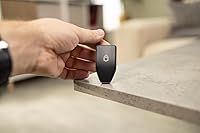
At 2.3 x 1.3 x 0.3 inches and half an ounce, this cold storage device genuinely disappears into a small safe, a fireproof document envelope, or a travel kit without occupying any meaningful space. Several buyers note the compact dimensions make it easy to keep in a single consistent storage location without needing a dedicated case or pouch.
The USB-C cable dependency means you always need a cable and a host device nearby to do anything with it — there is no transacting on a commute or in a meeting. Buyers who expected portable flexibility comparable to wireless competitors will find the practical day-to-day usability more constrained than the physical dimensions of the device itself suggest.
Documentation & Support
82%
18%
Trezor's official documentation is thorough and well-maintained, covering everything from basic first-time setup to advanced Shamir Backup configuration with clear step-by-step guidance. The active community of forums, video walkthroughs, and open developer discussions means peer-sourced help is rarely more than a search away — a genuine asset for first-time cold storage users.
Direct customer support operates on an email-based model, and response times draw mixed feedback from buyers accustomed to live chat or phone options, particularly during high-volume periods following major crypto market events. A portion of users report that resolving edge-case technical issues required several back-and-forth exchanges before reaching a satisfactory resolution.

Suitable for:

The Trezor Safe 3 Crypto Hardware Wallet is built for people who take self-custody seriously and want a well-tested, transparent device to back that up. It is an especially strong fit for long-term holders — anyone who owns Bitcoin, Ethereum, or a spread of altcoins and genuinely wants those assets stored offline rather than sitting exposed on an exchange. If open-source, auditable firmware matters to you, this cold storage device has one of the strongest transparency track records in its category, since the codebase is publicly verifiable in a way that proprietary alternatives simply cannot match. Multi-coin holders will appreciate the broad asset coverage, even if a handful of tokens still require third-party integrations to function. Setup takes roughly 15 minutes by most accounts, making it accessible even for buyers who are not deeply technical, and the well-established support community means documentation and peer advice are rarely hard to find.

Not suitable for:

The Trezor Safe 3 Crypto Hardware Wallet is not the right fit for buyers who prioritize mobile-first convenience or a wire-free experience. There is no Bluetooth or wireless connectivity of any kind — everything runs through USB-C, which becomes a genuine friction point if you primarily manage crypto from a phone. The 0.96-inch mono OLED display is purely functional: if you are coming from a device with a color touchscreen, the interface will feel like a generational step back, and that is a hardware constraint no software update will fix. Users who expect every token to work natively in a single app may also hit friction, since some assets require routing through MetaMask or another third-party wallet integration. And if physical resilience matters — say, for travel or unconventional storage conditions — the complete absence of water resistance is worth factoring into the decision before you buy.

Specifications

  • Manufacturer: Produced by SatoshiLabs s.r.o., a Prague-based company widely recognized as one of the original and most established hardware wallet manufacturers.
  • Model Number: Officially designated as model TS3, part of the Safe 3 product line first made available in October 2023.
  • Secure Element: Incorporates an EAL6+ certified Secure Element chip, independently evaluated for resistance to physical tampering, fault injection, and side-channel attacks.
  • Display: Equipped with a 0.96-inch monochrome OLED screen at 128x64 pixel resolution, used for on-device transaction review and confirmation.
  • Controls: Operated via a two-button physical navigation pad; no touchscreen, haptic feedback, or gesture input is available.
  • Connection: Connects to host devices exclusively through USB-C; there is no Bluetooth, NFC, Wi-Fi, or any form of wireless connectivity.
  • Dimensions: Measures 2.3 x 1.3 x 0.3 inches, making it comparable in footprint to a standard USB thumb drive.
  • Weight: Weighs 0.5 oz, light enough to store in a small safe, wallet, or envelope without occupying meaningful space.
  • Materials: Housing is constructed from a combination of aluminum and plastic; no reinforced Gorilla Glass or ruggedized casing is included.
  • Coin Support: Natively supports thousands of cryptocurrencies and tokens including Bitcoin and Ethereum, though some assets require a third-party integration such as MetaMask.
  • Authentication: Supports two-factor authentication and the FIDO2 standard, allowing the device to serve as a hardware security key beyond crypto asset management.
  • Backup Method: Recovery uses a standard 12-, 20-, or 24-word seed phrase, with optional Multi-share (Shamir) Backup to distribute the seed across multiple independent shares.
  • Passphrase: Supports an optional passphrase as a 25th seed word — it is never stored on the device, the app, or any backup card.
  • Companion App: Managed through Trezor Suite, a free application available natively for Windows, macOS, and Linux, with a browser-based version for additional compatibility.
  • Water Resistance: Carries no water resistance rating and should be kept away from moisture, liquids, and humid storage environments at all times.
  • In-Box Contents: Package includes the device, one USB-C cable, two wallet backup cards, a printed startup guide, and a set of Trezor stickers.

Related Reviews
Ledger Nano X Crypto Hardware Wallet
77%
96%
Security & Key Protection
74%
Bluetooth Connectivity
71%
Companion App (Ledger Live)
67%
Ease of Setup
93%
Coin & Token Support
More
D'CENT iD Biometric Hardware Wallet
80%
91%
Biometric Authentication
93%
Security Architecture
68%
Bluetooth Connectivity
88%
Coin & Blockchain Coverage
74%
Mobile App Experience
More
Arculus Cold Storage Crypto Wallet
73%
93%
Security Architecture
88%
Ease of Setup
84%
App Experience
79%
NFC Reliability
74%
Coin & Token Coverage
More
ELLIPAL X Card Crypto Cold Wallet
86%
94%
Security Features
88%
Ease of Use
91%
Backup and Redundancy
85%
Compatibility
80%
Transaction Speed
More
ELLIPAL Titan 2.0 Hardware Crypto Wallet

75%
93%
Security Architecture
89%
Build Quality & Durability
86%
Display & On-Device Interface
67%
QR Code Transaction Workflow
91%
Coin & Token Support
More
KCEVE KC-303X Triple Monitor KVM Switch
78%
88%
Setup & Installation
83%
Video Signal Quality
79%
Switching Speed & Reliability
71%
Remote Controller
81%
USB Peripheral Performance
More
Reyane Tradition R2B2 Crypto 3.3 oz Fragrance
74%
78%
Scent Quality
61%
Longevity
58%
Projection & Sillage
84%
Bottle Design
76%
Value for Money
More
BosleyMD Revive Color Safe Thickening Treatment 3.4oz
78%
74%
Effectiveness for Thinning Hair
91%
Color Safety
83%
Formula & Ingredient Quality
88%
Texture & Application
86%
Scent
More
MAKEP:REM Safe Me. Amino Refresh Balm 100ml
82%
93%
Makeup Removal Power
86%
Pore Cleansing Efficacy
91%
Eye Area Safety
88%
Post-Cleanse Skin Feel
82%
Packaging & Dispensing
More
Apricorn Aegis Fortress L3 1TB Encrypted Drive
79%
96%
Encryption Strength
97%
FIPS Compliance
88%
Build Quality
52%
Transfer Speed
61%
Ease of Setup
More

FAQ

The Trezor Safe 3 Crypto Hardware Wallet is marketed as a 15-minute setup, and real buyer feedback largely confirms that for a basic configuration. You plug it in, install Trezor Suite, follow the on-screen prompts to generate your seed phrase, and record it on the included backup cards. If you opt into features like Shamir Backup or a passphrase from the start, plan for a little extra time, but neither is required to get up and running.

Android users with a USB-C port and OTG support can connect the hardware wallet through a browser and use the Trezor Suite web interface reasonably well. iPhone users do not have a direct path right now — there is no Lightning adapter support, and without Bluetooth or NFC, wireless mobile use is simply not an option. For most people, desktop remains the more practical environment for day-to-day management.

It covers thousands of assets natively, so for mainstream holdings like Bitcoin, Ethereum, and major altcoins you will be covered. That said, some tokens — particularly certain ERC-20 assets and DeFi-related coins — require routing through a third-party app like MetaMask rather than working directly in Trezor Suite. Before purchasing, it is worth checking Trezor's official coin support page if your portfolio includes anything less common.

Your funds are not stored on the device itself — they exist on the blockchain, and the hardware only holds the private keys used to access them. As long as your seed phrase backup is safely stored somewhere offline, you can restore full access on any compatible wallet. This is why the way you store your backup words matters far more than protecting the physical hardware.

Yes, it integrates with MetaMask as a hardware signing device, so you can interact with DeFi protocols and Web3 applications while keeping private keys completely offline. Every transaction is initiated in MetaMask but must be physically confirmed on the device using the two buttons, which is exactly the security point of the arrangement. It is one of the more reliable third-party integrations available for this cold storage device.

EAL6+ is a rating from the Common Criteria evaluation framework, and it reflects that the chip has been rigorously tested by independent labs against physical and logical attack methods, including fault injection and side-channel analysis. Earlier Trezor models used general-purpose microcontrollers without this kind of dedicated secure enclave, which represented a known theoretical weakness. In practice, the upgrade means that extracting private keys from the chip — even with physical access and specialized equipment — is substantially harder.

Shamir Backup lets you divide your recovery seed into multiple separate shares — for example, splitting it into three pieces where any two are sufficient to restore your wallet. This removes the single-point-of-failure risk of keeping one complete seed backup: a single lost or discovered share cannot compromise your funds on its own. It is entirely optional and not required during setup, but it is a meaningful safeguard for anyone storing substantial value over the long term.

The passphrase acts as an extra word added to your seed phrase that is never written to the device or stored anywhere by Trezor — which makes it powerful but also unforgiving if forgotten. Unlike a PIN, there is no recovery mechanism if you lose it; the funds protected by that passphrase become permanently inaccessible. For less technical users, the safest approach is to either skip it initially or document it very carefully and store it separately from your seed phrase backup.

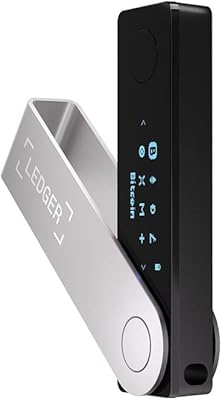
The Ledger Nano X offers Bluetooth connectivity and a slightly larger display, which gives it a genuine edge for users who want convenient mobile access and move funds frequently. The hardware wallet covered here counters with fully open-source firmware — Trezor's entire codebase is publicly auditable, while Ledger's remains partially proprietary. Neither is objectively superior; the choice comes down to whether you prioritize wireless flexibility or verifiable firmware transparency.

Trezor Suite is available as a native desktop application for Windows, macOS, and Linux, and a browser-based version covers most use cases without requiring a local install. No additional drivers are needed beyond what Trezor Suite configures automatically during first-time setup. Users across all three platforms generally report a consistent experience with no significant OS-specific issues.

Where to Buy