Overview

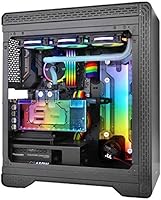
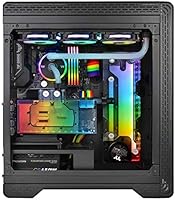
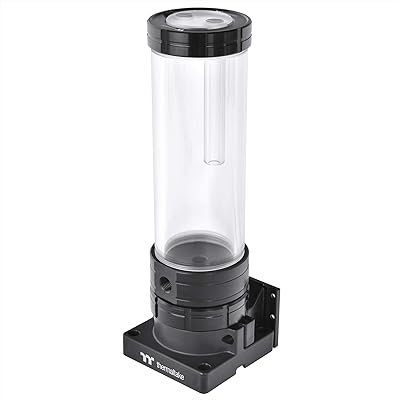
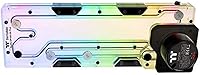
The Thermaltake Pacific DP100-D5 Plus 360mm Distro Plate is a purpose-built component that merges a reservoir and pump into a single unit, cutting down the complexity of planning a custom water cooling loop. It mounts directly to standard 360mm radiator screw points, so there's no hunting for adapter brackets or fabricating custom mounting solutions. That said, this is firmly enthusiast territory — if you haven't built a custom loop before, the port routing and filling process will feel steep. What draws experienced builders in is the broad RGB ecosystem support alongside genuine performance credentials, making it more than just a showpiece component.
Features & Benefits

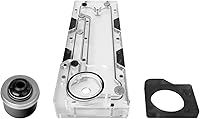
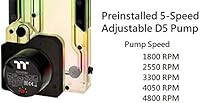
The pre-installed D5 pump is the centerpiece here. Running between 1800 and 4800 RPM across five selectable speeds, it covers everything from near-silent overnight operation to full-tilt cooling during demanding sessions, with a rated lifespan of 50,000 hours. The 200ml PMMA reservoir offers six G1/4-inch threaded ports — three outlets, two inlets, and a dedicated drain — giving builders real flexibility when planning loop routes. Eighteen addressable RGB LEDs sync directly with major motherboard platforms over a 5V header, and Razer Chroma support adds peripheral-level coordination. Alexa integration exists, but in practice most builders use it occasionally at best rather than as a daily control method.

Best For

This pump-reservoir unit is built for builders who already know their way around a custom loop and want to simplify the hardware without sacrificing control. It fits best in mid-tower to full-tower cases that can accommodate a 360mm mounting location at the top or front panel. If you're running ASUS, MSI, Gigabyte, ASRock, or a Razer peripheral setup, the lighting sync alone justifies the consideration. Budget-focused builders will likely find better value in separate components, but anyone prioritizing long-term pump reliability and a cleaner build with fewer fittings and less tubing will appreciate what this distro plate combo brings to the table.

User Feedback

Sitting at 4.3 stars from 116 ratings, the DP100-D5 Plus earns mostly positive marks, but the picture isn't entirely rosy. Buyers consistently praise how straightforward the physical installation is compared to sourcing and fitting a separate pump and reservoir, and pump noise levels at mid-range speeds draw few complaints. Where criticism surfaces, it tends to focus on two areas: PMMA acrylic clouding when used with certain coolant formulations over time, and the reliance on TT RGB PLUS software to unlock full lighting control — the software itself has a mixed reputation. A handful of reviewers also note that loop planning is trickier than expected for first-timers, particularly with port placement.

Pros

  • Combines pump and reservoir into one unit, reducing fittings and simplifying loop planning significantly.
  • The integrated D5 pump is a proven, well-regarded choice in enthusiast circles for quiet and reliable operation.
  • Five selectable pump speeds give real control over noise and flow rate depending on workload.
  • Mounts directly to standard 360mm radiator points — no proprietary brackets or adapter plates required.
  • Six G1/4-inch threaded ports offer genuine flexibility when designing complex loop routes.
  • Native 5V motherboard sync works cleanly with all major platform RGB ecosystems without extra hardware.
  • Razer Chroma support ties cooling system lighting into the broader peripheral setup with minimal configuration.
  • Rated pump lifespan of 50,000 hours MTBF gives confidence for long-term, high-use builds.
  • At 4.3 stars across over 100 real-world ratings, user satisfaction is consistently strong for a niche component.
  • Clean installation experience is a recurring praise point, especially compared to sourcing and fitting separate components.

Cons

  • TT RGB PLUS software required for full lighting control has a mixed reputation for stability and usability.
  • PMMA acrylic reservoir can cloud or discolor over time if incompatible or dye-heavy coolants are used.
  • Port placement and loop routing logic can feel unintuitive during a first distro plate build.
  • Alexa voice control is included but rarely practical — most builders never integrate it into their workflow.
  • No soft-mount or vibration dampening is included, which may matter in acoustically sensitive builds.
  • Software-locked speed control means pump adjustments are less immediate compared to hardware-based solutions.
  • Limited to cases that physically support a 360mm mounting location, ruling out compact and some mid-tower builds.
  • 200ml reservoir capacity is adequate but on the smaller side for larger or more complex loop configurations.
  • Premium pricing puts it out of reach for builders who don't specifically need the distro plate form factor.
  • At 2.2 pounds, physical weight is worth accounting for when planning top-mounted installations in lighter cases.

Ratings

Our AI-generated scores for the Thermaltake Pacific DP100-D5 Plus 360mm Distro Plate are based on a systematic analysis of verified global buyer reviews, with spam, bot-submitted, and incentivized feedback actively filtered out before scoring. Each category reflects the full picture — where this pump-reservoir unit genuinely stands out and where real users have run into friction. The results are designed to help you make a clear-headed decision rather than a hopeful one.

Pump Performance
91%
The integrated D5 pump is consistently praised for delivering strong, stable flow across a variety of loop configurations. Builders running multi-block setups — CPU, GPU, and chipset in series — report that the pump handles the resistance without audible strain, even at mid-range speed settings.
A small number of users noted that the pump produces a low-frequency hum at its highest RPM setting that becomes noticeable in quieter environments. It is not a widespread complaint, but builders targeting near-silent systems should factor this in.
Build Quality
84%
The PMMA acrylic body feels solid and the port threading is clean, with fittings seating securely without excessive torque. Several experienced builders commented that the overall construction feels on par with what you would expect from a premium cooling component at this price tier.
PMMA acrylic is inherently more vulnerable to stress fractures if fittings are over-torqued, and a few users reported hairline cracking near port openings after aggressive tightening. The material also shows micro-scratches over time, which affects the visual clarity of the reservoir body.
Installation Experience
88%
The 360mm radiator-compatible mounting pattern is one of the most practical design decisions here — builders can drop this into any case with a standard 360mm location without sourcing additional hardware. Reviewers with prior custom loop experience consistently describe the installation as straightforward and well-thought-out.
For anyone attempting their first distro plate build, the six-port layout and loop planning requirements create a steeper learning curve than a conventional reservoir and pump combo. The included documentation does not bridge that gap particularly well, so new builders are largely left to rely on community resources.
RGB Lighting Quality
83%
The 18 addressable LEDs produce even, diffused lighting through the acrylic body that looks genuinely impressive in a windowed build. Motherboard sync works reliably across all five supported platforms, and transitions between lighting modes are smooth and responsive during normal use.
Accessing the full range of lighting effects requires the TT RGB PLUS software, which adds a layer of dependency that not everyone wants. Without it, you are limited to whatever the synced motherboard ecosystem can control directly, which varies by platform.
Software Experience
57%
43%
TT RGB PLUS does cover the full feature set — lighting customization, speed profiles, Razer Chroma sync, and Alexa pairing are all accessible through a single application. When it works cleanly, the level of control offered is genuinely broad for a cooling component.
The software has a persistently mixed reputation among users for stability issues, occasional failure to detect connected devices after system restarts, and a UI that feels dated compared to competing platforms. For a product at this price point, the software experience is a notable weak link that repeatedly surfaces in critical reviews.
Coolant Compatibility
63%
37%
The G1/4-inch ports accept standard fittings from any major brand, and builders using distilled water with a corrosion inhibitor report clean, clear results over extended periods. Sticking to acrylic-safe premix coolants keeps the reservoir looking sharp well into the second year of use.
Users who used dye-heavy or non-PMMA-safe coolants reported visible cloudiness developing inside the reservoir within months, which is difficult to reverse without draining and polishing. This is a known characteristic of acrylic reservoirs broadly, but the product documentation does not warn buyers explicitly enough about incompatible coolant types.
Noise Level
79%
21%
At speeds between 1800 and 2800 RPM, the DP100-D5 Plus is genuinely quiet — comparable to the ambient noise floor of a typical enthusiast build with three to five case fans running. Most daily-use workloads sit comfortably in this range without any reason to push the pump harder.
Pushing to the upper speed range introduces a low hum that some users find acceptable and others find distracting, particularly in open-frame or test-bench builds where there is less sound dampening. Those targeting silent or near-silent builds may want to keep an eye on top-speed noise levels.
Port Layout & Flexibility
76%
24%
Having three outlets, two inlets, and a dedicated drain port in a single unit gives experienced builders real options for loop routing without needing to add a separate drain valve or tee fitting elsewhere in the loop. The drain port in particular is a practical convenience during maintenance cycles.
The fixed port positions mean that loop routing is constrained by where the unit physically mounts in the case, which does not always align naturally with a builder's preferred tubing path. Some reviewers noted that the port spacing made certain hard-tube bends more awkward than anticipated.
Razer Chroma Integration
72%
28%
For builders running Razer peripherals alongside their PC, the Chroma sync works as described — lighting effects across keyboard, mouse, and cooling system can be unified through Razer Synapse 3 with minimal configuration effort. It is a genuine differentiator compared to competitors that skip third-party peripheral sync entirely.
The integration requires both TT RGB PLUS and Razer Synapse 3 running simultaneously, which adds background software overhead. Users who are not already in the Razer ecosystem will see no benefit from this feature and may find the added software layer more nuisance than it is worth.
Alexa Integration
41%
59%
The Alexa pairing works technically — you can ask your Echo device to adjust lighting or pump speed, and it responds correctly. For a secondary display PC or media build in a living room context, the hands-free angle has a narrow but real use case.
The overwhelming consensus in user reviews is that this feature sees very little real-world use after initial setup. Controlling pump speeds or lighting profiles by voice is a solution looking for a problem in most builder workflows, and it does not justify relying on an always-on smart speaker as part of a performance PC setup.
Value for Money
67%
33%
The all-in-one convenience of combining a quality D5 pump with a reservoir and RGB lighting in a single bracket footprint does reduce the total fitting and tubing count meaningfully, which has a real value in complex builds. Experienced builders who have priced out equivalent separate components acknowledge the consolidation benefit.
At its price point, this distro plate combo sits in territory where budget-conscious builders can source a separate D5 pump and comparable reservoir for noticeably less, and retain more flexibility in component positioning. The premium here is largely for aesthetics and convenience rather than raw performance gains.
Long-Term Reliability
82%
18%
The D5 pump class has a strong track record in the enthusiast community, and the 50,000-hour MTBF rating aligns with what long-term owners of similar units have reported. Several reviewers with multi-year deployments noted zero pump degradation or failure, which is consistent with D5 performance history generally.
Long-term clarity of the PMMA body is coolant-dependent, and a handful of users with two or more years of use reported reservoir discoloration that was not reversible. Pump longevity appears solid, but the reservoir's visual condition over a five-plus year period is less predictable.
RGB Ecosystem Compatibility
86%
Supporting five major motherboard RGB platforms natively over a 5V header is genuinely broad coverage — most enthusiast-tier motherboards from ASUS, MSI, Gigabyte, ASRock, or BIOSTAR will sync without any workaround. Reviewers across all five platforms consistently confirmed the sync worked on first connection.
Builders on platforms outside these five — or using older 12V RGB headers rather than 5V addressable ones — will find native sync unavailable and will be fully dependent on the TT RGB PLUS software for lighting control. Compatibility should be verified against your specific motherboard before purchase.
Case Compatibility
74%
26%
Using a standard 360mm radiator mounting pattern was a smart engineering choice — it avoids the proprietary bracket problem that has plagued some competitor distro plates and gives this unit broad compatibility across the mid-tower and full-tower case market. Most cases with a 360mm radiator position will accommodate it without issue.
The unit's 4.29″ depth means clearance can be tight in cases with aggressive internal layouts or motherboard standoff positions near the top panel. Builders with compact mid-towers should measure carefully and cross-reference the case's internal radiator clearance spec before committing.

Suitable for:

The Thermaltake Pacific DP100-D5 Plus 360mm Distro Plate is built for experienced PC builders who want to consolidate their custom loop's pump and reservoir into a single, tidier installation without giving up performance or flexibility. If you're planning a high-end build in a mid-tower or full-tower case with a 360mm mounting location — whether top or front — this distro plate combo fits naturally into that space using standard radiator screw points, meaning you won't need to fabricate custom mounts or hunt for adapter hardware. It's particularly well-suited for builders already running ASUS, MSI, Gigabyte, ASRock, or Razer peripherals, since the 5V addressable RGB header support and Razer Chroma integration mean your lighting ecosystem stays unified without third-party workarounds. Builders who prioritize long-term reliability will also appreciate the industrial-grade D5 pump at the core of this unit, which is a known quantity in the enthusiast community for low noise and durability. If you've built at least one custom loop before and you're ready to step up to a cleaner, more intentional build aesthetic, this pump-reservoir unit makes a strong case for itself.
Not suitable for:

The Thermaltake Pacific DP100-D5 Plus 360mm Distro Plate is not the right entry point for someone building their first custom water cooling loop. Distro plates require a solid understanding of loop planning — how to route tubing between ports efficiently, how to bleed air from the system, and how to fill without creating airlocks — and the six-port layout here adds complexity that can frustrate anyone without that baseline experience. The PMMA acrylic construction is visually attractive but demands careful coolant selection; certain dye-based or incompatible coolant formulas can cause clouding over time, which is a real concern for long-term builds and not something casual users typically think to research upfront. The TT RGB PLUS software, required to access the full range of lighting effects and fan speed control, has a mixed track record among users and can feel like a friction point if you're used to plug-and-play RGB solutions. Budget-conscious builders should also weigh the cost carefully — if long-term pump reliability and a consolidated form factor aren't priorities for your specific build, a separate pump and reservoir pairing will likely deliver similar cooling performance at a lower overall spend.
Specifications

  • Brand: Manufactured by Thermaltake, a well-established brand in PC cooling hardware.
  • Model: Pacific DP100-D5 Plus, model code CL-W263-PL00SW-A.
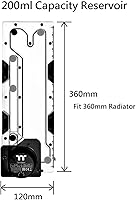
  • Dimensions: The unit measures 16.38″ in length, 6.81″ in width, and 4.29″ in height.
  • Weight: The assembled unit weighs 2.2 pounds, which should be factored in for top-mounted installations.
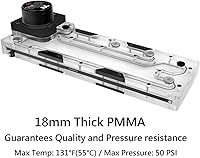
  • Material: The reservoir body is constructed from PMMA acrylic, which is transparent and visually clear when paired with compatible coolants.
  • Reservoir Capacity: The integrated reservoir holds up to 200ml of coolant fluid.
  • Port Configuration: Six G1/4-inch threaded ports are included: three outlets, two inlets, and one dedicated drain port.
  • Pump Type: A D5-class pump comes pre-installed and does not require separate sourcing or mounting.
  • Pump Speed Range: The pump operates across five selectable speed settings ranging from 1800 to 4800 RPM.
  • Pump Lifespan: Thermaltake rates the D5 pump at a mean time between failures of 50,000 hours under normal operating conditions.
  • RGB LEDs: 18 addressable RGB LEDs are built into the unit, capable of displaying up to 16.8 million colors.
  • RGB Sync: The unit supports 5V addressable motherboard sync with ASUS Aura Sync, Gigabyte RGB Fusion 2.0, MSI Mystic Light Sync, ASRock Polychrome Sync, and BIOSTAR RGB Sync.
  • Third-Party Sync: Razer Chroma synchronization is supported via TT RGB PLUS software paired with Razer Synapse 3.
  • Voice Control: Amazon Alexa integration allows voice-based control of lighting effects and pump speed when paired with a compatible Alexa-enabled device.
  • Power Connector: The unit uses a standard 4-pin power connector.
  • Voltage: Operating voltage is 5V DC.
  • Wattage: Power consumption is rated at 3.5W under normal operation.
  • Mounting: The unit mounts using standard 360mm radiator screw points, compatible with most mid-tower and full-tower cases that support a 360mm radiator position.
  • Software: Full lighting and speed control requires the TT RGB PLUS desktop application, available for Windows.
  • ASIN: The Amazon product identifier for this unit is B0814LHT6G, first listed in December 2019.

Related Reviews

Thermaltake Pacific PR32-D5 Plus Pump/Reservoir Combo
80%
91%
Pump Performance
88%
Reservoir Capacity & Stability
93%
Rotary Cap & Port Flexibility
83%
Build Quality & Materials
86%
Installation & Mounting Options
More
Thermaltake Pacific C360 Copper Radiator
81%
93%
Build Quality
84%
Thermal Performance
91%
Leak Resistance
67%
Fan Compatibility
78%
Value for Money
More
Thermaltake Toughpower 1500W 80 Plus Gold PSU
89%
96%
Power Delivery Stability
94%
Efficiency and Energy Use
91%
Noise Levels
93%
Build Quality
88%
Connector Variety
More
Thermaltake GF1 750W 80 Plus Gold Power Supply
89%
93%
Power Delivery Performance
95%
Energy Efficiency
89%
Noise Level
88%
Build Quality
90%
Cooling Efficiency
More
TourBox Elite Plus Bluetooth Creative Controller
80%
91%
Software Integration
88%
Workflow Efficiency
83%
Build Quality
86%
iPad Compatibility
61%
Setup & Onboarding
More
BuddyPhones Explore Plus
90%
94%
Comfort & Fit
91%
Build Quality
88%
Sound Clarity
97%
Volume Limiting Safety
90%
Portability
More
Quican IDW208 Plus Smartwatch
79%
91%
Value for Money
88%
Battery Life
93%
Ease of Setup
67%
Health Monitoring
74%
Display Quality
More
Yaber L2 Plus 1080P Smart Projector
75%
93%
Ease of Setup
78%
Picture Quality
61%
Brightness Performance
89%
Built-in Streaming Apps
74%
Audio Quality
More
Garmin Edge 1030 Plus GPS Cycling Computer
80%
93%
Navigation Accuracy
91%
Display Quality
88%
Battery Life
72%
Touchscreen Usability
89%
Training Features
More
Thermaltake Toughpower GF3 1350W Power Supply
86%
93%
Power Delivery Stability
91%
Compatibility with RTX 40 Series
88%
Noise Level & Fan Behavior
92%
Build & Component Quality
86%
Cable Management & Modularity
More

FAQ

The D5 pump comes pre-installed inside the unit, so there is nothing extra to source or mount. It is one of the key practical advantages of using a distro plate combo over building with separate components — you are essentially getting two major loop components in one bracket footprint.

You will want to stick with coolants specifically labeled as acrylic-safe or PMMA-compatible. Dye-heavy or petroleum-based fluids can cause cloudiness or surface degradation over time, which is a known issue with acrylic reservoirs in general, not just this one. Clear premix coolants or distilled water with a corrosion inhibitor additive are the safest options for keeping the reservoir visually clear long-term.

Not fully. The five-speed adjustment is accessible through the software or Alexa integration, but without TT RGB PLUS installed, your control options are limited. If you want complete control over both lighting and pump speed, installing the software on a Windows machine is essentially required.

It depends on whether your case supports a 360mm radiator mounting location, either at the top or front panel. The unit uses standard 360mm screw points, so if your case officially supports a 360mm rad, this distro plate combo should fit without modification. Always cross-check the case's internal clearance dimensions against the unit's 4.29″ depth before committing.

It functions as advertised, but most builders end up treating it as a novelty rather than a regular part of their workflow. Adjusting pump speed or switching lighting profiles via voice is convenient in theory, but the TT RGB PLUS software or motherboard sync tends to be the more practical day-to-day control method for most users.

Honestly, probably not. The Thermaltake Pacific DP100-D5 Plus 360mm Distro Plate assumes you already understand loop planning basics: how to route tubing between ports efficiently, how to bleed air after filling, and how to sequence your components correctly. If this is your first loop, a simpler reservoir and pump combo with a more straightforward port layout will give you a less stressful learning experience.
The unit works natively with ASUS Aura Sync, Gigabyte RGB Fusion 2.0, MSI Mystic Light Sync, ASRock Polychrome Sync, and BIOSTAR RGB Sync — all via a standard 5V addressable header on the motherboard. If your board supports any of those ecosystems, you can sync lighting directly without relying entirely on the TT RGB PLUS software.

At 1800 RPM, the D5 pump is quite quiet and unlikely to be noticeable over case fans in a normal build. As you push toward the higher end of the 4800 RPM range, there is more audible hum, but that is consistent with how D5 pumps behave generally. Most users run it at mid-range speeds and report minimal noise impact.

The main advantages here are a cleaner build with fewer fittings, a smaller combined footprint, and a simpler installation process since you are dealing with one bracket instead of two separate mounting points. The trade-off is less flexibility — with separate components, you can position the reservoir independently and swap the pump without replacing the whole assembly. For aesthetics and simplicity, the distro plate wins; for modularity and cost, separate components often make more sense.

PMMA acrylic is generally durable, but its longevity depends heavily on coolant compatibility and how well the fittings are torqued during installation. Over-tightening fittings into the G1/4-inch ports can stress the acrylic body, so finger-tight plus a quarter turn is the standard recommendation. Using acrylic-safe coolant and inspecting fittings periodically is good practice for any acrylic reservoir, including this one.

Where to Buy