Overview

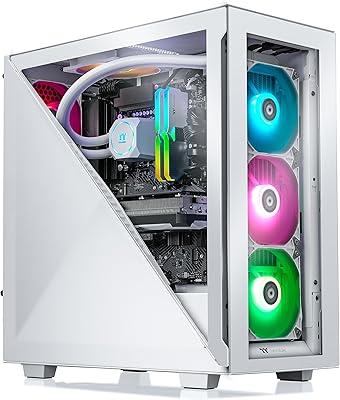
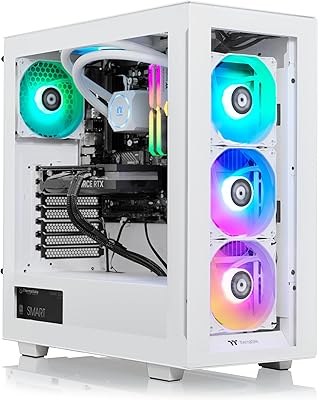
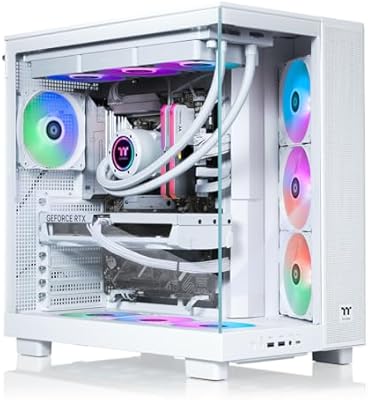
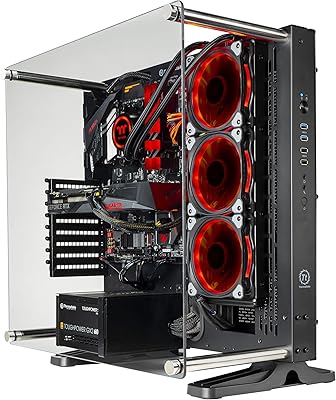
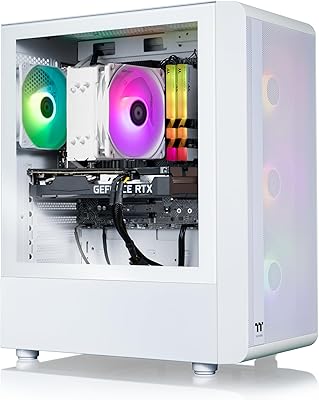
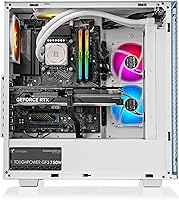
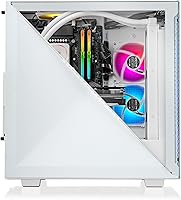
The Thermaltake Avalanche i477T Gaming Desktop sits in an interesting spot in the pre-built market — premium enough to appeal to serious gamers, but not the workstation-grade overkill that costs twice as much. Thermaltake has built a solid reputation around liquid cooling, and they've leaned into that here with a machine designed for people who want real performance without hours of researching parts and watching build videos. The white chassis and RGB-lit internals make a strong first impression. This is genuinely aimed at someone coming off a mid-range system or a console, ready to step up to a machine that can handle modern titles at the resolutions they deserve.
Features & Benefits

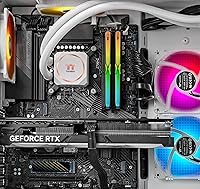
The i7-13700KF is a strong CPU choice here — its hybrid core design handles everything from competitive shooters at triple-digit frame rates to background streaming and rendering without missing a beat. Paired with the RTX 4070 Ti, you're looking at comfortable 4K gaming in most titles and extremely high refresh rates at 1440p, including with ray tracing enabled. The 360mm AIO cooler keeps temperatures in check better than most stock air solutions, though how quietly it actually runs depends on your room environment and case airflow. The 2TB NVMe SSD and 32GB of DDR5 round out a configuration that shouldn't demand immediate upgrading.

Best For

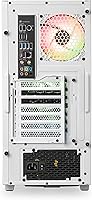
This liquid-cooled gaming PC makes the most sense for someone who games seriously at 1440p or is pushing into 4K territory and wants a machine ready on day one. The all-white build with built-in RGB will appeal to anyone curating an aesthetic setup. It's also a reasonable pick for streamers who need solid CPU multitasking headroom while the GPU handles in-game rendering. If you've been reluctant to build your own PC because of the complexity or time investment, the Avalanche i477T offers a warranty-backed path to a high-performing rig. This is not a machine for budget-conscious buyers — it's for someone who knows exactly what they want.

User Feedback

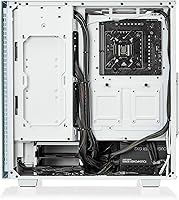
Buyers generally praise how strong the out-of-box experience is — boot it up, install your games, and you're playing at high settings within the hour. The visual presentation gets consistent compliments too. That said, a few recurring concerns are worth flagging. Shipping a machine at this price tier with Windows 10 Home rather than Windows 11 has frustrated buyers who expected current software included. Some users also point to internal cable management being less polished than the clean exterior suggests. On thermals, most report acceptable noise under gaming load, though not whisper-quiet. Fortunately, upgrade access — adding RAM or a second drive — has generally been described as straightforward.

Pros

  • The RTX 4070 Ti handles 4K gaming and maxed-out 1440p with ray tracing enabled in demanding modern titles.
  • 32GB of DDR5 at 5600MT/s is genuinely future-proof memory for gaming and multitasking workloads.
  • The 360mm AIO cooler keeps the CPU running cooler and quieter than typical air-cooled pre-builts under sustained load.
  • 2TB NVMe SSD storage means fast boot and load times with room for a substantial game library from day one.
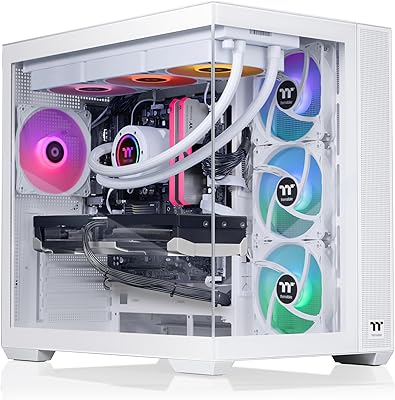
  • The all-white chassis with RGB internals delivers a polished, cohesive look that stands out among pre-builts.
  • Built-in WiFi removes the need for an ethernet run or a separate adapter right out of the box.
  • The Z790 motherboard chipset provides a solid upgrade foundation if you want to swap the CPU down the line.
  • Multi-monitor support with three DisplayPort outputs and one HDMI is genuinely useful for sim racers and productivity setups.
  • Adding RAM or a second storage drive is straightforward, so the system can grow with your needs over time.
  • Backed by a manufacturer warranty, giving buyers more recourse than sourcing secondhand or building on a tight budget.

Cons

  • Shipping with Windows 10 Home at this price tier feels like a cost-cutting decision that buyers will notice immediately.
  • Internal cable management has been described as messy by some users, which matters if you ever open the case.
  • The front I/O is limited — only one USB 3.0 port up front is tight for users with multiple peripherals.
  • At 36.5 pounds and full tower dimensions, this is not a machine that fits comfortably in compact or minimalist setups.
  • The AIO cooler performs well, but real-world noise levels vary — some users report more fan noise under heavy gaming load than expected.
  • Pre-built pricing means you are paying a premium over equivalent self-built configurations, which tech-savvy buyers will notice.
  • No secondary storage drive is included, so users with large media or game collections may need to add another drive.
  • The RTX 4070 Ti, while strong, is not the latest GPU generation, which affects long-term 4K headroom as titles get more demanding.

Ratings

The scores below reflect our AI-driven analysis of verified global buyer reviews for the Thermaltake Avalanche i477T Gaming Desktop, with spam, bot-generated, and incentivized feedback actively filtered out before scoring. Each category is rated independently based on patterns found across real ownership experiences — including both the praise and the frustrations buyers encountered. Nothing has been softened; where users consistently flagged issues, the scores reflect that honestly.

Gaming Performance
93%
Buyers consistently report that the RTX 4070 Ti and i7-13700KF combination delivers exactly what high-end gaming demands — smooth 4K in most titles and effortless high-refresh 1440p. Gamers switching from mid-range systems describe the jump as immediately noticeable, particularly in GPU-bound titles with ray tracing enabled.
A small number of users playing the most graphically intensive titles at native 4K without DLSS noted frame rate dips below their expectations. As newer GPU generations arrive, this machine's ceiling in the most demanding future titles will eventually feel constrained.
Thermal Management
84%
The 360mm AIO liquid cooler keeps the i7-13700KF well within safe operating temperatures during extended gaming sessions, with most users reporting CPU temps that stay meaningfully lower than what a comparable air-cooled pre-built would achieve under the same load.
Several users noted that actual cooling performance varies with ambient room temperature and desk placement — buyers in warmer climates or poorly ventilated rooms reported higher temps and louder fan spin-up than they anticipated. The AIO is good, but it is not immune to environmental conditions.
Noise Level
71%
29%
At idle and during light gaming, the system runs quietly enough that most users do not find it distracting. The liquid cooling setup does a better job managing noise under moderate workloads compared to the air-cooled pre-builts it competes with.
Under sustained heavy gaming loads, the radiator fans audibly ramp up and several buyers described the noise as more prominent than expected for a liquid-cooled system. Users gaming in quiet rooms or recording audio nearby found this more noticeable than casual players.
Build Quality
78%
22%
The chassis exterior is well-finished, and the overall structural rigidity holds up well during transport and setup. The white paneling looks premium on a desk, and buyers who care about aesthetics consistently mention that it photographs and presents better than most pre-builts in this price range.
Internal build quality tells a different story — cable management inside the case is frequently described as untidy, with wiring that looks hurried rather than purposeful. For buyers who plan to open the side panel for display or upgrades, the interior finish may be underwhelming.
Value for Money
67%
33%
Buyers who prioritize convenience and warranty coverage feel the price is fair relative to the peace of mind and plug-and-play experience. The component spec at this tier is genuinely competitive for a pre-built, and most users feel they received a capable machine rather than a spec-inflated underperformer.
Tech-savvy buyers consistently point out that self-building with equivalent parts would likely cost less and offer more flexibility. The Windows 10 Home inclusion at this price point is the most cited frustration — paying a premium and receiving last-generation software is a recurring complaint that meaningfully affects perceived value.
Out-of-Box Experience
88%
The setup process is praised widely — users report being fully operational and gaming within an hour of unboxing, with drivers pre-installed and hardware ready to run. For buyers transitioning from consoles or those who have never built a PC, this simplicity is exactly what they paid for.
The Windows 10 Home pre-installation requires buyers to manually initiate the Windows 11 upgrade if they want a current OS, adding a step that should not exist on a machine at this price. A handful of users also noted pre-installed bloatware that needed clearing before the system felt truly clean.
Aesthetic Design
91%
The all-white chassis combined with RGB RAM and AIO lighting consistently earns strong praise, particularly from buyers assembling a themed desk setup. It is one of the cleaner-looking pre-builts available at this tier, and photographs well enough that users regularly share their setups in community forums.
The RGB implementation, while visually appealing, requires third-party software to fully customize — which some users found cumbersome. A few buyers also felt the white finish shows fingerprints and dust more readily than darker alternatives, requiring more frequent cleaning.
Upgrade Potential
82%
18%
Buyers who have opened the chassis to add RAM or additional NVMe storage generally report the process is accessible without specialized knowledge. The Z790 motherboard provides a solid foundation with available expansion slots, and users appreciate that the system is not sealed or difficult to work inside.
Some users found the existing cable management made internal access more frustrating than it needed to be. The front I/O port count also limits peripheral connectivity for buyers who want to expand without adding a hub.
CPU Performance
89%
The i7-13700KF handles multitasking loads — simultaneous streaming, gaming, and background applications — without noticeable performance degradation. Streamers particularly appreciate the headroom it provides for encoding workloads running alongside demanding games.
The KF suffix means no integrated graphics, so the system is entirely dependent on the discrete GPU — a non-issue for gaming but worth knowing for troubleshooting scenarios. A small subset of users also note the CPU runs warmer than expected during sustained content creation workloads.
Storage Performance
87%
The 2TB NVMe SSD delivers fast boot times and near-instant game loading that buyers coming from HDD-based systems immediately notice. Having 2TB from the start means most users can install a large game library before needing to think about expansion.
There is no secondary storage drive pre-installed, and users with large media archives or video project files may find 2TB fills faster than anticipated. Adding a second drive is straightforward, but it is an additional cost not reflected in the base configuration.
Connectivity & I/O
74%
26%
Built-in WiFi is a genuine convenience, and the rear I/O provides a solid selection of USB ports and display outputs for a multi-monitor or multi-peripheral setup. The three DisplayPort outputs make it straightforward to connect high-refresh gaming monitors without adapters.
The front panel I/O is the weak point — a single USB 3.0 port up front is limiting for users who regularly plug in controllers, headsets, or drives. Buyers with multiple front-facing peripherals consistently flag this as something they wish had been expanded.
Software & OS
58%
42%
The hardware is fully Windows 11 compatible, and users who upgraded immediately after unboxing report no issues with driver support or system stability. The OS upgrade itself is free through Microsoft, so the long-term software situation is resolvable.
Shipping Windows 10 Home on a premium-tier machine is the single most cited negative across buyer feedback, and it is hard to defend as anything other than a cost-cutting decision. Some users also encountered pre-installed software they had to manually remove, which adds friction to what should be a clean first-use experience.
Packaging & Delivery
83%
The machine arrives well-packaged, and buyers report minimal concerns about transit damage even given the 36.5-pound weight of the unit. The unboxing experience is generally described as organized, with components protected adequately for a large tower system.
At over 36 pounds, delivery logistics require a bit of planning — some buyers note the box is awkward to manage alone. A few users also flagged that the packaging, while functional, felt less premium than they expected relative to the price tier of the product inside.

Suitable for:

The Thermaltake Avalanche i477T Gaming Desktop is built for serious gamers who want high-end performance delivered ready-to-use, without the time investment of sourcing parts and building a system from scratch. If you are gaming at 1440p and want high refresh rates, or you are pushing into 4K territory and expect modern titles to run at max or near-max settings, the RTX 4070 Ti and i7-13700KF combination will serve you well for several years. This machine also makes sense for streamers or creators doing light video editing on the side, since the 16-core CPU has enough headroom to handle background encoding without tanking in-game performance. The clean white aesthetic and integrated RGB make it a strong fit for anyone building a visually cohesive setup. Buyers who value the peace of mind of a manufacturer warranty over the flexibility of a self-built system will also find this a compelling option.
Not suitable for:

The Thermaltake Avalanche i477T Gaming Desktop is a hard sell if you are cost-sensitive or if you are comfortable building your own PC, since a self-built system with comparable components could potentially cost less and give you more control over part selection. Budget-focused buyers or those who primarily play less demanding titles will not get meaningful value from hardware at this tier. The inclusion of Windows 10 Home rather than Windows 11 is a real inconvenience at this price point, and buyers expecting a fully current software experience out of the box may be disappointed. Those needing extensive front-panel connectivity for professional peripherals will find the front I/O somewhat limited. And if compact form factor matters to you — for a smaller desk or a tighter living space — this is a full-size tower at 36.5 pounds that demands real estate.
Specifications

  • CPU: Intel Core i7-13700KF with 16 cores (8 performance + 8 efficiency) and a 3.4 GHz base clock, part of Intel's 13th-generation Raptor Lake lineup.
  • GPU: NVIDIA GeForce RTX 4070 Ti with 12GB of GDDR6X dedicated video memory, supporting DirectX 12 Ultimate and hardware ray tracing.
  • RAM: 32GB of DDR5 memory running at 5600MT/s with RGB lighting integrated into the modules.
  • Storage: 2TB NVMe M.2 solid-state drive offering fast sequential read and write speeds for quick boot times and game loading.
  • Motherboard: Intel Z790 chipset motherboard providing PCIe 5.0 support and compatibility with 12th and 13th-gen Intel processors.
  • Cooling: 360mm closed-loop AIO liquid cooler with a vertically side-mounted radiator configuration for efficient heat dissipation.
  • Operating System: Windows 10 Home is pre-installed; the system is hardware-compatible with a Windows 11 upgrade.
  • Display Outputs: Three DisplayPort outputs and one HDMI port are provided via the discrete GPU for multi-monitor configurations.
  • Front I/O: Front panel includes one USB 3.0 port, two USB 2.0 ports, one 3.5mm headphone jack, and one 3.5mm microphone jack.
  • Connectivity: Built-in WiFi adapter is included, enabling wireless network connectivity without a separate card or adapter.
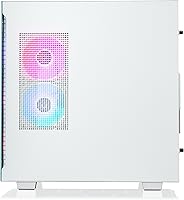
  • Form Factor: Full-size tower desktop chassis finished in white with a PSU power cover and filtered, ventilated side panel.
  • Weight: The unit weighs 36.5 pounds as shipped, reflecting the full-tower chassis and 360mm radiator assembly.
  • Dimensions: Package dimensions measure 23 x 22 x 14 inches, so adequate clearance should be confirmed before delivery.
  • Color: The chassis is finished in white with RGB-illuminated RAM and cooling components for a cohesive aesthetic.
  • USB Ports Total: The system provides a total of three USB 2.0 ports and ten USB 3.0 ports across front and rear I/O combined.

Related Reviews

Thermaltake Avalanche i476T Gaming Desktop
75%
84%
Gaming Performance
76%
Value for Money
88%
Thermal Management
73%
Build Quality
82%
Out-of-Box Experience
More
Thermaltake Quartz R66 Gaming Desktop
76%
83%
Gaming Performance
71%
Value for Money
86%
Build Quality
67%
Thermal Management
91%
Aesthetics & Design
More
Thermaltake View 460 RTX 4060 Gaming Desktop
79%
88%
Gaming Performance
82%
Value for Money
91%
Thermal Management
79%
Noise Levels
93%
Out-of-Box Experience
More
Thermaltake View i560T-170 Gaming Desktop
78%
83%
Gaming Performance
78%
Value for Money
91%
Out-of-Box Experience
84%
Build Quality
71%
Thermal Management
More
Thermaltake LCGS View 9580S-380XL Gaming Desktop
87%
94%
Gaming Performance
88%
Build Quality
90%
Cooling Efficiency
89%
Design & Aesthetics
85%
Setup and Installation
More
Thermaltake LCGS View i1460-170 Gaming Desktop
85%
91%
Performance for Gaming
88%
Build Quality
85%
Setup and Ease of Use
87%
Multitasking and Productivity
80%
Cooling Efficiency
More
Thermaltake View i1470S-380 Gaming Desktop
78%
93%
Gaming Performance
84%
Thermal Management
88%
Build Quality
91%
Aesthetics & Design
57%
Storage Capacity
More
Thermaltake Glacier 360 Gaming Desktop PC
75%
83%
Gaming Performance
78%
Thermal Management
74%
Value for Money
88%
Aesthetic Design
53%
GPU Consistency
More
Thermaltake Shadow 360i Gaming Desktop PC
78%
84%
Gaming Performance
88%
Build Quality
86%
Thermal Management
63%
Value for Money
71%
Noise Levels
More
Thermaltake LCGS Quartz i1460
79%
88%
Gaming Performance at 1080p
74%
Value for Money
86%
Build Quality & Fit
71%
Thermal Management
61%
Memory Configuration
More

FAQ

The RTX 4070 Ti is genuinely capable at 4K in most current titles, though you will see variable results depending on the game. Graphically demanding titles like Cyberpunk 2077 at maximum settings with ray tracing will require DLSS to hit smooth frame rates, but the majority of popular games run very well at 4K on this GPU. At 1440p with high refresh rates, it is an even more comfortable experience.

That is a fair frustration. At this price tier, most buyers reasonably expect Windows 11, and the Windows 10 Home inclusion appears to be a cost decision on Thermaltake's part. The good news is that the hardware fully supports Windows 11, so you can upgrade through Microsoft at no additional cost — but it is an extra step that should not be necessary on a machine in this category.

The 360mm AIO is quieter than a standard air cooler in most conditions, but it is not silent. Under sustained gaming sessions, the radiator fans spin up noticeably, and real-world noise levels depend on your room temperature and how the system is positioned. Most users report it as acceptable rather than intrusive, but if near-silent operation is a priority, you may want to manage expectations.

Yes, and this is one area where the Avalanche i477T holds up well as a long-term investment. The Z790 motherboard typically provides additional DIMM slots for RAM expansion beyond the stock 32GB, and M.2 slots for extra NVMe drives are generally available. Just confirm slot availability before purchasing upgrade components, as configurations can vary.

It handles this well. The i7-13700KF has enough core headroom that background encoding tasks — whether through OBS or a similar tool — do not significantly impact in-game frame rates. Streamers running at 1080p or 1440p output will find this setup comfortable without needing to compromise on game quality settings.

For the GPU to shine, pair it with a 1440p monitor running at 144Hz or higher, or a quality 4K display at 60–144Hz. The three DisplayPort outputs make it easy to drive a multi-monitor setup as well. If you are a sim racer or someone who works across multiple screens, the output options here are genuinely well-suited to that.

This is one area where buyer feedback is mixed. The exterior of the Thermaltake Avalanche i477T Gaming Desktop looks sharp, but some users have reported that the internal cable routing is less tidy than expected at this price point. It is functional and will not affect performance, but if you plan to leave a side panel off for display purposes, the interior may not impress.
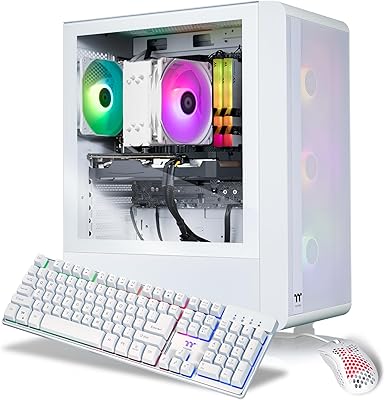
No peripherals are included in the box — this is a tower-only purchase. You will need to supply your own keyboard, mouse, and monitor. Given the target buyer is typically upgrading from an existing setup, that is a reasonable assumption, but first-time PC buyers should factor in peripheral costs.

The 360mm AIO is a closed-loop system, meaning it is sealed at the factory and requires no maintenance, refilling, or monitoring under normal conditions. These units are designed to last the practical lifespan of the PC. Custom open-loop cooling requires ongoing maintenance, but this is not that — set it up and forget about it.

A self-built system using equivalent components could potentially come in cheaper, and you would have more granular control over part selection — particularly the GPU and cooler. The trade-off is time, technical confidence, and the absence of a unified manufacturer warranty. This pre-built makes the most sense for buyers who value convenience, a warranty safety net, and a ready-to-run machine over the savings that come with a DIY approach.