Overview

ThePhotoStick Omni 256GB USB Flash Drive is built for one straightforward purpose: take the headache out of backing up photos and videos without signing up for yet another cloud subscription. It targets people who just want to plug in, press a button, and know their memories are safe — no IT background required. The 256GB capacity is genuinely generous for most households, comfortably holding well over 100,000 images and clips from years of shooting. A protective carrying case is included, which is a thoughtful touch rather than a throwaway add-on. Just set your expectations right: this is a convenience-first device, not a tool built for heavy-duty professional archiving workflows.

Features & Benefits

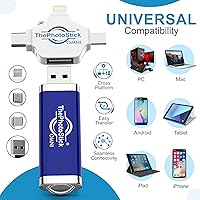
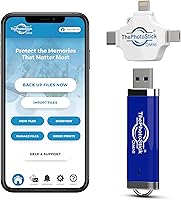
What makes the Omni drive stand out from a standard flash drive is the four built-in connector types — USB-A, USB-C, microUSB, and Lightning — packed into a single compact body. That means one device covers your older Windows laptop, your MacBook, your Android phone, and your iPhone without hunting for adapters. The companion backup app does the heavy lifting by automatically scanning connected devices and filtering out duplicates, so you are not manually sorting through thousands of files. A read speed of 125 MB/s means pulling photos off the drive onto a computer moves at a respectable pace. Format support is broad, covering HEIC files from iPhones alongside standard JPEGs, GIFs, and common video types.

Best For

This photo transfer device is genuinely well-suited for anyone who finds cloud storage confusing, expensive, or just unreliable when traveling. Think of the person who wants to back up three years of grandkid photos without touching iCloud settings — this backup stick was practically designed for that scenario. It is also a solid pick for mixed-device families where some members use iPhones and others use Android, since a single drive handles both without fuss. Frequent travelers benefit from having a local offline backup that does not depend on hotel Wi-Fi. For gift-givers, it checks the rare box of being genuinely useful without requiring the recipient to be tech-savvy.

User Feedback

Among the 400-plus ratings, a clear pattern emerges: casual everyday users tend to love it, while those with large libraries or higher technical expectations find things to nitpick. Setup and the all-in-one connector design draw consistent praise — most buyers mention being up and running within minutes. Where opinions diverge is the app experience; some find it intuitive, while others report occasional hiccups syncing across devices. A recurring frustration for power users is transfer speed — writing a very large batch of videos can feel slow. The included case generally earns positive marks for build quality, and customer support responses appear mixed, with some buyers reporting quick resolutions and others noting slower follow-up.

Pros

  • All four major connector types are built into one compact body, eliminating the need for separate adapters.
  • Setup takes only a few minutes, even for users with no technical background.
  • 256GB capacity comfortably holds a decade of family photos and videos for most households.
  • The companion app automatically detects and skips duplicate files, saving time during backups.
  • Works across iPhone, iPad, Android, Windows, and Mac without switching devices or cables.
  • The included protective case is sturdy and water-resistant, adding real everyday durability.
  • A 125 MB/s read speed means pulling files back onto a computer is reasonably quick.
  • Supports modern iPhone formats like HEIC natively, so no file conversion is needed.
  • Completely offline backup means no privacy concerns tied to third-party cloud servers.
  • Compact and lightweight enough to slip into a travel bag or pocket without a second thought.

Cons

  • Write speeds for large video libraries can feel noticeably slow during a full backup session.
  • The backup app must be launched manually each time — there is no true automatic background sync.
  • Some users report occasional app glitches or failed syncs that require restarting the process.
  • Relying on a proprietary app adds a layer of dependency that plain drag-and-drop drives avoid.
  • Customer support responsiveness appears inconsistent based on user reports, with some long wait times.
  • The price reflects a convenience premium that raw storage shoppers will find hard to justify.
  • RAW image formats common in mirrorless or DSLR cameras are not supported.
  • Long-term reliability data is limited given the drive only entered the market in mid-2024.
  • Users with very large existing libraries may need multiple sessions to complete an initial full backup.

Ratings

ThePhotoStick Omni 256GB USB Flash Drive earns a nuanced scorecard built from AI analysis of verified global buyer reviews, with spam, bot submissions, and incentivized feedback actively filtered out before scoring. Across hundreds of real-world experiences, this backup stick consistently impresses casual users while drawing sharper criticism from those with higher technical demands. Both the genuine strengths and the honest frustrations are reflected below without softening either side.
Ease of Setup
88%
Most buyers — including older adults with limited tech experience — report being fully operational within five to ten minutes of opening the box. The companion app walks users through each step clearly, and the built-in connectors mean there is nothing extra to configure before the first backup begins.
A small but consistent segment of users encounter app download issues or permission prompts that stall the initial setup, particularly on older Android devices. Those unfamiliar with granting storage access permissions can get stuck without on-hand support.
Multi-Device Compatibility
91%
Having four connector types physically integrated into one compact body is the feature buyers mention most enthusiastically. Families with a mix of iPhones, Android phones, older tablets, and both Mac and Windows computers can pass a single drive around without hunting for adapters or buying extras.
A small number of Android users on non-mainstream brands report the app failing to recognize their device even when the OS version technically meets the minimum requirement. Compatibility is broad but not quite universal.
Transfer Speed
54%
46%
Reading files back from the drive onto a computer moves at a genuinely useful pace, and for users with modest libraries of a few thousand photos, the backup process completes without much frustration or noticeable waiting.
Writing large batches of videos — especially longer clips from modern smartphones — can crawl at speeds that test patience. Power users with 50GB-plus libraries consistently flag the write performance as the single biggest disappointment, and it is hard to argue with that criticism given the price tier.
App Experience
63%
37%
For straightforward use cases — plug in, scan for photos, save them — the app does its job without requiring any technical knowledge. The automatic duplicate detection is a genuinely useful feature that saves casual users from managing bloated, redundant file collections.
Occasional sync failures, mid-transfer freezes, and UI quirks surface often enough across reviews to suggest the app is not yet fully polished. Some users report needing to restart the process multiple times before a large backup completes successfully.
Storage Capacity
86%
256GB is a realistic sweet spot for most households — enough to store the better part of a decade of smartphone photos and videos in one place without constantly monitoring available space. For the average family, it is unlikely to feel cramped anytime soon.
For users who shoot a lot of video or own multiple devices with large existing libraries, 256GB can fill faster than expected. There is no expandability option, so if you outgrow it, you are buying a second drive.
Build Quality
78%
22%
The drive itself feels solid for its size, and the included protective case adds a layer of reassurance that most flash drives at similar price points do not bother to include. Several buyers specifically mention feeling confident tossing the Omni drive into a bag without babying it.
The case is described as water-resistant but not waterproof, and a few buyers report the case latch feeling loose after extended use. The drive body itself shows minor scuff marks after regular handling, which is cosmetic but worth noting.
Portability
93%
At just 2.2 ounces and roughly the length of a standard USB stick, this photo transfer device disappears into a pocket, purse, or carry-on without a second thought. Travelers in particular appreciate having a full backup solution that takes up essentially no space.
The included protective case, while useful, adds a small amount of bulk compared to carrying the drive bare. It is a minor trade-off, but users who want the absolute slimmest form factor will notice it.
File Format Support
82%
18%
HEIC support is a meaningful inclusion — iPhone users no longer have to convert their camera roll to JPEG before backing up, which saves time and preserves the original file quality. Common video formats from both Android and iOS cameras are handled without any conversion step.
RAW image formats used by mirrorless cameras and DSLRs are not supported, which is a genuine gap for enthusiast photographers who also use their phone as a secondary shooter. The format coverage is strong for smartphone users specifically but stops there.
Value for Money
61%
39%
The all-in-one connector design, companion app, and included protective case do add up to a package that justifies some premium over a generic flash drive for users who genuinely need the cross-device convenience. For non-technical buyers, the time saved on compatibility headaches has real value.
On pure storage-per-dollar math, this backup stick is significantly more expensive than standard USB drives of the same capacity. Buyers who realize post-purchase that a cheaper drive would have met their needs tend to feel the price is harder to justify in hindsight.
Duplicate Detection
79%
21%
The automatic deduplication feature gets consistent praise from users who previously spent hours manually sorting through multiple copies of the same photo across devices. It works reliably in most tested scenarios and noticeably reduces the clutter in saved libraries.
Edge cases — like photos that were edited and saved as new files — are sometimes flagged incorrectly or missed entirely. The algorithm is helpful but not sophisticated enough to catch every redundancy, especially across mixed-device libraries.
Offline Reliability
84%
Unlike cloud-based solutions, this backup stick works entirely without an internet connection, which is a real advantage for travelers in areas with weak Wi-Fi or for anyone who has ever lost progress mid-upload due to a dropped connection. Everything happens locally, every time.
The trade-off is that there is no remote access to your backed-up files — if you leave the drive at home, those backups are inaccessible until you physically have it in hand. It is a fundamentally local solution with no hybrid cloud option.
Customer Support
57%
43%
Some buyers report positive experiences with responsive email support that resolved app issues or connectivity problems within a reasonable timeframe. When support does engage well, the resolutions tend to be practical and direct.
A notable portion of reviews describe delayed responses or generic troubleshooting replies that do not address the specific problem. Consistency appears to be the core issue — experiences vary enough that you cannot count on timely help if something goes wrong.

Suitable for:

ThePhotoStick Omni 256GB USB Flash Drive is an ideal match for people who want a reliable, low-effort way to back up personal photos and videos without dealing with monthly subscription fees or complicated software. It shines brightest in households where multiple device types coexist — say, a family where one person shoots on an iPhone, another on an Android, and both use a Windows or Mac laptop — because a single drive handles all of them without extra accessories. Older adults who feel overwhelmed by cloud storage settings will find the companion app approachable enough to use independently after an initial setup. It also makes a genuinely thoughtful gift for parents or grandparents who accumulate years of irreplaceable family photos but have no structured backup routine in place. Travelers who prefer keeping an offline copy of their memories rather than depending on spotty hotel Wi-Fi will appreciate having something physical, compact, and self-contained in their bag.
Not suitable for:

ThePhotoStick Omni 256GB USB Flash Drive is not the right tool for users who need fast, high-volume transfers on a regular basis. Photographers or videographers moving large batches of RAW files or 4K footage will likely find the write speeds frustratingly sluggish — this backup stick was built for convenience, not throughput, and that trade-off becomes obvious under heavy use. Power users who prefer direct drag-and-drop file management without a mandatory app layer may also find the workflow unnecessarily restrictive. If raw storage value is your primary concern, standard flash drives or portable SSDs at similar price points will deliver significantly more speed for the money. Anyone expecting a set-it-and-forget-it automatic background sync — the kind cloud services provide — will be disappointed, since manual app launches are required to initiate each backup session.

Specifications

  • Storage Capacity: The drive offers 256GB of onboard flash storage, enough to hold upwards of 102,400 photos and videos under typical smartphone shooting conditions.
  • Read Speed: Sequential read speed reaches 125 MB/s, allowing files to be pulled from the drive onto a computer at a reasonably brisk pace.
  • Write Speed: Write speed falls within a broad stated range of 1.5 to 300 MB/s, meaning real-world write performance can vary depending on file size and device conditions.
  • Connectors: Four physical connector types are integrated into one unit: USB-A, USB-C, microUSB, and Lightning, covering the vast majority of personal devices in current use.
  • Interface Standard: The USB-A connector operates on a USB 3.0 interface, which supports the advertised read speed when paired with a compatible USB 3.0 host port.
  • Compatible OS: Supported operating systems include Windows 7 SP1 and later, macOS 10.13 and later, iOS and iPadOS 13.0 and later, and Android 8.0 and later.
  • File Formats: Natively recognized media formats include JPEG, PNG, HEIC, GIF, MOV, and MPEG4, covering standard output from modern smartphones on both iOS and Android.
  • App Required: Backup and file management functions require the official companion app, which must be downloaded and launched manually to initiate any transfer session.
  • Dimensions: The drive measures 4″ in length, 0.5″ in width, and 0.1″ in height, making it slim enough to fit easily in a pocket or small travel pouch.
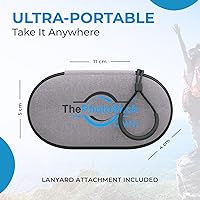
  • Weight: Total weight is 2.2 ounces including the protective case, keeping the overall package light for everyday carry or travel use.
  • Included Accessories: Each unit ships with a protective carrying case described as water-resistant, designed to shield the drive from moisture and minor physical impact during daily use.
  • Color: The drive is finished in a two-tone blue and gray colorway across both the device body and the included protective case.
  • Compatibility Scope: Designed to work with PC, Mac, iPhone, iPad, and most Android phones and tablets without requiring brand-specific adapters beyond those already built into the device.
  • Model Identifier: The product is sold under the model name Omni and manufactured by ThePhotoStick brand, with ASIN B0D9C94RBL on Amazon.
  • Market Availability: This product first became available in July 2024 and has accumulated over 400 customer ratings, ranking among the top 125 listings in the USB Flash Drives category.

Related Reviews
ThePhotoStick Omni 128GB USB Flash Drive

72%
88%
Multi-Device Compatibility
63%
Ease of Setup
54%
Transfer Speed
71%
Storage Capacity
61%
Build Quality & Durability
More
Corsair Flash Voyager 256GB USB 3.0 Flash Drive
89%
88%
Performance
93%
Durability
90%
Compatibility
72%
Speed (Write)
89%
Water Resistance
More
Corsair Flash Survivor Stealth 256GB USB Drive

82%
94%
Build Quality
91%
Waterproofing
89%
Durability Over Time
67%
Transfer Speed
88%
Storage Capacity
More
Corsair Flash Voyager GTX 256GB USB 3.1 Flash Drive
86%
91%
Performance
94%
Speed
89%
Durability
87%
Portability
88%
Compatibility
More
SSK 256GB USB Flash Drive
87%
93%
Transfer Speed
88%
Build Quality
91%
Durability
85%
Compatibility
89%
Portability
More
GARMESE 256GB Dual USB-C Flash Drive
78%
73%
Transfer Speed
91%
Dual Connector Design
84%
Build Quality
78%
Compatibility
76%
Value for Money
More
Vansuny 256GB USB 3.0 Flash Drive
77%
83%
Build Quality
91%
Portability
74%
Read Speed
61%
Write Speed
87%
Storage Capacity
More
Vansuny USB 3.2 Flash Drive 256GB
86%
89%
Performance
88%
Durability
91%
Ease of Use
87%
Portability
90%
Speed (Read/Write)
More
SanDisk Cruzer Glide 256GB USB Flash Drive
80%
91%
Storage Capacity Value
54%
Transfer Speed
83%
Build Quality
88%
Retractable Design
72%
Encryption & Security
More
SanDisk 256GB Ultra Curve USB 3.2 Flash Drive
87%
89%
Data Transfer Speed
94%
Portability and Size
85%
Build Quality
90%
Compatibility with Devices
88%
Durability of Retractable Connector
More
THKAILAR T7 256GB Dual-Port USB Flash Drive
78%
91%
Dual-Port Design
72%
Transfer Speed
88%
Build Quality
83%
iPhone Compatibility
67%
Android OTG Performance
More

FAQ

No subscription or account is required. You download the free companion app, plug in the drive, and follow the on-screen steps. There are no recurring fees — everything works locally on your own device.

Yes, the Lightning connector is built directly into the drive body, so you can plug it straight into any iPhone with a Lightning port. If you have a newer iPhone with USB-C, the USB-C connector handles that connection just as easily.

That depends heavily on how many files you have and what type they are. Reading files back from the drive is fairly quick at 125 MB/s, but writing a large batch of videos onto it can take noticeably longer. Expect the first full backup of a big library to run for a while — it is worth starting it when you have time to let it run.

Absolutely, that is one of the main reasons people choose this over a standard flash drive. Because it has USB-A, USB-C, microUSB, and Lightning connectors built in, one drive can connect to practically every phone or tablet in the house without needing to carry extra cables or adapters.

The case is described as water-resistant rather than fully waterproof, so it handles incidental moisture like rain or a spilled drink reasonably well. It is not designed for submersion, so you would not want to rely on it if the drive is fully submerged.

You need to open the app manually each time you want to run a backup — there is no automatic background sync the way cloud services work. For some people that is actually a plus since you stay in control of when transfers happen, but if you were hoping for a set-it-and-forget-it solution, that is worth knowing upfront.

No, the backup process copies your files onto the drive without removing them from your phone or computer. Losing the drive would mean losing that particular backup copy, but your originals would still be wherever they were stored originally.

Yes, the built-in USB-C connector handles modern Android phones directly. Just make sure your Android version is 8.0 or newer, since older versions are not officially supported by the companion app.

Yes, because files saved to the drive are stored as standard media files, you can plug the drive into any compatible computer and access them directly. The companion app is mainly needed for the automatic scanning and backup features — basic file access works like any other flash drive.

Most non-technical users do manage to get it working independently after the initial setup, and that is one of the most common compliments in real buyer reviews. The app walks you through each step with on-screen prompts. That said, helping them through the very first session would make things smoother and give them confidence for future use on their own.

Where to Buy