Overview

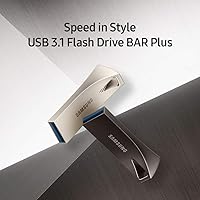
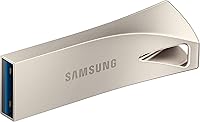
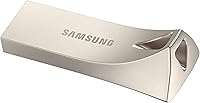
The Samsung BAR Plus 256GB USB Flash Drive sits in a sweet spot that not many drives manage to occupy — fast enough for serious file work, tough enough for daily carry, and compact enough to forget it's even on your keychain. Samsung has built a strong reputation in storage hardware, and this model reflects that experience without pushing into enterprise territory. The metal bar design feels noticeably more substantial than the plastic thumb drives you've probably tossed in a drawer and forgotten. It's aimed at people who move files regularly — photographers, remote workers, students — and need something dependable. Just know going in: read speeds impress, but write performance is more modest.
Features & Benefits

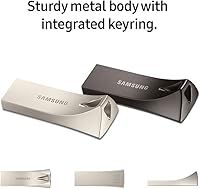
The BAR Plus 256GB earns its reputation on the read side — pulling files off the drive is genuinely quick, the kind of speed that makes transferring a folder of large photos feel like nothing. Writing to it is a different story; it's still respectable, but if you're regularly dumping large batches of data onto it at once, you'll notice it doesn't match the read pace. The one-piece metal casing is a real highlight: no cap to lose, no plastic seams to crack. It handles water, shock, and temperature swings without issue — though durable doesn't mean indestructible, so treat it accordingly. Older USB ports work fine thanks to backward compatibility, and the integrated keyring loop is a small but genuinely useful detail.

Best For

This Samsung flash drive is a natural fit for photographers and video editors who shuttle large files between machines regularly — the fast read speed cuts waiting time when pulling content off the drive. Students toting class notes, project files, and presentations will appreciate how compact and hard to accidentally damage it is. Travelers especially benefit from the keyring form factor; it clips to a bag or lanyard without adding any noticeable bulk. If you're still on a slow USB 2.0 stick from a few years back, the speed jump here is substantial and immediately noticeable. That said, if raw capacity is the main goal, this price tier does offer options with more storage elsewhere.

User Feedback

With nearly 50,000 ratings and a score well above average for the category, buyer satisfaction for this metal USB drive is hard to argue with. People consistently mention how quick transfers feel in practice, and build quality that exceeds expectations at this price point comes up again and again. On the critical side, a handful of users note the drive gets noticeably warm after extended use, and some report that real-world write speeds fall short of the advertised ceiling under sustained heavy loads — something worth knowing if you plan on frequent large writes. Long-term owners, however, largely report no issues after years of regular use, which speaks well to its long-term reliability.

Pros

  • Read speeds are fast enough to make transferring large photo or video files feel genuinely quick.
  • The all-metal one-piece casing feels premium and survives drops, splashes, and bag abuse without issue.
  • No cap to lose — the capless bar design with an integrated keyring loop is a practical everyday detail.
  • Compatible with older USB 3.0 and 2.0 ports, so it works across a wide range of laptops and desktops.
  • Waterproof, shockproof, and temperature-resistant protection covers most real-world accidents you are likely to encounter.
  • 256GB of storage handles large media libraries, project archives, and system backups without constant juggling.
  • Extremely lightweight and compact — it barely registers on your keychain or in a pocket.
  • Tens of thousands of verified buyers report consistent, reliable performance over years of regular use.
  • Samsung's track record in storage hardware adds a layer of confidence in long-term quality control.
  • The champagne silver finish looks noticeably more polished than typical plastic thumb drives in this category.

Cons

  • Write speeds fall well short of read speeds, which can frustrate users doing sustained or repeated data writes.
  • The drive gets noticeably warm during extended transfers, which some users find concerning even if it rarely causes issues.
  • Real-world write performance under heavy load often comes in below the advertised ceiling.
  • No built-in hardware encryption or password protection, making it a poor fit for sensitive or confidential data.
  • USB Type-A only — users with modern USB-C laptops will need a separate adapter, which adds friction.
  • At this capacity and price tier, competing drives from other reputable brands offer strong alternatives worth comparing.
  • The BAR Plus 256GB offers no companion software for backup scheduling or drive management out of the box.
  • 256GB may feel limiting faster than expected for users storing 4K video, RAW photo bursts, or large project files.
  • The keyring hole, while useful, is small enough that attaching a thick carabiner or large keyring can be awkward.
  • No USB-C variant available in this model, which limits forward compatibility as older ports become less common.

Ratings

The scores below reflect an AI-driven analysis of verified global buyer reviews for the Samsung BAR Plus 256GB USB Flash Drive, with spam, bot activity, and incentivized feedback actively filtered out to ensure the ratings represent genuine ownership experiences. Every category captures both what real users celebrate and where they ran into frustration, giving you an honest picture before you buy.

Read Speed Performance
91%
Users who regularly move large photo libraries or video clips between machines consistently report that file retrieval feels genuinely fast compared to drives they have used before. Photographers pulling RAW files from the drive to edit mention that the speed holds up in day-to-day use, not just in benchmark tests.
A small number of users with high-end workstations note that real-world read speeds occasionally fall a few notches below the ceiling figure, particularly when transferring many small files rather than large single ones. The gap is not dramatic, but sequential benchmarks and mixed-file workloads tell different stories.
Write Speed Performance
67%
33%
For routine tasks like saving documents, copying presentation files, or backing up a folder of photos, the write performance is perfectly workable and noticeably faster than older USB 2.0 drives. Most everyday users report they rarely feel bottlenecked during standard transfers.
This is where the most common buyer disappointment surfaces: many users expected write speeds closer to the read speeds, only to find sustained write tasks take significantly longer. Videographers trying to offload large batches of footage or users running repeated backup jobs are the ones most likely to feel this gap acutely.
Build Quality
94%
The one-piece metal casing earns consistent praise from buyers who have put it through real punishment — dropped on concrete, left in a car through summer heat, thrown loose in a backpack for months. The absence of a plastic cap or visible seams means there is simply less to break or lose over time.
A very small number of users report minor scuffing on the metal surface after extended keychain carry, which does not affect function but bothers those who care about appearance. The keyring loop opening is also on the smaller side, making it slightly awkward to attach to thicker key rings or carabiners.
Durability & Protection
88%
Travelers and outdoor-oriented users particularly value the five-way environmental protection — surviving rain exposure, airport security X-ray belts, and the occasional drop into a puddle without drama. Long-term owners frequently mention the drive still performs reliably years after purchase despite consistent rough handling.
It is worth being clear that these protections have practical limits: the drive is resistant, not indestructible. A few users who subjected it to more extreme conditions — prolonged submersion or heavy physical impact — reported issues, so the protection is best understood as covering everyday accidents rather than abuse.
Portability & Form Factor
92%
The compact bar shape and built-in keyring loop make this one of the better-designed drives for people who want it on them at all times without adding noticeable bulk. Students and commuters particularly appreciate that it clips onto a keychain or bag strap and genuinely disappears into daily carry.
The capless design, while convenient, does leave the connector exposed to lint, dust, and debris when carried loose in a pocket or bag over time. A few users mention they would appreciate a cover option for peace of mind, even if the metal casing itself holds up well.
Compatibility
83%
The backward compatibility with USB 3.0 and 2.0 ports means the drive works across a wide range of devices without any setup — plug it in and it is recognized immediately on Windows, macOS, and Linux systems alike. Users with older machines appreciate not having to worry about whether it will function.
The standard Type-A connector is increasingly a friction point as more laptops ship with only USB-C ports. Users who have made the switch to newer MacBooks or thin-and-light Windows laptops find themselves needing an adapter every time, which adds minor but real inconvenience.
Thermal Management
61%
39%
Under normal use — quick transfers, occasional plug-ins — the drive stays at a perfectly comfortable temperature and the metal casing actually helps dissipate heat better than a plastic body would. Most casual users never encounter a warmth issue at all.
During extended transfers or when left plugged in for long periods, the drive gets noticeably warm to the touch, which some users find alarming even if it rarely causes actual problems. Users doing large sustained backup jobs specifically flag this as something Samsung could improve in future revisions.
Value for Money
79%
21%
For buyers who want a durable, fast-reading drive from a trusted brand with solid long-term reliability, the pricing feels justified — especially compared to budget drives that fail within a year or offer a fraction of the speed. Samsung's warranty backing adds tangible peace of mind to the purchase.
At this price tier, competing drives from other reputable storage brands offer similar or higher capacities, and some buyers feel the write speed gap makes the value proposition less clear-cut for write-heavy use cases. Shoppers focused purely on raw storage per dollar can find better options.
Long-Term Reliability
89%
An unusually high proportion of reviews come from buyers reporting back after two, three, or even four years of regular use with no issues — a reassuring signal that the drive holds up well beyond the initial purchase period. Samsung's manufacturing consistency appears to translate into real-world longevity here.
A small subset of users report sudden failure without warning after extended use, which is an inherent risk with any flash storage but still worth noting. There is no S.M.A.R.T. monitoring support on flash drives like this, so there is no built-in way to anticipate when a drive might be nearing end of life.
Ease of Use
96%
There is essentially no learning curve here — plug it in, it mounts, transfer your files. The capless design removes even the small friction of managing a cover, and the keyring integration means it is always at hand without needing a dedicated storage spot.
There is no included software for encryption, backup scheduling, or drive management, which means users who want those features have to source and configure third-party tools on their own. For tech-savvy buyers this is a non-issue, but less experienced users may expect more out of the box.
Data Security Features
44%
56%
The physical durability features — shock, water, and magnet resistance — do provide a meaningful layer of protection against accidental data loss caused by environmental damage, which many users appreciate for peace of mind during travel or outdoor use.
There is no hardware encryption, password protection, or any built-in security layer on this metal USB drive, making it a poor choice for transporting sensitive professional or personal data. Users who work in fields requiring data confidentiality will need to rely entirely on software encryption, which adds complexity.
Aesthetics & Design
86%
The brushed champagne silver metal finish consistently draws positive comments — buyers frequently mention it looks noticeably more refined than the typical plastic thumb drive and feels like a considered product rather than an afterthought. It holds up visually over time without looking worn.
The color and style options are limited to a single finish for this variant, which is a minor frustration for buyers who prefer a specific look. Some users also feel the overall shape, while functional, is fairly utilitarian and does not stand out as particularly distinctive in a crowded product category.
Transfer Consistency
73%
27%
For typical single-session transfers — copying a project folder, moving a photo batch — the BAR Plus 256GB delivers consistent speeds without stalling or stuttering, which is a meaningful improvement over budget drives that slow dramatically as they warm up.
Under sustained multi-session or continuous write loads, some users report speed throttling that brings real-world performance noticeably below peak figures. This inconsistency between burst performance and sustained throughput is the most technically honest limitation of the drive.
Packaging & Unboxing
77%
23%
The drive arrives in clean, no-nonsense retail packaging that feels proportionate to the product tier — nothing excessive, but enough to communicate that you are buying a quality item. Buyers report it presents well as a gift, which is a common purchase scenario for this type of drive.
There are no accessories included — no adapter, no pouch, no software card — which some buyers at this price point feel should come standard. The minimalist unboxing is practical but leaves little impression beyond the drive itself.

Suitable for:

The Samsung BAR Plus 256GB USB Flash Drive is a strong pick for anyone who moves files regularly and wants a drive that can keep up without babying it. Photographers and videographers transferring large RAW files or footage between machines will notice a real difference compared to budget alternatives — reading data off the drive is quick enough to feel effortless. Students who carry their drive everywhere will appreciate the all-metal build and the keyring loop that keeps it from getting lost at the bottom of a bag. Remote workers and road-trip travelers benefit from the durability guarantees: the drive handles water splashes, temperature swings, and the general chaos of being tossed around in luggage without complaint. If you have been limping along on an old USB 2.0 stick and want a meaningful upgrade in both speed and toughness, this is a very sensible place to land.
Not suitable for:

The Samsung BAR Plus 256GB USB Flash Drive is not the right tool if your workflow involves writing large volumes of data to the drive repeatedly and quickly — the write speed lags noticeably behind the read speed, which can become a frustration in heavy-use scenarios like continuous backup jobs or live video recording directly to the drive. Power users who need maximum capacity for archiving large media libraries may find 256GB constraining at this price, since other drives in the same range offer more storage. Anyone hoping to run applications or an operating system directly from the drive may also hit performance ceilings under sustained read-write loads. It is worth noting the drive has no hardware encryption or password protection built in, so it is not ideal for transporting sensitive professional or confidential data. Finally, if your device only has USB-C ports with no adapter handy, the standard Type-A connector means you will need a workaround.
Specifications

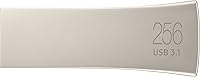
  • Capacity: The drive offers 256GB of usable storage, suitable for large photo libraries, video projects, and file backups.
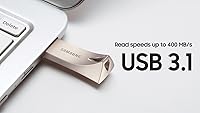
  • Read Speed: Sequential read speeds reach up to 400MB/s over a USB 3.1 connection, making file retrieval from the drive notably fast.
  • Write Speed: Sequential write speeds top out at up to 200MB/s, which is adequate for most everyday tasks but slower than the read ceiling.
  • Interface: Uses a USB 3.1 Gen 1 Type-A connector with full backward compatibility for USB 3.0 and USB 2.0 ports.
  • Connector Type: Standard USB Type-A plug — no USB-C option is included with this model.
  • Casing: Constructed from a single piece of rugged metal alloy with no seams or removable cap, giving the body long-term structural integrity.
  • Dimensions: The drive measures 1.58 x 0.61 x 0.47 inches, making it one of the more compact full-size USB drives available.
  • Weight: Weighs just 0.04 ounces, light enough to leave on a keychain without noticing it throughout the day.
  • Form Factor: Bar-style design with an integrated keyring loop built into the body — no separate lanyard or attachment needed.
  • Protection Rating: Rated for five environmental resistances: waterproof, shockproof, magnet-proof, temperature-proof, and X-ray proof.
  • Flash Memory: Uses CompactFlash-type NAND memory architecture internally, as specified by Samsung for this product line.
  • Color: Available in Champagne Silver, a brushed metallic finish that resists minor scuffs and fingerprints reasonably well.
  • Model Number: Official Samsung model identifier is MUF-256BE3/AM, which can be used to verify authenticity and check warranty status.
  • OS Compatibility: Works with Windows, macOS, Linux, and other operating systems that support standard USB mass storage devices without additional drivers.
  • Cap Design: Capless by design — the connector is protected by the metal housing itself, eliminating the common problem of losing a drive cap.
  • Manufacturer: Produced by Samsung Electronics, a major manufacturer with an established track record in consumer and enterprise storage products.
  • Availability Date: This model has been commercially available since April 2018 and remains an active, non-discontinued product in Samsung's lineup.
  • Warranty: Samsung provides a limited 5-year manufacturer warranty on the BAR Plus series, covering defects in materials and workmanship.

Related Reviews
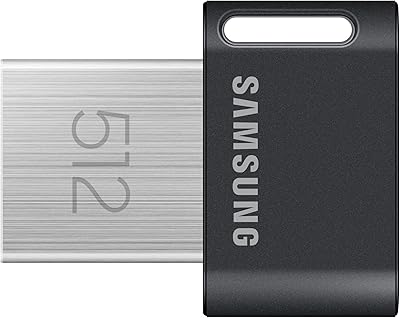
Samsung FIT Plus USB 3.2 Flash Drive 512GB
85%
89%
Performance & Speed
93%
Build Quality & Durability
91%
Portability & Design
85%
Compatibility
88%
Ease of Use
More
Corsair Flash Voyager 256GB USB 3.0 Flash Drive
89%
88%
Performance
93%
Durability
90%
Compatibility
72%
Speed (Write)
89%
Water Resistance
More
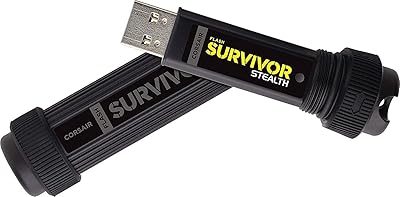
Corsair Flash Survivor Stealth 256GB USB Drive
82%
94%
Build Quality
91%
Waterproofing
89%
Durability Over Time
67%
Transfer Speed
88%
Storage Capacity
More
Corsair Flash Voyager GTX 256GB USB 3.1 Flash Drive
86%
91%
Performance
94%
Speed
89%
Durability
87%
Portability
88%
Compatibility
More
SSK 256GB USB Flash Drive
87%
93%
Transfer Speed
88%
Build Quality
91%
Durability
85%
Compatibility
89%
Portability
More
GARMESE 256GB Dual USB-C Flash Drive
78%
73%
Transfer Speed
91%
Dual Connector Design
84%
Build Quality
78%
Compatibility
76%
Value for Money
More
Vansuny USB 3.2 Flash Drive 256GB
86%
89%
Performance
88%
Durability
91%
Ease of Use
87%
Portability
90%
Speed (Read/Write)
More
SanDisk Cruzer Glide 256GB USB Flash Drive
80%
91%
Storage Capacity Value
54%
Transfer Speed
83%
Build Quality
88%
Retractable Design
72%
Encryption & Security
More
Vansuny 256GB USB 3.0 Flash Drive
77%
83%
Build Quality
91%
Portability
74%
Read Speed
61%
Write Speed
87%
Storage Capacity
More
Samsung Type-C USB Flash Drive 512GB
88%
91%
Performance
94%
Build Quality & Durability
93%
Portability
77%
Compatibility
89%
Ease of Use
More

FAQ

Yes, the BAR Plus 256GB is fully backward compatible with USB 3.0 and USB 2.0 ports. You will just see slower transfer speeds on older connections, which is expected behavior for any USB 3.1 drive.

It can be, depending on what you are doing. Reading files off the drive — like opening a photo or copying files to your computer — is very fast. Writing data onto the drive, like backing up a large folder, takes longer because the write speed is roughly half the read speed. For casual use it is rarely a problem, but if you are doing bulk transfers regularly, it is worth keeping in mind.

It is genuinely water-resistant in practical terms — Samsung rates it to survive submersion up to a certain depth for a limited period. That said, it is not designed for underwater use or prolonged exposure. Think of it as solid protection against spills, rain, or accidental drops in a puddle, not a dive computer.

Some users do report the drive gets noticeably warm during extended transfers or if left plugged in for hours. It is not typically hot enough to cause damage, but it is a real phenomenon worth knowing about. If you notice it running warm, finishing your transfer and unplugging it is a reasonable habit.

Technically possible, but not ideal for this drive. Running an OS or applications puts sustained read-write pressure on the flash storage, and this metal USB drive is not optimized for that kind of continuous workload. You would likely see sluggish performance and potentially shorten the drive's lifespan compared to using it for standard file transfers.

No, there is no bundled software included. The drive shows up as a standard removable storage device when plugged in. If you want encryption or automated backup, you will need to use third-party software like VeraCrypt or your operating system's built-in tools.

The drive has a small loop built directly into one end of the metal body, so a standard keyring threads right through it. No separate accessory is needed. Just note the loop opening is fairly compact, so very thick keyrings or oversized carabiners may be a tight fit.

For most people, yes. A 256GB drive holds thousands of JPEG photos, hundreds of RAW files, or several hours of compressed video footage. If you shoot 4K video in large quantities or archive very high-resolution RAW bursts regularly, you might fill it faster than you expect, but for the average photographer or student it is a comfortable amount of space.

Not directly — this drive uses a standard USB Type-A connector. You will need a USB-A to USB-C adapter or a hub with a Type-A port. Adapters are inexpensive and widely available, but it is an extra step that is worth factoring in if all your devices are USB-C only.

Based on widespread user feedback, the BAR Plus tends to hold up well over years of everyday use. The all-metal casing protects the internals better than most plastic drives, and Samsung's reputation for quality control in storage hardware is solid. Like any flash drive, it has a finite number of write cycles, but for typical personal use — not industrial or server-level workloads — longevity is rarely a concern.

Where to Buy