Overview

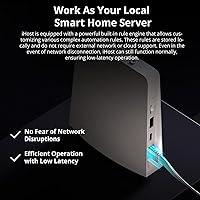
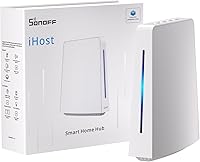
The SONOFF iHost 4GB Smart Home Hub takes a different approach from most hubs on the market — it keeps everything local. No cloud server required, no monthly subscription, and your device data never leaves your home network. That alone makes it interesting to a growing crowd of privacy-conscious users who are tired of smart home platforms that go offline whenever a company decides to shut down a service. The target audience here is pretty clear: Zigbee ecosystem builders, SONOFF device owners, and hobbyists comfortable tinkering with open software. This isn't a beginner's plug-and-play box. It's built for those who want real control over their smart home infrastructure.
Features & Benefits

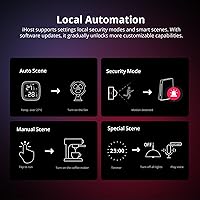
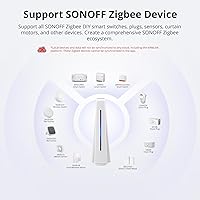
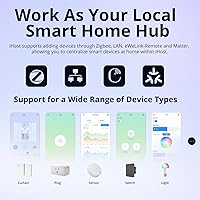
At the core of this local smart home hub is a private server that handles all automation logic on-device, using an RV1126 processor backed by 4GB of DDR4 RAM. In practice, automations trigger quickly and the interface feels responsive even when juggling multiple devices. It acts as a Zigbee coordinator, managing up to 128 sub-devices — and you can extend that network by adding Zigbee router devices for whole-home coverage. Dual-band Wi-Fi and LAN support means it handles non-Zigbee devices too. The Docker containerization support is where it gets genuinely interesting: you can run addons like Node-RED or community integrations, giving tinkerers real room to customize. Local log storage keeps up to 2,000 entries per category without sending anything off-device.

Best For

This Zigbee hub makes the most sense if you're already embedded in the SONOFF or Zigbee ecosystem. If you've got a handful of Zigbee bulbs, sensors, and switches spread around your home, the iHost gateway handles all of them from a single local interface — no third-party cloud accounts required. It's also a natural fit for households with spotty internet, since the whole system keeps working through an outage. Developers and advanced hobbyists will appreciate the open API and Docker access; there's real depth here for those willing to explore it. That said, if you've never touched a smart home hub and expect a simple mobile setup, this isn't the right starting point. Z-Wave users will also find no native support here.

User Feedback

Across several hundred ratings, the iHost gateway earns genuine praise for its reliable local control — users consistently note that automations run without hiccups even when the router reboots or the internet drops. Pairing Zigbee devices is generally considered straightforward once the initial setup is understood. Criticism tends to cluster around two areas: the learning curve for less technical users who find the web interface unfamiliar, and the absence of Z-Wave or Matter support, which limits compatibility for mixed-protocol setups. A handful of reviewers have flagged delayed firmware updates and wish SONOFF would expand third-party integrations faster. Overall, the 4.1-star average reflects a hub that delivers on its core promise but rewards users who arrive with some technical background.

Pros

  • Automations run fully offline — no internet connection needed once the system is configured.
  • No monthly fees or cloud subscription required, ever.
  • Supports up to 128 Zigbee sub-devices, with range extendable via router devices.
  • Docker support lets advanced users install custom addons and third-party integrations.
  • All device logs and scene data stay on-device, which is a real privacy advantage.
  • The iHost gateway pairs reliably with SONOFF and standard Zigbee devices with minimal fuss.
  • 4GB of RAM keeps the interface responsive even when managing multiple automations simultaneously.
  • Open API means developers can build or adapt their own tools without waiting on SONOFF.
  • Works as a solid local alternative for users migrating away from cloud-heavy platforms.

Cons

  • No native Z-Wave support limits compatibility for users with mixed smart home setups.
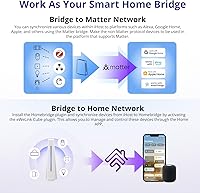
  • Matter protocol is not supported out of the box, which is a real gap as the standard grows.
  • Setup has a noticeable learning curve that non-technical users consistently find discouraging.
  • Firmware updates have been slow to arrive, leaving some feature requests unaddressed for months.
  • Third-party protocol support beyond Zigbee and LAN is narrow and unlikely to expand quickly.
  • The web interface is functional but feels dated compared to polished consumer hub apps.
  • Community addon ecosystem is still developing and lacks the depth of more established platforms.
  • Limited official documentation makes troubleshooting harder for users new to local home automation.

Ratings

The scores below were generated by AI after analyzing verified global user reviews for the SONOFF iHost 4GB Smart Home Hub, with spam, bot-submitted, and incentivized feedback actively filtered out to reflect genuine buyer experiences. This hub attracts a technically engaged audience, and their feedback is detailed — covering everything from Zigbee pairing reliability to Docker addon performance. Both the standout strengths and the recurring frustrations are transparently factored into every score you see here.

Local Control Reliability
91%
Users consistently report that automations trigger without delay and device controls respond instantly — even during full internet outages. Households in areas with unreliable connectivity particularly value this, since most competing hubs go dark the moment the router loses its upstream connection.
A small subset of users noted occasional automation hiccups after firmware updates, requiring a hub restart to restore expected behavior. These instances are infrequent but worth monitoring when SONOFF pushes new software versions.
Zigbee Device Compatibility
83%
Pairing standard Zigbee devices is generally smooth, and the hub performs well as a Zigbee coordinator across bulbs, sensors, plugs, and door contacts from multiple brands. SONOFF's own device lineup integrates particularly cleanly with minimal configuration.
Compatibility with less common or older Zigbee devices is inconsistent, and some third-party brands require workarounds to pair correctly. Users with a mixed Zigbee fleet from different manufacturers occasionally report devices dropping off the network without clear explanation.
Privacy & Data Security
94%
For privacy-conscious buyers, this is the hub's clearest advantage — all logs, automation history, and device activity are stored on the hardware itself and never transmitted to external servers. Users who previously ran cloud-based platforms specifically cite this as the reason they switched.
The local-only model means there is no easy remote access out of the box unless you configure your own VPN or reverse proxy, which introduces some complexity for users who occasionally need to manage their home while traveling.
Setup Experience
57%
43%
Users with a networking background or prior smart home hub experience generally get through the initial setup without major issues, and the web interface is logically organized once you understand the structure. The hardware itself arrives ready to connect with no assembly required.
Non-technical buyers frequently describe the setup process as confusing and poorly documented, with several noting they spent hours troubleshooting basic configuration steps. The lack of a guided mobile onboarding flow is a recurring complaint that SONOFF has been slow to address.
Docker & Addon Ecosystem
78%
22%
Docker support is a genuine differentiator at this price tier — power users have successfully deployed Node-RED, custom MQTT brokers, and community integrations that extend the hub well beyond its factory capabilities. The open API adds further flexibility for developers building bespoke tools.
The addon ecosystem is still relatively young compared to platforms like Home Assistant, and documentation for running specific containers is scattered across community forums rather than centralized in official guides. Less experienced Docker users often struggle without clear starting points.
Protocol Coverage
51%
49%
Within its supported protocols — Zigbee and LAN — the iHost gateway performs reliably and handles a broad range of devices. For households that have standardized on Zigbee, the protocol coverage is sufficient for a fully functional smart home setup.
The absence of Z-Wave and native Matter support is a tangible limitation that cuts this hub off from large portions of the broader smart home device market. Users with mixed-protocol setups will find themselves either replacing devices or managing two separate hubs, neither of which is an attractive option.
Performance & Responsiveness
86%
The RV1126 processor combined with 4GB of DDR4 RAM means the local web interface stays snappy even when running multiple addons simultaneously. Users running Node-RED alongside the core hub functions report no noticeable slowdowns under typical household automation loads.
Under heavier Docker workloads with several containers active, a small number of users have observed sluggishness in the management interface. This is more relevant to power users pushing the hardware than to typical Zigbee-only deployments.
Firmware & Update Quality
59%
41%
When firmware updates do arrive, they generally improve stability and occasionally add new features or Zigbee device support. Users running the hub long-term note that the overall software has matured since launch in 2023.
The pace of firmware releases has been a persistent frustration — feature requests raised by the community often wait months with no visible roadmap or official response. A handful of updates have also introduced temporary regressions that required rollback or manual fixes.
Value for Money
77%
23%
Compared to cloud-subscription hubs that charge monthly fees indefinitely, the one-time cost of the iHost gateway looks attractive over a two-to-three year horizon. The hardware specs — particularly the RAM — are generous relative to competing local hubs at a similar price point.
Buyers who need broad protocol support or a polished out-of-the-box experience may find the value proposition weaker, since they will likely need to invest additional time or companion hardware to fill the gaps. At this price, some users expected a more complete ecosystem from day one.
Build Quality & Design
74%
26%
The physical unit feels solid and is compact enough to sit on a shelf or tuck behind a networking cabinet without drawing attention. The white finish blends easily into most home environments, and the build quality feels appropriate for the price tier.
The industrial aesthetic is purely functional — there is no display, minimal LED feedback, and no premium material touches. Users accustomed to consumer-grade hubs with polished designs may find the appearance underwhelming, though it is unlikely to bother the technically minded buyers this product targets.
Network Flexibility
82%
18%
Dual-band Wi-Fi and wired LAN connectivity give users genuine placement flexibility — those who want a stable connection can run an ethernet cable, while others can rely on 5GHz Wi-Fi for clean performance. This hybrid approach is more practical than Wi-Fi-only competitors.
Some users in dense Wi-Fi environments reported occasional reconnection drops on the wireless interface, and the hub lacks a built-in Ethernet port indicator or signal strength display. Troubleshooting network issues is harder than it should be without better diagnostic tools in the interface.
Remote Access
48%
52%
For users who invest time in configuring a VPN or a reverse proxy, remote access works and gives full local control from anywhere. The open API also makes it possible to build lightweight external access solutions for those comfortable with self-hosting.
There is no simple, built-in remote access solution — a notable gap compared to cloud hubs where remote control is effortless by default. Average users who want to check on their home while traveling will find this a meaningful inconvenience that requires non-trivial technical setup to resolve.
Documentation & Support
53%
47%
The SONOFF community forums are reasonably active, and experienced users often help newcomers troubleshoot pairing and configuration issues. Some well-maintained third-party guides and YouTube walkthroughs fill in gaps that official documentation leaves open.
Official documentation from SONOFF is thin in places, particularly around Docker addon setup and API usage, forcing users to piece together information from scattered community posts. Customer support response times have drawn criticism, with some users reporting slow or unhelpful replies to technical tickets.
Scalability
81%
19%
Supporting up to 128 Zigbee sub-devices is more than sufficient for most households, and the ability to extend coverage using Zigbee router devices means the network can grow alongside a home renovation or device expansion without hitting hard limits quickly.
Users running very large Zigbee networks near the device cap have reported occasional instability and slower pairing times for new devices. The hub's ability to maintain consistent performance at high device counts is less proven than entry-level commercial Zigbee coordinators with dedicated firmware optimization.

Suitable for:

The SONOFF iHost 4GB Smart Home Hub is a strong fit for anyone who has grown frustrated with cloud-dependent smart home platforms and wants their automation to run entirely on their own hardware. If you're already deep in the Zigbee ecosystem — with SONOFF sensors, switches, or bulbs around the house — this hub ties everything together without requiring a third-party cloud account or a recurring subscription. It also makes a lot of sense for households in areas where internet reliability is inconsistent, since all automations and local controls keep working through an outage. Privacy-minded buyers who don't want device activity logs sitting on someone else's server will find the on-device storage approach genuinely reassuring. Developers and advanced hobbyists get extra mileage through Docker support and the open API, which opens the door to addons like Node-RED and community-built integrations that extend the platform well beyond its factory defaults.
Not suitable for:

The SONOFF iHost 4GB Smart Home Hub is not the right choice if you're new to smart home technology and expect a simple, app-guided setup experience. The initial configuration requires some comfort with networking concepts, and users without that background frequently report feeling lost before they get things running smoothly. It's also a poor fit for anyone with an existing Z-Wave device network or who wants to future-proof around Matter, since neither protocol is natively supported — and there's no guarantee when or whether that will change via firmware. If you rely heavily on a mixed ecosystem of devices from brands outside the Zigbee and LAN space, you'll find integration options frustratingly narrow. Buyers looking for a hub that pairs effortlessly with a polished consumer app and requires zero technical involvement should look elsewhere.
Specifications

  • Brand: Manufactured by SONOFF, a brand under ITEAD Intelligent Systems, known for affordable smart home hardware.
  • Model: The unit's model designation is AIBridge-26, which identifies the specific hardware revision of this hub.
  • Processor: Powered by a Rockchip RV1126 SoC, which provides enough processing headroom for local automation tasks and Docker containers.
  • RAM: Equipped with 4GB of DDR4 RAM, supporting responsive multitasking across automations, addons, and the local web interface.
  • Wireless: Supports dual-band Wi-Fi using the 802.11ac standard, covering both 2.4GHz and 5GHz frequency bands.
  • Protocol: Natively supports Zigbee and LAN-based device communication; Z-Wave and Matter are not supported.
  • Max Devices: Can manage up to 128 Zigbee sub-devices, with coverage extendable via Zigbee router devices placed around the home.
  • Local Storage: Stores up to 2,000 log entries per category — including scene logs, operation logs, and security logs — entirely on-device.
  • API: Provides an open REST API that allows developers to build custom integrations and interact with connected devices programmatically.
  • Containerization: Supports Docker containerization, enabling installation of third-party addons such as Node-RED and other community-developed tools.
  • Connectivity: Connects to the local network via Wi-Fi or wired LAN, giving users flexibility in placement and network architecture.
  • Offline Operation: All automations and device controls function independently of an internet connection once the system is set up.
  • Dimensions: Physical footprint measures 4.7 x 1.6 x 5.3 inches, making it compact enough to tuck behind a router or on a shelf.
  • Weight: Weighs 12.7 ounces, which is light enough to mount or place without dedicated hardware support.
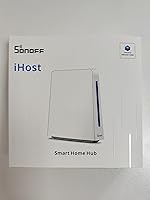
  • Color: Available in white, consistent with most home networking and smart home device aesthetics.
  • In the Box: Package includes one AIBridge-26 unit; additional accessories such as a power adapter may need to be sourced separately.
  • Subscription: No cloud subscription or recurring fee is required; all core functionality operates through the local network indefinitely.
  • Date Available: First listed for purchase on Amazon in July 2023, making it a relatively recent addition to the local smart home hub market.

Related Reviews
Honeywell Home Smart Home Security Starter Kit
81%
92%
Ease of Setup
89%
Alexa Integration
85%
Video Quality
78%
App Functionality
88%
Motion Detection
More
REOLINK Home Hub Security Camera Hub
74%
83%
Ease of Setup
91%
Local Storage Reliability
44%
Ecosystem Compatibility
78%
Value for Money
88%
Privacy & Data Security
More
REOLINK Home Hub Pro 2TB Security Hub
76%
83%
Value for Money
61%
Ecosystem Compatibility
88%
Storage Reliability
74%
App Experience
81%
Setup & Installation
More
YoLink YS6801-UC Smart Power Strip with Hub
80%
93%
Wireless Range
89%
Reliability & Uptime
78%
Value for Money
71%
Setup & Onboarding
74%
App Experience
More
Denon Home 350
Denon Home 350
80%
91%
Sound Quality
88%
Build Quality
86%
HEOS Multi-Room Performance
93%
AirPlay 2 Integration
61%
App Experience (HEOS App)
More
TUGARD G20 Smart Home Security System Kit
77%
91%
Value for Money
86%
Ease of Setup
78%
Dual-Network Reliability
67%
App Performance
72%
Sensor Coverage & Range
More
Denon Home 150 Wireless Smart Speaker
80%
83%
Sound Quality
78%
Multi-Room Performance
66%
App & Setup Experience
87%
AirPlay 2 Integration
81%
Alexa Integration
More
JBL Authentics 200 Smart Home Speaker
79%
93%
Build Quality
86%
Sound Quality
84%
Bass Performance
81%
Smart Integration
62%
App Experience
More
BenQ TK860i 4K Smart Home Theater Projector
85%
91%
Picture Quality
88%
Ease of Setup
87%
Connectivity Options
65%
Sound Quality
82%
Streaming Performance (Android TV)
More
KEYESTUDIO ESP32 Smart Home Starter Kit
76%
83%
Beginner Accessibility
61%
Content Depth & Longevity
72%
Documentation Quality
78%
Component Quality
81%
Assembly Experience
More

FAQ

Yes, that's actually one of its main strengths. Once your devices are paired and your automations are configured, everything continues running on your local network without needing any outside connection. Most users specifically buy this hub for exactly that reason.

Not natively out of the box, but it's possible with some configuration. The hub supports Docker and an open API, which means technically savvy users have found ways to bridge it with Home Assistant. It's not a one-click integration though — expect some manual setup if that's your goal.

No, Z-Wave is not supported. The iHost gateway handles Zigbee and LAN-based devices only. If you have a Z-Wave ecosystem, this hub won't work as a coordinator for those devices, and there's no indication that Z-Wave support is planned.

Matter is not natively supported at this time. This is a noted limitation that a number of users have flagged as a concern, especially as Matter adoption grows across the smart home industry. Whether SONOFF adds support via a future firmware update remains unclear.

The hub can manage up to 128 Zigbee sub-devices. If your home is large, you can extend the Zigbee network's reach by adding Zigbee router devices — like certain smart plugs or bulbs that act as signal repeaters — to fill in any coverage gaps.

Honestly, it depends on your comfort level with networking. Less experienced users consistently report a noticeable learning curve getting everything configured. If you're used to plug-and-play smart home apps, this hub will feel more involved than expected. That said, if you're comfortable with a web interface and basic networking, it's manageable.

All your data stays on the hub itself. Scene logs, security logs, and operation logs are stored in a local database on the device, with up to 2,000 entries per category. Nothing is sent to SONOFF's servers or any third-party cloud service.

Yes, and this is one of the more compelling aspects of the iHost gateway. It supports Docker containerization, so you can install community addons or develop your own. Tools like Node-RED are popular choices among users who want more complex automation logic than the default interface offers.

Generally yes — it follows the standard Zigbee protocol, so many third-party Zigbee devices will pair with it. That said, compatibility can vary by device and firmware version, so it's worth checking community forums for your specific devices before assuming everything will pair without issues.

No, there is no subscription fee of any kind. Once you buy the hardware, the full functionality is yours to use indefinitely on your local network. This is a deliberate design choice that distinguishes this Zigbee hub from cloud-dependent competitors that lock features behind paid tiers.