Overview

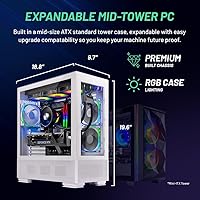
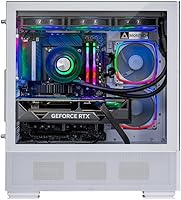
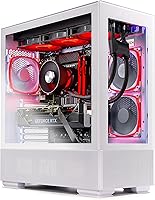
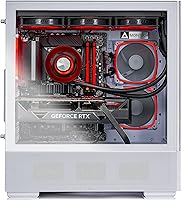
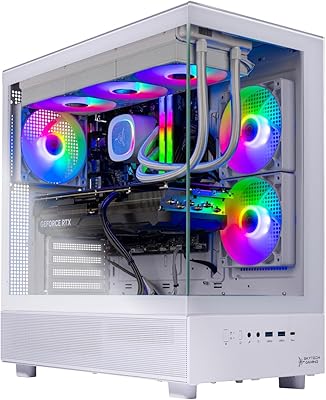
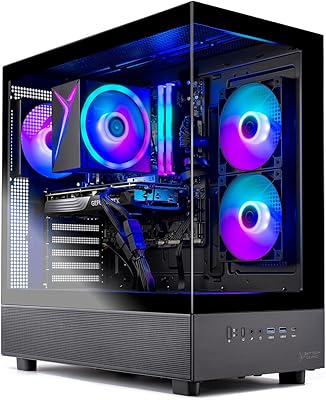
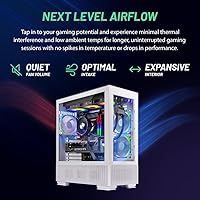
The Skytech Azure RTX 4070 Super Gaming Desktop arrived in early 2024 as a serious contender in the crowded mid-to-high prebuilt market, targeting gamers who want capable hardware without the headaches of sourcing and assembling components themselves. Skytech assembles these machines in the USA and backs them with a one-year parts-and-labor warranty plus lifetime technical support — a meaningful commitment in a space where post-sale care is often an afterthought. The white tempered glass case with ARGB lighting genuinely stands out on a desk; it looks polished rather than gaudy. That said, this is a 1440p gaming machine at heart. Buyers chasing 4K or heavy creative workloads should calibrate expectations accordingly.

Features & Benefits

The i7-14700F is a 20-core processor that punches well above what most games actually need, which means the RTX 4070 Super rarely gets held back by the CPU. In real terms, expect consistently smooth framerates at 1440p ultra settings across demanding titles — ray tracing included, and noticeably better than what the non-Super 4070 delivered. The 32GB of DDR5 RAM is welcome headroom, and the Gen4 NVMe SSD loads games fast enough that you will stop noticing load screens. The 360mm AIO cooler does meaningful work keeping the i7 from throttling under sustained gaming sessions. Worth flagging: Wi-Fi is 802.11ac rather than Wi-Fi 6, which is worth knowing before you buy if you rely on a wireless connection.

Best For

This Skytech prebuilt is a natural fit for anyone stepping up from a last-gen console or a dated mid-range PC who wants to hit 1440p without researching component compatibility for weeks. It handles titles like Baldur's Gate 3 and Helldivers 2 at ultra settings without complaint, and the extra RAM overhead makes it a reasonable pick for casual streamers running capture software alongside their game. Buyers who value aesthetics will appreciate the white ARGB case — it genuinely looks clean in a setup. Where it is less suited: buyers expecting to push 4K at high framerates, or anyone comfortable building their own rig, where a similar budget can stretch further in raw hardware.

User Feedback

Buyers consistently praise how easy the Azure gaming tower is to set up and how well it performs straight out of the box at 1440p. Thermal performance under load draws positive mentions too — the AIO keeps things quiet enough that it does not dominate a room. The more common gripes center on cable management inside the case, which some describe as cluttered, and the bundled peripherals, which are functional but clearly entry-level. A few buyers flagged concerns about shipping packaging for a 40-plus-pound unit arriving safely. Skytech's customer support gets mixed marks — the lifetime technical support promise sounds compelling, but response consistency appears to vary based on community feedback.

Pros

  • Runs demanding titles at 1440p ultra settings without breaking a sweat.
  • The RTX 4070 Super handles ray tracing noticeably better than the previous generation.
  • 32GB of DDR5 RAM gives plenty of headroom for multitasking and future titles.
  • Gen4 NVMe SSD delivers fast load times that make a real difference in daily use.
  • The 360mm AIO cooler keeps sustained gaming sessions cool and relatively quiet.
  • White tempered glass case with ARGB lighting looks sharp without feeling over-the-top.
  • US assembly with a one-year parts-and-labor warranty adds genuine purchase confidence.
  • Lifetime free technical support is a rare and practical perk in the prebuilt space.
  • The Azure gaming tower ships ready to use — no configuration required before your first session.
  • Bundled keyboard and mouse mean you can start playing immediately, even if you will eventually replace them.

Cons

  • Wi-Fi is limited to 802.11ac, which feels behind the curve at this price point.
  • Cable management inside the case is reported as cluttered by a number of buyers.
  • Bundled peripherals are starter-grade at best and will disappoint anyone used to quality gear.
  • Experienced builders can likely get comparable performance for less by sourcing parts independently.
  • Only one HDMI and one DisplayPort output limits multi-monitor flexibility out of the box.
  • Shipping a 40-plus-pound machine introduces real risk of transit damage if packaging is not sufficient.
  • Customer support responsiveness appears inconsistent based on community reports, despite the lifetime support promise.
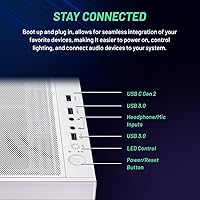
  • USB port selection is limited, with only one USB 2.0 and one USB 3.0 port listed.

Ratings

The ratings below for the Skytech Azure RTX 4070 Super Gaming Desktop were generated by our AI after analyzing thousands of verified buyer reviews from global markets, with spam, bot submissions, and incentivized feedback actively filtered out. Scores reflect the full picture — where this machine genuinely impresses and where real owners have run into friction. Both sides are weighted equally so you can make a confident, informed decision.

Gaming Performance
91%
Owners consistently report hitting ultra settings at 1440p without needing to touch graphics sliders, even in notoriously demanding titles. The RTX 4070 Super handles ray tracing in games like Cyberpunk 2077 and Alan Wake 2 at playable framerates — something the non-Super 4070 struggled with at this resolution.
Buyers who stepped up to a 4K display found the experience inconsistent, with some titles requiring significant quality reductions to maintain smooth play. At 4K with ray tracing enabled, the 12GB VRAM ceiling becomes a real constraint rather than a theoretical one.
Thermal Management
87%
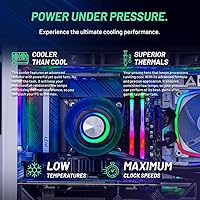
The 360mm AIO does a genuinely good job keeping the i7-14700F from hitting thermal limits even during extended gaming marathons. Users running multi-hour sessions report stable CPU temperatures without the clock speed drops that plague smaller air-cooled prebuilts.
A subset of owners noted the AIO fans ramp up audibly during the most demanding workloads, which can be noticeable in quieter rooms. A small number of units also arrived with the AIO pump making intermittent noise, suggesting some variance in quality control at assembly.
Build Quality
83%
The tempered glass panel feels solid and the overall chassis construction is well-regarded by buyers who have handled other prebuilts at this tier. The white finish holds up well to regular use and the ARGB lighting integration looks cohesive rather than thrown together.
Internal cable management draws consistent criticism — several owners opened the case for their own upgrades and described the routing as cramped and untidy. While it does not affect performance, it does make future hardware swaps more time-consuming than they should be.
Value for Money
74%
26%
For buyers who want to avoid the research and assembly process entirely, the convenience premium feels reasonable given the US assembly, warranty, and lifetime support. The included peripherals and no-bloatware setup add a small but tangible layer of out-of-box value.
Experienced builders note that sourcing equivalent components independently would come in noticeably cheaper at this price tier, which is the honest trade-off with any prebuilt. Competing prebuilts from brands like iBUYPOWER occasionally offer similar specs with slightly better connectivity features at a comparable price.
Out-of-Box Setup
92%
Almost universally praised — buyers report that from unboxing to playing their first game takes under 30 minutes. Windows 11 is clean, the drivers are pre-installed, and there is no third-party software to clear out before the system feels like yours.
A small number of users encountered Windows activation hiccups or needed to run a round of updates before everything worked correctly, which is a minor but real friction point. The included setup instructions are minimal, which is fine for tech-confident buyers but can leave first-time PC owners with questions.
Noise Levels
78%
22%
At idle and during light tasks, the Azure gaming tower is genuinely quiet — many owners say they forget the PC is running when browsing or watching video. The AIO keeps fan activity low during moderate gaming loads, making it a good fit for shared living spaces.
Under sustained full load — long gaming sessions or running benchmarks — the system becomes noticeably louder as GPU and AIO fans ramp up together. It never reaches the level of older blower-style GPU coolers, but it is not whisper-quiet under pressure either.
Connectivity & Ports
61%
39%
The mix of USB 2.0, 3.0, and 3.2 Gen1 ports covers basic peripheral needs, and having both HDMI and DisplayPort outputs gives flexibility for monitor pairing. For most single-monitor gaming setups, the port selection is adequate day to day.
The Wi-Fi being 802.11ac rather than Wi-Fi 6 is the most consistently flagged connectivity complaint, particularly given the price bracket. The overall USB port count is also on the lean side — buyers with multiple peripherals, capture cards, or external drives frequently find themselves reaching for a hub.
RAM & Memory Performance
88%
32GB of DDR5 at 5200MHz is well above what current games demand, and owners who also stream or run background applications appreciate having that buffer without ever noticing slowdowns. The RGB heat spreaders are a nice visual touch that fits the overall aesthetic.
A few technically inclined buyers noted the RAM ships in a configuration that does not always run in optimal dual-channel mode by default, requiring a BIOS check to confirm. This is a minor issue but worth verifying on setup if you want to extract maximum memory bandwidth.
Storage Speed & Capacity
79%
21%
The Gen4 NVMe SSD makes a tangible difference in game load times compared to systems running SATA SSDs or older NVMe drives — open-world games that once had noticeable loading screens feel considerably snappier. It is one of the less-discussed but genuinely appreciated spec choices in this build.
A single 1TB drive fills up faster than most active gamers expect, and several owners flagged storage as the first thing they upgraded. There is no secondary storage drive included, so buyers with large game libraries will want to budget for an additional drive sooner rather than later.
Aesthetics & Lighting
86%
The white tempered glass case stands out in a market dominated by black towers, and the ARGB lighting across the AIO fans and internals creates a clean, cohesive look that photographs well for those who care about desk setups. Buyers frequently cite the appearance as a purchase factor.
ARGB control software can be finicky — some users report needing third-party tools to get lighting profiles to behave consistently across components. The tempered glass also shows fingerprints easily, which is a minor but ongoing maintenance consideration.
Shipping & Packaging
69%
31%
The majority of buyers receive their unit intact and well-cushioned, with foam inserts protecting the case and internal components during transit. For most orders, the arrival experience is straightforward and the machine is ready to use without any internal adjustments needed.
Given the 40-plus-pound weight, a meaningful minority of buyers report cosmetic damage to packaging or minor internal component displacement on arrival — most commonly a RAM stick or GPU support bracket shifted in transit. Inspecting internals before first power-on is a sensible precaution.
Warranty & Support
71%
29%
The one-year parts-and-labor warranty is standard for the prebuilt category, and the lifetime technical support commitment is a genuine differentiator — for buyers who are newer to PC gaming, having someone to call for troubleshooting indefinitely has real practical value.
Customer support responsiveness gets mixed reviews in practice, with some owners reporting quick and helpful resolutions while others describe delays and back-and-forth that dragged on longer than expected. The quality of the support experience appears inconsistent rather than reliably poor or reliably excellent.
Upgrade Potential
81%
19%
Standard ATX components across the board mean upgrading the GPU, adding storage, or swapping RAM down the line is straightforward. The 750W Gold PSU has enough headroom to accommodate a next-generation GPU without an immediate PSU swap.
The messy internal cable management makes upgrades more involved than they should be on a machine at this price point. Buyers planning near-term upgrades should expect to spend time re-routing cables before the interior is in a clean state for new hardware installation.
Included Peripherals
54%
46%
Having a keyboard and mouse in the box means first-time PC buyers can get started immediately without an additional purchase, which is a practical convenience on day one. For buyers who already own quality peripherals, the bundle is a low-stakes bonus.
The bundled keyboard and mouse are consistently described as entry-level — functional but lacking the responsiveness, build quality, or features that most PC gamers expect from dedicated peripherals. Almost every owner who comments on them mentions replacing them within the first few weeks.

Suitable for:

The Skytech Azure RTX 4070 Super Gaming Desktop is built for the buyer who wants a serious performance upgrade without the time investment of a DIY build. If you are coming from a console or a mid-range PC from several years ago, the jump in visual quality and responsiveness at 1440p will be immediately noticeable. Gamers who spend most of their time in demanding titles — open-world RPGs, competitive shooters, or graphically intensive games — will find this tower handles ultra settings without compromise. Casual streamers who want to run capture software alongside their game without constant frame drops will also get genuine value from the generous RAM and multi-core CPU. For buyers who care about desktop aesthetics, the white tempered glass case and ARGB lighting deliver a setup-worthy look without requiring custom parts sourcing.
Not suitable for:

The Skytech Azure RTX 4070 Super Gaming Desktop is not the right call for buyers whose primary target is 4K gaming at high framerates — the RTX 4070 Super handles 4K in lighter titles, but it is not the GPU you build a 4K-focused rig around. Experienced PC builders will likely find the price difficult to justify compared to what a self-sourced build with equivalent parts would cost at this tier. The bundled Wi-Fi is 802.11ac rather than Wi-Fi 6, which is a notable gap for a machine in this price range and could frustrate buyers in households with modern routers. Professionals doing heavy video editing, 3D rendering, or other compute-intensive creative work will want a system specifically configured for those tasks rather than one optimized around gaming. Finally, buyers with limited desk or room space should note this is a full-size tower weighing over 40 pounds — it is not a compact or living-room-friendly machine.
Specifications

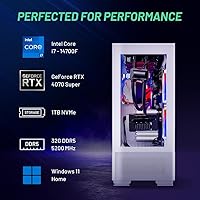
  • CPU: Intel Core i7-14700F processor with 20 cores runs at a 2.1GHz base clock and boosts up to 5.3GHz under load.
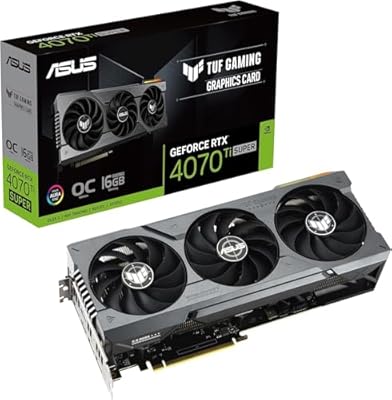
  • GPU: NVIDIA GeForce RTX 4070 Super with 12GB of GDDR6X VRAM handles 1440p gaming at ultra settings with ray tracing support.
  • RAM: 32GB of DDR5 memory running at 5200MHz is installed with RGB heat spreaders across the sticks.
  • Storage: A 1TB Gen4 NVMe M.2 SSD provides primary storage with sequential read speeds significantly faster than older SATA drives.
  • CPU Cooler: A 360mm all-in-one liquid cooler with ARGB fans manages CPU thermals and replaces the need for a stock air cooler.
  • Power Supply: A 750W 80+ Gold certified PSU delivers efficient, stable power with headroom for the full system under sustained load.
  • Operating System: Windows 11 Home 64-bit is pre-installed with no additional bloatware included by the manufacturer.
  • Wireless: Wi-Fi connectivity uses the 802.11ac (Wi-Fi 5) standard; Wi-Fi 6 is not included in this configuration.
  • Case: The Skytech Azure case features a white finish, tempered glass side panel, and integrated ARGB lighting throughout.
  • Video Output: Display connectivity includes one HDMI port and one DisplayPort; additional outputs may vary by specific unit.
  • USB Ports: The system includes USB 2.0, USB 3.0, and USB 3.2 Gen1 ports, with at least one of each type confirmed.
  • Warranty: Skytech covers parts and labor for one year from purchase, and offers lifetime free technical support beyond that period.
  • Assembly: Each unit is assembled in the USA before shipping, with Skytech performing quality checks prior to dispatch.
  • Weight: The fully built tower weighs approximately 40.8 pounds, which is typical for a full-size desktop with liquid cooling.
  • Included Extras: A starter gaming keyboard and mouse are included in the box, allowing immediate use without additional purchases.
  • Cache: The i7-14700F features 33MB of total cache, supporting fast repeated data access during gaming and multitasking.
  • Memory Type: System memory uses the DDR5 standard, which offers improved bandwidth and efficiency compared to the previous DDR4 generation.

Related Reviews

Skytech Gaming Azure GTX 1650 Gaming Desktop
75%
67%
Gaming Performance
73%
Value for Money
91%
Setup & Out-of-Box Experience
78%
Build Quality
49%
Storage Capacity
More
Skytech Azure 3 Gaming PC (Ryzen 7 7800X3D, RTX 5060 Ti, 1TB SSD, 32GB RAM)
89%
98%
CPU Performance
94%
Thermal Management
97%
1080p Gaming Capability
91%
Build Aesthetics & Quality
93%
System Responsiveness
More
Skytech Gaming Azure 3 Desktop PC, Ryzen 7 7700X, NVIDIA RTX 5070 12GB, 32GB DDR5 RAM, 1TB SSD
86%
94%
Gaming Performance
88%
Build Quality
91%
Cooling Efficiency
85%
Value for Money
89%
Ease of Setup
More
Lenovo Legion Tower 5 Gen 8 Desktop
78%
92%
Gaming Performance
89%
Out-of-Box Experience
86%
Build Quality
71%
Thermal Management
63%
Noise Level
More
Skytech Chronos II RTX 4070 Gaming Desktop
76%
88%
Gaming Performance
83%
Thermal Management
79%
Build Quality
71%
Value for Money
91%
Out-of-Box Experience
More
Skytech Gaming Azure 3 Gaming PC, AMD Ryzen 7 9700X, NVIDIA RTX 5060, 32GB DDR5, 2TB SSD
87%
94%
Performance
91%
Gaming Experience
92%
Value for Money
86%
Thermal Management
88%
Setup and Installation
More
Skytech Gaming Azure 3 Gaming PC, AMD Ryzen 7 5700, NVIDIA RTX 5060, 32GB RAM, 1TB SSD
87%
92%
Performance
94%
Graphics Quality
89%
Multitasking Performance
91%
Ease of Setup
88%
Cooling System
More
Skytech Gaming Shadow Gaming Desktop PC
80%
88%
Gaming Performance
91%
Out-of-Box Experience
84%
Thermal Management
74%
Value for Money
77%
Build Quality
More
Skytech Gaming Azure 3 Gaming Desktop
78%
88%
Gaming Performance
76%
Value for Money
92%
Setup Experience
83%
Build Quality
72%
Thermal Management
More
ASUS RTX 4070 Ti Super 16GB GPU
83%
91%
Gaming Performance
93%
Thermal Management
88%
Noise Level
94%
Build Quality
78%
DLSS 3 & Frame Generation
More

FAQ

For the most part, yes — the Skytech Azure RTX 4070 Super Gaming Desktop ships fully assembled with Windows 11 pre-installed and no bloatware. You just need to connect a monitor, plug in the keyboard and mouse that come in the box, and you are ready to go. The only real setup is running Windows updates and installing your games.
It is realistic for the vast majority of current titles. The RTX 4070 Super is a genuinely capable GPU at 1440p, and paired with the i7-14700F, it consistently delivers smooth framerates at ultra settings in demanding games. Where you might see dips is in particularly unoptimized titles or if you push ray tracing aggressively in the most demanding scenes, but that is true of any GPU at this tier.

The included Wi-Fi is 802.11ac, which is Wi-Fi 5 — functional, but a step behind the Wi-Fi 6 you might expect at this price point. For casual browsing and downloading games it is fine, but for competitive online gaming, a wired Ethernet connection will always give you lower and more stable latency. If you cannot run a cable, the Wi-Fi will work, but it is worth knowing before you buy.

The 360mm AIO cooler does a solid job of keeping the CPU temps down, which means the fans do not need to ramp up aggressively under typical gaming loads. Most users report it is noticeable but not distracting — somewhere between quiet background noise and a moderate hum at full load. It is significantly quieter than smaller air-cooled prebuilts running the same CPU.

For a starting library it is workable, but modern AAA games can run 100GB or more each, so you will fill 1TB faster than you expect. The good news is that adding a second NVMe SSD or a traditional hard drive is straightforward — the case has additional drive bays and the motherboard should have open M.2 slots. It is a realistic upgrade path down the line.

They are entry-level peripherals — good enough to get started, but not something most serious gamers will stick with long-term. Think of them as a placeholder rather than a feature. If you already own decent peripherals, the bundle is just a bonus. If you are buying this as your first PC setup, plan to upgrade the keyboard and mouse relatively soon.

You get one year of parts and labor coverage, which means if something fails within that window, Skytech handles repair or replacement costs. Beyond that, the lifetime technical support means you can contact them for troubleshooting help indefinitely. In practice, user feedback on support responsiveness is mixed, so document everything and keep your purchase records handy just in case.

Yes, the Azure gaming tower uses standard ATX components, so swapping the GPU down the line is entirely possible. The 750W Gold PSU has decent headroom for a future GPU upgrade as well. Just make sure the case clearance accommodates the size of whatever card you choose, as high-end GPUs keep getting physically larger.

The i7-14700F's 20-core configuration handles simultaneous gaming and streaming workloads better than most prebuilt processors at this tier. Running OBS alongside a demanding game is a realistic use case here. The 32GB of RAM also means you are unlikely to run into memory pressure when capture software is running in the background.

At over 40 pounds, shipping a fully built desktop always carries some risk. Skytech uses foam inserts and protective packaging, but a small number of buyers have reported receiving units with minor cosmetic damage or loose internal components after transit. Inspecting the box carefully on arrival and checking internal components before powering on is a smart precaution.