Overview

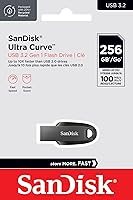
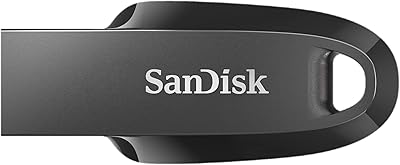
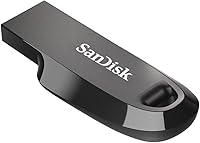
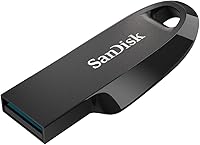
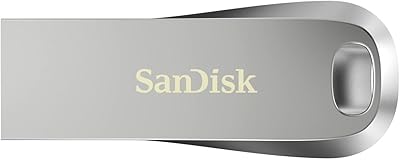
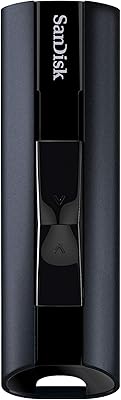
The SanDisk Ultra Curve 256GB USB 3.2 Flash Drive is one of those accessories that earns its place quietly without demanding much attention. Its curved, low-profile body sits flush against a port rather than jutting out at an awkward angle — a small design choice that matters more than it sounds in daily use. It runs on USB 3.2 Gen 1, which is essentially USB 3.0 under a newer name, so compatibility is broad across devices old and new. The 256GB capacity hits a practical sweet spot for most people, and SanDisk bundles in RescuePRO Deluxe software as an added safety net against accidental file loss.

Features & Benefits

The headline spec is a 100 MB/s read speed, and in practice it does make a noticeable difference when pulling large folders of photos or video clips. Worth knowing, though: write speeds run lower than read speeds — typical for flash drives at this price tier — so copying big files onto the drive takes somewhat longer than copying them off. At just 0.106 oz, this flash drive is easy to forget about until you actually need it. The USB Type-A connector plugs straight into almost any computer, TV, or car audio system without an adapter, and files stay accessible offline with no subscription required.

Best For

Students, photographers, and frequent travelers are the natural audience for the Ultra Curve. If you regularly move presentations, RAW image files, or lecture recordings between devices, the read speed saves you real time — not dramatically, but enough to notice across a busy week. It also suits anyone frustrated with cloud storage subscriptions or unreliable Wi-Fi; your files are simply on the drive, available whenever. The compact keychain-friendly size means it tags along without adding bulk, and the 256GB capacity comfortably holds a substantial photo library, music collection, or semester worth of coursework.

User Feedback

Sitting at 4.5 stars across nearly 300 ratings, this SanDisk drive has earned a solid reputation among everyday users. Buyers frequently highlight the low-profile shape as a genuine practical perk — it does not block neighboring ports, which is more than can be said for bulkier competitors. Transfer consistency under real-world conditions also draws positive mentions. On the flip side, a number of users were caught off guard learning that RescuePRO Deluxe requires a separate download rather than coming pre-installed. A smaller group flagged noticeably slower performance on older USB 2.0-only machines, which is a straightforward hardware compatibility limitation rather than a product defect.

Pros

  • The curved, low-profile design sits flush against the port without blocking adjacent USB slots or sticking out awkwardly.
  • Read speeds of up to 100 MB/s make offloading photo and video batches noticeably faster than older USB 2.0 drives.
  • At just 0.106 oz, this flash drive is light enough to leave on a keychain without noticing the extra weight.
  • 256GB of storage comfortably holds a semester of coursework, a large music library, or thousands of high-resolution photos.
  • USB Type-A connectivity means it works straight out of the box with virtually any laptop, desktop, TV, or car stereo.
  • No internet connection or subscription is ever required — your files are simply on the drive, ready when you need them.
  • RescuePRO Deluxe data recovery software adds a practical safety net for anyone who has ever accidentally deleted an important file.
  • SanDisk is a well-established brand in flash storage, which carries real weight when trusting a drive with important data.
  • Broad USB 3.2 Gen 1 compatibility ensures the drive works reliably across modern and slightly older hardware alike.
  • A 4.5-star average across nearly 300 ratings reflects consistently positive real-world experiences from a wide range of buyers.

Cons

  • Real-world write speeds are significantly lower than the advertised read speed, which can slow down large copy-onto-drive tasks.
  • RescuePRO Deluxe requires a separate download to activate — it is not pre-installed or ready to use out of the box.
  • No USB-C connector is included, so users with modern ultrabooks or tablets will need an adapter they may not have on hand.
  • Performance drops sharply on USB 2.0 ports, making the speed advantage irrelevant on older host machines.
  • No hardware encryption is offered, which is a meaningful gap for anyone storing sensitive personal or professional files.
  • The drive lacks any waterproofing or ruggedized casing, making it a risky choice for outdoor or high-wear environments.
  • 256GB may feel limiting sooner than expected for users archiving 4K video footage or large RAW photo libraries.
  • There is no physical write-protect switch, which can be a concern when using the drive on shared or public computers.

Ratings

The scores below were generated by our AI engine after analyzing verified global buyer reviews for the SanDisk Ultra Curve 256GB USB 3.2 Flash Drive, with automated filtering applied to remove incentivized, bot-generated, and outlier feedback. The result is a balanced snapshot of what real users consistently praise and where they run into genuine friction. Both strengths and frustrations are reflected transparently in every category.

Read Speed Performance
83%
Users regularly report that moving a folder of RAW photos or a batch of MP4 files off the drive feels noticeably quicker than older USB 2.0 drives they replaced. The 100 MB/s ceiling holds up well under typical workloads, and most reviewers who timed transfers found the results close to the advertised figure.
The speed advantage is only felt on USB 3.0 or newer ports — plug this into an older machine and you are back to USB 2.0 crawl rates. A small number of users also reported slightly inconsistent speeds during very large single-file transfers.
Write Speed Performance
61%
39%
For light tasks — saving a presentation, copying a few PDFs, dropping some MP3s onto the drive — write speeds are adequate and not noticeably painful in day-to-day use. Users who are not moving gigabytes at a time rarely flag this as a problem.
Write speeds land well below the read speed headline, and SanDisk does not publish an official figure, which frustrates buyers who want to know what they are actually getting. Users copying large video files or doing bulk backups onto the drive report waits that feel disproportionate compared to the read experience.
Build Quality
78%
22%
The curved plastic shell feels solid for a drive in this class, and the compact form factor means there are fewer protruding parts to snap or bend. Reviewers who carry it daily on a keychain report no cracking or connector loosening after months of use.
It is still a plastic body with no ruggedized rating, so drops onto hard floors or exposure to moisture are genuine risks. A few users noted the casing feels slightly hollow, and there is no protective cap to shield the connector when not in use.
Design & Form Factor
91%
The low-profile curved shape is one of the most consistently praised aspects across reviews — it slots into a port and sits nearly flush, leaving neighboring ports fully accessible. Commuters and students appreciate that it does not stick out far enough to get knocked loose in a bag or backpack.
The lack of a cap or retractable mechanism means the USB connector is always exposed, which some users find concerning for long-term connector hygiene. Those who prefer a lanyard loop will also find none here.
Portability
93%
At 0.106 oz and roughly the size of a large postage stamp, this flash drive genuinely disappears into a pocket or keychain without adding any noticeable bulk. Travelers in particular appreciate being able to carry 256GB of content without dedicating any meaningful space or weight to it.
The small size is a double-edged sword — several reviewers admit to losing the drive at least once because it is so easy to misplace. There is no wrist strap, lanyard loop, or carrying case included in the box.
Compatibility
74%
26%
USB Type-A is about as universal as it gets — the drive works plug-and-play on Windows, macOS, smart TVs, car stereos, and most USB hubs without any driver installation. Most users had it recognized within seconds of plugging in.
Modern ultrabooks and tablets with USB-C only ports require an adapter that is not included, which catches some buyers off guard. A minority of users with USB 2.0-only legacy hardware also found the drive functional but disappointingly slow.
Storage Capacity
86%
256GB hits a practical sweet spot for students, photographers, and general users — enough to hold tens of thousands of photos, a large music library, or years worth of documents without constantly managing space. Reviewers upgrading from 64GB or 128GB drives found the jump to 256GB meaningfully freeing.
For users working with 4K video or large application backups, 256GB fills up faster than expected. A few reviewers noted they wished they had bought the 512GB variant after a few months of use.
Value for Money
79%
21%
For an everyday carry drive from a reputable brand with solid read speeds and a data recovery software bundle, most buyers feel the price is justified. It sits comfortably in the mid-range tier without asking for premium pricing.
Budget-focused shoppers can find unbranded or lesser-known drives at a lower price point for the same stated capacity. The missing write speed transparency makes it harder to confidently assess whether the price premium over cheaper alternatives is truly warranted.
Software Bundle
67%
33%
RescuePRO Deluxe is a legitimate, commercially valued data recovery tool that adds real peace of mind — several reviewers mentioned it saved files they thought were permanently gone. Bundling it at no extra cost is a genuinely useful inclusion for less technically confident users.
The software is not pre-installed on the drive; it requires a separate download and registration, which surprised a meaningful number of buyers who expected it to simply be there. Users without reliable internet access at setup will find this frustrating.
Plug-and-Play Ease
88%
No drivers, no setup wizards, no account creation required just to use the drive — plug it in and it shows up as a removable disk within a few seconds on any modern OS. This frictionless experience is frequently called out positively by less tech-savvy reviewers.
The RescuePRO software setup introduces some friction for users who want to activate the full feature set on day one. A small number of macOS users noted they had to adjust security preferences before the software would run.
Brand Reliability
87%
SanDisk has been in the flash storage business long enough that many buyers purchase this drive partly on brand trust alone. Reviewers who have owned multiple SanDisk products over the years cite consistent longevity and minimal failure rates in their personal experience.
No product is immune to defects, and a small percentage of reviewers reported drives failing earlier than expected — though this appears to be within normal statistical range for the category. The brand name alone is not a substitute for keeping a backup of critical files.
Offline Accessibility
94%
Files are on the drive, full stop — no Wi-Fi, no account login, no monthly fee, no cloud outage to worry about. Travelers, remote workers, and users in areas with unreliable internet consistently highlight this as one of the most underrated practical benefits.
Offline storage also means no automatic syncing or version history — if you overwrite a file and do not have the recovery software set up, retrieving it requires extra steps. It is a trade-off that most users accept knowingly, but worth flagging for those coming from cloud-first workflows.
Data Recovery Option
72%
28%
Having a recognized data recovery tool bundled with the drive adds a layer of protection that most competing drives at this price simply do not offer. For users who have experienced accidental file deletion before, this inclusion carries real emotional and practical value.
The download-only delivery model and the requirement to register before accessing the software reduces its accessibility for the average user. Those who skip the setup entirely — a likely majority — may never benefit from it at all.

Suitable for:

The SanDisk Ultra Curve 256GB USB 3.2 Flash Drive is a strong fit for anyone who needs dependable, portable storage without the overhead of cloud subscriptions or Wi-Fi dependence. Students are an obvious match — shuttling assignments, recorded lectures, and presentation files between a dorm room and campus lab is exactly the kind of repetitive, low-friction task this drive handles well. Photographers and creatives working with large JPEG or RAW image batches will appreciate the 100 MB/s read speed when offloading a full memory card in a hurry. It also works well for home and office users who want a simple, offline backup of important documents — no account setup, no monthly fee, just plug in and copy. Travelers carrying movies, music, or reference files for long trips without reliable data access will find the offline accessibility genuinely useful rather than just a marketing point.
Not suitable for:

The SanDisk Ultra Curve 256GB USB 3.2 Flash Drive is not the right tool for users who prioritize write-heavy workflows, since real-world write speeds fall noticeably below the advertised 100 MB/s read figure — something that matters if you are constantly copying large files onto the drive rather than pulling files off it. Power users working with 4K video editing, large database transfers, or frequent full-drive backups will likely find the performance ceiling frustrating and should consider an external SSD instead. Anyone whose computer only has USB-C ports will need a separate adapter, as this drive uses a standard USB Type-A connector exclusively. Users still running very old hardware with USB 2.0-only ports should also temper their expectations, since the drive's speed advantage is entirely lost on those connections. Finally, buyers looking for hardware encryption or a rugged, waterproof build for demanding field conditions will need to look at a different product category altogether.
Specifications

  • Brand: Manufactured by SanDisk, a well-established name in consumer flash storage with decades of market presence.
  • Model Number: The official model identifier for this variant is SDCZ550-256G-G46.
  • Capacity: Offers 256GB of onboard flash storage for files, photos, videos, and documents.
  • Interface: Uses USB 3.2 Gen 1 (functionally equivalent to USB 3.0) with a standard USB Type-A connector.
  • Read Speed: Rated at up to 100 MB/s sequential read speed under optimal conditions.
  • Write Speed: Write speeds are not officially specified but perform below the advertised read speed, as is typical for drives in this category.
  • Form Factor: Features a compact curved body designed to sit low-profile against a port without blocking adjacent slots.
  • Dimensions: Measures 1.77 x 0.75 x 0.3 inches, making it small enough to fit on a keychain or in a pocket.
  • Weight: Weighs just 0.106 oz, adding virtually no noticeable bulk to a bag or keychain.
  • Color: Available in Black for this variant; other colorways may be available in different SKUs.
  • Bundled Software: Includes access to RescuePRO Deluxe data recovery software, which must be downloaded separately after purchase.
  • Connectivity: Connects via USB Type-A, compatible with laptops, desktops, smart TVs, car stereos, and most USB hubs.
  • OS Compatibility: Works with Windows and macOS out of the box; Linux support is generally functional but not officially guaranteed.
  • Release Date: First made available in February 2023.
  • UPC: The Universal Product Code for this item is 619659187859.
  • Avg. Rating: Holds a 4.5-out-of-5-star average rating based on 284 customer ratings on Amazon.
  • BSR Ranking: Ranked #1,815 in the USB Flash Drives category on Amazon at time of review.
  • Encryption: No hardware encryption is built in; users requiring secure storage should consider an encrypted alternative.
  • Durability: No official waterproof or ruggedized rating is listed; the drive should be kept away from moisture and impact.
  • Warranty: SanDisk typically offers a limited five-year warranty on Ultra-series flash drives, though buyers should verify current terms directly with the manufacturer.

Related Reviews
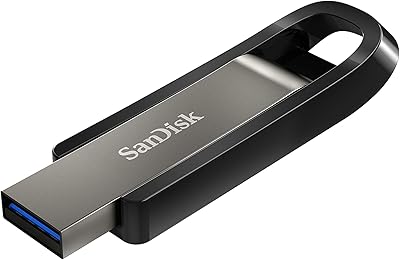
SanDisk Extreme Go 256GB USB Flash Drive
76%
83%
Transfer Speed
91%
Build Quality
94%
Portability
58%
Thermal Management
88%
Storage Capacity
More
SanDisk 128GB Ultra Luxe USB 3.2 Gen 1 Flash Drive
89%
94%
Transfer Speed
90%
Build Quality
88%
Ease of Use
87%
Security Features (AES Encryption)
92%
Portability
More
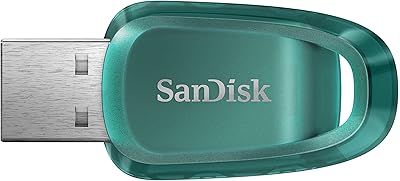
SanDisk Ultra Eco 512GB USB Flash Drive
76%
83%
Read Speed Performance
54%
Write Speed Performance
91%
Portability & Form Factor
86%
Storage Capacity Value
79%
Value for Money
More
THKAILAR T7 256GB Dual-Port USB Flash Drive
78%
91%
Dual-Port Design
72%
Transfer Speed
88%
Build Quality
83%
iPhone Compatibility
67%
Android OTG Performance
More
Vansuny USB 3.2 Flash Drive 256GB
86%
89%
Performance
88%
Durability
91%
Ease of Use
87%
Portability
90%
Speed (Read/Write)
More
SanDisk Ultra Curve USB 3.2 512GB
84%
91%
Transfer Speed
94%
Portability/Size
85%
Reliability
80%
Software Experience
77%
Build Quality
More
SanDisk Extreme Go 64GB USB Flash Drive
75%
83%
Transfer Speed
86%
Build Quality
81%
Value for Money
69%
Storage Capacity
67%
Speed Consistency
More
SanDisk Ultra Luxe 256GB USB-C Flash Drive
78%
88%
Read Speed Performance
54%
Write Speed Performance
93%
Build Quality
79%
Retractable Connector Mechanism
91%
Portability & Form Factor
More
Kingston DataTraveler Exodia Onyx 256GB USB 3.2 Flash Drive
86%
92%
Transfer Speed
85%
Build Quality
94%
Portability
89%
Compatibility
90%
Ease of Use
More
SanDisk Extreme PRO USB 3.2 Solid State Flash Drive 512GB
85%
91%
Speed and Performance
89%
Build Quality and Durability
85%
Ease of Use and Setup
90%
Compatibility
88%
Data Security Features
More

FAQ

That figure refers to read speed only, meaning how fast data comes off the drive onto your computer. Write speeds — copying files onto the drive — are noticeably lower and are not officially specified by SanDisk. For most everyday tasks like transferring documents or photos, this is perfectly fine, but if you are doing a lot of large file backups onto the drive regularly, expect the process to take longer than the headline number implies.

The Ultra Curve uses a standard USB Type-A connector, so it plugs directly into older MacBooks and Windows laptops with full-size USB ports. If your MacBook only has USB-C ports — which is common on models from 2017 onward — you will need a USB-A to USB-C adapter or hub. The drive itself works fine with macOS once connected.

It does not come pre-installed. You need to register and download it separately after purchase; SanDisk provides instructions on how to do this. It is a legitimate and useful tool for recovering accidentally deleted files, but do not expect to plug in the drive and find the software already sitting on it.

Yes, it will connect and function, but you will not get anywhere near the rated speed. USB 3.2 Gen 1 drives are backward compatible with USB 2.0 ports, but the transfer rate drops significantly — typically to around 25–35 MB/s or less. If your laptop is USB 2.0 only, the speed advantage of this drive is largely wasted.

Not directly in most cases, since the drive uses a USB Type-A connector and most modern Android devices use USB-C or Micro-USB. You would need an OTG adapter that matches your device's port. Some Android phones also require enabling USB OTG support in settings. It is doable, but not the most convenient setup for mobile use.

It depends on what you are storing. For documents, PDFs, and music, 256GB is enormous and will last years. For photos shot on a modern smartphone or DSLR, you can hold tens of thousands of images. Where it gets tight faster is 4K video — an hour of high-bitrate 4K footage can eat through 50GB or more. If video is your main use case, think carefully about whether you might want a higher capacity variant.

The drive itself has no built-in hardware encryption or password protection. If you need to secure sensitive files, you can use software solutions like VeraCrypt to create an encrypted container on the drive, but that requires some setup. If hardware-level encryption is a must, you would need a different product designed specifically for that purpose.

It is reasonably sturdy for a standard plastic-bodied flash drive, and its compact size means less to snag or bend. That said, it has no official waterproof or drop-resistance rating, so it is not designed to take abuse. Tossing it loose in a bag with keys and coins is not ideal long-term — a small protective pouch or a keychain clip helps a lot.

No drivers are needed on Windows 10, Windows 11, or modern versions of macOS — plug it in and it appears as a removable drive within seconds. The RescuePRO Deluxe software is optional and only relevant if you need to recover deleted files; the drive works completely fine without ever installing it.

For large, frequent transfers — say, editing video projects or backing up entire drives — a portable SSD will beat this flash drive on write speed by a wide margin. The Ultra Curve is best thought of as a convenient everyday carry drive rather than a workhorse transfer tool. If your workflow involves moving files that are several gigabytes at a time on a regular basis, a portable SSD is worth the extra cost. For lighter, less frequent use, this SanDisk drive is more than capable.

Where to Buy