Overview

The SAN ZANG MASTER SQ20 1TB Portable SSD enters a crowded market with one genuinely unusual trick: a magnetic snap-on connection that replaces the standard plug-and-port routine most external drives rely on. At under three ounces and barely a quarter-inch thick, the silver-finished drive feels more like a large coin than a storage device — first impressions are legitimately strong. It uses USB 3.2 Gen 2 for data transfer, which is a capable interface at this price tier. That said, this is a budget-to-mid-range drive, not a professional-grade workhorse, and buyers should calibrate expectations accordingly.
Features & Benefits

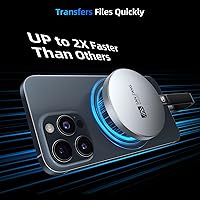
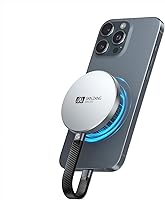
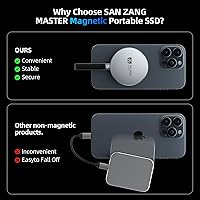
The magnetic connection is the standout here — you orient the drive near its target port and it clicks into place, which genuinely saves time when you're plugging in repeatedly throughout the day. On paper, USB 3.2 Gen 2 supports up to 10Gbps, though real-world sustained speeds will land noticeably lower depending on your host device and file types. The 2.68 x 2.68 x 0.28-inch footprint is legitimately pocketable, and 1TB gives you enough room to offload thousands of RAW photos or hours of 4K footage without constantly managing space. It works across Mac and PC, though mobile compatibility may require an appropriate adapter depending on your device.

Best For

This magnetic SSD makes the most sense for people who are always moving — photographers shuttling files between a camera, laptop, and client machine, or students who want a reliable backup that fits in any bag pocket. If you've ever fumbled with a USB-C port in poor lighting, the magnetic connection will feel like a genuine quality-of-life improvement. It's also a practical pick for smartphone users who regularly hit storage walls, provided they have the right adapter setup. Anyone who values a clean, minimal aesthetic in their tech gear will appreciate the understated silver design as a bonus.

User Feedback

Across roughly 100 ratings, the SQ20 drive sits at 4.1 stars — a respectable but not flawless score. Satisfied buyers consistently highlight the portability and magnetic design as the reasons they'd recommend it, with several noting it's become a daily carry item. The criticisms are worth noting, though: some users flag that sustained transfer speeds fall short of the advertised ceiling, which matters if you're moving large files regularly. A handful report that the magnetic hold feels less secure with certain device cases or port placements. Given the brand's short track record, long-term durability remains an open question that newer buyers should keep in mind.

Pros

  • The magnetic snap-on connection makes attaching and removing the drive genuinely faster than any standard cable-and-port setup.
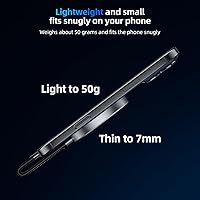
  • At under three ounces and barely a quarter-inch thick, this portable solid-state drive disappears into any pocket or pouch.
  • A full 1TB of storage handles years of photo backups, document archives, and video projects without constant file juggling.
  • USB 3.2 Gen 2 compatibility delivers noticeably faster transfers than older USB 3.0 drives for everyday file-moving tasks.
  • The minimalist silver finish looks sharp alongside modern laptops and tablets without drawing unnecessary attention.
  • No software installation is required — plug in on a Mac or PC and it is recognized immediately.
  • The square, coin-like form factor makes it one of the most pocketable external SSDs available at this capacity.
  • Students and remote workers get a practical, lightweight backup solution that does not add meaningful weight to a daily bag.
  • The SQ20 drive offers a magnetic connection feature that stands out clearly in a category where most products look and function identically.

Cons

  • Sustained transfer speeds in real-world use fall noticeably short of the 10Gbps theoretical maximum advertised.
  • The magnetic connection can feel unstable when the host port is recessed, angled, or partially blocked by a laptop case.
  • Mobile users on Android or iPad need to source a compatible adapter separately, which is an added cost and inconvenience.
  • Only one cable type is included in the box, leaving smartphone-first buyers underprepared right out of the packaging.
  • Long-term durability is an open question given the brand has a limited history and a small pool of extended-use reviews.
  • No ruggedized or water-resistant variant is available, making it a risky choice for outdoor or physically demanding environments.
  • The 1TB ceiling with no higher-capacity option limits how far this drive can scale with a growing media library.
  • Warranty and after-sales support processes are not clearly documented or consistently reported in buyer feedback.
  • The small body, while great for portability, can feel fiddly to handle when connecting without a flat surface to work on.

Ratings

The SAN ZANG MASTER SQ20 1TB Portable SSD scores below are generated by AI after analyzing verified global user reviews, with spam, bot-submitted, and incentivized feedback actively filtered out. This magnetic portable drive earned genuine praise in several areas, but real buyers also surfaced meaningful concerns — and both sides are reflected honestly in these ratings. From daily portability to transfer speed consistency, every score tells the full story.
Portability & Form Factor
93%
Buyers consistently describe slipping this drive into a shirt pocket or small pouch without a second thought. At under three ounces and barely thicker than a few stacked credit cards, it genuinely disappears into a bag. Travelers and commuters especially appreciate not having a bulky drive rattling around.
A few users with larger hands found the small square body slightly awkward to handle when connecting without a magnetic surface to guide placement. The compact size, while ideal for pockets, also means there is no room for a physical cable storage loop or attachment point.
Magnetic Connection Design
81%
19%
The snap-on magnetic mechanism is the feature most buyers single out as the reason they chose this drive over a conventional option. Users working at desks or in cafes say the quick connect-disconnect cycle saves real time when plugging in multiple times per day.
The magnetic hold can feel inconsistent when used with thicker laptop cases or certain port placements that are recessed or angled. A handful of reviewers noted the connection occasionally felt wobbly during active transfers, which raised concerns about accidental disconnections mid-copy.
Transfer Speed Performance
67%
33%
On a USB 3.2 Gen 2 host port with compatible cables, users moving large photo libraries or video project folders reported noticeably faster transfers compared to older USB 3.0 drives they had previously used. For everyday backup tasks, the speed feels adequate and responsive.
Speed-conscious buyers, particularly video editors, noted that sustained write speeds during large sequential transfers fall well below the 10Gbps theoretical ceiling. Real-world benchmarks shared in reviews suggest performance closer to mid-tier USB drives, which is worth factoring in before purchase.
Storage Capacity (1TB)
88%
A full terabyte gives casual to moderate users substantial breathing room — enough to hold thousands of RAW photos, several hours of 4K footage, or a complete laptop backup without constantly juggling files. Students backing up coursework found it more than sufficient for an entire academic year.
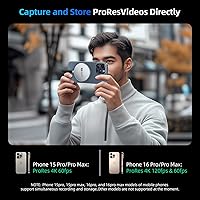
For professional video editors working with high-bitrate formats like ProRes or RAW cinema files, 1TB fills faster than expected. No higher capacity variant appears to be currently available in this model series, which limits scalability for power users.
Build Quality & Durability
71%
29%
The aluminum-finish housing feels solid in hand and resists fingerprints reasonably well. Most users reported no issues after several months of daily use in bags and pockets, suggesting the construction holds up under normal wear conditions.
SAN ZANG MASTER is a relatively new brand, and long-term durability data is still limited. A small number of reviewers raised concerns about the drive edges and magnetic connector showing minor wear after extended daily carry, though outright failures were not a dominant complaint.
Compatibility
74%
26%
Out of the box, this portable solid-state drive works reliably with Mac and Windows PC systems via standard USB-C ports. Most desktop and laptop users reported plug-and-play recognition without any driver installation required.
Mobile compatibility requires an appropriate adapter, and not all combinations with Android phones or iPads worked reliably for every user. A few reviewers specifically mentioned that certain Samsung and iPad Pro configurations required extra steps or failed to maintain a stable magnetic connection.
Value for Money
78%
22%
At its price point, the combination of 1TB capacity, USB 3.2 Gen 2 interface, and the genuinely novel magnetic design represents a fair deal for buyers who prioritize convenience. Users comparing it against similarly priced conventional drives felt the connection feature justified the cost.
Those who primarily care about raw speed over convenience found better-performing alternatives at a comparable price from more established brands. If the magnetic feature does not appeal to your workflow, the value proposition weakens noticeably against the competition.
Design & Aesthetics
86%
The clean silver finish and square shape drew consistent positive comments from design-conscious buyers. Several users mentioned it pairs visually well with MacBooks, iPads, and modern ultrabooks, which matters to people who care about how their desk setup looks.
Only one color option is available, which limits personalization. A few buyers also noted the drive lacks any branding subtlety — the logo placement felt prominent to those who prefer understated accessories.
Setup & Ease of Use
91%
There is essentially no learning curve. Users of all technical skill levels reported the drive was recognized immediately upon connection, with no software installation required. The magnetic alignment makes the initial connection more intuitive than fumbling with reversible USB-C ports in low light.
The magnetic orientation still requires some attention — connecting it upside down or at the wrong angle does not always trigger the snap cleanly, which confused a handful of first-time users expecting any position to work.
Cable & Accessory Inclusion
62%
38%
The included cable covers the most common use case for laptop and desktop users right out of the box, which most buyers considered adequate for immediate use. No additional purchases were necessary for basic Mac and PC connectivity.
Several buyers noted only one cable type was included, which meant Android phone or tablet users immediately needed to source an additional adapter. Given the drive is marketed partly for smartphone storage relief, the accessory bundle felt incomplete to mobile-first buyers.
Thermal Management
73%
27%
Under typical workloads — transferring photos, backing up documents, offloading a video project — the drive stays cool enough to handle comfortably throughout the session. Casual users reported no heat-related concerns during standard use.
During extended large file transfers pushing the drive continuously, some users noticed the body warming up more than expected. While no thermal throttling was explicitly reported, sustained high-load performance consistency remains an open question given the limited long-term review pool.
Brand Reliability & Support
58%
42%
The product arrived as described for the majority of buyers, with no widespread complaints about dead-on-arrival units or misrepresented specifications. Customer interactions that were mentioned skewed neutral to positive in tone.
As a newer market entrant, SAN ZANG MASTER lacks the track record of established storage brands. Warranty support processes are not well-documented in buyer feedback, and confidence in long-term after-sales reliability remains lower than it would be for a brand with years of market presence.

Suitable for:

The SAN ZANG MASTER SQ20 1TB Portable SSD is a strong fit for anyone whose daily routine involves moving files between multiple devices and who values speed of setup over raw throughput. Students carrying a laptop between classes and a home desk will appreciate having a full terabyte of backup space that weighs nothing and takes up almost no bag real estate. Photographers and videographers working at a hobbyist or semi-professional level — offloading memory cards, sharing footage with clients, or archiving shoots — will find the capacity and transfer speeds genuinely useful for their workflows. Remote workers who connect and disconnect external storage repeatedly throughout the day will notice a real quality-of-life difference from the magnetic snap-on mechanism compared to wrestling with USB-C ports on the side of a thin laptop. It also suits smartphone and tablet users who are constantly hitting internal storage limits and want a physical alternative to paying for more cloud storage each month.
Not suitable for:

The SAN ZANG MASTER SQ20 1TB Portable SSD is not the right tool for professional video editors or data-intensive workflows where sustained write speeds are critical — the real-world performance gap between advertised and actual throughput will frustrate anyone who benchmarks drives or regularly moves multi-gigabyte files under time pressure. Buyers who need more than 1TB will also hit a wall quickly, since no higher-capacity variant appears to be available in this series. If your primary device is an Android phone or an iPad and you do not already own the right adapter, expect an extra purchase before the drive is actually usable. Anyone who has had a bad experience with newer, less-established storage brands and prioritizes long-term warranty support and proven reliability should consider that SAN ZANG MASTER does not yet have the track record of incumbents in this category. Finally, users who work in environments where a drive might be knocked, dropped, or exposed to rough handling regularly would be better served by a ruggedized drive with impact and water resistance ratings.
Specifications

  • Storage Capacity: The drive provides 1TB of solid-state storage for files, photos, videos, and system backups.
  • Interface: It connects via USB 3.2 Gen 2, supporting theoretical maximum data transfer speeds of up to 10Gbps.
  • Connection Type: The drive uses a magnetic snap-on mechanism that aligns and attaches to the host port without manually inserting a connector.
  • Form Factor: It is an ultra-thin external SSD measuring 2.68 x 2.68 x 0.28 inches, roughly the size and thickness of a large coin.
  • Weight: The drive weighs 2.89 oz, making it one of the lightest 1TB external SSDs in its category.
  • Drive Type: It uses solid-state storage with no moving parts, which improves shock resistance compared to traditional hard disk drives.
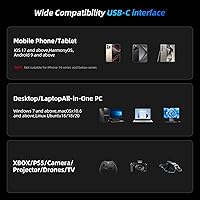
  • Compatible Platforms: The drive is compatible with Mac and Windows PC out of the box, and with smartphones and tablets via an appropriate adapter.
  • Color & Finish: The housing features a silver finish designed to complement modern laptops, tablets, and mobile devices aesthetically.
  • Model Series: This drive belongs to the SQ20 series from SAN ZANG MASTER, first made available in December 2024.
  • Installation: No software drivers or tools are required; the drive is recognized automatically upon connection on supported operating systems.
  • Cable Included: A USB cable is included in the box, though only one cable type is provided, which may not cover all device configurations.
  • Operating Temperature: Like most consumer-grade portable SSDs, this drive is intended for use in standard indoor temperature environments and is not rated for extreme conditions.
  • Shock Resistance: As a solid-state drive with no spinning platters, it offers inherent resistance to vibration and minor bumps during normal daily carry.
  • Water Resistance: No IP rating or water or dust resistance certification is specified for this drive; it should be kept away from moisture.
  • Power Source: The drive draws power directly from the host device via the USB connection and requires no external power adapter or battery.

Related Reviews
SAN ZANG MASTER S7000 1TB SSD
88%
93%
Performance
94%
Speed (Read/Write)
88%
Ease of Installation
72%
Thermal Management
90%
Durability & Reliability
More
SAN ZANG MASTER S7000 2TB SSD
88%
94%
Performance
97%
Read Speed
86%
Write Speed
91%
Thermal Management
89%
Ease of Installation
More
SAN ZANG MASTER S500 2TB SATA SSD
75%
88%
Value for Money
81%
Read Speed Performance
92%
Installation Ease
89%
Compatibility
61%
Brand Reliability
More
SAN ZANG MASTER S3000 2TB M.2 NVMe SSD
87%
92%
Performance
87%
Value for Money
90%
Build Quality
88%
Ease of Installation
85%
Thermal Management
More
SanDisk Portable SSD 1TB External Drive
77%
88%
Transfer Speed
93%
Portability & Form Factor
79%
Build Quality & Durability
41%
Cable & Accessories
86%
Value for Money
More
Samsung T5 Portable SSD 1TB
87%
94%
Performance
90%
Build Quality & Durability
92%
Portability & Size
88%
Data Security (Encryption)
85%
Ease of Use
More
PNY RP60 1TB Portable SSD
77%
83%
Transfer Speed
88%
Build Quality
86%
Durability & Protection
91%
Portability & Design
78%
Compatibility
More
Netac ZX20 512GB Portable SSD
75%
78%
Transfer Speed
93%
Portability
67%
Build Quality
84%
Value for Money
81%
Compatibility
More
JOIOT X3Pro 1TB Portable SSD
74%
93%
Portability & Form Factor
81%
Transfer Speed (Read)
66%
Transfer Speed (Write)
61%
Build Quality
84%
Value for Money
More
Lexar SL500 1TB Portable SSD
78%
88%
Transfer Speed
83%
Build Quality
93%
Portability
86%
iPhone Compatibility
79%
Gaming Console Use
More

FAQ

In most desktop and laptop setups the magnetic hold is firm enough to stay put during active transfers. The main risk comes when the port is recessed or when a thick laptop case partially blocks the connection surface — in those situations a slight bump can break the link. If you plan to move the laptop around while transferring, it is worth being cautious.

No installation is needed on either platform. Plug it in and the operating system recognizes it automatically, just like any standard external storage device. You can start dragging files over within seconds of connecting.

Not directly out of the box. The drive uses a USB-C type connection, so iPhones with Lightning ports will need a Lightning-to-USB-C adapter, while older Android phones with Micro-USB ports will need their own adapter. Even with the right adapter, some Android phones require enabling USB storage mode in settings before the drive is recognized.

The 10Gbps figure is the theoretical ceiling of the USB 3.2 Gen 2 interface, not what you will see in practice. Real-world sustained speeds depend heavily on your host device, the type of files being moved, and your cable quality. Expect performance in the range typical of mid-tier USB 3.2 drives rather than top-end NVMe enclosures.

Most units ship pre-formatted, typically in exFAT, which works on both Mac and Windows without reformatting. However, if you want to use it exclusively with one operating system, reformatting to APFS on Mac or NTFS on Windows can improve compatibility and performance in some cases.

It uses the standard USB-C port already on your device — there is no special port required. The magnetism is built into the drive-side connector, so it self-aligns and snaps into place when you bring it close to the port. Think of it like a MagSafe-style connection but for a USB-C port you already have.

For standard daily carry — going between home, an office, or a campus — it holds up fine based on reported user experiences. The solid-state internals mean there are no moving parts to damage from bumps. That said, it has no official drop rating or water resistance, so treating it with basic care is still advisable.

Yes, both macOS Time Machine and Windows Backup can use this drive as a destination. You may need to reformat it to the appropriate file system first — APFS or Mac OS Extended for Time Machine, NTFS for Windows Backup. Once formatted correctly, the setup process is the same as any other external SSD.

Under light to moderate workloads it stays comfortably cool. During prolonged large file transfers the body can warm up noticeably, which is normal for compact SSDs with limited surface area for heat dissipation. No users have reported thermal throttling, but extended heavy-load sessions are not this drive's primary use case.

SAN ZANG MASTER is a relatively new brand, and warranty terms are not prominently detailed in publicly available product listings. Before purchasing, it is worth checking the current Amazon listing or contacting the seller directly to confirm warranty duration and the returns process, particularly if long-term reliability assurance is important to you.