Overview

The Samsung QE55T 55-inch Commercial Display is built from the ground up for business environments — not adapted from a consumer TV lineup. That distinction matters more than it might seem. Consumer displays are not rated for extended daily operation and often carry warranties that do not cover commercial use. This Samsung signage screen sits at a mid-range commercial price point, placing it within reach for small and mid-sized operations like hotel lobbies, clinic waiting rooms, retail floors, and compact conference rooms. Samsung carries genuine credibility in the B2B display market, which adds meaningful reassurance when you are investing in hardware expected to run reliably week after week.

Features & Benefits

The QE55T runs on a Crystal 4K Processor that handles intelligent upscaling, so even standard-definition content looks reasonably clean on the 3840x2160 panel. The 16/7 operation rating — 16 hours a day, seven days a week — is one of the most practically useful specs here, backed by an IP5X dust-proof certification that matters in retail or light-industrial settings where airborne particles are a real concern. Two HDMI inputs give you source flexibility, and the built-in USB media player lets you loop promotional content straight from a drive without needing a connected PC. The three-side bezel-less design mounts cleanly via VESA 200x200 in portrait or landscape orientation, and integrated speakers handle ambient audio without a separate system. A three-year commercial warranty adds coverage well beyond what consumer panels typically offer.

Best For

This commercial display is a strong fit for small businesses that want dependable digital signage without the complexity — or cost — of enterprise-tier hardware and dedicated software platforms. A dental clinic looping appointment reminders, a boutique hotel promoting amenities, or a coffee shop cycling through its menu all fit squarely in the target scenario. It works equally well in compact conference rooms and polished reception areas where a wall-mounted 4K screen sets the right tone. One honest caveat: this Samsung signage screen has no built-in content management software, so buyers needing dynamic, remotely updated playlists should budget for a separate CMS or media player solution. For those running pre-loaded USB content or fixed HDMI sources, that gap is largely a non-issue.

User Feedback

With a 4.0-star average across 66 ratings, the QE55T has earned measured but genuine approval — though 66 reviews is a modest sample, so sweeping conclusions should be held loosely. Buyers most commonly praise image clarity and how straightforward wall mounting turns out to be, with several noting the build feels solid relative to the price tier. The 300-nit brightness draws mixed reactions: fine for controlled indoor environments away from direct sunlight, but noticeably underwhelming in bright storefronts or window-facing installations. The most recurring frustration is the absence of smart signage features — buyers expecting built-in scheduling or app support were caught off guard. A handful of reviewers flagged a learning curve during initial setup. Those who went in with realistic expectations for a simple, durable display largely came away satisfied.

Pros

  • The 4K UHD panel delivers sharp, professional-looking content that holds up well at typical viewing distances in public spaces.
  • A 16/7 operation rating means this commercial display is genuinely built for long business days, not just tolerating them.
  • IP5X dust-proof certification adds a layer of hardware protection consumer screens simply do not offer.
  • The built-in USB media player lets you run looping content without any additional hardware or PC connection.
  • A three-year commercial warranty provides meaningful coverage well beyond the standard one-year consumer guarantee.
  • Dual HDMI inputs give flexibility for connecting multiple sources without a switcher or splitter.
  • The three-side bezel-less design looks polished and professional when wall-mounted in a client-facing space.
  • VESA 200x200 compatibility makes installation straightforward, and portrait or landscape orientation is supported out of the box.
  • Built-in speakers handle ambient or informational audio adequately in quieter indoor environments.
  • Samsung's established presence in the commercial display market offers reasonable confidence in parts availability and support.

Cons

  • No built-in CMS or signage software means you need a separate solution for dynamic, remotely managed content.
  • At 300 nits, the QE55T will struggle in bright storefronts or any space with strong natural light.
  • The 16/7 operation ceiling rules it out for businesses that need true around-the-clock display uptime.
  • Setup can present a learning curve for non-technical staff, particularly around input configuration and USB playback formatting.
  • Only one USB 2.0 port limits peripheral flexibility and is a bottleneck if content files are large or frequently updated.
  • No built-in Wi-Fi or network connectivity means remote content updates require physical access to the screen.
  • At 42 pounds, wall installation typically requires two people and proper stud-finding — not a quick solo job.
  • The 66-rating review sample is relatively small, making it harder to draw firm conclusions about long-term reliability.
  • Buyers expecting consumer-TV picture modes or smart features will find the interface notably stripped back by comparison.
  • No support for 24/7 continuous operation may catch buyers off guard if they skim specs without reading the fine print.

Ratings

Our AI scoring system analyzed verified buyer reviews for the Samsung QE55T 55-inch Commercial Display from commercial purchasers worldwide, actively filtering out incentivized submissions, bot activity, and outlier feedback to surface what real facilities managers and business owners actually experienced. Scores reflect both consistent praise and recurring frustrations with equal weight, so you get an honest picture of where this signage screen earns its reputation — and where it falls short.
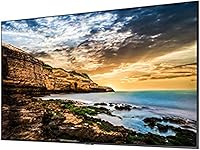
Image Clarity
88%
Buyers deploying this screen in clinic waiting rooms and hotel lobbies consistently praised how sharp promotional graphics and 4K video content appeared at normal viewing distances. The Crystal 4K Processor does a respectable job cleaning up lower-resolution source material, which matters when not all your content is natively 4K.
A handful of users noted that upscaled standard-definition content, while improved, still shows visible softness compared to native 4K assets. Those piping older slideshow content from legacy systems found the upscaling less impressive than the marketing language suggested.
Brightness & Visibility
61%
39%
For enclosed indoor spaces — interior retail floors, reception desks, and dim conference rooms — the 300-nit output is generally adequate. Buyers in controlled-light environments reported no complaints about readability during normal operating hours.
This is the most frequently flagged limitation in user feedback. Installations near windows or in sun-washed lobbies found the screen washed out and difficult to read without additional light-blocking measures. Several buyers specifically wished they had chosen a higher-nit panel for their particular setup.
Build Quality
83%
Users consistently described the physical construction as solid and professional-looking, particularly noting that the slim bezel-less design on three sides gives it a clean, polished appearance once wall-mounted. The IP5X dust-proof rating was cited as a genuine differentiator for a café owner and a gym operator who had burned through consumer displays previously.
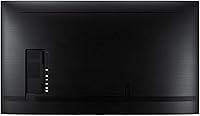
At 42 pounds, a few buyers found the unit heavier than expected during installation, and noted the rear panel casing feels slightly less premium than the front-facing display surface. Nothing structural — more of a first-impression observation during unboxing.
Ease of Installation
76%
24%
The VESA 200x200 mount compatibility is a practical standard that works with most commercially available wall brackets. Buyers with prior AV mounting experience found the physical installation process straightforward, and portrait versus landscape flexibility was appreciated by boutique retailers with specific layout requirements.
First-time commercial display installers reported a steeper learning curve than expected, particularly around input configuration and getting the USB media player to recognize their content correctly. The need for two people to safely lift and align the unit also caught some solo operators off guard.
USB Media Playback
72%
28%
For businesses running looping promotional content — menus, announcements, branded slideshows — the built-in USB player works reliably once content is properly formatted. Small retail and hospitality operators appreciated being able to update content simply by swapping a flash drive, with no additional hardware required.
The single USB 2.0 port is a bottleneck, and users with large video files or complex playlists found transfer and playback less responsive than expected. Compatibility with less common video codecs caused headaches for a number of buyers who had to re-encode their content libraries before achieving stable playback.
Smart & Software Features
43%
57%
For buyers who specifically wanted a display — not a smart platform — the stripped-back software environment is actually a stability advantage. There is nothing to update unexpectedly, no apps competing for resources, and no interface to navigate past.
This is the QE55T's most consistent source of buyer disappointment. The complete absence of built-in CMS functionality, remote content management, or any scheduling software means buyers expecting smart signage capabilities were left scrambling for third-party solutions. Several reviewers admitted they would have chosen a different screen had they understood this limitation upfront.
Connectivity Options
69%
31%
Having two HDMI inputs gives small conference room and reception area deployments enough flexibility to switch between a laptop and a dedicated media player without a separate switcher. For the majority of straightforward single-source setups, the connectivity spec is entirely adequate.
The absence of Wi-Fi or ethernet connectivity is a genuine limitation for buyers who expected to push content updates remotely. With only one USB port and no network connection, any content changes require physical access to the screen, which is impractical in multi-location deployments or hard-to-reach installations.
Operational Reliability
84%
Buyers who had been running the display for six months or longer reported consistent uptime with no unexpected shutdowns during normal business-hours operation. The 16/7 rating aligns well with most standard retail and hospitality schedules, and the dust certification appears to hold up in practice based on owner feedback from busier floor environments.
A small subset of users who pushed the screen toward or beyond its 16-hour daily limit reported premature brightness degradation over time. The warranty does not cover misuse beyond the rated operation ceiling, so buyers with near-continuous needs should factor that into their planning.
Audio Performance
57%
43%
For quiet environments running background music or basic narrated content — a medical waiting room or a boutique fitting area — the built-in speakers are passable and save the cost of external hardware. Buyers with modest audio requirements found them functional enough out of the box.
In any environment with moderate ambient noise, the speakers fall short. Volume output is limited, and sound quality is thin at higher levels. Retail and hospitality buyers using audio-driven content in busier spaces almost universally reported needing to add external speakers, which negates the built-in audio as a cost-saving feature.
Value for Money
78%
22%
Compared to enterprise-tier commercial displays at significantly higher price points, the QE55T delivers a respectable feature set — 4K resolution, commercial warranty, dust protection, and a clean design — at a price accessible to small business budgets. Buyers who entered with accurate expectations consistently felt they received fair value.
Buyers who compared it to large consumer Samsung TVs at lower price points felt the premium was harder to justify without fully understanding the commercial-grade operational differences. Those who later needed to add a CMS solution on top found the total cost of ownership crept higher than originally anticipated.
Warranty & Support
86%
The 3-year commercial warranty stands out as a genuine advantage in this category. Business buyers who had previously dealt with consumer warranty rejections on commercial deployments specifically called out this coverage as a meaningful reason they chose this panel over cheaper alternatives.
A few buyers reported slower-than-expected response times when initiating warranty claims through Samsung's commercial support channel. The process was described as navigable but not fast, which matters when a display going dark in a public-facing space represents real business disruption.
Design & Aesthetics
81%
19%
The slim profile and three-side bezel-less construction genuinely looks professional in wall-mounted scenarios. Buyers in upscale hospitality and corporate reception settings appreciated that the screen does not draw attention to itself — it frames the content rather than competing with it.
The rear panel and cable management options are purely functional with no design consideration, which becomes relevant in open-plan or partially exposed installations. A few buyers in minimalist or design-forward environments noted visible cabling as an afterthought they had to solve independently.
Setup & Configuration
66%
34%
For buyers connecting a single HDMI source or loading content via USB, initial setup is relatively quick once the physical installation is complete. The interface for basic input switching and display settings is direct and uncluttered.
The lack of any onboarding documentation specific to commercial signage workflows left some non-technical buyers confused during initial configuration. Getting USB playback to loop correctly without interruption required trial and error for several users, and there is no companion app or remote management interface to simplify the process.
Content Compatibility
67%
33%
Standard MP4 video and JPEG image content plays reliably through the USB port for buyers who tested compatible formats before deployment. For organizations with a simple, consistent content library, the playback experience is stable and predictable.
Users with diverse content libraries — mixing video formats, animated graphics, or audio-synced presentations — encountered inconsistent playback behavior. The lack of any software environment means troubleshooting compatibility issues requires external resources, and there is no built-in fallback or error display to indicate what went wrong.
Long-Term Durability
74%
26%
Among buyers who had owned the display for over a year under normal commercial conditions, the consensus was positive — no significant panel degradation, consistent color accuracy, and no mechanical failures in well-ventilated installations. Samsung's commercial-grade component selection appears to deliver on its durability promise for typical use cases.
The long-term sample is limited by the relatively small review pool and the product's commercial niche. A few buyers in warmer or poorly ventilated environments reported accelerated backlight dimming, suggesting thermal management is a factor worth considering in the installation planning stage.

Suitable for:

The Samsung QE55T 55-inch Commercial Display is purpose-built for small and mid-sized businesses that need a dependable, no-fuss signage solution they can mount and largely forget about. Think dental offices cycling through patient education content, hotel lobbies running branded welcome screens, or retail boutiques looping promotional material from a USB drive — these are exactly the environments this screen was designed for. Facilities managers who want a panel that holds up through long operating days without requiring constant IT attention will find the 16/7 rating and IP5X dust certification genuinely reassuring rather than just marketing copy. The three-year commercial warranty is a real differentiator here, especially for organizations where unexpected hardware failure means real operational disruption. If your goal is a clean, wall-mounted 4K display in a reception area or compact conference room — and you are sourcing content from a fixed input rather than a cloud-based platform — this commercial display hits a practical, well-balanced target.

Not suitable for:

The Samsung QE55T 55-inch Commercial Display is not the right call for buyers who need built-in content management, remote scheduling, or app-driven signage capabilities — there is no CMS software included, and expecting smart-TV-style functionality will lead to frustration. Buyers planning installations in bright, window-facing environments should also think carefully: 300 nits is adequate for dim lobbies and interior rooms, but it will struggle to compete with strong ambient or direct sunlight. This screen is similarly not a fit for 24/7 operations — it is rated for 16 hours daily, not round-the-clock use, which rules it out for certain retail or hospitality deployments. Consumers hoping to repurpose this as a large home TV will find it an expensive choice with fewer picture-enhancement features than a comparably sized consumer panel. Larger enterprises with centralized AV infrastructure and specific commercial-grade requirements — higher brightness, SoC-based signage OS, or daisy-chain support — should be looking further up the product ladder.

Specifications

  • Screen Size: The panel measures 55 inches diagonally, making it well-suited for wall-mounted signage in mid-sized commercial spaces.
  • Resolution: Native resolution is 3840x2160 (4K UHD), delivering sharp detail at typical lobby or retail viewing distances.
  • Brightness: Peak brightness is rated at 300 nits, appropriate for controlled indoor environments but not for high-ambient-light or window-facing installations.
  • Panel Type: Uses a flat LED panel with a non-glare surface treatment to reduce reflections in standard indoor lighting conditions.
  • Processor: The Crystal 4K Processor handles intelligent upscaling, improving the appearance of standard and HD content displayed on the 4K panel.
  • Operation Rating: Rated for up to 16 hours of continuous daily operation, 7 days a week, which covers the majority of standard business-hours deployments.
  • Dust Protection: IP5X dust-proof certification provides a meaningful level of protection in retail or light-commercial environments where airborne particles are a concern.
  • Connectivity: Includes two HDMI inputs and one USB 2.0 port with a built-in media player for direct content playback from a flash drive.
  • VESA Mount: Compatible with VESA 200x200 wall mounts, supporting both portrait and landscape installation orientations.
  • Dimensions: The unit measures 2.4 x 48.4 x 27.8 inches (D x W x H) and weighs approximately 42 pounds without a wall mount.
  • Aspect Ratio: Standard 16:9 widescreen aspect ratio, consistent with the majority of commercial signage templates and video content formats.
  • Audio: Built-in speakers are included, providing basic audio output suitable for low-ambient-noise environments without requiring external hardware.
  • RAM: Equipped with 2 GB of onboard RAM to support the internal media player and basic system operations.
  • Warranty: Backed by a 3-year commercial warranty, offering significantly broader coverage than the 1-year terms typical of consumer-grade displays.
  • Bezel Design: Features a three-side bezel-less design that produces a slim, polished appearance when mounted in client-facing or public-area settings.
  • Voltage: Operates at 120 volts, compatible with standard North American commercial electrical outlets.
  • Color Finish: Available in black, which integrates cleanly into most commercial interior environments without drawing visual attention to the frame.
  • Certifications: Carries commercial-grade certification from Samsung, distinguishing it from consumer panels in terms of operational durability expectations.

Related Reviews

Samsung QE50T 50-inch Commercial Display
77%
88%
Picture Quality
63%
Brightness & Visibility
86%
Build Quality & Durability
91%
Ease of Installation
74%
Content Connectivity
More
Samsung Q60D 55-inch QLED 4K TV
83%
88%
Picture Quality
91%
Color Accuracy
82%
HDR Performance
84%
Motion Handling
70%
Audio Performance
More
Samsung The Serif 55-inch QLED 4K TV
79%
96%
Design & Aesthetics
78%
Picture Quality
91%
Anti-Glare Performance
88%
Stand & Placement Flexibility
74%
Smart Platform & App Support
More
Samsung QN85D 55-Inch QLED 4K Smart TV
81%
91%
Picture Quality
88%
Brightness & HDR
74%
Contrast & Black Levels
87%
Motion Handling
82%
Gaming Performance
More
Samsung Q80A 55-Inch QLED 4K TV
80%
86%
Picture Quality
89%
Brightness & HDR Performance
92%
Gaming Performance
67%
Local Dimming & Contrast
83%
Motion Handling
More
Samsung 55-inch CU8000 4K LED Smart TV
72%
74%
Picture Quality
61%
Motion & Refresh Rate
83%
Smart TV Experience
58%
Built-in Audio
86%
Design & Build
More
Samsung RU8000 55-inch 4K UHD Smart TV
76%
83%
Picture Quality
81%
Motion Handling
72%
HDR Performance
76%
Smart TV Interface
54%
Audio Performance
More
Samsung QN95B 55-Inch Neo QLED 4K TV
73%
91%
Picture Quality
88%
Gaming Performance
52%
Smart TV Software
86%
Design & Aesthetics
67%
Audio Quality
More
Samsung Q70C 55-inch QLED 4K TV
76%
83%
Picture Quality
63%
Contrast & Black Levels
88%
Motion Handling
69%
HDR Performance
81%
Gaming Performance
More
Samsung 55-inch The Terrace Outdoor QLED TV
79%
91%
Outdoor Brightness
88%
Weather Resistance
89%
Picture Quality
93%
Build Quality
82%
Smart TV Experience
More

FAQ

No — the QE55T is rated for 16 hours of continuous operation per day, not round-the-clock use. If your deployment genuinely requires 24/7 uptime, you will need to look at a screen specifically rated for that, as running this panel beyond its rated hours could affect its longevity and void the warranty.

It does not include any built-in CMS or signage scheduling software. The Samsung QE55T 55-inch Commercial Display plays content via USB or HDMI input, which works well for static or looping media, but if you need remote content management, timed playlists, or multi-screen coordination, you will need to purchase a separate media player or CMS solution.
The built-in USB player supports common video and image formats including MP4, AVI, JPEG, and PNG, among others. For best results, check Samsung's official QE55T documentation for the full supported format list before encoding your content, as less common codecs may not play back correctly.

Probably not. At 300 nits, this commercial display performs well in dimmer indoor environments like waiting rooms, corridors, or interior retail floors. If the screen will face a window or be placed in a space with strong ambient sunlight, you should look for a panel rated at 700 nits or higher to ensure readability.

Yes. The QE55T supports both portrait and landscape wall mounting via its VESA 200x200 pattern. Just keep in mind that you may need to configure your content source to output in portrait orientation, as the screen itself does not auto-rotate content.

Consumer TVs are cheaper upfront but are not designed or warranted for commercial use. They typically carry 1-year warranties, are not rated for extended daily operation, and lack the IP5X dust protection this signage screen includes. If the display is running in a business environment for many hours a day, the commercial-grade build and 3-year warranty justify the price difference for most buyers.

The integrated speakers are adequate for low-volume ambient audio in quiet spaces like reception areas or waiting rooms. If you are running audio-heavy content in a louder environment — a busy retail floor, for example — you will likely want to connect external speakers via the audio output for better coverage and clarity.

At 42 pounds, this is not a one-person job. You will need a compatible VESA 200x200 wall bracket (sold separately), a stud finder, and ideally two people for the physical lift and alignment. The bracket installation itself is fairly standard if you have done any AV mounting before, but first-timers should budget extra time or consider hiring a professional installer.

Yes, the two HDMI inputs make it straightforward to connect a laptop, dedicated media player, or any HDMI-capable source device. This is actually a common setup for businesses that want more control over their content than a USB drive allows, pairing the screen with a small-form-factor PC or dedicated signage player.

Samsung's commercial warranty covers defects in materials and workmanship under normal commercial use conditions for three years from the purchase date. It is specifically designed to account for the extended daily operating hours typical of business deployments, unlike consumer warranties that may be voided by commercial use. For specific claims procedures and exclusions, it is worth reviewing Samsung's official warranty documentation before purchase.