Overview

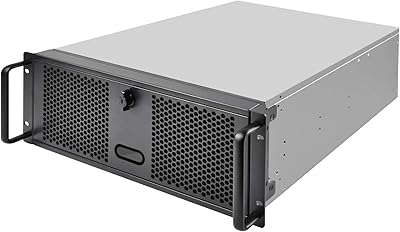
The Rosewill RSV-Z3200U 3U Rackmount Server Case sits in an interesting spot — priced accessibly for home lab budgets, yet capable enough for legitimate small business workloads. Rosewill has built a solid reputation for keeping server hardware affordable without stripping out useful features, and this chassis reflects that philosophy well. Three rack units is a reasonable footprint trade-off, especially when rack real estate is tight. The silver and black finish is a subtle differentiator; most enclosures at this price ship in plain black, so the two-tone look lends a slightly more polished, professional appearance to any open rack setup.

Features & Benefits

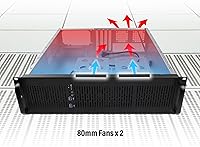
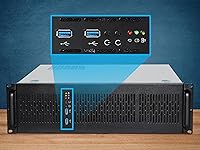
Six internal 3.5-inch drive bays is the headline feature here — you can load this rackmount chassis with spinning drives for a NAS or backup server without needing a separate expansion shelf. E-ATX motherboard support is genuinely useful; it means you are not limited to standard ATX boards, so workstation-class CPUs with higher core counts are fair game. Four PCIe slots leave room for an HBA card, a dedicated NIC, or a GPU if your workload demands it. Two front USB 3.0 ports handle quick transfers without crawling under the rack. The two pre-installed 80mm PWM fans manage moderate thermal loads adequately, though being smaller-diameter fans, they spin faster than 120mm alternatives and will be noticeable under sustained use.

Best For

This Rosewill server case makes the most sense for two types of buyers: home lab enthusiasts building their first proper rackmount server, and small businesses that need dependable on-premises storage or virtualization without enterprise-level pricing. If you are running Proxmox, TrueNAS, or a similar self-hosted platform and want to consolidate everything into a real rack, the RSV-Z3200U checks the core boxes without demanding a premium chassis budget. It is also a smart stepping stone for anyone graduating from a tower build. The E-ATX compatibility specifically sets it apart from cheaper 3U options that cap at standard ATX, giving builders meaningful headroom for higher-end platforms.

User Feedback

Across roughly 160 ratings, this rackmount chassis holds a 4.2-star average — respectable, though not without nuance. Buyers consistently praise the sturdy steel construction and how straightforward drive installation feels compared to cheaper alternatives. Airflow earns positive marks under light-to-moderate server loads. Where things get more mixed: the 80mm fans become noticeably loud when the system is working hard, and a handful of users flagged sparse documentation as a friction point during assembly. Cable management inside is workable but tight, particularly with longer PSUs or dense wiring. A few builders also noted that deep power supplies can be a snug fit depending on the specific model, so measure before purchasing.

Pros

  • Six internal 3.5-inch drive bays offer generous storage expansion for NAS and server builds.
  • E-ATX motherboard support unlocks workstation-class CPU platforms that most budget chassis cannot accommodate.
  • Four PCIe slots provide real flexibility for adding HBAs, NICs, or other expansion cards.
  • Alloy steel construction feels solid and durable relative to the price tier.
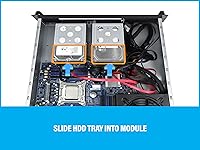
  • Drive installation is straightforward, with users consistently praising the no-fuss process.
  • Dual front USB 3.0 ports are genuinely convenient during setup and routine maintenance.
  • Front panel LEDs for power, HDD activity, and LAN status make quick system checks easy.
  • The silver and black finish looks noticeably more professional than typical all-black budget enclosures.
  • PWM fan control helps moderate noise under lighter workloads when the system is not taxed.
  • The 3U footprint keeps rack space usage reasonable for the feature set provided.

Cons

  • The 80mm fans become noticeably loud under sustained load, which may be disruptive in quiet environments.
  • No 2.5-inch SSD mounting options limits builds that rely on solid-state storage.
  • Cable management inside the chassis is tight, especially with high-wattage or multi-drive wiring setups.
  • Documentation included in the box is sparse, making first-time rackmount builders work harder during assembly.
  • Longer power supplies may have fitment issues depending on the specific PSU model chosen.
  • No hot-swap drive backplane means drive swaps require powering down the system.
  • No redundant PSU support rules this out for uptime-critical small business deployments.
  • Only air cooling is supported, with no provision for liquid cooling integration.
  • The absence of 5.25-inch bays limits options for optical drives or fan controllers that use that form factor.

Ratings

The scores below were produced by our AI engine after processing verified global buyer reviews for the Rosewill RSV-Z3200U 3U Rackmount Server Case, with spam, bot activity, and incentivized feedback actively filtered out before analysis. This rackmount chassis lands in a competitive mid-range bracket, and the ratings honestly reflect where it earns its keep — and where real users have run into friction. Both the genuine strengths and the recurring pain points are represented without softening either side.

Build Quality
78%
22%
The alloy steel chassis feels noticeably solid for the price tier, and most buyers report that panels align cleanly with no alarming flex during installation. For a home lab or small business rack that does not move around often, the structural rigidity is more than adequate.
A handful of users noted that some internal edge finishing is rougher than expected, with sharp metal edges on drive bay rails that can catch hands during installation. It is not an enterprise-grade build, and up close the fit and finish shows its price point.
Value for Money
81%
19%
For buyers who need E-ATX compatibility and six 3.5-inch drive bays in a 3U form factor, the RSV-Z3200U hits a price point that competing options struggle to match. Most reviewers explicitly call out the value proposition as the primary reason they chose it over alternatives.
Buyers expecting the included accessories and documentation to match the chassis quality will be disappointed — the sparse documentation and minimal hardware pack feel like corners were cut to hit the price target. Some feel a few extra dollars at purchase would have been worth it for better out-of-box completeness.
Cooling Performance
67%
33%
Under light-to-moderate server workloads — typical NAS operation, low-traffic virtualization, or file serving — the two pre-installed PWM fans provide sufficient airflow to keep temperatures in a safe range. Users running TrueNAS or similar low-intensity server OS report comfortable thermals.
Push this chassis into sustained heavy compute or dense drive configurations and the 80mm fan setup shows its limits — 80mm fans must spin significantly faster than 120mm alternatives to move comparable airflow, and the thermal headroom narrows quickly. This is not a chassis for high-TDP CPUs or dense GPU workloads without supplemental cooling.
Noise Level
59%
41%
At idle or during light workloads, the PWM speed control keeps fan noise tolerable, and users in dedicated server closets or equipment rooms report no meaningful complaints. The PWM control at least prevents the fans from running at full tilt unnecessarily.
Under load, the 80mm fans ramp up noticeably and become the dominant sound source in the room — a recurring criticism across multiple verified reviews. Buyers who planned to place this rackmount chassis in a home office or shared workspace have flagged the noise as a genuine quality-of-life issue.
Storage Expandability
83%
Six internal 3.5-inch bays is a meaningful amount of raw storage capacity for a chassis at this size and price — enough to run a ZFS RAIDZ2 pool with a hot spare, or to stage a multi-drive backup server without needing an external shelf. Home lab builders consistently highlight this as a standout feature.
The complete absence of 2.5-inch SSD bays is a real limitation for builders who want fast boot drives or SSD caching without consuming a full 3.5-inch bay slot via adapter bracket. There is also no option to add 5.25-inch devices, which eliminates fan controllers or optical drives for those who need them.
Motherboard Compatibility
86%
Supporting E-ATX is a meaningful differentiator at this chassis price tier, unlocking dual-socket and high-core-count workstation platforms that standard ATX cases simply cannot fit. Builders pairing this with HEDT or server-grade motherboards consistently report clean fitment.
While E-ATX support is confirmed, some users have noted that very large E-ATX boards with non-standard mounting hole layouts occasionally require extra care during installation. Documentation does not clearly outline any specific edge-case board compatibility limitations.
Cable Management
54%
46%
The interior provides enough raw space for basic builds to route cables in an organized manner, and less complex configurations — a single CPU board, a few drives, and a standard PSU — can be wired reasonably neatly without too much effort.
There are no built-in cable management channels, tie-down anchor points, or routing cutouts, which makes dense wiring setups genuinely messy. Users running multiple drives alongside a full-length modular PSU and several PCIe cards report that the interior becomes crowded and difficult to manage cleanly.
Drive Installation
82%
18%
Reviewers consistently praise how straightforward it is to seat drives in the bays, with the process being intuitive enough that even first-time server builders report no significant difficulty. The bay spacing is clean and drives slide in without awkward angling or force.
There is no tool-less or hot-swap mechanism — drives are secured with screws, which slows down swaps and requires powering down the system entirely. For a NAS or storage server where drive replacement is a routine event, this adds friction that a backplane solution would eliminate.
PCIe Expansion
77%
23%
Four PCIe slots is a practical count for the target use case — enough to house an HBA for drive control, a 10GbE NIC, and still have room for one additional card. Most home lab and small business builds will not hit the ceiling here.
The slot layout and bracket quality are functional but not refined, and users adding multiple full-height cards in adjacent slots note that thermal spillover between cards is something to watch. There is no riser card flexibility or tool-less expansion slot retention.
Front Panel Usability
74%
26%
The three-LED front panel indicator layout — covering power, HDD activity, and LAN status — gives administrators a quick at-a-glance system health check without logging into a management interface. The dual USB 3.0 ports are positioned conveniently for plugging in a USB drive during maintenance.
The front panel is utilitarian rather than thoughtful — there are no additional diagnostic LEDs, no temperature readout, and no fan speed indicator that more premium chassis often include. For a rack that is not at eye level, the LED visibility angle is also limited.
PSU Compatibility
63%
37%
Standard ATX power supplies of common lengths seat without issue, and the rear-mount configuration is familiar to anyone who has built a server before. Most mid-range PSUs from well-known brands fit without complications.
Longer fully modular PSUs — particularly those exceeding roughly 170mm in depth — have caused fitment headaches for a notable subset of buyers, who report that the PSU either conflicts with drive cabling or simply does not seat flush. Rosewill does not publish a clear maximum PSU depth specification, which forces buyers to guess.
Documentation & Setup
48%
52%
For experienced server builders who have assembled rackmount systems before, the chassis is intuitive enough that the documentation gap is largely a non-issue — the layout is conventional and the assembly sequence is logical.
First-time rackmount builders will find the included documentation genuinely inadequate, with multiple reviewers calling it out specifically as a frustration point. There are no labeled diagrams for front panel header connections or fan header routing, which adds unnecessary troubleshooting time for less experienced users.
Aesthetics & Finish
72%
28%
The two-tone silver and black exterior is a legitimate differentiator at this price range, giving the RSV-Z3200U a more professional appearance than the plain black enclosures that dominate the budget tier. In an open-frame rack or glass-door cabinet, it looks the part.
Up close, the paint finish and panel alignment are consistent with budget steel construction — adequate but not polished. Internal finish quality, particularly around drive bay rails and cut edges, does not match the relatively clean exterior appearance.

Suitable for:

The Rosewill RSV-Z3200U 3U Rackmount Server Case is a strong fit for home lab builders and small business operators who want a real rackmount enclosure without spending on enterprise-grade hardware. If you are running a self-hosted NAS, a Proxmox virtualization cluster, or an on-premises backup server, the six 3.5-inch drive bays give you meaningful storage headroom right out of the box. E-ATX motherboard support is a genuine advantage for builders who want to leverage higher-core-count workstation platforms that simply do not fit in standard ATX chassis. IT hobbyists transitioning from a tower build to a proper rack environment will appreciate that this Rosewill server case handles the fundamentals well at an accessible price point. The four PCIe expansion slots also make it practical for anyone who needs to add an HBA for drive control, a dedicated 10GbE NIC, or even a low-profile GPU for a compute node.

Not suitable for:

Buyers expecting enterprise-level thermal management or near-silent operation under sustained heavy workloads should look elsewhere — the Rosewill RSV-Z3200U 3U Rackmount Server Case relies on two 80mm PWM fans which, by their nature, spin faster and generate more audible noise than larger 120mm alternatives when pushed. If your rack is in a living space or a noise-sensitive environment, the fan profile under load may become genuinely irritating. This chassis also has no 2.5-inch SSD mounts or 5.25-inch bays, so builders who need SSD-only storage arrays or optical drive slots will hit a wall quickly. Anyone running a dense, high-wattage system with a long power supply should verify PSU depth compatibility before buying, as several users have flagged fitment issues. Data center operators or businesses needing hot-swap backplanes, redundant PSU support, or IPMI-ready toolless designs will find this rackmount chassis underequipped for those demands.

Specifications

  • Form Factor: This chassis follows the standard 3U rackmount form factor, occupying three rack units of vertical space in any compatible 19-inch rack enclosure.
  • Motherboard Support: The case supports Extended ATX (E-ATX) motherboards, as well as smaller ATX, Micro-ATX, and Mini-ITX form factors.
  • Drive Bays: Six internal 3.5″ HDD bays are included; there are no native 2.5″ SSD bays or 5.25″ external bays.
  • Cooling: Two 80mm PWM fans come pre-installed at the front of the chassis to draw cool air across internal components.
  • Expansion Slots: Four rear PCIe expansion slots accommodate full-height add-in cards such as HBAs, network interface cards, or low-profile GPUs.
  • Front USB Ports: Two USB 3.0 ports are located on the front panel for convenient peripheral and storage device access.
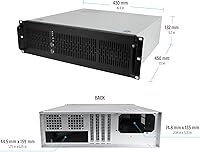
  • Chassis Dimensions: The chassis measures 16.9″ wide by 5.2″ tall by 15.0″ deep, not including the rear bracket and handle.
  • Overall Dimensions: With the rear bracket and handle included, the total depth extends to 15.9″, which is relevant for shallow rack cabinets.
  • Item Weight: The chassis weighs 13.22 pounds unloaded, which is typical for steel-construction rackmount cases in this size class.
  • Material: The enclosure body is constructed from alloy steel, providing structural rigidity without the cost premium of aluminum alternatives.
  • Color: The exterior finish is a two-tone silver and black combination, which is less common at this price tier where all-black is the norm.
  • PSU Mounting: The power supply mounts at the rear of the chassis using a standard ATX rear-mount configuration; no redundant PSU bay is included.
  • Front Panel LEDs: The front panel includes individual LED indicators for system power status, HDD activity, and LAN link or activity monitoring.
  • Cooling Method: Cooling is handled entirely by air, with no provisions or cutouts for liquid cooling tubing or radiator mounting.
  • Fan Size: Both pre-installed fans measure 80mm in diameter, a smaller format that typically requires higher RPM to achieve the same airflow as 120mm fans.
  • Rack Compatibility: This case is designed to fit standard 19-inch EIA-310-compliant rack enclosures, which is the universal standard for server and networking equipment.

Related Reviews
Rosewill RSV-R4100U 4U Server Chassis Rackmount Case
85%
89%
Cooling Efficiency
91%
Build Quality
85%
Ease of Setup
88%
Expansion Options
92%
Security Features
More
Rosewill RSV-L4500U 4U Rackmount Server Case
76%
94%
Drive Bay Capacity
88%
Cooling Performance
51%
Noise Level
78%
Build Quality
83%
Value for Money
More
Rosewill RSV-Z2850U 2U Rackmount Server Case
74%
74%
Build Quality
83%
Value for Money
67%
Cooling Performance
61%
Noise Level
81%
Storage Flexibility
More
Rosewill RSV-L4412U 4U Server Chassis
85%
91%
Build Quality
93%
Cooling Performance
85%
Ease of Installation
88%
Storage Flexibility
89%
Expandability
More
SilverStone SST-RM44 4U Rackmount Server Chassis
79%
93%
Build Quality
91%
Liquid Cooling Support
89%
Motherboard Compatibility
88%
Expansion Slot Count
86%
Rail Installation
More
SilverStone RM400 4U Rackmount Server Case
76%
88%
Build Quality
93%
Motherboard Compatibility
91%
Rack Integration
76%
Value for Money
54%
Accessories & Inclusions
More
RackChoice N4058 4U Rackmount Server Chassis
84%
90%
Build Quality
85%
Cooling Performance
80%
Storage Capacity
88%
Ease of Maintenance
83%
Security Features
More
Chenbro RM42300-F 4U Rackmount Server Chassis
86%
93%
Build Quality & Durability
91%
Expansion Slot Flexibility
75%
Cooling Performance
88%
Ease of Installation & Setup
90%
Space Optimization
More
Rosewill RSR-4P12U001 12U Open Frame Server Rack
67%
83%
Depth Adjustability
44%
Assembly Experience
57%
Structural Stability
71%
Value for Money
53%
Cable Management
More
GGAIFbp Ca-01 Double Layer Barber Carrying Case
71%
74%
Build Quality
81%
Interior Organization
67%
Lock Security
61%
Portability & Carry Comfort
63%
Interior Capacity
More

FAQ

Yes, the RSV-Z3200U is designed to accommodate E-ATX boards natively, which typically measure up to 12″ by 13″. That said, it is always worth double-checking your specific board dimensions against the chassis interior, since E-ATX is not a perfectly standardized size and some boards push the upper limits of the spec.

At idle or light loads, the 80mm PWM fans are manageable. Under sustained heavy workloads, they spin up noticeably — 80mm fans inherently run at higher RPM than 120mm alternatives to move comparable air volume, so expect audible fan noise if this machine is doing real work. If the case is in a home office or living space, that is worth factoring into your decision.

You can swap the 80mm fans for quieter third-party 80mm models, which will help somewhat. The chassis is sized for 80mm front fans specifically, so fitting 120mm fans in that same position is not feasible without modification. If noise is a primary concern, look for high-quality 80mm fans with low dBA ratings.

Yes, this Rosewill server case is built to the standard 19-inch EIA rack specification, so it will slide into any compliant rack cabinet or open-frame rack. Just confirm your rack has at least 3U of free space available.

Rosewill does not publish a specific maximum PSU length, and user feedback suggests that some longer ATX power supplies — typically those exceeding 160mm to 170mm — can be a tight fit or cause clearance issues. It is best practice to measure your PSU and cross-reference before purchasing if you are planning to use a high-wattage or fully modular unit.

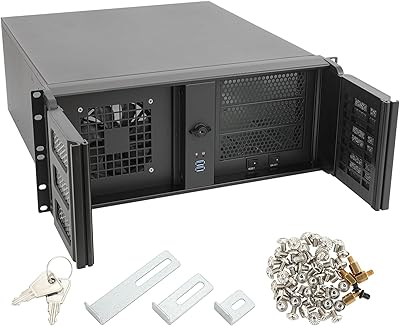
The Rosewill RSV-Z3200U 3U Rackmount Server Case typically ships with basic mounting hardware, though documentation and included accessories have been described as minimal by several buyers. It is a good idea to have a set of standard 6-32 drive screws and rack mounting screws on hand before you start the build.

Not natively — there are no dedicated 2.5-inch drive bays included. If you need SSD storage, you would have to use a 3.5-inch to 2.5-inch adapter bracket to seat them in one of the six standard HDD bays. That is a common workaround, but it does consume a full drive bay slot per SSD.

It is genuinely well-suited for that use case. Six drive bays is enough to run a useful ZFS pool with redundancy, and E-ATX support means you have flexibility on the motherboard side. Many home lab NAS builds run cool enough that the stock 80mm fans are sufficient, especially with a well-ventilated rack setup.

The chassis includes fixed rack ears for standard bolted rackmounting. A sliding rail kit is not included and would need to be purchased separately if you want tool-less slide-out access. This is common for chassis in this price range — rail kits are typically sold as add-ons even for much more expensive enclosures.

Honestly, it is functional but not refined. The interior gives you enough room to route cables with some care, but there are no dedicated cable channels, Velcro tie-down points, or modular drive cage arrangements you would find in premium chassis. Builders with dense wiring setups — multiple drives, a full-length GPU, and a fat modular PSU — should plan their cable routing carefully before closing everything up.

Where to Buy