Overview

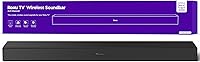
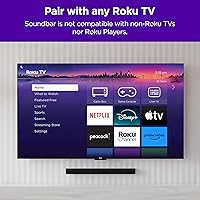
The Roku TV Wireless Soundbar 9301R is built specifically for Roku TV owners — and that exclusivity is worth understanding before you buy. It connects to your Roku TV over Wi-Fi with no HDMI ARC cables, optical adapters, or remote programming required. At 31.5 inches wide, it fits comfortably beneath most mid-size and larger screens, and wall-mount hardware comes in the box. Power output sits at 60W RMS with a 120W peak — respectable for a stereo bar at this price point. If your setup grows, you can pair a Roku Wireless Bass subwoofer later, or push toward a full 4.1 surround setup with a Roku Plus Series TV.
Features & Benefits

What sets this Roku wireless bar apart in daily use is how it handles the small frustrations of TV audio. Automatic volume leveling keeps commercial breaks from suddenly blasting at full volume, and Night mode softens loud peaks without muffling dialogue — useful for late evenings. Five dedicated sound modes (Standard, Dialogue, Movie, Music, Night) are controlled directly through the Roku TV menu, no separate app needed. The Speech Clarity setting is a genuine highlight for news watchers and drama fans — voices sharpen noticeably on the Auto setting. Bluetooth 5.0 also lets you stream music from your phone, though that runs independently from the TV audio connection.

Best For

This Roku audio upgrade is tailor-made for a specific buyer: someone who already owns a Roku TV and wants noticeably better sound without installation headaches. It is especially well-suited to bedrooms and smaller living rooms, where the 31.5-inch bar scales proportionally and the stereo spread feels natural rather than thin. Those who dread cable management or fiddling with input settings will appreciate that the whole setup begins with a single power cord. It also makes a strong case for less tech-savvy users — parents, grandparents, anyone who just wants to plug it in and have it work. Plans to expand gradually? The path to a subwoofer or surround add-on is clearly mapped within the Roku ecosystem.

User Feedback

Across nearly 950 ratings, the Roku wireless bar holds a 4.4-star average, and the review themes are fairly consistent. Most buyers highlight how quick setup was and how much dialogue clarity improved over their TV's built-in speakers. The most common complaint is bass — the 2.0 configuration has real limits in low-end punch, and action scenes can feel flat without the optional subwoofer. Worth flagging clearly: this bar is Roku TV exclusive, meaning it will not work with Roku streaming sticks or any other TV brand, which has caught some buyers off guard. A small number of reviews mention occasional Wi-Fi sync hiccups, though the majority report stable, consistent performance over time.

Pros

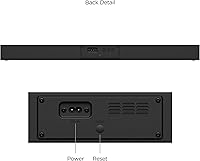
  • Setup takes minutes — plug in the power cord and the Roku TV finds the bar automatically over Wi-Fi.
  • Speech Clarity mode noticeably sharpens dialogue, making it ideal for news and drama fans.
  • Automatic volume leveling quietly handles loud commercial spikes without any manual intervention.
  • All controls, modes, and settings live inside the Roku TV menu — no extra remote, no extra app.
  • Night mode compresses loud peaks so late-night watching does not wake up the household.
  • Bluetooth 5.0 lets you stream music from your phone independently of the TV connection.
  • Wall-mount hardware is included in the box, saving a separate purchase and keeping the setup clean.
  • The Roku wireless bar can expand into a 4.1 surround system by adding Roku subwoofer and speaker accessories.
  • Dual-band Wi-Fi support keeps the audio connection stable even on busier home networks.
  • Energy Star certified with a single power cord — minimal cable clutter for a tidy setup.

Cons

  • Strictly Roku TV only — will not work with any other TV brand or even Roku streaming devices.
  • Bass performance is noticeably thin on action films and music without the separately sold subwoofer.
  • No dedicated physical remote included — you rely entirely on the Roku TV remote or mobile app.
  • The stereo soundstage feels flat compared to Dolby Atmos bars available at a similar price point.
  • Wall-mount instructions are vague enough that several buyers drilled misaligned holes on the first attempt.
  • Bluetooth and TV audio modes cannot run simultaneously — switching between them requires a manual toggle.
  • Some users on older Roku TV firmware experienced pairing failures before updating their TV software.
  • The plastic grille and end caps feel below average in build quality relative to the mid-range pricing.
  • Occasional Wi-Fi audio sync delays reported by users on congested or 2.4 GHz-only home networks.
  • Expanding to a proper surround setup requires buying additional Roku accessories, raising the true total cost significantly.

Ratings

The Roku TV Wireless Soundbar 9301R has been scored below by our AI engine after analyzing verified purchase reviews from buyers worldwide — with spam, incentivized posts, and bot activity actively filtered out. Scores reflect the full picture: where this Roku soundbar genuinely delivers and where real users ran into friction. Both strengths and honest pain points are weighted into every number you see.
Ease of Setup
96%
This is where the Roku wireless bar earns its loudest applause. Buyers consistently describe plugging it in and having it recognized by their Roku TV within seconds — no input switching, no remote codes, no app required. For households that have struggled with traditional soundbar installations, this experience feels almost surprisingly effortless.
A small number of users on older Roku TV firmware versions reported the bar not appearing automatically and needing a manual software update first. It is a minor friction point, but worth knowing if your Roku TV has not been updated recently.
Dialogue Clarity
91%
Buyers who watch a lot of news, dramas, or subtitled content repeatedly call out the Speech Clarity feature as a genuine improvement over their TV speakers. On the Auto setting, voices cut through background music and sound effects in a way that built-in TV audio rarely manages, especially at moderate listening volumes.
At the highest Speech Clarity setting, some users find voices start to sound slightly processed or over-sharpened — almost sibilant. For most content it is not an issue, but sensitive listeners may prefer the Low or Auto setting over High.
Bass Performance
58%
42%
For a compact 2.0 stereo bar, low-end presence is adequate during casual TV watching — sitcoms, talk shows, and documentary content all sound fuller than bare TV speakers. The soundbar handles moderate bass frequencies reasonably well when listening at normal room volumes.
Action movies, music with heavy low-end, and gaming audio expose the limits of a 2.0 setup without a subwoofer. Several buyers felt the bass was noticeably thin and went on to purchase the Roku Wireless Bass add-on, which suggests the base configuration leaves a real gap for anyone who cares about low-frequency impact.
Volume & Loudness
83%
At 120W peak output, the Roku wireless bar gets genuinely loud for bedroom and medium living room spaces. Users in apartments and smaller homes report it fills the room comfortably without needing to push the volume slider very high, which is a practical win for everyday use.
In larger, open-plan living rooms the maximum output can feel limiting, particularly during action-heavy scenes where you want the audio to expand into the space. It is not underpowered for its intended context, but buyers in larger rooms should factor this in.
Sound Mode Usefulness
79%
21%
Having five distinct modes — Standard, Dialogue, Movie, Music, and Night — controlled directly from the Roku TV menu is genuinely convenient. Night mode in particular gets positive mentions from users who watch late without wanting to disturb others, as it compresses loud peaks without making dialogue harder to follow.
Some users feel the difference between Standard and Movie modes is subtle enough to be nearly indistinguishable in practice. The Music mode also draws mixed feedback — it works fine for background listening but is not a compelling reason to route serious music playback through the bar.
Automatic Volume Leveling
87%
The auto-leveling feature — which quietly pulls down the spike when a loud commercial hits — gets frequent, unprompted praise in buyer reviews. It is one of those background features that users notice most when watching TV without it, and it works reliably across live TV, streaming apps, and recorded content.
A handful of users noted that leveling can occasionally over-suppress audio during fast-paced scenes with dramatic sound design, briefly making the mix feel compressed. It is not a consistent problem, but those who prefer unaltered dynamic range may want to try the Off setting.
Bluetooth Streaming
72%
28%
Bluetooth 5.0 pairing is fast and the connection holds steady for phone and tablet music streaming. Users who use the bar as a secondary Bluetooth speaker for casual listening — cooking playlists, background music while working from home — report a satisfying experience that the TV audio mode alone does not provide.
Bluetooth and TV audio are completely separate modes, meaning you cannot mix or switch between them without manually toggling inputs. Several buyers found this unintuitive at first, and audio latency during video calls or mobile video playback over Bluetooth drew occasional complaints.
Build Quality & Design
74%
26%
The metal and plastic combination gives the bar a clean, understated look that blends well beneath most TVs. At 5.1 pounds, it feels solid without being heavy, and the included wall-mount hardware is a thoughtful inclusion that saves buyers a separate purchase.
Up close, the plastic grille and end caps feel closer to budget-tier than the mid-range price would suggest. A few buyers noted minor flex when pressing on the housing, and the matte black finish attracts dust more than expected — something to consider if your setup is in a high-traffic area.
Wi-Fi Connection Stability
81%
19%
Dual-band Wi-Fi support means the bar can latch onto a less congested 5 GHz network, which most users find results in a stable, dropout-free connection. The majority of long-term reviewers report months of use without any meaningful disconnection issues.
A subset of users — typically those with busier home networks or 2.4 GHz-only routers — mention occasional audio sync delays or brief dropouts. These issues appear intermittent rather than systematic, but they do show up consistently enough in reviews to warrant mention.
Roku Ecosystem Integration
93%
For buyers already in the Roku TV universe, the integration is about as tight as it gets short of built-in speakers. Volume, sound modes, and settings all live inside the familiar Roku menu, the Roku remote controls everything, and there is a clear upgrade path toward a subwoofer or full surround setup without leaving the ecosystem.
That integration is also a hard wall. The bar is completely non-functional with any non-Roku TV, and it will not connect to Roku streaming sticks either — only Roku-branded TVs. Buyers who misread this requirement have left frustrated reviews, so the compatibility caveat deserves to be front and center.
Value for Money
77%
23%
Within its intended use case — a wire-free, friction-free audio bump for a Roku TV — the pricing feels justified. You are paying partly for the native integration, and buyers who have tried to set up universal soundbars with Roku TVs before tend to appreciate that convenience premium.
Compared to similarly priced universal soundbars from Sony or Yamaha, the audio performance alone does not quite match up. Buyers who shop purely on sound quality per dollar may feel the Roku-exclusivity tax is not worth it, especially given the bass limitations of the stock 2.0 configuration.
Wall Mounting Experience
69%
31%
Wall-mount hardware ships in the box, which is not universal among soundbars in this category. Users who completed the wall mount describe it as a clean, low-profile installation that keeps the bar close to the TV without looking like an afterthought.
The included template and instructions drew criticism for being vague, with a few buyers drilling holes in slightly misaligned positions on the first attempt. The mounting bracket also does not allow much vertical angle adjustment, which can be limiting depending on TV placement height.
Remote & Control Convenience
88%
Using the existing Roku TV remote to control volume, switch sound modes, and adjust Speech Clarity is a real day-to-day convenience. There is no learning curve, no second remote on the coffee table, and the controls feel like a natural extension of the TV interface buyers already know.
There is no dedicated physical remote included for the soundbar itself, which means if your Roku TV remote runs out of batteries or gets misplaced, you lose primary control. The Roku mobile app works as a backup, but it is an extra step some users find annoying.
Stereo Sound Staging
66%
34%
For a 31.5-inch bar with a 2.0 channel layout, the stereo spread is wider than most TV speakers and creates a noticeably more immersive listening field for standard TV content. Buyers watching sports and concert footage mention hearing a clearer left-right separation than they expected at this form factor.
Anyone coming from a 3.1 or Atmos bar will immediately notice what is missing — there is no center channel, no height layer, and no surround width. For drama and action film enthusiasts, the soundstage can feel compressed and one-dimensional compared to more capable multi-channel setups at comparable price points.

Suitable for:

The Roku TV Wireless Soundbar 9301R is purpose-built for one audience: people who already own a Roku TV and want a meaningful audio upgrade without the setup headache that typically comes with it. If you have ever wrestled with HDMI ARC settings, optical cable compatibility, or the frustration of a soundbar remote that refuses to sync with your TV remote, this bar solves all of that with a single power cord and a Wi-Fi connection. It works especially well in bedrooms and mid-size living rooms where a 31.5-inch bar fits proportionally and a 2.0 stereo spread covers the space comfortably. Older adults, less tech-confident users, and anyone who just wants things to work without reading a manual will find this Roku audio upgrade uniquely satisfying. Those who watch a lot of news, dialogue-heavy dramas, or late-night TV will get immediate, noticeable value from the Speech Clarity and Night mode features. And if you are the type who likes to start simple and expand later, the clear path to adding a subwoofer or surround speakers within the Roku ecosystem makes this a reasonable long-term investment rather than a dead end.
Not suitable for:

The Roku TV Wireless Soundbar 9301R has one absolute dealbreaker that disqualifies a large portion of shoppers: it only works with Roku-branded TVs, and not even with Roku streaming sticks or players — only the TV itself. If you own a Samsung, LG, Sony, Vizio, or any other brand of television, this bar will not connect to it, full stop. Beyond compatibility, buyers who prioritize bass-heavy sound — think action movies, hip-hop, gaming — will likely find the 2.0 stereo configuration underwhelming without also purchasing the separately sold Roku Wireless Bass subwoofer, which adds to the total cost. Anyone comparing this Roku wireless bar against Dolby Atmos or 3.1 soundbars at a similar price point will notice a real gap in sound staging and immersive depth. Larger living rooms may also find the output ceiling limits how well the bar fills the space during louder viewing sessions. If you are a dedicated home theater enthusiast with specific audio standards, this bar is not designed to meet those expectations.

Specifications

  • Model Number: The official model identifier for this soundbar is 9301R.
  • Dimensions: The bar measures 31.5″ wide, 3.9″ deep, and 2.5″ tall, making it a low-profile fit beneath most standard televisions.
  • Weight: The unit itself weighs 5.1 lb, with a shipping weight of 6.5 lb including packaging and accessories.
  • Channel Config: This is a 2.0 stereo soundbar with no built-in subwoofer or center channel driver.
  • Power Output: Rated at 60W RMS continuous power with a 120W peak output for dynamic audio spikes.
  • Driver Type: The soundbar uses dynamic drivers for full-range stereo sound reproduction.
  • Wi-Fi: Connects via 2x2 802.11ac dual-band Wi-Fi supporting both 2.4 GHz and 5 GHz networks.
  • Bluetooth: Equipped with Bluetooth 5.0 for independent wireless audio streaming from smartphones and tablets.
  • Sound Modes: Five preset modes are available: Standard, Dialogue, Movie, Music, and Night, all accessible from the Roku TV menu.
  • Speech Clarity: A dedicated Speech Clarity setting offers four levels — Off, Low, High, and Auto — to sharpen voice intelligibility.
  • Volume Modes: Volume management options include Off, Leveling (auto-flattens commercial spikes), and Night mode for compressed dynamic range.
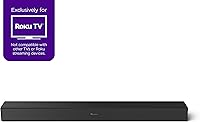
  • Compatibility: This soundbar is exclusively compatible with Roku-branded televisions and will not function with other TV brands or Roku streaming devices.
  • Expandability: The system supports wireless expansion with the Roku Wireless Bass or Roku Wireless Bass Pro subwoofer, and can reach a full 4.1 surround configuration when paired with a Roku Plus Series TV and Roku Wireless Speakers.
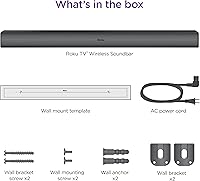
  • Mounting: The bar can be placed on a shelf below the TV or wall-mounted using the included bracket hardware and mounting template.
  • Power Supply: Operates on 100–240V AC at 50–60 Hz, making it compatible with standard outlets globally, and includes an AC power cord.
  • Certification: Energy Star certified, indicating compliance with energy efficiency standards set by the U.S. Environmental Protection Agency.
  • Materials: The enclosure is constructed from a combination of metal and plastic, with a matte black finish.
  • Warranty: Covered by a 1-year limited manufacturer warranty from the date of purchase.
  • In the Box: Package includes the soundbar unit, AC power cord, two wall bracket screws, two wall mounting screws, and a wall mount template.
  • Tone Controls: Manual Bass and Treble tone adjustments are available for users who prefer to fine-tune the sound beyond the preset modes.

Related Reviews

Roku Smart TV 2025 – 55-Inch Select Series 4K HDR TV
86%
88%
Picture Quality
91%
User Interface & Smart Features
94%
Setup & Installation
90%
Value for Money
84%
Gaming Performance
More
MZEIBO 50W TV Soundbar
85%
85%
Audio Performance
92%
Setup & Installation
88%
Connectivity Options
81%
Build Quality
90%
Size & Portability
More
Vibeadio TV Soundbar with Subwoofer
84%
88%
Sound Quality
92%
Bass Performance
90%
Ease of Setup
85%
Connectivity Options
80%
Build Quality
More
Denon Home 550 Wireless Soundbar
86%
91%
Sound Quality
87%
Ease of Setup
90%
Build Quality
94%
Wireless Connectivity
88%
Alexa Integration
More
Philips TAB8405 Soundbar with Wireless Subwoofer
83%
90%
Sound Quality
89%
Bass Performance
93%
Ease of Setup
88%
Audio Depth (Dolby Atmos)
85%
Connectivity Options
More
Dytole TV001 Wireless Headphones for TV
86%
88%
Sound Quality
90%
Comfort & Fit
94%
Battery Life
85%
Ease of Setup
76%
Bluetooth Range
More
ANSTEN AS60 Wireless TV Headphones
80%
93%
Ease of Setup
88%
Wireless Range & Stability
91%
Audio Latency
84%
Comfort & Wearability
71%
Sound Quality
More
Bose Solo 5 TV Soundbar
85%
92%
Value for Money
88%
Sound Clarity
94%
Ease of Setup
70%
Bass Performance
85%
Bluetooth Connectivity
More
Philips B6309 Soundbar with Wireless Subwoofer
83%
88%
Sound Quality
85%
Bass Performance
92%
Ease of Setup
68%
Connectivity
70%
App Control
More
ROSIDA TH11 Wireless Headphones for TV
85%
88%
Audio Quality
92%
Comfort and Fit
91%
Battery Life
94%
Ease of Setup
85%
Connectivity
More

FAQ

It only works with Roku-branded televisions — that is the one compatibility rule you absolutely cannot work around. The Roku TV Wireless Soundbar 9301R connects over Wi-Fi exclusively through the Roku TV operating system, so it will not pair with Samsung, LG, Sony, or any other brand. It also will not connect to Roku streaming sticks or Roku players, only to Roku TVs themselves.
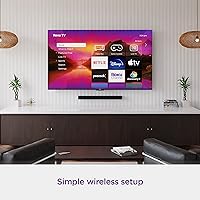
No cables between the bar and the TV are needed at all. The only cord you will deal with is the AC power cord that goes from the soundbar to a wall outlet. The audio connection to your Roku TV happens entirely over Wi-Fi, which is exactly why so many buyers find the setup refreshingly simple.

Yes, and this is one of the most appreciated aspects of this Roku audio upgrade. Volume, sound mode selection, Speech Clarity, and all other audio settings are controlled through the standard Roku TV remote and the familiar Roku menu system. No separate soundbar remote, no programming, no extra app required.

Honest answer: it is adequate for everyday TV content like news, talk shows, and comedies, but it runs out of impact during action movies or music with heavy low-end. The 2.0 stereo configuration simply does not produce the chest-feel bass that more demanding listeners want. If bass matters to you, budget for the Roku Wireless Bass subwoofer add-on from the start rather than treating it as optional.

Yes, Bluetooth 5.0 is built in and operates independently of the TV audio connection. You can pair your phone or tablet and stream music directly to the bar without the TV being on. Just keep in mind that Bluetooth mode and TV audio mode are separate — you toggle between them rather than running both at once.

Speech Clarity is a processing feature that specifically targets voice frequencies to make dialogue more intelligible without simply turning the volume up. It has four settings — Off, Low, High, and Auto — and the Auto setting is widely praised in buyer reviews, particularly by people who watch a lot of news or drama. Most users notice a real improvement in understanding voices, especially during scenes with background music or ambient sound.

The hardware is included in the box, which is a nice touch, and the basic process is straightforward. That said, several buyers have noted that the included mounting template and instructions are not especially detailed, and a few reported needing to make a second attempt after drilling slightly off-position. Using a level and measuring twice before committing will save you from that frustration.

Yes, there is a clear upgrade path within the Roku ecosystem. You can add a Roku Wireless Bass or Roku Wireless Bass Pro subwoofer at any point, and if you have a Roku Plus Series TV, you can go further by adding Roku Wireless Speakers to reach a full 4.1 surround configuration. It is not a dead-end purchase if your audio ambitions grow over time.

Most users find it genuinely useful. Night mode compresses the dynamic range, pulling down loud sound effects and music peaks while keeping dialogue at a comfortable, audible level. It is not a perfect substitute for a proper center channel, but for late-night TV without waking others, it does the job reliably.

The majority of long-term users report stable, consistent Wi-Fi performance, but a portion of reviews — typically from people on older routers or congested 2.4 GHz networks — mention occasional audio sync delays or brief dropouts. Connecting the bar to the 5 GHz band when possible tends to resolve these issues. Also worth noting: if your Roku TV firmware is outdated, updating it before pairing can prevent initial setup hiccups.