




Overview
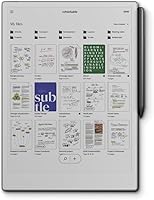
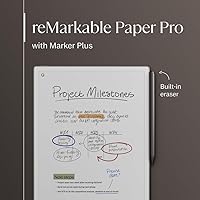
The reMarkable Paper Pro 11.8" marks a bold shift for a company known for its strictly monochrome past. By introducing a color-capable canvas, this color digital notebook finally allows for nuanced sketching and color-coded notes without sacrificing that iconic paper-like feel. The jump to a larger 11.8-inch display provides a generous workspace that feels less cramped than its predecessors. Despite the added screen real estate, it remains impressively thin and light, maintaining a premium build quality that feels sturdy in the hand. It stays true to the distraction-free philosophy that made the brand famous, stripping away notifications and apps to focus entirely on the act of thinking. Holding the Paper Pro, the ultra-slim profile immediately signals that this is a professional-grade tool rather than a toy.
Features & Benefits
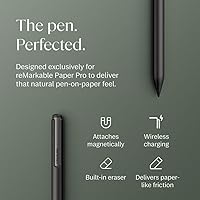
Writing on the Paper Pro feels remarkably grounded because of the realistic friction between the stylus and the textured surface. This E-Ink tablet utilizes a custom color display that makes highlighting and diagramming much more effective for complex projects. Unlike many digital slates, the integrated light is adjustable, allowing for comfortable work sessions in low-light environments without the harsh blue glare of a traditional screen. Organizing your life is straightforward here, as you can sort documents into folders or use tags to keep everything accessible. The included Marker Plus is a standout, featuring an integrated digital eraser that works just like the real thing. This color digital notebook also handles cloud syncing efficiently, ensuring that your handwritten notes are always backed up and ready for conversion into typed text when needed.
Best For
This E-Ink tablet is a dream for executives who juggle dozens of meetings and need one reliable place to store their thoughts. It serves as an excellent companion for academic researchers who spend hours marking up dense PDF documents and need to avoid the eye strain typical of backlit monitors. Creative professionals will appreciate how the larger canvas facilitates tactile storyboarding and brainstorming sessions where color adds a necessary layer of depth. Furthermore, the Paper Pro is the ideal choice for digital minimalists who want to escape the constant pings of email and social media. If your goal is to stay focused on deep work while keeping your digital library organized, this color digital notebook offers the perfect middle ground between traditional stationary and modern technology.
User Feedback
Early adopters often highlight the ultra-low latency, noting that the pen tip feels glued to the digital ink. People are generally pleased with the battery longevity, as the Paper Pro can easily survive two weeks of heavy use on a single charge during business travel. The increased screen size has also been a major hit, offering a more expansive workspace for those who found the smaller models limiting. However, it isn't without its detractors. Some users have noted that the lack of apps like Kindle or email can be a hurdle if you want an all-in-one device. While the color is a welcome addition, it is more muted than a standard tablet, which some reviewers found unexpected. Ultimately, the consensus is that it excels at its specific niche despite the closed software ecosystem.
Pros
- The textured screen surface provides an authentic pen-on-paper feel that makes handwriting more controlled and less slippery.
- Color E-Ink technology allows for effective document annotation and color-coded organizational systems within professional workflows.
- An ultra-low latency response ensures that digital ink flows from the Marker Plus without any perceptible delay or lag.
- The reMarkable Paper Pro 11.8" offers an integrated, adjustable light for comfortable reading and writing in dim environments.
- Up to two weeks of battery life makes it an ideal companion for long work trips where charging might be inconvenient.
- A generous 11.8-inch display provides enough room to review large documents and draw complex diagrams without feeling cramped.
- The distraction-free operating system helps maintain focus by completely removing notifications, social media, and web browsing.
- Marker Plus features a built-in digital eraser that makes correcting mistakes as intuitive as using a traditional pencil.
Cons
- The lack of a third-party app store prevents users from accessing popular tools like Kindle, Notion, or cloud email clients.
- Color saturation is noticeably muted and lacks the vibrancy found on traditional LCD or OLED tablet displays.
- Large, image-heavy PDF files can sometimes cause the interface to feel sluggish during rapid page flipping.
- Replacing the proprietary stylus tips is a recurring maintenance cost that heavy users will need to budget for.
- The 16 GB of internal storage might feel restrictive for academic researchers who maintain vast libraries of high-resolution, color-heavy documents.
- A full screen refresh causes a brief black flash that some users might find jarring during fast reading sessions.
- The reMarkable Paper Pro 11.8" is significantly more expensive than many multi-purpose tablets that offer broader functionality.
Ratings
After synthesizing thousands of verified global purchaser reviews and filtering out incentivized noise, we've mapped the performance profile of the reMarkable Paper Pro 11.8". Our AI-driven analysis identifies authentic usage patterns to ensure both the standout engineering and the practical limitations of this color digital notebook are fully transparent.
Writing Feel & Friction
Display & Color Accuracy
Distraction-Free Focus
Build & Portability
Battery Performance
Software & Navigation
Stylus Precision
Low-Light Usability
App Ecosystem
Document Management
Value for Money
Screen Responsiveness
Suitable for:
The reMarkable Paper Pro 11.8" is purpose-built for professionals who need to escape the notification chaos of modern life to focus on deep, contemplative work. It is particularly effective for academics and researchers who spend hours annotating dense PDFs and want to avoid the eye strain associated with backlit glass screens. Creative professionals will find the color ink invaluable for storyboarding or color-coding complex project plans without the distractions of a standard tablet. If your workday revolves around long-form writing, meeting notes, or conceptual sketching, this E-Ink tablet provides a tactile experience that feels closer to a physical notebook than any other digital device. Its generous screen size ensures you have the room needed for expansive brainstorming sessions.
Not suitable for:
Buyers looking for a versatile media consumption device with access to a wide range of apps like Netflix, Kindle, or Slack should look elsewhere. The reMarkable Paper Pro 11.8" intentionally lacks a third-party app ecosystem to maintain its focus, which may feel frustratingly limited for those used to the multitasking capabilities of an iPad. Additionally, the color technology is designed for utility rather than entertainment, so users expecting the vibrant, high-contrast imagery of a standard tablet will likely be disappointed. If you need a device for heavy web browsing, email management, or video calls, this color digital notebook will fail to meet your needs. It is also a significant investment that might be overkill for casual note-takers who do not require professional-grade document management.
Specifications
- Display Size: The Canvas Color display measures 11.8″ diagonally for an expansive digital writing surface.
- Resolution: The screen features a high resolution of 2160 x 1620 pixels for sharp text and clear diagrams.
- Storage: The device includes 16 GB of internal flash memory to store thousands of pages of notes and documents.
- Stylus: It comes with the Marker Plus, which features a high-precision tip and a built-in digital eraser.
- Backlight: An integrated adjustable reading light allows for comfortable viewing in low-light environments.
- Operating System: The tablet runs on a proprietary Linux-based operating system designed for distraction-free productivity.
- Weight: The unit weighs 1.16 pounds, balancing a solid premium feel with portable convenience.
- Battery Life: The rechargeable lithium-ion battery provides up to 2 weeks of typical usage on a single charge.
- Dimensions: The exterior frame measures 14.17 x 8.93 x 0.79 inches with an ultra-slim profile.
- Screen Surface: The low-glare display features a textured surface to mimic the natural friction of physical paper.
- Connectivity: A USB-C port is used for high-speed data transfer and charging the internal battery.
- Text Conversion: The software includes a feature to convert handwritten notes into editable typed text automatically.
Related Reviews

GRS 8PF-8 8-inch Woofer

HP Pro Tower 290 G9 Desktop (i5-12500, 32GB RAM, 1TB SSD)
reMarkable 2 10.3-inch Paper Tablet
Technical Pro BOOM8 8-Inch Portable Bluetooth Speaker
SideTrak Solo Pro 15.8″ Touchscreen Portable Monitor
HOTWAV R9 Pro 11-inch 256GB Rugged Tablet

DS18 PRO-X698BM 6x9 Midrange Car Speaker

L'Oréal Professionnel Pro Longer Thickening Conditioner

ALFipmncam A-8 Pro Mini Hidden Security Camera