Overview

The Logitech G560 2.1 Gaming Speaker System is built around a simple idea: pair two satellite speakers with a dedicated subwoofer and let surround processing do the heavy lifting for your games. It's been Logitech's go-to desktop audio rig for PC gamers since 2018, and that staying power says something on its own. What sets this speaker system apart from a typical 2.1 setup is the combination of layered sound with lighting that actually reacts to what's happening on screen, rather than just glowing for show. With thousands of reviews behind it at this point, it's had plenty of time to prove whether that combination holds up in daily use.
Features & Benefits

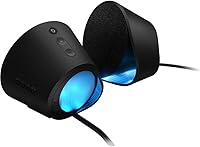
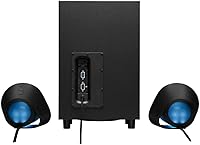
Once you get into the details, this 2.1 sound system makes a strong case for itself. DTS:X Ultra surround sound is the standout feature, turning footsteps, gunfire, and ambient effects into audio you can actually pinpoint by direction rather than just volume. The four-zone LIGHTSYNC RGB lighting reacts to on-screen action in real time, and Logitech's software lets you dial in colors and zones until the look matches your setup exactly. On the power side, 240 watts of peak output means the system has real headroom, so it doesn't sound strained even at higher volumes. Connectivity is flexible too, with Bluetooth and wired/USB options covering both serious gaming sessions and casual phone streaming, while on-speaker controls let you adjust volume or switch inputs without digging through menus mid-match.

Best For

This kind of setup makes the most sense for a specific kind of buyer rather than everyone shopping for desktop speakers. Gamers who want a sense of depth and direction in fast-paced titles, but don't want to deal with running a full 5.1 surround setup, are the clearest fit. The same goes for streamers or anyone who enjoys a desk that doubles as a lighting display, since the RGB zones give a setup real personality. It also works well as an all-in-one solution if you want one system handling both gaming audio and Bluetooth music from a phone or tablet. On the other hand, it's worth pausing if your desk space is tight, since the subwoofer needs real room, and Mac-only users should know going in that DTS:X playback simply isn't supported on that platform.

User Feedback

Looking at how owners describe daily use, the feedback skews positive but isn't without some honest gripes. A lot of buyers talk about how noticeable the sense of depth feels in open-world games and shooters, often describing it as the first time their desk setup actually sounded like it had real space behind it. The reactive lighting gets singled out constantly too, with plenty of people calling it the feature that made friends ask about their setup. On the downside, a fair number of reviewers mention that finding a good spot for the subwoofer and keeping cables tidy took some extra effort. A few also note a short adjustment period while learning the software, though most say it clicked quickly. Years of consistently strong ratings suggest it holds up well over long-term, everyday use.

Pros

  • Surround sound makes it genuinely easier to locate footsteps and gunfire by direction
  • Reactive RGB lighting adds noticeable personality to a gaming desk setup
  • 240 watts of peak power gives plenty of headroom for louder sessions
  • Bluetooth connectivity makes it easy to switch to phone or tablet audio
  • On-speaker controls let you adjust volume without pausing your game
  • Software allows deep customization of lighting zones and colors
  • Long track record of strong ratings suggests solid long-term reliability
  • Works well as a single system for both gaming and casual music listening

Cons

  • DTS:X surround sound is not supported at all on Mac systems
  • Subwoofer has a noticeable footprint that demands real desk or floor space
  • Cable routing between satellites and the subwoofer can get messy
  • Initial software setup takes a bit of trial and error for some users
  • Bluetooth range tops out at 10 meters, which limits flexibility in larger rooms
  • Total weight of over 12 pounds makes repositioning the system a bit cumbersome
  • Lighting customization requires installing and learning separate companion software
  • Not an ideal fit for buyers wanting a minimal, cable-free desk aesthetic

Ratings

Our scores for the Logitech G560 2.1 Gaming Speaker System are generated by AI after analyzing thousands of verified buyer reviews from across the globe, with spam, bot activity, and incentivized feedback filtered out before any scoring happens. The goal is to give you an honest snapshot of where this 2.1 sound system genuinely excels and where real owners have run into friction, without smoothing over the rough edges.
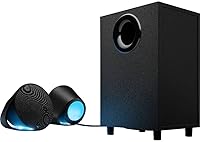
Surround Sound Immersion
89%
Buyers consistently mention being surprised at how directional the audio feels in shooters and open-world games, with footsteps and distant explosions actually feeling like they're coming from a specific spot. For a 2.1 setup, the DTS:X Ultra processing punches well above what the speaker count would suggest.
A few users note the positional effect is most noticeable in games specifically optimized for DTS:X, and feels less dramatic in titles without strong native audio mixing. Movies and general media playback don't always showcase the surround effect as clearly as gaming does.
Bass & Subwoofer Performance
84%
The dedicated subwoofer gives explosions, engine rumble, and low-end music a physical presence that small all-in-one speakers simply can't match. Several owners specifically mention it being enough to feel through a desk during intense gaming moments.
Some reviewers feel the bass can get a touch boomy at higher volumes if the subwoofer isn't positioned thoughtfully in the room. Placement against a wall or in a corner tends to exaggerate this rather than improve it.
RGB Lighting Customization
91%
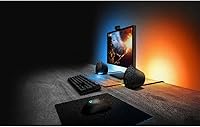
The four-zone LIGHTSYNC lighting is one of the most talked-about features, with owners enjoying how it reacts in real time to on-screen colors and effects rather than just cycling through a static pattern. Streamers in particular like having a setup that visually matches their other RGB gear.
A handful of users mention that getting the lighting to sync exactly the way they want takes some trial and error within the software. It's also a feature that simply won't matter to buyers who don't care about aesthetics on their desk.
Build Quality & Durability
85%
Given how long this speaker system has been on the market, the volume of long-term owners still reporting reliable daily use speaks well to its construction. The satellites and subwoofer both feel solid rather than hollow or cheaply assembled.
A small number of reviewers mention the on-speaker buttons feeling slightly less premium than the rest of the build. There are also occasional reports of connector wear over years of repeated use, though this isn't a widespread complaint.
Software Experience
73%
27%
Once configured, the companion software gives genuinely deep control over lighting zones, colors, and effects, letting users fine-tune the look well beyond basic presets. People who enjoy tinkering tend to get the most value out of it.
First-time setup has a learning curve that catches some buyers off guard, and a few mention the software feeling clunky compared to the simplicity of the hardware itself. Occasional connectivity hiccups between the software and speakers are also reported by a minority of users.
Connectivity & Compatibility
88%
Having both Bluetooth and wired USB options covers a wide range of real-world use cases, from gaming at a desk to streaming music from a phone across the room. Pairing is generally described as quick and reliable once set up the first time.
Mac users specifically run into a real limitation, since DTS:X surround processing isn't supported on that platform at all. This narrows the appeal for anyone outside a Windows-based gaming setup.
Setup & Cable Management
67%
33%
Basic plug-and-play setup is straightforward, and most users report being up and running with sound within a few minutes of unboxing. The included cables are long enough to accommodate typical desk configurations without extensions.
Running cables between the satellites and the separate subwoofer is mentioned repeatedly as a minor annoyance, especially on desks without built-in cable routing. It's not a dealbreaker, but it does require a bit more planning than a single all-in-one speaker.
Volume & Power Output
86%
With 240 watts of peak power, owners say the system has plenty of headroom for filling a bedroom or home office without distortion creeping in at higher volumes. It's loud enough that most people rarely push it past the halfway mark.
A small number of reviewers in apartments or shared living spaces note that pushing the volume up for full immersive effect isn't always practical due to noise concerns for neighbors or housemates. This is more a situational limitation than a flaw in the hardware itself.
Desk Footprint & Design
71%
29%
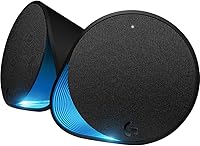
The satellite speakers themselves have a clean, understated look that fits well into most gaming desk setups without looking out of place. Their angled design also helps direct sound toward the listener rather than just outward.
The subwoofer takes up noticeably more space than buyers expect from photos alone, and isn't ideal for smaller desks or tight under-desk areas. Anyone working with a compact setup may need to get creative with placement.
Value for Money
83%
For buyers who specifically want surround sound and reactive lighting without assembling a multi-speaker 5.1 system, owners feel this setup justifies its price by combining several features into one cohesive package. Longevity reports also support it being a reasonably durable investment over time.
Buyers who only care about straightforward audio quality without surround processing or RGB lighting may feel they're paying for features they won't fully use. Comparable stereo-only options can come in at a noticeably lower price for that more limited use case.
Mac & Platform Compatibility
41%
59%
Basic audio playback still functions on Mac systems via Bluetooth or standard wired connection, so the speakers aren't unusable outside Windows. Casual listening for music or video on a Mac works without issue.
The core DTS:X Ultra surround feature, which is a major part of the appeal, simply doesn't work on Mac OS X. This makes the system a poor match for anyone whose primary or only machine is a Mac.
Controls & Ease of Use
87%
Physical on-speaker controls make day-to-day adjustments like volume and input switching fast and intuitive, without needing to pause a game to dig through software menus. Reviewers frequently mention appreciating this kind of direct, tactile control.
A few users wish there were slightly more controls available directly on the speaker, such as quick access to lighting presets, rather than needing to open the software for those adjustments. It's a minor convenience gap rather than a functional problem.

Suitable for:

The Logitech G560 2.1 Gaming Speaker System makes the most sense for PC gamers who want a real sense of direction in their audio without setting up a full surround sound rig with speakers in every corner of the room. It's a strong fit for anyone who plays a lot of shooters or open-world games, where being able to tell which direction a sound is coming from actually matters. Streamers and people who like a desk setup with some visual flair will likely appreciate the reactive lighting, since it adds personality without requiring extra hardware. It also suits buyers who want one system to do double duty, handling gaming audio during the day and Bluetooth music or podcasts the rest of the time. Anyone upgrading from basic stereo speakers and looking for a noticeable jump in both sound quality and immersion should find this a worthwhile step up.
Not suitable for:

This setup is not a great match for Mac-only users, since DTS:X playback simply isn't supported on that platform, which removes one of the main selling points. Buyers with very limited desk space should also think twice, as the subwoofer takes up real room and isn't something you can tuck away easily. People who prioritize a clean, cable-free desk may find the wiring between the satellites and subwoofer more fuss than they'd like. If someone is mainly looking for simple background music speakers rather than a gaming-focused audio system, the Logitech G560 2.1 Gaming Speaker System is probably more capability than they need. Anyone who finds RGB lighting more distracting than appealing also won't get full value from one of its more prominent features.
Specifications

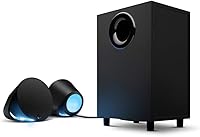
  • Speaker Configuration: The system uses a 2.1 layout with two satellite speakers and one separate subwoofer.
  • Peak Power: Peak output power is rated at 240 watts across the full system.
  • RMS Power: Continuous maximum output power is rated at 40 watts.
  • Surround Processing: Integrated DTS:X Ultra technology renders 3D positional surround sound from a 2.1 speaker arrangement.
  • RGB Lighting: LIGHTSYNC RGB lighting spans four customizable zones across the front and rear of the speakers.
  • Color Range: Lighting effects can be customized across 16.8 million colors using Logitech's companion software.
  • Connectivity: The system supports both wired USB connections and wireless Bluetooth pairing.
  • Bluetooth Range: Bluetooth connections support a maximum range of up to 9.7 meters.
  • Frequency Response: The speakers have a frequency response rated up to 18,000 Hz.
  • Signal-to-Noise Ratio: The system has a signal-to-noise ratio of 97 dB.
  • Subwoofer Size: The subwoofer measures 16.6 cm in diameter.
  • Subwoofer Connection: The subwoofer connects to the satellite speakers via a wired connection.
  • Driver Type: The system uses dynamic audio drivers for sound reproduction.
  • Total Weight: The complete system weighs approximately 12.1 pounds.
  • Dimensions: Each speaker measures approximately 8.1 inches deep by 6.5 inches wide by 5.8 inches high.
  • On-Speaker Controls: Physical controls on the speaker allow quick adjustment of volume and input source.
  • Compatible Devices: The system works with Windows PCs, smartphones, and tablets via Bluetooth or wired connection.
  • Mac Compatibility: DTS:X surround processing is not supported when connected to Mac OS X devices.
  • Control Software: Logitech Family Software manages lighting customization and zone configuration.
  • Warranty: The product is covered by a limited manufacturer warranty.

Related Reviews
Logitech Z625
Logitech Z625
79%
88%
Bass Performance
79%
Overall Sound Quality
93%
Connectivity & Input Options
91%
Volume Output
71%
Build Quality
More
Logitech Z533
Logitech Z533
80%
86%
Bass Performance
67%
Satellite Speaker Clarity
82%
Value for Money
83%
Build Quality & Durability
78%
Control Pod Usability
More
Logitech Z313 2.1 Speaker System
82%
93%
Value for Money
96%
Ease of Setup
81%
Bass Performance
88%
Longevity & Reliability
84%
Control Pod Functionality
More
Infinity Primus 603CF 6.5-inch Component Speakers
79%
88%
Sound Clarity
63%
Bass Performance
84%
Treble Quality
79%
Soundstage & Imaging
86%
Installation Ease
More
Focal 165AS 6.5-inch Component Speaker System
80%
93%
Sound Clarity
61%
Bass Performance
89%
Soundstage & Imaging
91%
Build Quality
54%
Installation Experience
More
Edifier S351DB 2.1 Bookshelf Speaker System
81%
91%
Bass Performance
88%
Sound Quality
86%
Soundstage & Imaging
84%
Treble Clarity
92%
Input Versatility
More
SteelSeries Arena 7 2.1 Gaming Speakers
82%
90%
Sound Quality
88%
Bass Performance
85%
RGB Lighting
82%
Connectivity Flexibility
78%
Ease of Setup
More
Cyber Acoustics CA-3908 2.1 Speaker System
84%
88%
Sound Quality
91%
Bass Performance
84%
Volume Control Ease
87%
Setup & Installation
76%
Connectivity Options
More
Cyber Acoustics CA-3810 2.1 Speaker System
82%
87%
Sound Quality
90%
Bass Performance
92%
Ease of Setup
91%
Value for Money
88%
Compact Design
More
Acoustic Audio AA2170 Bluetooth 2.1 Speaker System
76%
83%
Bass Performance
88%
Value for Money
91%
Ease of Setup
79%
Connectivity Range
61%
Satellite Speaker Quality
More

FAQ

You can connect this speaker system to a Mac for basic audio playback, but the DTS:X Ultra surround sound feature specifically isn't supported on Mac OS X. If 3D positional audio is the main reason you're considering this, a Windows PC is really where it shines.

The satellite speakers themselves are fairly compact, but the subwoofer is a separate unit that needs its own spot, either on the floor or somewhere nearby. It doesn't have to sit right next to your monitor, but you'll want a few inches of clearance and a nearby outlet for cabling.

It's mostly aesthetic, but it does react to in-game audio and visuals in real time across four separate zones, which adds some genuine feedback during gameplay rather than just sitting there glowing. Most buyers treat it as a nice bonus rather than the main reason to buy.

Yes, the Bluetooth connection lets you pair it with smartphones and tablets for casual listening, separate from the wired PC setup. It's a convenient way to use the same speakers for music or podcasts when you're not gaming.

With 240 watts of peak power, the G560 setup has more than enough volume for a typical room without distorting. Most users find they rarely need to push it past half volume for normal gaming sessions.

You can use it without installing anything, since basic audio works right out of the box. The companion software is only needed if you want to customize the RGB lighting zones and colors.

There's some cable management involved since the subwoofer connects to the satellites with a wired connection, and a few users mention this as a minor annoyance during setup. Once everything is routed and tucked away, though, it's a one-time hassle rather than an ongoing issue.

Quite a few buyers say yes, particularly in shooters and open-world games where hearing direction matters. The DTS:X Ultra processing renders audio with a real sense of depth, so footsteps or distant effects feel like they're coming from a specific direction rather than just general background noise.

Given how long this 2.1 sound system has been on the market and the consistently strong ratings it's maintained over the years, it seems to hold up well under regular daily gaming use. Build quality issues aren't a common complaint among long-term owners.

Basic setup is straightforward, mostly plugging in cables and connecting via USB or Bluetooth. The only part with a slight learning curve is the lighting software, but most people get comfortable with it after a short adjustment period.