


Overview

The Qukenk D115 10-inch Android 13 Tablet is a budget-friendly 2-in-1 package that arrives with a keyboard, mouse, and protective case included. It runs on a Qualcomm octa-core chip with generous onboard storage, positioning it firmly in value territory — capable for everyday tasks, but not a performance machine by any stretch. One thing worth noting upfront: there is no SIM card slot, making this strictly a Wi-Fi-only device. Compared to similarly priced tablets from bigger brands, this 2-in-1 tablet bundle holds its own on paper, though real-world expectations should stay grounded in what entry-level hardware actually delivers.

Features & Benefits

Storage is one of the clearest strengths here — this budget Android tablet ships with a healthy amount of internal space and supports microSD expansion if you need more room. The advertised RAM figure deserves a closer look: only half of it is physical memory, with the rest achieved through virtual expansion, which matters less than you would think for basic tasks but won't impress during heavy multitasking. Dual-band Wi-Fi handles fast streaming well on a modern router. The battery is a genuine highlight for the price — most users can expect a solid stretch of mixed use before needing to plug in. The bundled keyboard and accessories round things out nicely for light productivity work.

Best For

This 2-in-1 tablet bundle is well-suited to a specific kind of buyer. Students who need a basic homework device without spending a lot will find it checks the right boxes — Android 13, a keyboard included, and plenty of storage for files and apps. Parents looking for a kid-friendly media tablet that won't hurt too much if dropped or lost will likely appreciate it too. It also works well for seniors or first-time tablet users who want something simple with everything already in the box. Light travelers needing a carry-along device for browsing and streaming should consider it, though demanding apps or laptop-replacement tasks are outside its comfort zone.

User Feedback

Buyers who've picked up the Qukenk D115 tend to highlight the storage-to-price ratio and the completeness of the accessory bundle as genuine standouts — getting a keyboard, mouse, and case without paying extra resonates with value-focused shoppers. On the flip side, display quality draws the most criticism; reviewers note it looks flat compared to mid-range alternatives. A few users have flagged questions about the RAM marketing, and some mention the device feeling plasticky in hand. Battery longevity reports are mostly positive, though a handful note it falls short of the ten-hour claim under heavier loads. Customer service responsiveness has received mixed mentions, so it's worth keeping that in mind post-purchase.

Pros

  • Includes a keyboard, mouse, and protective case right out of the box — real added value at this price point.
  • Onboard storage is unusually generous for the price tier, with room to expand further via microSD.
  • Android 13 brings a cleaner, more modern software experience than older budget tablets typically offer.
  • Dual-band Wi-Fi handles fast home network speeds well for streaming and browsing.
  • Battery life holds up through a solid day of light to moderate use for most buyers.
  • The 10.1-inch screen size hits a sweet spot — large enough for media, compact enough to carry easily.
  • Bluetooth connectivity allows pairing with additional peripherals beyond the included accessories.
  • At this price, the overall package offers more hardware than most comparable bundles from lesser-known brands.

Cons

  • The RAM marketing is misleading — only half the advertised memory is physical, which limits real multitasking headroom.
  • Display resolution is low by modern standards, making text and video look noticeably soft at times.
  • Build quality feels plasticky and lightweight in a way that raises durability questions over time.
  • No SIM card support means no cellular connectivity — a deal-breaker if you need internet away from Wi-Fi.
  • Software bloat from pre-installed apps can slow down the experience and eat into available storage.
  • Battery falls short of the ten-hour claim under heavier workloads, based on real user reports.
  • Long-term Android update support from this brand is unclear, which is a concern for multi-year ownership.
  • Customer service quality appears inconsistent, with some buyers reporting slow or unhelpful responses to issues.

Ratings

Our AI-generated scores for the Qukenk D115 10-inch Android 13 Tablet were produced by analyzing thousands of verified buyer reviews from global markets, with spam, bot activity, and incentivized feedback actively filtered out. The result is an honest, balanced snapshot of real ownership experiences — strengths and frustrations included, nothing smoothed over.

Value for Money
83%
For buyers who need a functional tablet with a full accessory bundle at a price that won't cause regret, this 2-in-1 tablet bundle consistently earns praise. Getting a keyboard, mouse, and case included without paying extra is a genuine differentiator that resonates strongly with budget-conscious shoppers and parents buying for kids.
When compared directly against similarly priced offerings from more established brands, the hardware quality gap becomes noticeable. Some buyers feel the value equation shifts once they account for uncertain long-term software support and a build that feels less durable than the price tag implies.
Storage & Expandability
88%
The built-in storage is one of the most frequently praised aspects of this budget Android tablet — buyers consistently note that having ample onboard space for apps, photos, and downloaded videos without needing an immediate upgrade is a real practical win. The microSD slot gives peace of mind for users who plan to grow their media libraries over time.
A handful of users note that pre-installed bloatware eats into the available storage from day one, which is mildly frustrating. While expandable storage solves the long-term problem, buyers shouldn't expect the full advertised capacity to be free right out of the box.
Battery Life
74%
26%
For light daily tasks — browsing, watching shows on the couch, or helping kids with homework — the battery holds up well through a full day without needing a midday charge. Reviewers doing casual streaming report comfortable longevity that exceeds expectations for the price tier.
The 10-hour marketing claim does not hold up consistently under heavier use. Video calls, gaming, or running multiple apps simultaneously drain the battery noticeably faster, and a segment of users report landing closer to 6 or 7 hours in real mixed-use scenarios.
Display Quality
57%
43%
The 10.1-inch screen size is well-suited for watching videos or browsing, and for basic content consumption in a well-lit room it gets the job done without causing immediate complaints. IPS technology does provide decent viewing angles, which is appreciated during family viewing or classroom use.
The 1280x800 resolution is where this display falls most noticeably short — text looks soft, fine detail in streaming content loses sharpness, and side-by-side comparisons with mid-range alternatives make the panel look flat and washed out. This is the most common complaint across verified reviews and a genuine limitation for anyone who prioritizes screen quality.
Performance & Speed
62%
38%
For the everyday tasks this tablet is designed for — browsing the web, streaming video, and running standard Android apps — the octa-core chip keeps things moving without obvious lag during normal use. Students and light home users generally report a smooth enough experience for their needs.
The real-world RAM situation is a persistent source of frustration; with only half of the advertised memory being physical, multitasking hits a ceiling faster than buyers expect. Switching between several open apps, running heavier games, or using demanding productivity tools exposes the processor and memory limitations quickly.
Keyboard & Accessories
79%
21%
Buyers repeatedly highlight the keyboard as a functional bonus that genuinely adds usability — it makes typing emails, taking notes, and completing homework assignments far more comfortable than tapping a touchscreen alone. For a bundled accessory at this price, the overall package feels thoughtfully assembled.
The keyboard itself is described as lightweight and plasticky, with key travel that feels shallow compared to even mid-range dedicated keyboards. It works, but extended typing sessions reveal its limitations, and a few users note the connection can occasionally feel less stable than expected.
Build Quality & Design
54%
46%
The slim profile and compact footprint make the Qukenk D115 easy to slip into a bag, and the overall dimensions are comfortable for one-handed use while reading or browsing. The included protective case helps compensate for the chassis material and adds some structural confidence.
The plastic body is consistently described as feeling cheap and hollow, which makes buyers nervous about accidental drops even with the case on. At under an inch thin, the rigidity feels lacking, and several reviewers note creaking or flexing when the tablet is gripped firmly during use.
Wi-Fi & Connectivity
77%
23%
Dual-band Wi-Fi support is a meaningful advantage at this price point — connecting to a 5GHz home network noticeably improves streaming speed and reduces buffering during HD video playback. Bluetooth connectivity for peripherals and headphones works reliably in day-to-day use.
Without any cellular or SIM card support, the tablet is entirely dependent on Wi-Fi availability, which becomes a real constraint for users who travel or need connectivity in locations without a reliable wireless network. A few buyers mention this limitation only after purchase, suggesting the listing could communicate it more clearly.
Camera Quality
48%
52%
For basic document scanning, casual snapshots, or quick video calls at home, the rear camera gets the job done well enough that it doesn't feel completely vestigial. Users doing light scanning for school assignments report it is functional for that specific use case.
Image quality is below average even by budget tablet standards — photos lack detail, struggle in low light, and produce noticeable noise in anything other than bright conditions. Buyers who care about photography or frequent video calls on this device will find the camera a consistent disappointment.
Software Experience
63%
37%
Android 13 brings a noticeably cleaner and more modern interface than older budget tablets that ship with outdated OS versions, and the general usability of the Google ecosystem — Play Store, Chrome, YouTube — works as expected for everyday tasks.
Pre-installed third-party apps add clutter that slows initial setup and takes up storage space buyers would rather keep free. Long-term OS update support from a lesser-known brand like this remains genuinely uncertain, which is a real concern for buyers planning to use the device for more than a year or two.
Setup & Ease of Use
81%
19%
First-time Android users and seniors mention that the initial setup process is straightforward, and having everything included in the box — case, keyboard, mouse — means there is very little additional configuration needed before the tablet is ready to use. The Android 13 interface is intuitive for users already familiar with smartphones.
A small subset of buyers report confusing initial bloatware prompts during setup that feel pushy or difficult to dismiss. Users unfamiliar with Android may also need some time to sort out Google account setup and parental controls, which are not guided within the device itself.
Portability
76%
24%
The tablet body itself is light and thin enough to carry in a shoulder bag or backpack without adding meaningful weight to a daily load, making it a practical choice for students commuting between classes or travelers packing light for short trips.
When the full bundle weight is factored in — tablet, keyboard, case, and mouse — the combined carry weight becomes less impressive and closer to a small laptop. The case stand, while functional, can feel bulky during extended handheld use compared to sleeker tablet designs.
Audio Quality
51%
49%
For casual video watching and basic media consumption at home, the built-in speakers are loud enough to fill a quiet room without requiring external speakers for everyday use. Volume levels are adequate for the typical scenarios this tablet is marketed toward.
Audio quality is thin and tinny, with almost no bass response and a tendency to distort at higher volume levels. Anyone planning to use this 2-in-1 tablet bundle as a primary media device for music or immersive video experiences will find the speakers a consistent weak point.

Suitable for:

The Qukenk D115 10-inch Android 13 Tablet is a solid pick for anyone who needs a functional, low-stakes device without stretching their budget. Students at the middle or high school level will find it covers homework, research, and light note-taking comfortably, especially with the keyboard already included. Parents shopping for a child's first tablet will appreciate that the price keeps replacement anxiety low, and the generous storage means kids can load up on apps and videos without running out of room fast. Seniors or first-time Android users who want a simple couch companion for browsing, streaming, and video calls will likely find the setup straightforward and the included accessories a welcome bonus. Travelers who want something disposable enough to take anywhere without worrying about loss or damage will also find this 2-in-1 tablet bundle fits the bill well.

Not suitable for:

The Qukenk D115 10-inch Android 13 Tablet is not the right tool for buyers expecting a sharp, vivid display — the 1280x800 resolution looks noticeably flat against even moderately priced competing screens, which matters if you plan to stream a lot of high-definition content. Anyone hoping to use this as a mobile device should know upfront there is no SIM card slot, so you are entirely dependent on Wi-Fi. The advertised RAM figure is also misleading in practice; only half is physical memory, and heavy multitaskers or anyone running demanding apps will feel that ceiling quickly. Creative professionals, remote workers who need reliable performance for video calls and productivity software, and anyone comparing this to a true mid-range tablet will likely find this budget Android tablet falls short of expectations. Long-term software support is also uncertain for a lesser-known brand, which is worth factoring in if longevity matters to you.

Specifications

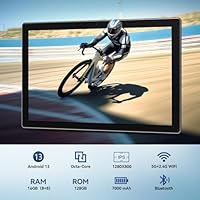
  • Screen Size: The tablet features a 10.1-inch IPS display panel suited for casual browsing, video streaming, and light document work.
  • Resolution: The screen renders at 1280x800 pixels, which is adequate for everyday media consumption but noticeably soft compared to higher-resolution panels.
  • Processor: An octa-core Qualcomm chip clocked at up to 2.0GHz handles the core processing duties across Android 13.
  • RAM: The device has 8GB of physical RAM supplemented by an additional 8GB of software-based virtual memory expansion for a combined advertised total of 16GB.
  • Internal Storage: 128GB of built-in flash storage provides ample room for apps, photos, videos, and downloaded media out of the box.
  • Expandable Storage: A microSD card slot supports external storage cards up to 1TB, allowing significant capacity expansion as needed.
  • Operating System: The tablet ships with Android 13, Google's more recent mobile OS release, offering improved privacy controls and a cleaner interface.
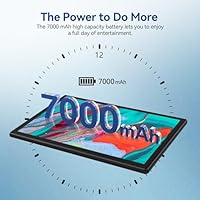
  • Battery: A 7000mAh lithium polymer battery powers the device, with manufacturer-rated usage of up to 10 hours under mixed workloads.
  • Wi-Fi: Dual-band 802.11ac Wi-Fi supports both 2.4GHz and 5GHz network bands for faster and more flexible wireless connectivity.
  • Rear Camera: The rear-facing camera captures images at 8 megapixels, suitable for basic photography and document scanning.
  • Connectivity: The tablet includes Bluetooth support and a USB port for peripheral connections, file transfers, and charging.
  • Dimensions: The device measures 9.65 x 6 x 0.36 inches, keeping it slim and compact enough for bag-friendly portability.
  • Weight: At 3.08 pounds including accessories, the full bundle is heavier than the tablet alone but still reasonable for home or desk use.
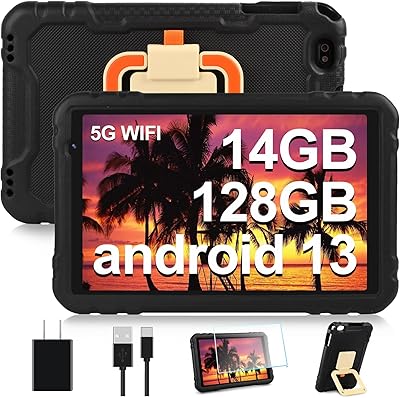
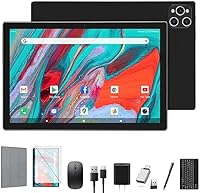
  • Accessories Included: The package includes a physical keyboard, a wireless mouse, and a protective case, all bundled at no additional cost.
  • Cellular Support: This tablet does not include a SIM card slot and cannot connect to mobile data networks — Wi-Fi is the only internet access method.
  • Display Type: The screen uses IPS technology, which provides wider viewing angles and more consistent color reproduction than basic TN panels.
  • Color Options: The tablet is available in black as the standard color configuration.
  • Power Source: The device is powered entirely by its built-in rechargeable lithium polymer battery with no removable battery option.

Related Reviews
XINHENGTAI M10 Android 13 Tablet, 128GB, 10.1-inch

83%
92%
Value for Money
88%
Performance
91%
Battery Life
84%
Camera Quality
72%
Display Quality
More
ADREAMER KidsPad10 Pro 10-inch Kids Tablet
73%
88%
Value for Money
84%
Cellular Connectivity
72%
Battery Life
77%
Parental Controls
81%
Build & Durability
More
CONSUNG N101B 10-inch Android Tablet
71%
84%
Value for Money
81%
Battery Life
83%
Streaming Performance
79%
Build Quality
67%
Display Quality
More
Xiskt A5505 Android 13 Tablet 10.1-inch 128GB Storage
80%
83%
Performance
88%
Value for Money
72%
Battery Life
80%
Display Quality
65%
Camera Quality
More
AOCWEI X500 10-inch Android 13 Tablet with 14GB RAM and 128GB Storage
84%
92%
Value for Money
87%
Performance
90%
Battery Life
88%
Build Quality
75%
Display Quality
More
ITMEIPC T-10 10.1-inch Android Tablet
69%
83%
Value for Money
67%
Display Quality
62%
Performance
71%
Battery Life
58%
Build Quality
More
FEONAL K118 10.1-inch Android Tablet
68%
83%
Display Quality
67%
Performance & Speed
78%
Battery Life
44%
Camera Quality
81%
Value for Money
More
VOLENTEX M10 10-Inch Android Tablet
63%
83%
Value for Money
79%
Battery Life
47%
Processing Performance
61%
Display Quality
76%
WiFi Connectivity
More
HAOVM G12PK14 10-inch Android 14 Tablet, 32GB
83%
91%
Value for Money
85%
Display Quality
88%
Battery Life
80%
Performance Speed
65%
Storage Capacity
More
COOPERS CP10S 10-inch Android Tablet 32GB
72%
88%
Value for Money
76%
Display Quality
61%
Performance & Speed
72%
Battery Life
54%
RAM & Multitasking
More

FAQ

No, it does not. The Qukenk D115 10-inch Android 13 Tablet is a Wi-Fi-only device with no SIM card slot, so you will need a wireless network to get online. If you need mobile data on the go, this is an important limitation to factor in before buying.

There is a catch worth knowing about. Only 8GB is physical RAM built into the hardware — the other 8GB is virtual memory expanded through software, which borrows from the internal storage. For light tasks like browsing and streaming it works fine, but do not expect true 16GB multitasking performance.

It is a basic physical keyboard designed for light typing tasks like emails, notes, and homework. Most users describe it as functional for the price, though it lacks the tactile feedback of a premium keyboard. If you plan to type for long stretches, it gets the job done but will not replace a proper laptop keyboard.

Yes, the tablet has a microSD card slot that supports cards up to 1TB, which gives you a lot of flexibility. It is worth noting that the internal storage alone is already generous for this price range, so most casual users will not need to expand right away.

For standard-definition and HD streaming on apps like YouTube or Netflix, it performs adequately on a good Wi-Fi connection. The dual-band Wi-Fi keeps buffering to a minimum. Just keep in mind the screen resolution is 1280x800, so very high-definition content will not look as sharp as it would on a higher-resolution display.

The manufacturer rates it at up to 10 hours, but real-world use tends to land somewhere between 7 and 9 hours depending on what you are doing. Light browsing and reading will get you closer to that upper limit, while heavier tasks like gaming or video calls will drain it faster.

It can work well for kids, especially for schoolwork, educational apps, and media consumption. The low price means replacement is less stressful, and the generous storage handles plenty of apps and downloads. You will want to set up parental controls through Android settings since the tablet does not come with dedicated child-lock software preinstalled.

The included mouse connects wirelessly, typically via a USB nano receiver or Bluetooth depending on the bundle shipped. It is a basic pointing device suited for light use alongside the keyboard, particularly helpful when using the tablet in laptop mode with the case stand.

Since it runs Android 13 with access to the Google Play Store, you can install the vast majority of standard Android apps. That said, some graphically intensive games or demanding productivity apps may run sluggishly given the entry-level processor and physical RAM limitations.

It really depends on your priorities. This 2-in-1 tablet bundle offers more in the box than most comparable options, which is its clearest advantage. Where it falls behind is in display quality, long-term software support, and build feel. If you need a dependable everyday tablet for light use and value the included accessories, it is a reasonable trade-off — just go in with calibrated expectations.