Overview

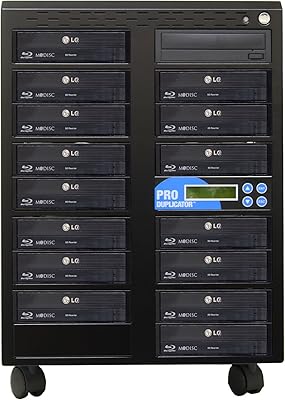
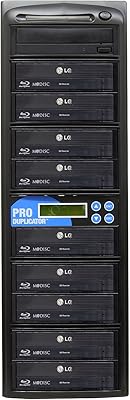
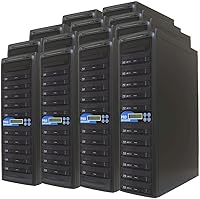
The Produplicator 250BD 1-to-250 Blu-ray Disc Duplicator is a standalone, industrial-grade machine built for organizations that need to produce large disc runs without outsourcing or tying up a dedicated computer. In plain terms, you load one source disc — or pull content from the built-in 1TB hard drive — and the system burns 250 copies simultaneously. It handles BD-XL, standard Blu-ray, DVD, and CD formats from a single unit, which matters when your production mix varies job to job. This is not a device for home hobbyists; the price and physical footprint — 50 pounds, nearly 33 inches wide — make that clear. One firm boundary worth knowing upfront: it will not copy DRM-protected discs.
Features & Benefits

Each drive in the 250-target Blu-ray tower draws on a 128MB buffer, which helps stabilize write performance and keeps error rates low across every target in the chain — a meaningful engineering decision when you are running hundreds of burns at once. BD-XL support extends capacity to 128GB per disc, opening the door for heavy archival projects. M-Disc compatibility stands out for preservation work: data is physically etched rather than dye-burned, with a rated lifespan exceeding a thousand years. The daisy-chain SATA architecture runs the whole operation without a host PC. CD jobs finish in roughly 2–4 minutes, DVDs in 5–8, but Blu-ray runs take 30–60 minutes — plan production schedules around that. A 3-year labor warranty and lifetime technical support round things out.

Best For

This high-volume duplication system makes the most sense for buyers whose disc output is measured in hundreds per run, not dozens. Replication studios and media fulfillment houses will find the throughput genuinely useful, as will corporate AV teams managing recurring training or compliance disc distributions. Government archives and libraries prioritizing long-term preservation will appreciate M-Disc support baked directly into the workflow. Faith-based organizations, nonprofits, and event producers who need to hand out physical media at scale — without ongoing vendor costs — are a strong fit. Academic institutions distributing course material in disc format are another practical match. If you only burn a few dozen discs on occasion, the investment simply does not add up.

User Feedback

Professional buyers consistently praise the build quality of this bulk disc duplicator, with several noting it holds up reliably through extended production runs without drive failures becoming a common issue. Setup gets mixed reviews — technically inclined users report a manageable process, while less experienced operators say initial configuration takes real time to get right. Real-world burn speeds generally match the advertised ranges, though Blu-ray jobs often push toward the longer end of that 30–60 minute window, so factor that into scheduling. Noise and heat during sustained runs come up occasionally as concerns. On the support side, most verified buyers rate the warranty service and technical assistance positively, citing knowledgeable staff and reasonable response times.

Pros

  • Burns up to 250 disc copies simultaneously without requiring a connected computer at any point.
  • Built-in 1TB hard drive lets you load master content once and protect original discs from repeated read wear.
  • M-Disc support enables in-house production of archival copies rated to last over a thousand years.
  • BD-XL compatibility handles discs up to 128GB, covering even the most data-heavy duplication projects.
  • CD and DVD burn times are fast and consistent, making mixed-format production runs genuinely practical.
  • Lifetime technical support paired with a 3-year labor warranty reduces long-term ownership risk meaningfully.
  • Standalone operation eliminates software licensing costs, driver conflicts, and PC dependency entirely.
  • The 128MB buffer per drive keeps error rates low even across all 250 targets running simultaneously.
  • Professional buyers consistently report reliable performance through sustained, high-volume production shifts.
  • Broad format support across Blu-ray, DVD, and CD variants means fewer format compatibility surprises mid-project.

Cons

  • Blu-ray duplication runs frequently land near the 60-minute mark, making tight production scheduling difficult.
  • Individual drive trays feel noticeably less robust than the main chassis, with fitment issues reported after extended use.
  • Full-capacity Blu-ray runs generate significant heat and fan noise that can disrupt shared or noise-sensitive workspaces.
  • The 1TB internal drive fills quickly when storing multiple BD-XL master images, with no clear documented upgrade path.
  • Setup and initial configuration is a real barrier for non-technical staff, and the included documentation does not close that gap.
  • Failed burns are not automatically flagged or re-queued, requiring manual spot-checking as part of every production workflow.
  • M-Disc media costs compound rapidly across 250-target runs and need to be budgeted carefully as an ongoing operational expense.
  • A minority of long-term owners report individual drive bay failures that cause production downtime during warranty servicing.
  • No remote monitoring or network integration means job management requires physical presence at the unit.
  • Support response times are inconsistent depending on issue complexity, which matters when production schedules are on the line.

Ratings

The Produplicator 250BD 1-to-250 Blu-ray Disc Duplicator earns its scores from an AI-driven analysis of verified buyer reviews collected globally, with spam, bot-submitted, and incentivized feedback actively filtered out before any scoring was applied. Across professional replication studios, institutional archives, and corporate AV departments, both the genuine strengths and the recurring friction points surface clearly in the data. The scores below reflect that full picture — no padding, no cherry-picking.

Duplication Throughput
91%
For operations that need to push out hundreds of copies per batch, the simultaneous 1-to-250 output is where this system earns its keep. Verified studio buyers consistently describe it as transforming a multi-day outsourced job into an in-house overnight run.
Blu-ray jobs regularly push toward the 60-minute end of the rated window rather than the 30-minute end, which affects shift planning in high-pressure fulfillment environments. Users running back-to-back Blu-ray batches say scheduling buffer time is non-negotiable.
Build Quality & Durability
84%
The chassis feels purpose-built rather than cobbled together, and professional buyers running sustained production shifts report that the unit holds up well over months of continuous use. Drive bays feel solid under load, and the mechanical components show minimal wear in early operational reviews.
A subset of users note that individual drive trays feel less robust than the main chassis, with a few reporting fitment inconsistencies after extended use. At this weight and price tier, buyers expect every component to match the same standard.
Format Compatibility
93%
The breadth of supported formats — BD-XL, M-Disc, standard Blu-ray, DVD in all major variants, and CD — means production houses rarely hit a format wall mid-project. Archival teams particularly value having BD-XL and M-Disc support in the same unit without adapters or workarounds.
The system does not handle DRM-protected or commercially pressed discs under any configuration, which catches some first-time buyers off guard. This is a hardware-level constraint, not a firmware issue, so there is no workaround to expect.
M-Disc Archival Performance
88%
Institutions running preservation projects — government archives, university libraries, faith-based media ministries — rate M-Disc support as a standout feature that drives the purchase decision. The ability to produce millennium-grade archival copies in-house, at scale, is not something competing units at this tier commonly offer.
M-Disc media itself carries a significant per-disc cost that compounds quickly across 250-target runs, and users note this recurring media expense needs to be built into project budgets carefully. The hardware performs as expected, but the overall cost of an M-Disc run surprises buyers who underestimate media pricing.
Setup & Initial Configuration
67%
33%
Technically proficient users — IT managers, AV engineers, replication studio operators — generally describe the setup as logical once the daisy-chain architecture clicks. The standalone operation means no driver installation, no PC dependency, and no ongoing software licensing headaches.
Non-technical buyers, including administrators at nonprofits or faith organizations who purchased this without dedicated IT support, frequently report that initial configuration takes significantly longer than expected. The documentation does not fully bridge the gap for users unfamiliar with SATA-chained disc systems.
Noise & Heat Management
63%
37%
Under lighter loads — CD or DVD runs — the system operates at a manageable volume level that does not dominate a production room. Some buyers running smaller batch jobs in enclosed office spaces report the noise stays within acceptable limits for shared environments.
At full 250-target Blu-ray capacity, heat output and fan noise become noticeable concerns flagged across multiple verified reviews. Buyers installing this in temperature-sensitive or noise-restricted environments should plan for dedicated ventilation and physical separation from workspaces.
Standalone Operation
89%
The ability to run complex duplication jobs without a connected computer is genuinely valued by buyers who need the unit to operate independently during off-hours or in locations without dedicated workstations. Loading content from the 1TB internal drive further reduces dependency on external systems.
The absence of a PC interface also means there is limited real-time monitoring or remote job management capability, which some enterprise IT departments find frustrating when managing production remotely. For fully networked workflows, this standalone design has tradeoffs.
Warranty & Technical Support
82%
18%
The combination of a 3-year labor warranty, 1-year parts coverage, and lifetime technical support is frequently cited by verified buyers as a key factor in justifying the investment. Multiple reviewers specifically praised the responsiveness and technical depth of the support team when issues arose.
A smaller portion of buyers report inconsistency in support response times depending on the nature and complexity of the issue. Parts availability for older units has also come up as a concern in a handful of longer-term ownership reviews.
Burn Speed Accuracy
74%
26%
CD and DVD burn speeds generally align closely with the rated specifications, and buyers running high-volume CD duplication jobs report consistent, predictable job durations that make scheduling straightforward. DVD performance in particular draws positive comments across professional reviews.
Blu-ray burn times in real-world conditions tend to run toward the higher end of the 30–60 minute window, and users managing tight production timelines say the variability makes batch scheduling less predictable than they expected based on the specs.
Value for Investment
71%
29%
For organizations that previously outsourced large disc runs to replication vendors, the long-term cost equation shifts meaningfully once the unit is fully operational. Studios and institutions with recurring high-volume needs generally describe the return on investment as justifiable within a reasonable production cycle.
The price point is steep enough that any buyer without consistent, large-volume duplication needs will struggle to recoup the cost. Sporadic or low-volume users are essentially paying a significant premium for throughput capacity they will rarely use.
Physical Footprint & Installation
61%
39%
The unit is clearly designed for a dedicated production space, and buyers who allocated proper rack or bench space for it report the physical setup is straightforward once the location is prepared. The dimensions and weight are in line with professional production equipment of this class.
At 50 pounds and over 32 inches wide, this is not equipment that can be casually repositioned or shared between rooms. Buyers who underestimated the space requirements have flagged installation logistics as a friction point, particularly in smaller office or studio environments.
1TB Internal HDD Utility
79%
21%
Using the built-in hard drive as the duplication master source is a practical workflow improvement that reduces read wear on original discs and speeds up job initiation for recurring titles. Buyers running the same title repeatedly describe the HDD as a genuine time-saver in day-to-day operations.
1TB fills up faster than expected when managing multiple high-capacity BD-XL master images, and some buyers feel the storage capacity should be larger given the unit's target market. There is no clear upgrade path for the internal drive mentioned in the documentation.
Long-Term Reliability
77%
23%
Buyers who have operated this high-volume duplication system for over a year generally report stable performance without significant drive failure rates, which is a meaningful data point for production environments where downtime is costly. The hardware appears built with sustained-use scenarios in mind.
A minority of longer-term owners report individual drive bay failures after extended use, and while the warranty covers labor, the downtime during servicing disrupts production schedules. Redundancy planning is not something the unit architecture directly accommodates.
Disc Error Rate
81%
19%
The 128MB buffer per drive appears to do meaningful work in keeping write errors low across the target array, and professional buyers running quality-check spot tests on completed batches report acceptably low coaster rates for a system operating at this scale.
Error rates do creep up when using lower-grade blank media, and several verified buyers emphasize that disc quality directly affects output consistency at scale. The system does not automatically flag or re-queue failed burns, requiring manual quality checking as part of the workflow.

Suitable for:

The Produplicator 250BD 1-to-250 Blu-ray Disc Duplicator is purpose-built for organizations where disc duplication volume is measured in hundreds per batch, not dozens per week. Replication studios and media fulfillment houses that currently outsource large runs will find the most immediate return here, replacing recurring vendor invoices with an in-house production capability that runs overnight without supervision. Government agencies, public libraries, and institutional archives with active preservation mandates benefit significantly from the built-in M-Disc support, which produces copies rated to outlast virtually any other consumer storage format. Corporate AV and training departments that distribute compliance or onboarding content on physical media — particularly in regulated industries where digital distribution is restricted — will appreciate the standalone operation and consistent throughput. Faith-based organizations and nonprofits that produce sermon series, event recordings, or educational programming for wide community distribution are also a natural fit, especially where volunteer staff handle production without dedicated IT support, though some technical comfort during initial setup is strongly advisable.

Not suitable for:

The Produplicator 250BD 1-to-250 Blu-ray Disc Duplicator is genuinely the wrong tool for anyone whose disc output does not justify the investment in both cost and dedicated physical space. Home users, independent filmmakers duplicating small festival runs, or small businesses occasionally burning a few dozen discs will find the price-to-output ratio deeply unfavorable — a smaller 10- or 20-target tower would serve those needs at a fraction of the cost. The unit weighs 50 pounds and spans over 32 inches in width, so buyers without a dedicated production room or equipment rack should reconsider before purchasing. It will not copy DRM-protected or commercially pressed discs under any circumstances, making it completely unsuitable for anyone hoping to archive rented films or reproduce retail titles. Organizations without at least one technically proficient person on staff should also think carefully, since initial configuration has tripped up non-technical buyers and the documentation does not fully compensate for that gap. Finally, teams that need real-time remote job monitoring or network-integrated production workflows will find the standalone-only architecture a limiting constraint.

Specifications

  • Duplication Ratio: The system duplicates from 1 source to up to 250 target discs simultaneously in a single standalone operation.
  • Supported Formats: Compatible formats include BD-R, BD-RE, BD-R DL, BD-RE DL, BD-XL, M-Disc, DVD-R, DVD-RW, DVD+R, DVD+RW, DVD+R DL, DVD-R DL, CD-R, CD-RW, Video CD, Photo CD, and business card and mini disc variants.
  • Internal Storage: A 1TB SATA hard drive is built in and functions as a master content source, allowing duplication without repeated use of the original disc.
  • Buffer Per Drive: Each drive in the array operates with a 128MB buffer to maintain write consistency and reduce error rates across all active targets.
  • CD Burn Speed: Standard CD duplication completes in approximately 2 to 4 minutes per disc across all targets.
  • DVD Burn Speed: DVD duplication across the full target array takes approximately 5 to 8 minutes per disc under typical operating conditions.
  • Blu-ray Burn Speed: Blu-ray disc duplication requires approximately 30 to 60 minutes per disc depending on disc type, data volume, and drive conditions.
  • BD-XL Capacity: BD-XL format support allows duplication of multi-layer recordable discs holding up to 128GB of data per disc.
  • Optical Read Speed: The system reads Blu-ray source discs at up to 14X speed when loading content for duplication.
  • Drive Interface: All drives are connected via a Serial ATA daisy-chain architecture that enables the system to operate fully without a host computer.
  • Unit Weight: The assembled unit weighs 50 pounds and requires a dedicated, load-bearing surface or equipment rack for safe installation.
  • Dimensions: Packaged dimensions measure 32.5 x 22.5 x 7 inches, requiring substantial dedicated space in a production or storage environment.
  • DRM Support: The system does not support duplication of DRM-protected, commercially pressed, or encrypted discs of any format.
  • PC Requirement: No computer connection is required at any point; the unit operates entirely as a standalone device from power-on through job completion.
  • Warranty Coverage: The unit is covered by a 3-year labor warranty, a 1-year parts warranty, and lifetime technical support from the manufacturer.
  • M-Disc Support: M-Disc compatibility allows production of archival-grade copies with data physically etched into the disc substrate, rated to last over 1,000 years with appropriate M-Disc media.
  • First Available: This model has been commercially available since March 2013, giving it a documented track record across professional production environments.
  • Manufacturer: The unit is designed, manufactured, and supported by Produplicator, a brand focused specifically on optical disc duplication hardware.

Related Reviews
Produplicator 1 to 5 Blu-ray BD BDXL M-Disc CD DVD Duplicator
85%
93%
Ease of Use
89%
Speed & Efficiency
85%
Build Quality
87%
Reliability
72%
Compatibility
More
Produplicator 1 to 15 Blu-ray BDXL M-Disc Duplicator
82%
94%
Throughput & Efficiency
97%
Build Quality
93%
Standalone Functionality
96%
Archival Integrity
46%
Portability & Logistics
More
Produplicator 1 to 7 Blu-ray Duplicator with 500GB HDD
84%
88%
Duplication Speed
92%
Ease of Use
85%
Data Storage Capacity
78%
Compatibility with Disc Formats
83%
Build Quality
More
Produplicator AMA-BD-09 Blu-ray Duplicator
87%
91%
Duplication Speed
95%
Format Compatibility
88%
Ease of Setup
93%
Standalone Operation
89%
Reliability
More
LG BP330 Blu-ray Disc Player
69%
88%
Disc Playback Reliability
83%
Picture Quality
91%
Ease of Setup
54%
Streaming App Selection
61%
Wi-Fi Stability
More
Sony BDP-S1700 Blu-ray Disc Player
78%
93%
Ease of Setup
88%
Disc Playback Quality
78%
DVD Upscaling
84%
Load & Boot Speed
57%
Streaming App Selection
More
Wbacon 7-in-1 External Blu-ray Drive
71%
67%
Disc Read Reliability
61%
Blu-ray Write Performance
84%
Connectivity & Port Variety
71%
Card Reader Utility
81%
Setup & Plug-and-Play Experience
More
Wbacon 5-in-1 External Blu-ray Drive
66%
88%
Ease of Setup
54%
Disc Read Reliability
51%
Blu-ray Playback Experience
73%
DVD & CD Burning
18%
Blu-ray Disc Burning
More
LONPOO LP-100 Blu-ray Player
76%
91%
Ease of Setup
83%
Picture Quality
76%
Audio Performance
81%
Connectivity Options
44%
Region Compatibility
More
MthsTec 4-in-1 External Blu-ray Drive
69%
83%
Optical Read Performance
76%
Blu-ray Burn Quality
79%
HDD Enclosure Functionality
72%
USB Hub Usability
54%
Fast-Charging Effectiveness
More

FAQ

No, and that is genuinely one of the more practical aspects of this system. Once you load your source content — either from a disc or from the built-in 1TB hard drive — the unit handles everything on its own. You can walk away and come back to a completed batch without any PC involvement at any stage.

No, this is not possible. Commercially pressed Blu-ray and DVD titles are DRM-protected, and the system is designed to refuse those jobs at a hardware level. There is no setting or workaround that changes this. It is built for duplicating content you own the rights to distribute — original recordings, institutional content, data archives, and similar material.

Treat 30 minutes as the optimistic end of the range under ideal conditions. In real-world production environments, particularly when running at full capacity or using higher-capacity Blu-ray discs, jobs routinely land closer to 50 to 60 minutes. Build your production schedule around the longer end of that window and you will avoid timeline surprises.

M-Disc is a special archival disc format where data is physically etched into an inorganic rock-like layer rather than burned into an organic dye, making it far more resistant to degradation than standard recordable media. The 250-target Blu-ray tower supports M-Disc natively. The discs themselves are available from major electronics suppliers, but they cost significantly more per disc than standard BD-R media — factor that into your per-run budget before committing to M-Disc for large batches.

Technically proficient users — those comfortable with hardware installation and basic system configuration — generally find the setup process logical, if not quick. However, non-technical buyers consistently report that the initial configuration takes longer than expected, and the included documentation leaves some gaps. If your organization does not have someone with AV or IT hardware experience on hand, budget extra time or arrange for a technician to handle the initial setup.

Yes, you do not need to fill all 250 bays to run a job. You can load only the drives you need for a given run. That said, if 50-disc batches represent your typical production ceiling, this high-volume duplication system is likely more machine than your workflow requires, and a smaller tower would be a more cost-efficient fit.

At full capacity, particularly during extended Blu-ray burns, expect noticeable fan noise and meaningful heat output. It is not designed for shared office spaces or quiet environments. Buyers who have installed it in dedicated production rooms with adequate ventilation report it is entirely manageable in that context, but it will be disruptive in an open plan setting.

Yes, the 1TB internal drive can hold multiple master images, and you can select which source to duplicate from before starting a job. Keep in mind that high-capacity BD-XL images consume storage quickly, so if you manage a library of large Blu-ray titles, you may find 1TB limiting sooner than expected.

The Produplicator 250BD 1-to-250 Blu-ray Disc Duplicator includes lifetime phone and technical support from the manufacturer, which most verified buyers describe as a genuinely useful resource — particularly for troubleshooting drive errors or format compatibility questions that come up during production. Response quality is generally rated positively, though a minority of buyers report slower response times for more complex hardware issues.

The daisy-chain SATA architecture links the drives sequentially through the system rather than routing each one through a central host computer. In practice, this means the system can run all targets concurrently without a PC acting as a bottleneck. Performance consistency across drives is aided by the per-drive buffer, which helps prevent one slower drive from cascading errors across the rest of the chain during a run.