

Overview
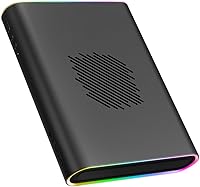
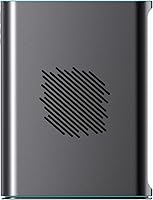
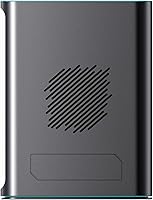
The ONE XPLAYER OneXGPU 2 External GPU is a rare thing in the eGPU market: a genuinely portable graphics enclosure that doesn't look like it belongs under a desk. Built from aluminum alloy and weighing just 1.59kg, it's compact enough to slip into a laptop bag alongside your handheld or ultrabook. Compatibility spans Thunderbolt 3/4, USB 4, and OCuLink, which covers most modern handhelds and thin laptops — though MacBook users need to look elsewhere, as it's explicitly unsupported. The included 300W GaN charger means you're not hunting for a separate power brick on day one. This is a niche product with a specific audience, and it knows it.
Features & Benefits
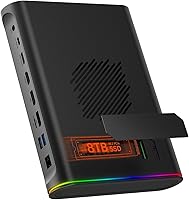
At the heart of the OneXGPU 2 sits an AMD Radeon RX 7800M with 12GB of GDDR6 VRAM, and on the RDNA 3 architecture, that translates to solid 1080p and capable 1440p gaming without breaking a sweat. A physical Turbo Button lets you toggle the GPU's TDP between 130W for quieter, cooler operation and 180W when you need to push harder — useful when you're plugged in and fan noise is acceptable. Display output covers HDMI 2.1 and two DisplayPort 2.0 ports, supporting three screens simultaneously at up to 4K. Add an M.2 SSD slot, ethernet, a TF card reader, two USB-A ports, and 65W pass-through charging, and this eGPU dock doubles as a full travel dock.
Best For
This portable graphics enclosure is purpose-built for handheld PC users — think devices like the OneXFly or GPD Win Max 2 — who want a proper GPU waiting at their desk without owning a full desktop. Laptop owners with confirmed Thunderbolt 4 or USB 4 ports will also get genuine performance gains, particularly for GPU-accelerated workloads or gaming sessions that integrated graphics simply can't handle. Frequent travelers who need multi-monitor output and a wired ethernet connection in one box will appreciate how much it consolidates. That said, MacBook users are out entirely, and anyone with only USB-C 3.2 ports won't get the bandwidth needed to make it worthwhile.
User Feedback
Buyers who've put the OneXGPU 2 to regular use tend to praise the build quality — the aluminum chassis feels solid, and the dock functionality genuinely reduces cable clutter. The all-in-one convenience of having ethernet, USB ports, and GPU in one unit gets called out repeatedly as a highlight. On the flip side, a consistent frustration is that the OCuLink cable — the connection method that delivers the best bandwidth — isn't included in the box, which stings at this price point. Fan noise in Turbo mode at 180W is notably louder, and a handful of users report initial confusion sorting out whether their laptop's USB-C port is actually USB 4 or just USB-C 3.2 in disguise.
Pros
- Compact aluminum chassis weighs under 1.6kg, genuinely portable in a way most eGPUs are not.
- OCuLink support significantly reduces the bandwidth bottleneck compared to Thunderbolt-only enclosures.
- The RX 7800M with 12GB VRAM handles 1080p and 1440p gaming without being pushed to its limits.
- Turbo Button lets you choose between quieter 130W operation and full 180W performance on the fly.
- Supports up to three simultaneous 4K displays via HDMI 2.1 and dual DisplayPort 2.0.
- Built-in M.2 slot, ethernet, TF card reader, and USB-A ports make it a capable travel dock, not just a GPU.
- The included 300W GaN charger powers both the GPU and your laptop through a single cable.
- Broad connectivity across Thunderbolt 3/4 and USB 4 covers most modern Windows handhelds and ultrabooks.
- Aluminum alloy build feels premium and road-worthy rather than plasticky or fragile.
Cons
- OCuLink cable is not included in the box, despite being the best-performing connection method available.
- MacBook compatibility is entirely absent — no workarounds exist.
- At 180W Turbo mode, fan noise is noticeable enough to be distracting in quiet environments.
- Thunderbolt bandwidth limitations still create a performance gap compared to a native PCIe desktop GPU slot.
- USB 4 port confusion is a real risk — many buyers discover too late that their laptop's USB-C port does not meet the required standard.
- At this price point, the absence of the OCuLink cable stings harder than it would on a budget product.
- No support for USB-C 3.2 or 3.0 connections means a subset of thin-and-light laptop owners are completely locked out.
- Driver installation and initial setup can require troubleshooting, particularly for users new to eGPU configurations.
- The 65W laptop charging pass-through, while convenient, may fall short for power-hungry laptops under heavy combined load.
Ratings
The scores below for the ONE XPLAYER OneXGPU 2 External GPU were generated by our AI system after analyzing verified purchase reviews from buyers worldwide, with spam, bot-submitted, and incentivized feedback actively filtered out. We weighted feedback from users who provided detailed, usage-based accounts to ensure the results reflect genuine ownership experience. Both the standout strengths and the recurring frustrations are represented transparently in each category score.
GPU Performance
Portability
Build Quality
Connectivity & Compatibility
Dock Functionality
Thermal Management
Fan Noise
Out-of-Box Experience
Setup & Driver Experience
Display Output
Value for Money
OCuLink Implementation
Power Delivery
Software & Ecosystem
Suitable for:
The ONE XPLAYER OneXGPU 2 External GPU is built for a specific but growing crowd: handheld PC enthusiasts and ultrabook users who want real GPU headroom without committing to a desktop. If you own a device like the OneXFly or GPD Win Max 2 with an OCuLink port, this eGPU dock is about as close to a perfect home-base upgrade as the market currently offers, since the OCuLink connection sidesteps most of the bandwidth bottleneck that plagues Thunderbolt-based setups. Thunderbolt 4 and USB 4 laptop users will also see meaningful gains for gaming or GPU-accelerated creative tasks, even if the headroom is slightly more constrained than OCuLink. Frequent travelers who want to consolidate a multi-monitor workstation, wired internet, extra USB ports, and SSD storage into a single portable unit will find the dock functionality alone justifies serious consideration. The included 300W GaN charger is a genuinely thoughtful inclusion — one less thing to track down separately at this tier.
Not suitable for:
The ONE XPLAYER OneXGPU 2 External GPU is not a universal laptop upgrade, and knowing where it falls short matters before you spend at this level. MacBook users are flatly unsupported — this is a hard limitation, not a workaround situation. Anyone whose laptop has only a USB-C 3.2 or USB-C 3.0 port will not get the bandwidth necessary to make this eGPU dock worthwhile; confusingly, many modern laptops have USB-C ports that look identical to USB 4 but are not, so checking your specs before purchasing is non-negotiable. Desktop gamers or users who already have a discrete GPU in their machine have no practical use case here. If fan noise in performance-heavy scenarios is a dealbreaker for your workspace, the 180W Turbo mode runs audibly loud — fine for a gaming session, less ideal for a quiet office. And buyers expecting the OCuLink cable to be in the box will be disappointed; it is sold separately, which is a meaningful oversight given it is the highest-bandwidth connection option available.
Specifications
- GPU: Equipped with an AMD Radeon RX 7800M graphics processor built on the RDNA 3 architecture.
- VRAM: Features 12GB of GDDR6 video memory, providing ample headroom for modern gaming and GPU-accelerated workloads.
- Default TDP: Operates at 130W by default, with a user-toggled Turbo mode that raises power draw to 180W for maximum performance.
- Connectivity: Compatible with Thunderbolt 3, Thunderbolt 4, USB 4, and OCuLink host connections.
- Display Output: Offers one HDMI 2.1 port (4K at 60Hz) and two DisplayPort 2.0 ports (4K at 120Hz), supporting up to three simultaneous displays.
- SSD Expansion: Includes one M.2 2280 PCIe 3.0 slot supporting up to 8TB of additional storage.
- Extra Ports: Provides two USB-A 3.2 ports, one RJ45 gigabit ethernet port, and one TF (microSD) card slot.
- Pass-Through Power: Delivers up to 65W of laptop charging via the USB-C 4.0 port while simultaneously powering the GPU.
- Included Charger: Ships with a 300W GaN fast charger capable of powering both the enclosure and a connected laptop from a single outlet.
- Weight: The enclosure weighs approximately 1.59kg (around 3.5 lbs), making it one of the lighter eGPU options available.
- Enclosure Material: Chassis is constructed from aluminum alloy, contributing to both structural rigidity and passive heat dissipation.
- Dimensions: Physical footprint measures approximately 9 x 6.9 inches, with a slim profile suited for travel bags and desk setups alike.
- MacBook Support: MacBook computers are explicitly not supported by this enclosure regardless of port type.
- OCuLink Cable: An OCuLink cable is not included in the box and must be purchased separately from ONE XPLAYER or compatible retailers.
- Included Cables: Package includes one 3.3ft USB-C 4.0 cable for Thunderbolt and USB 4 connections.
- Multi-Display: Supports running up to three independent external displays simultaneously when connected via a compatible host device.
- In the Box: Contents include the eGPU enclosure, a 300W GaN charger, a 3.3ft USB-C 4.0 cable, and a user manual.
Related Reviews
THKAILAR T8 1TB Dual-Port Portable SSD
Patriot Transporter Lite 512GB Portable SSD


IO CREST SY-ENC50127 USB 3.2 Type-C Dual Bay HDD + M.2 NVMe External Enclosure
Seagate One Touch 4TB External Hard Drive
JBL Bar 2.0 All-in-One MK2 Soundbar

LifeCell All-In-One Anti-Aging Cream 2.54oz
Seagate One Touch 5TB External Hard Drive
Seagate One Touch Hub 20TB External Hard Drive