Overview

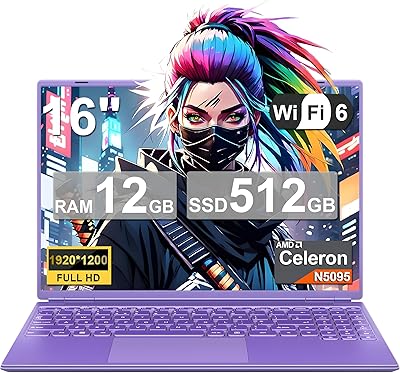
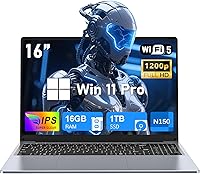
The NIAKUN NY-08 16-Inch Laptop is a budget-oriented Windows machine aimed squarely at students and light office users — not the gaming crowd, despite what the product title implies. Let's be direct: the Intel 13th Gen Celeron N150 is an entry-level chip, and there is no realistic scenario where it handles modern games. What it does offer, though, is a 16:10 FHD display that is genuinely rare at this price point, giving you a taller, more document-friendly screen than the usual 16:9 slabs. NIAKUN is not a household name, and that brand anonymity is worth keeping in mind when weighing long-term purchase confidence.

Features & Benefits

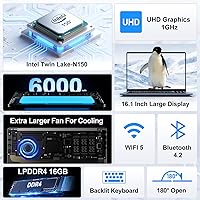
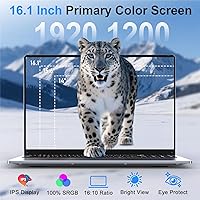
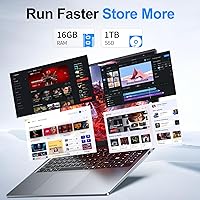
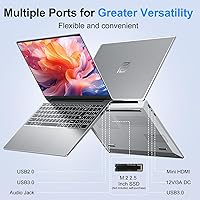
The 16.1-inch display is where the NY-08 genuinely earns some credit — the 1920x1200 resolution with a 16:10 aspect ratio means more vertical space for documents and browser tabs without squinting. The Celeron N150 handles word processing, video calls, and light multitasking without drama, but do not push it into anything demanding. Paired with 16GB of LPDDR4 RAM and a 1TB SSD, the day-to-day experience stays reasonably responsive for the intended workload. The backlit keyboard includes a numeric keypad, a thoughtful touch for data-entry users. Connectivity covers the basics: two USB 3.0 ports, Mini HDMI, and dual-band Wi-Fi round out a functional, if minimal, port selection.

Best For

This budget laptop makes the most sense for students and remote workers who need a portable machine for writing, research, and standard productivity apps — the 3.5-pound build and modest footprint make it easy to slip into a bag. If your daily workflow lives in a browser, a word processor, or a video call app, the NY-08 handles that without complaint. Be honest about the limitations, though: gaming is off the table entirely, and so is anything involving video rendering or photo editing. As a first laptop or a dependable secondary machine, this NIAKUN machine occupies a reasonable niche in a crowded budget segment.

User Feedback

Early buyers tend to highlight the display as a standout — the wider aspect ratio and anti-glare coating come up positively, especially among students doing extended reading sessions. On the downside, some purchasers report frustration stemming from the misleading gaming label, arriving with expectations the hardware simply cannot meet. Keyboard comfort gets mixed reactions: adequate for everyday typing, though the trackpad occasionally draws criticism for inconsistent tracking. Chassis flex under pressure is a recurring observation, which matters if durability is a priority. The brand's after-sales support remains largely untested in public reviews, and that uncertainty gives cautious buyers a reasonable reason to hesitate.

Pros

  • The 16:10 FHD display offers noticeably more vertical space than typical budget laptops, making it easier to read documents and websites.
  • A 1TB SSD means you can store years of files, projects, and media without constantly managing storage.
  • 16GB of RAM handles everyday multitasking reliably — multiple browser tabs, Office apps, and a video call running together.
  • The backlit keyboard with a numeric keypad is a practical feature that budget laptops at this size often skip.
  • Dual-band Wi-Fi keeps connections stable whether you are on a crowded 2.4GHz network or a faster 5GHz band.
  • At 3.5 lbs, the NY-08 slips into a backpack without adding meaningful weight to a student or commuter load.
  • Windows 11 Pro comes pre-installed, which is an upgrade over the Home edition that most competitors bundle in.
  • The anti-glare display coating reduces eye strain during long working sessions under office lighting or near windows.

Cons

  • The Celeron N150 processor will feel sluggish during anything beyond light office tasks — sustained CPU loads expose its limitations quickly.
  • Real-world battery life is unlikely to reach the advertised six hours under normal mixed-use conditions.
  • NIAKUN is an unfamiliar brand with limited public track record, making long-term reliability and warranty support harder to assess.
  • The misleading gaming laptop label in the product title creates mismatched expectations that frustrate buyers who do not read the specs carefully.
  • The port selection lacks USB-C or Thunderbolt, which limits compatibility with modern accessories and faster external storage.
  • Chassis flex has been flagged by early users, suggesting the build quality trades sturdiness for weight reduction.
  • Bluetooth 4.2 is outdated compared to the 5.0 or 5.3 standard found in many competing laptops at a similar price.
  • The integrated Intel UHD graphics offer no practical capability for photo editing, light 3D work, or any visual rendering tasks.
  • Trackpad responsiveness has drawn criticism in early user reports, which is a daily friction point that reviews and spec sheets rarely highlight.

Ratings

The NIAKUN NY-08 16-Inch Laptop scores below are generated by our AI engine after analyzing verified buyer reviews from global marketplaces, actively filtering out incentivized, bot-generated, and duplicate submissions to ensure the data reflects genuine ownership experience. Both the standout strengths and the recurring frustrations are weighted equally, so you get an honest picture of what living with this machine actually looks like day to day.

Value for Money
78%
22%
For buyers who know exactly what they are getting — a capable word-processing and browsing machine — the storage and RAM on offer at this price tier are legitimately hard to beat. Students setting up a first laptop find the out-of-box Windows 11 Pro inclusion a meaningful bonus that saves them an additional software cost.
Buyers who purchased expecting gaming or multimedia production capability felt misled, and for them the value equation collapses entirely. The misleading product title creates a segment of disappointed buyers who skew the perceived value score downward despite the hardware being appropriate for its true intended use.
Display Quality
81%
19%
The 16:10 aspect ratio consistently surprises users who upgrade from standard 16:9 budget laptops — the extra vertical real estate makes reading long documents and browsing research-heavy pages noticeably more comfortable. The anti-glare coating performs well near windows and under office lighting, reducing squinting during long study sessions.
Color accuracy is adequate but not impressive, and users doing any casual photo work notice the panel struggles with saturation depth compared to IPS displays in higher price brackets. Maximum brightness draws occasional criticism from outdoor users who find it insufficient in direct sunlight.
Performance
54%
46%
For the core intended workload — writing essays, managing spreadsheets, attending video calls, and streaming content — the Celeron N150 handles tasks without visible stuttering under light conditions. Users who run one application at a time report a smooth enough experience that does not get in the way of productivity.
The moment workload complexity increases — multiple browser tabs alongside an active video call and a background download — the processor visibly struggles and responsiveness drops. Anything touching graphics or encoding workloads exposes the chip's hard ceiling quickly, and thermal throttling under sustained load has been flagged by technically minded reviewers.
Battery Life
61%
39%
For short commutes, library study sessions, or a half-day of light office tasks, the battery holds up well enough to avoid carrying a charger everywhere. Users running primarily document editing at moderate brightness report hitting the four-hour mark without issue.
The advertised six-hour figure proves optimistic for most real-world users, with actual runtime landing closer to four hours under normal mixed-use conditions. Anyone expecting to get through a full eight-hour school or workday on a single charge will be regularly disappointed.
Build Quality
57%
43%
The slim 0.8-inch profile and 3.5-pound weight make the chassis genuinely easy to carry, and the overall aesthetic is clean enough that it does not stand out as a cheap-looking machine on a desk or in a meeting room.
Chassis flex is a recurring complaint — users notice the lid bends under moderate hand pressure and the keyboard deck gives slightly when typing with force. At this weight, some structural compromise is inevitable, but a handful of reviewers describe it as feeling fragile enough to give pause when packing it into a crowded bag.
Keyboard & Typing Experience
69%
31%
The inclusion of a numeric keypad is a practical differentiator for users who regularly work with numbers, and the backlit keys are bright enough to work comfortably in dim dorm rooms or evening home-office sessions. Key spacing is reasonable and most users adapt to the layout within a day or two.
Key travel is shallow and feedback is soft, which some touch-typists find tiring over extended writing sessions. The overall feel is functional rather than satisfying, and a few reviewers note that individual keys feel slightly inconsistent in resistance across the board.
Trackpad
55%
45%
For basic navigation — scrolling, clicking links, and moving between windows — the trackpad gets the job done without requiring an external mouse for casual use. Surface texture is smooth enough that fingers glide without catching.
Cursor accuracy under fast movement draws criticism, and multi-finger gestures occasionally register incorrectly, which becomes noticeable during video calls when trying to switch windows quickly. Several users recommend pairing the NY-08 with an external mouse for anything requiring precision.
Portability
83%
At 3.5 lbs and under an inch thick, this NIAKUN machine genuinely disappears into a standard backpack, which students and commuters consistently highlight as a daily-use advantage. The compact footprint fits comfortably on small cafe tables and economy tray tables without feeling cramped.
The Mini HDMI port rather than a full-size HDMI requires an adapter for most external displays, which is an easy-to-forget accessory that undermines the otherwise smooth portable experience. The charger adds meaningful bulk and weight to a travel bag.
Connectivity & Ports
62%
38%
Having two USB 3.0 ports covers the most common simultaneous device needs — a USB drive and a mouse — without forcing the user into a hub immediately. Dual-band Wi-Fi performs reliably on both 2.4GHz and 5GHz networks in home and campus environments.
The absence of USB-C or Thunderbolt is a growing frustration as more accessories and monitors shift to that standard, and Bluetooth 4.2 feels dated compared to the 5.0 or higher found on competing machines. Users with multiple modern peripherals will likely need a USB hub from day one.
Software & OS
74%
26%
Windows 11 Pro is a genuinely useful inclusion at this price point, offering BitLocker encryption and better remote desktop tools than the Home edition — features that home-office users appreciate without paying extra for an upgrade key.
Some users report the initial setup includes pre-installed software beyond the standard Windows package, requiring a cleanup session before the system feels streamlined. Boot times are reasonable given the SSD, but the underlying chip means Windows 11 animations occasionally feel slightly sluggish.
Thermal Management
52%
48%
Under light workloads the laptop runs quietly and the chassis stays close to room temperature, which is exactly what a student doing research or writing expects from a machine they might use with on their lap.
Under sustained load — long video encoding attempts or prolonged high-CPU tasks — heat builds in the upper-left deck area and fan noise becomes audible enough to distract in quiet environments. Throttling under these conditions means performance drops at precisely the moment you need it most.
Brand Trust & Support
48%
52%
The stated 1-year warranty and 24/7 customer support line give buyers a documented channel for issues, and a handful of early reviewers report receiving prompt responses to initial inquiries.
NIAKUN has virtually no established public reputation, and there is little third-party data on how warranty claims are handled when hardware fails. For buyers who factor long-term reliability and accountable support into a purchase decision, this anonymity is a genuine risk that no spec sheet can offset.
Storage & Memory
82%
18%
A 1TB SSD is a standout specification at this price tier — students can store full course libraries, downloaded media, and software installations without managing free space constantly. The 16GB RAM allocation means the system handles a reasonable number of concurrent browser tabs and office applications without slowdown.
The LPDDR4 memory type is functional but not fast, and power users coming from newer DDR5 systems will notice the difference in memory-bandwidth-sensitive tasks. Storage expandability is unconfirmed and the SSD is unlikely to be user-replaceable without technical confidence.
Product Listing Accuracy
39%
61%
The display resolution, RAM, and storage specifications are accurately represented, and buyers who cross-check the tech details before purchasing tend to arrive with calibrated expectations.
Labeling an entry-level Celeron laptop as a gaming laptop is a significant misrepresentation that has generated measurable buyer frustration in early reviews. This kind of title inflation erodes trust not just in the listing but in the brand overall, and it is the single biggest source of negative feedback this machine receives.

Suitable for:

The NIAKUN NY-08 16-Inch Laptop is a reasonable pick for students who spend most of their day in Google Docs, a browser, or a video call — the kind of workload where processing muscle matters far less than screen size and storage breathing room. A first-year college student writing essays, managing a calendar, and streaming lecture recordings will find the 1TB SSD and 16GB of RAM more than adequate for that daily rhythm. Remote workers handling email, spreadsheets, and light web-based tools will also feel at home here, especially those who appreciate the taller 16:10 display for reading long documents without constant scrolling. At 3.5 lbs, it travels well as a secondary machine for someone who already owns a more capable desktop or workstation at home. Budget-conscious buyers who genuinely need a large-screened Windows 11 Pro laptop and are not chasing performance will get fair value from this machine.

Not suitable for:

Anyone drawn in by the word gaming in the product title should stop and reconsider — the Celeron N150 is a power-efficient office chip, and it will struggle noticeably with any title released in the past several years. The NIAKUN NY-08 16-Inch Laptop is equally unsuitable for video editors, photographers running Lightroom, or developers compiling large codebases, since the integrated Intel UHD graphics and entry-level CPU form a hard ceiling on performance. The six-hour battery estimate is optimistic under real mixed-use conditions, so anyone who needs all-day untethered productivity should look elsewhere. Buyers who prioritize build rigidity and long-term durability may find the lightweight chassis underwhelming, as reports of chassis flex suggest it was engineered to hit a weight and price target rather than a sturdiness benchmark. Finally, those who value proven after-sales support from established brands will be taking a leap of faith with a relatively unknown OEM whose warranty track record is still thin.

Specifications

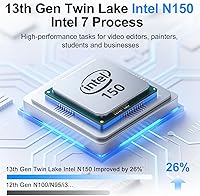
  • Processor: Intel 13th Gen Celeron N150 with 4 cores running at up to 3.6GHz, designed for energy-efficient everyday computing.
  • RAM: 16GB of LPDDR4 memory provides sufficient headroom for everyday multitasking across office apps and browser tabs.
  • Storage: A 1TB SSD delivers ample space for files, applications, and media with faster read and write speeds than a traditional hard drive.
  • Display: 16.1-inch FHD anti-glare panel with a 1920x1200 resolution and a 16:10 aspect ratio offering a 92% screen-to-body ratio.
  • Graphics: Intel UHD integrated graphics handle standard display output, video playback, and basic visual tasks without a discrete GPU.
  • Operating System: Comes pre-installed with Windows 11 Pro, which includes BitLocker encryption and enhanced remote desktop capabilities.
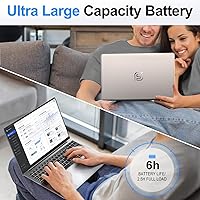
  • Battery: A 46.2Wh (6000mAh) battery is rated for up to 6 hours of mixed-use operation on a single charge.
  • Weight: The laptop weighs 3.5 lbs, keeping it light enough for daily commutes and travel without being a burden in a backpack.
  • Dimensions: The chassis measures 14 x 7.5 x 0.8 inches, maintaining a slim and compact footprint relative to the screen size.
  • Ports: Connectivity includes two USB 3.0 ports, one USB 2.0 port, a Mini HDMI output, a 3.5mm headphone jack, and a DC power input.
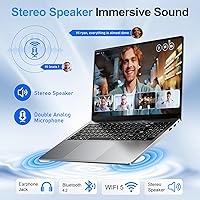
  • Wireless: Dual-band Wi-Fi 802.11ac (2.4GHz and 5GHz) and Bluetooth 4.2 provide standard wireless connectivity for home and office networks.
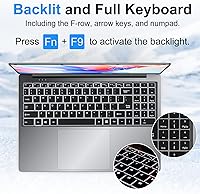
  • Keyboard: A full backlit keyboard with an integrated numeric keypad supports comfortable typing in low-light environments and data-entry workflows.
  • Warranty: Covered by a 1-year manufacturer warranty with 24/7 customer support for troubleshooting and replacement assistance.
  • Aspect Ratio: The 16:10 display ratio provides more vertical screen real estate compared to standard 16:9 panels, improving document and web readability.
  • Brand & Model: Manufactured by NIAKUN under the model designation NY-08, released in April 2025.

Related Reviews
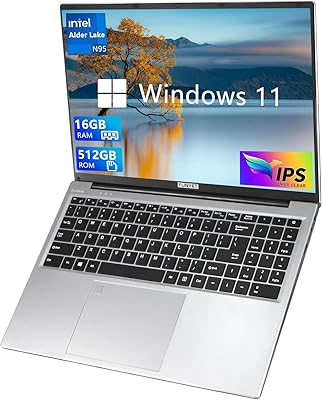
FUNYET NY-02 16-Inch 512GB Laptop
67%
83%
Value for Money
78%
Display Quality
53%
Processing Performance
76%
RAM & Multitasking
58%
Build Quality
More
OIWAS Laptop Backpack 16 Inch
84%
88%
Comfort & Ergonomics
85%
Durability
91%
Water Resistance
89%
Storage Capacity & Organization
87%
Ease of Use
More
SwissGear Shield 16-inch Laptop Backpack
80%
83%
Build Quality
91%
Organization & Storage
74%
Laptop Protection
86%
Carrying Comfort
69%
Travel Usability
More
SwissGear Orientation 16-inch Laptop Backpack
85%
88%
Comfort & Ergonomics
91%
Organization & Storage
84%
Durability
82%
Design & Aesthetics
90%
Value for Money
More
NOTODD N600 16-inch Windows Laptop
65%
78%
Value for Money
44%
Processing Performance
73%
Display Quality
52%
Build Quality
57%
Battery Life
More
SwissGear VersaMax 18-Inch Laptop Backpack
77%
91%
Organization & Layout
88%
Laptop Protection
74%
Comfort & Ergonomics
83%
Airflow & Back Ventilation
79%
Build Quality & Durability
More
MSI Creator A16 AI+ 16-inch Laptop
75%
93%
Display Quality
84%
GPU Performance
47%
Battery Life
61%
Thermal Management
67%
Value for Money
More
SwissGear Civic Pro 16″ Laptop Backpack
78%
86%
Build Quality
83%
Laptop Protection
81%
Carrying Comfort
78%
Back Panel Ventilation
88%
Organization & Storage
More
Lenovo Yoga 7i 16″ 2-in-1 Laptop, Core Ultra 7 155U, 16GB, 1TB
74%
84%
Display Quality
82%
Performance & Speed
79%
Build Quality & Hinge
81%
Keyboard & Trackpad
67%
Battery Life
More
Sinaliy Personal Item Backpack 16-inch Laptop Backpack
87%
88%
Organization & Storage
83%
Comfort & Fit
87%
Durability & Build Quality
90%
Waterproof Performance
84%
Ease of Packing
More

FAQ

No, and the product title is genuinely misleading. The NIAKUN NY-08 16-Inch Laptop uses an Intel Celeron N150, which is a low-power office processor with integrated graphics — it cannot handle modern games. If you are looking for a gaming machine, this is the wrong choice entirely.

For the typical student workload — writing papers, browsing research, watching lectures, and managing email — 16GB is more than comfortable. You will not feel memory pressure unless you start opening dozens of browser tabs while running multiple applications at once.

Yes, for everyday use, 1TB gives you substantial room to work with. Several years of documents, photos, and installed applications will not come close to filling it under typical student or office use patterns.

The 6-hour figure assumes light, mixed usage under controlled conditions. In practice, with screen brightness up, Wi-Fi active, and a few apps running, you should realistically expect somewhere between 4 and 5 hours. Plan to have a charger nearby if you need a full workday of untethered use.

Yes, the NY-08 includes a Mini HDMI port for connecting to an external display. You will need a Mini HDMI to standard HDMI cable or adapter, which is not included. Note that the lack of a USB-C or Thunderbolt port limits your options for modern docking stations or monitors that use those connections.

Early users report it is serviceable for extended typing, and having a numeric keypad is a genuine plus for anyone working with spreadsheets or entering figures regularly. That said, key travel and tactile feedback are on the lighter side, as is typical for slim budget laptops — it may take a short adjustment period if you are used to a more premium keyboard.

That is a fair concern. NIAKUN is not a recognized OEM in the way that Lenovo or ASUS are, and there is limited long-term public data on their reliability or support responsiveness. The 1-year warranty exists on paper, but how smoothly claims are handled in practice is not yet well-documented. If brand reputation and after-sales certainty matter to you, that is worth factoring into your decision.

Yes, the Celeron N150 handles video calls comfortably when that is the primary task running. Where it may struggle is if you are running Teams in the background while simultaneously working across many other open applications, so close what you are not actively using during calls.

At 3.5 lbs and 0.8 inches thick, the chassis is lightweight, and some early buyers have noted noticeable flex when pressing on the lid or keyboard deck. It does not feel as solid as higher-priced machines, which is a typical trade-off at this price tier. Handle it with normal care and it should hold up fine for everyday use, but it is not built to take rough treatment.

No — it ships with Windows 11 Pro, but Microsoft Office is not included. You would need to purchase a Microsoft 365 subscription separately or use the free web-based versions of Word, Excel, and PowerPoint through a browser, which work well enough for most student and light office tasks.