Overview

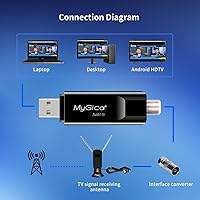
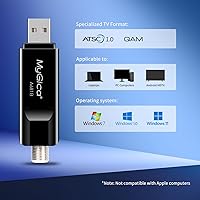
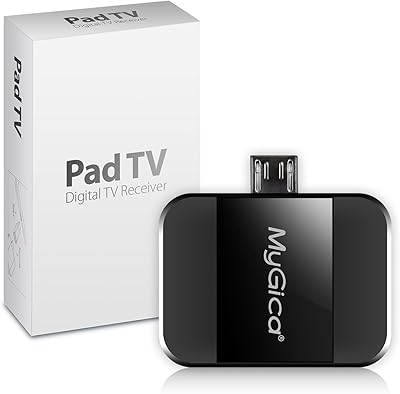
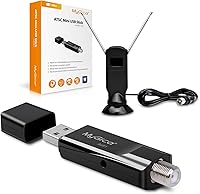
The MyGica A681B USB TV Tuner is a compact stick that plugs into your PC or laptop and pulls in free over-the-air HDTV — no cable bill, no streaming subscription required. It targets cord-cutters and sports fans who want local broadcast channels on their computer screen. One thing to get straight before buying: this is not plug-and-play. You will need to install drivers and the HiDTV playback software before it works, which takes some patience. Also worth knowing upfront — if you own a MacBook, stop here. This over-the-air TV dongle has no macOS support whatsoever, and that limitation is firm.
Features & Benefits

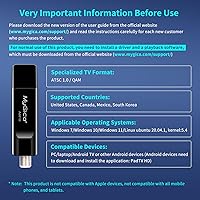
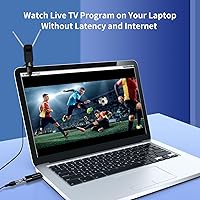
On the technical side, this USB tuner stick receives ATSC digital broadcast signals and can display content at up to 1080p HD. The USB 2.0 connection means there is nothing to open or install inside your machine — just plug it in, get the drivers running, and you are set. The HiDTV software handles live viewing, recording, and playback, which is more than you might expect at this price point. It works with Windows 7, 10, and 11, Linux Ubuntu 20.04, and various Android devices including TV boxes and car navigation units. The form factor is genuinely small and light enough to toss in a laptop bag without a second thought.

Best For

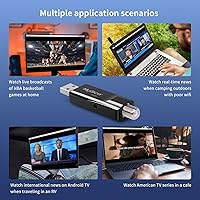
This over-the-air TV dongle makes the most sense for a specific type of buyer. If you want free local channels — think network news, sports, and primetime TV — on a Windows desktop or laptop without paying for a subscription, it fits the bill. It works particularly well for sports fans who want to catch live games on a bigger monitor setup. Students and remote workers adding a TV screen to their workspace on a budget will also find it practical. Keep in mind that reception quality depends entirely on your location and proximity to broadcast towers, so rural users with weak signal coverage may see inconsistent results.

User Feedback

Buyer sentiment around the A681B tuner tends to split along one clear line: did they manage to get it working or not. Those who pushed through the driver and software installation generally came away happy, reporting solid channel reception in areas with decent broadcast coverage and appreciating that there is zero monthly cost involved. The portability and build quality also drew positive comments, especially given the price tier. On the other side, buyers who expected it to work straight out of the box ran into frustration. A number of negative reviews come from Mac users who overlooked the compatibility warning. Customer support responsiveness has helped in some of those cases, though the setup hurdle remains real.

Pros

  • Pulls in free over-the-air HDTV with no monthly subscription or internet connection required.
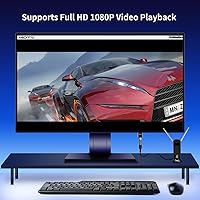
  • Supports up to 1080p HD resolution when signal conditions are good.
  • Compatible with Windows 7, 10, and 11, plus Linux and Android platforms.
  • The HiDTV software includes live TV, recording, and playback in one package.
  • Compact and light enough to carry daily in any laptop bag without noticing it.
  • Works with Android TV boxes and car navigation units, expanding its use cases significantly.
  • Build quality holds up well relative to what you pay at this budget tier.
  • Customer support has helped users work through driver installation issues when contacted directly.
  • Once set up correctly, the A681B tuner runs stably without frequent reinstallation on modern Windows builds.
  • No internal hardware installation needed — USB 2.0 connection handles everything externally.

Cons

  • Driver and software installation is required before first use and trips up many buyers.
  • Completely incompatible with macOS — no exceptions, no workarounds, no partial support.
  • The included antenna is too basic for anything other than strong-signal urban environments.
  • Reception quality varies dramatically by location and cannot be improved by the device itself.
  • HiDTV software feels outdated and has a steeper learning curve than modern apps.
  • Windows updates can occasionally break the driver, requiring a full reinstallation.
  • Channel scanning is slow and gives users no useful feedback when results are poor.
  • Finding and downloading the correct driver version from the manufacturer site is not straightforward.
  • No support for streaming platforms or internet-based content of any kind.
  • Negative reviews from Mac buyers and setup-confused users skew the product rating unfairly but still affect purchase confidence.

Ratings

Our AI rating system analyzed hundreds of verified global reviews for the MyGica A681B USB TV Tuner, actively filtering out incentivized, bot-generated, and low-signal feedback to surface what real buyers actually experienced. The scores below reflect both the genuine strengths that keep this over-the-air TV dongle selling steadily and the friction points that have frustrated a meaningful share of buyers. Nothing has been smoothed over — the setup headaches are scored just as honestly as the reception quality and value.

Ease of Setup
47%
53%
For users who are comfortable downloading drivers and installing third-party software, the process is manageable and well-documented enough to complete in under an hour. Tech-savvy buyers who read the instructions first tend to get through it without major issues.
This is the single biggest pain point across all reviews. Many buyers plug in the stick expecting it to work immediately and hit a wall when nothing happens. The driver and HiDTV software installation trips up a large share of everyday users, leading to frustration and returns.
Reception & Signal Quality
71%
29%
In urban and suburban areas with strong broadcast tower coverage, the A681B tuner pulls in local channels reliably and at respectable quality. Sports fans watching network broadcasts in signal-rich environments have reported consistently clean, stable reception during live events.
Reception is heavily dependent on your geographic location, and this stick cannot change that reality. Users in rural areas or in buildings with weak signal penetration report dropped channels, pixelation, and inconsistent tuning that makes the experience unreliable.
Video Quality
76%
24%
When conditions align — good signal, proper installation, and a capable antenna — the over-the-air TV dongle delivers genuine 1080p HD output that looks sharp on a desktop monitor. Free broadcast HD can actually outperform some compressed streaming video at equivalent resolutions.
The 1080p ceiling is only as good as the broadcast signal feeding it. In weaker signal conditions, quality degrades noticeably, and there is no software-side processing to compensate. The dongle itself introduces no upscaling or enhancement.
Software Experience (HiDTV)
58%
42%
HiDTV covers the functional bases — live viewing, scheduled recording, and playback — which is more than the bare minimum for a device at this price. Users who took time to explore the interface found it adequate for daily TV watching and recording local programming.
The software feels dated and is not particularly intuitive for new users. Several reviewers noted that finding, downloading, and configuring the correct version of HiDTV added another layer of friction on top of the driver installation, and the interface itself has a steep learning curve.
Value for Money
82%
18%
Once it is up and running, this USB tuner stick delivers genuinely free over-the-air TV with no ongoing costs, which is a hard value proposition to argue with. For cord-cutters who just want local news and network sports without a subscription, the math works out strongly in its favor.
The value calculation shifts if you factor in the time spent troubleshooting installation. For buyers who give up before getting it working — or who purchase on a Mac and have to return it — the effective cost-to-value ratio drops considerably.
Build Quality & Portability
78%
22%
The physical dongle is compact and light enough to slip into any laptop bag without adding noticeable bulk. Multiple reviewers commented positively on the build for a budget-tier device, noting it feels more solid than some cheaper USB accessories at similar price points.
It is still a budget device, and the plastic casing shows that. There are no premium touches here. The antenna connection is functional but not particularly confidence-inspiring for users who plan to move it around frequently between setups.
OS & Device Compatibility
63%
37%
Support across Windows 7 through 11, Linux Ubuntu 20.04, and a range of Android devices — including TV boxes and car navigation units — gives this tuner a broader compatibility footprint than many competitors at the same price level.
The complete exclusion of macOS is a firm dealbreaker for a meaningful segment of laptop users, and it generates a steady stream of negative reviews from Mac buyers who missed the warning. Linux support, while listed, has nuances that non-technical users may find limiting.
Recording Functionality
67%
33%
The ability to record and play back live broadcast TV through HiDTV is a genuine added-value feature that not all USB tuners at this tier offer. Users who set up scheduled recordings for network shows and sports found it worked reliably once the software was properly configured.
Recording capability is entirely dependent on getting HiDTV running correctly first, which circles back to the setup difficulty issue. Users who struggled with installation never reached the point of testing this feature, leaving it underutilized for a portion of buyers.
Driver Stability
54%
46%
On Windows 10 and Windows 11, the drivers generally hold once installed and do not require frequent reinstallation. Users running stable, up-to-date Windows builds tended to report fewer driver-related issues after the initial setup was complete.
Driver conflicts on certain system configurations have been reported, and Windows updates occasionally break the installation, requiring users to reinstall. The process of sourcing the correct driver version from the manufacturer website was described as unclear by several reviewers.
Antenna Included
44%
56%
A bundled antenna is included, which at least gets buyers started without an additional purchase. For users in strong signal areas near broadcast towers, the included antenna may be sufficient for basic channel scanning and everyday viewing.
The included antenna is basic and short-ranged. Most users in anything other than ideal signal conditions will need to invest in a quality indoor or outdoor antenna separately to get reliable reception, adding to the effective total cost of the setup.
Customer Support
66%
34%
MyGica has been noted by some buyers as responsive when contacted directly about installation problems. Having a support channel available for driver and software issues is a meaningful differentiator for a product where setup complexity is the primary friction point.
Support quality appears inconsistent based on reviews, and responses are not always fast enough to prevent frustrated buyers from leaving negative feedback or initiating returns. Self-service documentation could be significantly clearer to reduce support demand in the first place.
Channel Scan Reliability
69%
31%
In well-covered broadcast areas, the channel scanning process within HiDTV finds available local channels accurately and without requiring repeated rescans. Users in metro areas often discovered more available channels than expected through free ATSC broadcast.
Channel scan results vary widely by location, and the software does not provide much guidance when scans return few or no results. Users in fringe reception areas often cannot tell whether the problem is the device, the antenna, or their local signal environment.
Portability for Travel Use
73%
27%
The small form factor makes this a practical companion for travelers who want to catch local news or sports in hotel rooms or temporary setups without relying on hotel TV packages or streaming. It fits easily in any bag alongside a laptop.
Portability value is offset by the fact that broadcast channel availability changes entirely by region. A traveler crossing between coverage areas will need to rescan channels each time, and the process is not as quick or automatic as users might expect.

Suitable for:

The MyGica A681B USB TV Tuner is a solid pick for Windows users — on desktops or laptops — who want to watch free over-the-air local channels without paying for cable or a streaming service. It fits especially well into the routines of sports fans who want to catch network broadcasts on a computer monitor, or students and remote workers who want a low-cost secondary screen setup that pulls in local news and primetime TV. Android TV box owners and users with Android-based car navigation units will also find it practical, provided they install the required Android playback software. Travelers who work from laptops and want access to local broadcast channels in hotel rooms or temporary setups will appreciate how easily it tucks into a bag. The value is genuinely strong for anyone in an urban or suburban area with reasonable broadcast tower coverage, particularly if they are comfortable with a short driver and software installation process before first use.
Not suitable for:

Anyone who owns a MacBook or any macOS device should stop reading here — the MyGica A681B USB TV Tuner has zero compatibility with Apple computers, and no workaround exists. Beyond that, buyers who expect a plug-and-play experience will likely be disappointed, as getting the device working requires downloading and installing drivers plus the HiDTV playback software, a process that is straightforward for tech-comfortable users but genuinely frustrating for those less familiar with manual software setup. Users in rural areas or locations with weak broadcast signal coverage should also temper their expectations, because this USB tuner stick cannot manufacture reception that the local broadcast environment does not provide. If you are looking for a device to stream internet-based content or access cable channels, this is the wrong tool entirely — it only receives free over-the-air ATSC broadcast signals. Finally, anyone who needs a ready-to-run device out of the box, with no setup patience to spare, would be better served looking at simpler alternatives.
Specifications

  • Brand: Manufactured by MyGica, a brand focused on digital media and broadcast reception hardware.
  • Model: The exact model designation is A681B, used for driver downloads and official support requests.
  • Connection: Connects via USB 2.0, requiring no internal installation or PCIe slot access.
  • Signal Standard: Receives ATSC digital over-the-air broadcast signals, the standard used in the US, Canada, Mexico, and South Korea.
  • Max Resolution: Capable of displaying broadcast content at up to 1080p HD resolution under strong signal conditions.
  • Playback Software: Requires HiDTV software for live viewing, channel scanning, recording, and playback functionality.
  • Supported OS: Compatible with Windows 7, Windows 10, Windows 11, and Linux Ubuntu 20.04 (kernel 5.4).
  • Android Support: Works with Android TV boxes, Android car navigation units, and other Android devices with the Android version of HiDTV installed.
  • macOS Support: Explicitly incompatible with macOS and MacBook devices; no driver or software workaround is available.
  • Driver Required: A separate driver must be downloaded and installed before the device will function on any supported platform.
  • Recording Support: Supports scheduled recording and video playback through the HiDTV software on compatible systems.
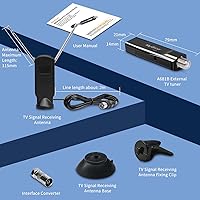
  • Dimensions: The device measures 6.89 x 5.04 x 1.77 inches, including the antenna and housing.
  • Weight: Weighs 4.6 ounces, making it light enough to carry daily in a laptop bag without added bulk.
  • Color: Available in black only.
  • Supported Regions: Designed for use in the United States, Canada, Mexico, and South Korea where ATSC broadcast standards apply.
  • Compatible Devices: Works with Windows desktops, Windows laptops, Android TV boxes, and Android-based car navigation systems.
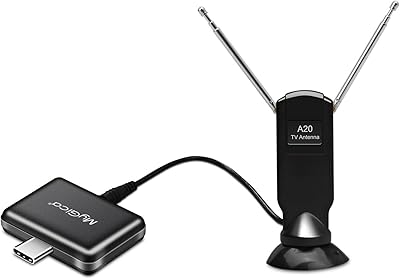
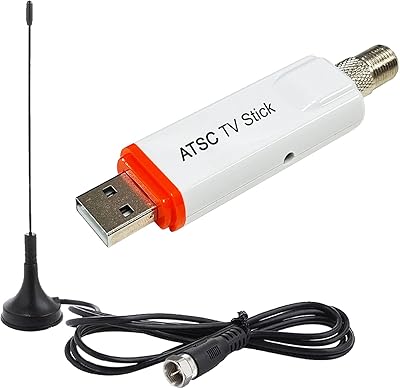
  • Antenna Type: Includes a bundled external antenna; an upgraded indoor or outdoor antenna is recommended for weak-signal environments.
  • First Available: This model was first listed for sale on February 4, 2021.

Related Reviews

MyGica PT681 USB TV Tuner
62%
74%
Value for Money
47%
Device Compatibility
53%
Signal Reception & Channel Scanning
51%
App Quality & Stability
67%
Time-Shift & DVR Performance
More
Geniatech MyGica PT682C
70%
71%
Signal Reception Quality
63%
App Experience (PAD TV HD)
66%
Device Compatibility
78%
Ease of Setup
67%
Antenna Performance
More
AllAboutAdapters USB Digital ATSC Clear QAM TV Tuner with HD MPEG DVR Recorder
83%
88%
Performance
91%
Ease of Setup
85%
Recording Quality
87%
Portability
80%
Compatibility with Windows
More
Hauppauge WinTV-SoloHD 01589
80%
88%
Ease of Setup
74%
Signal Reception Quality
61%
Software (WinTV v8)
83%
Picture Quality
82%
Build Quality & Durability
More
Zenith DTT901 Digital TV Tuner Converter Box
81%
88%
Value for Money
93%
Ease of Setup
74%
Signal Reliability
80%
Picture Quality
81%
Remote Control Functionality
More
ZJBOX ATSC Digital TV Converter Box
76%
92%
Value for Money
88%
Ease of Setup
84%
Picture Quality
78%
Recording Functionality (PVR)
61%
User Interface & Menus
More
KOQIT ATSC TV Tuner Digital Converter Box
81%
88%
Performance & Signal Quality
90%
Ease of Setup
87%
Value for Money
80%
Recording Functionality
85%
Design & Portability
More
Hauppauge WinTV-quadHD PCI Express TV Tuner Card 1609
84%
93%
Installation and Setup
89%
Multi-Channel Performance
88%
Video Quality
77%
System Requirements
85%
Build Quality
More
Insignia NS-DXA1 Digital to Analog TV Tuner Converter Box
82%
89%
Ease of Setup
91%
Value for Money
66%
Signal Reception
80%
Build Quality
85%
Audio Quality
More
TBS6902 DVB-S/S2 Dual Tuner PCIe Card
78%
88%
Dual Tuner Performance
76%
Hardware Installation
54%
Software Setup & Configuration
68%
Operating System Compatibility
86%
Recording Reliability
More

FAQ

No, and that is actually one of its main selling points. This USB tuner stick receives free over-the-air broadcast signals through an antenna, so once it is set up, it works completely independent of WiFi or any internet connection. You are essentially pulling in the same signals your antenna-equipped TV would receive.

There is definitely setup involved — do not expect to plug it in and have it work immediately. You will need to download and install the correct driver for your system, then install the HiDTV playback software before the device does anything. For someone comfortable with basic software installation, it takes maybe 30 to 60 minutes. For less tech-savvy users, it can be a genuine stumbling block.

No. The MyGica A681B USB TV Tuner has no macOS support at all — no drivers exist for it, and there is no workaround. If you are on a Mac, this is not the right device for you, and purchasing it will result in a return.
You can receive any free over-the-air broadcast channels available in your area — typically local network affiliates like ABC, NBC, CBS, FOX, and PBS, plus any additional subchannels your regional broadcasters carry. The exact channel count depends entirely on your location and how close you are to broadcast towers.

Honestly, for a lot of users, yes. The bundled antenna is basic and works best when you are relatively close to broadcast towers in an urban area. If you are in a suburban or rural location, or in a building with poor signal penetration, investing in a quality indoor amplified antenna or an outdoor antenna will make a significant difference in reception reliability.

You can record. Once HiDTV is set up correctly, it supports scheduled recording and playback, so you can capture a broadcast and watch it later. It is not a DVR in the traditional sense, but the functionality is there and it works reasonably well once the software is running properly.

Yes, Windows 11 is on the supported list alongside Windows 7 and Windows 10. That said, some users have noted that major Windows updates can occasionally disrupt the driver installation, requiring a reinstall. It is worth keeping that in mind if you update your OS and the device stops working.

It can, but you will need to install the Android version of the HiDTV software on your device. It is not as straightforward as the Windows setup, and compatibility can vary depending on the specific Android version and hardware your TV box uses. If you are comfortable sideloading apps and adjusting settings, it is achievable.

MyGica recommends downloading the latest drivers directly from their official website rather than relying on any included disc. The product description specifically advises reading the electronic instructions from the MyGica site before starting. Downloading directly ensures you get the most current version, which is important for Windows 10 and 11 compatibility.

First, double-check that you installed the correct driver for your specific OS version, as using the wrong driver is a common cause of failure. If everything looks right and it still will not scan channels, check your antenna connection and try a channel scan in a different location in your home. MyGica customer support has been noted as reasonably responsive, so reaching out directly with your system specs and a description of the issue is worth trying before giving up.