Overview

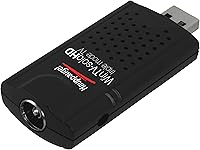
The Hauppauge WinTV-SoloHD 01589 is one of those rare accessories that solves a real problem without making you jump through hoops. Plug it into any spare USB port on a Windows laptop or desktop and you have live Freeview TV on your screen — no engineer visit, no subscription needed. The stick is compact enough to stay permanently attached without getting in the way, barely adding bulk to the side of a laptop. It covers standard Freeview (DVB-T), Freeview HD (DVB-T2), and cable (DVB-C), which handles virtually every free-to-air broadcast scenario in the UK. Having been on sale since 2015 and still carrying over 1,300 genuine buyer reviews, this USB TV tuner has quietly built a solid reputation in its niche.

Features & Benefits

The real appeal of this Freeview HD dongle is how much it delivers without needing a power adaptor or any internal installation. It draws power straight from the USB port, the bundled WinTV v8 software installs without drama, and within minutes you can be browsing an electronic program guide and scheduling recordings. Broadcasts are saved in their original digital format, so there is no quality loss from re-encoding — what you record is exactly what was transmitted. The ability to pause and rewind live TV is genuinely handy when something distracts you mid-programme. Full compatibility with Windows 7 through 10 also means you do not need a brand-new machine to make it work.

Best For

This USB TV tuner is squarely aimed at UK users who want free-to-air Freeview HD without the fuss of a set-top box or a second screen. It makes particular sense for students or home workers using a laptop in a bedroom or study who want the option to catch a programme in the background. The portability is a genuine plus — being just a USB stick, you can move it between a home desktop and a work laptop without any hassle. One thing worth flagging clearly: you do need a TV aerial or cable connection to receive a signal. It does not work over Wi-Fi or through any streaming service, which catches some buyers off guard.

User Feedback

Across more than 1,300 ratings, the WinTV SoloHD stick holds a 4.1-star average, pointing to a broadly positive ownership experience with a few consistent caveats. Most buyers praise the straightforward initial setup and reliable signal reception in areas with decent aerial coverage. Where feedback gets more divided is the WinTV v8 software — it functions well enough, but it looks dated and can be occasionally unstable on Windows 10. Users in weak-signal areas report spotty reception regardless of adjustments. The absence of a remote control is a small but recurring complaint for those using it on a living room PC. On the plus side, long-term owners consistently mention the build quality, noting the dongle holds up well after years of use.

Pros

  • No subscription fees — just plug in and access the full free-to-air Freeview HD lineup.
  • Setup takes minutes; most users are watching live TV before they finish their coffee.
  • Triple-mode tuner handles DVB-T, DVB-T2, and DVB-C from a single compact device.
  • Records TV in original broadcast quality with no re-encoding or picture degradation.
  • Bus-powered design means zero cables, zero adaptors, and zero desk clutter.
  • Wide Windows OS support makes it usable on machines most rivals have quietly dropped.
  • The WinTV SoloHD stick has proven durable over years of daily use for many long-term owners.
  • Pause and rewind live TV without any additional hardware or cloud service required.
  • Compact enough to leave permanently attached to a desktop port without blocking adjacent connectors.
  • A genuinely cost-effective way to bring Freeview HD to a PC with no recurring costs.

Cons

  • The WinTV v8 software interface feels significantly behind modern media application standards.
  • Occasional software crashes after Windows 10 updates remain an unresolved long-term complaint.
  • No official Windows 11 support creates real uncertainty for users on newer systems.
  • Reception quality in weak signal areas is poor, with no built-in amplification to compensate.
  • Scheduled recordings can fail silently after a PC sleep cycle, which undermines reliability.
  • No remote control included, making it awkward to use from any distance beyond arm's reach.
  • Mac and Linux users are entirely unsupported — there is no workaround for non-Windows machines.
  • Customer support response times from Hauppauge draw consistent criticism in user reviews.
  • Third-party software alternatives require additional research and setup to work with the hardware.
  • Useful portability is limited to locations that already have a TV aerial or cable point available.

Ratings

The scores below for the Hauppauge WinTV-SoloHD 01589 were generated by our AI engine after systematically analyzing verified purchaser reviews from multiple global marketplaces, with spam, bot-generated, and incentivized feedback actively filtered out. Each category reflects the genuine consensus of real buyers — the things they praised unprompted and the frustrations they kept coming back to. Nothing has been glossed over; where this USB TV tuner divides opinion, the scores show it.

Ease of Setup
88%
The vast majority of buyers report being up and running within a few minutes of opening the box. Plugging into a USB port, installing the bundled software, and running a channel scan is described as a genuinely painless process even for non-technical users.
A small number of users on fresh Windows 10 installations encountered driver hiccups that required a manual update before the stick was recognised. Those cases were fixable, but they added unwanted friction to what should be a plug-and-play experience.
Signal Reception Quality
74%
26%
In areas with a strong aerial signal, buyers consistently report clean, stable Freeview HD pictures with no dropouts. Users in city centres and well-covered suburban zones are generally satisfied with day-to-day reliability.
Reception performance drops noticeably in rural or fringe coverage areas, and the included hardware offers no amplification to compensate. Several reviewers noted that the same aerial producing a perfect picture on a dedicated set-top box gave inconsistent results with this dongle.
Software (WinTV v8)
61%
39%
The built-in EPG works reliably for browsing schedules and setting recordings, and the time-shifting features — pause, rewind, record — all function as advertised for most users running compatible Windows versions.
The interface looks and feels like it was designed in the mid-2000s, and that is not charming retro — it is genuinely clunky. Occasional crashes and instability on Windows 10, particularly after OS updates, are the single most common complaint across long-form reviews.
Picture Quality
83%
When conditions are right, the HD output is sharp and natural-looking on a PC monitor. Buyers appreciate that recordings are stored in their original broadcast format, so replayed content looks exactly as it did live without any compression artefacts.
Picture quality is entirely dependent on your aerial signal — the tuner itself introduces no processing to compensate for a weak feed. On standard-definition channels in DVB-T mode, quality is adequate but unremarkable compared to a dedicated HD display.
Build Quality & Durability
82%
18%
Long-term owners repeatedly highlight the sturdiness of the stick itself. Several reviewers mention using the same unit for three or more years without any hardware failure, which is a credible indicator of reliable construction for a small peripheral.
The plastic casing can feel lightweight in hand, giving a first impression that does not fully match its actual durability. The USB connector shows minor wear over time if the stick is frequently swapped between machines.
Portability
91%
Being roughly the size of a large USB flash drive, this Freeview HD dongle slips into a laptop bag without a second thought. Users who regularly work across multiple locations find the ability to move it between machines genuinely convenient.
Portability is only useful if you have an aerial connection at your destination — something easy to forget. Without a roof aerial or cable point, the stick is dead weight, which limits its real-world portability to fixed indoor environments.
Value for Money
79%
21%
For a one-off outlay with no ongoing subscription, the WinTV SoloHD stick offers access to the full Freeview HD lineup on a PC, which buyers working from home or studying find an easy case to justify. There are no hidden costs after purchase.
At its price point, some buyers feel the dated bundled software lets down an otherwise competent hardware package. A handful of reviewers noted that third-party tuners at a similar price now ship with more polished applications, making the value equation less clear-cut than it once was.
OS Compatibility
77%
23%
Official support spanning Windows 7 through 10 is broader than many rivals, making this a practical choice for anyone running an older machine who does not want to upgrade their OS just to watch TV.
There is no native support for Windows 11, and while some users report it working under the newer OS, Hauppauge does not officially certify it. Mac and Linux users are entirely unsupported, which is a hard wall for a portion of the audience.
Power & Convenience
89%
Drawing power directly from the USB port means no wall adaptor, no cable clutter, and no hunting for a spare socket. For laptop users particularly, this keeps the setup clean and entirely self-contained.
On older machines or USB hubs with limited power delivery, a small number of users have reported intermittent disconnections linked to insufficient USB bus power. It is rare, but worth knowing if your machine is getting on in years.
Channel & Format Coverage
86%
Triple-mode support across DVB-T, DVB-T2, and DVB-C gives this dongle broader compatibility than many single-mode rivals. UK users get the full free-to-air Freeview HD channel set, and cable subscribers have the option to use the same hardware for their service.
There is no satellite (DVB-S) support, which rules it out for Freesat users. International buyers outside DVB broadcast regions will find no use for this hardware at all, making it a product firmly rooted in the UK and European markets.
Recording Functionality
81%
19%
Scheduled recordings via the EPG work consistently for most users, and the original-quality capture is a genuine differentiator for anyone who cares about archiving content without quality loss. The time-shifting feature holds up well in normal daily use.
The recording scheduler can occasionally miss a programme after a Windows sleep-wake cycle, which has frustrated users who relied on it for overnight recording. This is a software-side issue rather than a hardware one, but it affects real-world reliability.
Physical Footprint
93%
The stick barely registers when plugged into the side of a laptop — it does not obstruct adjacent ports and does not run noticeably warm during extended use. Reviewers who keep it permanently attached to a desktop have no complaints about desk clutter.
The compact size, while largely a plus, does mean there is no space for an integrated antenna booster or extension cable socket. In marginal signal areas, the only workaround is an external powered amplifier, which adds cost and complexity.
Documentation & Support
58%
42%
Basic setup instructions are included, and Hauppauge does maintain a support website with driver downloads and FAQ articles that are useful for common issues. Community forums also carry a reasonable amount of troubleshooting advice accumulated over years.
The printed documentation is minimal, and Hauppauge customer support response times draw criticism in a recurring thread of reviews. Users hitting edge-case driver issues on Windows 10 often find themselves relying on community forums rather than official channels.

Suitable for:

The Hauppauge WinTV-SoloHD 01589 is a strong fit for UK-based Windows users who want to add live Freeview HD to a laptop or desktop without any internal hardware changes or ongoing subscription costs. Students living in rented accommodation, where drilling for a satellite dish is off the table, will appreciate that all they need is a TV aerial socket and a spare USB port. Home workers who want a second screen running live news or background TV during the day will find the setup refreshingly low-effort. It also suits anyone with an older Windows machine — the broad compatibility stretching back to Windows 7 means you do not need modern hardware to make it work. If you already move between a home office desktop and a portable laptop, the fact that this Freeview HD dongle weighs almost nothing and fits in a pocket makes it a genuinely practical tool to carry between locations.

Not suitable for:

The Hauppauge WinTV-SoloHD 01589 will frustrate buyers who do not have a working TV aerial or cable point at their intended location — and that catches more people off guard than you might expect. It is strictly a Windows product, so Mac and Linux users can rule it out entirely, and those who have moved to Windows 11 are in uncertain territory given the lack of official certification for that OS. Anyone living in a rural or fringe Freeview coverage area should think carefully before buying, since weak signal performance is a recurring pain point that no software update will fix. Users hoping for a polished, modern viewing experience should also temper expectations — the bundled WinTV v8 software is functional but visually dated, and it has a track record of instability after Windows updates. If you want to watch satellite channels, stream from the internet, or control playback from the sofa with a remote, this USB TV tuner simply is not built for those scenarios.

Specifications

  • Brand: Manufactured by Hauppauge, a long-established specialist in PC TV tuner hardware.
  • Model Number: The exact model designation is 01589, sometimes referenced alongside the WinTV-SoloHD product line name.
  • Form Factor: Compact USB 2.0 stick design requiring no internal installation or external power supply.
  • Dimensions: The stick measures 3.15 x 1.57 x 0.79 inches, small enough to remain permanently attached to most laptops.
  • Weight: The unit weighs 4.1 ounces, making it light enough to carry daily without any meaningful added bulk.
  • Tuner Type: Triple-mode tuner supporting DVB-T (standard Freeview), DVB-T2 (Freeview HD), and DVB-C (digital cable) broadcast standards.
  • Connector: USB 2.0 Type-A connector provides both the data interface and all required operating power from the host machine.
  • Power Source: Bus-powered via USB — no wall adaptor, external cable, or separate power source is required during operation.
  • Compatible OS: Officially supported on Windows 7, Windows 8, Windows 8.1, and Windows 10 in both 32-bit and 64-bit editions.
  • Bundled Software: Includes the WinTV v8 application, which provides live viewing, an Electronic Program Guide, and scheduled recording functionality.
  • Recording Quality: TV programmes are recorded in their original digital broadcast format with no transcoding or quality reduction applied.
  • Time-Shifting: The WinTV v8 software supports pausing and rewinding live TV without any additional hardware or subscription service.
  • Remote Control: No remote control is included in the box; all functions are operated via the WinTV software on-screen interface.
  • Aerial Required: A standard TV aerial (for Freeview) or a cable connection (for DVB-C) must be connected to receive any broadcast signal.
  • Color: The unit is finished in black and has a plain utilitarian appearance with no indicator lights on the casing.
  • In The Box: The package contains the USB 2.0 stick only; no aerial adapter, remote control, or extension cable is included.
  • First Available: The product was first listed for sale in September 2015 and has remained in continuous production since that date.
  • Satellite Support: DVB-S and DVB-S2 satellite standards are not supported; this tuner is designed exclusively for terrestrial and cable reception.

Related Reviews
Hauppauge WinTV-dualHD
71%
83%
Ease of Setup
61%
Signal Reception & Sensitivity
86%
Dual Tuner Performance
74%
WinTV v10 Software Quality
68%
Plex Media Server Integration
More
Hauppauge WinTV-quadHD PCI Express TV Tuner Card 1609
84%
93%
Installation and Setup
89%
Multi-Channel Performance
88%
Video Quality
77%
System Requirements
85%
Build Quality
More
Hauppauge ImpactVCB-e 1381
72%
83%
Driver Installation
79%
Analog Signal Quality
51%
OS Compatibility
74%
Build Quality
81%
CPU Overhead
More

FAQ

You do need a physical TV aerial or cable connection — there is no Wi-Fi reception built in. The stick tunes actual broadcast signals, so without a coaxial aerial socket to plug into, it will not receive anything. This surprises quite a few buyers, so it is worth confirming your room has an aerial point before ordering.

Hauppauge officially supports Windows 7 through 10, and Windows 11 is not on the certified compatibility list. Some users have reported it working under Windows 11 anyway, but you would be operating outside the guaranteed support envelope. If you rely on it for regular recordings, that uncertainty is worth factoring in.

No — the Hauppauge WinTV-SoloHD 01589 is a Windows-only product. There are no official Mac or Linux drivers, and while some determined Linux users have explored third-party driver options in community forums, there is no supported or reliable path for non-Windows platforms.

It is genuinely straightforward. You plug the stick into a USB port, install the bundled WinTV v8 software from the included media or Hauppauge's website, and run an automatic channel scan. Most users are watching live Freeview within ten minutes. You do not need to adjust any settings manually in the typical case.

It runs entirely off USB bus power — no adaptor needed. For the vast majority of modern laptops and desktops this works without any issues. On older machines with low-power USB ports or passive USB hubs, a very small number of users have reported occasional disconnections, but this is uncommon.

Yes, recording is a core feature of the bundled software. Programmes are saved in their original digital broadcast format, which means HD recordings are stored at full HD quality with no re-encoding or compression added. You schedule recordings directly through the built-in Electronic Program Guide.

The WinTV v8 software is functional and covers everything you need — live viewing, recording, scheduling, and time-shifting. The honest caveat is that the interface looks dated compared to modern media apps, and it has a history of occasional instability after Windows 10 updates. Some users prefer to pair the hardware with third-party applications like MediaPortal or Kodi with the appropriate plugin, which involves a bit more setup but gives a more polished result.

In areas with good Freeview HD coverage, yes — the WinTV SoloHD stick supports DVB-T2, which is the standard used to broadcast all Freeview HD channels in the UK. Reception quality depends entirely on your aerial signal strength, so if your location has a weak Freeview signal, some HD channels may be unreliable or absent regardless of the hardware.

You can move it between machines freely — there is no hardware lock or single-device activation. You would need to install the WinTV software on each computer you want to use it with, but that is a straightforward process. Many buyers specifically choose this Freeview HD dongle because it works across their home desktop and their laptop.

None at all. Freeview is a free-to-air service funded by the BBC licence fee and advertising, so once you have the hardware there are no subscription charges, no monthly fees, and no account to register for basic channel access. The only recurring cost to be aware of is the TV licence, which you need to hold if you watch or record live TV in the UK — but that applies to any TV-viewing device, not specifically to this tuner.