Overview

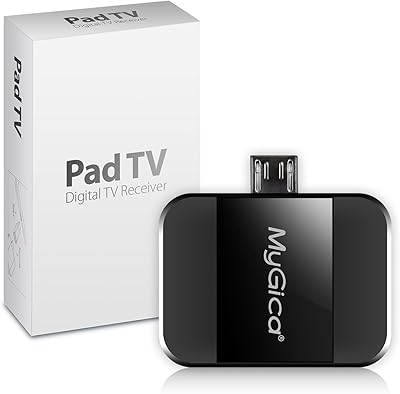
The Geniatech MyGica PT682C is a small USB-C dongle that lets Android phone and tablet users watch free over-the-air TV — no data plan, no Wi-Fi, no subscription required. Geniatech has been building digital TV receiver hardware for years, and this tuner sits in an accessible price range that makes cord-cutting realistic for most people. It works through the PAD TV HD app, which you download from the Play Store, giving you live viewing, pause, and recording capabilities. If you commute, travel frequently, or live somewhere with unreliable connectivity, this USB-C TV tuner was essentially built with you in mind.
Features & Benefits

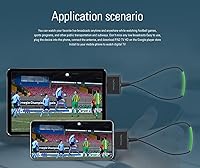
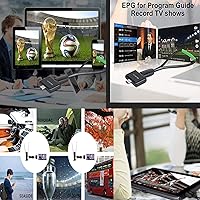
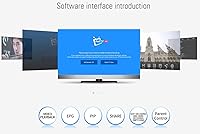
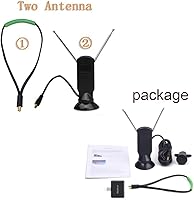
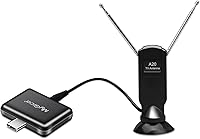
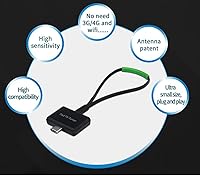
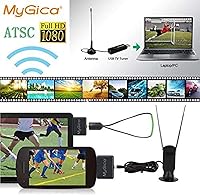
Plug this portable TV adapter into your Android phone or tablet and it is ready to go — no driver installation, no configuration headaches. The included rope-style antenna picks up ATSC broadcast signals, so you are pulling in local channels through the air rather than burning through mobile data. Inside the PAD TV HD app, you get a proper electronic program guide, picture-in-picture support, parental controls, and the ability to record directly to your device storage. One caveat worth knowing upfront: Samsung smartphones are explicitly excluded from compatibility. The dongle weighs just over two ounces, so it tucks into any pocket or bag without adding meaningful bulk.

Best For

This portable TV adapter is a natural fit for cord-cutters on a budget who want local broadcast channels — news, network shows, and live sports — without paying monthly for a streaming service. Commuters riding buses, trains, or subways through areas with decent broadcast coverage will find it genuinely useful. Sports fans wanting to catch a local game without a cable subscription or a reliable data connection are another obvious audience. It also works well for Android tablet owners who want a second-screen TV experience at home or on the road. Rural users where streaming constantly buffers may appreciate having a reliable fallback that does not depend on connectivity at all.

User Feedback

Reception is where opinions on the MyGica tuner dongle tend to split. Urban users near strong broadcast towers generally report solid channel counts and stable signals, while suburban and rural buyers see mixed results depending on antenna placement and local topography. The PAD TV HD app earns praise for its feature set, but some users note the interface feels dated and occasional crashes are not unheard of. Build quality is described as functional rather than premium — the dongle feels light, though no one has flagged serious heat issues during extended use. The confirmed Samsung incompatibility has frustrated buyers who missed that detail before purchasing. Overall, satisfaction tracks closely with signal strength in your specific area.

Pros

  • Watch free local TV on your Android device without using a single megabyte of mobile data.
  • Plug-and-play setup means most users are watching live TV within minutes of unboxing.
  • The MyGica tuner dongle is light enough to forget it is in your bag until you actually need it.
  • Live pause and recording let you time-shift broadcasts without any cloud service or subscription.
  • A one-time purchase with no recurring fees makes it an easy financial decision for budget-conscious buyers.
  • Works reliably across a wide range of non-Samsung Android phones and tablets without driver installs.
  • EPG and PIP support inside the companion app add genuine usability beyond basic channel surfing.
  • Urban users near strong broadcast towers consistently report a healthy channel count and stable pictures.

Cons

  • Samsung smartphone owners are completely locked out — no exceptions, no workarounds reported.
  • Reception quality varies so dramatically by location that it is essentially impossible to predict before purchase.
  • The PAD TV HD app feels dated and has a documented history of occasional crashes on newer Android builds.
  • The bundled rope antenna struggles in weak-signal areas, often requiring awkward positioning just to hold a picture.
  • Channel lineup is limited to whatever local ATSC broadcasters are transmitting — no streaming, no on-demand content.
  • App dependency introduces a long-term risk: an abandoned or broken app update could render the hardware useless.
  • The USB-C connector tolerance is inconsistent, and some users report a loose fit in certain phone ports.
  • No automated recording scheduler or storage management tools, making regular recording use cumbersome.

Ratings

Our AI rating system analyzed verified global user reviews for the Geniatech MyGica PT682C, actively filtering out incentivized, spam, and bot-generated feedback to surface what real buyers actually experienced. The scores below reflect both the standout strengths and the honest friction points of this portable ATSC TV tuner, so you can make a genuinely informed decision. Across reception performance, app usability, and device compatibility, the picture is nuanced — and we have not glossed over the rough edges.

Signal Reception Quality
71%
29%
Users in urban areas with strong broadcast towers consistently pull in a solid channel lineup with stable signals, making this USB-C TV tuner a reliable option for city commuters. Several reviewers noted they could pick up 20 or more local channels when positioned near a window.
Suburban and rural users report a much spottier experience — weaker signals drop out on moving vehicles, and the compact rope antenna struggles in fringe coverage zones. Reception quality is genuinely location-dependent, which makes it hard to predict performance before you buy.
App Experience (PAD TV HD)
63%
37%
The PAD TV HD app covers the bases well for a free companion app — channel scanning is straightforward, the EPG loads reliably, and features like PIP and recording are functional without requiring any technical setup. For most casual viewers, it gets the job done.
The interface feels noticeably dated, and a subset of users report intermittent crashes, particularly on newer Android versions. Some buyers found the initial scan and channel setup more finicky than the plug-and-play marketing implies, requiring multiple rescans to populate all available channels.
Device Compatibility
66%
34%
Across a broad range of Android phones and tablets from brands like LG, Motorola, and Xiaomi, this portable TV adapter connects and runs without needing sideloaded drivers or manual configuration. Tablets in particular tend to work well, offering a better screen for watching local broadcasts.
The Samsung exclusion is a real and confirmed limitation — multiple buyers who missed the fine print discovered their Galaxy devices simply would not work, with no viable workaround reported. Even among supported brands, a handful of users encountered USB-C port recognition issues depending on the Android build.
Ease of Setup
78%
22%
For the majority of compatible Android devices, setup is genuinely fast — plug in the dongle, download the app, run a channel scan, and you are watching live TV within a few minutes. No PC, no driver downloads, and no account registration required.
The app discovery step is not automatic, which trips up less tech-savvy users who expect the device to prompt them. A small number of reviewers also found the antenna connection finicky, with the rope-style antenna needing careful positioning to hold a stable signal.
Antenna Performance
67%
33%
The included rope-style antenna is compact and travels well, which is a practical advantage for commuters tossing this into a bag. In strong-signal environments it performs adequately for a bundled accessory at this price point.
It is clearly the weak link in the hardware chain. Users in moderate or weak signal areas found themselves holding the antenna at odd angles or propping it against a window to maintain reception, and a number of buyers opted to pair the tuner with a separate amplified antenna for better results.
Portability & Form Factor
88%
At just over two ounces, the MyGica tuner dongle barely registers in a bag or jacket pocket. The compact build is one of its most consistently praised physical traits — reviewers frequently highlight how little space it takes up compared to older bulkier tuner solutions.
The light plastic housing does not inspire premium confidence, and a few long-term users noted wear on the USB-C connector after months of daily insertion and removal. It is durable enough for casual use, but heavy daily commuters may want to handle it with some care.
Live TV Recording
72%
28%
Recording live ATSC broadcasts directly to on-device storage is a genuinely useful feature that separates this tuner from basic stream-only dongles. Commuters who want to catch the evening news on their lunch break and watch it later found this function worked reliably when the signal was strong.
Recording quality is tied directly to signal strength — pixelated or dropped recordings were reported when reception was weak. Storage management is also manual, and the app offers no automated cleanup or scheduling tools, which can frustrate users who record frequently.
Value for Money
74%
26%
For buyers in urban areas with good broadcast coverage, the value proposition is hard to argue with — free local TV on any compatible Android device, with recording and EPG included, at a one-time mid-range price. No monthly fees changes the calculus significantly.
For suburban or rural buyers where reception is weak, the value collapses quickly. If the antenna cannot reliably pull in channels in your area, the entire use case falls apart, and there is no money-back guarantee tied to reception quality.
Build Quality
61%
39%
The dongle is functional and adequately assembled for the price tier. Users who treat it as a supplementary travel accessory rather than a daily-driver device generally report it holding up fine over several months of use.
The materials feel budget-grade, and the USB-C connector tolerance is tighter than ideal — some users reported the dongle feeling loose in certain phone ports. A few extended-use reviews flagged minor heat buildup during prolonged viewing sessions, though nothing reported as unsafe.
EPG & Channel Guide
69%
31%
The electronic program guide loads current broadcast schedules and works as expected for navigating live TV options. Users who primarily watch local news and network sports found it sufficient for planning what to watch without hunting through channels manually.
EPG data can be slow to refresh and occasionally shows incomplete or mismatched program information, depending on the broadcaster. It is not on par with what cable or smart TV guides offer, and users with higher expectations for guide accuracy were occasionally disappointed.
Streaming Independence
91%
The ability to watch live TV without touching mobile data is the single most praised aspect across all user demographics. Commuters on the subway, travelers in low-coverage areas, and users on capped data plans all called this out as the reason they bought the tuner in the first place.
The trade-off is that you are limited to whatever ATSC broadcast channels are available in your area. There is no catch-up TV, no on-demand content, and no way to expand the channel selection beyond what your local towers are transmitting.
Picture-in-Picture (PIP)
64%
36%
PIP support inside the companion app is a welcome addition for multitaskers who want to keep an eye on a live game while using other apps. On tablets with larger screens, it works reasonably well and adds genuine utility.
On smaller phone screens, PIP windows become too small to be practically useful, and performance stutters were noted on mid-range Android hardware running PIP simultaneously with other background tasks. It is more of a nice-to-have than a core feature.
Parental Controls
58%
42%
The presence of parental controls is a thoughtful inclusion for families using this as a household tablet TV solution. The basic PIN-lock functionality works as described and gives parents a layer of content management without needing third-party apps.
The implementation is basic at best — it lacks per-channel granularity and relies entirely on a simple passcode that older children could circumvent. Users expecting robust parental filtering comparable to smart TV platforms will find it underwhelming.
Long-Term Reliability
59%
41%
A portion of buyers who have used the MyGica tuner dongle for over a year report it still functioning without hardware failure, which is a reasonable baseline for the price. For occasional use during commutes or travel, it holds up adequately.
Longer-term reviews are mixed, with some users reporting app compatibility issues after Android OS updates that required waiting for an app patch. The dongle hardware itself is rarely faulted, but the app ecosystem dependency introduces a longevity risk that hardware-only products do not have.

Suitable for:

The Geniatech MyGica PT682C is a solid pick for Android users who want access to free local broadcast channels without touching their mobile data or relying on a Wi-Fi connection. Commuters who ride buses, trains, or subways through areas with decent broadcast coverage will get the most out of it — the ability to catch live news or a sports game during a daily commute, without eating into a data plan, is genuinely practical. It also makes sense for cord-cutters who primarily want local network channels and do not need a sprawling streaming library, especially if they already own an Android tablet that could double as a portable TV. Budget-conscious sports fans who want to watch local games live without a cable subscription or a paid streaming tier will find the value proposition compelling. Rural users who deal with patchy cellular coverage and unreliable broadband can also benefit, since this portable TV adapter operates entirely off broadcast signals that do not depend on any internet infrastructure.
Not suitable for:

The Geniatech MyGica PT682C is a firm pass for anyone using a Samsung smartphone — the incompatibility is confirmed, consistent across user reports, and there are no reliable workarounds. Beyond that, buyers expecting consistent, cable-quality reception regardless of location will likely be disappointed, since performance is heavily tied to proximity to broadcast towers and local geography. If you live in a suburban fringe area or a rural region with weak ATSC signals, the dongle may pull in very few channels, or struggle to hold a stable picture at all. People who want on-demand content, streaming services, or a wide international channel selection should look elsewhere entirely — this USB-C TV tuner only receives what your local broadcast towers are transmitting. Those who are not comfortable navigating Android app stores, running channel scans, or troubleshooting occasional app crashes may also find the setup experience more frustrating than expected.
Specifications

  • Brand: Manufactured by Geniatech under the MyGica product line, a company with an established history in digital TV receiver hardware.
  • Model Number: The exact model designation is PT682C, which identifies this specific USB-C ATSC tuner variant.
  • Connector Type: Uses a USB Type-C connector for direct plug-in to compatible Android phones and tablets without an adapter.
  • Signal Standard: Receives ATSC (Advanced Television Systems Committee) digital broadcast signals, the standard used for over-the-air TV in North America.
  • Internet Required: No internet connection, Wi-Fi, or mobile data is required to receive or watch live broadcast channels.
  • Driver Install: No driver installation is needed; the device is recognized automatically when plugged into a compatible Android device.
  • Companion App: Requires the PAD TV HD app, available as a free download from the Google Play Store, to operate and access all features.
  • App Features: PAD TV HD supports live TV viewing, live pause, recording to local storage, EPG, picture-in-picture, parental controls, and content sharing.
  • Supported OS: Compatible with Android operating systems including Android 10 and later major releases on supported non-Samsung devices.
  • Compatibility: Works with a broad range of Android phones and tablets from major mainstream brands; Samsung smartphones are explicitly not supported.
  • Antenna Type: Includes a compact rope-style antenna designed for portability, intended for use in areas with accessible broadcast tower signals.
  • Weight: The dongle weighs approximately 2.12 oz (60 g), making it lightweight enough for daily carry in a bag or pocket.
  • Color: Available in black only.
  • Recording: Recorded content is saved directly to the Android device's available local or external storage, with no cloud dependency.
  • Market Rank: Ranked #48 in the External TV Tuners category on Amazon, indicating steady buyer interest within its product segment.
  • First Available: This product was first listed for sale on November 26, 2021, and has accumulated a meaningful user review base since launch.

Related Reviews

MyGica PT681 USB TV Tuner
62%
74%
Value for Money
47%
Device Compatibility
53%
Signal Reception & Channel Scanning
51%
App Quality & Stability
67%
Time-Shift & DVR Performance
More
MyGica A681B USB TV Tuner
65%
47%
Ease of Setup
71%
Reception & Signal Quality
76%
Video Quality
58%
Software Experience (HiDTV)
82%
Value for Money
More
Geniatech KloudNote Mini 9.7-inch Android e-Ink Tablet
85%
95%
Battery Life
88%
Stylus Performance
85%
Display Quality
92%
Portability
80%
Cloud Sync Functionality
More

FAQ

Unfortunately, no. The Geniatech MyGica PT682C is explicitly not compatible with Samsung smartphones, and this limitation is confirmed by multiple buyers who tried. There are no known workarounds, so if you own a Samsung phone, this particular tuner is not the right fit.
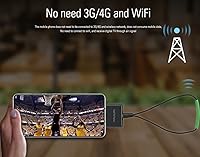
No, that is actually the main reason most people buy this USB-C TV tuner. It pulls in over-the-air ATSC broadcast signals through its antenna, completely independent of any internet connection or data plan. You can watch local channels on a bus, subway, or anywhere with broadcast coverage without touching your mobile data.

You need the PAD TV HD app, which is free to download from the Google Play Store. It handles channel scanning, live viewing, the program guide, recording, and extra features like picture-in-picture. Just search for PAD TV HD after plugging in the dongle and you should be up and running quickly.

That depends almost entirely on where you live and how close you are to broadcast towers. Urban users near strong transmitters commonly report 15 to 30 or more channels, while suburban and rural users may pull in significantly fewer. Before buying, it is worth checking a site like AntennaWeb or TVFool to see what ATSC signals are available in your specific area.

Yes, the PAD TV HD app includes a recording function that saves content directly to your device's local storage. There is no cloud service involved, so make sure you have enough free space on your phone or tablet before you start recording, especially for longer programs.

Yes, and honestly a tablet tends to be the better experience for watching TV on this portable TV adapter. As long as your tablet has a USB-C port and runs Android (from a supported non-Samsung brand), it should work. The larger screen makes live TV much more enjoyable, particularly for sports or news.

Some users mention that the dongle warms up during extended viewing sessions, which is typical for compact signal-processing hardware. Nothing reported suggests unsafe heat levels, but if you are watching for several hours straight it may feel noticeably warm to the touch.

This is a legitimate long-term concern with any app-dependent hardware. The tuner itself is just a receiver — without a working companion app, its functionality is limited. A few users have reported needing to wait for app patches after major Android OS updates. It is worth keeping that dependency in mind if long-term reliability matters to you.

The rope-style antenna works adequately in areas with strong broadcast signals, but it is clearly a budget-grade accessory. If you find signal quality disappointing after setup, pairing the tuner with a separate compact amplified antenna is a common and effective upgrade that many buyers recommend.

For most supported Android devices, the process is straightforward: plug in the dongle, download PAD TV HD from the Play Store, connect the antenna, and run a channel scan. The whole thing typically takes under five minutes. That said, a small number of users report needing multiple channel rescans to pick up all available stations, and the app interface is not the most polished, so factor in a small learning curve if you are less comfortable with Android apps.