
Overview

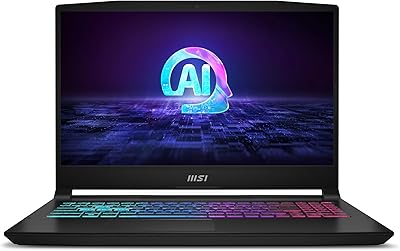
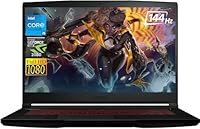
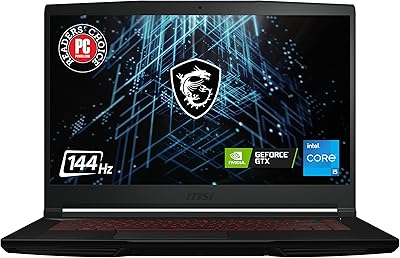
The MSI Thin 15.6-inch Gaming Laptop sits in an interesting spot — aimed squarely at budget-conscious gamers and students who want real dedicated graphics without lugging around a thick, heavy rig. Unlike most competitors in this price range, this MSI Thin laptop arrives in a slim aluminum chassis with a thin-bezel display that looks more polished than you might expect. The RTX 2050 is a genuine step above integrated graphics, though it sits below the RTX 3060 and 4060 tier, so expectations need calibrating accordingly. Practical touches like Wi-Fi 6 and Windows 11 Home pre-installed make it feel ready out of the box. The 8GB RAM baseline, however, is worth addressing honestly — workable today, but tight for heavier workloads.

Features & Benefits

The i5-12450H's eight cores handle gaming and everyday multitasking without complaint, and its clock speed headroom means it rarely bottlenecks the GPU in lighter titles. The RTX 2050 with 4GB GDDR6 delivers comfortable 1080p frame rates in esports games and holds its own in less demanding AAA titles at medium settings — ray tracing is technically supported, though enabling it will cost you frames. The 144Hz display is genuinely one of the strongest selling points; fast-paced shooters feel noticeably sharper compared to a standard 60Hz panel. Add a 1TB NVMe SSD for quick load times, a well-rounded port selection including USB-C and Ethernet, and a backlit keyboard, and the daily-use package comes together quite well.

Best For

This budget gaming laptop makes the most sense for college students who need a capable daily machine that can handle gaming sessions in the evenings. If you're coming from console and want to step into PC gaming without spending a fortune, the MSI Thin 15 handles popular esports titles like Valorant, CS2, and League of Legends at high frame rates with ease — and the 144Hz panel makes that noticeably better. It also suits remote workers or students who spend long hours in productivity apps and want occasional gaming on the side. Anyone who values a thinner, lighter form factor over raw power will feel comfortable carrying this between classes or meetings without second-guessing themselves.

User Feedback

Owners of the MSI Thin 15 tend to praise the display quality and build for the price — many are genuinely surprised by how solid it feels compared to plastic-heavy competitors. On the critical side, 8GB RAM surfaces frequently as a sticking point; buyers report it starts feeling restrictive with 2024 titles, though the RAM is upgradeable, which softens that concern. Thermals are a real conversation point — under extended gaming sessions, the fans get loud and some users mention thermal throttling during prolonged loads. Battery life draws complaints too; real-world runtime under gaming conditions is modest, as expected for this category. Most buyers still walk away feeling the overall value holds up, especially for light-to-moderate gaming use.

Pros

  • The 144Hz FHD display punches well above its price tier, making fast-paced games feel noticeably fluid.
  • Slim aluminum chassis looks and feels more premium than most budget gaming laptops in this range.
  • The RTX 2050 handles 1080p esports titles confidently, with smooth frame rates in popular competitive games.
  • Wi-Fi 6 support means stable, fast wireless connections even in congested dorm or apartment environments.
  • A 1TB NVMe SSD keeps game and app load times quick without the sluggishness of older HDD-based systems.
  • RAM is upgradeable up to 40GB, giving buyers a clear path to extend the machine's lifespan affordably.
  • The i5-12450H holds up well for multitasking, web browsing, and everyday productivity alongside gaming.
  • Port selection is practical and complete, with USB-C, dual USB-A, Ethernet, and a headphone jack all included.
  • At 4.1 pounds, this budget gaming laptop is genuinely portable compared to thicker gaming alternatives.
  • Windows 11 Home comes pre-installed, meaning no extra setup cost or license purchase on day one.

Cons

  • 8GB RAM is the baseline and starts feeling restrictive with newer, memory-hungry games and applications.
  • The RTX 2050 struggles at high or ultra settings in demanding AAA titles released in recent years.
  • Fan noise under sustained gaming loads is noticeable and can be distracting in quiet environments.
  • Thermal throttling has been reported during extended heavy sessions, which can affect consistent performance.
  • Battery life under gaming conditions is short, making a power outlet a near-constant necessity for gaming.
  • The 4GB VRAM on the RTX 2050 limits texture quality options and longevity as games grow more demanding.
  • No Thunderbolt support on the USB-C port limits connectivity for high-bandwidth peripherals and external GPUs.
  • The display, while fast, lacks color accuracy refinements that creative professionals or media editors would want.

Ratings

The scores below for the MSI Thin 15.6-inch Gaming Laptop were generated by our AI system after analyzing thousands of verified buyer reviews from global markets, with spam, bot activity, and incentivized feedback actively filtered out. The results reflect a balanced picture — where this budget gaming laptop genuinely delivers, and where real owners have run into friction. Both strengths and honest pain points are represented in every category.

Gaming Performance
72%
28%
For esports-focused gaming, the RTX 2050 and i5-12450H combination handles Valorant, CS2, and Apex Legends with comfortable frame rates that make the 144Hz panel feel well-utilized. Users transitioning from console consistently report being impressed by how smooth competitive titles feel at 1080p on this machine.
Buyers who pushed into demanding AAA titles like Cyberpunk 2077 or newer open-world games hit a clear ceiling quickly, with the RTX 2050 requiring medium or low settings to stay playable. The 4GB VRAM limit starts showing in memory-intensive scenes, which frustrated users expecting more headroom from a dedicated GPU.
Display Quality
83%
The 144Hz refresh rate is the standout feature most buyers mention first — fast-paced shooters and even everyday scrolling feel noticeably smoother than on a standard 60Hz panel. Brightness and color reproduction are solid for the price tier, and the thin bezels give the screen a more premium look than similarly priced competitors.
While the 144Hz rate impresses, the panel lacks the color accuracy or contrast depth that creative users or media enthusiasts expect. A handful of users noted that the display can appear slightly washed out at wider viewing angles, which becomes noticeable when sharing a screen.
Build Quality
81%
19%
The aluminum hairbrush chassis consistently surprises buyers who expect a plasticky feel at this price point — it feels sturdy in hand and holds up well to daily commuting in a backpack. Most owners describe it as looking more expensive than it actually is, which goes a long way for students using it in public settings.
While the lid and base feel solid, some users noted minor flex in the keyboard deck under firm typing pressure, and the hinge mechanism feels slightly looser than premium-tier laptops. It is not a dealbreaker, but buyers accustomed to ThinkPad or MacBook rigidity will notice the difference.
RAM & Multitasking
58%
42%
For lighter multitasking — a few browser tabs, Discord, Spotify, and a game running simultaneously — the 8GB DDR4 manages adequately without obvious stuttering. The fact that the system supports upgrades up to 40GB is a meaningful safety net that more experienced buyers appreciate.
8GB RAM in 2024 is genuinely limiting, and users who game while keeping background apps open reported frequent slowdowns and longer load times in newer titles. Several buyers specifically called out that they had to upgrade RAM within months of purchase, adding an unplanned cost to the overall investment.
Thermal Management
61%
39%
During light to moderate workloads the laptop stays reasonably cool, and the thin chassis does a respectable job under typical daily use scenarios like classes, browsing, and light gaming sessions. Users running esports titles at normal settings rarely reported discomfort from heat.
Under sustained heavy gaming loads, thermal throttling becomes a real issue — several users noted performance dips during long sessions as the thin chassis struggled to dissipate heat effectively. Fan noise under load is loud enough that many users default to wearing headphones, which is a recurring complaint in reviews.
Battery Life
46%
54%
For low-intensity tasks like note-taking, video streaming, or writing, the battery manages a few hours of reasonable use, which covers a short class or a commute. Users who keep the machine plugged in at a desk for most of its life rarely raise battery as a concern.
Gaming on battery is essentially not viable — users report 1.5 to 2 hours under load before needing a charger, which means this machine is fundamentally desk-bound for gaming. Even for everyday productivity tasks, runtime falls short of what students carrying it across a full day of classes would hope for.
Value for Money
78%
22%
When the price is weighed against the combination of a 144Hz display, a discrete RTX 2050, Wi-Fi 6, and a 1TB NVMe SSD, most buyers agree this MSI Thin laptop offers a competitive package for the money. Students and first-time PC gamers especially feel they got a solid starting point without overspending.
Buyers who were not upfront with themselves about the machine's limitations — particularly around RAM and AAA gaming — reported feeling let down by the value after a few months. The cost of an immediate RAM upgrade dilutes the initial price advantage somewhat for users who need more than the base 8GB right away.
Portability
84%
At 4.1 pounds and under an inch thick, this budget gaming laptop travels noticeably lighter than most gaming-focused machines, making it a practical fit for students commuting between campus buildings or remote workers moving between home and coffee shops. The slim profile fits neatly into standard laptop sleeves and backpacks without bulk.
While lighter than traditional gaming laptops, the charger itself is relatively large and adds weight to a travel bag, which offsets some of the portability benefit. A few users also noted that the thin profile means fewer cooling vents, which connects back to the thermal concerns under heavy load.
Keyboard & Typing Experience
74%
26%
The backlit keyboard is comfortable for extended typing sessions — key travel feels adequate, and the backlighting is even enough to be useful in dim lecture halls or evening gaming setups. Writers and students who use the machine primarily for coursework often praise the typing feel positively.
The keyboard lacks the tactile feedback depth that enthusiast typists prefer, and the trackpad — while functional — drew criticism for inconsistent click response in some units. There is no dedicated numpad, which is a minor inconvenience for users accustomed to numerical data entry.
Connectivity & Ports
79%
21%
The port layout is practical and well-rounded — having USB-C 3.2, two USB-A ports, a dedicated Ethernet jack, and a combo audio port covers the vast majority of real-world connection needs without relying on a hub. Wi-Fi 6 support means fast and stable wireless in dense network environments like dorms or shared apartments.
The USB-C port does not support Thunderbolt, which limits high-bandwidth use cases like external GPU enclosures or ultra-fast storage devices. There is also no SD card slot, which is a minor but noticeable omission for photographers or students who work with media cards regularly.
Software & Setup
77%
23%
Windows 11 Home comes pre-installed and the out-of-box setup experience is clean — users report being up and running quickly without excessive bloatware or complicated driver installations. MSI Center software gives access to performance profiles and fan control, which more technical users appreciate.
Some users flagged that MSI Center can feel cluttered and pushes software notifications that become mildly annoying over time. A small number of buyers reported needing to manually update GPU drivers immediately after unboxing to resolve minor performance or stability issues in games.
Storage Performance
86%
The 1TB PCIe NVMe SSD delivers fast read and write speeds that make game installations, file transfers, and application launches feel snappy in daily use. Students who carry large project files or gamers with big game libraries especially appreciate having a full terabyte available without immediately needing an external drive.
While the SSD performs well, users who filled up storage quickly noted that the upgrade path, while accessible, requires some technical comfort to execute. There is no dedicated secondary drive bay mentioned in most unit teardowns, meaning storage expansion relies on replacing the existing drive rather than adding to it.
Audio Quality
55%
45%
The built-in speakers are clear enough for casual video calls, YouTube, and background music during light work sessions. For a thin gaming laptop, the audio does not embarrass itself in a quiet room, and the combo headphone jack delivers clean output for wired headsets.
Under gaming conditions or media playback, the speakers lack bass and volume depth, and the sound profile feels thin and slightly tinny at higher volumes. Most users default to headphones almost immediately, which makes the onboard audio a secondary consideration at best for anyone serious about their audio experience.

Suitable for:

The MSI Thin 15.6-inch Gaming Laptop is a strong fit for college students who want one machine that handles coursework, streaming, and casual gaming without weighing down a backpack. If your gaming diet is mostly esports titles — Valorant, CS2, League of Legends, Apex Legends — you will get genuinely smooth performance thanks to the 144Hz display and the RTX 2050 handling 1080p with headroom to spare. Students moving from console to PC gaming for the first time will find this a capable and approachable entry point that does not require a large upfront investment. Remote workers or hybrid students who need reliable daily productivity and want the option to game in the evenings will also get real value here. The slim aluminum build and 4.1-pound weight make it far easier to carry daily than most gaming-focused machines, which is a practical advantage that adds up over time.

Not suitable for:

Serious PC gamers who play demanding AAA titles at high or ultra settings should look elsewhere — the MSI Thin 15.6-inch Gaming Laptop was not built for that workload, and the RTX 2050 with 4GB of VRAM will hit its ceiling quickly in graphically intensive games like Cyberpunk 2077, Alan Wake 2, or Black Myth: Wukong. The 8GB RAM baseline is manageable today but already feels tight in memory-hungry games and creative applications, meaning buyers who do not want to upgrade immediately may find themselves frustrated sooner than expected. Content creators working with video editing or 3D rendering software will find both the GPU and RAM limiting for serious production work. If long unplugged sessions matter to you — long flights, full days in a library without an outlet — battery life under real-world use is modest and unlikely to satisfy. Power users or competitive gamers who need sustained peak performance will also want to consider how the thin chassis handles heat over long sessions, as fan noise and occasional thermal throttling are noted concerns.

Specifications

  • Processor: Intel Core i5-12450H with 8 cores and 12 threads, running up to 4.4GHz under Turbo Boost.
  • Graphics: NVIDIA GeForce RTX 2050 dedicated GPU with 4GB GDDR6 video memory.
  • Display: 15.6-inch Full HD IPS-style panel at 1920x1080 resolution with a 144Hz refresh rate and thin bezels.
  • RAM: 8GB DDR4 SDRAM installed at launch, with the system supporting upgrades up to 40GB total.
  • Storage: 1TB PCIe NVMe SSD providing fast read and write speeds for games, applications, and files.
  • Operating System: Windows 11 Home comes pre-installed out of the box.
  • Wireless: Wi-Fi 6 (802.11ax) and Bluetooth are both supported for wireless connectivity.
  • Ports: Includes 1x USB-C 3.2, 2x USB-A 3.2, 1x Ethernet port, and 1x headphone and microphone combo jack.
  • Weight: The laptop weighs 4.1 pounds, making it relatively portable for a 15.6-inch gaming machine.
  • Dimensions: Measures 14.13 inches long by 9.99 inches wide by 0.85 inches thin.
  • Chassis: Aluminum build with a hairbrush finish and a thin-bezel display surround for a clean, modern look.
  • Keyboard: Full-size backlit keyboard designed for comfortable use during extended gaming or typing sessions.
  • GPU Type: Discrete dedicated graphics card, meaning the RTX 2050 operates independently from the CPU.
  • Release Date: First made available in October 2023.
  • Memory Type: DDR4 SDRAM is the installed memory standard, offering reliable performance for multitasking workloads.
  • Storage Interface: The SSD uses a PCIe solid-state interface, which is significantly faster than older SATA-based drives.
  • USB Standard: All three USB ports support the 3.2 standard, enabling fast data transfers with compatible devices.
  • Screen Resolution: Native resolution is 1920x1080 pixels, which is Full HD and well-suited for 1080p gaming.

Related Reviews
NIAKUN LAITMIN-G5 Gaming Laptop, 15.6-inch, AMD Ryzen 7 5700U, 32GB RAM, 1TB SSD
82%
88%
Performance
92%
Value for Money
65%
Battery Life
87%
Display Quality
80%
Build Quality
More
MSI GV15 15.6″ Gaming Laptop - Intel Core i5-11400H, GTX 1650, 8GB RAM, 256GB SSD
83%
92%
Value for Money
80%
Gaming Performance
88%
Display Quality
85%
Portability
67%
Battery Life
More
MSI Katana A15 AI Ryzen 9 8945HS, 32GB RAM, 1TB SSD, RTX 4070, 15.6″ QHD Gaming Laptop
83%
94%
Gaming Performance
89%
Display Quality
61%
Battery Life
72%
Portability/Weight
88%
Cooling System (Thermals)
More
HP 15.6-inch Laptop 15-ef0021nr, Ryzen 3 3200U, 8GB RAM, 256GB SSD

82%
92%
Value for Money
85%
Performance
83%
Build Quality
89%
Portability
81%
Battery Life
More
Dell Inspiron 3593 15.6-inch Laptop
68%
74%
Everyday Performance
81%
SSD Speed & Storage
52%
Display Quality
63%
Battery Life
57%
Build Quality
More
Bluboon 15.6 Inch Laptop Backpack
84%
89%
Organization & Storage
84%
Comfort & Ergonomics
90%
Portability & Weight
78%
USB Charging Port Convenience
85%
Laptop Protection
More
Vonxury 15.6 Inch Laptop Backpack
87%
92%
Value for Money
89%
Comfort & Ergonomics
88%
Durability & Build Quality
85%
Water Resistance
90%
Storage Capacity & Organization
More
Liokesa 15.6-Inch Laptop Backpack
86%
89%
Value for Money
87%
Comfort and Ergonomics
84%
Durability and Build Quality
92%
Storage and Organization
90%
Water Resistance
More
Kuosdaz S6 Laptop Backpack 15.6″
81%
88%
Overall Design & Aesthetics
79%
Build Quality & Durability
84%
Laptop Protection
86%
Storage & Organization
81%
USB Charging Port
More
MATEIN Rolling Laptop Bag with Lunch Box
77%
86%
Rolling Mobility
91%
Storage & Organization
88%
Laptop Protection
78%
Lunch Box Utility
74%
Handle System
More

FAQ

Good news — the MSI Thin 15.6-inch Gaming Laptop supports RAM upgrades up to 40GB, so you are not locked into 8GB forever. If you find the baseline feeling tight after a year, adding more DDR4 memory is a practical and relatively affordable fix.

It handles them very well. The RTX 2050 paired with the 144Hz display is actually a strong combination for competitive esports titles — you will get high frame rates in games like Valorant, CS2, and League of Legends, and the smooth display makes a noticeable difference in responsiveness compared to a standard 60Hz panel.

It can run them, but you will need to drop settings to medium or even low to maintain playable frame rates in the most demanding titles. The RTX 2050 with 4GB of VRAM hits its ceiling in graphically intensive modern games, so if AAA gaming at high settings is your main goal, a laptop with an RTX 3060 or above would serve you better.

Fan noise is a real consideration with this machine. Under heavy gaming sessions the fans spin up audibly and some users find it noticeable in quiet environments. It is not unusually loud for a thin gaming laptop, but if you are sensitive to fan noise, headphones during gaming sessions will help.

During gaming, battery life is short — expect roughly 1.5 to 2 hours under load, so you will want to stay near an outlet for gaming sessions. For lighter tasks like browsing, writing, or watching video, runtime improves but is still modest compared to ultrabooks. Treat this as a plugged-in machine for gaming and a light-use portable for everything else.

The USB-C port is a USB 3.2 Gen 2 port and supports data transfer and display output, but it does not support Thunderbolt. Charging is handled via the proprietary barrel connector rather than USB-C, so you will need to carry the included charger for power.

Yes, the MSI Thin 15 uses a standard PCIe NVMe M.2 slot, so the SSD can be replaced with a larger drive if you eventually need more storage. The 1TB included is generous for most users at launch, but having the option to upgrade later is a genuine plus.

For a machine in this price range, the aluminum chassis gives it a noticeably more premium feel than plastic-bodied competitors. It is not as rigid as a flagship business laptop, but most users are pleasantly surprised by how sturdy it feels in daily handling and commuting.

Yes — the USB-C port supports display output, and you can also use an HDMI-compatible adapter if needed. The RTX 2050 handles external displays well, making it a decent option for a dual-screen setup at a desk.

It is genuinely one of the more approachable options for that transition. The setup is straightforward, Windows 11 comes pre-installed, and the hardware handles the games most new PC gamers start with — esports titles and mid-tier games — without requiring any immediate upgrades or complicated configuration.