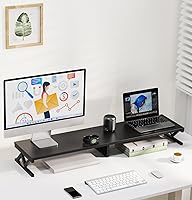
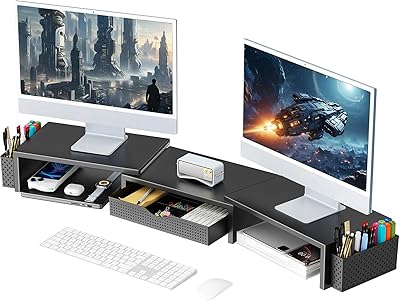
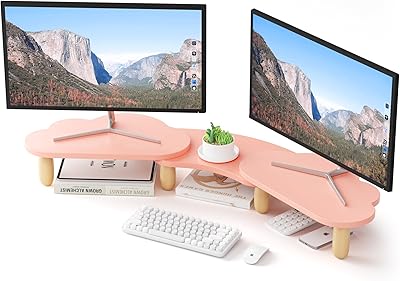
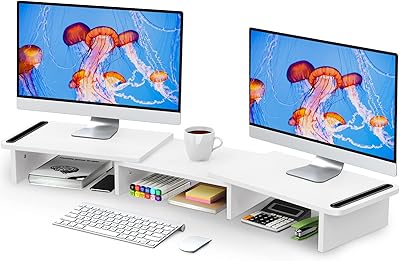
Overview

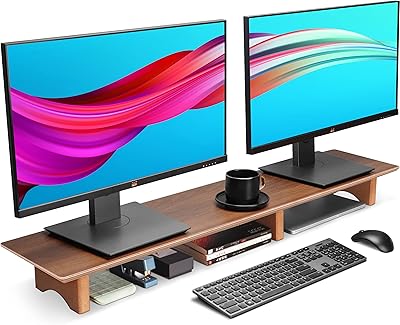
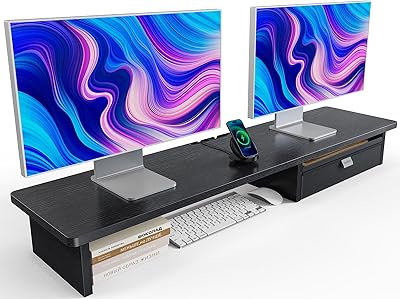
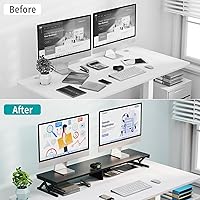
The ErgoFocus Wood Dual Monitor Stand Riser is one of those desk accessories that looks simple on paper but ends up doing more than expected once it is actually sitting under your screens. This is not a premium ergonomics brand play; it is a budget-to-mid-range stand built for people who just need two monitors lifted and organized without spending a lot. The wood-finish top paired with a steel-leg base gives it a warmer look than the usual all-black metal riser, which is a small detail that matters if your desk doubles as a living space. It is built to hold two monitors side by side while opening up real estate underneath, and with hundreds of ratings and a solid category ranking, it has clearly earned some trust from regular buyers.
Features & Benefits

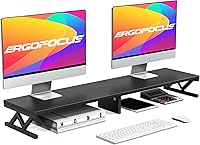
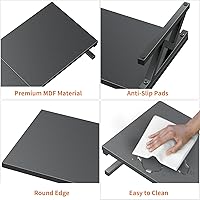
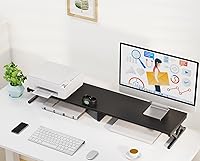
What stands out about this monitor riser is the open storage space underneath, which is large enough for a keyboard, a mouse, a stack of notebooks, or a tablet you do not want cluttering your desktop. The steel legs feel genuinely thick, and they are meant to carry a heavier combined monitor load without flexing or wobbling under normal use. Anti-slip pads come included, and you can install them or leave them off depending on how your monitors sit. Beyond the obvious dual-screen use, this dual-monitor stand quietly works as a printer stand, a laptop riser, or even a TV stand if you need one. Raising your screens closer to eye level also helps with neck and eye strain over long work sessions, and the wood-toned top keeps the whole setup from feeling clinical.

Best For

This desk organizer stand makes the most sense for anyone juggling two monitors on a desk that is already tight on space, since it lifts both screens while reclaiming the surface underneath for actual use. Home office workers who are tired of loose cables and scattered accessories will appreciate having a dedicated storage shelf built in rather than bolting on a separate organizer. It is also a good fit for buyers who want a wood accent instead of another all-black metal-and-glass riser, especially if the rest of the desk setup leans toward a warmer aesthetic. And if you occasionally need a printer stand or laptop riser too, this earns its keep. It is a sensible pick for people who want solid build quality without paying premium prices.

User Feedback

Feedback on this dual-monitor stand tends to land in a pretty consistent place. The steel legs come up again and again as feeling sturdy in real-world use, and the storage area underneath is probably the single most praised feature, since it actually gets used rather than sitting empty. The wood finish also draws regular compliments for blending into home-office decor instead of looking like another gray metal box. On the downside, assembly is required, and a handful of buyers mention it takes longer than expected, though most call it manageable with basic tools. A few reviewers also suggest checking how it handles larger or heavier monitor pairs before loading both screens at once, just to be safe.

Pros

  • The underneath storage area is genuinely useful, not just a marketing bullet point.
  • Steel legs feel sturdy under real-world use, even with two monitors loaded.
  • Doubles easily as a printer stand or laptop riser when you need extra flexibility.
  • Raises screens to a more comfortable eye level, easing neck and shoulder strain.
  • Wood-toned top gives desks a warmer, more furniture-like look than typical metal stands.
  • Anti-slip pads are optional, so you can skip them if your monitors already sit flat.
  • Backed by hundreds of positive ratings and a solid rank in its category.
  • Priced well below premium ergonomic stands while still feeling reasonably well-built.

Cons

  • Assembly is required and takes longer than a quick five-minute setup for most buyers.
  • Heavier or oversized monitor pairs should be checked carefully before fully loading the stand.
  • No height adjustment, so the lift height is fixed once it is assembled.
  • Anti-slip pads need manual installation if you want that extra grip.
  • Only available in one black-and-wood color combination, limiting how well it matches other decor.
  • Underneath storage space is open, not enclosed, so it will not hide everything from view.
  • Package dimensions suggest a compact ship size, so larger components can arrive tightly packed.
  • Not designed as a true sit-stand ergonomic solution for height-adjustable workstations.

Ratings

Every score below for the ErgoFocus Wood Dual Monitor Stand Riser is generated by AI after analyzing verified user reviews from buyers worldwide, with spam, bot activity, and incentivized feedback filtered out before any number is calculated. The goal is a transparent snapshot, so the categories below reflect both the genuine strengths reviewers keep mentioning and the real pain points that come up often enough to matter.
Build Quality & Sturdiness
84%
The steel legs hold up well during everyday typing and mouse use, and reviewers say two monitors loaded side by side does not cause noticeable flex. For a stand in this price range, the frame feels closer to office furniture than a flimsy accessory.
A handful of buyers running larger or heavier displays mention wanting more reassurance about exact load limits before committing both screens to it. Without published weight specs, some shoppers are left estimating rather than confirming capacity.
Storage & Organization
89%
The open shelf underneath regularly gets singled out as the most-used feature, holding a keyboard, mouse, and a stack of notebooks without crowding the desk. It turns dead space under the monitors into something people actually rely on daily.
Because the storage area is open rather than enclosed, smaller items like cables or pens can still look a bit messy if you do not tidy them. It organizes desk clutter, but it does not hide it completely.
Ergonomic Comfort
81%
19%
Lifting both screens closer to eye level is one of the most appreciated effects, with several buyers noting less neck strain after long work sessions. It is a simple height fix that pays off during back-to-back video calls.
The lift height is fixed, so taller or shorter users without an adjustable chair may still need to fine-tune their seating to get the angle right. It helps most people, but it is not a custom fit.
Assembly Experience
71%
29%
Most buyers describe putting it together as straightforward with the included hardware, even for people who do not usually enjoy furniture assembly. A flat surface and a few spare minutes is really all it takes.
A number of reviewers mention the process taking longer than expected, especially when double-checking alignment of the legs. It is manageable, but it is not the five-minute, tool-free setup some shoppers hope for.
Aesthetic & Wood Finish
86%
The stained wood top draws regular compliments for making a desk feel warmer and more put-together than an all-metal stand. It blends into home-office decor in a way that plain black risers usually do not.
Buyers who prefer an all-black or glass-and-metal look may find the wood tone clashes with a more minimalist or industrial setup. It is a style choice, and it will not suit every aesthetic.
Value for Money
88%
Sitting in the budget-to-mid-range tier, it delivers a level of build quality and storage that buyers often compare favorably to pricier ergonomic stands. For the cost, getting both lift and storage in one piece feels like a fair trade.
It does not include premium extras like height adjustment or cable management channels found on higher-end risers. Buyers expecting those features at a similar price point may feel the value gap closes a bit.
Versatility & Multi-Use
79%
21%
Beyond holding two monitors, people use it as a printer stand, a laptop riser, or even a small TV stand without issue. That flexibility makes it useful even if your setup changes down the road.
Its dimensions are tailored to typical monitor pairs, so very large printers or oversized TVs may not sit on it as comfortably. The multi-use angle works best with similarly sized gear.
Stability with Heavier Monitors
67%
33%
With two standard-sized monitors, most buyers report the platform staying level and steady through normal daily use, even during typing and frequent mouse movement. The steel-leg base does most of the heavy lifting here, quite literally.
Reviewers specifically flag checking your monitor's weight before loading two larger or heavier displays at once, since exact load limits are not published. This is the one area where caution is repeated most often in feedback.
Anti-Slip Pad Performance
74%
26%
The included anti-slip pads do a solid job keeping monitors from sliding once installed, which matters if your desk sees any bumps during the day. Being optional also means you can skip them if your monitors already sit flat.
Installing them is an extra manual step rather than something built in from the start, so a few buyers wish they came pre-attached. It is a minor inconvenience rather than a real flaw.
Overall Customer Satisfaction
92%
With hundreds of ratings and a strong average score, buyers consistently come away satisfied with what they get for the price. The combination of lift, storage, and a warmer look seems to land well across a wide range of home office setups.
Satisfaction dips slightly for the small group dealing with heavier monitor pairs or longer-than-expected assembly, though these remain minority experiences rather than common complaints. Even critical reviews tend to stay measured rather than harsh.
Desk Fit & Footprint
77%
23%
The compact footprint works well on standard desks, leaving room on either side for a phone, notepad, or other small peripherals. It does not dominate the desk the way some bulkier, oversized stands tend to.
On smaller desks, the platform combined with two monitors can still use up most of the usable surface, leaving little room to spare. Measuring your desk beforehand helps avoid a tight fit.
Long-Term Durability
73%
27%
Early and longer-term reviews both mention the steel legs holding their shape without sagging or loosening over months of daily use. The wood top also seems to resist scuffing under normal desk activity.
As with most stands in this price range, there is not extensive long-term data beyond a year or so of typical use. Heavy daily repositioning or overloading could shorten its lifespan faster than light, stationary use.

Suitable for:

The ErgoFocus Wood Dual Monitor Stand Riser makes the most sense for people running two monitors on a desk that never has enough surface area to begin with. If you work from home and your setup has slowly accumulated cables, a spare keyboard, sticky notes, and random office supplies, having dedicated storage underneath the screens instead of stacked on top of them is genuinely useful. It also suits buyers who specifically want a wood-toned accent piece rather than yet another black metal or glass riser, especially if the rest of the room leans warmer in style. Anyone who occasionally needs to prop up a printer or use it as a laptop riser gets extra mileage out of the multipurpose design. And because it sits in the budget-to-mid-range price tier, it is a sensible choice for shoppers who want solid build quality without committing to a premium ergonomic brand.
Not suitable for:

The ErgoFocus Wood Dual Monitor Stand Riser is not the right fit for anyone expecting a premium, engineered ergonomic platform with adjustable height or tilt features, since this is a fixed, simpler design built around affordability. Buyers running unusually large or heavy monitor pairs should pause and think carefully, since reviewers specifically flag checking load capacity before stacking both screens on at once. People who dislike any assembly should also temper expectations, as putting this together does take a bit of time and is not quite a five-minute, tool-free setup. If you need a stand that adjusts on the fly for sitting and standing throughout the day, this riser's static design will not keep up. Finally, anyone committed to an all-metal or glass aesthetic may find the wood-toned top clashes with their existing setup rather than complementing it.
Specifications

  • Brand: This stand is manufactured by ErgoFocus, a brand focused on affordable desk and workspace accessories.
  • Material: The riser is built from alloy steel legs paired with a wood top surface.
  • Color: It comes in a single black base with a wood-tone top finish.
  • Finish Type: The wood surface uses a stained or varnished finish rather than raw or painted wood.
  • Monitor Capacity: The platform is sized to hold two monitors side by side.
  • Storage Space: An open shelf area underneath the platform provides room for accessories like a keyboard or notebooks.
  • Base Type: The base uses a leg-style steel assembly rather than a solid platform underneath.
  • Anti-Slip Pads: Anti-slip pads are included in the box and can be installed or left off as needed.
  • Assembly: Some assembly is required using basic tools before the stand is ready to use.
  • Item Weight: The item weighs 8.91 lbs (4.05 kg) as listed by the manufacturer.
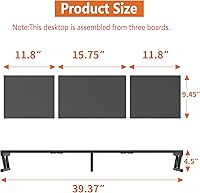
  • Package Dimensions: The product ships in a package measuring 16.89 x 10.55 x 3.62 inches.
  • Shape: The overall form factor is a rectangular prism.
  • Customer Rating: The listing holds a 4.7 out of 5 star rating based on 269 customer ratings.
  • Category Rank: It ranks number 79 in the Computer Monitor Stands category on Amazon.
  • Versatility: Beyond monitors, it can also function as a printer stand, laptop riser, TV stand, or makeup organizer.
  • Batteries: No batteries are required to use this stand.

Related Reviews

AFOOYO Rainbow Cloud Dual Monitor Stand
72%
93%
Aesthetic Design
81%
Build Quality
67%
Assembly Experience
72%
Ergonomic Benefit
76%
Value for Money
More
gianotter D1-2B Dual Monitor Stand Riser
78%
88%
Build Quality
81%
Stability & Wobble Resistance
74%
Storage Functionality
94%
Ease of Setup
67%
Pen Holder Performance
More
Zimilar Z208L-4 Dual Monitor Stand Riser
80%
91%
Value for Money
78%
Build Quality
88%
Aesthetic Design
74%
Adjustability
82%
Stability
More
Aothia 43-inch Large Dual Monitor Stand
81%
88%
Build Quality
71%
Surface Depth & Usability
93%
Width & Dual-Monitor Fit
91%
Weight Capacity
86%
Aesthetic & Finish
More
WESTREE CS3006 Dual Monitor Stand Riser
77%
83%
Build Quality & Sturdiness
78%
Adjustability & Flexibility
81%
Storage Drawer Functionality
86%
Desk Surface Organization
74%
Monitor Compatibility
More
RUILALIFE Dual Monitor Stand Riser with Drawer
74%
72%
Build Quality
68%
Stability & Wobble
83%
Storage Functionality
86%
Adjustability
78%
Ergonomic Lift
More
Mount-It! 39″ Dual Monitor Stand Riser
81%
81%
Build Quality
91%
Surface Width & Capacity
73%
Ergonomic Lift
77%
Under-Shelf Storage
84%
Stability & Anti-Slip Performance
More
Simple Houseware Dual Monitor Stand Riser
80%
91%
Storage Functionality
88%
Adjustable Width
74%
Build Quality
86%
Value for Money
67%
Ease of Assembly
More
HUANUO Dual Monitor Stand Riser with Drawer
79%
83%
Build Quality
88%
Platform Stability
86%
Storage Utility
76%
Ergonomic Benefit
91%
Value for Money
More
MOUNT PRO Freelift Dual Monitor Stand
82%
93%
Height Reach
88%
Ease of Assembly
82%
Gas Spring Performance
79%
Build Quality
71%
Monitor Compatibility
More

FAQ

Most buyers report it takes somewhere in the range of 15 to 30 minutes with basic tools like a screwdriver. It is not complicated, but you will want a clear, flat surface to work on. Once it is together, you will not need to redo it again.

It is designed primarily for two standard monitors side by side, so very large or ultra-wide screens should be measured against the platform size first. Reviewers specifically suggest checking your monitor's weight and footprint before loading two big screens onto it. If you are unsure, comparing your monitor's base dimensions to the platform width is a smart precaution.

Most reviewers describe the steel legs as feeling sturdy under normal use once fully assembled. Like any riser, results can vary slightly depending on your desk surface and how evenly weight is distributed. Using the anti-slip pads can help reduce any minor shifting.

No, they are optional. You can install them if your monitors tend to slide, or skip them entirely if your setup already feels stable.

The open area underneath comfortably fits a keyboard, mouse, a stack of notebooks, or a small tablet. Some buyers also use it for sticky notes and other small desk supplies. It is open rather than enclosed, so it is best for items you do not mind having visible.

Yes, several buyers use it as a printer stand, a laptop riser, or even a small TV stand. It is also mentioned as a makeup organizer by some reviewers. The flat, sturdy platform makes it flexible beyond just monitor use.

A dry or slightly damp cloth is generally enough to keep the stained or varnished wood surface clean. Avoid soaking the surface with liquid, since excess moisture is not ideal for a wood finish over time.

The ErgoFocus Wood Dual Monitor Stand Riser uses a black steel base with a wood-tone top, which tends to suit home office setups that already lean toward warmer, more furniture-like aesthetics. If your space is fully metal or glass, it may stand out rather than blend in.
Exact load numbers are not published, but the steel legs are built to support a heavier combined monitor load than typical lightweight risers. Reviewers do recommend checking your monitor's weight, especially if you are running two larger displays at once.

It does not arrive fully assembled. You will need basic tools, which are typically included, to put the legs and platform together before use.