Overview

The VIVO STAND-SIT1KW Sit-Stand Wall Mount Workstation is a wall-anchored ergonomic solution built for anyone who wants sit-stand flexibility without sacrificing floor or desk space. It runs on a dual-spring mechanism — a mechanical spring handles the monitor arm while a pneumatic spring manages the keyboard tray — letting you shift positions throughout the day with minimal resistance. At its mid-range price point, the build feels appropriately solid: alloy steel construction, a clean white finish, and a hardware kit that arrives well-organized. One thing to understand immediately: wall drilling is required. This is not a freestanding unit, so anyone in a rental or working with concrete walls needs to factor that in before buying.
Features & Benefits

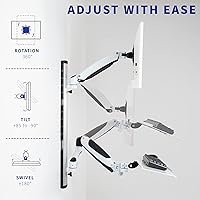
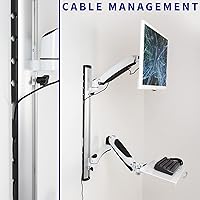
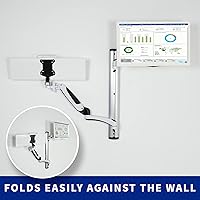
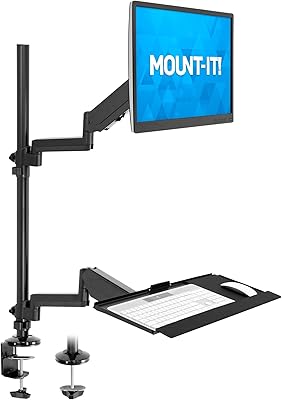
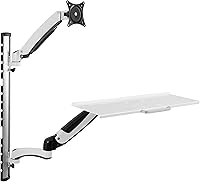
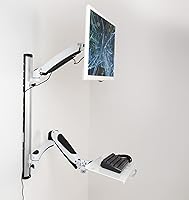
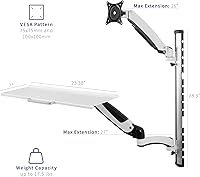
The monitor arm handles screens from 13″ to 27″ and supports up to 17.5 lbs, with VESA compatibility for both 75x75mm and 100x100mm patterns — covering most standard displays. Articulation is strong: you get a wide tilt range, full 180° swivel, and 360° rotation, so finding a comfortable viewing angle is straightforward. The keyboard tray extends up to 27″ from the wall and measures 23.4″ wide, fitting most full-size keyboards. Worth flagging, though: at just 7″ deep, the tray is narrower than average, and mousing directly on it gets cramped fast. The fold-flat design is a genuine convenience — both the arm and tray collapse against the wall cleanly. Integrated cable management along the 28.5″ center pole keeps things tidy without extra hardware.

Best For

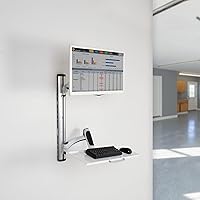
This sit-stand wall mount suits compact home offices and shared workspaces where reclaiming square footage matters. It also works well in healthcare or clinical environments where a clean, repositionable workstation is a practical necessity. Anyone alternating between sitting and standing throughout the day without wanting a motorized desk will find the spring-assisted adjustment quick enough for routine use. That said, single-monitor users with a standard keyboard get the most out of it — the tray simply is not built for dual-screen brackets or ultrawide configurations. Permanent wall installation is non-negotiable, making this wall-mounted workstation a better match for homeowners than renters unless drilling is explicitly permitted.

User Feedback

With a 3.9-star average across nearly 350 reviews, the VIVO wall mount system lands in solidly acceptable territory — liked by many, but not without recurring frustrations. Buyers consistently praise smooth height adjustment and the fold-away convenience, noting the unit feels stable once properly anchored. The criticisms are equally consistent: installation is the main friction point, with stud alignment proving tricky and instructions leaving some steps open to interpretation. Monitors near the 17.5 lb limit can make tension calibration fiddly. A smaller number of long-term owners mention the pneumatic spring losing responsiveness after extended use — not universal, but worth tracking. Satisfaction correlates closely with how straightforwardly the mounting process goes.

Pros

  • Spring-assisted height adjustment lets you shift between sitting and standing without tools or manual effort.
  • Supports screens up to 27 inches with solid VESA compatibility covering most standard monitors.
  • Full articulation — wide tilt, 180° swivel, and 360° rotation — makes precise ergonomic positioning easy.
  • The fold-flat design is a genuine space-saver; both the arm and tray collapse flush against the wall when unused.
  • Integrated cable management along the center pole keeps the workspace looking clean without extra accessories.
  • Alloy steel construction feels sturdy and well-supported once the unit is properly anchored to the wall.
  • The 23.4-inch wide keyboard tray comfortably fits most full-size keyboards.
  • White finish works naturally in clinical, modern, or minimalist environments without looking out of place.
  • Pneumatic spring on the keyboard tray provides smooth, resistance-adjusted movement rather than a rigid lift.

Cons

  • Installation is genuinely involved — stud alignment is finicky, and the instructions leave room for confusion.
  • The keyboard tray is only 7 inches deep, making it too cramped for anyone who mouses on the same surface.
  • Calibrating monitor arm tension near the 17.5 lb weight limit can be frustrating and imprecise.
  • Wall drilling is non-negotiable, which immediately eliminates this option for renters or lease-restricted spaces.
  • Some long-term users report the pneumatic spring on the keyboard tray losing responsiveness over time.
  • The monitor arm extends only 16 inches from the wall, which may not provide enough depth for all desk configurations.
  • No dual-monitor or ultrawide support — buyers with multi-screen setups need to look elsewhere.
  • At 12.7 lbs, the unit itself is heavy enough that solo installation can be awkward without a second person.
  • The center pole height of 28.5 inches may not accommodate very tall users who need a higher standing position.

Ratings

The scores below reflect an AI-driven analysis of verified global buyer reviews for the VIVO STAND-SIT1KW Sit-Stand Wall Mount Workstation, with spam, bot activity, and incentivized feedback actively filtered out to surface what real users genuinely experienced. Ratings span the full spectrum of ownership — from first-time setup frustrations to long-term daily use — so both the strengths and the recurring pain points are represented without bias.

Ease of Installation
54%
46%
Users who had prior experience with wall-mounted hardware and located studs confidently reported a manageable install with the included hardware kit. When the wall cooperates, most found the bracket-to-pole assembly logical and the component fit reasonably tight.
For the majority of buyers, installation was the single biggest frustration. Stud alignment proved inconsistent with the mounting plate, instructions were frequently described as vague at critical steps, and solo installation was considered genuinely difficult given the unit's 12.7 lb weight.
Height Adjustment
78%
22%
The spring-assisted system — mechanical for the monitor arm and pneumatic for the keyboard tray — allows users to shift between sitting and standing positions without needing tools or manual locks. For most daily workflows, the movement feels fluid and purposeful rather than stiff.
Monitors sitting in the upper portion of the 17.5 lb weight range expose a calibration problem — the arm tension requires more precise tuning and can drift over time. Some users also noted the adjustment range along the pole felt shorter than expected for taller standing positions.
Build Quality
74%
26%
Once mounted, the alloy steel frame feels solid and does not wobble under normal monitor repositioning. The white powder-coat finish looks professional and holds up well in clean, indoor environments like offices or clinics where the unit is not being knocked around.
A subset of long-term owners reported signs of wear at the arm pivot joints after extended daily use, and the spring mechanisms drew some concern around longevity — particularly the pneumatic tray spring, which a notable number of reviewers said lost resistance within the first year.
Monitor Arm Articulation
83%
The arm delivers genuinely useful articulation — the wide tilt range, 180° swivel, and 360° rotation cover nearly every realistic viewing angle adjustment a single-screen user would need. Repositioning the monitor from portrait to landscape takes seconds and requires no tools.
The 16-inch maximum arm extension from the pole is limiting for users who prefer their screen further from the wall, particularly in deeper desk setups. The arm can also feel slightly springy at the far end of its reach when holding heavier displays.
Keyboard Tray Usability
58%
42%
The 23.4-inch tray width accommodates most full-size keyboards without crowding, and the pneumatic spring allows smooth upward and downward movement during position changes. For users with compact or tenkeyless keyboards, the tray provides a comfortable typing surface.
At just 7 inches deep, the tray is too shallow for practical mouse use alongside a standard keyboard — a significant drawback for anyone running a conventional desktop workflow. Buyers with larger ergonomic keyboards also found the depth restrictive during extended typing sessions.
Fold-Flat Storage
88%
The ability to collapse both the arm and tray flush against the wall is a genuinely well-executed feature that sets this sit-stand wall mount apart from fixed-position alternatives. Users in dual-purpose rooms — home offices that convert to guest spaces, for instance — highlighted this as a daily convenience they relied on.
The fold mechanism works well early on, but a few users noted it became slightly looser over months of repeated folding and unfolding. The unit also protrudes a few inches from the wall even when folded, which matters in very tight corridor or galley-style layouts.
Cable Management
71%
29%
The integrated channels along the center pole handle a single monitor cable and one or two peripheral cords tidily, resulting in a noticeably cleaner workstation appearance compared to unmanaged setups. For single-monitor users, it largely eliminates visible cable clutter at eye level.
The channels are sized for standard cables and become inadequate when users run thicker HDMI or DisplayPort cables alongside USB hubs or power bricks. There are no clips or guides on the arm itself, so the cable between the pole and the monitor remains partially exposed.
Ergonomic Performance
76%
24%
For users who genuinely alternate between sitting and standing throughout the workday, the system provides meaningful ergonomic benefit — monitor positioning is flexible enough to fine-tune eye-level alignment, and the tray adjusts independently to support neutral wrist angles while typing.
The 28.5-inch pole height creates an upper limit that taller users — particularly those standing above 6 feet 2 inches — may find insufficient for a true standing eye-level position. The keyboard tray depth also limits wrist posture options for users with larger hands or forearm rests.
Space Efficiency
91%
In compact workspaces, the VIVO wall mount system genuinely frees up significant surface area that a traditional desk-mounted arm and keyboard tray would occupy. Healthcare workers and small home office users consistently praised how much usable desk or counter space they recovered after installation.
The space savings are only realized if the installation itself goes cleanly — poorly aligned wall anchoring can create an awkward protrusion that partially defeats the compact footprint. The pole also occupies a fixed vertical strip of wall that cannot be repositioned without re-drilling.
VESA Compatibility
82%
18%
Supporting both 75x75mm and 100x100mm VESA patterns covers the vast majority of monitors in the 13″ to 27″ size range, and most users confirmed their display mounted without needing adapter plates or additional hardware.
Monitors with non-standard VESA configurations — some older displays or certain ultrawide models — are simply not compatible, and there is no adapter solution offered in the box. Buyers with less common mounting patterns will need to source third-party adapters independently.
Weight Capacity Reliability
63%
37%
For monitors comfortably under 15 lbs, the arm holds position reliably and the tension calibration is straightforward during initial setup. Lightweight displays in the 10 to 13 lb range paired with this sit-stand wall mount consistently received positive feedback on arm stability.
Approaching the 17.5 lb rated limit introduces real inconsistency — tension adjustment becomes fussier, arm drift is more common, and recalibration is needed more frequently. The margin between the rated maximum and where performance becomes unreliable is narrower than the spec implies.
Value for Money
69%
31%
For buyers whose installation goes smoothly and whose monitor stays well within the weight limit, the sit-stand wall mount delivers a functional ergonomic setup at a mid-range price that undercuts many comparable systems. The fold-flat feature and dual-spring design add genuine utility relative to the cost.
When installation becomes complicated or the arm requires repeated tension adjustments, the time investment quickly erodes the perceived value. Users who encountered spring degradation within the first year felt the longevity did not justify the price compared to more robust alternatives.
Aesthetic Finish
79%
21%
The clean white finish integrates naturally into clinical, healthcare, and modern home office settings where neutral, professional aesthetics matter. Several reviewers specifically noted it looked more refined than competing black-only options in bright or white-walled rooms.
White coatings show scuffs and minor scratches more visibly than darker finishes, particularly around the pivot joints that see the most contact. For high-traffic shared environments, the finish requires ongoing attention to maintain its clean appearance over time.
Setup Documentation
47%
53%
The physical hardware kit is organized well out of the box, with labeled bags that reduce the risk of misidentifying fasteners during assembly. Users familiar with wall-mounting hardware found the general assembly sequence intuitive enough to proceed without the manual.
The instruction documentation drew consistent criticism — diagrams were described as too small, steps for wall anchoring lacked specificity about stud-finding and load distribution, and several users resorted to third-party video tutorials to complete installation confidently. This is a meaningful gap for first-time installers.

Suitable for:

The VIVO STAND-SIT1KW Sit-Stand Wall Mount Workstation is a strong fit for anyone who wants to reclaim desk or floor space without giving up ergonomic flexibility. It makes the most sense in compact home offices, clinic workstations, or school environments where a permanent wall anchor is practical and space efficiency is a genuine priority. Healthcare workers, in particular, benefit from the clean profile and easy repositioning between patients or tasks. If you regularly shift between sitting and standing throughout the day but have no interest in a bulky motorized desk, the spring-assisted adjustment on this sit-stand wall mount hits a practical middle ground. It is also a good match for anyone running a single-monitor setup with a standard keyboard who values a minimalist, organized workstation over a feature-packed one.
Not suitable for:

The VIVO STAND-SIT1KW Sit-Stand Wall Mount Workstation is a hard sell for renters, anyone working with concrete or brick walls, or anyone unwilling to commit to permanent installation — because drilling into studs is not optional here. Buyers hoping to use this as a dual-monitor station or pair it with an ultrawide display will hit immediate limitations; the arm and tray are designed around a single standard screen. The keyboard tray, at just 7 inches deep, is also too shallow for anyone who keeps a mouse on the same surface, which rules out a lot of conventional desktop workflows. If your monitor pushes close to the 17.5 lb weight ceiling, expect to invest real time dialing in the arm tension — some users never quite get it right. And if you anticipate moving your workstation frequently or want the option to relocate without patching walls, this sit-stand wall mount simply is not the right category of product.
Specifications

  • Screen Compatibility: Supports monitors between 13″ and 27″ in size, weighing up to 17.5 lbs.
  • VESA Patterns: Compatible with 75x75mm and 100x100mm VESA hole patterns, covering most standard flat-panel displays.
  • Keyboard Tray Size: The tray measures 23.4″ wide by 7″ deep, accommodating most full-size keyboards without a numpad overhang issue.
  • Tray Extension: The keyboard tray extends up to 27″ from the wall-mounted pole when fully pulled out.
  • Monitor Arm Reach: The monitor arm extends a maximum of 16″ from the center pole toward the user.
  • Pole Height: The vertical center pole measures 28.5″, defining the total adjustable height range of the system.
  • Tilt Range: Monitor arm offers a tilt range of +85° to -90°, allowing both forward-lean and near-vertical positioning.
  • Swivel Range: The monitor arm swivels 180°, enabling lateral repositioning without remounting the display.
  • Rotation: Full 360° rotation lets users switch between landscape and portrait orientations at any time.
  • Monitor Spring: A mechanical spring drives the monitor arm height adjustment, providing consistent lift resistance across the weight range.
  • Tray Spring: The keyboard tray uses a pneumatic spring mechanism for smooth, pressure-assisted vertical movement.
  • Material: The primary structure is built from alloy steel, contributing to overall rigidity and load-bearing stability.
  • Finish: Available in white, making it suitable for clinical, modern, or minimalist workspace aesthetics.
  • Mounting Type: Designed exclusively for wall mounting; installation requires securing to wall studs or appropriate anchors.
  • Cable Management: Integrated cable routing channels run along the center pole to keep monitor and peripheral cords neatly organized.
  • Fold-Flat Design: Both the monitor arm and keyboard tray fold flush against the wall, allowing the unit to be stored out of the way when not in use.
  • Product Weight: The complete assembled unit weighs 12.7 lbs, which is worth factoring in when planning solo installation.
  • Product Dimensions: Overall footprint measures approximately 7″ deep by 23.38″ wide by 28.5″ tall in its stored configuration.

Related Reviews

Mount-It! MI-7995 32″ Sit-Stand Monitor Mount
70%
81%
Ease of Installation
67%
Build Quality
72%
Pneumatic Spring Performance
58%
Stability & Wobble
78%
Keyboard Tray Usability
More
VIVO STAND-TV70A TV Stand with Adjustable Mount for 49–70-inch TVs
86%
85%
Ease of Assembly
91%
Stability
89%
Build Quality
87%
Adjustable Height Functionality
82%
Aesthetic Design
More
VIVO DESK-EV02RB Electric Sit Stand Desk Frame
86%
91%
Ease of Height Adjustment
87%
Stability & Weight Capacity
88%
Build Quality & Durability
92%
Ergonomics & Usability
64%
Assembly Process
More
VIVO MOUNT-E-UP80D Motorized TV Lift Stand
76%
88%
Motor Performance
83%
Remote Control Usability
61%
Installation Experience
86%
Build Quality
91%
VESA Compatibility
More
VIVO MOUNT-E-UP65A 32-65″ Motorized TV Lift Stand
74%
84%
Motor Performance
78%
Remote Control Usability
81%
Build Quality
89%
VESA Compatibility
53%
Installation Experience
More
VIVO MOUNT-E-FD85W Motorized Ceiling TV Mount
79%
89%
Build Quality
83%
Motor Performance
61%
Installation Experience
91%
Remote Control Usability
78%
App & Smart Home Integration
More
VIVO Motorized Drop Down Ceiling TV Mount MOUNT-E-DN88
84%
88%
Ease of Installation
92%
Motorized Operation
90%
Build Quality and Durability
75%
App and Remote Control Functionality
85%
TV Mounting Capacity (Size and Weight)
More
VIVO STAND-TV65AW Easel TV Floor Stand
74%
91%
Aesthetic Design
74%
Build Quality
67%
Stability
78%
Ease of Assembly
82%
Height Adjustability
More
VIVO MOUNT-E-FD70S Electric Flip Down Swiveling Ceiling TV Mount
83%
92%
Motorized Tilt & Swivel
78%
Ease of Installation
85%
App & Voice Control Functionality
90%
Build Quality
88%
Weight Capacity
More
Mount-It! MI-7934 36″ Dual Monitor Desk Converter
77%
88%
Ease of Assembly
83%
Monitor Arm Stability
79%
Gas Spring Height Adjustment
91%
Work Surface Size
71%
Keyboard Tray Usability
More

FAQ

Yes, wall drilling is required — this is not a clamp-on or freestanding unit. You will need to anchor the mounting plate securely into wall studs to support the combined weight of the system and your monitor. If you are in a rental or working with concrete or masonry walls, this is a significant hurdle to plan around before purchasing.

Not ideally. The VIVO STAND-SIT1KW Sit-Stand Wall Mount Workstation is rated for screens up to 27″ in standard widescreen formats, but ultrawide monitors at that size often exceed the 17.5 lb weight limit and can have VESA patterns that fall outside the supported 75x75mm and 100x100mm options. Check your monitor's weight and VESA specs carefully before assuming compatibility.
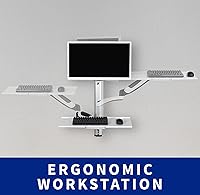
The tray is 7″ deep, which is on the narrow side — most people find it tight for a mouse alongside a full-size keyboard. If you use a compact or tenkeyless keyboard, you might squeeze a small mouse in, but it is not comfortable for everyday use. A separate mouse surface or a wider arm rest attachment would be a better long-term solution.

In practice, the spring-assisted adjustment is reasonably smooth for most users. The monitor arm uses a mechanical spring and the keyboard tray uses a pneumatic spring, so both move without tools. That said, users with monitors near the top of the weight range sometimes report needing to recalibrate the arm tension to get the movement feeling right.

Yes, both the monitor arm and the keyboard tray fold back toward the wall when not in use, which is one of the more practical features of this sit-stand wall mount. It works well in rooms that serve multiple purposes throughout the day, like a guest bedroom that doubles as a home office.

For monitors well under the 17.5 lb limit, most users report no sagging issues once the arm tension is properly set. The concern comes with heavier displays close to the rated maximum — some reviewers note that the mechanical spring requires more frequent recalibration in those cases. If your monitor is between 15 and 17.5 lbs, factor in some extra setup time to dial in the tension correctly.

The unit ships with a mounting hardware kit for standard drywall-to-stud installation. However, if your walls are concrete, brick, or an unusual material, you will likely need to source appropriate anchors separately. Reviewing the installation instructions before your hardware store run is a good idea.

The channels along the center pole do a decent job of keeping cords from dangling freely, especially for the monitor cable and a single USB or power line. It is not a fully hidden cable solution, but for most single-monitor setups it keeps things tidy enough to look organized from a normal viewing distance.

In theory, yes — adjusting the height to accommodate different users is what the spring mechanisms are designed for. In a real shared-use scenario, the adjustment is quick enough for occasional changes, though it is not as instant as a gas-lift desk. It works better for users with a similar height range rather than dramatically different standing heights.

The powder-coat finish on the alloy steel holds up reasonably well under normal use, but like most white-coated metal products, it can show scuffs if knocked or scratched during installation or repeated adjustment. For high-traffic environments like clinics or schools, it is worth handling the components carefully during setup and periodically wiping the surface with a soft, damp cloth to keep it looking clean.