Overview

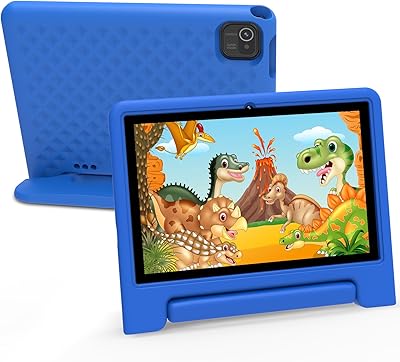
The Maxsignage K109B 10″ Kids Android Tablet is a budget-conscious 10-inch device built for young children aged 3 and up, entering a crowded space dominated by Amazon's Fire HD Kids lineup. It ships with Android 13, Google Kids Space pre-installed, and a shockproof stand case right in the box — meaning parents face very little friction getting started. Maxsignage isn't a household name, and that's worth stating plainly. But the software bundle and hardware specs it offers at this price tier make it a credible option worth a closer look, particularly for families hunting for a first tablet as a birthday or holiday gift.
Features & Benefits

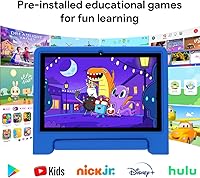
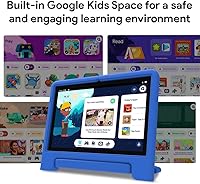
What stands out most for everyday use is the Google ecosystem integration. Google Kids Space delivers a walled-garden experience with age-appropriate apps and content — no subscription required, which is a quiet but real advantage over some rivals. Parents can manage everything remotely through Google Family Link, approving downloads and capping screen time directly from their own phone. The quad-core processor and 2GB of RAM cope fine with educational apps and video streaming, though multitasking will expose the ceiling. Internal storage starts at 32GB and expands to 128GB via microSD — genuinely useful for offline libraries. WiFi 6 and Bluetooth 5.0 are modern specs that feel out of place at this price, in a good way. The 1280x800 screen is functional but nothing more.

Best For

This kids tablet makes the most sense for parents picking out a first device for a toddler or early elementary-age child who doesn't need raw processing power. If your household already runs on Google tools — using Family Link on your phone, for instance — the whole setup feels natural rather than like learning something new. The 10-inch screen is a genuine differentiator here; most competing kids tablets at this price land at 7 or 8 inches. For families who want to load it with offline videos or apps, expandable storage via microSD is a real practical bonus. It also works well as a ready-to-unwrap gift, since it arrives fully configured and case-included.

User Feedback

Parents who've bought the K109B generally praise how quickly the Family Link setup comes together — getting parental controls running takes minutes rather than a troubleshooting session. The bundled case also earns consistent credit for surviving drops from small, unpredictable hands. The sticking point most buyers circle back to is 2GB of RAM: slowdowns appear when kids bounce between apps, and there's a reasonable worry about how the tablet holds up as apps become more demanding over the next year or two. Battery life gets mixed reports, with some users finding real-world endurance falls short of the six-hour claim under active play. A handful of buyers also raised questions about long-term software support from an unfamiliar brand — a fair concern worth factoring in before purchasing.

Pros

  • Google Kids Space comes pre-installed with no subscription required, making child-safe content available immediately out of the box.
  • Google Family Link parental controls are genuinely easy to configure and manage remotely from a parent's phone.
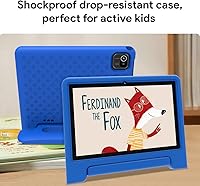
  • The included shockproof stand case adds real drop protection without an extra purchase.
  • WiFi 6 support is a standout spec at this price tier, offering faster and more stable connections than many rivals.
  • A 10-inch screen gives younger children noticeably more viewing space compared to budget competitors stuck at 7 or 8 inches.
  • Internal storage expands up to 128GB via microSD, which is a practical advantage for families with large offline media libraries.
  • Bluetooth 5.0 allows reliable pairing with headphones or speakers, useful for keeping audio private during travel.
  • Android 13 as the base OS means access to a broad app ecosystem through Google Play, not a locked-down proprietary store.
  • The tablet arrives ready to gift — case included, parental controls pre-loaded, no complicated first-time setup required.

Cons

  • With only 2GB of RAM, multitasking or running heavier apps can produce noticeable slowdowns that frustrate kids and parents alike.
  • Battery endurance in real-world use often falls short of the advertised six hours, particularly during active video or gaming sessions.
  • Maxsignage has no established track record for long-term software or security update support, which is a genuine unknown.
  • The 1280x800 display is adequate indoors but struggles with brightness and clarity in well-lit or outdoor environments.
  • At 2.79 pounds, the tablet is on the heavier side for small children to hold comfortably for extended periods without the stand.
  • There is limited independent review coverage of the brand, making it harder to verify real-world performance claims before buying.
  • The quad-core processor, while sufficient today, may feel underpowered as apps grow more demanding over the next year or two.
  • Customer support quality and warranty claim reliability from a lesser-known brand remain difficult to evaluate ahead of purchase.

Ratings

The scores below for the Maxsignage K109B 10″ Kids Android Tablet were generated by our AI system after analyzing verified buyer reviews from multiple global markets, with spam, bot-submitted, and incentivized feedback actively filtered out before scoring. Each category reflects the honest distribution of real parent experiences — not a promotional summary — so both the genuine strengths and the frustrating limitations are captured here with equal weight.
Parental Control Setup
88%
Parents consistently highlight how quickly Google Family Link gets running — linking the tablet to a parent's phone takes only a few minutes, and the ability to approve apps or cut screen time remotely from any location is something families actively rely on during evenings and weekends. The interface feels familiar to anyone already in the Google ecosystem.
A small but recurring complaint is that Family Link notifications can feel aggressive, and some parents found the initial Google account creation for a child's profile confusing if they hadn't done it before on another device.
Value for Money
83%
At its price point, the combination of a 10-inch screen, WiFi 6, Google Kids Space, and an included protective case is genuinely difficult to beat. Most buyers who bought it as a first tablet for a young child felt they got more hardware and software for their money than expected from an unfamiliar brand.
The calculus shifts if you factor in longevity — with uncertain software update support and a RAM ceiling that may limit the tablet's useful lifespan, some parents feel the value proposition weakens when thinking two or three years ahead rather than just the first few months of use.
Kids Content & Apps
81%
19%
Google Kids Space delivers a well-curated, age-appropriate environment that parents trust for unsupervised use, and the absence of a subscription fee to access it is something reviewers specifically appreciated. Children aged 3 to 7 in particular responded well to the coloring, storytelling, and puzzle content available out of the box.
Older kids in the 8-to-10 range tend to outgrow the Kids Space library relatively quickly, and parents of those children noted that the curated environment starts to feel limiting once a child wants access to more varied or demanding content.
Durability & Case
78%
22%
The bundled shockproof case earned genuine praise from parents who expected to pay extra for decent protection — it absorbed drops from tables and sofas without visible damage to the tablet underneath, and the multi-angle stand held up to repeated folding and repositioning over weeks of daily use.
The case material shows scuff marks and wear more visibly than premium alternatives, and a handful of reviewers noted the kickstand hinge became slightly looser after several months of active use by young children who open and close it repeatedly.
Performance & Speed
62%
38%
For the core use cases this tablet is built for — running a single educational app, streaming video, or playing a light puzzle game — the quad-core processor keeps up without obvious stuttering. Kids transitioning between a video and one app at a time generally had a smooth enough experience.
Two apps running simultaneously is where things start to visibly lag, and parents who let children switch quickly between YouTube Kids, a game, and a coloring app reported freeze moments that frustrated younger users. The 2GB RAM ceiling is real, and it becomes more apparent as apps receive updates over time.
Display Quality
61%
39%
The 10-inch screen size itself earns positive feedback from parents who wanted their child to have a comfortable viewing experience for longer educational sessions, and indoors under normal lighting the picture is clear enough for cartoons and reading apps without causing obvious eye strain.
Outdoor or bright-room use exposes the display's limitations quickly — reflections are noticeable and brightness tops out at a level that makes content harder to see in sunlight. Color accuracy and sharpness are firmly average, which matters less for a toddler but becomes more noticeable as children use it for drawing or detailed content.
Battery Life
59%
41%
Under light use — a mix of reading apps and occasional short video clips at moderate screen brightness — some parents found the tablet lasted through a full afternoon before needing a charge, which is adequate for home use where a charger is nearby.
The advertised six-hour figure rarely holds up in practice during active play. Parents who relied on it for travel reported needing to charge mid-journey on longer trips, and video streaming with the screen at full brightness drained the battery noticeably faster than the spec sheet suggests.
Screen Size
77%
23%
A 10-inch display is a meaningful differentiator at this price, and parents who specifically upgraded from a smaller kids tablet noted the difference was immediately appreciated by their children — particularly for video calls with grandparents and side-by-side reading activities.
The larger screen combined with the case makes the overall device heavier and bulkier than 7- or 8-inch alternatives, and younger toddlers around age 3 or 4 sometimes struggle to hold or carry it comfortably without the stand.
WiFi Connectivity
84%
WiFi 6 support stands out as a spec that genuinely overdelivers for the price tier, and families with modern routers noticed faster app downloads and more stable streaming compared to older budget tablets that dropped to older WiFi standards. Range within the home was consistently reported as reliable.
The WiFi 6 advantage is only meaningful if your home router also supports it — households running older routers will see no difference, and a small number of reviewers reported occasional connection drops that required a restart to resolve.
Bluetooth Performance
74%
26%
Bluetooth 5.0 paired reliably with wireless headphones in most reported use cases, which parents appreciated for keeping audio private during commutes or when a child wants to watch something independently without disturbing the household.
A few buyers noted intermittent reconnection issues when the tablet and headphones were separated briefly — such as a child walking to another room — requiring a manual re-pair that young children cannot always do themselves.
Storage & Expandability
79%
21%
The microSD expansion option up to 128GB is a practical feature that parents with offline-heavy households genuinely use, and downloading a library of shows before a long trip without worrying about space constraints was a specific scenario multiple reviewers mentioned positively.
The base 32GB fills up faster than expected once a few larger games and a handful of downloaded video series are installed, meaning the microSD slot quickly goes from optional to necessary — an added cost buyers should anticipate upfront.
Brand Trust & Support
44%
56%
A portion of buyers reported receiving responsive email support from Maxsignage when troubleshooting initial setup issues, and the tablet functioned as described for those who had no hardware problems — suggesting the product itself is not a scam or bait-and-switch situation.
Maxsignage has no publicly documented update policy, no established community of long-term users to consult, and limited presence in consumer tech media. Parents who care about ongoing security patches or have a problem after the return window closes have very little institutional support to lean on.
Ease of Setup
82%
18%
The out-of-box experience is largely hassle-free — the tablet powers on with clear prompts, and parents familiar with Google accounts can get through the full setup including Kids Space and Family Link in under 15 minutes. It genuinely functions as a plug-and-play gift in most cases.
Buyers without an existing Google account, or those setting up a child's account for the first time, encountered more friction than expected — the Google account creation flow for minors has several steps that can catch less tech-savvy parents off guard.
Weight & Portability
57%
43%
The slim 0.31-inch profile keeps the tablet from feeling bulky when stored in a bag, and the stand case doubles as a travel accessory that lets children prop it up on a tray table or car seat without extra gear.
At 2.79 pounds with the case, the K109B is noticeably heavier than comparable 8-inch alternatives, and several parents noted that children under age 5 tire quickly when holding it unsupported — making the stand more of a necessity than a convenience for younger users.

Suitable for:

The Maxsignage K109B 10″ Kids Android Tablet is a practical pick for parents who want a dedicated, supervised device for a young child without spending heavily on a brand-name option. It fits best in households that already use Google's ecosystem — if Family Link is already on your phone managing a sibling's device, adding this tablet to that setup takes almost no effort. The 10-inch screen is a meaningful step up from the 7- and 8-inch kids tablets that dominate this price range, making it a better fit for children who watch videos or follow along with educational content for longer stretches. Families who store offline content — downloaded shows, audiobooks, or apps for travel — will appreciate the microSD expansion slot, which removes the frustration of constantly managing space. It also works well as a gift purchase, since the shockproof case and pre-configured parental controls mean the recipient's parents don't need to do much before handing it to a child.
Not suitable for:

The Maxsignage K109B 10″ Kids Android Tablet is a harder sell for parents who want peace of mind around long-term brand support and software update commitments. Maxsignage is not an established name, and there is no public track record of how long they support their devices with security patches or OS updates — a real consideration when buying tech for a child who may use it for several years. The 2GB of RAM is also a genuine constraint; if your child is the type to run multiple apps simultaneously, or if they gravitate toward more graphically demanding games, the tablet will likely frustrate rather than satisfy. Buyers who prioritize display quality — especially for outdoor use or bright environments — should look elsewhere, as the 1280x800 screen lacks the brightness and sharpness of pricier alternatives like the Fire HD Kids 10. Finally, parents who prefer Amazon's curated content ecosystem or Apple's tighter hardware-software integration will find this Android tablet a weaker fit for their existing setup.
Specifications

  • Screen Size: The tablet features a 10-inch display, offering more viewing area than the 7- and 8-inch kids tablets common at this price point.
  • Resolution: The screen renders at 1280x800 pixels, which is adequate for video playback and reading but not a standout in terms of sharpness or color vibrancy.
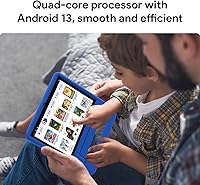
  • Operating System: The device ships with Android 13, providing access to the full Google Play Store alongside the pre-installed Google Kids Space environment.
  • Processor: A quad-core ARM processor clocked at 1.6GHz handles everyday educational apps, light games, and media streaming without significant difficulty.
  • RAM: The tablet includes 2GB of RAM, sufficient for single-app use but a noticeable constraint when multiple apps are running simultaneously.
  • Internal Storage: 32GB of onboard storage is included, providing room for a reasonable library of apps and downloaded content before expansion is needed.
  • Expandable Storage: A TF/microSD card slot supports storage expansion up to 128GB, which is especially useful for families who download offline videos or large app libraries.
  • WiFi: WiFi 6 (802.11ax) connectivity is supported, offering faster and more reliable wireless performance than the older standards found on many competing budget tablets.
  • Bluetooth: Bluetooth 5.0 enables stable, low-latency pairing with wireless headphones, speakers, or other compatible accessories.
  • Battery Life: The manufacturer rates battery life at up to 6 hours, though real-world endurance under active use may vary.
  • Weight: The tablet weighs 2.79 pounds, which is on the heavier end for a device intended to be held by young children for extended periods.
  • Dimensions: The unit measures 6.4 x 9.7 x 0.31 inches, keeping it relatively slim despite the larger 10-inch form factor.
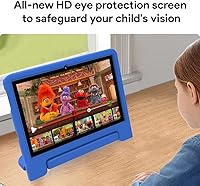
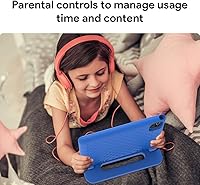
  • Parental Controls: Google Family Link is pre-installed, allowing parents to set screen time limits, approve app downloads, and monitor usage remotely from their own device.
  • Kids Platform: Google Kids Space comes pre-loaded with a curated selection of age-appropriate apps, games, and content for children aged 3 and up, with no additional subscription required.
  • Included Case: A shockproof, drop-resistant stand case with a multi-angle kickstand is included in the box, eliminating the need for a separate accessory purchase.
  • Color Options: The tablet is available in Blue as listed in the standard configuration reviewed here.
  • Battery Type: The device is powered by a built-in lithium polymer battery, which is included and not user-replaceable under normal circumstances.
  • Target Age: The tablet is designed for children aged 3 and up, with the software environment and physical case both reflecting that young-child use case.

Related Reviews

CFVOCUY TS-K109B 10.1″ Kids Tablet
67%
83%
Value for Money
79%
Ease of Setup
71%
Battery Life
66%
Durability & Build
74%
Parental Controls
More
YACXBTK J10 10.1-inch Kids Tablet
70%
84%
Battery Life
81%
Value for Money
78%
Parental Controls
62%
Performance
67%
Display Quality
More
PEICHENG 10.1-inch Kids Tablet, 128GB Storage, Android 15.0
85%
93%
Durability & Build Quality
90%
Parental Control Features
76%
Battery Life
82%
Display Quality
88%
Ease of Use
More
ZOFYWNAS 10-Inch Android 14 Kids Tablet
70%
83%
Value for Money
61%
Performance
67%
Display Quality
74%
Build Quality
77%
Parental Controls
More
Aheadthink AHYQ10K Kids Tablet 10 Inch Android 12 4GB RAM 64GB ROM
82%
92%
Parental Controls
88%
Durability
85%
Battery Life
81%
Display Quality
79%
Storage Capacity
More
YATIOM SS-35 10-inch Kids Tablet
70%
84%
Value for Money
61%
Performance & Speed
73%
Build Quality & Durability
78%
Parental Controls
69%
Battery Life
More
Fivahiva FF-35 Kids Tablet 10-inch, 10GB RAM, 64GB Storage, Android 14
85%
91%
Performance
88%
Parental Controls
86%
Durability & Build Quality
83%
Battery Life
74%
Display Quality
More
ITMEIPC T-10 Android Tablet 10.1-inch, 6GB RAM, 64GB Storage
80%
91%
Value for Money
85%
Display Quality
74%
Battery Life
78%
Build Quality
88%
Performance for Light Use
More
CWOWDEFU 10-inch Kids Tablet 128GB
86%
87%
Performance
92%
Battery Life
88%
Build Quality
82%
Display Quality
91%
Ease of Use
More
TWTNVOF Kids Tablet 10 inch, 32GB
86%
89%
Educational Features
94%
Parental Controls
90%
Durability & Build Quality
82%
Battery Life
85%
Performance (Processor Speed)
More

FAQ

No, Google Kids Space comes pre-installed and does not require a subscription to access its curated content library. You will need a Google account to complete the initial setup, but the core kids experience is free to use.

The tablet uses Google Family Link, which is managed through the Family Link app on your own Android or iOS phone. Once you link your child's Google account to yours during setup, you can control screen time, approve app downloads, and review activity reports remotely. Most parents find the process straightforward and complete it in under ten minutes.

Yes, the tablet has a microSD card slot that supports cards up to 128GB. Adding a card is a simple fix if your child starts downloading a lot of apps, offline videos, or games.

The bundled case is shockproof and drop-resistant, and parent feedback generally suggests it holds up well against the kinds of drops and bumps typical of daily use by toddlers and young kids. It also doubles as a stand, which is handy for watching videos hands-free. For an especially rough-and-tumble child, you might eventually want a heavier-duty case, but most families find the included one sufficient.

Yes, the Maxsignage K109B 10″ Kids Android Tablet supports Bluetooth 5.0, so it should pair reliably with most modern wireless headphones or earbuds. This makes it a practical choice for keeping audio contained during long car rides or flights.
The advertised six-hour battery estimate is achievable under light to moderate use, like reading or watching videos at moderate brightness. If your child is playing more graphically demanding games or the screen brightness is turned up high, expect something closer to four or five hours in practice.

The tablet runs standard Android 13 with access to the full Google Play Store, so it is not locked to kids content by default. Google Kids Space provides the curated child-safe layer, and Family Link lets you control whether your child can exit that environment and access other apps. You have full control over how open or restricted the experience is.

The software environment, with Google Kids Space and its coloring, storytelling, and puzzle apps, is genuinely designed with toddlers in mind. The physical size and weight are more comfortable for kids around 5 and up to hold independently, but a 3-year-old using it on the included stand or propped on a surface would have no problem interacting with the content.

The Fire HD Kids 10 comes with Amazon's Kids Plus subscription service and a two-year worry-free guarantee, which gives it an edge in content ecosystem and brand support confidence. This Android tablet counters with Google Kids Space, full Google Play access, and WiFi 6 — and typically costs less. The trade-off is that Maxsignage is a lesser-known brand with no comparable long-term support track record, so buyers who value that peace of mind may prefer Amazon's offering.

This is an honest area of uncertainty. Maxsignage is not an established brand with a publicly documented update policy, and there is no reliable information about how long they intend to support this device with patches. For a tablet your child might use for two or three years, that is worth factoring into the decision. If long-term software security is a priority, a device from a brand with a clear update commitment may be a safer bet.