Logitech PTZ Pro 2

Overview
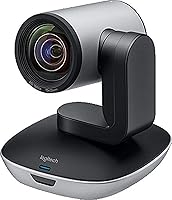
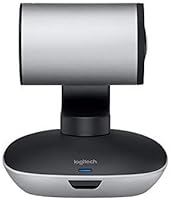
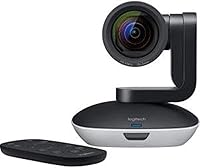
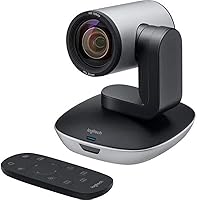
The Logitech PTZ Pro 2 has earned a firm place in professional AV setups since its 2017 launch, and for good reason. Designed specifically for medium-to-large conference rooms, this PTZ camera sits firmly in the premium business video tier — not a consumer webcam, but a purpose-built room solution. It connects via USB and runs on both Windows and macOS, which keeps deployment straightforward. The 1080p CCD sensor is worth noting; CCD technology tends to produce more accurate color and sharper detail than the CMOS sensors found in most standard webcams, giving remote participants a noticeably cleaner image.
Features & Benefits
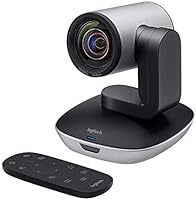
The motorized pan, tilt, and zoom mechanics are where this PTZ camera really earns its keep. You can save multiple camera presets and jump between them with a remote or software controls — useful when a trainer needs to shift from presenter to whiteboard in seconds. The wide field of view means a single camera can cover most of a mid-sized room without awkward repositioning. A practical detail that often goes unmentioned: the camera handles video processing on-board, which offloads work from the host computer and results in a steadier stream, especially on networks that are less than ideal. Setup is USB plug-and-play, with no driver headaches on either major OS.
Best For
This room camera makes the most sense in medium-to-large meeting spaces where a fixed webcam simply cannot cover the room. Corporate training setups are a strong fit — when a presenter moves around or shifts attention to a screen, the motorized controls let the operator follow the action without physically touching the camera. IT managers running Microsoft or Logitech ecosystems will appreciate how cleanly it integrates into existing workflows. It is also a reliable pick for teams that regularly share whiteboard content or walk remote participants through printed materials, since the zoom range brings real detail into frame. This is not a camera you buy for a small huddle room.
User Feedback
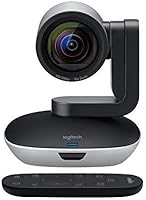
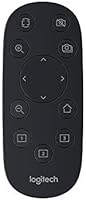
Buyers consistently praise the smooth zoom transitions and the overall build quality — this feels like a camera built for daily professional use, not something that will wobble loose from its mount after a few months. Setup gets frequent compliments too: plug in, configure presets, done. On the critical side, some users find the included remote controller feels cheap relative to the camera price point, and a few note that full functionality requires Logitech companion software. Compatibility with Microsoft Teams and Zoom is generally reported as solid, though occasional users note minor quirks. The main debate in reviews comes down to value: at this price tier, buyers expect consistent, flawless performance.
Pros
- Motorized pan, tilt, and zoom with smooth preset transitions covers large rooms without manual repositioning.
- The CCD sensor delivers noticeably sharper color and detail than standard CMOS-based webcams in the same room.
- USB plug-and-play setup means IT staff can deploy across multiple rooms without driver headaches.
- On-board video processing keeps streams stable even when the host computer is under load during meetings.
- Long-term owners consistently report reliable mechanical performance after two or more years of daily use.
- Works cleanly with Microsoft Teams, Zoom, and Skype for Business right out of the box.
- Wide field of view handles a full conference table without needing a second camera unit.
- The zoom range is practical for pulling in whiteboard content or printed materials during live calls.
- Organizations running Logitech room systems benefit from tight ecosystem integration across devices.
Cons
- The included remote controller feels cheap and plasticky relative to the overall cost of the system.
- Full preset management requires Logitech companion software, adding a software dependency IT teams must maintain.
- Firmware updates have occasionally reset custom configurations, frustrating administrators managing multiple rooms.
- The software interface feels dated and has received limited meaningful updates since the camera launched.
- At maximum zoom, minor lens hunting before settling has been reported during live presentations.
- Value-for-money scores are polarizing — buyers expecting premium accessories alongside the camera are consistently let down.
- Software outside the core Logitech environment offers limited encoding customization for advanced AV users.
- In very large or oddly shaped rooms, the wide-angle field of view reaches its practical limits.
- Remote control range requires near line-of-sight, which can be awkward in larger or irregularly laid out spaces.
Ratings
The Logitech PTZ Pro 2 has been stress-tested by IT teams, facilities managers, and AV integrators across thousands of real-world deployments — and our AI has analyzed verified global buyer reviews, actively filtering out incentivized and bot-generated feedback, to produce the scores below. Ratings reflect genuine day-to-day experiences in conference rooms, training centers, and corporate environments, with both the standout strengths and the recurring frustrations weighted equally.
Image Quality
Pan, Tilt & Zoom Performance
Build Quality & Durability
Ease of Setup & IT Manageability
Platform Compatibility
Remote Control Usability
Zoom Range & Close-Up Capability
Value for Money
Video Processing & Stream Stability
Wide Field of View Coverage
Software & Firmware Experience
Long-Term Reliability
Compatibility with Logitech Ecosystem
Suitable for:
The Logitech PTZ Pro 2 is built for IT managers and facilities teams equipping medium-to-large conference rooms where a fixed webcam simply cannot do the job. If your organization runs regular training sessions, all-hands meetings, or client presentations in rooms that seat eight or more people, the motorized pan, tilt, and zoom controls solve a real problem — you can follow a presenter or shift focus to a whiteboard without anyone physically touching the camera. Organizations already invested in Microsoft Teams, Skype for Business, or the broader Logitech room ecosystem will find the integration genuinely smooth, with minimal configuration required at deployment. IT administrators who prioritize low-maintenance, long-life hardware over cutting-edge specs will appreciate the camera's track record of running reliably in daily-use environments for years. It is also a strong pick for teams that regularly share visual materials on calls, where the zoom range makes whiteboard text and printed documents legible to remote participants.
Not suitable for:
The Logitech PTZ Pro 2 is a poor fit for anyone equipping a small huddle room, a home office, or a personal desk setup — the price and physical footprint simply do not make sense at that scale, and a quality fixed webcam will do the job for far less. Individual remote workers or small startups should look elsewhere; this camera is sized and priced for institutional deployment, not personal use. Buyers expecting a premium accessory bundle to match the camera's cost will be disappointed — the included remote controller feels noticeably budget-grade. Teams operating on tight AV budgets who need PTZ functionality should evaluate newer entrants in the category before committing, since the competitive landscape has shifted considerably since this camera launched in 2017. If your conferencing platform sits outside the mainstream Microsoft and Google ecosystems, compatibility should be verified carefully before purchase rather than assumed.
Specifications
- Resolution: The camera captures video at 1080p Full HD, delivering sharp, detailed footage suitable for professional conferencing environments.
- Sensor: A CCD image sensor is used, which typically produces more accurate color reproduction and cleaner images under mixed office lighting compared to standard CMOS sensors.
- Connectivity: The camera connects to a host computer via USB, enabling plug-and-play operation without proprietary drivers on supported operating systems.
- Dimensions: The unit measures 3 x 6 x 12 inches (L x W x H), making it compact enough for shelf or table mounting in most conference room setups.
- Weight: The camera body weighs 1.28 pounds, light enough for standard AV mounts without requiring heavy-duty mounting hardware.
- Focal Length: Maximum focal length reaches 280mm, providing sufficient optical reach to capture whiteboard content or presenter detail from across a medium-to-large room.
- Aperture: The maximum aperture is f/1.8, allowing adequate light intake for clear imaging in typical office lighting conditions.
- Still Resolution: The camera supports up to 12 MP still image capture, useful for documenting whiteboard content or meeting visuals.
- PTZ Support: Motorized pan, tilt, and zoom are all supported, with the ability to save and recall multiple camera presets for dynamic room coverage.
- Video Format: Captured and streamed video is encoded in MPEG format, which is broadly compatible with major conferencing and recording platforms.
- Audio Formats: The camera supports AAC and MP3 audio formats for compatibility with a range of recording and streaming applications.
- OS Compatibility: Full functionality is supported on both Windows and macOS, covering the two dominant operating systems used in corporate environments.
- Power Source: The camera is powered entirely via its USB connection, eliminating the need for a separate power adapter in standard deployments.
- Color: The unit is finished in black, consistent with professional AV equipment standards and suitable for most corporate room aesthetics.
- Platform Support: The camera is officially compatible with Microsoft Skype for Business and works with other major platforms including Microsoft Teams and Zoom.
- Video Processing: On-board video processing handles encoding within the camera itself, reducing the computational load on the connected host device during live streams.
- Model Number: The official model number is 960-001184, which should be referenced when sourcing replacement accessories or contacting support.
- Launch Date: The product was first made available in April 2017 and remains in active production as of the current date.
Related Reviews
Timetec TP01 1TB Portable External SSD
Asustor Drivestor 2 Pro Gen2 2-Bay NAS

Bliss Fab Foaming 2-in-1 Cleanser Exfoliator 17.2oz
PNY Pro Elite V2 1TB Flash Drive
PNY PRO Elite V3 2TB Flash Drive
Deeper PRO+ 2 Castable Fish Finder with GPS
Behringer B-2 PRO Large-diaphragm Condenser Microphone
Samsung Galaxy Buds2 Pro Wireless Earbuds

Logitech Pebble Mouse 2 M350s