Overview

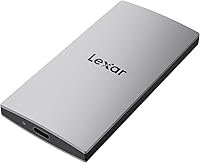
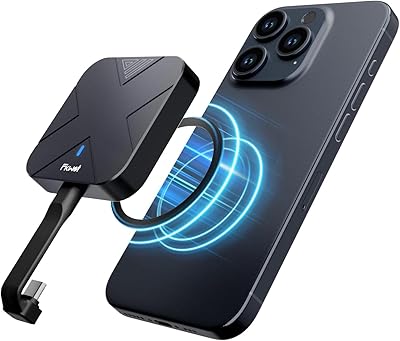
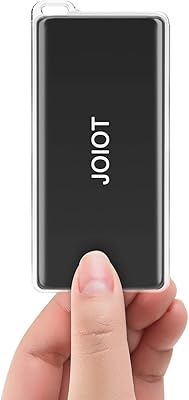
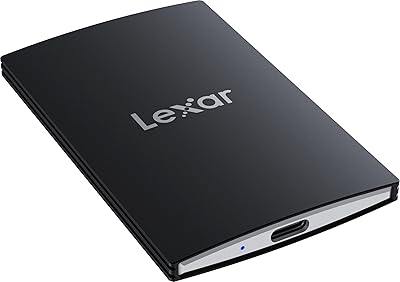
The Lexar ES3 1TB External SSD is Lexar's answer to a crowded portable storage market, and it makes a solid case for itself at a mid-range price point. At just 42g and 10.5mm thin, this pocket-sized drive genuinely fits in a pocket — not just technically, but comfortably. The metal chassis feels sturdy without adding unnecessary weight. One thing worth flagging upfront: there is no MagSafe support in this version, so if you were expecting to snap it magnetically to an iPhone, look elsewhere. That aside, the Lexar ES3 brings USB 3.2 Gen 2 performance to a form factor that competes well with pricier alternatives that launched around the same time.

Features & Benefits

The headline numbers are strong: reads up to 1050MB/s and writes up to 1000MB/s, which in practice means moving a large 4K video file takes seconds rather than the minutes you would spend waiting on a traditional drive. One caveat worth knowing upfront — if your laptop or hub only supports older USB 3.0 or 3.1 ports, expect noticeably reduced speeds. The drive connects via an included Type-C cable with no external power required, and compatibility stretches across iPhone 15 and newer, Mac, Android, PS5, and Xbox Series X|S. 256-bit AES encryption via Lexar's DataShield software rounds out the package with a practical security option for sensitive files on the go.

Best For

This portable SSD makes the most sense for a fairly specific type of user. If you regularly move large video or photo files between a camera, laptop, and phone, the fast transfer speeds translate into real time savings. iPhone 15 and 16 owners get a particularly useful case here — direct external storage without hunting for adapters or hubs. Console gamers can take advantage of the PS5 and Xbox Series X|S compatibility for extended libraries or backups. Travelers and remote workers who want reliable pocket storage without the bulk of a larger drive will also find it a natural fit. Anyone upgrading from a spinning hard drive will feel the difference right away.

User Feedback

With over 350 ratings averaging 4.6 out of 5, buyers have responded well overall. The most consistent praise centers on build quality and real-world speed reliability, particularly among users upgrading from older mechanical drives. iPhone 15 and 16 compatibility is called out frequently as a genuine day-to-day benefit. On the negative side, the missing MagSafe is a recurring frustration — some buyers expected it based on how the drive appears in search results, so that disconnect is worth flagging. A portion of users also found the DataShield encryption setup less intuitive than hoped. A few reported slower-than-expected speeds, which aligns directly with the USB host limitation covered earlier. Minor complaints overall, but worth knowing before buying.

Pros

  • Genuinely pocketable at 42g — lighter than most people expect from a 1TB drive.
  • Real-world transfer speeds hold up well for moving large 4K video files quickly.
  • Direct iPhone 15 and 16 compatibility via Type-C works without any adapter needed.
  • The all-metal chassis feels durable and noticeably more premium than plastic alternatives.
  • Plug-and-play setup means no driver installs or configuration on most major platforms.
  • Works across a wide range of devices including Mac, Android, PS5, and Xbox Series X|S.
  • 256-bit AES encryption adds a meaningful security layer for sensitive files on the go.
  • The Lexar ES3 1TB External SSD ranks highly in its category, reflecting strong overall buyer satisfaction.
  • Included Type-C cable means you are ready to use it straight out of the box.
  • At its price point, the combination of speed and form factor is genuinely competitive.

Cons

  • Speed drops significantly when connected to older USB 3.0 or 3.1 ports — a real-world catch for many users.
  • No MagSafe support, which has caught some buyers off guard based on how the drive appears in searches.
  • The DataShield encryption software has a steeper setup curve than the hardware itself suggests.
  • No protective case or sleeve is included, and the bare metal surface attracts scratches in a bag.
  • Only available in one color, with no texture or grip feature to aid handling.
  • The included Type-C cable is short enough to be inconvenient in desktop or TV setups.
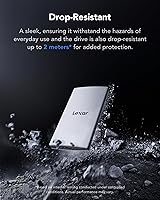
  • No official dust or water resistance rating limits confidence in outdoor or high-risk environments.
  • iPhone compatibility cuts off at iPhone 15 — older Apple device owners are completely excluded.
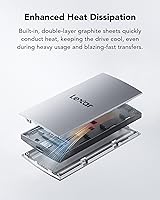
  • Sustained heavy workloads can cause mild thermal slowdown, relevant for long backup sessions.
  • No lanyard hole or attachment point makes it easy to lose among other small accessories.

Ratings

The Lexar ES3 1TB External SSD has been scored by our AI rating engine after processing verified buyer reviews from multiple global markets, with spam, bot activity, and incentivized feedback actively filtered out. Across categories from raw transfer speed to everyday portability, both the strengths and the genuine frustrations are reflected in the numbers below. Nothing has been smoothed over — the scores tell the full picture.
Transfer Speed
88%
Users moving large batches of RAW photos or 4K footage between a laptop and phone consistently report that this pocket-sized drive gets the job done in a fraction of the time a USB 3.0 drive would take. The real-world read performance closely matches advertised figures when paired with a capable USB 3.2 Gen 2 host.
Connect it to an older laptop or a USB hub that tops out at USB 3.1 or 3.0, and the speed advantage largely disappears. A notable share of buyers discovered this the hard way after expecting top-tier performance from their aging MacBook or older PC.
Portability & Form Factor
93%
At 42g and just over 10mm thick, the Lexar ES3 slips into a jeans pocket without any noticeable bulk — something many buyers specifically call out after comparing it to chunkier alternatives they had previously owned. For daily commuters and frequent flyers, that physical profile matters a lot.
A small number of users wish it came with a protective sleeve or pouch given how slim the metal chassis is. Without any bundled case, the bare metal surface picks up light scratches over time in a bag or pocket.
Build Quality
86%
The all-metal shell feels noticeably more premium than plastic-bodied drives at a similar price. Buyers who have dropped it or tossed it in a bag alongside keys and cables generally report no damage, which builds confidence for travel use.
There is no official dust or water resistance rating, which some buyers note as a gap for outdoor or adventure use cases. The slim edges can also feel slightly sharp in hand during extended use.
iPhone 15/16 Compatibility
84%
For iPhone 15 and 16 owners, the plug-and-play Type-C connection works without any adapter fuss — a point buyers frequently highlight as a daily convenience for offloading camera footage or backing up photos directly from the phone.
Compatibility is strictly limited to iPhone 15 and newer. Buyers with iPhone 14 or older models cannot use this drive with their phone at all, and a handful of reviews reflect frustration from users who did not notice this restriction before purchasing.
Value for Money
81%
19%
Sitting in the mid-range price bracket, the Lexar ES3 delivers a combination of speed, compactness, and brand reliability that buyers consistently describe as fairly priced relative to comparable drives from larger-name competitors. It does not cut corners in the ways cheaper options often do.
A few buyers note that marginally cheaper alternatives occasionally appear on the market with similar specs, making the value proposition slightly situational depending on sale pricing. It is not the absolute cheapest option available at 1TB capacity.
Read Performance Consistency
83%
Most buyers running sustained file transfers — think large video project folders or game backups — report that speeds hold reasonably steady rather than dropping sharply after the first few gigabytes. That consistency is what sets it apart from budget drives with inflated burst specs.
Under prolonged heavy workloads, a small number of power users noticed slight thermal slowdown after extended continuous writes. This is unlikely to affect casual users but is relevant for professionals doing long backup sessions.
Write Performance
82%
18%
Write speeds close to the read figures mean that loading up the drive is nearly as fast as pulling data off it — a practical benefit when copying a fresh batch of footage from a card reader directly to the drive on location.
The write speed advantage is again dependent on a USB 3.2 Gen 2 host. A few buyers who tested write performance on older devices reported figures more in line with a mid-tier USB 3.0 drive, which was disappointing in context.
Device Compatibility
87%
The range of compatible devices is genuinely broad — Mac, Windows, Android, PS5, Xbox Series X|S, and select iPhones all work without needing driver installs or additional adapters. This versatility is a real selling point for users who switch between multiple devices regularly.
iPhone compatibility stops at iPhone 15 — older Apple devices and non-supported Android configurations still require workarounds. The listing language has caused confusion for some buyers who assumed broader smartphone support.
Encryption & Security Software
67%
33%
The inclusion of 256-bit AES encryption via Lexar DataShield is a meaningful addition for users who store sensitive work documents or client files on the go. Having hardware-level encryption at this price point is not a given, and security-conscious buyers appreciate it.
The DataShield software setup process has drawn consistent criticism for being less intuitive than expected. Several buyers report a clunky initial experience and wish the interface were more straightforward, particularly for less technical users.
Cable & Accessories
71%
29%
The included Type-C cable is appreciated as a genuine convenience — buyers do not need to hunt for a compatible cable on day one. The plug-and-play setup means the drive is usable within seconds of opening the box.
The cable is relatively short, which can be awkward when connecting to a desktop tower or a port on the back of a TV for console use. Several buyers recommend picking up a longer cable separately for desk setups.
Setup & Ease of Use
85%
Outside of the encryption software, initial setup is straightforward across all major platforms. Buyers consistently describe it as a true plug-and-play experience — plug in the cable, and the drive is immediately recognized without any configuration required.
On macOS, a small number of users encountered a brief format prompt before the drive worked as expected, which added an unexpected step. It is minor but worth knowing if you are handing it to a less tech-savvy family member.
Gaming Console Performance
78%
22%
PS5 and Xbox Series X|S owners using this pocket-sized drive for expanded game storage or backup report smooth performance for loading and storing titles. The fast interface makes game transfers quicker than older external hard drives.
The drive is not officially certified as a PS5 extended storage expansion drive for playing PS5 native titles directly, so some console gamers find its role limited to PS4 titles or backup storage depending on their use case.
Thermal Management
72%
28%
Under typical workloads — file syncing, photo offloads, general backup — the drive stays cool to the touch and does not exhibit any noticeable heat buildup. Most everyday users will never encounter a thermal issue.
Extended high-throughput sessions, such as copying hundreds of gigabytes in a single pass, can cause the metal shell to become warm. A handful of professional users flagged minor speed dips during these edge cases, suggesting the thermal headroom is limited.
Brand Reliability
84%
Lexar has an established track record in consumer storage, and buyers often cite that familiarity as a reason for choosing this drive over lesser-known alternatives at a similar price. The brand name carries meaningful confidence for repeat customers.
Lexar is not universally seen as a top-tier premium brand compared to Samsung or Western Digital, and a few buyers expressed mild skepticism about long-term durability despite positive early experiences. Time will tell on that front.
Aesthetics & Design
79%
21%
The silver metal finish looks clean and understated — it does not scream budget peripheral. Several buyers mention it pairs well visually with MacBooks and premium smartphones, which matters when using it professionally in public or client-facing settings.
Only one color option is available, and the minimalist design means there are no distinguishing visual features to help identify it quickly in a bag full of accessories. A lanyard hole or grip texture would have been welcome additions.

Suitable for:

The Lexar ES3 1TB External SSD is a strong match for anyone whose daily life involves moving large files between multiple devices and who values not having to think about the storage solution itself. Content creators — photographers, videographers, and video editors — will get the most obvious benefit, since offloading a memory card or transferring a full project folder happens fast enough that it stops feeling like a bottleneck. iPhone 15 and 16 owners who shoot a lot of video or photos directly on their phone will find the direct Type-C connection genuinely useful for freeing up internal storage without relying on the cloud. Console gamers juggling PS5 or Xbox Series X|S libraries can use it as a convenient overflow or backup solution. Frequent travelers and remote workers who need a pocketable, reliable drive that can handle whatever device they pull out of their bag — Mac, Windows laptop, or Android phone — will also find it a practical everyday companion. If you are upgrading from an older spinning external hard drive, the speed difference alone will feel transformative.
Not suitable for:

The Lexar ES3 1TB External SSD is not the right choice for every buyer, and a few specific situations make that clear. If you own an iPhone 14 or older, this drive simply will not connect to your phone — there is no workaround, so iPhone users on older models should look elsewhere for a mobile-compatible storage solution. Anyone expecting MagSafe functionality — the ability to magnetically attach the drive to the back of an iPhone — will be disappointed, as that feature is explicitly absent from this version. Users whose primary computer only has USB 3.0 or USB 3.1 ports will not get anywhere near the advertised transfer speeds, making the performance advantage largely irrelevant and the value proposition weaker at that point. Professionals who need ruggedized storage with an official IP rating for outdoor or field work should consider purpose-built options instead, as this pocket-sized drive carries no water or dust resistance certification. Finally, users who want a straightforward hardware encryption experience without any software learning curve may find the DataShield setup process more friction than expected.
Specifications

  • Storage Capacity: The drive offers 1TB of usable solid-state storage, suitable for large video libraries, project archives, or game backups.
  • Interface: It uses a USB 3.2 Gen 2 interface, capable of sustained data transfer up to 1050MB/s read and 1000MB/s write under optimal conditions.
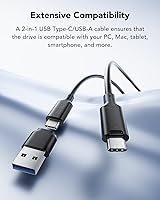
  • Connector Type: A USB Type-C connector is used for both data transfer and bus power, with a Type-C cable included in the box.
  • Max Read Speed: Peak sequential read speed reaches up to 1050MB/s when connected to a USB 3.2 Gen 2 compatible host device.
  • Max Write Speed: Peak sequential write speed reaches up to 1000MB/s under the same USB 3.2 Gen 2 host conditions.
  • Dimensions: The drive measures 3.94 x 1.97 x 0.39 inches (approximately 100 x 50 x 10.5mm), making it smaller in footprint than a standard playing card.
  • Thickness: At 10.5mm thin, the chassis is slim enough to sit flat and unnoticed in a shirt or jeans pocket.
  • Weight: The drive weighs just 42g (1.59 oz), which is lighter than most smartphones and adds negligible bulk to a bag or pocket.
  • Build Material: The outer shell is constructed from a slim metal alloy chassis, providing structural rigidity and a premium feel without significantly increasing weight.
  • Encryption: Hardware-level 256-bit AES encryption is available through the Lexar DataShield software, which must be installed and configured separately on a host device.
  • Drive Type: This is a NAND-based solid-state drive with no moving parts, making it more shock-resistant than traditional mechanical external hard drives.
  • Power Source: The drive is entirely bus-powered via the USB Type-C connection, requiring no external power adapter or additional cables.
  • Compatible Devices: Officially compatible with iPhone 15 and iPhone 16 series, Android smartphones, Mac computers, Windows laptops and PCs, PS5, and Xbox Series X|S consoles.
  • MagSafe Support: MagSafe magnetic attachment is not supported in this version; the drive connects exclusively via a physical Type-C cable.
  • Color: Available in Silver only; no additional color variants are currently offered for this model.
  • Series: This drive belongs to Lexar's ES3 product line, positioned as a mid-range portable SSD balancing speed, compactness, and price.
  • Included Accessories: One USB Type-C to Type-C cable is included in the packaging; no protective pouch, case, or adapter is bundled.
  • Release Date: The drive was first made available in January 2025, making it a current-generation product as of mid-2025.
  • Manufacturer: Designed and sold by Lexar Co., Ltd., a storage brand with a history in consumer flash memory and portable storage products.
  • Water Resistance: No official IP dust or water resistance rating is listed for this drive; it should be kept away from moisture and liquids.

Related Reviews

Lexar 1TB ES5 Magnetic External SSD
86%
92%
Performance
88%
Build Quality & Durability
90%
Ease of Use
94%
Speed (Transfer Rate)
85%
Portability & Size
More
Lexar 1TB NS100 SSD
Lexar 1TB NS100 SSD
88%
89%
Performance
92%
Value for Money
85%
Durability & Build Quality
95%
Ease of Installation
88%
Speed/Read Speed
More
Lexar 1TB NQ780 SSD
Lexar 1TB NQ780 SSD
85%
93%
Performance
84%
Value for Money
88%
Durability
92%
Installation Ease
95%
Gaming Experience
More
BUFFALO External SSD 1TB
88%
89%
Performance Improvement for Gaming
93%
Setup & Installation Ease
91%
Build Quality & Durability
88%
Portability & Size
90%
Shock Resistance
More
Lexar NM620 SSD 1TB
Lexar NM620 SSD 1TB
89%
95%
Read Performance
93%
Write Performance
91%
Durability & Build Quality
88%
Ease of Installation
90%
Compatibility with Systems
More
KEXIN External SSD 1TB
86%
88%
Performance (Speed)
91%
Portability
87%
Compatibility
83%
Build Quality
80%
Durability (Shock Resistance)
More
Fikwot FU386 1TB External SSD
86%
91%
Performance
88%
Build Quality
85%
Portability
90%
Compatibility
89%
Durability
More
fanxiang FF951 1TB External SSD
86%
94%
Performance (Speed)
89%
Build Quality
91%
Ease of Use (Plug-and-Play)
86%
Compatibility
92%
Portability & Size
More
Lexar 1TB SL500 Portable SSD
89%
93%
Performance
89%
Portability
85%
Compatibility
91%
Build Quality
88%
Ease of Use
More
JOIOT 1TB Portable External SSD
86%
85%
Performance Speed
94%
Portability & Size
88%
Build Quality & Durability
91%
Value for Money
90%
Ease of Setup & Use
More

FAQ

Yes, but only with iPhone 15 and iPhone 16 series models. If you have an iPhone 14 or anything older, it will not work — those devices either lack the required USB 3 Type-C port or do not support the necessary protocols. Make sure you check your exact iPhone model before buying.

The speeds are real, but only if your host device supports USB 3.2 Gen 2. If you plug the Lexar ES3 1TB External SSD into a laptop or hub that only has USB 3.0 or 3.1 ports, the drive will still work — it just will not come close to those peak figures. Check your device specs first if speed is a priority for you.
It is generally ready to use on Windows without any reformatting. On macOS, you may see a prompt asking you to initialize or format the drive, which takes under a minute. For PS5 or Xbox use, the console may also prompt a quick format step the first time you connect it.

It is not automatic — you need to download and install Lexar's DataShield software to enable the 256-bit AES encryption. Once set up, you can create an encrypted partition, but the process does require a few manual steps. Some users find the software interface a bit dated, so budget a few extra minutes for the initial setup if security is important to you.

Not for native PS5 titles, unfortunately. Sony only allows PS5 games to be played directly from drives installed in the internal M.2 slot. This portable SSD can be used to store and play PS4 games on a PS5, or to archive PS5 titles that you transfer back to internal storage when you want to play them.

No protective case or sleeve is included in the box — just the drive and a Type-C cable. Given how slim and bare the metal surface is, it is worth picking up a small pouch or cable organizer bag separately if you plan to carry it loose in a bag with other gear.

For typical everyday transfers — offloading photos, syncing a project folder, moving a game backup — heat is not an issue and the metal shell stays cool. If you are copying several hundred gigabytes in one continuous session, the chassis can get noticeably warm, and you might see a slight dip in write speed toward the end. It is not a common problem for most users but is worth knowing if you do heavy-duty batch transfers regularly.

No driver installation is required for basic use on either platform. It is a true plug-and-play device — connect the cable and the drive shows up as an external volume within a few seconds. The DataShield encryption software is optional and only needed if you want to use the security features.

It works fine for laptop use where the port is close at hand, but for desktop towers or connecting to a TV for console use, many buyers find the cable a bit short. If you plan to use it with a desktop PC or a TV-mounted console, having a longer USB Type-C cable on hand is a practical idea.

Absolutely, and the difference will be immediately obvious. Moving large files on a traditional spinning hard drive can feel painfully slow compared to what this pocket-sized drive delivers over USB 3.2 Gen 2. If you have been using a mechanical drive for backups or media storage, the speed improvement alone makes the switch worthwhile.