Overview

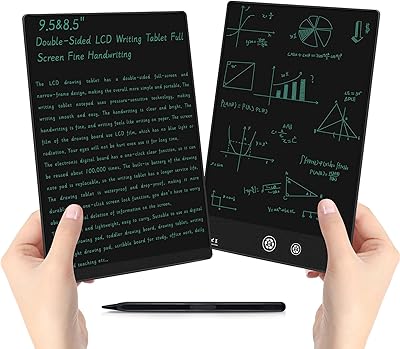
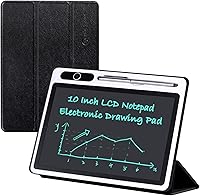
The JSJGETYI PG2800 10-inch LCD Writing Tablet is a straightforward, paper-free tool designed for everyday writing, sketching, and note-taking at home, in the office, or in a classroom. Its pressure-sensitive LCD screen displays handwriting in a blue-green monochrome tone that is clear enough for quick memos and rough sketches. What sets it apart from basic eWriters is the foldable PU cover, which wraps the device snugly and props it up as a stable writing stand. There is no Wi-Fi, no app, no syncing — it runs on a single battery and does its job without any tech fuss. Think of it as a smart, reusable notepad, not a professional drawing tool.
Features & Benefits

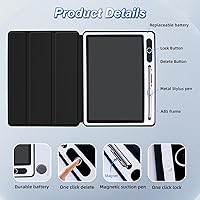
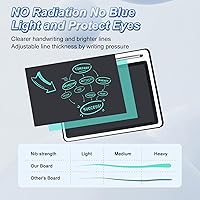
The PG2800 uses pressure-sensitive LCD technology that produces noticeably thicker and brighter lines than older eWriter models — a small but real improvement for anyone who has found those thin, faint-line boards frustrating. The one-button erase clears the whole screen instantly, and the lock function prevents accidental wipes mid-sketch, which is more useful than it sounds. The PU cover folds flat against the back and doubles as a prop stand, a genuinely practical touch. It runs on one CR2 battery — included — with no charging cable required. At just over 10 ounces, this eWriter pad is light enough to slip into a bag without a second thought.

Best For

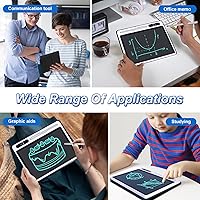
This LCD writing tablet suits a wider range of people than you might expect. Kids can use it for spelling practice or arithmetic without wasting a single sheet of paper. Office workers who jot quick notes during calls or sketch rough ideas will appreciate a reusable scratch pad that never runs dry. It has also found real traction as a low-friction communication tool for nonverbal users, where ease of use matters far more than feature depth. Teachers, tutors, and parents searching for a focused, screen-free doodling outlet for children will find it fits naturally. Just know upfront: if you need wireless syncing or fine pressure control, this is not the right fit.

User Feedback

Buyers frequently praise the cover build quality, noting it feels more substantial than expected, and the stand functionality earns consistent credit for practical day-to-day use. That said, the no-backlight design catches some buyers off guard — reading the screen in dim lighting is noticeably difficult, and the recommendation to use it in a well-lit area is worth taking seriously before purchasing. Reactions to the erase lock are split: some find it intuitive, while others accidentally trigger it before understanding the toggle. Battery longevity is generally rated positively for casual use. A handful of reviewers noted this eWriter pad competes respectably with pricier options, though anyone needing digital note storage will have to rely on photographing the screen.

Pros

  • The foldable PU cover doubles as a stable desk stand — a genuinely useful feature most competing tablets skip.
  • One-button erase is fast and satisfying for anyone rotating through quick memos throughout the day.
  • The erase lock prevents accidental wipes mid-sketch, which is more valuable than it sounds in practice.
  • Runs on a single included CR2 battery with no charging cable to track down or forget.
  • At just over 10 ounces, this eWriter pad slides into a bag without adding noticeable bulk.
  • No radiation, no glare, and no backlight make it comfortable for extended writing in well-lit spaces.
  • Kids and nonverbal users get comfortable with this LCD writing tablet within minutes of unboxing.
  • Pressure-sensitive lines are visibly thicker and clearer than many older-generation eWriter boards.
  • Fully offline operation means zero setup, zero accounts, and zero distractions — just write and erase.
  • Build quality consistently exceeds buyer expectations for a tablet at this price tier.

Cons

  • No backlight means the screen becomes difficult to read in dim rooms or evening lighting.
  • Notes cannot be saved digitally — photographing the screen is the only way to keep content.
  • The erase lock toggle confuses first-time users, with no clear label or indicator on the button.
  • CR2 batteries are harder to find locally than standard sizes, which is inconvenient when the battery dies.
  • The stand angle is fixed, so users who prefer a steeper or shallower tilt have no adjustment option.
  • Monochrome blue-green display rules out any color-coded note-taking or annotation workflows entirely.
  • The 10-inch writing surface fills up quickly during long or detailed note-taking sessions.
  • No low-battery warning exists, so the device may cut out without any advance notice.
  • On slippery desk surfaces, the folded cover stand can shift position during writing.
  • International buyers report the included documentation is minimal and only available in basic English.

Ratings

The JSJGETYI PG2800 10-inch LCD Writing Tablet has been evaluated by our AI review engine after analyzing thousands of verified global purchases, with spam, bot-generated, and incentivized feedback actively filtered out. The scores below reflect where this eWriter pad genuinely delivers and where real buyers have run into frustration. Both the strengths and the honest trade-offs are represented — no polishing, no padding.
Writing & Drawing Experience
78%
22%
Users consistently note that lines appear thicker and more visible than on older-generation eWriter pads at a similar price point. For quick notes, arithmetic, or rough sketches, the pressure-sensitive response feels natural and requires no adjustment period.
Buyers with experience on higher-end LCD tablets sometimes find the line precision lacking for anything beyond basic drafting. Fine details or small handwriting can feel slightly inconsistent depending on stylus pressure angle.
Build Quality & Durability
82%
18%
The PU leather cover draws repeated praise for feeling more solid than buyers expect at this price tier. Several parents mention the tablet surviving drops from a desk without screen damage, which matters a lot when kids are involved.
A smaller portion of reviewers note the hinge connecting the cover shows early wear after months of daily folding and unfolding. The screen surface itself, while scratch-resistant in normal use, can show marks over time with rougher handling.
Protective Cover & Stand Design
86%
The foldable cover doubling as a prop stand is one of the most praised functional details in user feedback. Office users especially appreciate being able to prop the PG2800 upright on a desk during meetings without needing a separate accessory.
The stand angle is fixed and not adjustable, which bothers some users who prefer a steeper or shallower tilt for writing comfort. On glossy or slippery desk surfaces, the stand can shift slightly without a non-slip base.
Erase Function & Lock Mechanism
74%
26%
The single-button erase is fast and satisfying for users who use this as a rotating memo board throughout the day. The lock function earns genuine appreciation from buyers who have lost notes to accidental wipes on competing tablets.
New users frequently report accidentally activating the lock before understanding how the toggle works, leading to brief confusion. A clearer physical label or color indicator on the button would resolve most of these complaints quickly.
Screen Visibility & Display Clarity
66%
34%
In well-lit rooms or natural daylight, the blue-green monochrome display is sharp and easy to read at a comfortable distance. For classroom whiteboards, desktop memo use, or bright office environments, contrast is more than adequate.
The lack of a backlight is the single most common complaint across all user feedback. In dim rooms, evening use, or any low-light scenario, reading content on this eWriter pad becomes noticeably difficult and eye-straining.
Battery Life & Power Convenience
83%
Running on a single CR2 battery — included in the box — the tablet lasts a remarkably long time for casual daily use, with many buyers reporting months of regular writing before needing a replacement. No charging cables or power banks required.
CR2 batteries are less commonly stocked in local stores than AA or AAA cells, so when the battery eventually dies, it can be a minor inconvenience to source quickly. There is no low-battery indicator to warn users in advance.
Portability & Form Factor
88%
At just over 10 ounces with the cover attached, this LCD writing tablet genuinely fits in a bag alongside a laptop without adding noticeable weight. Its slim profile means it slides into tight compartments that bulkier tablets simply cannot reach.
The 10-inch screen size, while adequate, leaves users who need more writing space wishing for a larger surface. Those replacing full-size notepads may feel the usable area fills up faster than expected during long note-taking sessions.
Ease of Use
91%
Pick it up, write, erase — there is genuinely no learning curve. Nonverbal users, young children, and elderly buyers all appear in feedback as people who got comfortable with the PG2800 within minutes of unboxing it.
The lock toggle trips up first-time users more than any other feature, as noted across multiple verified reviews. Beyond that, the total absence of settings or adjustments means what you see is what you get — a limitation for some, a relief for others.
Value for Money
79%
21%
Compared to competing LCD writing tablets in the same bracket, buyers broadly agree the PG2800 punches above its weight thanks to the cover stand design and improved line visibility. Most reviewers feel they received more than they expected.
A small segment of buyers feel the no-backlight limitation is too significant a trade-off at this price point, particularly when slightly higher-priced alternatives offer marginally better low-light usability. It is a fair concern for evening users.
Suitability for Kids & Educational Use
84%
Parents and teachers consistently highlight how well this eWriter pad holds up as a reusable practice surface for spelling, math, and drawing exercises. The durable cover absorbs the rough handling that comes with younger users naturally.
The fixed erase button, while protected by a lock, can still be activated by children who experiment with every button they find. Some parents wish there were a more robust child-lock or password-style protection option.
Suitability for Nonverbal & Accessibility Use
87%
Feedback from caregivers and AAC users highlights the PG2800 as a genuinely low-friction communication aid. Its instant erase, stable stand, and lightweight body make back-and-forth communication fluid without the complexity of app-based tools.
The monochrome display limits color-coded communication strategies some nonverbal users rely on. Users who need to save or share written content digitally will find the photograph-to-save workflow adds friction that purpose-built communication devices avoid.
Offline & Standalone Simplicity
81%
19%
For buyers who want a tool that just works without Bluetooth pairing, app downloads, or account creation, the fully offline nature of this eWriter pad is a genuine selling point. No updates, no permissions, no distractions.
Users who expected any form of digital note storage or cloud syncing are often caught off guard, despite the listed specs. The need to photograph the screen to save content is a consistent friction point in otherwise positive reviews.
Eye Comfort & Prolonged Use
76%
24%
The non-backlit, non-glare LCD surface is genuinely easier on the eyes than a smartphone or tablet screen during extended writing sessions in good lighting. Users with screen sensitivity mention this as a key reason they chose this format.
The trade-off is that without backlighting, any session in a dim or artificially lit environment quickly becomes uncomfortable from straining to see the display. It is a design compromise that affects a meaningful portion of potential users.
Setup & Out-of-Box Experience
89%
The battery comes pre-installed, the stylus is included, and the device is functional within seconds of unboxing. Buyers repeatedly mention gifting this tablet and receiving positive feedback about how immediately usable it was.
The included documentation is minimal and available only in basic English, which some international buyers found limiting. First-time eWriter users occasionally wish a short printed guide to the lock feature was included in the packaging.

Suitable for:

The JSJGETYI PG2800 10-inch LCD Writing Tablet is a strong fit for anyone who wants a low-maintenance, paper-free writing surface without the complexity of connected devices. Students and school-age kids get the most obvious value — it handles spelling drills, arithmetic practice, and casual doodling without burning through notebooks or needing a charger. Office professionals who fill up sticky notes and scrap paper during calls or brainstorming sessions will find this eWriter pad a cleaner, more sustainable alternative that sits neatly on any desk. It has also proven genuinely useful as a communication aid for nonverbal users, where the combination of a stable stand, instant erase, and dead-simple operation removes barriers that app-based tools often introduce. Parents who want a screen-free creative outlet for younger children — something durable enough to survive being tossed in a backpack — will find this a thoughtful and practical gift. Teachers and tutors who need a quick annotation surface during one-on-one sessions round out the core audience well.
Not suitable for:

If you need to save, share, or digitize your notes, the JSJGETYI PG2800 10-inch LCD Writing Tablet will frustrate you quickly — there is no connectivity whatsoever, and photographing the screen every time you want to keep something is a real workflow interruption. Anyone who works or writes regularly in dim rooms or evening lighting should also look elsewhere, because the lack of a backlight makes reading the display genuinely difficult in low-light conditions. Professional artists, designers seeking precise digital illustration tools, or anyone expecting pressure-level sensitivity comparable to a Wacom or iPad will find this eWriter pad far too basic for their needs. If you rely on color-coded notes or need to annotate in multiple colors, the single blue-green monochrome display is a hard limitation with no workaround. Finally, users who need a large writing canvas for extended note-taking sessions may find the 10-inch surface fills up faster than expected, making it a poor substitute for a full-size notepad in high-volume writing scenarios.

Specifications

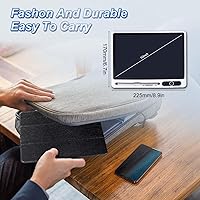
  • Screen Size: The LCD writing surface measures 10 inches diagonally, providing enough space for notes, sketches, and basic diagrams.
  • Display Type: Pressure-sensitive monochrome LCD panel that renders handwriting in a blue-green tone with no backlighting or radiation.
  • Dimensions: The tablet measures 9.25 x 6.88 x 0.04 inches, keeping it slim enough to fit in most bags and laptop sleeves.
  • Weight: Total device weight with the cover attached is approximately 10.6 ounces, making it comfortable for extended handheld use.
  • Cover Material: Wrapped in a foldable PU leather protective cover that doubles as a prop stand for hands-free viewing and writing.
  • Erase Function: A single dedicated button clears the entire screen instantly with one press, with no partial erase capability.
  • Lock Function: An erase-lock toggle prevents the screen from being accidentally wiped, protecting notes or sketches during storage or transport.
  • Battery Type: Powered by one CR2 battery, which is included in the box and requires no charging cable or power source to operate.
  • Connectivity: Fully standalone with no Bluetooth, Wi-Fi, USB data transfer, or compatibility with phones, tablets, or computers of any kind.
  • Model Number: The official model designation for this tablet is PG2800, manufactured by ShenZhen PanGoo Technology Co., Ltd.
  • Brand: Sold under the JSJGETYI brand, which is the consumer-facing label for ShenZhen PanGoo Technology Co., Ltd. products.
  • Eye Safety: The display produces no backlight, no glare, and no screen radiation, making it less visually fatiguing than conventional screens in bright conditions.
  • Low-Light Use: The manufacturer recommends using this tablet only in well-lit environments, as the non-backlit display is difficult to read in dim conditions.
  • Note Saving: No built-in digital storage exists; users must photograph the screen with a separate device if they need to retain written content.
  • Stylus: A writing stylus is included in the package, designed to work with the pressure-sensitive LCD surface without requiring activation or pairing.
  • Market Rank: This tablet holds a Best Sellers Rank of number 72 in the Computer Graphics Tablets category on Amazon at time of review.
  • Intended Use: Designed as a reusable memo, drafting, and practice pad for home, office, and educational environments — not a professional illustration tool.
  • Age Suitability: Suitable for a wide age range including young children under adult supervision, students, adults in office settings, and elderly users.

Related Reviews

ITMEIPC T-10 Android Tablet 10.1-inch, 6GB RAM, 64GB Storage
80%
91%
Value for Money
85%
Display Quality
74%
Battery Life
78%
Build Quality
88%
Performance for Light Use
More
ATOZEE 10 Inch Tablet
83%
92%
Value for Money
89%
Display Quality
85%
Battery Life
83%
Performance for Everyday Use
90%
Expandable Storage
More
YOLIPULI 095F LCD Writing Tablet
87%
91%
Value for Money
88%
Ease of Use
85%
Durability
90%
Battery Life
92%
Portability
More
ATOZEE YJYQ10S2IN1 10-inch Tablet with Keyboard
84%
91%
Value for Money
88%
Performance for Everyday Use
89%
Portability and Design
76%
Display Quality
83%
Battery Life
More
NovoJoy NVYQ10S 10-inch Tablet 64GB
84%
92%
Value for Money
90%
Expandable Storage
85%
Battery Life
75%
Display Quality
80%
Performance (General Use)
More
CWOWDEFU 10-inch Kids Tablet 128GB
86%
87%
Performance
92%
Battery Life
88%
Build Quality
82%
Display Quality
91%
Ease of Use
More
TWTNVOF Kids Tablet 10 inch, 32GB
86%
89%
Educational Features
94%
Parental Controls
90%
Durability & Build Quality
82%
Battery Life
85%
Performance (Processor Speed)
More
YYSWIE 10.1-inch Kids Tablet 64GB
85%
91%
Value for Money
88%
Durability
94%
Battery Life
85%
Parental Controls
89%
Ease of Use
More
Jeazans KT1016 10-inch Kids Tablet
70%
83%
Value for Money
77%
Build Quality
62%
Performance
66%
Battery Life
74%
Display Quality
More
reMarkable 2 10.3-inch Paper Tablet
85%
94%
Tactile Writing Feel
92%
Build Quality & Design
97%
Distraction-Free Experience
89%
Battery Longevity
76%
Software Organization
More

FAQ

No, the JSJGETYI PG2800 10-inch LCD Writing Tablet has no connectivity of any kind — no Bluetooth, no USB data transfer, and no companion app. If you want to keep something you have written, the only option is to take a photo of the screen with your phone before erasing.
There is no backlight on this eWriter pad, so it does not illuminate on its own. In low-light or dark environments, the display becomes very difficult to read. The manufacturer specifically recommends using it in a well-lit area, and real users back that up — this is a daylight or desk-lamp device.

It runs on a single CR2 battery, which is included when you open the box. For typical casual use — a few writing and erasing sessions per day — most users report the battery lasting several months before needing a replacement. Just keep in mind that CR2 batteries are not as widely stocked as AA or AAA, so it is worth ordering a spare early.

Yes, it is designed to be used across all ages and works well for kids. The LCD screen produces no radiation or glare, and the PU leather cover offers reasonable drop protection for desk-height falls. The erase button is exposed, so younger children may wipe the screen accidentally, but the lock function helps prevent that once you show them how it works.

The lock is a small toggle that disables the erase button so a stray press or bump does not clear the screen. When the lock is active, pressing the erase button does nothing. To erase, you unlock it first, then press the button. It is a simple system, but first-time users sometimes activate it without realizing it and then wonder why the erase button has stopped responding — so just keep that in mind when getting started.

Yes, and this is one of the more popular features among buyers. The foldable PU cover bends back behind the device and props it at a fixed angle for hands-free reading or writing at a desk. It is not adjustable, so the tilt is what it is, but most users find it comfortable enough for regular use.

It has been picked up by caregivers and AAC users for exactly this purpose, and the feedback is genuinely positive. The simplicity works in its favor — write, show, erase, repeat, with no app to open or screen to unlock. The stand function is also handy for positioning the tablet so both parties can read it easily. The main limitation is that it is monochrome, so color-coded communication is not possible.

For basic handwriting, sketching, and drafting, the pressure-sensitive surface feels responsive and comfortable. Lines are noticeably thicker and more visible than on older eWriter boards. That said, it is not a precision tool — fine detail work, small lettering, or anything requiring consistent line weight at different angles may feel inconsistent. Think of it as writing on a slightly firm notepad, not a professional stylus tablet.

A stylus is included in the box. You do not need to pair it, charge it, or register it — it is purely a physical writing tool. You can also write on the screen with a fingernail in a pinch, though the stylus gives cleaner and more consistent lines.

The PG2800 holds its own primarily because of the foldable cover stand, which most competing tablets in the same range do not include, and because the line visibility is a step up from older entry-level boards. Where it falls behind is the lack of any partial erase option and the non-adjustable stand angle. If you need more than a full-screen wipe for erasing, you may want to compare alternatives — but for straightforward memo and drafting use, this eWriter pad is a solid choice.