Overview

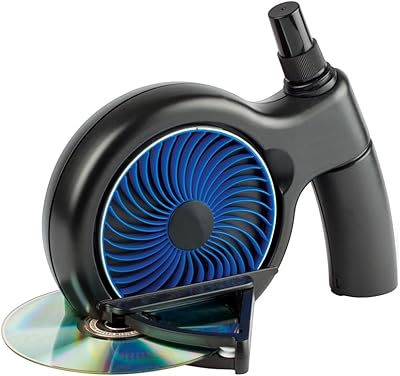
The JFJ Easy Pro Disc Repair Machine has been around since 2004, which says something in a market full of products that vanish after a season. This resurfacing unit tackles scratched CDs, DVDs, Blu-rays, and game discs across virtually every optical format — all without a drop of water. No filters, no pumps, no wet mess to clean up afterward. It sits at the higher end of what consumers typically spend on disc repair, but it is clearly built as a serious repair tool rather than a cheap novelty. If you own a large disc library, that investment starts making sense quickly.
Features & Benefits

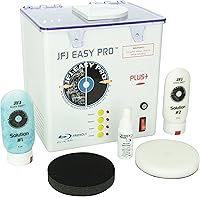
The machine runs on a silent electric motor — genuinely quiet, which you appreciate when running repairs at odd hours. Out of the box it includes sanding pads, buffing pads, anti-static spray, and two proprietary JFJ solutions, so you can start immediately. There are two operating modes: a one-step process for fingerprints and light scratches, and a multi-stage approach for deeper gouges. Compatibility covers PlayStation 1 through 4, Xbox, Xbox 360, Xbox One, Wii, GameCube, Blu-ray, HD DVD, and standard CD and DVD formats. At roughly 15 to 20 cents per repair, the cost per disc stacks up favorably against simply replacing scratched games outright.

Best For

This disc repair machine is a natural fit for retro game collectors regularly pulling aging PlayStation 2 or original Xbox discs off the shelf only to find them unreadable. Parents cycling through kids' movie and game discs will appreciate it too — replacing scratched media gets expensive fast. Used game resellers and small rental shops are another obvious audience; they need something dependable, not a weekend experiment. If you have already burned through multiple liquid scratch-repair kits without satisfying results, this resurfacing unit is the kind of meaningful upgrade that resets your expectations. It handles mixed disc libraries without requiring format-specific tools.

User Feedback

Buyers consistently praise the JFJ Easy Pro for handling light to moderate scratches reliably — that is clearly its strongest ground. Deep gouges are a different conversation; the multi-stage process helps, but results vary and the learning curve is real for first-time users. Some owners note the bundled supplies run out faster than expected, nudging the true ongoing cost higher. On long-term durability, the sentiment is largely positive, with many reporting years of use without mechanical problems. The recurring criticism from skeptical buyers is that cheaper manual kits handle minor surface damage adequately, making the price harder to justify unless heavy, frequent disc restoration is genuinely part of your routine.

Pros

  • Handles every major disc format in one machine — no swapping tools between PS2, Blu-ray, and DVD repairs.
  • Dry process means zero setup time and no messy water systems to maintain between uses.
  • Silent motor makes running repairs in shared living spaces completely practical.
  • Per-repair cost of roughly 15 to 20 cents makes the unit economical for high-volume use over time.
  • One-step mode is genuinely fast and effective for fingerprints and light everyday scratches.
  • Comes ready to use out of the box with solutions, pads, and anti-static spray included.
  • Long market history since 2004 suggests a product that has earned sustained buyer trust.
  • One-year parts and labor warranty plus a 30-day return window provides meaningful purchase protection.
  • Lightweight and compact enough to store on a shelf without dedicating permanent counter space.

Cons

  • Deep gouge repair results are inconsistent and heavily dependent on user technique.
  • The included buffing pads wear out faster than most buyers anticipate, adding ongoing supply costs.
  • Official documentation is widely criticized as too vague for first-time multi-stage users.
  • GameCube disc repairs require separately purchased supplies, which is an annoying extra cost for retro collectors.
  • The plastic casing feels underwhelming in hand relative to what the price point implies.
  • Blu-ray repairs require noticeably more care than standard DVD or CD work to avoid over-sanding.
  • 110V-only design locks out international buyers or anyone relying on a step-down converter.
  • No visual or digital guides are included to support learning the more advanced repair modes.

Ratings

Our AI rating system analyzed thousands of verified global reviews for the JFJ Easy Pro Disc Repair Machine, actively filtering out incentivized submissions and outlier bot activity to surface what real buyers consistently experience. The scores below reflect a transparent synthesis of both the genuine strengths that keep this resurfacing unit ranked near the top of its category and the recurring frustrations that prevent it from earning a perfect recommendation across the board.

Repair Effectiveness (Light Scratches)
88%
For fingerprints, surface scuffs, and light circular scratches, users report strikingly reliable results. A disc that skipped constantly on a PS2 or refused to load on a Wii frequently plays without issue after a single one-step cycle. That consistency on everyday damage is what earns this machine its loyal following.
Results are not always perfectly repeatable — occasionally a disc needs two passes to fully clear minor marks, which some buyers find frustrating given the price. A small number of users noted faint swirl patterns remaining after treatment on darker disc surfaces.
Repair Effectiveness (Deep Scratches)
61%
39%
The multi-stage process genuinely extends what this resurfacing unit can handle compared to manual kits or single-step machines. Users dealing with heavily gouged GameCube or original Xbox discs have reported rescuing media they had written off entirely, which feels like a significant win.
Deep gouge repair is inconsistent and heavily dependent on user technique during the multi-stage process. Several buyers report that heavily damaged discs improved but did not fully recover, and a few experienced disc surface clouding after aggressive sanding — a hard outcome to reverse.
Ease of Use
74%
26%
The one-step mode is genuinely straightforward — load the disc, apply solution, run the cycle. Most users are up and running within minutes for routine repairs, and the dry process removes the setup friction that wet resurfacing machines carry.
The multi-stage mode has a real learning curve. First-time users frequently apply too much pressure or misjudge sanding duration, leading to subpar results or surface damage. The manual instruction quality drew repeated criticism, with buyers wishing for clearer step-by-step visual guidance.
Build Quality & Durability
82%
18%
For a machine that has been on the market since 2004 with minimal redesign, the core construction holds up well. Long-term owners — some reporting three to five years of regular use — say the motor remains reliable and the mechanical components show minimal wear under moderate workloads.
The outer casing feels plasticky relative to the price point, and a handful of users noted that pad holders show wear after extended use. It does not feel like a professional-grade device when handled, even if it performs like one under normal conditions.
Format Compatibility
93%
Covering PS1 through PS4, all Xbox generations, Wii, GameCube, Blu-ray, HD DVD, and standard CD and DVD formats in a single machine is a genuine practical advantage. Collectors and resellers with mixed libraries avoid the hassle of owning multiple tools, which simplifies workflow considerably.
GameCube discs require separately purchased supplies, which is a frustrating asterisk for retro collectors specifically targeting that format. The 110V limitation also means international buyers or those using step-down converters have occasionally reported motor performance inconsistencies.
Value for Money
67%
33%
Over time the per-repair cost of roughly 15 to 20 cents makes the upfront spend easier to rationalize for anyone repairing discs regularly. Resellers and rental shops that run dozens of repairs weekly report a clear return on investment within a few months of consistent use.
For casual users with only a handful of scratched discs to fix, the price is a difficult ask — especially when cheaper manual kits handle light surface damage adequately. Buyers who purchased hoping to rescue a single beloved game often feel the cost-to-benefit ratio does not work in their favor.
Included Accessories & Supplies
71%
29%
The starter kit — two JFJ Pro Solutions, sanding pads, buffing pads, and anti-static spray — means buyers can run real repairs immediately out of the box. That is a meaningful advantage over competitor machines that ship essentially bare and require immediate additional purchases.
The bundled supplies run out faster than most buyers expect, particularly the buffing pads, which wear noticeably after 20 to 30 repair cycles. Replacement supply costs are an ongoing consideration that the initial listing does not make entirely transparent.
Noise Level
91%
The silent motor is one of the most consistently praised aspects of this resurfacing unit, with users specifically noting they can run repairs while others are nearby without causing disruption. It is a small detail that meaningfully improves the day-to-day experience of using it regularly.
A small number of users reported a faint vibration hum developing after extended use, particularly on older units. This did not appear to affect performance in most cases but was enough to concern some owners about long-term motor health.
Size & Footprint
84%
At 7.5 pounds and roughly the footprint of a large toaster, this disc repair machine stores easily on a shelf or in a closet between uses. It does not demand dedicated counter space the way commercial resurfacing machines do, which home users consistently appreciate.
The 9-inch height catches some buyers off guard relative to product photos. For those storing it in tighter spaces — a media cabinet shelf, for example — the vertical clearance requirement occasionally poses a problem.
Dry Process & Maintenance
89%
Eliminating water from the repair process removes an entire category of maintenance overhead. No filter cleaning, no pump priming, no risk of mold or stagnant water — users who previously owned wet-system machines describe switching to this as an immediately noticeable quality-of-life improvement.
The dry compounds require careful application to avoid residue buildup on the disc surface or machine spindle over time. A few users reported needing to periodically clean the pad holders to maintain consistent repair quality, which adds minor upkeep not prominently mentioned in the documentation.
Warranty & Support
72%
28%
A one-year parts and labor warranty plus a 30-day unconditional return window gives buyers a reasonable safety net for a mid-to-high-cost purchase. Users who encountered early defects report that the warranty process was honored without significant friction in most documented cases.
Post-warranty support options are limited, and replacement parts availability has been a concern for some long-term owners. A few buyers with units older than two years report difficulty sourcing specific mechanical components when something eventually does wear out.
Learning Curve & Documentation
58%
42%
Once a user masters the multi-stage process through trial and experience, the results improve considerably. Enthusiasts who invested time learning the technique report much higher satisfaction scores and more consistent outcomes on challenging discs.
The included manual is widely criticized as insufficient — particularly for multi-stage repairs. New users routinely turn to online forums and third-party video guides to fill the gaps, which is a telling sign that the official documentation has not kept pace with user expectations.
Consistency Across Disc Types
76%
24%
Performance across CDs, DVDs, and Blu-rays is broadly consistent for light to moderate damage, and users running repairs on mixed batches appreciate not having to reconfigure the machine between format types. That uniformity reduces friction during high-volume repair sessions.
Blu-ray results are slightly less predictable than standard DVD or CD repairs, possibly due to the harder coating on Blu-ray media. Several users noted that Blu-ray discs required more careful technique to avoid over-sanding, adding a layer of caution not needed for older formats.

Suitable for:

The JFJ Easy Pro Disc Repair Machine is a strong match for anyone who regularly deals with scratched optical media and has moved past the point where cheap manual kits feel adequate. Retro game collectors are probably the most obvious fit — if you are actively buying and restoring PS1, PS2, or original Xbox titles, the breadth of format compatibility alone saves you from owning multiple tools. Parents who cycle through scratched kids' movie and game discs on a near-weekly basis will find the low per-repair cost genuinely attractive over time, since replacing those discs individually adds up fast. Small used game shops and disc resellers are another natural audience, as a machine that can process mixed batches of CDs, DVDs, and Blu-rays without reconfiguration keeps workflow practical. If you have already tried liquid scratch-repair solutions and found them underwhelming on anything beyond the lightest surface damage, this resurfacing unit represents a meaningful step up in capability and reliability.
Not suitable for:

The JFJ Easy Pro Disc Repair Machine is a harder sell if your disc repair needs are occasional or limited to a handful of titles. Buyers with one or two scratched discs to fix will find it difficult to justify the upfront investment when cheaper alternatives handle light surface damage adequately. It is also not the right tool for anyone expecting miracles on deeply gouged media — the multi-stage process helps, but it demands patience and technique, and inconsistent results on severe damage are a documented reality. International buyers outside the US, Canada, and Mexico should know the 110V limitation is a genuine constraint, not just a fine-print formality. Anyone who wants a hands-off, foolproof experience should also be cautious: the learning curve on multi-stage repairs is real, and the documentation is not good enough to carry a beginner through it confidently. Finally, this resurfacing unit cannot address cracked discs or any damage to the label side — if that is what you are dealing with, no amount of buffing will help.
Specifications

  • Manufacturer: Made by JFJ Disc Repair, a company specializing in optical media restoration equipment.
  • Model Number: The exact model designation for this unit is EasyPro.
  • Voltage: Operates on 110V power, compatible with standard outlets in the USA, Canada, and Mexico only.
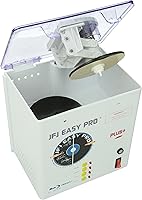
  • Dimensions: The machine measures 9 x 6.75 x 9.75 inches (length x width x height).
  • Weight: Unit weighs 7.5 pounds, making it light enough to move and store without difficulty.
  • Motor Type: Powered by a silent electric motor designed to operate quietly during repair cycles.
  • Repair Modes: Offers two distinct operating modes: a one-step mode for light damage and a multi-stage mode for deeper scratches and gouges.
  • Process Type: Uses a fully dry resurfacing process — no water, filter systems, or pumps are involved at any stage.
  • Compatible Formats: Works with CD, CD-R, CD-ROM, DVD, DVD-R, Blu-ray, HD DVD, GameCube (with separately sold supplies), Wii, PS1, PS2, PS3, PS4, Xbox, Xbox 360, and Xbox One discs.
  • Included Accessories: Comes with JFJ Pro Solutions 1 and 2, sanding pads, buffing pads, and an anti-static spray cleaner.
  • Cost Per Repair: Estimated repair cost is approximately 15 to 20 cents per disc when using JFJ-branded consumables.
  • Warranty: Backed by a one-year manufacturer warranty covering both parts and labor.
  • Return Policy: Includes a 30-day unconditional money-back guarantee from the date of purchase.
  • Market Debut: This product was first made available to consumers in April 2004.
  • Category Rank: Currently ranked number 5 in the Audio and Video Disc Repair Kits category on Amazon.
  • Discontinuation: As of the latest available product data, this unit has not been discontinued by the manufacturer.

Related Reviews

Ubiquiti UniFi Dream Machine Pro UDM-Pro
86%
94%
Performance
88%
Ease of Use
90%
Reliability
92%
Connectivity
85%
Network Security Features
More
Pantene Pro-V Repair Serum 4.9 Oz
84%
88%
Effectiveness on Damaged Hair
94%
Non-Greasy Formula
85%
Hydration and Moisture
90%
Ease of Use (Overnight Treatment)
92%
Hair Texture and Softness After Use
More
Digital Innovations SkipDr Manual Disc Repair System
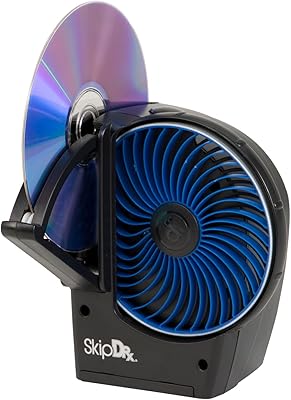
76%
74%
Scratch Repair Effectiveness
88%
Ease of Use
81%
Value for Money
61%
FlexiWheel Durability
77%
Included Accessories
More
Digital Innovations SkipDr Motorized Disc Repair System
77%
78%
Repair Effectiveness
91%
Ease of Use
63%
FlexiWheel Longevity
74%
Value for Money
69%
Build Quality & Durability
More
ohora Care Pro Easy Dual Stick Nail Art Tool
86%
88%
Ease of Use
92%
Ergonomic Design
90%
Effectiveness in Smoothing Gel Nails
85%
Portability
82%
Value for Money
More
Neutrogena Rapid Wrinkle Repair Retinol Pro+ Power Facial Serum 1oz
87%
92%
Effectiveness in Reducing Wrinkles
89%
Dark Spot Reduction
90%
Skin Texture Improvement
86%
Absorption Speed
75%
Skin Sensitivity/Tolerance
More
DS18 PRO-DR1PK44 Compression Driver with PRO-H44/BK Horn
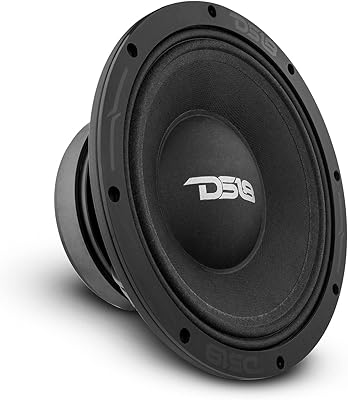
86%
96%
High-Frequency Loudness
93%
Sensitivity & Efficiency
88%
Vocal Clarity & Naturalism
86%
Build Quality & Materials
81%
Installation Versatility
More
DS18 PRO-ZXI10MBASS 10-inch Pro Audio Mid Bass Loudspeaker
86%
88%
Sound Quality
91%
Bass Performance
85%
Ease of Installation
87%
Durability and Build Quality
92%
Value for Money
More
Cinema Secrets Pro Cosmetics Ultimate Corrector 5-In-1 Pro Palette No.1
86%
91%
Effectiveness for Color Correction
88%
Blendability
84%
Coverage Customization
85%
Longevity of Wear
93%
Suitability for All Skin Tones
More
Apple MacBook Pro 14-inch M1 Pro 16GB RAM 1TB SSD
87%
95%
Performance
92%
Display Quality
89%
Battery Life
91%
Build Quality
82%
Value for Money
More

FAQ

It depends on how deep the damage actually is. The JFJ Easy Pro Disc Repair Machine includes a multi-stage mode specifically for more severe scratches, and it can rescue discs that lighter kits would give up on. That said, results on genuinely deep gouges vary — some discs come back fully readable, others improve but do not fully recover. Setting realistic expectations here is important; this is not a miracle tool for worst-case disc damage.

No, the entire process is dry. There are no water tanks, pumps, filters, or hoses involved at any stage. You apply the included JFJ Pro Solutions directly to the disc or pads, run the cycle, and that is it. It is one of the more practical aspects of this resurfacing unit, especially compared to older wet-system machines.

Honestly, shorter than most buyers expect. The buffing pads in particular tend to show wear after 20 to 30 repair cycles under regular use. The solutions last somewhat longer depending on how much you apply per repair. It is worth budgeting for replacement supplies from the start rather than being caught off guard.

Yes, but with a catch — GameCube discs are compatible, but the specific supplies needed for that format are sold separately and are not included in the standard kit. If restoring GameCube media is your main goal, factor that additional purchase into your decision.

No, the motor is genuinely quiet. Most users describe it as nearly silent during operation, which makes it easy to run repairs without disturbing others nearby. It is one of the more consistently praised aspects of the machine in long-term user feedback.

No — cracked discs and label-side damage are outside what any resurfacing machine can address, including this one. Disc repair machines work by resurfacing the clear read side of the disc. If the crack goes through the disc body or the damage is on top where the label is printed, the disc is unfortunately beyond repair.

Not in any complicated way. The machine handles all those formats in the same unit, and switching between them is straightforward. Blu-ray discs do benefit from a slightly more careful touch during the process since their coating is harder and more sensitive to over-sanding, but there is no separate configuration required.

There is a learning curve, and it is worth acknowledging honestly. The one-step mode for light scratches is easy to pick up quickly, but the multi-stage process for deeper damage requires some trial and error to get right. The included manual has been widely criticized for lacking detail, so many users end up supplementing it with online video guides before they feel fully confident.

The one-year warranty covers parts and labor, so a defect or mechanical failure within that window should be addressed by the manufacturer without additional cost to you. The 30-day money-back guarantee also gives you an early exit window if the machine simply does not meet your needs after testing it at home.

It is one of the more practical choices available at the consumer level for that use case. The low per-repair cost, broad format compatibility, and dry process make it well-suited for processing mixed batches of discs without a complicated setup. Shops running a high volume of repairs daily might eventually look at commercial-grade options, but for small to mid-volume operations this resurfacing unit holds up well over time according to long-term owners.