Overview

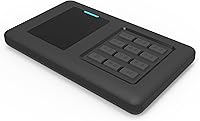
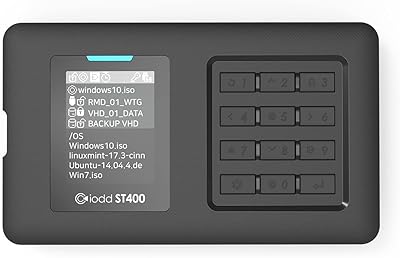
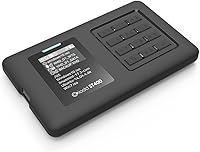
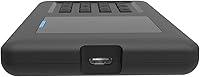
The IODD ST400 2TB (No SSD) is a hardware-encrypted external drive enclosure from South Korean brand IODD, built squarely for power users who take data security seriously. One thing to get straight upfront: no storage drive is included. You supply your own 2.5-inch SATA SSD or HDD (7mm or slimmer), which gives flexibility but does require a bit of setup effort. Onboard management happens through a 12-key physical keypad and a compact TFT LCD — no software, no drivers, no cloud dependencies. It connects via USB-C and runs across Windows, macOS, Linux, and Android. With a 4.4-star rating from over 300 buyers, this secure drive caddy has built a quiet but devoted following.
Features & Benefits

The headline capability here is AES256-XTS hardware encryption, locking your data at the device level with a PIN of up to 76 digits — entirely independent of the host operating system. No drivers, no background software. Beyond plain storage, the ST400 functions as a virtual optical drive, letting you mount ISO files and boot directly from them. It also handles VHD, VMDK, IMA, and RMD virtual disk formats with equal ease. A write-protect toggle adds practical control for forensic work or maintaining a clean OS image. Windows-To-Go support and auto-sleep round out a feature set that goes well beyond what a standard enclosure typically offers.

Best For

This encrypted enclosure is purpose-built for a specific kind of user, and it is worth being upfront about that. IT administrators who boot from ISO images or juggle multiple OS environments will find it genuinely practical. Security professionals who distrust software-based encryption will value the hardware-only key management — nothing touches the host machine to expose the PIN. Developers working with virtual disk images, anyone building a Windows-To-Go setup, and privacy-conscious users carrying sensitive credentials all have legitimate reasons to consider it. If you already own a spare 2.5-inch SATA drive, the value proposition sharpens considerably. Casual plug-and-play users should look elsewhere.

User Feedback

Buyers are largely satisfied, with consistent praise for the build quality and encryption reliability. The bring-your-own-drive model is appreciated for its flexibility, though some first-time buyers are caught off guard by the initial setup. The keypad and LCD have a short learning curve, but most users report it becomes intuitive within a session or two. The most recurring technical concern is the absence of TRIM and UASP support, which can gradually affect SSD performance over time — not a dealbreaker, but worth factoring in when choosing a drive to pair with it. A handful of buyers feel the plastic and acrylic casing feels modest given the price, though active firmware updates from IODD suggest the product is genuinely supported long-term.

Pros

  • Hardware AES256-XTS encryption works entirely independently of the host OS — no software vulnerabilities to exploit.
  • Mount and boot ISO files directly, turning this encrypted enclosure into a portable multi-OS toolkit.
  • Supports VHD, VMDK, IMA, and RMD formats, covering most real-world virtualization use cases.
  • Write-protect toggle is reliable and useful for forensic work or maintaining a pristine reference image.
  • Windows-To-Go support lets you carry a full, encrypted Windows environment to any compatible machine.
  • Driverless operation across Windows, macOS, Linux, and Android removes compatibility headaches entirely.
  • At 90 grams without a drive, it is genuinely pocket-portable for daily field work.
  • Active firmware updates from IODD indicate the product is maintained and improved after purchase.
  • Bring-your-own-drive model lets you reuse existing hardware and choose storage capacity freely.
  • Up to 76-digit PIN support gives serious security headroom well beyond standard encrypted drives.

Cons

  • No internal drive is included — the total cost of a working setup is higher than the listing price implies.
  • Setup requires careful reading of the manual; there is no intuitive out-of-box experience for newcomers.
  • TRIM and UASP are not supported, which can gradually reduce SSD performance over heavy long-term use.
  • The plastic and acrylic casing picks up scratches easily and feels modest relative to the asking price.
  • Older BIOS configurations may not recognize the virtual optical device without manual boot-order adjustments.
  • Forgetting the PIN means permanent data loss — there is no recovery mechanism by design, which surprises some buyers.
  • The compact keypad is awkward for users with larger fingers, especially during initial configuration.
  • Android OTG support is limited in practice and depends heavily on the specific device being used.
  • The TFT display is difficult to read in bright outdoor conditions, reducing usability in field environments.
  • No quick-start guide is included in the box, making the first-time setup experience unnecessarily frustrating.

Ratings

The IODD ST400 2TB (No SSD) earns its reputation as a specialist tool, and the scores below reflect exactly that — compiled by AI after analyzing verified global buyer reviews, with spam, bot submissions, and incentivized feedback actively filtered out. The result is an honest picture that captures what this secure drive caddy genuinely excels at and where real users have run into friction. Both the strengths and the sticking points are reflected without softening either.
Encryption Reliability
94%
Users who depend on this enclosure for sensitive data — think traveling consultants, security researchers carrying client credentials — report that the hardware AES256-XTS implementation has never let them down. The PIN system works independently of any operating system, so there is no software layer that can be exploited or corrupted.
A small number of users found the initial PIN setup process confusing without closely reading the manual. There is no recovery option if the PIN is forgotten, which is by design but can feel unforgiving if you are setting it up in a hurry.
Virtual Drive & ISO Boot Functionality
91%
For IT admins and developers who regularly boot from ISO images — spinning up Linux environments, running diagnostics, or deploying clean Windows installs — this feature alone justifies the purchase. Mounting an ISO and booting from it is reliable across multiple machines and operating systems.
The virtual ODD function has a learning curve, particularly around file organization on the drive. Some users report that certain older BIOS configurations do not recognize the virtual optical device without manual boot-order adjustments.
Build Quality
72%
28%
The enclosure feels solid in hand and the internal SATA connector is well-engineered — drives seat securely with no wobble. Several long-term users report daily carry over months without any structural issues or connector degradation.
The outer casing is plastic and acrylic, which reads as functional rather than premium. At this price point, a segment of buyers expected aluminum or at least a rubberized finish, and the all-plastic exterior does pick up scratches over time.
Ease of Setup
63%
37%
Users who arrive with a technical background — even a modest one — typically get the enclosure running within 20 to 30 minutes. The physical keypad and on-screen menus cover most operations without needing a connected computer.
This is not a plug-and-play device, and several buyers learned that the hard way. The onboarding process requires reading documentation carefully, and the lack of a quick-start guide in the box drew repeated criticism from users who expected immediate usability.
Keypad & Display Usability
68%
32%
Once familiar, the 12-key tact-switch layout becomes muscle memory for regular users. The TFT LCD is small but readable in most lighting conditions, and the multilingual UI is a practical touch for international buyers.
The initial interaction feels cramped, particularly for users with larger fingers navigating the compact keypad. The display resolution is functional rather than sharp, and in bright outdoor light it can be difficult to read without angling the device.
Virtual Disk Format Support
88%
Supporting ISO, VHD, VMDK, IMA, and RMD covers the vast majority of real-world use cases for developers and system administrators. Users working with Hyper-V images or VMware snapshots found they could work directly from the enclosure without conversion.
VMDK support is appreciated but noted as occasionally inconsistent depending on the originating virtualization platform version. A few users flagged that very large VMDK files above a certain threshold caused mounting delays.
Windows-To-Go Support
83%
Running a full Windows installation directly from this secure drive caddy is one of its more impressive practical tricks. Field technicians and IT support staff who move between machines found it a reliable way to carry a consistent, encrypted work environment.
Performance is naturally bounded by the USB 3.1 Gen 1 interface and the speed of the paired drive. Users pairing it with a slower HDD found the Windows-To-Go experience sluggish enough to be frustrating under normal workloads.
Write Protection
86%
The hardware write-protect toggle is genuinely useful for forensic investigators and anyone maintaining a clean reference OS image. Engaging it at the device level means no accidental writes regardless of what the host OS attempts.
The toggle is a software-controlled setting accessed through the menu rather than a dedicated physical switch, which disappointed a few users who wanted a visible mechanical lock for quick confirmation of protection status.
Drive Compatibility
79%
21%
The enclosure accepts both SATA2 and SATA3 drives in the 2.5-inch form factor, giving buyers flexibility to reuse older spare drives or fit a modern high-speed SSD. The 7mm height limit covers the overwhelming majority of standard consumer drives.
The 7mm height restriction excludes some older or thicker 9.5mm drives that users hoped to repurpose. TRIM and UASP are not supported, which means SSD performance can degrade over time as the drive fills up — not critical, but worth knowing before pairing with a premium NVMe-style SATA SSD.
Portability
85%
At 90 grams without a drive installed, this encrypted enclosure barely registers in a laptop bag. The auto-sleep function and safe-removal feature mean it handles the bumps and interruptions of daily travel without data risk.
The dimensions are slightly bulkier than a bare drive sleeve, and the acrylic finish does not grip naturally in a jacket pocket. Users who carry it loosely reported minor cosmetic scratching after extended daily use.
Firmware & Long-Term Support
81%
19%
Active firmware updates from IODD were mentioned positively by a notable share of long-term owners, signaling that the product is not abandoned after purchase. Updates have addressed minor usability quirks and expanded format support over time.
Applying firmware updates requires a specific process that some users found poorly documented. A handful of buyers on older firmware versions encountered bugs that had already been patched, suggesting the update notification system could be more proactive.
OS Compatibility
87%
Working across Windows, macOS, Linux, and Android without needing any installed drivers is a meaningful practical advantage. Security professionals who operate across heterogeneous environments — mixing Mac laptops with Linux workstations — found the driverless operation genuinely convenient.
Android support, while listed, is limited in scope and depends heavily on the OTG capability of the specific device. A few users found macOS behavior slightly inconsistent when switching between virtual drive modes without a full disconnect cycle.
Value for Money
71%
29%
For the target audience — someone who needs hardware encryption, ISO booting, and virtual disk support in one compact unit — the value calculation works out favorably, especially when pairing with a drive already on hand. There is no credible direct competitor at a lower price that matches the full feature set.
For buyers who do not specifically need the advanced booting and virtual drive features, the price is harder to justify against simpler encrypted enclosures. The no-drive-included model also means the real total cost is higher than the listing price implies.

Suitable for:

The IODD ST400 2TB (No SSD) was built for a specific kind of user, and if you fit that profile, it is hard to find a more capable tool at this price point. IT administrators who regularly boot diagnostic tools, deployment images, or live OS environments will find the virtual ODD and ISO mounting features genuinely useful in day-to-day work. Security professionals who need hardware-level encryption they can trust — without relying on BitLocker, VeraCrypt, or any other software that touches the host machine — will appreciate that the encryption lives entirely in the device itself. Developers and testers who work with VHD, VMDK, or other virtual disk formats can use this secure drive caddy as a portable lab that moves between machines without friction. It also makes strong practical sense for anyone who already has a spare 2.5-inch SATA drive sitting unused — pairing that drive with this enclosure adds encryption, write protection, and bootable virtual media support for a relatively modest incremental cost. Privacy-conscious users carrying sensitive credentials or confidential client files will find the PIN-protected hardware encryption a meaningful upgrade over standard encrypted USB sticks.
Not suitable for:

If you are looking for a simple plug-and-play encrypted drive to back up photos or move files between home and work, the IODD ST400 2TB (No SSD) is almost certainly more device than you need — and more complicated than you want. The setup process requires patience and a willingness to read documentation; there is no quick-start experience, and buyers who skip the manual tend to leave frustrated reviews. The absence of TRIM and UASP support is a real consideration if you plan to pair it with a high-performance SSD and use it heavily over years — drive longevity will be affected in ways that a standard enclosure would not cause. The plastic and acrylic casing, while functional, will feel underwhelming to anyone expecting the build finish typical of premium storage accessories. Budget buyers should also account for the fact that the drive itself is sold separately, meaning the true cost of a complete, ready-to-use setup is meaningfully higher than the listing price suggests. And if your primary machine runs an older BIOS that does not handle virtual optical devices cleanly, the ISO boot functionality — arguably the flagship feature — may require workarounds that negate its convenience.
Specifications

  • Encryption: Hardware AES256-XTS encryption is implemented directly on the device, supporting a PIN of up to 76 digits with no reliance on host software or drivers.
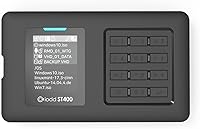
  • Display: A 128x160 TFT LCD screen is built into the enclosure for on-device menu navigation and status display.
  • Input Method: A 12-key tact-switch keypad is used for all on-device input, including PIN entry and menu navigation.
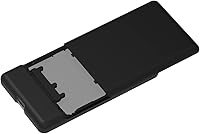
  • Drive Compatibility: Accepts standard 2.5-inch SATA2 or SATA3 solid-state or mechanical drives with a maximum height of 7mm; no drive is included.
  • External Interface: Connects to host devices via a USB Type-C port operating at USB 3.1 Gen 1 speeds (up to 5 Gbps theoretical).
  • Dimensions: The enclosure measures 80mm in width, 140mm in length, and 14mm in height without an installed drive.
  • Weight: The enclosure weighs 90 grams without an internal drive installed.
  • Power Source: Powered entirely by the host USB connection at DC 5V, requiring no external power adapter.
  • Supported Formats: Virtual disk and image formats supported include ISO, VHD, VMDK, RMD, and IMA.
  • OS Support: Compatible with Windows 7 and later, macOS 10 and later, Linux distributions, and Android devices with OTG support.
  • TRIM & UASP: Neither TRIM nor UASP (USB Attached SCSI Protocol) is supported, which may gradually affect SSD performance under sustained heavy use.
  • Special Modes: Onboard feature modes include Windows-To-Go, Write Protection, Auto-Sleep, Safe Removal, and a multilingual UI with a built-in help key.
  • Material: The outer casing is constructed from plastic and acrylic.
  • Color: Available in black only.
  • Internal Interface: The internal drive bay uses a SATA2/SATA3 interface, backward compatible with both interface generations.
  • Brand Origin: Designed and manufactured by IODD co., Ltd., based in South Korea.
  • Virtual ODD: The enclosure emulates a bootable optical disc drive (CD, DVD, or Blu-ray ROM) by mounting a selected ISO file from the internal drive.
  • Security Mode: An Administrator Mode is available for advanced configuration, separating administrative access from standard user operation.

Related Reviews

iodd ST400 1TB SSD Enclosure USB-C
89%
91%
Performance
93%
Data Transfer Speed
96%
Encryption Security
88%
Portability
85%
Compatibility with Windows
More
SanDisk SSD PLUS 2TB Internal SSD
86%
89%
Performance
92%
Value for Money
88%
Ease of Installation
85%
Durability
90%
Compatibility
More
SanDisk 2TB SSD Plus M.2 NVMe SSD
86%
89%
Performance
92%
Ease of Installation
88%
Reliability
91%
Value for Money
90%
Capacity
More
Alienware Aurora R16 Gaming Desktop, Intel Core Ultra 9, NVIDIA RTX 5080, 64GB RAM, 2TB SSD + 2TB HDD
87%
94%
Performance
92%
Cooling System
93%
Graphics/Visuals
88%
Build Quality
80%
Value for Money
More
INLAND Platinum 2TB SSD
89%
87%
Performance
92%
Installation Ease
89%
Read Speed
85%
Write Speed
91%
Value for Money
More
Fikwot FX815 2TB SSD
87%
87%
Performance
92%
Value for Money
91%
Ease of Installation
88%
Durability
83%
Power Efficiency
More
TEAMGROUP QX 2TB SSD
86%
87%
Performance
91%
Read Speed
86%
Write Speed
88%
Endurance
72%
Compatibility
More
Crucial BX500 2TB SSD
85%
86%
Performance
91%
Value for Money
89%
Speed (Boot-Up and File Loading)
92%
Energy Efficiency
75%
Durability (Long-Term Use)
More
Verbatim Vi7000 2TB SSD
90%
96%
Read Speed Performance
92%
Write Speed Performance
94%
PS5 Compatibility
88%
Thermal Management
89%
Shock Resistance
More
Lexar NM790 2TB SSD
Lexar NM790 2TB SSD
89%
94%
Performance for Gaming
92%
Speed (Read/Write)
88%
Ease of Installation
93%
PS5 Compatibility
85%
Cooling Efficiency (Heatsink)
More

FAQ

No, it does not. The IODD ST400 2TB (No SSD) is an enclosure only — you need to supply your own 2.5-inch SATA SSD or HDD. Make sure the drive you choose is 7mm tall or thinner, as thicker 9.5mm drives will not fit.

There is no recovery option — that is an intentional security design. If the PIN is lost, the data on the drive is permanently inaccessible. Write your PIN down and store it somewhere secure before relying on this enclosure for important data.

Yes, and this is one of the ST400's standout capabilities. You can store multiple ISO files on your drive and select one to mount as a virtual optical drive. From there, you can boot into it from the host machine just as you would from a physical disc.

The enclosure uses a USB-C connector, but a standard USB-C to USB-A cable or adapter will work fine since the connection negotiates down to USB 3.0 speeds. Just note that USB-A adapters can sometimes be slightly less stable — use a quality cable.

Yes, macOS 10 and above is fully supported without any drivers. The main caveat is that switching between virtual drive modes works best when you do a full disconnect and reconnect cycle rather than hot-switching modes while the device is mounted.

It can, gradually. Because TRIM is not supported, your SSD cannot clear unused blocks in the background the way it normally would. In practice this means write speeds may slow down over months of heavy use. It is not a sudden or dramatic drop, but pairing this enclosure with a mid-range SSD rather than a high-performance one is a sensible choice.

It takes more effort than a typical plug-and-play drive. You will need to read the manual to set up your PIN, format the drive through the device menu, and understand how the file system needs to be organized for virtual drive features to work. Most technically comfortable users get it running in under 30 minutes, but skipping the documentation is a reliable way to get frustrated.

Yes. The drive is partitioned to handle both a virtual media area (where your ISO and VHD files live) and a standard storage area for regular files. The two coexist without issue, and the encryption covers everything on the drive.

There is definitely a learning curve at first, especially if you have larger fingers. Most users report it becomes natural after a few sessions. The keys are tactile and responsive — it is mostly just a matter of learning the menu structure, which the built-in help key makes easier.

Linux is fully supported, and running a live Linux distribution from a mounted ISO is one of the most popular use cases for this secure drive caddy. Users regularly carry multiple Linux ISO files and select the appropriate one at boot time depending on what task they need to perform.