Overview

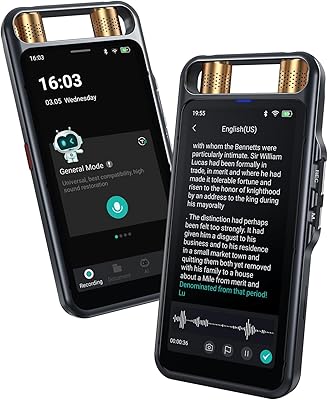
The Innioasis R1 Voice Recorder arrived in mid-2024 as a mid-range option that genuinely looks the part — a slim, 3-ounce device with a 3.69-inch HD touchscreen that feels more modern than most recorders at this price point. Physical buttons are still there if you prefer them, which is a thoughtful design choice. USB-C charging and a 3.5mm headphone jack keep connectivity current. Two microphones cover different sensitivity levels, and the built-in DSP noise reduction does real work filtering out ambient sound. It is not a professional studio tool, but for everyday capture, it holds its own against pricier competition.
Features & Benefits

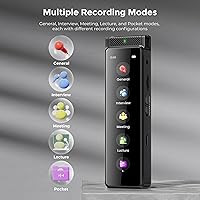
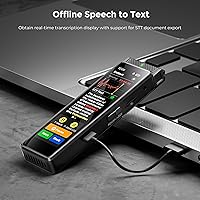
What sets the R1 apart from simpler recorders is the depth of its recording options. Five modes — General, Interview, Meeting, Lecture, and Pocket — let you match the capture settings to your actual environment rather than guessing. Voice-activated and scheduled recording handle automation well, so you don't have to babysit the device. The offline speech-to-text feature is genuinely useful: transcriptions happen in real time with no internet required, and you can export the text as a document. Storage is practically a non-issue since it supports SD cards up to 1TB, and the 1100mAh battery holds up through long sessions without needing a recharge mid-meeting.

Best For

This pocket recorder makes the most sense for people who actually need to capture audio regularly and want more than a basic device. Journalists and reporters will appreciate the quick transcription export when chasing deadlines. Students benefit from having searchable text output from lectures rather than scrubbing through hours of audio. Legal and business professionals handling meetings or client interviews get a reliable backup record. Writers and podcasters who want a compact, touchscreen-based recording tool will find the interface far less frustrating than older button-heavy alternatives. If you are upgrading from a dated recorder and want something that feels current without paying a premium price, this fits.

User Feedback

Buyers tend to praise the touchscreen responsiveness and how easy the navigation feels compared to older recorders. Audio clarity gets solid marks for general use, and the voice-activated recording works reliably in quieter environments. On the critical side, offline transcription accuracy is a genuine variable — it performs well with clear speech but can struggle with heavy accents, fast talkers, or background noise. A few users have flagged that battery life estimates are optimistic under heavier use. Build quality feels acceptable for the price point, though it won't be mistaken for a premium device. Most feedback suggests it punches fairly at its weight, assuming you keep expectations grounded.

Pros

  • Offline speech-to-text transcription requires no internet and exports cleanly as a document.
  • Five dedicated recording modes let you match audio settings to your actual environment.
  • The 3.69-inch touchscreen makes navigation genuinely intuitive, even for first-time users.
  • Supports SD cards up to 1TB, so running out of storage mid-assignment is essentially not a concern.
  • Voice-activated recording handles hands-free capture reliably in quiet-to-moderate environments.
  • USB-C charging and a 3.5mm jack keep the R1 compatible with modern setups without adapters.
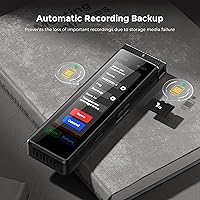
  • The optional automatic backup feature protects important recordings from storage media failure.
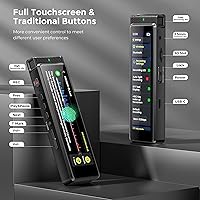
  • Physical buttons are retained alongside the touchscreen, giving you a fallback in any situation.
  • At its price tier, the feature set — transcription, multiple modes, expandable storage — is hard to beat.
  • Compact and light enough to carry all day without noticing it is in your pocket.

Cons

  • Transcription accuracy drops significantly with accents, fast speech, or background noise.
  • Real-world battery life under continuous use falls short of the figures quoted in the listing.
  • The 136GB storage headline combines internal memory and an included card, which surprises some buyers.
  • Bluetooth pairing is inconsistent, and supported use cases are poorly explained in the documentation.
  • USB-C file transfer speeds slow down noticeably when moving large batches of recordings.
  • The casing material shows wear with regular daily carry, particularly around the ports.
  • Advanced features like scheduled recording require trial and error due to sparse documentation.
  • Touch sensitivity can lag slightly when navigating quickly between menus.
  • Some SD cards from third-party brands have shown compatibility issues worth checking before buying.
  • Screen visibility in direct sunlight is limited enough to make outdoor adjustments cumbersome.

Ratings

The Innioasis R1 Voice Recorder has been scored by our AI engine after processing verified buyer reviews from global markets, with spam, bot submissions, and incentivized feedback actively filtered out. The scores below reflect where this recorder genuinely delivers and where real users ran into friction — no inflated praise, no buried complaints.
Audio Recording Quality
78%
22%
Most buyers are pleasantly surprised by the clarity this recorder produces in quiet-to-moderate environments. The dual-microphone setup handles standard meeting rooms and one-on-one interviews well, capturing voices without the muffled quality common in budget devices.
In louder or reverberant spaces — a busy café, a large lecture hall — the DSP noise reduction starts to struggle, and some users noted a processed, slightly artificial quality to recordings made under those conditions.
Touchscreen & Interface
84%
The 3.69-inch screen is a genuine upgrade over the tiny displays on older recorders. Users frequently mention how intuitive navigation feels right out of the box, especially those switching from button-only devices that required memorizing multi-step shortcuts.
A handful of reviewers found the screen harder to use with gloves on or in direct sunlight. The touch sensitivity, while generally responsive, has been described as slightly laggy when jumping between menus quickly.
Offline Speech-to-Text Accuracy
61%
39%
The fact that transcription works entirely offline is a meaningful advantage for anyone working in areas with poor connectivity or handling sensitive recordings they would rather not route through cloud services. For clear, standard-accent speech in quiet settings, the accuracy is genuinely usable.
Accuracy drops noticeably with regional accents, technical jargon, or background noise. Several users — particularly non-native English speakers and those recording in open offices — found the output required heavy editing before it was actually useful.
Battery Life
72%
28%
For a device this compact, the 1100mAh battery holds up reasonably well during full workdays of intermittent recording. Users covering multi-hour conferences or court sessions generally report getting through without needing a recharge.
The advertised battery figures seem to assume fairly light use. Under continuous recording with the screen active and Bluetooth on, real-world endurance falls short of the claimed numbers — a pattern echoed by multiple reviewers.
Build Quality & Durability
67%
33%
At this price tier, the R1 feels solid enough in hand — not cheap or plasticky, but not remotely premium either. The compact dimensions and light weight make it easy to pocket or clip to a bag without adding noticeable bulk.
The casing material feels like it would show scratches after regular daily carry, and a few users expressed concern about long-term durability around the USB-C port and headphone jack after months of use.
Storage & Expandability
91%
Supporting SD cards up to 1TB essentially removes storage as a concern for even the most prolific recorders. Journalists on multi-day assignments or students who record every class can go weeks without needing to offload files.
The stated 136GB internal storage figure combines internal and an included card, which some buyers found misleading when they received the device. A small number of users also reported compatibility quirks with certain third-party SD card brands.
Voice-Activated Recording
76%
24%
The automatic recording trigger works reliably in quiet-to-moderate environments, making it easy to set the device down and forget about it during a meeting or lecture. The reduction in dead-air files saved time for users who review recordings later.
In noisier environments, the sensitivity threshold either triggers too early on ambient sound or misses the first syllable of speech entirely. Fine-tuning this behavior requires digging into settings that are not clearly documented.
Ease of Setup & First Use
83%
Most buyers report being up and recording within minutes of unboxing. The touchscreen interface guides new users through the basics without a steep learning curve, and the inclusion of physical buttons means there is always a fallback if the screen feels unfamiliar.
The manual has been described as thin on detail, particularly around the more advanced features like scheduled recording and STT export settings. Users wanting to get the most out of the device often turned to online forums rather than the included documentation.
File Management & Transfer
69%
31%
USB-C connectivity makes transferring recordings to a laptop straightforward, and files are organized in a folder structure that most users found logical. Exporting STT documents alongside audio files in one go is a workflow benefit that several professional users highlighted.
Transfer speeds via USB-C have been described as inconsistent — adequate for small batches but frustratingly slow when moving large volumes of files. A few Windows users also ran into driver recognition issues on first connection.
Recording Modes Versatility
81%
19%
Having five distinct modes is more than a marketing checkbox — users who switched between Interview and Pocket modes in the same day noticed real differences in how the device handled proximity and ambient noise. It adds practical flexibility without complicating the interface.
The distinction between some modes, particularly General and Meeting, was not immediately obvious to new users. Without clearer guidance on when to use which mode, some buyers stuck to the default setting and never explored the others.
Scheduled Recording
74%
26%
For users with predictable recording needs — a weekly team meeting, a recurring class — the scheduling function eliminates the need to remember to press record. Several legal and academic users specifically called this out as a feature they rely on daily.
Setting up scheduled recordings involves several steps that are not intuitive without reading the manual carefully. A couple of users reported missed recordings after the device did not trigger as expected, though it is unclear if this was user error or a firmware issue.
Portability & Form Factor
88%
Weighing just over 3 ounces and fitting easily in a shirt pocket, the R1 travels well without drawing attention. Journalists and field researchers appreciate that it does not look or feel like a conspicuous piece of equipment during discreet recording situations.
The slim profile means the battery capacity is inherently limited, and some users found the device a little too small — easy to misplace in a bag and occasionally awkward to hold steady during longer handheld recording sessions.
Value for Money
79%
21%
At its price point, the combination of a touchscreen, offline transcription, multiple recording modes, and expandable storage is genuinely hard to match. Buyers who did their research before purchasing consistently expressed that the feature set felt above its tier.
Buyers who expected near-professional audio quality or highly accurate transcription based on the listing were disappointed. The value proposition holds up when expectations are calibrated to a capable mid-range device — less so when it is purchased as a near-professional tool.
Bluetooth Functionality
58%
42%
Bluetooth connectivity adds a layer of flexibility for users who want to monitor audio wirelessly through headphones or send files without a cable. For some buyers, this was a deciding factor when comparing the R1 against non-Bluetooth alternatives.
Real-world Bluetooth use cases are narrow and not well-documented by the manufacturer. Several users struggled to confirm exactly what the Bluetooth is intended to connect to, and a few reported inconsistent pairing behavior that required repeated attempts.

Suitable for:

The Innioasis R1 Voice Recorder is a strong fit for anyone who needs a reliable, modern recording device for everyday professional or academic use. Journalists and reporters will find the combination of clear audio capture and offline transcription export particularly useful when working on deadline without guaranteed internet access. Students who record lectures benefit from having searchable, exportable text rather than scrubbing through hours of audio to find one key moment. Legal professionals, consultants, and business teams capturing meetings or client interviews get a discreet, pocketable device that handles long sessions without fuss. Writers and podcasters who want a touchscreen-driven interface — rather than the confusing button combos on older recorders — will appreciate how little friction is involved in starting and managing recordings. If you are upgrading from a dated, bare-bones device and want something that feels current without spending significantly more, this recorder sits in a genuinely practical sweet spot.
Not suitable for:

The Innioasis R1 Voice Recorder is not the right choice for buyers expecting near-professional audio quality or highly reliable transcription across all speech types and environments. If your recordings frequently happen in noisy settings — construction sites, crowded events, busy open-plan offices — the DSP noise reduction will not fully compensate, and you will likely be disappointed with the results. Speakers with strong regional accents or those who record in languages other than standard English should approach the offline speech-to-text feature with caution, as accuracy drops considerably in those scenarios. Anyone who needs Bluetooth for a specific workflow — pairing with a wireless mic, for instance — should verify compatibility carefully before purchasing, since the Bluetooth functionality is not well-documented and has produced inconsistent results for some users. Field recorders, oral historians, or broadcast journalists who need broadcast-grade audio fidelity will need to look at dedicated professional equipment at a higher price tier. If you are the kind of buyer who relies on the manufacturer manual to learn a device, the thin documentation here may also frustrate you.
Specifications

  • Dimensions: The device measures 4.33″ long by 1.26″ wide by 0.55″ deep, making it slim enough to fit in a shirt pocket.
  • Weight: At 3.03 ounces (86 grams), the recorder is light enough for all-day carry without noticeable bulk.
  • Display: A 3.69-inch HD touchscreen provides the primary interface, with physical buttons retained as a secondary control option.
  • Microphones: Dual built-in microphones are included — one high-sensitivity and one low-sensitivity — to handle different recording distances and environments.
  • Noise Reduction: DSP (Digital Signal Processing) combined with RTC intelligent noise reduction technology is applied during capture to reduce ambient interference.
  • Recording Modes: Five selectable modes are available: General, Interview, Meeting, Lecture, and Pocket, each optimized for a specific recording scenario.
  • Automated Recording: Both scheduled recording (time-based trigger) and voice-activated recording (sound-based trigger) are supported for hands-free operation.
  • Speech-to-Text: An offline speech-to-text engine is built in, enabling real-time transcription during recording without requiring an internet connection.
  • Internal Storage: The device ships with 136GB of combined storage (internal memory plus included SD card); the exact split may vary by configuration.
  • SD Card Support: External microSD cards are supported up to 1TB capacity, serving as the primary storage medium for recordings.
  • Battery: A built-in 1100mAh lithium-ion battery powers the device and is rechargeable via the USB-C port.
  • Charging Port: USB Type-C is used for both charging and wired data transfer to a computer.
  • Headphone Jack: A 3.5mm headphone jack is included for direct audio monitoring or playback through wired earphones.
  • Connectivity: Bluetooth is built in for wireless connectivity; refer to manufacturer documentation for supported pairing use cases.
  • Audio Backup: An optional automatic backup function can duplicate recordings upon save to reduce the risk of file loss from storage failure.
  • Model Number: The official model identifier is R1, manufactured by Innioasis.
  • Release Date: The R1 was first made available in July 2024.
  • Power Source: One lithium-ion battery is required and included with the device at purchase.

Related Reviews

Run_kkarrr 59-64 64GB Voice Recorder
73%
88%
Battery Life
91%
Storage Value
67%
Audio Clarity
63%
Voice-Activated Recording (VAR)
74%
Ease of Use
More
COHANA GL-37 128GB Voice Recorder
76%
74%
Audio Clarity
61%
Noise Cancellation Performance
88%
Magnetic Mount Usability
78%
Voice Activation Accuracy
93%
Storage & Capacity
More
Yegolito U46 64GB Voice Recorder
80%
83%
Audio Clarity (Quiet Environments)
67%
Noise Reduction Performance
89%
Battery Life
71%
VOR (Voice Activated Recording) Reliability
86%
Storage & File Management
More
Powerextra AI Voice Recorder 64GB
82%
83%
Transcription Accuracy
94%
Battery Life
81%
Recording Quality
77%
AI Summary & Mind Map Quality
86%
Value for Money
More
G L87 136GB Digital Voice Recorder
77%
91%
Ease of Use
67%
Audio Quality
83%
Battery Life
93%
Storage & Memory
74%
Build Quality & Portability
More
ZIPCIDE 64GB Digital Voice Recorder
84%
85%
Audio Quality
92%
Battery Life
88%
Noise Reduction Effectiveness
90%
Portability
65%
Voice Activation Sensitivity
More
Amazebra AI Voice Recorder 64GB
86%
91%
Transcription Accuracy
88%
Real-Time Translation
93%
Battery Life
90%
Portability
92%
Data Security
More
Voxitenus 128GB Digital Voice Recorder
87%
94%
Battery Life
89%
Ease of Use
88%
Audio Quality
92%
Portability & Size
72%
Bluetooth Connectivity
More
Rpbznr AI Voice Recorder 80GB
75%
83%
Transcription Accuracy
78%
Microphone Performance
81%
AI Summary & Notes Generation
74%
Real-Time Translation
71%
Build Quality & Design
More
TTQ Chime Note AI Voice Recorder 64GB
74%
78%
Transcription Accuracy
91%
Battery Life
74%
AI Summary Quality
58%
App Stability & Reliability
82%
Audio Recording Quality
More

FAQ

Yes, the transcription engine on this recorder runs entirely on-device, so it works in airplane mode, underground, or anywhere else without connectivity. Just keep in mind that accuracy is better in quiet environments with clear, unhurried speech.

Not exactly. The 136GB figure reflects a combination of built-in internal memory and an included SD card rather than purely internal storage. The SD card is the primary storage medium, and you can swap it out for one up to 1TB if you ever need more space.

Under moderate use — intermittent recording with the screen going to sleep between sessions — most users get through a full workday comfortably. That said, if you are recording continuously with the screen on and Bluetooth active, expect the real-world endurance to fall noticeably short of the maximum advertised figures.

The Innioasis R1 Voice Recorder officially supports cards up to 1TB, but a small number of users have reported compatibility issues with certain budget third-party brands. Sticking to well-known brands like SanDisk or Samsung generally avoids those problems.
This is a fair question to ask, because the manufacturer does not spell it out clearly. Bluetooth is listed as a feature, but documented use cases are limited. Some users connect wireless headphones for monitoring playback, but if you have a specific pairing scenario in mind — like a wireless external mic — it is worth verifying with the seller before buying.

Both are available. The 3.69-inch touchscreen handles most navigation, but physical buttons are built in alongside it. That is genuinely useful if your hands are cold, you are wearing gloves, or you just prefer tactile controls for quick functions like stopping and starting a recording.

The recorder monitors ambient sound and starts capturing automatically once it detects audio above a set threshold, then pauses during silence. It works reliably in quieter environments, but in noisier rooms it can either trigger on background sound or clip the first syllable of speech. It is worth testing in your typical environment before relying on it for anything critical.

You can export the speech-to-text output as a document file, which is one of the more practical features on this device. It is particularly useful for journalists or students who want to search through or edit transcriptions on a computer rather than reading them on the recorder screen.

The USB-C connection is primarily intended for file transfer and charging rather than functioning as a live USB microphone input. If you need a USB mic for direct computer recording, this device is not designed for that use case.

The offline transcription engine performs best with clear, standard-accent speech — typically American or British English. Accuracy drops with heavy regional accents, non-native speakers, or other languages. If transcription quality is critical to your workflow and your speech patterns fall outside that range, it is worth testing this feature carefully before committing to the device.