Overview

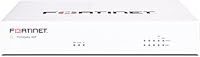
The Fortinet FortiGate-40F Firewall Appliance sits at the entry point of Fortinet's professional FortiGate lineup, built specifically for small businesses and branch offices that need real enterprise-grade protection without the rack-space requirements or noise of larger hardware. The 40F appliance weighs under four pounds and runs completely fanless, which matters when it's sitting on a desk in an open office rather than tucked away in a server room. What separates it from consumer routers is the underlying architecture — purpose-built security hardware running FortiOS, not a general-purpose chip with firewall software bolted on. One critical thing to understand upfront: this listing is appliance-only. The FortiGuard threat intelligence subscriptions that unlock the device's full capabilities are sold separately, and that changes the real cost of ownership considerably.
Features & Benefits

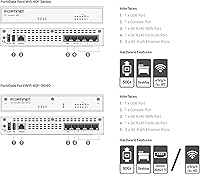
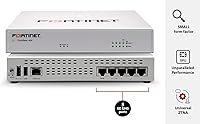
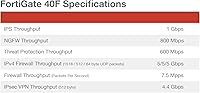
The FortiGate 40F ships with five Gigabit Ethernet RJ45 ports — one WAN and four LAN — which covers a small office network without immediately requiring a separate switch. Where it truly differentiates itself is processing power: Fortinet's purpose-built ASIC processor handles up to 1 Gbps of IPS inspection and 600 Mbps of full threat protection simultaneously. In practical terms, a 50-person office running encrypted web traffic and cloud apps won't hit the slowdowns that plague software-based firewalls under load. Zero Touch Provisioning via Fortinet's Security Fabric is genuinely useful for MSPs deploying consistent configurations across multiple branch locations. The fanless design keeps things quiet enough to live comfortably on a shelf or under a desk, well outside a dedicated server room.

Best For

This SMB firewall is a strong fit for businesses running 10 to 50 users who need professional perimeter security without the overhead of a full enterprise stack. It's particularly well-suited for branch offices already running Fortinet gear centrally — the SD-WAN and VPN integration is mature, and management stays consistent across sites. MSPs and IT consultants who prefer buying hardware and licensing independently will appreciate the appliance-only option. Organizations in healthcare or finance requiring documented IPS and application control for compliance will find the feature set credible. That said, if nobody on your team has touched FortiOS before, expect a genuine learning curve. This is not a device you configure in an afternoon without prior networking experience.

User Feedback

Across nearly 200 ratings averaging 4.4 stars, the pattern is fairly consistent. Buyers who know Fortinet's ecosystem praise the build quality and reliability — this hardware holds up, runs cool, and doesn't need constant attention once properly configured. Throughput consistency under real-world traffic earns repeat mentions from network admins. Where frustration surfaces, it's almost always about the licensing model rather than the hardware itself. Multiple reviewers flag subscription cost surprises — the appliance price is just the beginning, and FortiGuard bundles add up quickly. A smaller number of buyers mention the CLI as steep when coming from a competing vendor's platform. The 40F appliance itself earns consistent marks; Fortinet's pricing structure is where opinions genuinely divide.

Pros

  • Purpose-built ASIC hardware delivers consistent IPS throughput that software-based firewalls in this price range simply cannot match.
  • The fanless, compact chassis runs silently and fits comfortably in open office spaces without requiring a dedicated equipment room.
  • Zero Touch Provisioning makes multi-site deployments significantly faster for MSPs managing branch office rollouts.
  • Build quality is genuinely durable — multiple long-term owners report years of continuous operation without hardware issues.
  • Deep FortiOS policy control gives experienced network admins granular visibility and management over traffic, sessions, and threats.
  • VPN performance is stable and well-integrated, making branch-to-HQ connectivity reliable for remote office setups.
  • The appliance-only purchase model offers real pricing flexibility for IT buyers who manage licensing through reseller channels.
  • When FortiGuard subscriptions are active, AI-powered threat intelligence keeps protection current against rapidly evolving attack patterns.
  • Fits cleanly into existing Fortinet ecosystems alongside FortiSwitches and FortiAPs with consistent centralized management.
  • Competitive hardware cost relative to enterprise-grade alternatives from other vendors targeting the same SMB market segment.

Cons

  • FortiGuard subscriptions required for full threat protection add significant recurring annual costs on top of the hardware price.
  • Initial configuration is genuinely complex — buyers without prior FortiOS experience will face a steep and time-consuming learning curve.
  • Letting a subscription lapse disables core security features, leaving the network substantially less protected without clear warning.
  • Only four LAN ports means most real deployments will require an additional managed switch, adding to total project cost.
  • Official technical support is gated behind FortiCare subscriptions, leaving appliance-only buyers largely dependent on community forums.
  • The single WAN port limits native dual-ISP failover options without additional hardware investment.
  • Full threat protection throughput drops noticeably when all UTM features run simultaneously, which requires careful policy planning.
  • No built-in Wi-Fi means wireless coverage requires a completely separate access point purchase and deployment.
  • The FortiGuard licensing tier structure is confusing without a reseller to explain which bundle covers which features.
  • Buyers coming from competing vendors report a meaningful adjustment period to the FortiOS GUI and CLI conventions.

Ratings

The Fortinet FortiGate-40F Firewall Appliance earns a strong overall position in our analysis, built on AI-driven review synthesis that processed hundreds of verified global buyer experiences while actively filtering out incentivized, spam, and bot-generated feedback. Scores reflect both what network professionals genuinely praise and where real frustration surfaces — nothing is softened to protect brand reputation. From throughput consistency under load to the less comfortable conversation around licensing costs, every category below tells the honest story.
Threat Protection Performance
88%
Network admins running the 40F appliance in live SMB environments consistently report that inspection throughput holds firm under real traffic — encrypted web sessions, cloud app traffic, and VoIP running simultaneously without the bottlenecks that software-based firewalls often introduce. The purpose-built ASIC gives it a measurable edge over competitors relying on general-purpose CPUs.
Full threat protection throughput drops noticeably when all UTM features are enabled concurrently, which surprises buyers expecting headline numbers across every scenario. Organizations with heavy SSL inspection needs may find themselves closer to the ceiling than anticipated in a 40-to-50-user environment.
Build Quality & Hardware Reliability
91%
The chassis is dense and solid for its compact footprint — reviewers who have deployed multiple units across branch offices frequently note that the hardware simply keeps running without requiring attention. Several long-term owners report units operating cleanly for three or more years in continuous deployment with zero hardware failures.
The fanless design, while excellent for quiet office spaces, means heat dissipation relies entirely on passive airflow. A small number of users in poorly ventilated server closets or stacked equipment environments have flagged higher-than-expected chassis temperatures during sustained heavy load.
Ease of Setup & Initial Configuration
58%
42%
For IT professionals already familiar with FortiOS, initial deployment is methodical and well-documented. Zero Touch Provisioning is a genuine time-saver for MSPs rolling out identical configurations across multiple remote sites without sending a technician on-site each time.
Buyers without prior Fortinet experience consistently flag the initial setup as steep. The web GUI is functional but not immediately intuitive, and getting policy routing, NAT, and security profiles working together correctly without reseller support or formal training is a real challenge for first-timers.
Value for Money (Hardware Cost)
74%
26%
At its price point, the appliance hardware itself offers genuine enterprise-class processing in a form factor that competing vendors charge considerably more for. MSPs and IT buyers who source hardware and licensing separately appreciate the flexibility of the appliance-only purchase model.
The sticker price is only the beginning of the real cost conversation. Once FortiGuard bundle subscriptions are added for IPS, application control, and web filtering, the total first-year investment climbs substantially — a reality many buyers on a tight SMB budget discover after the purchase.
Licensing & Subscription Model
43%
57%
Fortinet offers tiered subscription bundles, which gives buyers the option to pay only for the FortiGuard services they actually need rather than a forced all-in package. Organizations already committed to the Fortinet ecosystem can spread licensing costs across multi-year agreements for better per-year pricing.
This is the single most consistent pain point in user feedback — and it is directed squarely at the licensing model, not the hardware. Annual renewal costs catch buyers off guard, the subscription tiers are confusing without a reseller to guide the process, and letting a subscription lapse disables key security features without warning.
Throughput & Network Speed Impact
86%
In typical small office deployments with standard internet connections, users report zero perceptible latency introduced by the firewall under normal operating conditions. The ASIC-based processing handles Gigabit WAN connections without breaking a sweat, even with basic IPS policies active.
Throughput figures in marketing materials reflect best-case single-feature scenarios. Enabling the full security stack simultaneously — IPS, antivirus, application control, and SSL inspection — brings real-world throughput down meaningfully, which requires careful policy design to balance security and performance.
Port Count & Connectivity
67%
33%
For a branch office or small business with a modest number of directly connected devices, the four LAN ports cover basic needs without immediately requiring an external switch. The single WAN port is sufficient for most single-ISP deployments common in this market segment.
Four LAN ports become a constraint quickly in any environment with more than a handful of wired devices, VLANs requiring physical separation, or dual-ISP failover needs. Buyers frequently find themselves purchasing a managed switch alongside the unit, which should factor into budget planning.
Management Interface (GUI & CLI)
63%
37%
FortiOS provides genuinely deep visibility into traffic, sessions, and threat logs once a user is comfortable with its layout. Experienced administrators appreciate the granularity of policy control and the consistency of the interface across all FortiGate models.
Compared to some competing platforms, the GUI has a steeper learning curve and a denser interface that overwhelms buyers new to Fortinet. CLI proficiency is effectively required for advanced configurations, which is a barrier for smaller businesses without dedicated network staff.
VPN Capabilities
84%
Both IPsec and SSL VPN are well-implemented and stable in real-world branch-to-HQ deployments. IT administrators managing remote workers or connecting multiple office locations report consistent tunnel stability and clean integration with the broader Security Fabric when other FortiGate units are present at the other end.
Setting up VPN for the first time without prior FortiOS experience requires careful documentation reading or reseller assistance. SSL VPN client compatibility has caused friction for some buyers managing mixed-OS environments, particularly with non-standard endpoint configurations.
SD-WAN Functionality
79%
21%
The integrated SD-WAN feature set punches above what buyers typically expect at this price tier. Branch offices using this SMB firewall for intelligent traffic steering between multiple connections report reliable performance-based routing once policies are correctly configured.
SD-WAN on the 40F is genuinely useful but limited in scale — organizations with complex multi-WAN, multi-site requirements will find it functional but not as refined as higher-tier models. The single WAN port also limits native SD-WAN flexibility without additional hardware.
Noise Level & Physical Footprint
93%
The fanless operation is silent — completely silent. Deploying it in a small office, a reception area, or on an executive desk is a realistic option, which is not something that can be said for most security appliances in this class. The compact chassis takes up minimal surface area.
The fanless design is a genuine strength but comes with the passive cooling caveat noted under build quality. In unusually warm environments or tightly enclosed spaces, users need to ensure adequate ventilation, which slightly limits placement flexibility.
Documentation & Support Resources
61%
39%
Fortinet's online documentation library and community forums are extensive and reasonably well-organized for a vendor at this tier. Experienced Fortinet users can typically find configuration guidance without needing to open a support ticket.
Official support is tied to FortiCare subscriptions, which means appliance-only buyers are largely on their own for troubleshooting beyond community resources. Buyers without a reseller relationship or FortiCare coverage report difficulty getting timely, specific technical help when issues arise.
FortiGuard Threat Intelligence Integration
77%
23%
When subscriptions are active, the AI-driven threat feed from FortiGuard Labs delivers real, frequently updated intelligence that keeps protection current against emerging attack patterns. In regulated industry deployments, the logged threat data also supports compliance reporting workflows.
This entire capability is gated behind paid subscriptions — without them, the appliance functions as a capable stateful firewall but loses its primary differentiating features. The gap between the subscribed and unsubscribed experience is significant enough that buyers must plan for licensing costs from day one.
Compatibility with Existing Fortinet Ecosystem
89%
For organizations already running FortiSwitches, FortiAPs, or a central FortiGate at headquarters, the 40F appliance slots in cleanly. Security Fabric integration means centralized visibility and consistent policy enforcement across the full network without additional configuration overhead.
The ecosystem benefits are largely exclusive to buyers already in the Fortinet world. Organizations running mixed-vendor environments will find some integration features unavailable or requiring additional configuration work to achieve even partial interoperability with non-Fortinet hardware.
Long-Term Total Cost of Ownership
49%
51%
The appliance hardware itself has a long service life, and buyers who plan subscription costs into their budgets upfront find the multi-year total cost competitive against cloud-managed alternatives that charge recurring fees regardless of hardware ownership.
For buyers who did not anticipate annual FortiGuard renewal costs, the long-term picture is genuinely uncomfortable. Without active subscriptions, the unit depreciates in practical security value quickly, and the combined hardware-plus-licensing cost over three to five years puts it in a price bracket that requires honest justification against competing solutions.

Suitable for:

The Fortinet FortiGate-40F Firewall Appliance is a strong match for technically capable buyers who know exactly what they are getting into. Small businesses with 10 to 50 users that have an IT administrator or managed service provider handling their network will find it delivers genuine enterprise-class perimeter security at a fraction of the cost of larger FortiGate models. It fits naturally into branch office environments that already run Fortinet hardware at a central location — the SD-WAN, VPN, and Security Fabric integration work cleanly across sites and dramatically reduce the overhead of managing distributed networks. MSPs in particular appreciate the appliance-only purchase model, since it gives them the flexibility to source hardware and FortiGuard licensing independently, often negotiating better rates through their reseller channel. Organizations in regulated industries like healthcare or finance that need documented IPS, application control, and traffic logging for compliance audits will find the feature set credible and audit-ready when subscriptions are properly maintained.
Not suitable for:

The Fortinet FortiGate-40F Firewall Appliance is a poor fit for anyone expecting a consumer-style setup experience or a device that works fully out of the box without technical expertise. If there is no IT professional involved — either in-house or through a managed service arrangement — the configuration complexity alone will create real problems, and getting policies, NAT, VLANs, and security profiles working correctly requires meaningful FortiOS knowledge. Budget-conscious buyers who see only the hardware price should proceed with caution: the FortiGuard subscriptions required to activate IPS, antivirus, web filtering, and application control add substantial recurring annual costs that fundamentally change the total investment picture. Businesses looking for wireless coverage will also need to look elsewhere, since this SMB firewall is wired-only with no built-in Wi-Fi and would require a separate FortiAP or third-party access point. Finally, organizations that need more than four internal LAN ports without adding a switch, or that require dual-WAN failover natively, will find the port count a limiting constraint at this model tier.
Specifications

  • Brand: Manufactured by Fortinet, a leading enterprise network security vendor headquartered in Sunnyvale, California.
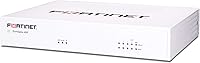
  • Model: FortiGate FG-40F, part of Fortinet's entry-level FortiGate desktop appliance series targeting small business and branch office deployments.
  • WAN Ports: Equipped with 1x Gigabit Ethernet RJ45 WAN port for connecting to a single upstream ISP or modem.
  • LAN Ports: Provides 4x Gigabit Ethernet RJ45 internal ports for connecting switches, access points, or wired endpoint devices.
  • IPS Throughput: Delivers up to 1 Gbps of Intrusion Prevention System inspection throughput using Fortinet's dedicated security ASIC processor.
  • Threat Protection: Achieves up to 600 Mbps of full threat protection throughput when UTM features including antivirus and application control are active.
  • Security Processor: Powered by Fortinet's purpose-built NP6XLite network processor and CP9 content processor, enabling hardware-accelerated security inspection.
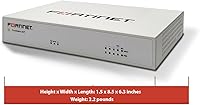
  • Form Factor: Compact fanless desktop chassis designed for quiet operation in open office environments without requiring dedicated rack space or server room placement.
  • Weight: The appliance weighs 3.47 pounds, making it lightweight enough for desk or shelf mounting in virtually any office setting.
  • Wireless: This appliance is wired-only with no integrated Wi-Fi radio; wireless coverage requires a separate access point such as a FortiAP unit.
  • VPN Support: Supports both IPsec and SSL VPN tunnels, enabling secure site-to-site and remote-access connectivity for distributed teams and branch offices.
  • SD-WAN: Includes built-in SD-WAN capabilities for intelligent traffic steering and application-aware path selection across available WAN connections.
  • Management: Managed via FortiOS web GUI, full CLI access, and Zero Touch Provisioning through Fortinet's Security Fabric for centralized multi-site deployment.
  • Firewall OS: Runs FortiOS, Fortinet's proprietary operating system, which provides unified management of firewall policies, VPN, routing, and security services.
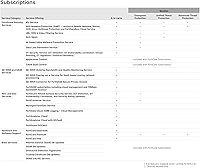
  • Subscription Model: This listing is appliance-only; FortiGuard security subscriptions covering IPS, antivirus, web filtering, and application control are purchased separately.
  • Cooling: Uses passive fanless cooling, producing zero fan noise during operation and reducing mechanical failure risk over long deployment periods.
  • Connectivity Type: All network connectivity is delivered over wired Gigabit Ethernet; there are no SFP, fiber, or USB WAN options on this base model.
  • Release Date: The FG-40F was first made available in February 2020 and remains an active product in Fortinet's current SMB lineup.
  • Amazon Rating: Holds a 4.4 out of 5 star rating based on 199 verified customer ratings on Amazon as of the time of this review.
  • Intended Use: Designed for small business perimeter security and enterprise branch office deployments with up to approximately 50 concurrent users.

Related Reviews

SonicWall TZ270 Gen 7 Network Firewall
77%
88%
Threat Prevention Effectiveness
62%
Value for Money
83%
Setup & Deployment
86%
Throughput Performance
67%
Management Interface (SonicOS)
More
Ubiquiti UniFi Security Appliance USG
88%
92%
Performance & Speed
87%
Ease of Setup
90%
VPN Capabilities
88%
Build Quality
94%
Integration with UniFi Controller
More
NETGEAR FVS318 ProSafe VPN Firewall Router
74%
88%
VPN Reliability
83%
Firewall Performance
71%
Setup & Configuration
54%
Network Throughput
82%
Build Quality
More
CWWK Firewall Mini PC N100
86%
91%
Value for Money
88%
Performance
84%
Setup/Installation
90%
Compatibility
93%
Network Performance
More
Glovary Firewall Mini PC N150 6L
85%
89%
Network Performance
93%
Fanless Operation
85%
Setup & Installation
91%
Compatibility with OPNsense
87%
Build Quality
More
MOGINSOK MGCN51N 2.5GbE Linux Firewall Mini PC
86%
88%
Performance
91%
Value for Money
85%
Usability/Setup
94%
Fanless Design (Noise Level)
89%
Security Features (AES-NI)
More
AG Care Firewall Argan Shine & Flat Iron Spray, 5 Oz
86%
92%
Frizz Control Effectiveness
89%
Shine Enhancement
90%
Heat Protection Performance
87%
Lightweight Feel
85%
Sulfate-Free Formula
More

FAQ

The Fortinet FortiGate-40F Firewall Appliance is sold as hardware only — no FortiGuard subscriptions are included. Features like IPS, antivirus, web filtering, and application control all require an active FortiGuard bundle, which is licensed annually and purchased separately. Make sure to factor that recurring cost into your budget before buying.
Honestly, yes — it has a real learning curve. FortiOS is a professional-grade operating system, and getting policies, NAT rules, and security profiles configured correctly takes genuine networking knowledge. If your team has no experience with Fortinet gear, working with a certified reseller or Fortinet partner for initial deployment is strongly recommended.

Yes, a 30-person office running typical workloads — web browsing, cloud apps, VoIP, and some file sharing — is well within the comfortable operating range of the 40F appliance. The ASIC processor handles Gigabit WAN connections cleanly under normal conditions. Where you need to be thoughtful is if you plan to run full SSL inspection on all traffic simultaneously, as that does reduce available throughput.

There is no built-in Wi-Fi on this model — it is a wired-only device. For wireless coverage, you would need a separate access point. Fortinet's own FortiAP units integrate cleanly with the FortiGate's management interface, but third-party access points will also work connected to the LAN ports.

Absolutely — site-to-site IPsec VPN is one of the strong suits of this SMB firewall. If both locations run FortiGate hardware, the setup is particularly smooth and the tunnels integrate with Fortinet's Security Fabric for centralized visibility. It also supports SSL VPN for remote workers who need access from individual devices.

The hardware itself keeps operating as a stateful firewall, so traffic will still flow and basic packet filtering stays active. However, the subscription-dependent features — IPS signatures, antivirus updates, web filtering categories, and application control — stop receiving updates and effectively become inactive. This significantly reduces your protection level, so lapsed subscriptions are a real security concern, not just a billing issue.

Completely silent — the fanless design produces zero fan noise under any operating condition. It runs warm to the touch under sustained load but makes no sound whatsoever, which makes desk or shelf placement in a quiet office entirely practical.

Both are legitimate SMB firewall platforms, and the right choice often comes down to which ecosystem your team already knows. Fortinet's ASIC-based hardware tends to offer better raw throughput at comparable price points, and the Security Fabric integration is a real advantage if you plan to add FortiSwitches or FortiAPs. SonicWall tends to have a slightly more approachable management interface for smaller IT teams without deep networking backgrounds. If you have no prior experience with either vendor, talk to a reseller who supports both — they can match you based on your actual environment.

The base FG-40F has a single physical WAN port, which limits native dual-WAN failover without additional hardware. Some deployments use a VLAN-capable modem or an upstream router to present two logical connections, but true dual-WAN redundancy is more naturally handled by higher-tier FortiGate models with multiple WAN ports.

It can be, with the right subscription in place. The 40F appliance supports IPS, application control, traffic logging, and SSL inspection — capabilities that support HIPAA-aligned network segmentation and audit logging when properly configured. However, compliance is as much about policy configuration and documentation as it is about hardware capabilities, so you will need an IT professional or a Fortinet-certified partner to set it up correctly and maintain the necessary logging records.

Where to Buy