
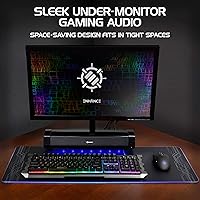
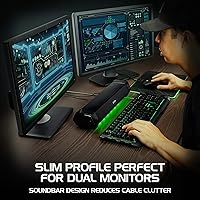
Overview

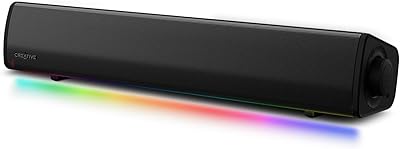
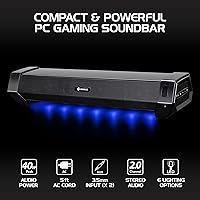
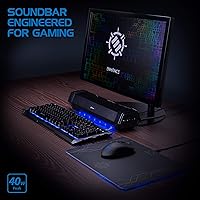
The ENHANCE Gaming Soundbar ENPCSM2100 is designed to sit quietly under your monitor and actually do its job — replacing the tinny audio that ships built into most displays. It targets the middle ground between cheap desktop speakers and a full 2.1 setup, making it an accessible step up without the bulk or added complexity. Two 50mm drivers handle the stereo workload in a 2.0 channel configuration, which is honest about what it is: strong mids and solid volume, not a bass-heavy experience. Setup takes minutes with just two cables and you are done. The 3-year warranty quietly separates it from cheaper alternatives in the same space.

Features & Benefits

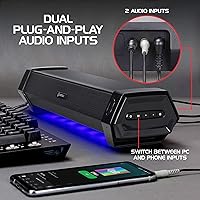
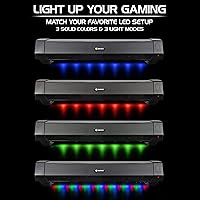
At 40W peak power, this gaming soundbar pushes noticeably more volume than the average desktop speaker pair — enough to fill a small room without distortion creeping in at higher levels. The dual AUX inputs are genuinely useful: one for your PC, one for a phone or tablet, and a single button switches between them without hunting through a menu. The RGB setup covers three solid colors and three dynamic lighting effects, which look clean in a dark room without being overdone. Controls sit on the side panel, so adjusting volume or swapping light modes does not require reaching behind anything. The 60-inch cable gives real flexibility when positioning this under a monitor.

Best For

This under-monitor speaker hits a sweet spot for a specific type of buyer. If your monitor speakers are embarrassingly weak and you want a straightforward upgrade without committing to a 2.1 system with a subwoofer eating floor space, this fits. Students or apartment dwellers appreciate the clean footprint and the ability to plug in a phone without fiddling with settings. It also works well for anyone running a dual-monitor setup who wants audio hardware that does not compete visually with the rest of the desk. One honest caveat: if you need Bluetooth or USB-C connectivity, look elsewhere — this relies entirely on 3.5mm AUX.

User Feedback

With a 4.3-star average across over 250 reviews, the ENHANCE soundbar earns consistent praise for two things: how fast and easy it is to get running, and how good the lighting looks in a dark gaming setup. Many buyers mention it as a meaningful improvement over monitor built-ins. The critiques that surface most often center on low-end performance — this is a 2.0 design, and buyers expecting deeper bass are sometimes let down. The AUX-only connection is a genuine friction point for users accustomed to wireless audio. On the positive side, the 3-year warranty earns occasional mentions as reassurance that the brand stands behind the hardware.

Pros

  • Sits cleanly under single, dual, or curved monitors without adding desk clutter
  • Plug-and-play setup is genuinely two cables and done — no drivers or software needed
  • Dual AUX inputs let you keep PC and phone connected simultaneously with one-button switching
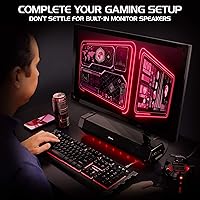
  • Delivers noticeably fuller audio than built-in monitor speakers, especially for dialogue and mids
  • RGB lighting looks clean and controlled, with enough modes to match most gaming setups
  • Side-mounted controls make volume and LED adjustments easy without reaching behind anything
  • Three-year warranty provides real purchase confidence at a price tier where that is rare
  • 60-inch cable gives enough reach to work with most desk configurations without an extension

Cons

  • No Bluetooth or USB input — wired AUX is the only connection option available
  • Bass performance is limited for a 2.0 design, noticeably thin during action-heavy content
  • Only three fixed color options for RGB; no app or software control for customization
  • The power adapter is shorter than the audio cable, which can complicate tidy cable routing
  • Volume control lacks the tactile precision of pricier competitors — the knob feel is basic
  • LED cycling speed on dynamic modes cannot be adjusted, which frustrates some users
  • Input switch button has a soft, imprecise feel that makes it hard to confirm activation
  • Not powerful enough to fill larger rooms comfortably at high volume without noticeable thinning

Ratings

The ENHANCE Gaming Soundbar ENPCSM2100 has been scored by our AI system after analyzing verified buyer reviews from multiple global markets, with spam, incentivized, and bot-generated feedback actively filtered out. Scores reflect the real distribution of user sentiment — not a polished average — so both the standout strengths and the genuine frustrations are represented transparently. Whether you are weighing audio quality against desk space savings or comparing connectivity options, these ratings give you an honest, ground-level read on what buyers actually experience.

Audio Quality
74%
26%
For a compact 2.0 bar sitting under a monitor, most users report the clarity at mid and high frequencies is noticeably better than built-in monitor speakers. Dialogue in games and the detail in music tracks at moderate volumes receive consistent praise from buyers who were previously tolerating thin, flat desktop audio.
The 2.0 channel design has real limits in the low end, and buyers expecting punchy bass are frequently disappointed. Several reviewers specifically note the absence of a subwoofer makes itself felt during action-heavy gaming sessions or bass-forward music genres.
Bass Performance
57%
43%
At moderate listening volumes, the soundbar produces enough low-frequency presence to make casual gaming and movie watching feel fuller than a typical monitor speaker. Users who primarily watch YouTube content or play strategy games find the bass level adequate for their daily use.
This is the most consistently cited weakness across user reviews. Buyers who use the soundbar for shooters, EDM, or action films find the low-end noticeably lacking, and no EQ adjustments can fully compensate for the absence of dedicated bass hardware in a 2.0 system.
Build Quality
78%
22%
The chassis feels solid for its price bracket — not hollow or creaky — and the matte black finish resists fingerprints reasonably well. Users frequently comment that it looks and feels more substantial than its cost would suggest, which builds initial confidence when it arrives.
The plastic construction does show its limits over time for some buyers, with a few noting the side controls feel slightly loose after extended use. It is not a premium tactile experience, and those accustomed to higher-end audio hardware will notice the material trade-offs.
Design & Aesthetics
83%
The low-profile bar tucks neatly under single or dual monitors without dominating the desk visually. Users with clean, minimal setups consistently praise how well it disappears into a battlestation without adding visual clutter or requiring extra desk real estate.
The design is fairly generic and does not stand out as particularly distinctive if you prefer a more premium-looking setup. A small number of buyers also mention the LED strip placement feels slightly front-heavy, making it less subtle than expected when lighting is active.
RGB Lighting
86%
The three static color options and dynamic lighting modes land well with buyers who care about desk aesthetics. Multiple reviewers mention the lighting looks genuinely good in a darkened room and complements other RGB peripherals without overpowering them or flickering.
The color selection is limited compared to full per-zone RGB systems, and users wanting precise color matching to a specific setup theme may find the fixed options restrictive. A few buyers also report that the dynamic modes cycle a bit faster than they would prefer with no speed adjustment available.
Ease of Setup
93%
Two cables, a few minutes, and it works — that description appears repeatedly across buyer reviews. Users of all technical skill levels mention the plug-and-play experience as a highlight, with no drivers, software, or complicated pairing required to get audio running immediately.
The AUX-only setup, while simple, means users with newer devices that lack a headphone jack need a separate adapter. A small subset of buyers also note the power brick is larger than expected and can be awkward to route cleanly behind a desk.
Connectivity Options
52%
48%
The dual 3.5mm AUX inputs are a practical touch — being able to keep both a PC cable and a phone cable plugged in simultaneously, then switch with one button, is genuinely useful for people who frequently move between audio sources throughout the day.
The absence of Bluetooth or USB audio is a recurring frustration, especially as more users own devices without a standard headphone jack. Buyers who expected wireless capability or digital input options are the most critical group, and this limitation is the single most common reason for lower-star reviews.
Volume & Power Output
81%
19%
At 40W peak, this gaming soundbar gets loud enough to fill a small bedroom or office without audible distortion at high-but-not-maximum volumes. Users in dorm rooms or apartments consistently say it provides more output than they expected from a bar this size.
At the absolute top of the volume range, some buyers report a slight thinning of sound quality. For larger rooms, the soundbar starts to feel underpowered, and users who like to push audio to room-filling levels in open spaces may find themselves wanting more headroom.
Value for Money
82%
18%
Buyers frequently describe this under-monitor speaker as a fair deal given what it delivers — functional stereo audio, RGB lighting, dual inputs, and a 3-year warranty rolled into one accessible package. For users stepping up from monitor built-ins, the perceived value is high.
Users comparing it against competing bars from brands like Creative or Logitech sometimes feel the audio performance does not fully justify the price premium over cheaper options. If audio quality is the primary concern rather than desk aesthetics, buyers can find comparably priced alternatives with better sound.
Controls & Usability
79%
21%
Side-mounted controls are a practical placement decision that most buyers appreciate — no reaching behind the unit to adjust volume or switch inputs. The dedicated LED mode button also means users can turn off the lighting without unplugging anything, which is a small but appreciated detail.
The controls are functional but not particularly refined. A few buyers note the volume knob lacks the smooth resistance feel of higher-end units, and the input switch button has a slightly mushy press feel that makes it harder to confirm the action was registered.
Size & Fit Under Monitor
87%
The bar fits cleanly under most standard and ultrawide monitors without blocking any ports or obstructing the display. Users with dual-monitor setups especially appreciate that it spans neatly and does not require repositioning existing hardware to accommodate it.
A narrow subset of buyers with very low-clearance monitor stands or raised desk surfaces found the height just slightly taller than expected. It is not a widespread issue, but buyers with unconventional desk configurations should confirm their clearance measurements before purchasing.
Cable Management
71%
29%
The 60-inch cable length is long enough to reach a tower PC on the floor or a desk-mounted USB hub without awkward stretching. Most buyers find the included AUX cable sufficient and appreciate not needing to source their own.
The power adapter cable is on the shorter side relative to the audio cable, which can create routing challenges depending on outlet placement. Several users mention wishing both cables were closer in length to allow for more symmetrical routing behind the desk.
Warranty & Brand Support
76%
24%
The 3-year warranty is a genuine differentiator at this price tier, and buyers who have had to contact ENHANCE for support generally describe the experience as responsive. It provides a level of purchase confidence that cheaper competitors simply do not offer.
While the warranty coverage period is strong, a few buyers report that the claims process involves more back-and-forth than expected. Warranty confidence is high in principle, but the practical experience of using it is mixed enough that it is not a universal selling point.

Suitable for:

The ENHANCE Gaming Soundbar ENPCSM2100 is a strong match for anyone who spends serious time at a gaming desk and is tired of the flat, lifeless audio that comes out of most monitor speakers. Students in dorms or small apartments will appreciate how it delivers real stereo presence without eating up desk space or requiring a subwoofer to sit on the floor. It is equally well-suited to the multi-device user who wants one bar handling both PC audio and phone playback, switching between them with a single button press rather than unplugging and replug cables constantly. Desk aesthetics matter to this crowd too, and the low-profile form factor fits cleanly under single or dual monitor setups without disrupting a carefully organized workstation. The plug-and-play setup also makes it a practical gift or first audio upgrade for someone who does not want to deal with drivers, software, or complicated pairing.

Not suitable for:

Buyers who prioritize deep, room-filling bass should look elsewhere before committing to the ENHANCE Gaming Soundbar ENPCSM2100, because the 2.0 channel design has honest low-end limits that no amount of volume adjustment will fix. If you primarily play bass-heavy shooters, listen to EDM, or watch a lot of action films where low-frequency impact matters to the experience, this bar will likely leave you underwhelmed. Users who have moved past wired peripherals and expect Bluetooth or USB audio input as a baseline feature will also find the AUX-only connectivity a constant friction point, especially if their primary device lacks a standard headphone jack. Anyone furnishing a larger room or open office where audio needs to carry across significant distance may find the output insufficient even at higher volumes. And if you already own a capable 2.1 speaker system or a dedicated DAC-amp setup, this under-monitor speaker is a lateral move at best, not a meaningful upgrade.

Specifications

  • Model Number: The unit carries the official model designation ENPCSM2100BKUS, identifying the black colorway variant sold in the US market.
  • Dimensions: The soundbar measures 20″ long by 6.13″ deep by 4.88″ tall, making it sized to span comfortably under most standard desktop monitors.
  • Weight: The unit weighs 3.21 pounds, light enough to reposition without tools but substantial enough to stay in place on a desk surface.
  • Driver Configuration: Two 50mm full-range drivers are housed in a 2.0 stereo channel layout with no dedicated subwoofer or satellite components.
  • Peak Power Output: The system is rated at 40W peak power output, providing sufficient headroom for small-to-medium room audio at higher volume levels.
  • Power Input: The soundbar requires a 12V DC power input delivered via the included AC power adapter.
  • Audio Connectivity: Two independent 3.5mm AUX input ports allow simultaneous wired connections from a PC and a secondary device such as a phone or tablet.
  • Input Switching: A single dedicated button on the side panel toggles between the two AUX inputs without requiring software or menu navigation.
  • Cable Length: The included 3.5mm AUX audio cable measures 60 inches, providing enough reach for most standard desktop and tower PC configurations.
  • RGB Lighting: The integrated LED system supports three static color options and three dynamic lighting effect modes, controlled via a side-panel button.
  • Control Placement: All user controls including volume adjustment and LED mode switching are located on the side panel for convenient access during use.
  • Channel Configuration: This is a 2.0 stereo soundbar with no subwoofer output, bass port passthrough, or expansion capability for additional speakers.
  • Wireless Connectivity: The soundbar does not include Bluetooth, Wi-Fi, or any other wireless audio transmission technology; all audio input is via physical AUX cable only.
  • USB Audio: There is no USB audio input; the unit does not function as a USB sound card or accept digital audio over USB connection.
  • Compatibility: The soundbar is compatible with any device that outputs a standard 3.5mm analog audio signal, including PCs, laptops, gaming consoles, phones, and tablets.
  • Box Contents: The retail package includes the soundbar unit, one 3.5mm AUX audio cable, and the AC power adapter required for operation.
  • Warranty: ENHANCE provides a 3-year limited warranty covering manufacturing defects, which is notably longer than the typical 1-year coverage common in this product category.
  • Manufacturer: The ENHANCE Gaming Soundbar ENPCSM2100 is designed and warranted by ENHANCE, a US-based brand specializing in gaming peripherals and desktop accessories.
  • First Available: This model was first listed for sale in November 2019 and has accumulated verified buyer reviews over multiple years of market availability.
  • BSR Ranking: The unit holds a Best Sellers Rank of approximately 571 in the Computer Speakers category on Amazon, reflecting sustained buyer interest.

Related Reviews
Creative Sound Blaster GS3
83%
94%
Form Factor & Desk Integration
84%
Overall Sound Quality
67%
Bass Performance
91%
Connectivity & Setup
82%
RGB Lighting & Aesthetics
More
OXS Thunder Lite PC Gaming Soundbar
84%
86%
Sound Quality
71%
Bass Performance
91%
Connectivity Options
93%
Setup & Installation
88%
Design & Build Quality
More
Creative Sound Blaster Katana V2X 5.1 Gaming Soundbar
85%
91%
Sound Quality
89%
Bass Performance
78%
Ease of Setup
88%
RGB Lighting Customization
85%
Build Quality
More
Skytech Gaming Azure Gaming PC Desktop
83%
89%
Value for Money
85%
Gaming Performance
92%
Setup and Ease of Use
84%
Build Quality
80%
Cooling and Thermals
More
MSI X670E GAMING PLUS WIFI Gaming Motherboard
87%
92%
Performance
89%
Connectivity
86%
Thermals
90%
Setup and Installation
88%
Power Delivery
More
MSI B650 Gaming Plus WiFi
80%
83%
Value for Money
88%
BIOS & Software Experience
91%
Power Delivery & Stability
84%
Wireless Connectivity
79%
Memory Performance & Overclocking
More
Pulsar Gaming Gears X3 Wireless Gaming Mouse
86%
94%
Precision & Tracking Performance
89%
Ergonomics & Comfort
91%
Lightweight Design
87%
Durability & Build Quality
90%
Button Responsiveness & Switch Longevity
More
Pulsar Gaming Gears LAB X2F Wireless Gaming Mouse
90%
93%
Performance
95%
Precision & Accuracy
88%
Comfort & Ergonomics
89%
Build Quality & Durability
91%
Wireless Connectivity & Latency
More
MSI Gaming GeForce RTX 3070 Gaming X Trio 8GB
86%
94%
Performance in Gaming
90%
Cooling Efficiency
60%
Power Consumption
92%
Value for Money
88%
RGB Lighting Customization
More
Skytech Gaming MT-MOONSHADOW 27-inch Curved Gaming Monitor
86%
91%
Performance in Gaming
87%
Image Quality
94%
Smooth Gameplay (Refresh Rate & Response Time)
85%
Build Quality
72%
Ease of Setup
More

FAQ

Yes, as long as your console or monitor has a 3.5mm headphone or audio output jack, you can connect this gaming soundbar without any issues. Most modern monitors have a 3.5mm output that passes through console audio, so it is a straightforward connection in most setups.

You can cycle through the lighting modes using the dedicated button on the side panel, and one of the available settings turns the LEDs off entirely. You do not need to unplug anything or adjust any software — just press the button until the lights go dark.

The ENHANCE Gaming Soundbar ENPCSM2100 uses a 3.5mm AUX input exclusively, so you would need a USB-C to 3.5mm adapter to connect it to a modern MacBook. Those adapters are inexpensive and widely available, and once connected the soundbar works just like it would on any other device.

At just under 5 inches tall, it sits in front of and below most monitor bezels rather than behind them, so it generally does not block anything. That said, if your monitor has ports on the underside of the bezel, it is worth measuring your clearance before ordering.

It depends heavily on what you play. For strategy games, RPGs, or anything dialogue-heavy, most users find the audio more than adequate. If you regularly play games with a lot of explosions, gunfire, or deep bass soundtracks, you will notice the low-end limitation — it is a real trade-off with any 2.0 design at this size.

Both devices can stay plugged in simultaneously — that is exactly what the dual AUX inputs are designed for. A single button on the side switches playback between them, so you never need to unplug or replug anything during your day.

They are separate controls. The volume knob handles audio output only, while the LED button cycles through lighting modes and brightness states independently. You can run the lights at any mode without it affecting your audio settings.

In most cases, yes. The bar is about 20 inches wide and sits just under 5 inches tall, which fits comfortably under the majority of 27-inch ultrawide displays on standard factory stands. If your monitor sits particularly low or you use a flat riser, check your clearance gap before purchasing.

ENHANCE handles warranty claims directly, and you would contact their support team with proof of purchase and a description of the issue. Most users who have gone through the process describe it as responsive, though a few note it can take a couple of rounds of communication before a resolution is reached. The 3-year coverage period itself is longer than most competitors in this price range offer.

A small number of buyers do mention a faint electrical hiss at low volumes, which is not unusual for powered speakers in this class. It is typically only audible in a very quiet room when no audio is actively playing. The majority of buyers do not flag it as a meaningful issue in daily use.